
Best Auto Repair CRM Software for Your Shop
The day usually starts fine. Then the phones light up, a walk-in wants a quick answer, a technician asks whether a brake job was approved, and someone at the counter says they never got the estimate text. By lunch, the service advisor is flipping between paper repair orders, a spreadsheet, missed call notes, and a half-finished reminder list.
That kind of shop doesn't have a people problem. It has a system problem. Manual processes force good employees to rely on memory, handwritten notes, and constant interruptions. Work gets delayed, approvals stall, and simple follow-ups disappear into the noise.
That's where Auto Repair CRM software changes the game. Not as a fancy add-on. Not as a sales toy. As the operating system that keeps the front desk, the bays, and the customer in sync.
Table of Contents
- Is Your Shop Running You or Are You Running Your Shop
- What Is Auto Repair CRM Software Really
- Core Features Your Shop Cannot Live Without
- Calculating the Real ROI of a Modern CRM
- How to Evaluate and Choose the Right Software
- Implementation and Getting Your Team on Board
- Your Next Step to a More Efficient Shop
Is Your Shop Running You or Are You Running Your Shop
A lot of shop owners live in reaction mode without meaning to. The schedule exists, but it's really held together by whoever answers the phone fastest. The vehicle history exists, but only if the right person remembers where it was written down. The follow-up process exists, but only on slow days.
That's how a shop slowly becomes dependent on heroics. One advisor keeps everything in their head. One technician always knows which car is waiting on parts. One owner spends the evening calling customers back because nobody had time during the day. It works until somebody gets sick, the volume spikes, or a customer asks a basic question and nobody can find the answer fast enough.
Shops rarely break down because they don't know how to fix cars. They break down because information is scattered.
A proper Auto Repair CRM software setup pulls that chaos into one place. The customer record, the vehicle record, the estimate, the status, the notes, and the communication trail all stay connected. That means the front desk doesn't need to chase technicians for updates, and technicians don't need to stop working every time the advisor needs context.
There's also a customer-side benefit that gets overlooked. When a shop handles inquiries with consistent intake and follow-up, it stops treating every phone call like a scramble. Teams trying to often discover the same principle applies inside an auto shop. Better intake creates better scheduling, cleaner communication, and fewer dropped opportunities.
The real shift
The shift isn't digital paperwork. It's control.
A controlled shop can answer simple questions fast. It can see what's approved, what's stuck, and what still needs a call. It doesn't rely on memory for routine communication. It gives the owner a way to run the day instead of getting dragged through it.
What Is Auto Repair CRM Software Really
Most shop owners hear “CRM” and think contact database. That's too small. In an auto repair business, Auto Repair CRM software works more like the shop's central nervous system. It connects customer communication, vehicle history, scheduling, estimates, approvals, and job progress so everyone sees the same record.
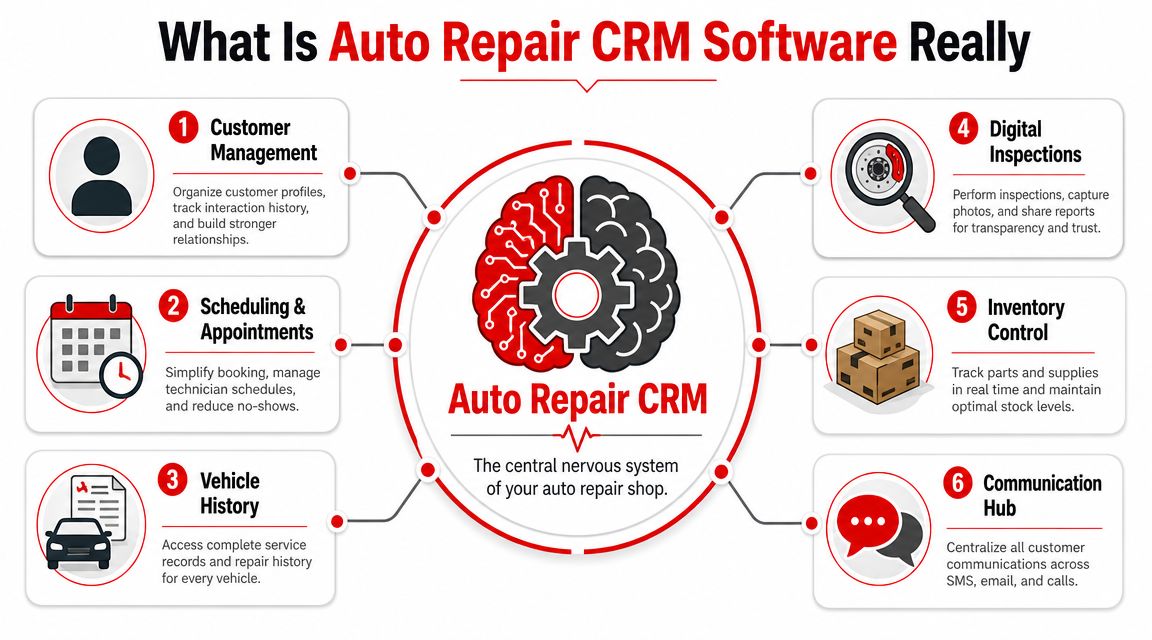
It starts with one shared record
The strongest systems don't separate the customer from the work. They tie the person, the car, the estimate, and the status together so the advisor and technician aren't operating from different versions of the truth.
Industry guidance describes that shift clearly. A modern auto repair CRM ties together customers, vehicles, job statuses, estimates, and approvals, and the common workflow includes Intake, Diagnosis, Estimate, Approved, In Progress, Waiting on Parts, Ready, and Picked Up according to.
That matters because repair shops don't run on a neat sales pipeline. Cars move forward, stall, get repriced, wait on parts, and need new approvals. If the system can't track that reality, the team starts building side systems with whiteboards, sticky notes, text threads, and memory.
A useful way to think about it is this:
| Shop activity | What the CRM should control |
|---|---|
| Customer check-in | Contact details, vehicle lookup, prior history |
| Estimate building | Labor, parts, notes, approval status |
| Job movement | Status changes from intake to pickup |
| Communication | Texts, calls, reminders, updates |
| Follow-up | Deferred work, service reminders, next visit |
Why generic CRM tools fail in repair shops
Generic business CRMs were built for sales reps, not service advisors. They may track a person well, but they usually struggle with one customer owning multiple vehicles, repair-specific approvals, live job statuses, and vehicle-centric history.
That's why many shops need a platform built around operations, not just lead tracking. The same logic shows up in adjacent trades too. Companies comparing often run into the same limitation. Marketing tools can help capture attention, but they don't run the actual service workflow once the customer says yes.
Practical rule: If software can't show the front desk what's happening in the bay right now, it isn't acting like a true shop CRM.
Good Auto Repair CRM software becomes the shared workspace for the whole team. It doesn't sit off to the side. It runs the day.
Core Features Your Shop Cannot Live Without
A feature only matters if it helps the front desk, the bay, and the customer stay in sync. Shops get into trouble when software handles one part of the job well but leaves the rest to paper notes, hallway conversations, or memory. Good CRM software acts as the operating system for the day. It keeps the estimate, the repair status, the customer conversation, and the vehicle record connected.
The features that actually remove friction
Some tools look polished in a demo and still create extra work once the shop gets busy. The features below tend to hold up under real operating pressure.
A digital shop board: Everyone needs one live view of every car in the building. Checked in, waiting on diagnosis, estimate sent, approved, waiting on parts, in progress, ready for pickup. If that status lives in three places, advisors start interrupting techs, managers start guessing, and customers wait longer than they should.
Vehicle history tied to the customer record: Advisors need prior visits, deferred work, mileage notes, inspections, and invoices on one screen. That speeds up write-ups and leads to better recommendations. It also cuts down on the awkward moment where a customer says, "You told me this last time," and nobody can confirm it quickly.
Integrated estimates and approvals: Estimate creation, customer approval, and job status should sit in one workflow. If the advisor has to build the estimate in one system, text it from another, and update the board by hand, delays pile up fast. Shops lose approved work that way.
Two-way texting with the conversation attached to the RO: Texting is useful because customers respond faster than they do to voicemail. What matters operationally is that the full thread stays attached to the repair order and vehicle record. Any advisor can open the job and see what was promised, what was approved, and what still needs an answer.
Missed approvals often come from delay and confusion, not just price.
Automated service reminders: Follow-up should not depend on whoever had a spare minute that day. A good system schedules reminders for declined work, routine maintenance, and upcoming services based on time, mileage, or prior recommendations. That protects repeat business and gives the shop a steadier car count.
Digital inspections: Photo-backed inspections improve communication because customers can see the worn brake pad, cracked belt, or leaking seal for themselves. They also help the front desk sell needed work without turning every recommendation into a long verbal explanation.
What a strong platform looks like in practice
In a shop that uses its CRM well, each role sees what it needs without hunting for it.
The service advisor can open one screen and get the customer record, vehicle history, current job status, pending approvals, and recent messages. The technician can work from assigned jobs and inspection findings without chasing paper across the building. The owner can spot where work is backing up, whether cars are waiting too long for approval, and whether the schedule is flowing or stalling.
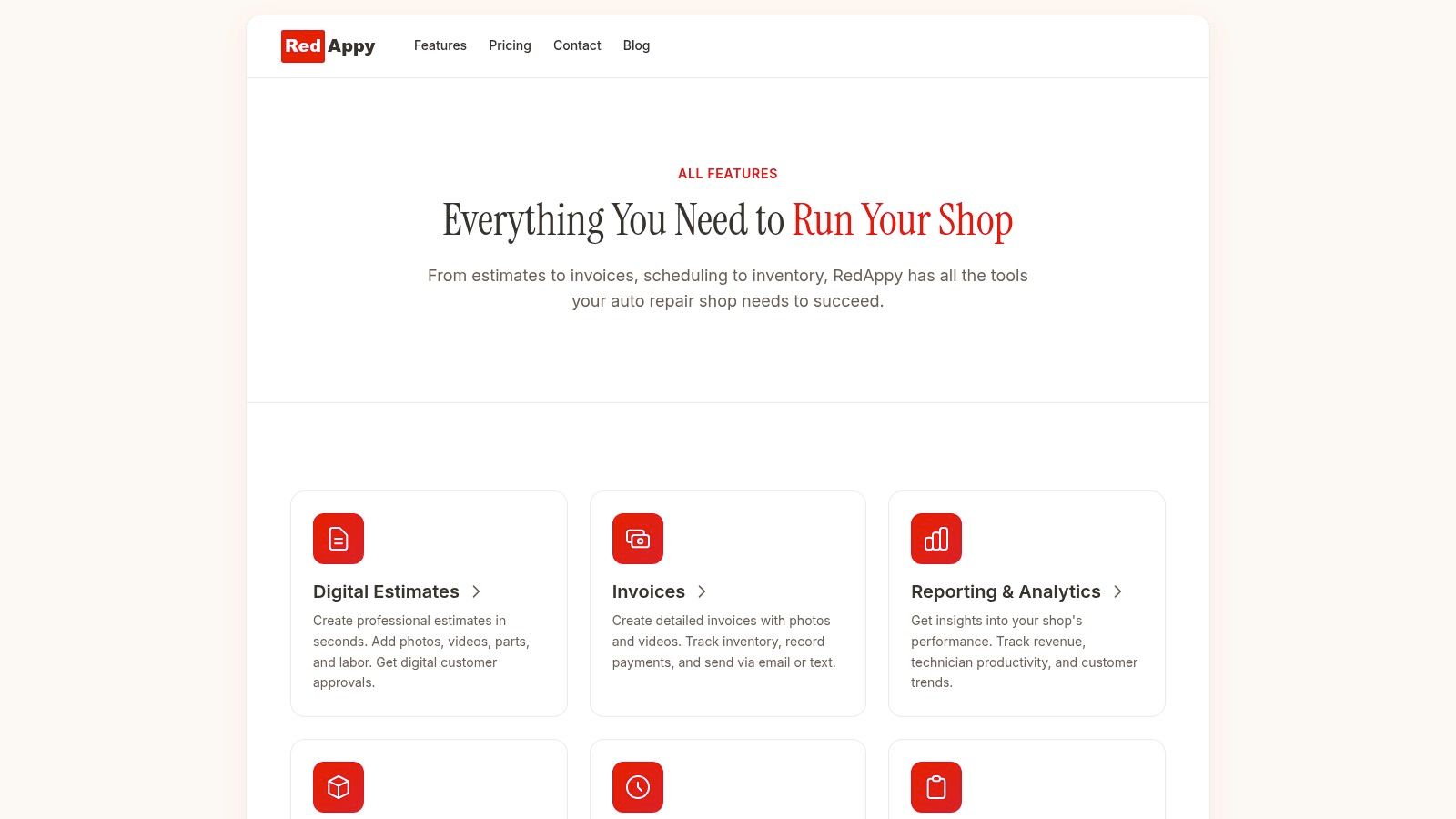
RedAppy is one example of a platform built around that connected workflow. Its setup includes digital inspections, a Kanban-style shop board, parts ordering, invoicing, payments, and centralized vehicle lookup. That structure matters because disconnected tools often shift admin work from one person to another instead of removing it.
Most shops do not need every advanced tool on day one. They do need the core workflow connected. Once the front desk, the bay, and the customer are working from the same system, the shop runs with fewer dropped balls and far less guesswork.
Calculating the Real ROI of a Modern CRM
Monday morning tells the story fast. Three cars are waiting on approval. One advisor is digging through old invoices to answer a maintenance question. A technician is standing still because the customer has not seen the inspection yet. In a manual shop, those delays look normal. In a shop with the right CRM, they show up as lost capacity.
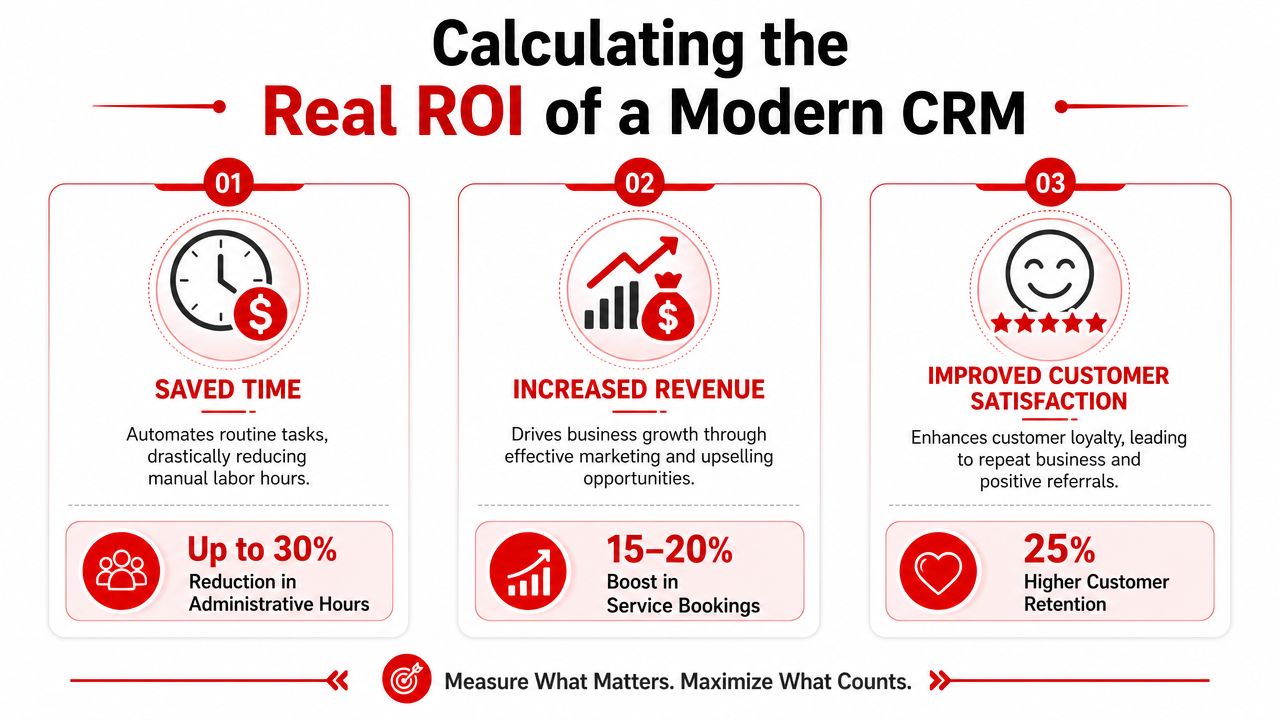
ROI in an auto repair CRM is not just a marketing metric. It shows up in how the whole operation moves between the front desk, the bay, and the customer. The returns usually land in three places first: repeat business, staff time, and approval speed. If the system does not improve one of those areas in a way you can measure, it will be hard to justify the monthly cost.
Where the return usually shows up first
Retention is often the first place owners notice a difference. Shops that stay in front of customers with timely reminders, declined-work follow-ups, and consistent service history communication tend to bring more people back, as noted earlier. That matters because a CRM is doing more than storing contact records. It keeps the relationship connected to the vehicle, the work performed, and the next recommended visit.
Time savings come next, and they are usually easier to feel than to calculate at first. Advisors stop re-entering the same details in multiple places. Technicians spend less time waiting for updates to reach the customer. Owners get fewer interruptions that start with, “Do we know what is going on with this car?” One shop may save ten minutes per repair order. Another may save only a few. Across a busy month, that still adds up to more billed work and fewer administrative stalls.
Approval flow is the third bucket, and it is often the most overlooked. Customers make decisions faster when the estimate, inspection notes, photos, and message history sit in one place. The gain is not that every job gets approved. The gain is that fewer jobs sit in limbo because the process is scattered across paper notes, voicemail, and text threads on personal phones.
| ROI area | What to watch |
|---|---|
| Retention | Return visits after reminders, follow-ups, and declined-work outreach |
| Labor efficiency | Advisor time saved, fewer duplicate entries, less status chasing |
| Approval flow | Time from estimate sent to customer decision |
What software can prove and what it can't
Good software can show activity. Great software can tie that activity to outcomes.
That distinction matters.
Vendors can usually show message volume, sent reminders, inspection counts, and closed estimates. Those numbers are useful, but they are not enough by themselves. Ask whether the system can show repeat visit trends, approval timing, average response time, and declined-work recovery over time. If it cannot connect actions to results, the ROI case stays soft.
Shops should also be careful with AI claims. Automated messaging, call handling, and service suggestions may help, but broad promises deserve scrutiny. Forbes Business Council's discussion of automotive AI and customer experience makes the broader point well: the value comes from practical use inside the workflow, not from the label itself. In a repair shop, that means less phone tag, faster approvals, and clearer next steps for staff and customers.
Ask vendors to show what the tool measures inside the product, not just what the marketing page promises.
Cost still matters, but subscription price alone is the wrong benchmark. Compare the monthly fee against hours lost to manual updates, repair orders waiting on approval, and customers who disappear because nobody followed up. That is the comparison that matters.
How to Evaluate and Choose the Right Software
At 10:30 on a Tuesday, the front counter is stacked, a technician is waiting on parts, and a customer is calling for an update on a vehicle with a revised estimate. That is the moment software gets exposed. If the advisor has to bounce between tabs, the tech cannot update status from the bay, and the approval thread lives in someone's text inbox, the system is not running the shop. The staff is chasing it.
What to look for during a demo
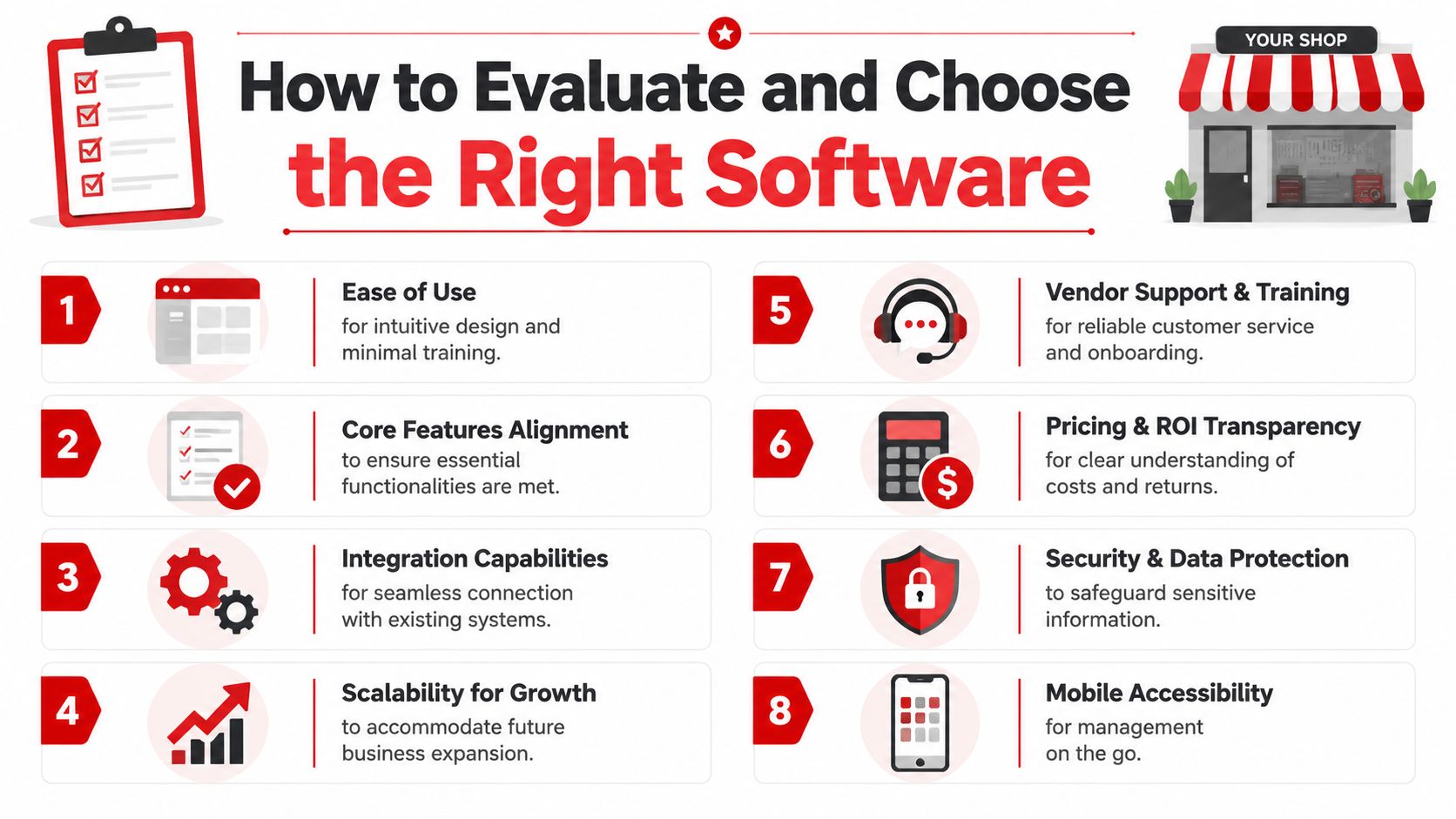
Ask the vendor to run one complete job, start to finish. A real evaluation should show how the CRM connects the front desk, the service bay, and the customer in one operating flow. Intake, vehicle history, estimate changes, inspection results, approvals, status updates, payment, and follow-up should all stay tied to the same repair order and the same customer record.
Watch for friction.
If an advisor needs too many clicks to check job status, they will stop using it properly. If a technician cannot add notes or inspection results from a phone or tablet without hassle, updates will get delayed or skipped. If customer messages are separate from the repair order, the shop loses context and the team starts relying on memory again.
A useful demo should answer practical questions fast:
- Front desk speed: Can advisors build and update a ticket while phones are ringing?
- Bay usability: Can technicians post updates, photos, and inspections without leaving the workflow?
- Vehicle organization: Does the system handle households and fleets with multiple vehicles cleanly?
- Job communication: Are approvals, texts, notes, and status changes attached to the actual work order?
- Device fit: Does it work well on the hardware the shop already owns?
Use a simple scorecard during the demo. Owners who do this usually make better decisions because they are comparing operating fit, not vendor polish.
| Evaluation point | What good looks like |
|---|---|
| Workflow fit | Matches how the shop writes, updates, and closes jobs |
| Integration | Connects with shop management, payments, inspections, or accounting tools already in use |
| Status visibility | Gives advisors, techs, and managers a shared live view of job progress |
| Support quality | Includes onboarding help, training by role, and responsive post-launch support |
| Data control | Offers a clear import process, clean records, and straightforward export access |
Questions that expose weak software fast
Good vendors answer direct questions without getting vague.
Ask how they import customer history, vehicle records, and past service data. Ask what happens when your process does not match their default workflow. Ask whether you can set custom job stages that reflect how your shop runs. Ask how quickly an advisor can find a customer by phone number, plate, VIN, or last name while a line is forming at the counter.
Then get more specific about failure points.
What happens if a customer has three vehicles and two drivers? What happens if an estimate changes after the initial approval? What happens if a technician flags additional work from the bay? What happens if the internet drops for a few minutes? Those answers tell you more than a feature list ever will.
Use these questions in the demo or follow-up call:
- How do you migrate customer, vehicle, and service history from the current system?
- What training is included for advisors, technicians, and managers separately?
- Can the shop create custom statuses, inspection steps, and approval flows?
- How does the system handle one customer account with multiple vehicles and drivers?
- Can staff search by name, plate, VIN, phone number, and work order?
- Who provides support after launch, and what does response time usually look like?
- If the shop leaves later, how is data exported and in what format?
AI needs the same scrutiny. Plenty of platforms can generate messages or suggest follow-ups. That does not mean those tools improve shop performance. Ask the vendor to show what the feature changes inside daily operations. Less manual calling. Faster estimate approvals. Better recovery of declined work. Clearer documentation. If they cannot tie the feature to a shop outcome, treat it as optional until proven otherwise.
Buying advice: Buy the software that handles the messy middle of a repair order well. Demos are easy. Midday shop traffic is the real test.
Support is often the tiebreaker. Two systems can look similar in a demo and perform very differently after launch. Shops need a vendor that can help fix import issues, answer workflow questions, and coach the team once real-world exceptions start showing up. That support is not a bonus. It is part of the product.
Implementation and Getting Your Team on Board
The software decision is only half the job. A weak rollout can make good software look bad in a week.
Most resistance inside a shop isn't about technology. It's about disruption. Technicians don't want more taps and logins. Advisors don't want to learn a new process while phones are ringing. Owners don't want a month of slower operations just to “get digital.”
Start smaller than you think
The cleanest rollouts usually start with a narrow scope. Customer records, vehicle history, job statuses, and estimate approvals. Get those working first. Once the team trusts the basics, then add deeper automation, reminders, advanced reporting, or AI tools.
A simple implementation pattern works well:
- Pick one in-shop champion: This should be someone respected by the team, not just the owner.
- Clean the data first: Bad imports create bad first impressions.
- Train by role: Advisors, technicians, and managers need different workflows.
- Protect real training time: Don't squeeze training between active jobs and expect adoption.
- Launch with a clear standard: If the team can still “just do it the old way,” many of them will.
Get buy-in by removing pain, not by selling software
The team has to see what changes for them personally.
For technicians, the pitch is less paperwork, clearer approvals, and fewer interruptions. For service advisors, it's fewer callbacks, easier status checks, and a cleaner communication trail. For managers, it's visibility without walking the floor asking ten separate questions.
That message has to be practical.
“You won't have to chase paper or wonder whether the customer approved it” lands better than “This platform improves operational visibility.”
It also helps to set one firm rule early. If a status changes, it gets updated in the system. If an estimate goes out, it goes through the system. If a customer replies, that conversation stays tied to the job. Teams adopt software faster when there's no confusion about where the definitive record lives.
Change gets easier once the staff sees fewer headaches in the day. That's the turning point. Not enthusiasm. Relief.
Your Next Step to a More Efficient Shop
A shop can survive on paper, memory, and hustle for a long time. But survival isn't the same as control. When the phones are busy, approvals are delayed, and customer history is scattered, the shop pays for it in wasted time, missed follow-up, and preventable friction.
That's why Auto Repair CRM software matters. It isn't just a digital contact list. It's the operating layer between the front desk, the bays, and the customer. Done right, it gives the team one place to track the work, communicate clearly, and keep vehicles moving without constant guesswork.
The practical benefit is simple. The day gets easier to manage. Advisors spend less time hunting for context. Technicians get cleaner handoffs. Customers get faster, more consistent communication. Owners get visibility into what's happening without relying on whoever remembers the most.
For shops that are comparing options, the next smart move is to look at real workflows, not just sales copy. See how a platform handles inspections, estimates, approvals, invoicing, and shop status in one connected process. Then ask how it fits the way the shop already works.
See these features in action by visiting RedAppy's features page. If there are questions specific to the shop's workflow, team, or rollout plan, contact the team through RedAppy's contact page.
RedAppy brings customer management, digital inspections, estimating, invoicing, payments, parts workflow, and shop visibility into one system for modern repair businesses. For shops that want a clearer view of how that would work day to day, visit RedAppy.
Ready to Transform Your Shop?
RedAppy helps auto repair shops create professional digital estimates with photos and videos, send them instantly via text or email, and get customer approvals in seconds. No credit card required to start.