
Auto Repair Shop Website Design to Get More Customers
A lot of shop owners are in the same spot right now. The bays stay busy some weeks, then the phone goes quiet, and the website sits there doing almost nothing except showing an old logo, a phone number, and a few vague lines about “quality service.” Meanwhile, drivers nearby are finding another shop that lets them book faster, trust faster, and approve work without friction.
That gap usually isn't caused by bad repair work. It comes from bad digital flow. A strong auto repair shop website design doesn't just make a shop look professional. It answers urgent questions, routes people to the right service, supports the front desk, and helps turn inspections, estimates, approvals, and payments into one connected process.
Table of Contents
- Your Website Is Your Most Important Employee
- Laying the Foundation for a High-Performance Site
- Designing Your Essential Website Pages and Content
- Integrate Your Website with Your Shop Operations
- Attract Local Customers with SEO and Trust Signals
- Launch and Optimize Your Website for Growth
Your Website Is Your Most Important Employee
A weak website creates the same kind of drag as a weak service advisor. It misses calls. It gives incomplete answers. It makes people wait. It lets good prospects slip away.

What a weak site costs a shop every day
A common shop scenario looks like this. A driver hears brake noise on the way home, searches on a phone, lands on a repair site, and can't immediately find hours, location, or a clear way to book. That driver doesn't study the site for ten minutes. That driver leaves.
This is why underperforming websites are such a large opportunity in this industry. Independent research indicates that 9 out of 10 (90%) auto repair shop websites receive a failing grade when audited for quality, which leaves a wide opening for shops that invest in better design and function, according to.
A site that fails usually has the same problems. The menu is cluttered. Service information is too generic. Contact details are buried. The mobile version feels like an afterthought. Shops that want to often start by fixing those basics before they spend more money on ads or SEO.
A website doesn't need to impress another marketer. It needs to help a driver decide, quickly, that this shop is trustworthy and easy to work with.
What a working website actually does
The right website behaves like a reliable employee who never clocks out. It answers the first round of customer questions, routes people to the right service page, collects leads after hours, and reduces repetitive front-desk work.
That changes the role of the website. It stops being a digital business card and starts acting like operating infrastructure.
A good site should help with things like:
- Urgent decision-making: A driver with a warning light or grinding brakes should know within seconds whether the shop handles that issue.
- Trust-building: Real service pages, actual shop photos, clear process explanations, and visible reviews reduce hesitation.
- Front-desk relief: Booking requests, inspection communication, and payment tools can move routine tasks out of phone-only workflows.
- Revenue flow: Better visibility plus less friction usually means more booked work from the traffic the shop already has.
Most shops don't need a flashy site. They need one that works hard, stays current, and supports the way the shop runs.
Laying the Foundation for a High-Performance Site
The best-looking site in the market still fails if it loads slowly, confuses visitors, or sends everyone to the same generic page. Strong auto repair shop website design starts with planning, not colors.
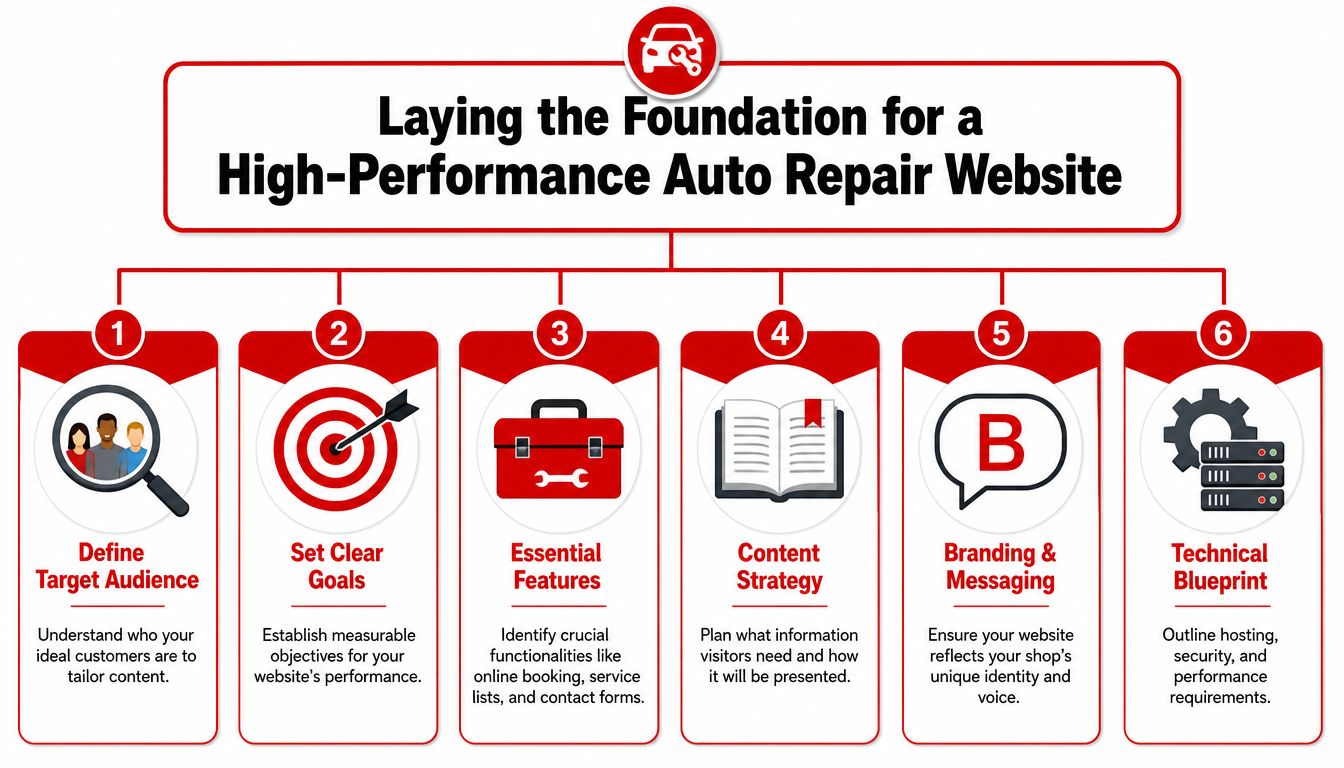
Start with structure before design
Most shops should decide four things before touching the homepage layout.
Who the site is trying to convert
Daily commuters, fleet customers, European vehicle owners, truck drivers, and performance customers don't search the same way and don't need the same message.What services deserve dedicated pages
High-frequency and high-value services usually need their own page. Brake repair, diagnostics, oil changes, transmission work, AC repair, suspension, tires, alignment, and maintenance are common examples.What the primary action should be
Some shops want phone calls. Others want appointment requests. Others want estimate approvals and online payments to happen through the site.What systems the website must connect to
If the team uses a shop management platform, digital inspections, invoicing software, or a customer database, the website should support those workflows instead of sitting apart from them.
A shop that wants help mapping those priorities into build requirements can also review examples of to understand what should be handled upfront rather than patched later.
Speed and intent drive results
Load time isn't a minor technical detail. It's one of the first conversion filters. When an auto repair shop website takes more than 3 seconds to load, the business loses approximately 40% of visitors before they view any offerings, based on guidance from.
That one fact changes how the whole build should be approached.
Practical rule: Compress images, avoid bloated scripts, and use reliable hosting before spending time on decorative effects.
A fast site gives the customer immediate answers. A slow site forces the customer to make another search.
Here's the real planning test. The site should match user intent:
- Urgent repair intent: “Brake repair near me” needs fast proof, clear booking, and confidence signals.
- Research intent: “Why is my check engine light on” needs educational content that leads into diagnostics.
- Maintenance intent: “Oil change in [city]” needs simple service details, hours, and an easy appointment path.
- High-ticket intent: “Transmission repair” needs stronger trust content, process detail, and a clearer explanation of next steps.
A homepage can't carry all of that by itself. That's why site architecture matters. A shop gets better results when major services, common symptoms, and local search needs are organized into a clean structure instead of being crammed into one broad page.
Designing Your Essential Website Pages and Content
A high-performing website isn't one page with a phone number at the top. It's a set of pages, each with a job. One page earns trust. Another captures high-intent searches. Another removes friction when someone is ready to contact the shop.
The pages every shop needs
A strong standard comes from this requirement: a high-quality auto repair website must feature clear, distinct service pages listing specific repairs like oil changes, brake repair, and engine diagnostics rather than generic statements, and contact information including phone number, address with an embedded clickable map, and business hours must be prominently visible at the top and bottom of every page to drive immediate customer action, as outlined by.
That single principle eliminates a lot of weak sites. If the contact details disappear after the homepage, or if every repair type is buried under “Services,” the site is making customers work too hard.
Here's a practical content map.
| Page | Primary Goal | Essential Content |
|---|---|---|
| Home | Create immediate trust and drive first action | Clear headline, key services, service area, visible phone number, hours, embedded map, primary CTA, real shop imagery |
| Service Pages | Capture specific searches and qualify leads | One service per page, common symptoms, what the service includes, related vehicles or issues, booking CTA |
| About | Humanize the business | Shop story, team photos, certifications, values, warranty or process details |
| Contact | Remove friction | Phone, address, clickable map, hours, contact form, service area notes |
| FAQ | Handle objections early | Questions about diagnostics, appointments, timelines, inspections, payments, and warranties |
| Reviews or Testimonials | Reinforce trust | Selected customer feedback, review snippets, links or prompts to leave feedback |
Build service pages around real customer needs
Service pages shouldn't read like a parts catalog. They should answer the exact concern that got the visitor there.
A brake repair page should speak to squealing, grinding, vibration, warning lights, and inspection steps. An engine diagnostics page should explain what happens when a customer books. A transmission page should reduce panic and set expectations without overpromising.
Three content choices usually work better than generic copy:
- Use problem-based language: Write for “car pulls when braking” or “AC blowing warm air,” not just broad service labels.
- Show process, not just services: Customers trust a shop more when the page explains how inspections, estimates, and approvals work.
- Keep the CTA matched to the page: “Schedule brake inspection” converts better than a vague “Learn more.”
The best service pages feel like a service advisor answering the first two minutes of a customer call.
The About page matters too, but it shouldn't become a long biography. Customers want enough story to know the shop is real, competent, and stable. A few strong team photos, certifications, specialties, and a straightforward explanation of how the shop communicates are usually enough.
The Contact page needs the fewest words and the fewest excuses. If someone is there, the site should make calling, finding directions, or sending a request effortless.
Integrate Your Website with Your Shop Operations
Most websites stop at lead capture. They collect a form, send an email, and dump more work on the front desk. That setup looks modern from the outside, but inside the shop it creates delays, missed follow-up, and duplicate admin work.
The stronger model is different. The website should connect directly to how the shop books jobs, communicates with customers, sends inspections, gets approvals, and collects payment.
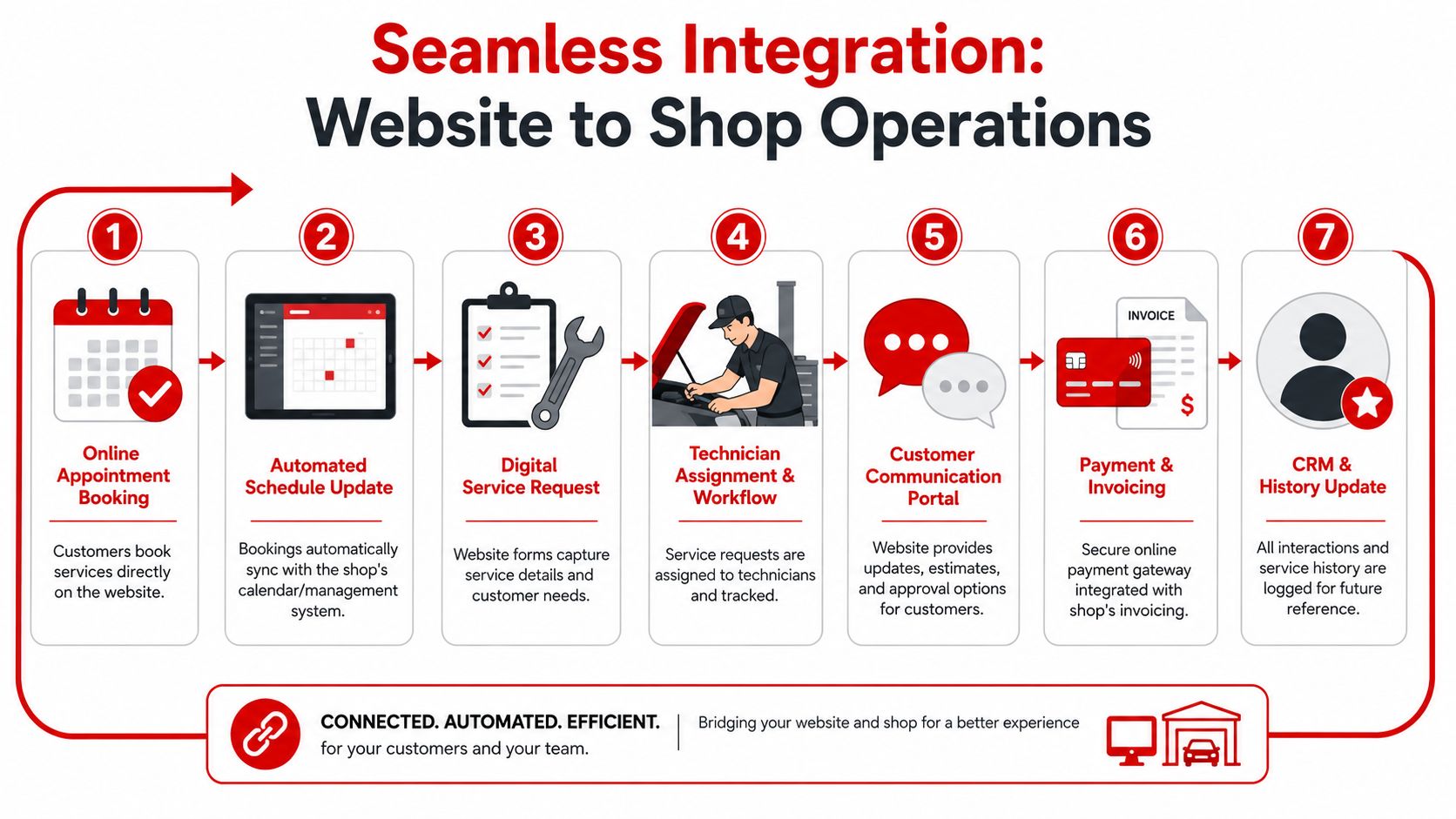
A website should reduce phone calls, not create more
Shops often say they want more calls. What they usually want is more booked work. Those aren't always the same thing.
If every online request still requires multiple calls to confirm the concern, gather vehicle details, explain availability, and chase approval, the site hasn't solved much. It has only moved the first step online.
A connected workflow does better:
- Online appointment requests collect the needed information upfront.
- Calendar sync keeps the front desk from juggling separate systems.
- Digital estimate delivery shortens the time between inspection and approval.
- Customer status updates reduce inbound “just checking” calls.
- Online payment links speed up pickup and reduce checkout bottlenecks.
All-in-one tools matter. Some platforms combine the website with inspections, estimates, invoicing, and customer communication. RedAppy features show one example of that model, including digital inspections, payments, team workflow views, and a branded website that ties into shop operations.
Photo approvals and online payments change the workflow
Most website guides stop at mobile responsiveness and booking buttons. That misses one of the most useful trust tools a modern shop can offer. Most existing guides emphasize mobile-friendliness and booking buttons but fail to address the critical gap in how auto repair shops can integrate real-time photo-rich inspection workflows directly into their website for instant customer trust and approval, despite 78% of customers now demanding visual proof before authorizing repairs, based on.
That matters because photo-backed communication changes customer behavior. A written estimate says one thing. A clear image of worn pads, a leaking component, or a damaged belt says much more.
A customer who can see the problem and approve the repair from a phone is easier to serve than a customer waiting for voicemail.
The same logic applies to payments. When a customer can pay online after approval or before pickup, the service advisor spends less time chasing cards, printing paperwork, and clearing a line at the desk. The website becomes part of the production system, not just the marketing layer.
For many shops, that's a fundamental shift. The site stops asking for attention and starts saving time.
Attract Local Customers with SEO and Trust Signals
A sharp website still won't help if local drivers can't find it. Search visibility for repair shops is usually won with straightforward execution, not clever tricks.
Show Google where you work and what you repair
Local SEO for an auto repair shop starts with clear service and location signals across the site.
That means the homepage should say what the shop does and where it does it. Service pages should mention the service area naturally. The contact page should include the full business details, map, and hours. The Google Business Profile should match the same shop name, address, phone number, and categories used on the website.
A practical setup usually includes:
- Location-specific page language: Mention the city, neighborhood, or service area where it fits naturally.
- Service-specific pages: Brake repair, oil changes, diagnostics, suspension, tires, and other core services should stand alone.
- Consistent business details: Keep the same contact information everywhere the shop appears online.
- Mobile-first usability: Most local shop searches happen on phones, so tap-to-call, directions, and booking need to work cleanly.
A blog can help too, but only if it answers real customer questions. Short local guides tied to common services often work better than broad industry commentary.
Trust signals close the gap between visit and booking
Search rankings bring visitors in. Trust signals turn those visits into calls and appointments.
The strongest trust elements are usually simple:
- Real customer reviews: Pull highlights onto key pages, especially service pages and the homepage.
- Actual team and shop photos: Skip generic stock images. People can tell the difference.
- Certifications and specialties: ASE credentials, brand specialties, and fleet capabilities help the right customers self-select.
- Clear calls to action: Buttons should tell people exactly what to do next.
Effective mechanic CTAs use direct language such as “Book Your Service Now,” “Get a Free Quote,” or “Contact Us Today,” and the buttons should be large, bright, and visually distinct, according to.
If a visitor has to hunt for proof or guess the next step, the shop loses momentum right when the customer is ready to act.
Trust isn't built by a single badge or headline. It's built by stacking clear signals that remove doubt.
Launch and Optimize Your Website for Growth
A site launch isn't the finish line. It's the point where the shop starts learning what customers do on the site.
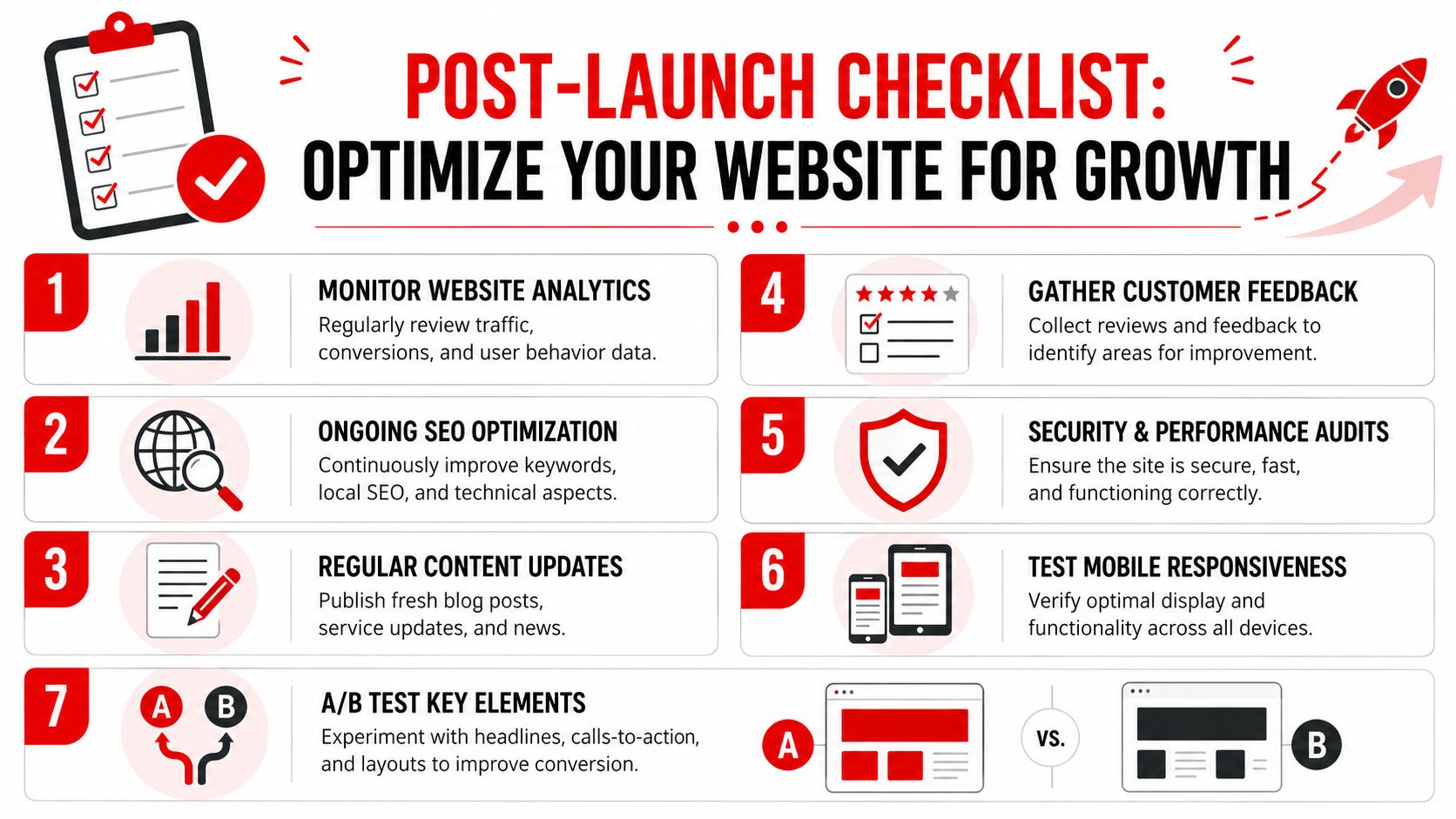
Use a simple post-launch routine
Most shops don't need a deep analytics team. They need a short weekly and monthly checklist.
Weekly, check whether forms work, booking requests arrive properly, phone buttons tap correctly on mobile, and business hours are accurate. Monthly, review which service pages get attention, which pages lead to calls or requests, and where visitors drop off.
A strong optimization routine often includes:
- Speed checks: Performance slips over time when new images, plugins, or scripts pile up.
- Content updates: Add new reviews, fresh photos, and service detail where customers hesitate.
- CTA testing: Try different button text and placement on high-traffic pages.
- Workflow checks: Make sure requests, approvals, and payment links still move cleanly through the process.
That maintenance work matters because small speed gains can affect conversion. Increasing website speed by just one-tenth of a second can lead to an 8.4% increase in conversion rates for retail sites, according to.
Treat the site like an operating asset
The shops that get the most from their websites don't treat them like one-time design projects. They treat them like service equipment. The site needs inspection, tuning, and occasional replacement of weak parts.
That mindset changes spending decisions. Instead of asking whether the website “looks good enough,” the better question is whether it helps the shop book work, communicate faster, reduce admin time, and make approvals easier.
If the answer is no, the site isn't finished. It's underbuilt.
Shops that want a website tied directly to inspections, estimates, payments, and day-to-day workflow can contact RedAppy to see how an all-in-one setup fits their operation. For owners who are tired of juggling a brochure site on one side and shop software on the other, that kind of connected system is often the cleaner next step.
Ready to Transform Your Shop?
RedAppy helps auto repair shops create professional digital estimates with photos and videos, send them instantly via text or email, and get customer approvals in seconds. No credit card required to start.