
Auto Shop Invoice Template: Boost Cash Flow & Reduce
A customer is standing at the counter, keys in hand, staring at an invoice that says little more than “repair work completed.” The service advisor knows the work was done right, the technician documented the job, and the parts were installed properly. But the invoice doesn't prove any of that. It turns a solid repair into an awkward payment conversation.
That's the problem with a weak auto shop invoice template. It doesn't just look sloppy. It creates doubt at the exact moment the shop is asking to get paid. Shops that tighten up invoice design usually see the same immediate benefit. Fewer questions, fewer callbacks, fewer delays, and cleaner records when a customer returns months later asking what was done.
Table of Contents
- Why Your Invoice Is More Than Just a Bill
- The Anatomy of a Bulletproof Invoice
- Itemizing Parts and Labor for Total Clarity
- Beyond the Basics Legal Notices and Branding
- Streamlining Your Invoicing Workflow
- From Template to Total Shop Management
Why Your Invoice Is More Than Just a Bill
A bad invoice usually doesn't fail in the shop. It fails at the front counter.
The repair order may have made perfect sense to the technician. The estimate may have been approved over the phone. But when the final invoice is vague, the customer sees a number without a story behind it. That's when simple questions turn into disputes. Why was there diagnostic time? Why were extra supplies charged? Was that part new or reused? If the document doesn't answer those questions, the advisor has to do it live, under pressure.
That's why an auto shop invoice template should be treated as a communication tool first. It's the final version of the job in plain language. It confirms what the shop found, what the team did, what parts went into the vehicle, and what the customer is paying for.
A clean invoice often prevents the argument that a rushed explanation creates.
Shops see this issue outside routine maintenance too. Collision repairs, specialty jobs, and vehicles that arrive through resale or transport channels often come with more background questions and more paperwork. In those cases, even related logistics matter. For example, shops that handle vehicles acquired through auctions may already be coordinating details around, title paperwork, storage timing, and condition notes. If the invoice doesn't match that same level of detail, it weakens trust.
Trust is built in the small details
Customers don't read invoices the way shop owners do. They scan for signs of order.
They look for clear line items, recognizable vehicle details, readable totals, and terms they can understand. A neat layout says the shop runs a disciplined operation. A messy one suggests corners might have been cut somewhere else too, even when that isn't true.
A strong invoice does three jobs at once:
- Explains the repair clearly so the customer understands the value received.
- Protects the shop operationally by preserving a service record that can be checked later.
- Supports cash flow because people pay faster when the bill makes sense on first read.
What works and what doesn't
What works is specificity. Separate labor from parts. Show the vehicle identity clearly. Include terms that answer the obvious questions before they're asked.
What doesn't work is the old shortcut invoice with a few handwritten notes, one subtotal, and no context. That kind of template may feel faster in the moment, but it usually shifts the time cost to follow-up calls, reprints, and payment delays.
The Anatomy of a Bulletproof Invoice
A good invoice answers the questions that show up three weeks later, not just the ones asked at pickup.
A customer wants to know why the total changed. A service writer is off that day. An owner is checking a comeback repair. Bookkeeping is trying to match a card payment to the right job. If the invoice cannot stand on its own in those moments, the shop is left defending work with memory instead of records.
A practical template builds that record in a clear order.
Start with identity and traceability
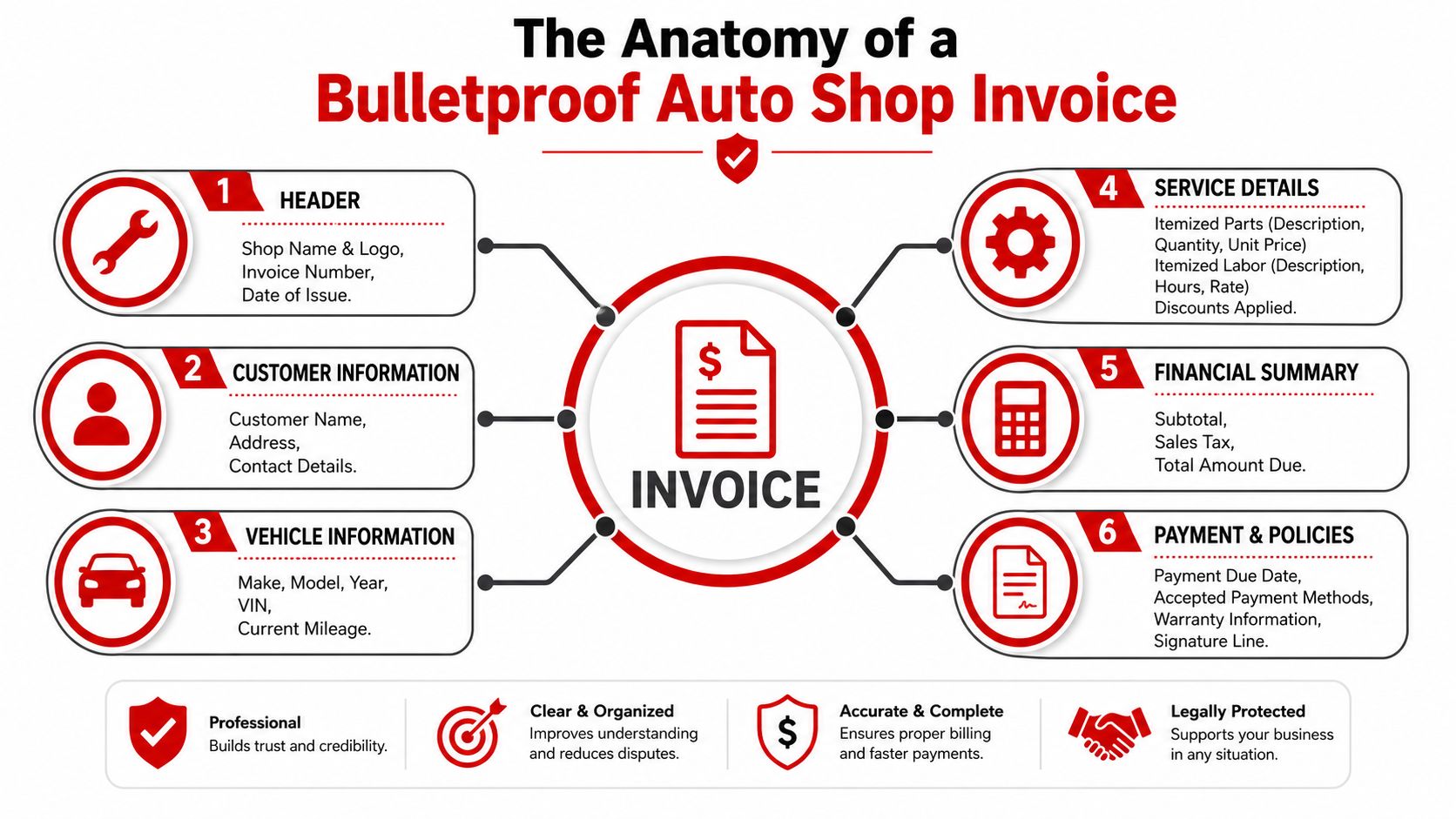
The top of the invoice should make the document easy to trace before anyone reads a single line of repair detail. That starts with a unique invoice number and the date of service, both of which support recordkeeping and later verification, as noted by.
The header should also show the shop's legal business name, address, phone number, email, and logo if the shop uses one. This is basic information, but it does real work. It tells the customer the document is official, gives them a clear point of contact, and reduces the odds that a warranty or bookkeeping question turns into a frustrated phone call.
A strong header usually includes:
- Shop identity with business name, logo, address, phone, and email
- Invoice tracking with invoice number and service date
- Customer details including name and contact information
Capture the vehicle like it could end up in a dispute file
Thin vehicle information is one of the fastest ways to weaken an otherwise decent invoice.
For major markets like Ontario, invoice requirements can include the vehicle make, model, VIN, license number, and odometer readings in and out. Even where those exact rules do not apply, the business logic is the same. The more precisely the invoice ties the repair to one vehicle, the easier it is to defend the bill, verify service history, and support lien or collection paperwork if payment goes sideways.
The vehicle section should identify:
| Field | Why it matters |
|---|---|
| Make and model | Confirms the serviced vehicle |
| VIN | Prevents mix-ups and supports service history |
| License number | Helps match internal and customer records |
| Odometer in and out | Records vehicle status at drop-off and release |
I have seen shops skip odometer-out or plate number because the advisor was busy. That shortcut looks harmless until a customer disputes pickup timing, mileage, or even which vehicle received the work.
Show authorization, work performed, and money in a clean sequence
The middle and bottom of the invoice should read like a clean chain of events. What was approved. What was done. What was charged. What is still owed.
That structure matters because invoices do more than request payment. They also back up estimate compliance, warranty decisions, and any later claim that the customer approved added work. A manual template can handle this if it is designed carefully, but this is also where paper forms and generic spreadsheets start to break down. Once jobs change mid-repair, the shop needs a reliable way to document revisions, taxes, fees, and signatures without creating inconsistencies.
Charges should still be separated clearly, with distinct Parts and Labor sections, following the structure outlined by.
Practical rule: If an owner, advisor, customer, and bookkeeper would each read the same invoice and reach the same understanding, the template is doing its job.
The closing section should include the subtotal, taxes, total due, payment terms, accepted payment methods, warranty terms for parts and labor, and a signature line if the shop uses one. It should also leave room to record approved changes to the original estimate. Shops that build this discipline into the invoice process have fewer disputes and cleaner files. Shops that do not usually end up patching together proof from notes, texts, and memory.
Itemizing Parts and Labor for Total Clarity
A customer reaches the counter, sees one line that says “parts and labor,” and the pickup conversation slows down fast. The repair may be solid, but the invoice looks vague. Vague invoices get questioned, delayed, and sometimes partially paid.
What clear itemization looks like
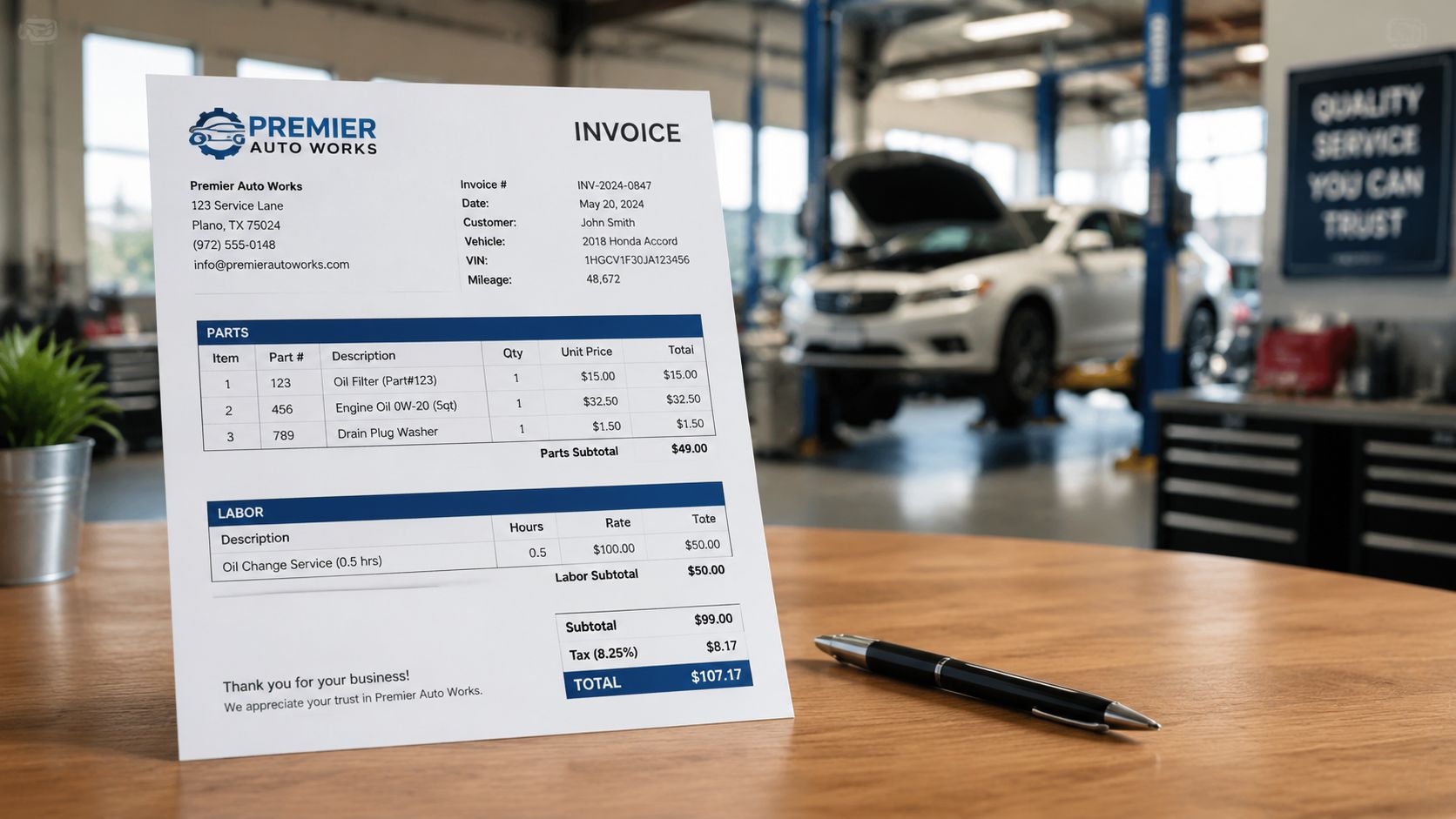
Parts and labor need their own sections, and each line needs enough detail to stand on its own months later. For parts, that usually means part number, plain-English description, quantity, and unit price. For labor, it means the operation performed, billed time, and the rate used.
That level of detail does two jobs at once. It helps the customer understand the bill, and it gives the shop a cleaner record if a charge is disputed later.
For labor, the clearest format is simple:
Labor entry example
Brake inspection and front pad replacement
2.0 hours × posted hourly rateParts entry example
Front brake pad set, part number, quantity, unit priceDiagnostic entry example
Electrical system diagnosis or no-start inspection listed separately from repair labor
Shops get into trouble when labor descriptions are too broad. “Repair work performed” is weak. “Removed failed alternator, installed replacement unit, verified charging output” is much easier to defend. The same rule applies to parts. “Brake parts” invites questions. A listed pad set, rotor, hardware kit, or sensor gives the customer a concrete reason for the total.
The charges that cause the most friction
The disputed items are usually predictable. They are the charges that customers did not see clearly during approval or cannot identify at checkout.
The usual trouble spots are:
- Diagnostic fees that are buried inside repair labor
- Shop supplies that appear as a vague add-on
- Call-out or trip fees for mobile, towing, or after-hours work
- Added work after teardown that is included in the final total without a clear approval trail
I have seen plenty of invoices where the repair itself was justified, but the paperwork made the shop look sloppy. That is a preventable problem.
When a job changes after inspection, document the added operation as its own approved line or change order. Include the date, the amount, and who approved it. If the shop stores photos, measurements, or scan results, note that in the file and tie it back to the invoice or repair order number. A manual template can make room for that, but once a shop handles frequent supplements or diagnostics-heavy work, software usually keeps the record cleaner.
When the final amount changes, the invoice should show why it changed and when that change was approved.
Small charges need the same discipline. If the shop bills supplies, disposal, or environmental fees, label them clearly and apply them consistently. Customers usually accept charges that are explained, predictable, and presented the same way every time. They push back on charges that look improvised.
Good itemization is not just about readability. It lowers the odds of a counter argument, gives the advisor a cleaner explanation at pickup, and leaves the shop with better support if payment turns into a collections or lien issue later. That is the ceiling on a manual template. It can work, but only if the process around it is just as disciplined as the form itself.
Beyond the Basics Legal Notices and Branding
The invoice usually gets real scrutiny at the worst moment. The customer is at the counter, the car is done, and the total is higher than they expected. If the document looks generic, missing policy language, or hard to follow, the conversation gets harder fast.
I have seen solid repair work turn into a payment dispute because the invoice footer was vague and the shop could not point to clear terms.
Legal language isn't filler
An auto repair invoice is part receipt, part risk-control document. It should restate the shop's terms in plain language and match the paperwork the customer already approved. If your state requires specific notice language for storage, late fees, vehicle retention, or lien rights, a generic template may leave it out. That omission matters most when a customer delays payment or challenges the bill after pickup is scheduled.
The practical fix is simple. Review the template with local counsel or your state repair association, then lock the wording down so staff are not improvising legal notices from memory. Shops that skip that step usually discover the gap only after a dispute starts.
A safer footer often includes:
- Payment terms stated in plain English
- Warranty terms that match what the shop offers
- Storage or late pickup policies if the shop enforces them
- References to signed approvals already tied to the repair order
- Any state-required notice language for lien or vehicle retention rights
Short, readable language works better than a block of dense text. The goal is not to intimidate the customer. The goal is to show the rules clearly enough that the shop can enforce them later if needed.
A customer may ignore the fine print during drop-off. Their bank, attorney, or card issuer will read it closely if the charge is challenged.
Branding finishes the job
Branding is not decoration. It signals that the shop runs an organized process.
A clean logo, consistent type, readable spacing, and clearly separated subtotals make the invoice easier to trust. Customers notice when a document looks thrown together. They notice when labor, parts, fees, taxes, and payment terms are laid out in a way that feels deliberate. That affects how often they question the total and how confidently your advisor can walk them through it.
Good branding also helps months later. The customer should be able to pull a printed invoice from a glove box or email folder and immediately find the shop name, phone number, address, and warranty reference. That reduces friction on comeback work and warranty conversations.
Manual templates can handle this if someone maintains them carefully. In busy shops, that discipline often slips. Fonts change, disclaimers get edited, logos disappear, and old terms stay in circulation long after policy changes. Dedicated shop software usually does a better job because it keeps every invoice on the same format, with the same legal language and branding, every time.
Streamlining Your Invoicing Workflow
A good template solves only part of the problem. The rest is process.
Many invoicing issues start before the final document is created. The estimate was approved verbally. Additional work was noted on paper. Parts got swapped at the counter. A technician added supplies after the advisor already printed the invoice draft. By the time the customer arrives, the office is piecing together the final version from multiple places.
Where manual templates break down
Manual templates work best when the job is simple and nothing changes. That's not how most repair days go.
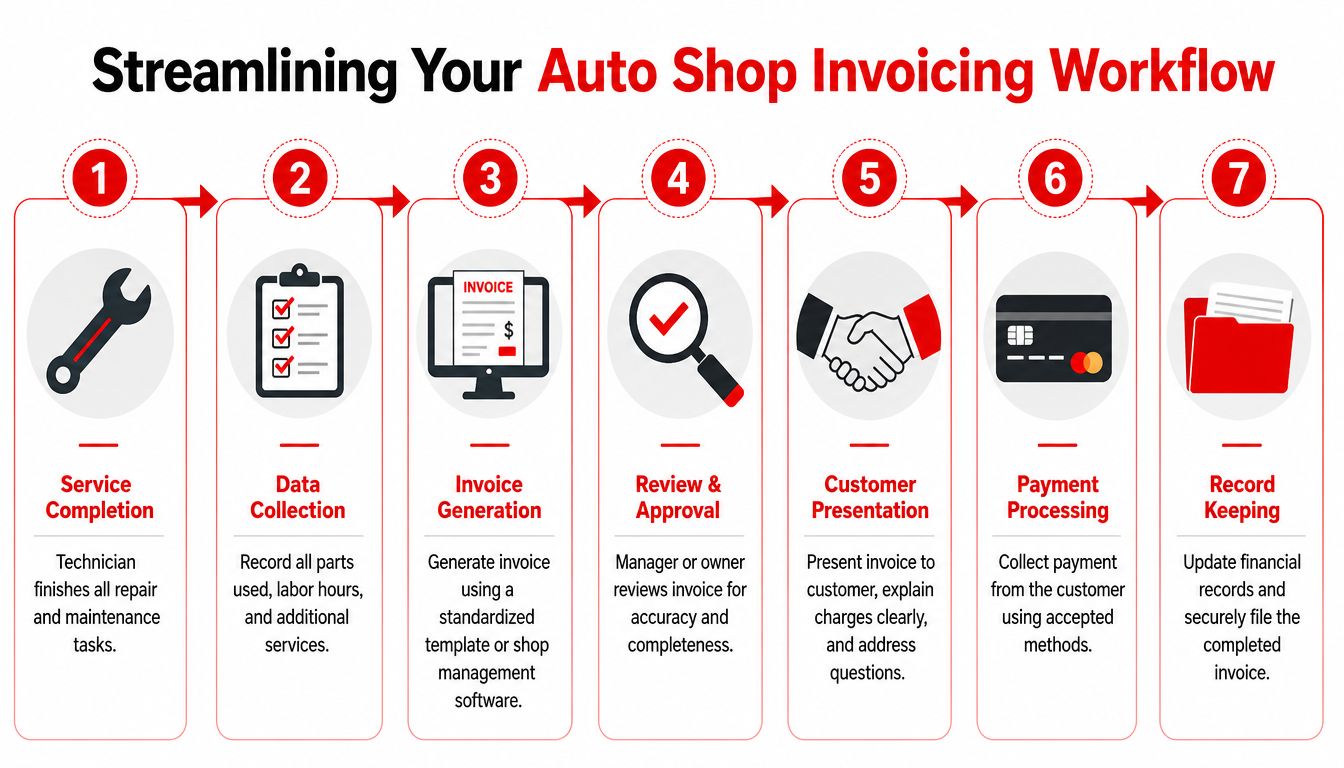
As jobs move through the shop, the invoicing process needs discipline in a few places:
Estimate approval
The approved scope needs to be recorded clearly before work starts.Change handling
Extra parts, hidden damage, or additional labor should be added as a documented change order, not folded into the final bill without context.Manager review
Someone should check that the invoice matches the work performed, the parts used, and the customer authorizations.Customer presentation
The final handoff should be calm and simple. A good invoice makes that possible.
This is also where delivery matters. A printed invoice is useful at pickup. An emailed copy is useful for records, warranty follow-up, and business reimbursements. Shops that offer both usually avoid the “can you send that again” scramble later.
A smoother handoff gets shops paid faster
The invoice should be easy to explain in under a minute. If it takes longer, the process upstream probably failed.
What helps most is consistency:
| Workflow point | Weak process | Strong process |
|---|---|---|
| Added work | Verbal note only | Logged as approved change |
| Supporting proof | Scattered photos | Attached to customer record |
| Payment handoff | Customer decodes charges at counter | Advisor walks through clear categories |
| Record keeping | Paper copy filed somewhere | Clean digital copy stored with vehicle history |
Online payments add another layer of convenience because they remove friction after pickup. Even without advanced automation, a shop that sends a clean invoice and offers simple payment options puts less strain on staff and customers alike.
The invoice isn't the end of the workflow. It's the proof that the workflow was controlled from start to finish.
From Template to Total Shop Management
A manual invoice template can carry a shop a long way. It gives the team a standard format, reduces sloppy write-ups, and makes the customer handoff more professional.
Then the weak point shows up at the counter.
An advisor is comparing the estimate, the technician notes, the parts list, the photos, and the payment screen while the customer waits. If any detail was missed earlier, the invoice becomes cleanup work instead of a final record. That is usually the moment a shop realizes the underlying problem is not the template itself. The problem is that the invoice lives outside the rest of the operation.
Why the template eventually stops being enough
Templates break down when volume increases because they depend on re-entry. Staff retype labor lines, copy part numbers, move supporting photos by hand, and check totals against a separate estimate. Every handoff creates another chance for a mismatch, a delayed pickup, or a charge the customer questions.
That gap matters for more than convenience.
If the final invoice does not clearly connect to approved work, installed parts, and the repair order history, the shop has a weaker file when a customer disputes the bill or when staff need to support collection steps later. The same disconnect shows up when service work has to coexist with other admin demands, such as scheduling, follow-up, and. Clean paperwork on the surface can still hide a messy process underneath.
What a connected system changes
A connected shop management system keeps the invoice tied to the job from start to finish. Approved inspections feed the estimate. Labor entries feed the bill. Parts usage, photos, notes, payment status, and vehicle history stay attached to the same record. That cuts down on re-entry and gives the shop a clearer trail if a customer asks what was authorized, what was installed, or why the total changed.
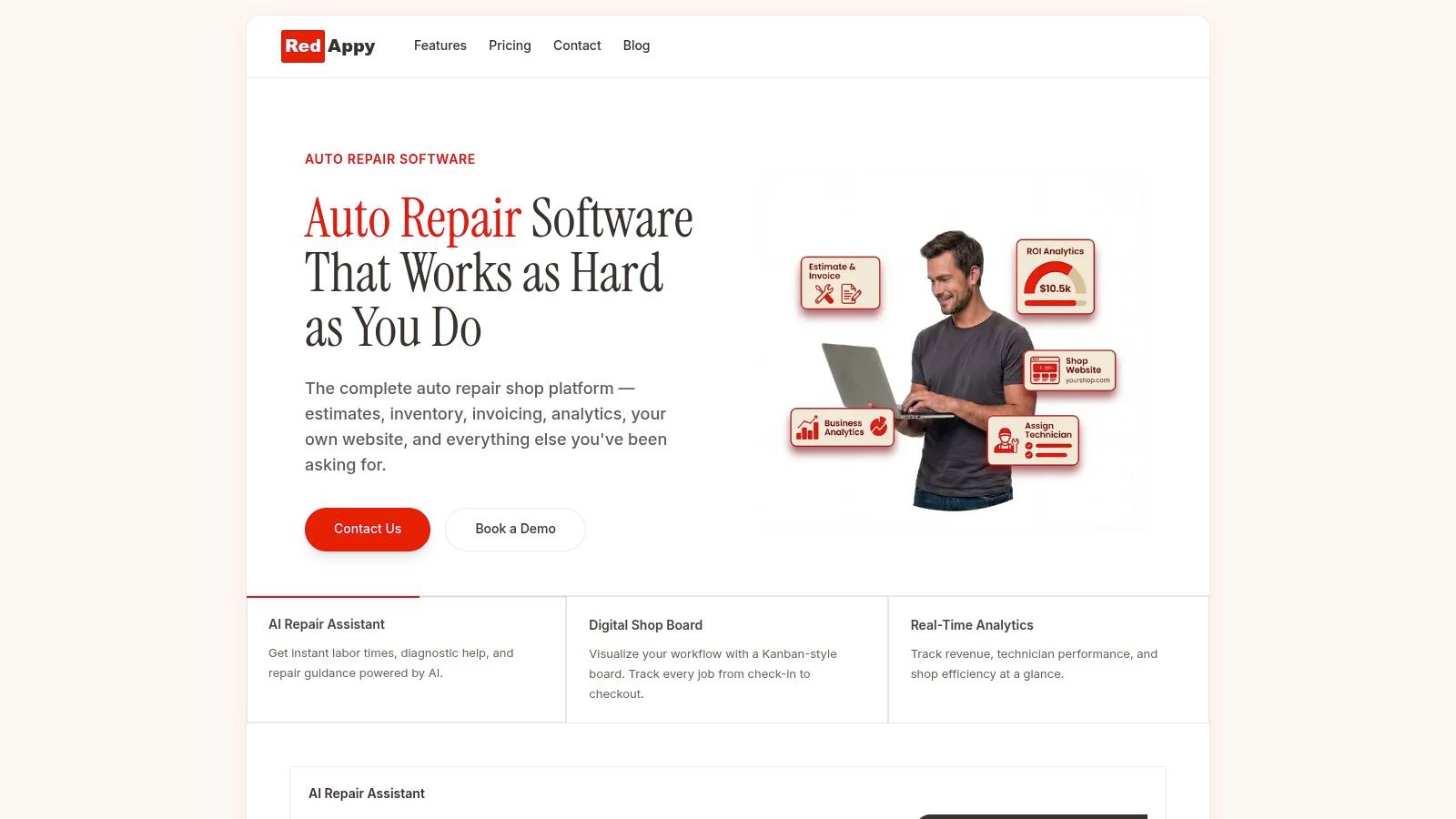
Shops often make that move after they have outgrown paper forms, spreadsheets, or basic templates. For example, RedAppy includes digital inspections, one-click invoicing, online payments, inventory support, analytics, vehicle lookup, and a digital shop board in one system. The practical benefit is straightforward. The invoice stops being something staff assemble at the end from scattered information and starts reflecting work that was documented all the way through.
Manual templates still have value. They help define standards and expose what the invoice needs to show. But once the shop is spending too much time reconciling notes, defending charges, or correcting preventable errors, software usually costs less than the friction it replaces.
If the current process still depends on rebuilding the job at the counter, it is worth looking at a tighter system behind the invoice. Explore RedAppy to see how a connected workflow handles estimates, inspections, invoices, payments, and shop operations in one place, or reach out through the contact page for a closer look at how it fits a working repair shop.
Ready to Transform Your Shop?
RedAppy helps auto repair shops create professional digital estimates with photos and videos, send them instantly via text or email, and get customer approvals in seconds. No credit card required to start.