
Auto Shop Repair Order Software: Your 2026 Guide
The front counter is backed up. A customer is waiting for an update. The service advisor is flipping through paper repair orders to find an old recommendation, while a technician is asking whether the part was approved or just quoted. Someone wrote the labor note fast, and now nobody is fully sure what it says.
That scene is common in shops that still run on paper, whiteboards, and disconnected tools. The problem isn't just clutter. It's lost time, delayed approvals, parts mistakes, invoicing friction, and too many moments where the team has to stop working just to figure out what's happening on a job.
Auto shop repair order software fixes that when it's set up around real shop workflow instead of just office paperwork. The right system keeps the repair order moving from check-in to checkout without forcing the staff to re-enter the same information in three different places.
Table of Contents
- Escaping the Paperwork Pileup
- What Is Auto Shop Repair Order Software
- Core Features That Drive Shop Performance
- Transforming Your Shop's Daily Workflow
- How to Choose the Right Software for Your Shop
- Measuring Your Return on Investment
- Your Next Step to a More Profitable Shop
Escaping the Paperwork Pileup
A paper shop rarely breaks all at once. It slows down one interruption at a time.
A caller books an appointment, but the note lands on a sticky pad. The vehicle shows up, and the front desk starts a handwritten RO. The technician finds extra work, then hands back inspection notes that need to be translated into an estimate. The customer doesn't answer the phone, so the car sits. A part gets ordered, but the order confirmation lives in someone's email instead of on the job itself.
By the end of the day, the team isn't just repairing cars. They're chasing status.
Shops usually don't switch to software because they want more screens. They switch because they're tired of losing control of the day.
That's why the move to digital matters. It removes the gaps between the first customer call, the estimate, the parts order, the repair, the invoice, and payment. The shop gains one current version of the truth instead of a stack of partial updates.
There's also a hidden paperwork problem that many owners miss. Once forms, supplier slips, and handwritten notes start piling up, staff members spend more time retyping or searching than serving customers. That's one reason tools built for document capture and workflow cleanup are getting attention outside the auto space too. A practical example is, which shows how automated extraction reduces manual handling when businesses are buried in documents.
What paper usually gets wrong
- Status visibility disappears: Advisors can't instantly see whether a vehicle is waiting on approval, parts, labor, or pickup.
- Handwriting creates risk: Tech notes, labor lines, and recommendations get misread.
- Customer communication gets delayed: Updates depend on phone tag instead of a clean digital trail.
- Paper doesn't scale: Once car count rises, the process starts breaking at the front desk first.
A shop that runs cleanly on software feels different. The team knows where every job stands. The customer gets clearer updates. The owner stops relying on memory and starts relying on process.
What Is Auto Shop Repair Order Software
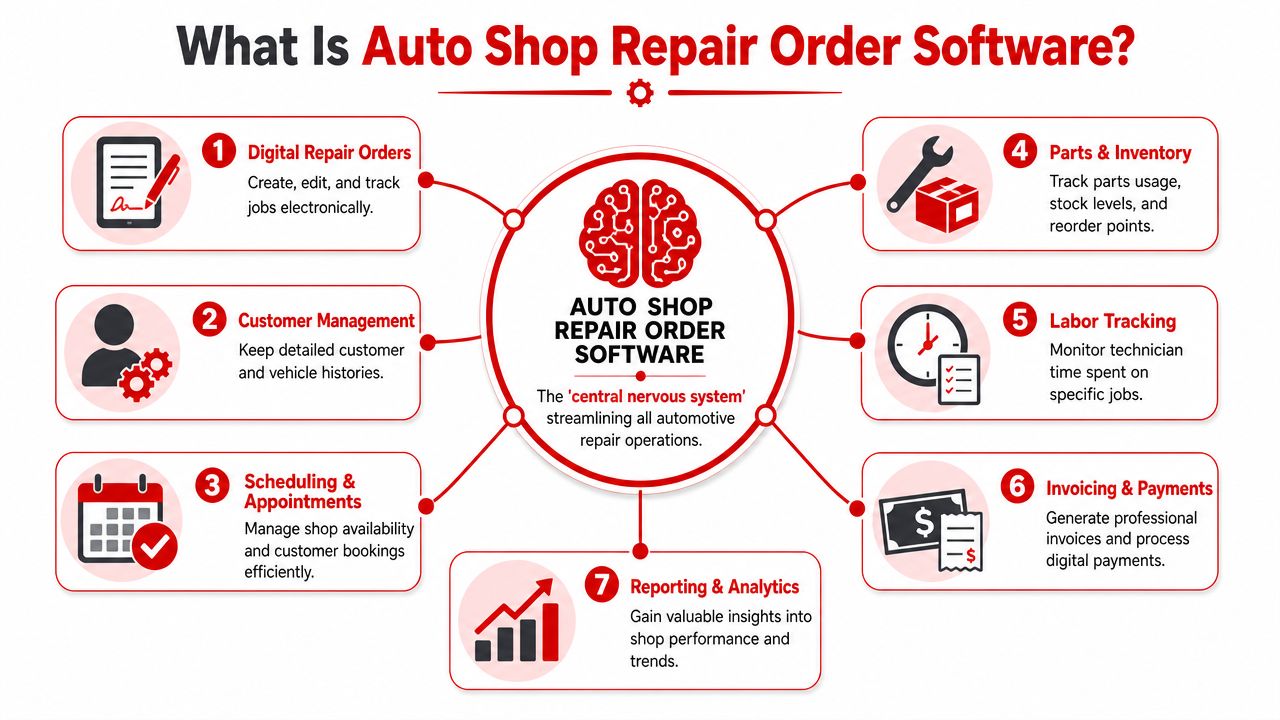
Auto shop repair order software is the system that connects the front desk, the bays, and the back office around the repair order. It's the shop's central nervous system. Every action feeds the same record, and every person sees the same job status.
That matters because modern repair order platforms aren't just digital versions of a paper ticket. The category has shifted into a full workflow system. As explained by, modern platforms replace fragmented paper workflows with a single system that handles estimates, work orders, parts, invoicing, and payments through the full repair lifecycle.
More than a digital invoice tool
A lot of owners first look for software because they want cleaner estimates or faster invoices. That's a good start, but it's not the whole value.
A real shop system should do all of this inside one workflow:
- Check-in and scheduling: customer details, vehicle information, appointment timing
- Estimate building: labor lines, parts lines, notes, recommendations
- Approval handling: clear communication back to the customer
- In-process tracking: who's working on the job and what's holding it up
- Checkout: invoice, payment, and saved history for the next visit
If those steps live in separate tools, the staff still spends the day stitching the job together by hand.
Why this affects the money too
Operational mess turns into financial mess quickly. Missed labor, weak parts tracking, and poor follow-up all hit the bottom line. Shops that want cleaner books usually need cleaner workflow first. For owners tightening the financial side, this guide to is useful because it connects daily shop activity to bookkeeping discipline and reporting.
Practical rule: If the advisor, technician, and owner can't all look at the same repair order and understand its status in seconds, the system is incomplete.
The strongest platforms reduce handoffs. They don't just store information. They keep the repair order moving.
Core Features That Drive Shop Performance
Feature lists are easy to write and easy to ignore. What matters is whether a feature removes a real bottleneck in the shop.
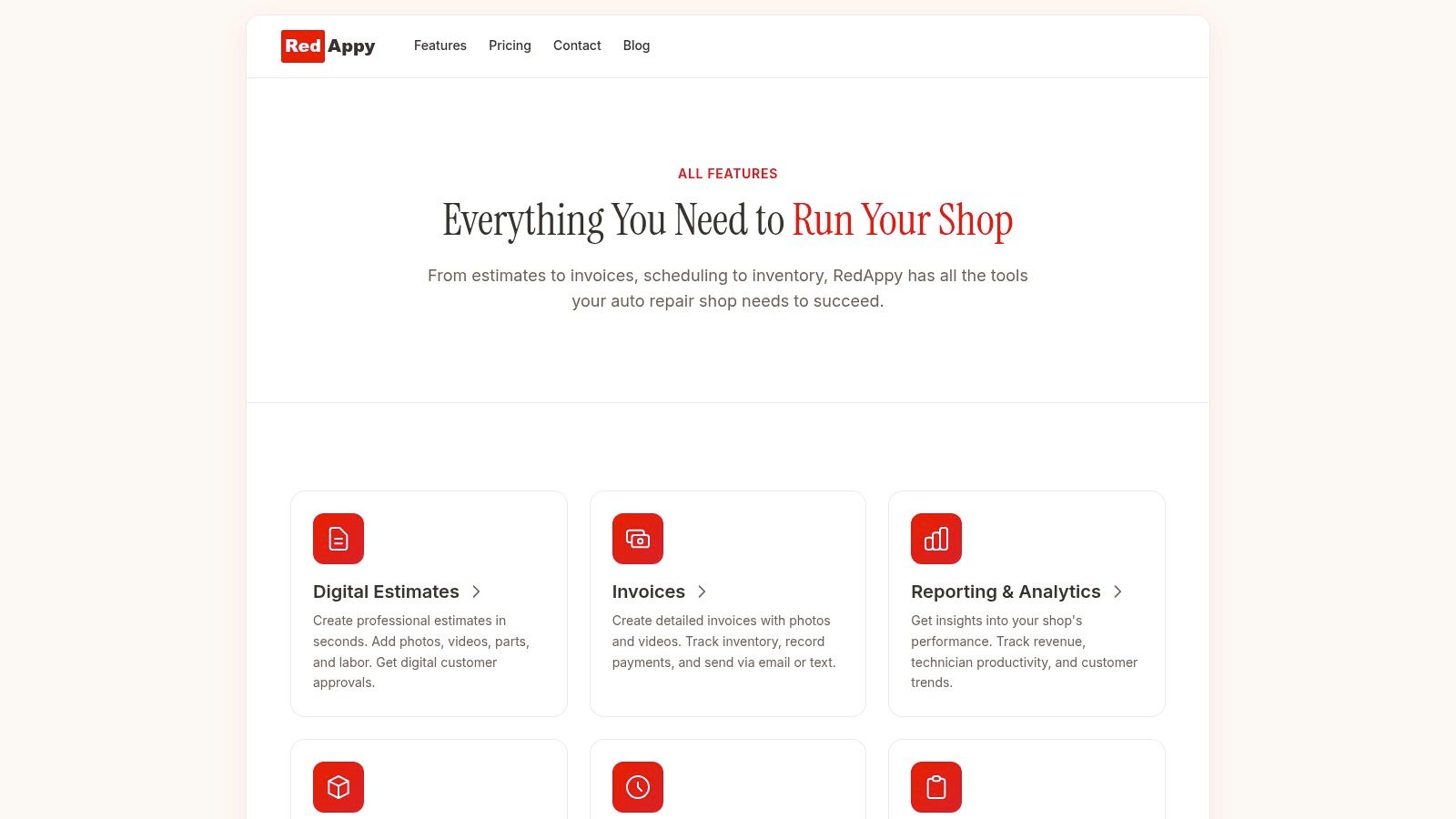
A strong system should make the front counter faster, the bays clearer, and the final invoice more accurate. That's where all-in-one tools earn their keep. For readers comparing what this looks like in practice, RedAppy's feature set is one example of a platform that combines repair orders, inspections, job tracking, invoicing, payments, parts workflow, and reporting in one place.
Digital repair orders that actually stay current
A digital RO should be live, not static. The advisor opens the job, adds customer concerns, assigns labor, and updates notes as the vehicle moves through the shop. The technician doesn't have to track down a clipboard. The owner doesn't have to ask three people what's going on.
This solves a basic paper problem. On paper, every update creates another chance for mismatch. The estimate says one thing, the bay note says another, and the invoice gets built from memory at checkout.
Good digital repair orders also clean up history.
- Vehicle records stay attached: prior recommendations and previous work are easier to find.
- Notes stay readable: no guesswork about technician handwriting.
- Changes stay visible: everyone sees the current version instead of an old printout.
Inspections and approvals that move work forward
Inspections matter because they turn a tech finding into a customer decision. Photos, videos, and line-by-line recommendations make the job easier to sell and easier to approve.
Without that, the advisor has to translate technical findings over the phone. That usually means delays, missed context, and too much back-and-forth. A customer who can review the issue clearly is more likely to respond quickly, even if the final decision is still a no.
Parts workflow that stays tied to the job
Parts management is where many systems start sounding good on paper and fail in the middle of the day.
The test is simple. What happens after the customer approves the work and the needed part isn't on the shelf?
According to, software can trigger purchasing at the moment a service is authorized. The parts-ordering screen can surface needed parts and send the order directly to linked vendors while keeping the procurement record synchronized with the repair order.
That changes the workflow in a useful way.
| Shop situation | Weak system | Strong system |
|---|---|---|
| Customer approves brake job | Advisor writes a note to order parts | Approved line items connect to ordering workflow |
| Part is out of stock | Staff checks vendor sites separately | Needed parts are surfaced during the RO workflow |
| Supplier order is placed | Confirmation lives outside the job | Order activity stays tied to the repair order |
| Vehicle status changes | Team asks around for updates | RO reflects parts-related status clearly |
This is one of the most overlooked features in the category. Many tools handle estimates and invoices well enough, but parts delays still break the day if the software doesn't support actual procurement.
Invoicing, payments, and the digital shop board
Checkout should be the easiest part of the job. In weak systems, it's often the messiest.
If labor lines, parts costs, taxes, and approvals have been managed inside the same job record, the final invoice comes together cleanly. If they've been tracked across paper notes, text threads, and separate screens, the cashier ends up rebuilding the story at the counter.
The digital shop board solves a different problem. It gives the advisor and manager an at-a-glance view of cars waiting on diagnosis, approval, parts, active repair, or pickup. That keeps the day from turning into a memory test.
- For advisors: it helps prioritize callbacks and stalled jobs.
- For managers: it exposes bottlenecks fast.
- For technicians: it reduces verbal interruptions from the office.
A shop board isn't decoration. It's how the team sees work in motion instead of work after the fact.
History and reporting that support better decisions
History lookup sounds small until the customer asks, “Didn't you recommend this last time?” Then it becomes a sales and trust tool.
The same goes for reporting. Owners need to know which jobs are profitable, where labor time is drifting, and whether the team is writing better repair orders or just working harder. Reporting belongs inside the same platform because the value comes from linking operational activity to outcomes, not from exporting spreadsheets after the day is over.
The shops that get the most out of software don't chase flashy features. They choose the features that remove the exact friction points slowing down their current process.
Transforming Your Shop's Daily Workflow
The difference between paper and software becomes obvious when one vehicle moves through the entire process.
Before software
A customer arrives with a check engine light and a brake concern. The advisor writes up the complaint by hand and clips the ticket to the keys. The technician inspects the vehicle, marks notes on paper, and walks back up front to explain what was found. The advisor rewrites those findings into an estimate.
Then the waiting starts. The customer gets called, doesn't answer, and the car sits. Once approval comes through, someone realizes the needed part isn't in stock. Another call goes out to a supplier. The order is placed, but the tracking detail never makes it back onto the RO clearly.
By pickup time, the invoice has to be assembled from multiple scraps of information.
After software
The same car comes in. The advisor checks the customer in on screen, the plate or VIN brings up history, and the concern is attached to a digital repair order immediately. The technician opens the job in the bay, records findings, and adds photos to the inspection.
The customer receives a clear estimate with supporting inspection details. Approval comes back into the same workflow. The service advisor can move straight into parts handling and job scheduling without rewriting anything. The manager can see whether the vehicle is waiting on parts, in repair, or ready for delivery.
At checkout, the invoice is already built from approved work.
Where the shop feels the change
The gains show up in moments that used to create drag:
- Check-in gets faster: customer and vehicle data are easier to retrieve.
- Diagnosis stays clearer: technician notes remain attached to the job.
- Approvals move with context: customers can review what the shop found.
- Repair status stays visible: front desk and bay staff work from the same board.
- Payment is cleaner: the invoice reflects the work already documented and approved.
The best workflow improvement isn't speed by itself. It's fewer stops, fewer questions, and fewer chances for the job to go sideways.
That's the practical value of auto shop repair order software. It doesn't just digitize forms. It keeps the day from fragmenting.
How to Choose the Right Software for Your Shop
Most shops don't buy the wrong software because the demo looked bad. They buy the wrong software because the demo looked too polished and didn't reflect their real workflow.
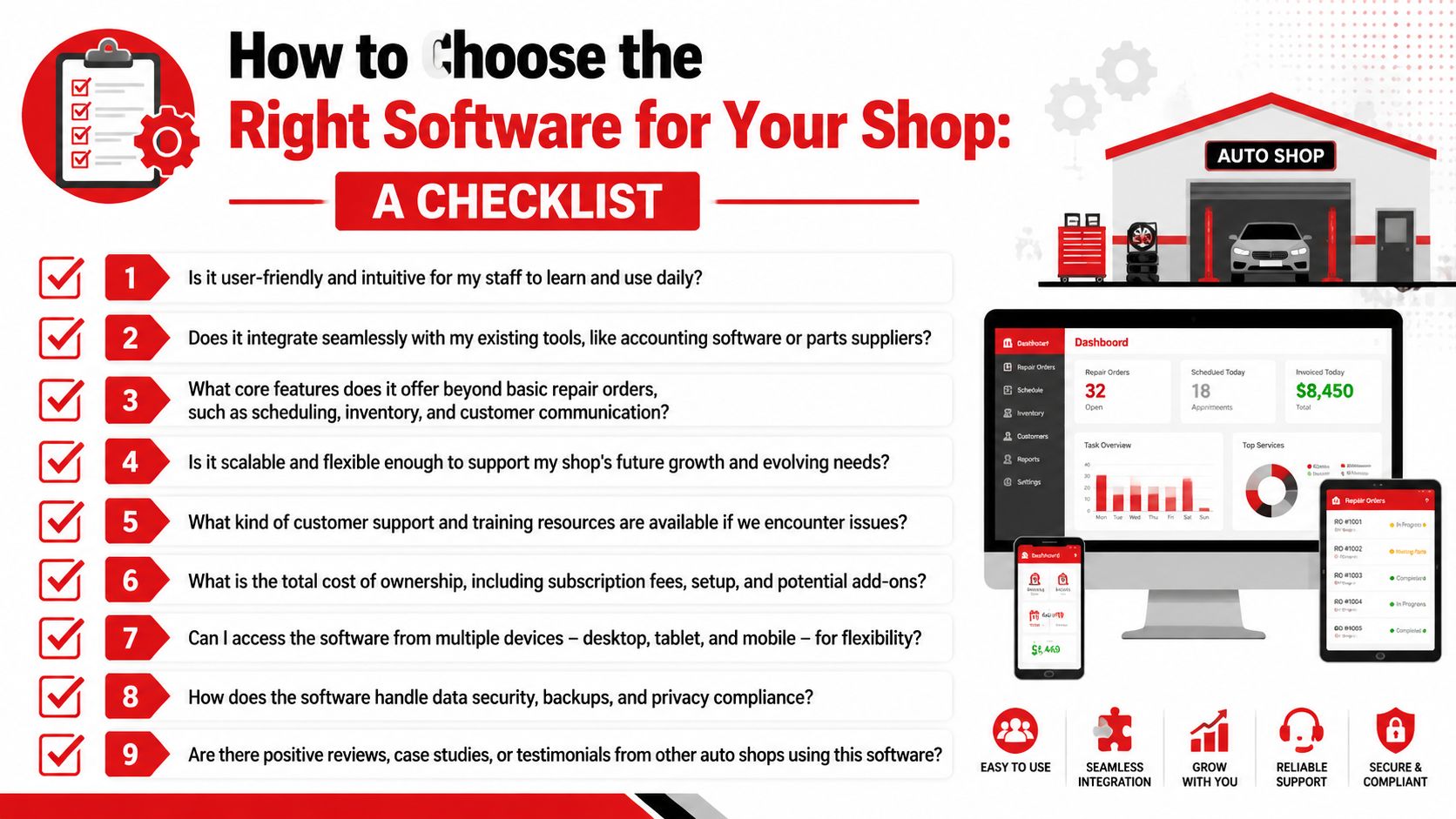
The right evaluation starts with operational pressure points. Is the front desk drowning at check-in. Are approvals too slow. Is the team losing time on parts sourcing. Is the owner struggling to see job status and performance without asking around all day. Those answers matter more than a generic feature sheet.
Questions that expose weak systems fast
Ask every vendor questions that force them to show the actual workflow.
- How does the system handle check-in to checkout in one job record: Don't accept a tour of separate modules. Ask them to run one repair from intake through payment.
- What happens when a part is unavailable: Weak systems usually fall apart at this point.
- How do technicians use it in the bay: A front-office tool that techs avoid creates double entry.
- How is customer approval captured and saved: Approval should be visible and attached to the job.
- What does the service advisor see at a glance: A strong dashboard should show active bottlenecks without hunting.
A vendor should also explain data migration clearly. Customer records, vehicle history, canned jobs, pricing structure, and inventory setup are all part of the switch. If the answer is vague, onboarding probably will be too.
What good vendors handle well
Good software partners don't just sell access to a login. They help the shop change process without losing continuity.
Look for these signs:
| Evaluation area | What to look for |
|---|---|
| Ease of use | Staff can understand the main workflow quickly |
| Mobility | Advisors and techs can work on the devices they actually use |
| Support | Training and post-launch help are easy to reach |
| Growth fit | The system won't need replacement when the shop adds complexity |
| Pricing clarity | Costs are understandable before rollout |
Support quality matters more than many buyers think. Shops don't need help only on setup day. They need help when a process needs adjustment, when a new employee starts, or when the owner wants better reporting.
For owners who want a platform walkthrough tied to their actual process, it makes sense to contact the RedAppy team and ask for a workflow-based demo instead of a generic product tour.
Measuring Your Return on Investment
Software should earn its place in the shop. If it only changes how the team enters data, it's overhead. If it improves decisions and throughput, it becomes an operating tool.
That's why the most useful return on investment conversation starts with what the shop can finally measure. Auto shop finance guidance identifies average repair order, gross profit margin, and labor rate efficiency as core numbers shops need to monitor, and modern systems surface those KPIs directly inside reporting dashboards, as explained in this guide on.
The numbers that matter inside the RO
A repair order isn't just paperwork. It's the source record for performance.
When software ties each RO to shop metrics, owners can manage the business with more clarity:
- Average repair order: shows whether the team is building and presenting work effectively
- Gross profit margin: helps reveal whether pricing and parts control are healthy
- Labor rate efficiency: shows whether billed labor and actual workflow are aligned
Those numbers matter because they change management behavior. Pricing decisions improve. Staffing gets less reactive. Advisors can see whether recommended work is being converted consistently.
Where the return usually shows up first
The first payoff usually isn't some dramatic dashboard moment. It shows up in daily control.
A cleaner approval process means fewer stalled jobs. Better job visibility means fewer handoff mistakes. Stronger repair history supports more consistent recommendations. Better reporting helps the owner catch weak spots before they become habits.
Owners should judge software by the operational questions it answers every day, not by how many tabs it includes.
That's the shift. The system stops being an administrative tool and starts becoming a decision system. Once that happens, the return is easier to see because the shop is no longer guessing where time, labor, and revenue are slipping away.
Your Next Step to a More Profitable Shop
Paper repair orders can keep a small shop moving for a while. They don't keep a growing shop under control. Once the workload increases, paper creates slow check-ins, unclear job status, approval delays, parts confusion, and messy checkout.
That's why auto shop repair order software has become an operating necessity. The strongest systems connect check-in, diagnosis, approvals, parts, invoicing, payments, and reporting in one workflow. The team works with fewer interruptions, customers get clearer communication, and owners gain better control over shop performance.
A shop doesn't need more software for the sake of software. It needs a repair order system that fits how work flows across the counter and through the bays.
If the current process still depends on paper tickets, memory, and too much verbal follow-up, it's time to see a cleaner workflow in action. Explore RedAppy to review the platform, then decide whether a modern all-in-one repair order process fits the way the shop runs today.
Ready to Transform Your Shop?
RedAppy helps auto repair shops create professional digital estimates with photos and videos, send them instantly via text or email, and get customer approvals in seconds. No credit card required to start.