
Auto Shop Solutions: Complete Guide for 2026
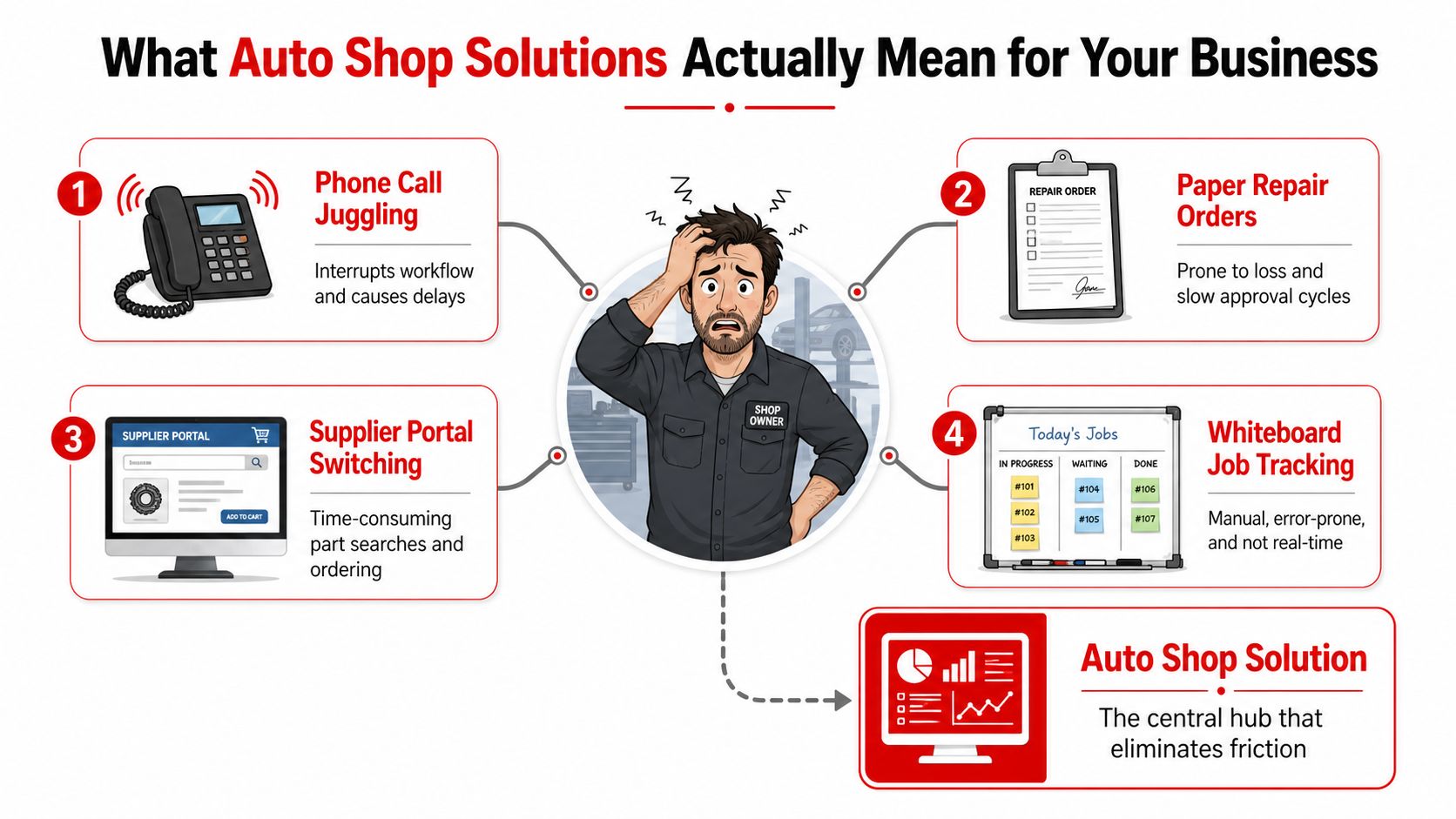
You already know the feeling. The phone rings while a tech is waiting on parts, a customer is asking for an update, another repair order is still on paper, and someone in the office is toggling between a supplier portal, a spreadsheet, and a whiteboard. That setup doesn't just waste time. It hides approvals, slows checkout, and keeps owners from seeing what each bay is really producing.
Auto Shop Solutions exist to kill that chaos. The category has moved far beyond basic websites and marketing help. It now means connected shop systems that tie together estimates, digital inspections, parts, payments, reporting, and customer communication so the whole operation runs from one workflow instead of a pile of disconnected tools.
Table of Contents
- What Auto Shop Solutions Mean for Your Business
- The Six Core Modules Every Modern Solution Should Cover
- Key Features That Move Revenue per Bay
- Building a Realistic ROI Picture for Your Shop
- A Buyer's Checklist for Comparing Platforms
- Your 90-Day Implementation Roadmap
- A Real Shop Story and Your Next Step
What Auto Shop Solutions Mean for Your Business
A shop owner can lose half a morning without ever touching a wrench. One customer calls for a status update, another asks for a quote, parts are split across two supplier tabs, and the front counter is still chasing a signature on a paper repair order. By lunch, the team has done plenty of work, but nobody can say with confidence what is approved, what is waiting, and what is profitable.
That is why this category exists. Auto shop solutions are the operating system for the shop floor and the front office. A good platform connects the first call, the estimate, the inspection, the parts request, the invoice, and the payment into one flow, so managers stop guessing and techs stop waiting.
The category changed because the work changed
Older versions of the market were built around websites and marketing services. That mattered, but it only solved the first problem, getting drivers to the door. The operational problem stayed in place, which is why modern shop platforms now have to handle estimating, inspections, invoicing, and reporting inside one system.
The history of the space shows that shift clearly. Autoshop Solutions traces its origin to 1998, “when the Internet was still new and growing,” which signals that shop-focused digital marketing was already becoming its own category then. A later profile places the company's founding at 2005, and another industry profile says it made the Inc. 5000 for three consecutive years, 2013, 2014, and 2015, while AutoInc. recognized it for seven years in a row for top websites. That arc says a lot about where the market went.
Practical rule: If a vendor only helps a shop get found online, that vendor is solving demand. If it helps the team process the car from start to finish, that is an auto shop solution.
What to skip and what to demand
Marketing-only vendors can still be useful, but they are not operational platforms. Legacy point solutions solve one task well, then force the team to stitch together the rest. An all-in-one platform should remove those handoffs, not create new ones.
For a broader view of how service businesses think about connected operations, the structure of is a useful comparison point. It shows the same logic at work, one workflow, one source of truth, fewer places for tasks to disappear.
The buyer's question is simple. Does the platform just bring in customers, or does it help the shop turn each car into approved, paid, trackable work? Only one of those choices changes revenue per bay.
The Six Core Modules Every Modern Solution Should Cover
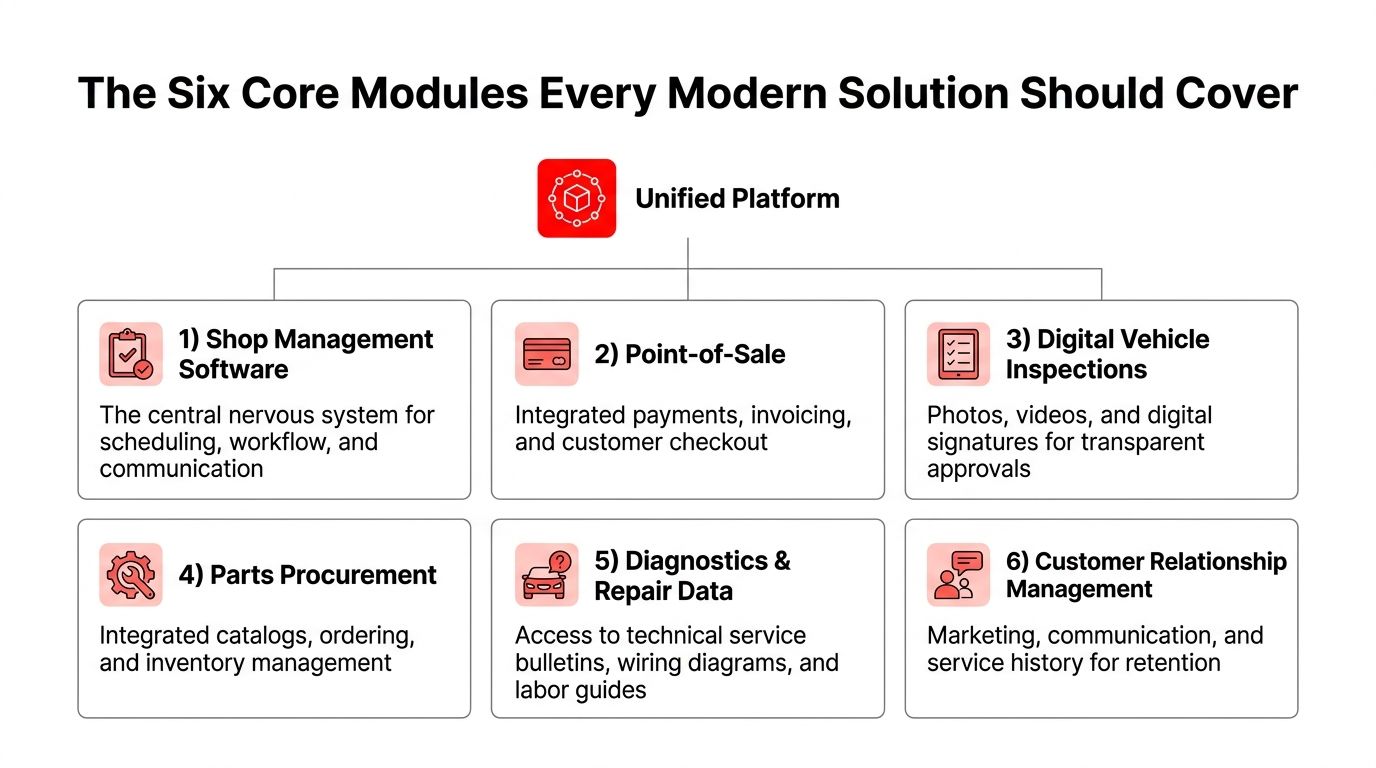
A serious auto shop solution should do more than store customer names and spit out invoices. It should connect the pieces that most shops currently keep separate, because separation is where delays and errors multiply. If one module is weak, the whole workflow feels it.
Start with the shop management backbone
Shop management software is the central nervous system. It holds the customer record, the vehicle history, the work order, the schedule, and the status of every active job. Without it, the front counter lives in email threads and sticky notes, which is a bad place to run a business.
A simple example is a returning customer who shows up for a brake concern. The advisor should pull the record, see prior work, assign the job, and route it without rebuilding the file from scratch. That's the difference between a real operating system and a glorified spreadsheet.
Add the tools that move money, not just data
Point-of-sale handles invoicing and checkout. Digital vehicle inspections turn a vague complaint into photos, notes, and clear approval requests. Parts procurement checks inventory and supplier options before the advisor promises a repair. Diagnostics and repair data give technicians the procedure and application match they need instead of forcing a trip to the dealer for answers.
A shop owner should be able to ask one blunt question about each module. Does this tool reduce friction at the exact moment the car is waiting? If the answer is no, the feature is probably cosmetic.
Don't forget the customer-facing layer
The sixth module is the one many owners underestimate, customer relationship management. It keeps service history, communication, and follow-up organized so the shop doesn't rely on memory or a front-desk hero.
A customer can approve a brake job from a phone after seeing annotated photos. Parts can be ordered without the advisor calling three suppliers. The invoice can be paid online instead of standing around the counter. That kind of flow is what makes the system useful.
The point is not to own six apps with six passwords. The point is to make the car move through one connected path.
A platform like RedAppy fits this model because it bundles digital inspections, estimates, invoicing, online payments, multi-supplier parts ordering, analytics, a Digital Shop Board, and a branded website into one shop workflow. That's the standard buyers should compare against, not a feature list padded with extras nobody uses.
Key Features That Move Revenue per Bay
Most feature lists are junk because they treat every tool as equal. They are not equal. Some features help the shop get paid faster. Others just look good in a demo. The right way to judge auto shop solutions is to ask which feature changes approvals, ARO, or time at the counter.
Features that shorten the path from estimate to payment
Photo-rich digital vehicle inspections are worth money because they make the recommendation visible. A customer who sees worn pads, leaks, or a torn boot is reacting to evidence, not a vague warning. That is why inspection tools tied directly to estimate lines matter more than generic note-taking.
One-click invoicing and online payments do the unglamorous work of reducing checkout drag. Every minute a customer waits at the counter is a minute the advisor is not writing the next ticket. Integrated payment flow is not a finance feature, it is throughput.
A useful comparison comes from the vehicle repair world's push toward better process tools. Industry guidance on AI-driven shop workflows argues that technology should amplify technicians rather than replace them. That is the right lens here too. The tool has to help the team decide faster and document better, not replace judgment.
Features that protect labor and prevent leaks
The deepest operational leak is hidden in dealer referrals. The Auto Care Association says limited vehicle data access is the top issue facing the repair industry, and it cites Babcox Media findings that shops spend an average of 2 to 4 labor hours per vehicle before referring it out. That time is often unrecovered. A decent repair-data module should help a shop spot that loss sooner and cut the time spent guessing.
That is where OEM-level data coverage matters. Solera's Autodata reports support for 43,500 vehicle models, 170+ manufacturers, and 600,000 step-by-step procedures, with 40,000 vehicle updates added in the last 12 months. For a working shop, that means fewer wrong procedures and a better shot at the first fix.
Good buying rule: If a feature does not improve an approval, protect labor, speed payment, or reduce admin work, it belongs in the nice-to-have pile.
Features that improve visibility without creating more work
A Kanban-style Digital Shop Board makes job status obvious. Advisors see what is checked in, what is waiting, what is approved, and what is done. That cuts down on hallway conversations that should never have existed.
A proper parts tool should pull from multiple suppliers with real-time inventory so the team stops guessing stock. A website with contact forms belongs in the package too, but only if it feeds the workflow instead of floating off as a separate marketing asset. A shop owner looking for should ask the same question here, does it save time at the point of work, or does it just add another thing to manage.
Analytics matter last, not first. They should show revenue per bay, technician efficiency, and repeat business in a way that owners can use. Dashboards that only look pretty are a waste of money.
Building a Realistic ROI Picture for Your Shop
The owner who buys software based on the sticker price ends up paying twice, once to buy it and again to patch the workflow around it. The better way is to price the time saved, the work recovered, and the labor protected against dealer referrals. That's the financial story an accountant can work with.
Use capacity, not guesswork, as the baseline
PartsTech's 2025 Auto Repair Shop Report puts the average daily car count at 2.2 vehicles per bay. That benchmark matters because every small improvement in approvals, checkout speed, or recovered labor hits a finite number of bays, not an infinite sales pipe.
A three-bay shop at that pace is processing a meaningful amount of work every day. If software helps the front desk save time, speed approvals, and avoid a dealer referral on even a few jobs, the benefit compounds across the month. The question is not whether the system looks modern, it's whether each bay produces more usable revenue.
Run the math the way a lender would
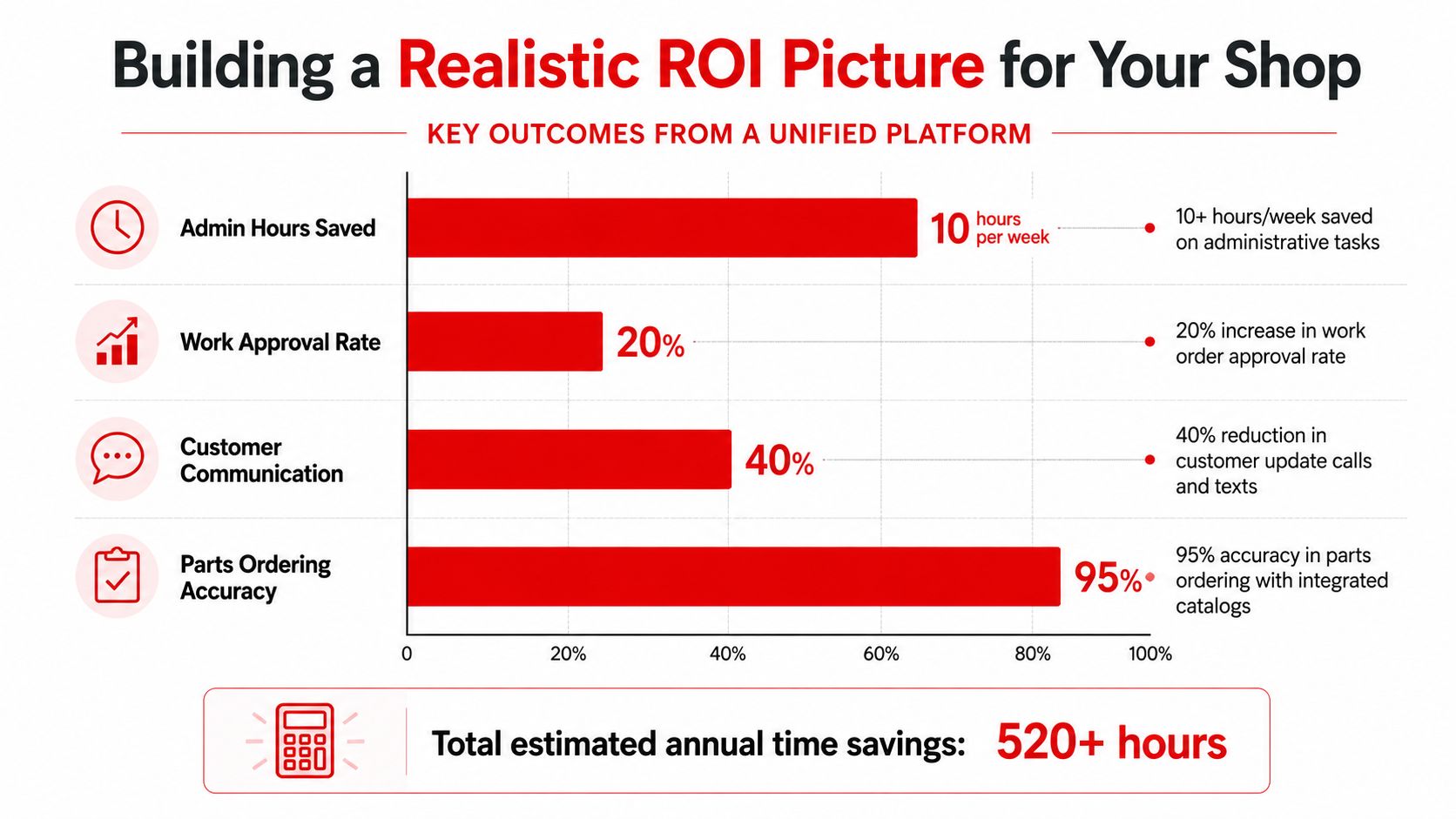
A reasonable ROI model starts with admin time. If a platform saves 10+ hours per week on office work, that is time that can go back into estimates, calls, follow-up, and closing work. RedAppy reports that level of savings as a typical outcome, along with stronger approval rates from photo-rich inspections and stronger first-year ROI.
Now add the hidden leak from limited repair data. If a technician spends 2 to 4 labor hours per vehicle before referring the job out, those hours are a cost, not a win. A platform that helps shorten that path can protect labor even when the car still leaves for the dealer.
Here's the simple version for a three-bay independent shop. Save admin time, tighten approvals, cut checkout friction, and recover a few hours that would have been burned on dead-end diagnostics. That combination changes ARO and labor efficiency without needing a bigger advertising budget.
The mistake is buying software to make the office prettier. The money shows up when the platform helps each bay finish more of the work it already sees.
Price the real cost, not just the monthly fee
True cost includes setup, onboarding, payment processing, customization, and contract flexibility. A cheap tool with painful integrations is not cheap for long. A platform with transparent pricing and month-to-month terms is easier to justify because the owner can leave if it stops performing.
Customization matters too. Shops don't all run the same way, and software that forces every counter person into the same script usually creates workarounds. A system has to fit how the team already moves cars, or adoption stalls.
A Buyer's Checklist for Comparing Platforms
The cleanest demo questions are the ones that force the vendor to prove workflow, not recite features. Owners should score each platform on what it does for the counter, the bays, and the checkout lane. If a vendor can't show the path from estimate to payment without skipping steps, keep walking.
Score the platform against the work you do every day
| Criterion | Weight | What to Verify | All-in-One vs Point Solution |
|---|---|---|---|
| Inspection depth | High | Photos, notes, digital signatures, estimate-line approval | All-in-one keeps the inspection tied to the job. Point solutions often leave the team exporting and retyping. |
| Parts supplier access | High | Real-time inventory, multiple suppliers, ordering flow | All-in-one reduces tab switching. Point solutions usually depend on manual handoffs. |
| Payments | High | Invoicing, online payment, checkout flow | All-in-one keeps payment inside the work order. Point solutions often bolt on separate processors. |
| AI usefulness | Medium | Labor guidance, likely causes, repair support, human review | All-in-one should support decision-making. Marketing claims without workflow are noise. |
| Mobile use | High | Advisor and tech experience on phone or tablet | All-in-one should work at the bay and the counter. Point solutions can be clumsy outside the office. |
| Reporting | Medium | ARO, technician productivity, repeat business | All-in-one should show shop health, not vanity charts. |
| Onboarding | High | Data import, training, support responsiveness | All-in-one should reduce disruption. Point solutions add coordination overhead. |
| Contract terms | High | Pricing clarity, flexibility, exit path | All-in-one can still be fair if terms are simple. Hidden fees are a red flag in any model. |
| Scale | High | Single location to multi-location use | All-in-one should grow with the business. Point solutions often break as locations multiply. |
What the buyer should notice in the demo
A legacy point solution can be fine for one narrow job, but the owner inherits the integration burden. That usually means more vendors, more logins, more support calls, and more things that can break. Marketing-only agencies are useful for lead generation, but they do not solve shop-floor throughput.
An all-in-one platform is easier to operate because the team has one bill, one support path, and one workflow to learn. RedAppy sits in that all-in-one category, with estimates, digital inspections, parts ordering, invoicing, analytics, and a branded website in one system. That does not make it magic, but it does make the operational model clearer.
If the demo spends more time on pretty screens than on live job flow, the sales pitch is covering for a weak product.
The live capabilities page matters more than the brochure. Use the RedAppy features page to verify what's included, then compare it against the checklist above.
Your 90-Day Implementation Roadmap
The worst software rollout is the one that tries to fix everything on day one. Shops do better with a clean sequence, one workflow at a time, one team habit at a time. That lowers drama and keeps the bay moving while the office learns the new system.
Days 1 to 30, build the foundation
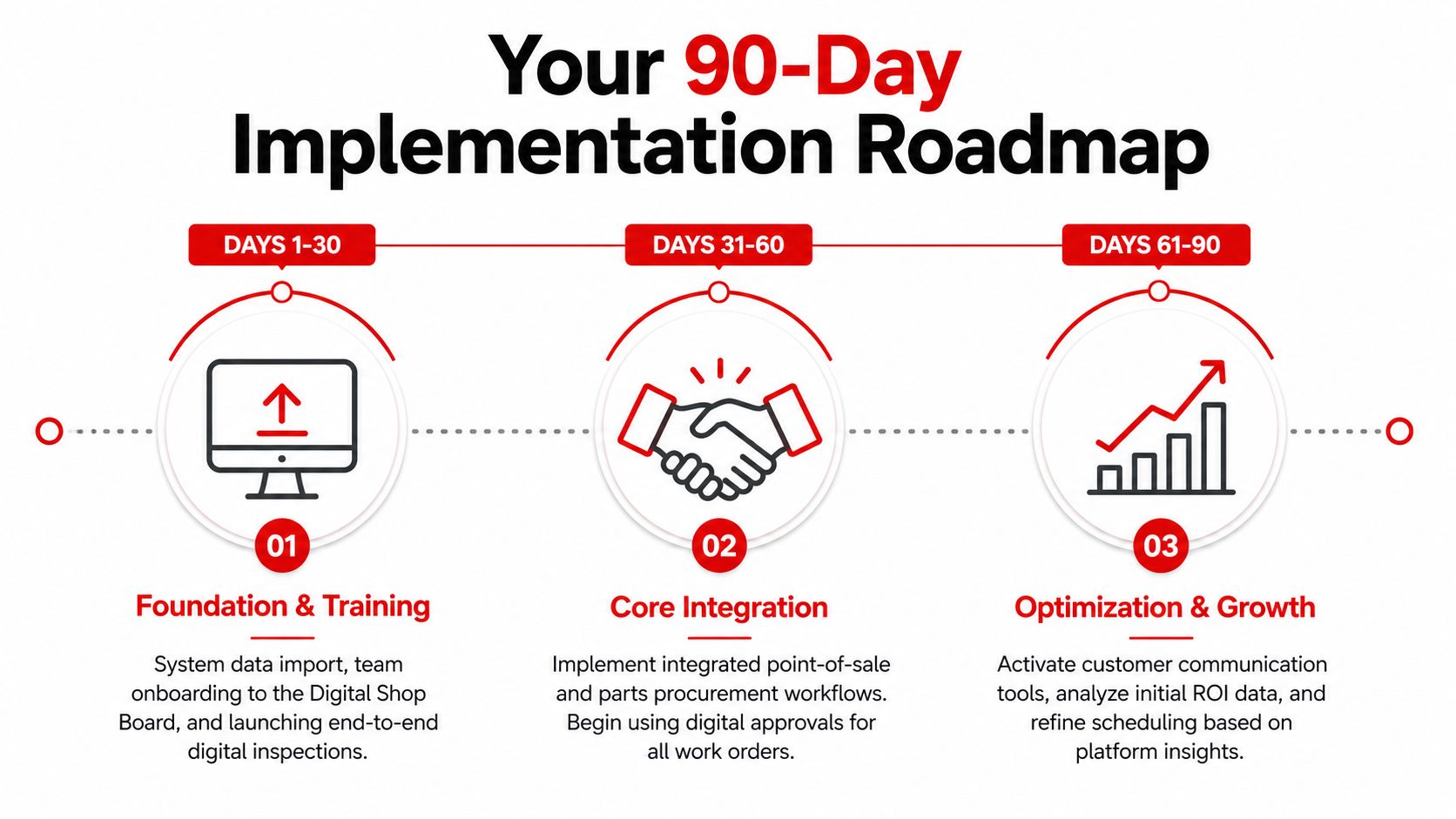
Start with data import, cleanup, and team access. Then train the staff on the Digital Shop Board and switch one workflow end to end, usually digital inspections. The point is to get one clean process working before the rest of the stack goes live.
Dirty customer data causes more pain than bad software. Missing phone numbers, duplicate records, and old vehicle histories will poison confidence quickly. Advisors need buy-in too, because if the front desk resists the new flow, technicians end up doing the old work anyway.
Days 31 to 60, connect the money flow
Turn on parts ordering, online payments, and branded website updates. Then train service advisors on the customer-facing side so they can explain approvals and payment options without sounding like they're reading from a manual.
Keep tech training at the bay when possible. Pulling technicians away for long classroom sessions kills momentum and makes the system feel like an interruption. It works better when the workflow is learned on real cars, not in a conference room.
Days 61 to 90, tighten the operation
Turn on analytics, refine AI prompts, and standardize shop-floor procedures so the system supports compliance-minded work habits. EPA guidance for automotive repair and fleet-maintenance workplaces stresses concrete controls around hazardous materials, exposure pathways, and best workplace practices. That's why the process layer matters just as much as the software layer.
Measure baseline metrics before go-live, then compare them after the rollout. Without that starting point, nobody can tell what improved and what merely feels better. A calm rollout beats a dramatic one every time.
A Real Shop Story and Your Next Step
A three-bay independent shop can look busy and still leave money on the table. Before switching, the front counter was split between paper repair orders, a separate payment tool, and supplier calls that dragged on. Admin work ate too much of the day, approvals took longer than they should, and the owners had no clean view of what each bay was producing.
After moving to a unified platform, the office team cut admin burden, approval rates improved through photo-rich inspections, and checkout moved faster because invoicing and payment lived in the same workflow. The shop also saw a better handle on ARO and less wasted time on dead-end diagnostic work, which is exactly where a platform should pay off. That result lines up with the benchmarks already covered, not hype.
The next step is simple. Open the live feature set, compare it against the checklist, and talk through rollout with someone who understands shop operations instead of just software sales.
RedAppy gives auto repair shops one connected system for estimates, digital inspections, invoicing, online payments, parts ordering, analytics, and a branded website. If the goal is fewer handoffs and better revenue per bay, visit RedAppy and see how the workflow fits a real shop before the next software purchase lands on the wrong stack.
Ready to Transform Your Shop?
RedAppy helps auto repair shops create professional digital estimates with photos and videos, send them instantly via text or email, and get customer approvals in seconds. No credit card required to start.