
Automobile Inventory Management System: A Shop Owner's Guide
A credible automobile inventory management system should target greater than 99% location accuracy and greater than 98% on-hand accuracy for A-movers, because a missing fast-moving part can stop an entire repair order. It should connect the repair order, supplier search, purchase order, receiving process, technician, and front desk in one visible workflow.
A technician is chasing an alternator across three suppliers while the customer waits and the bay sits empty. The service advisor is retyping a part number from a sticky note, the parts counter is checking yesterday's supplier email, and nobody can say with confidence whether the vehicle will leave today.
That isn't just a stock-counting problem. It's a workflow failure. An automobile inventory management system gives the shop one live record for what is on the shelf, what is committed to a repair order, what is on order, where it is located, and who needs to act next.
Table of Contents
- What an Automobile Inventory Management System Actually Does
- Core Features Every Modern System Should Cover
- How Parts Ordering and Multi-Supplier Stock Workday Really Run
- Benefits That Change the Way a Repair Shop Operates
- How to Choose the Right System for Your Shop
- Implementation Checklist for a Smooth Rollout
- ROI and What Comes Next for Your Shop
What an Automobile Inventory Management System Actually Does
A busy shop creates inventory confusion in small, familiar ways. A technician asks whether a filter arrived. The parts manager checks a delivery pile. The service advisor calls a supplier again because the first answer was never recorded. By afternoon, the same part may appear available in a spreadsheet, unavailable in the supplier portal, and already assigned to another vehicle.
An automobile inventory management system replaces that uncertainty with a shared operational record. In plain terms, it's software that tracks every part on the shelf and on order, connects each item to a vehicle and repair order, and displays the status to the technician, parts counter, and front desk at the same time.
That definition matters because the system isn't just counting boxes. It manages the movement of parts through the shop.

The record must follow the repair order
A useful system starts when a repair order is opened. The advisor or technician identifies the vehicle, searches by part number, description, or vehicle data, and sees available stock, supplier options, cost, and order status. Platforms with real-time parts inventory can also track ordered parts and costs from the same workboard connected to repair orders, as described by.
The part then moves through a clear sequence:
- Requested: The technician adds the required item to the repair order.
- Sourced: The system checks available stock and supplier options.
- Ordered: The parts counter creates or confirms the purchase order.
- Received: Staff scan or record the delivery against the order.
- Issued: The part is assigned to the vehicle and consumed from inventory.
- Closed: The repair order retains the part, cost, and related transaction history.
This structure also helps shops understand why manufacturing environments need disciplined part identification and traceability. A resource on offers useful context for the broader automotive need to manage components consistently across complex workflows.
Why independent shops need workflow control
Enterprise dealerships often have dedicated parts departments, purchasing teams, and integrated systems. An independent shop usually has fewer people covering more responsibilities. The service advisor may approve work, the parts specialist may place the order, and the owner may still approve unusual purchases.
Modern platforms such as RedAppy bring connected inventory, repair-order workflows, estimates, invoices, supplier ordering, and shop-board visibility to independent repair shops and small dealerships without requiring dealership-sized infrastructure. The practical test is simple: can every employee answer what was ordered, for which vehicle, from whom, at what cost, and when it should arrive?
The next set of capabilities determines whether the system answers those questions quickly or merely stores more data.
Core Features Every Modern System Should Cover
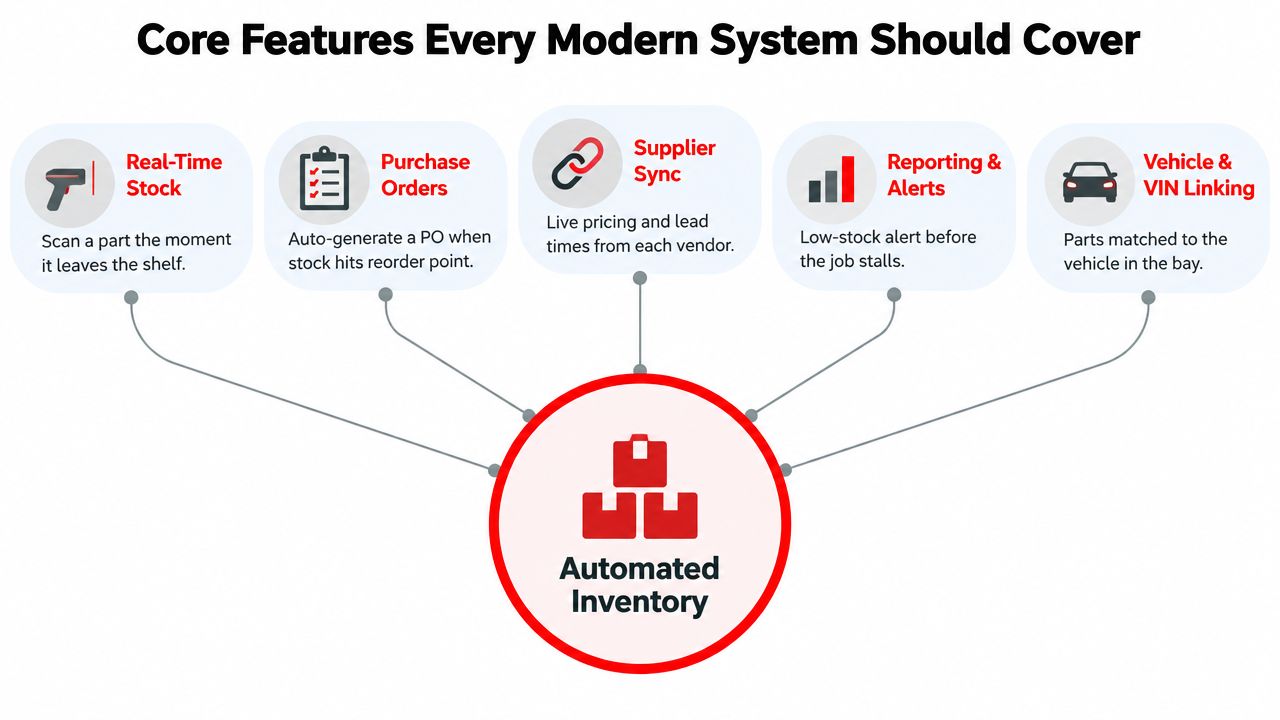
A system earns its cost only when it shortens the loop between identifying a need and placing the correct part on the correct vehicle. Five feature groups deserve close attention during evaluation.
Real-time stock and supplier visibility
The first requirement is a live view of every bin, shelf, secondary location, and committed item. If a brake pad appears on hand but is already reserved for another repair order, the system must show that distinction.
Supplier data matters just as much. Staff should be able to compare preferred vendors, price, availability, and lead time without opening several portals or making repeated calls. That comparison becomes especially important when one supplier has rotors while another has brake fluid.
Ordering, scanning, and system connections
Parts ordering should begin inside the repair order, not on a separate handwritten list. When a technician adds a part, the system should identify the vehicle, preserve the requested quantity, and create a purchase order or order request without forcing staff to retype information.
Barcode or QR scanning makes receiving and issuing more reliable. A clerk can scan a delivery, confirm the quantity, and update stock instead of typing every line item. Real-time synchronization, barcode scanning, and cycle counting are also used by independent distributors to track available, committed, ordered, and physically located inventory, as outlined by.
Vehicle matching and operational reporting
A strong platform links parts to the vehicle, VIN, repair order, and technician. That prevents a correct part from being delivered to the wrong bay and gives the shop a useful history for warranty questions or repeat repairs.
Reporting should expose the decisions that cost owners money:
- Reorder points: Which items need replenishment before a job stalls?
- Dead stock: Which parts occupy shelf space without supporting current demand?
- Supplier lead times: Which vendors regularly create scheduling risk?
- Committed inventory: Which items are physically present but unavailable for another job?
- Part-line margin: Which purchases improve or weaken repair-order profitability?
Practical rule: A feature belongs in the buying decision only if it removes a phone call, a duplicate entry, a manual search, or a preventable bay delay.
How Parts Ordering and Multi-Supplier Stock Workday Really Run
At 8:15 AM, a technician opens a repair order for a sedan and requests brake pads. In a disconnected shop, the parts counter calls a primary supplier, waits, checks a second supplier, and writes down an ETA that may never reach the service advisor.
In a connected workflow, the repair order carries the request immediately. The system checks the catalog, matches the vehicle data, and shows stock and purchasing options. The team can see whether a part is already in the building, committed elsewhere, or available from a supplier.
One repair order, several supplier decisions
The parts manager opens the dashboard and sees overnight deliveries flagged for receiving. Instead of asking each employee for an update, the manager starts with the exceptions that affect today's bays.
The brake-pad request then follows a visible path:
- The technician submits the request: The vehicle and repair order already provide the context.
- The system checks supply: Available stock and supplier catalogs appear against the requested part.
- The counter splits the order when needed: Rotors can come from one vendor while brake fluid comes from another.
- The purchase order records the decision: The selected supplier, price, and expected arrival stay attached to the job.
- Receiving updates the record: Staff scan or confirm the delivery, and the system changes the availability.
- The technician sees the handoff: The part is ready for the correct bay rather than sitting in an unidentified delivery pile.
That sequence removes several weak points at once. The technician doesn't leave the bay to search. The advisor doesn't guess about delivery timing. The parts counter doesn't rely on memory to explain why an order was split.
Visibility must include exceptions
The afternoon dashboard may show a slow-moving sensor approaching its reorder point. That alert doesn't mean the manager should automatically buy it. It means the manager can review demand, supplier lead time, current commitments, and upcoming work before the item becomes urgent.
For safety-critical, unusual, or time-sensitive components, supplier availability still deserves human review. A resource covering can be useful when a shop needs to understand how specialist availability affects repair planning.
Shops running on memory treat every handoff as a fresh conversation. Shops running on connected data log the request, decision, order, receipt, and issue against the same repair order. That connected workflow is where tools such as RedAppy can create measurable time savings, because staff spend less time reconstructing events and more time completing vehicles.
Benefits That Change the Way a Repair Shop Operates
Inventory software pays back through ordinary work, not impressive demo screens. The owner should connect each capability to a loss already visible in the shop, such as idle technician time, duplicate freight, incorrect ordering, delayed approvals, or parts that become dead stock.
Real-time stock visibility reduces supplier phone-tag. When the parts counter can search availability and compare vendors from the repair order, the service advisor receives a clearer answer and the customer gets a more defensible completion estimate.
Linked purchase orders prevent duplicate shipments. If one employee has already ordered a part, another employee can see the commitment instead of placing a second order because the first order was buried in an inbox.
Automatic reorder controls also protect the bay. High-value or fast-moving items can receive tighter attention, while slow-moving items can follow a different policy. Automotive inventory research commonly uses ABC classification to prioritize the smaller share of parts that represents most inventory value. A study of an auto-parts warehouse with 120 kinds of parts over a 6-month period applied ABC classification and cumulative percentage calculations to identify items requiring tighter control, as documented in this.
The operational impact appears in several places
| Pain Point | System Capability | Measurable Outcome |
|---|---|---|
| Staff call several suppliers for one job | Multi-supplier search and comparison | Fewer calls and faster sourcing decisions |
| Employees order the same item twice | Repair-order-linked purchase orders | Fewer duplicate shipments and reversals |
| A vehicle waits for a missing fast mover | Reorder points and low-stock alerts | Fewer preventable bay-idle events |
| A warranty question lacks a clear record | Part, vehicle, and repair-order history | Better documentation for callbacks and claims |
| Advisors wait for parts information | Shared order and delivery status | Faster estimate updates and approvals |
| Owners cannot see shelf performance | Dead-stock, turnover, and margin reporting | Better purchasing and working-capital decisions |
Accuracy is a labor issue
Inventory accuracy isn't administrative decoration. A neutral automotive inventory guide recommends greater than 99% location accuracy and greater than 98% on-hand accuracy for A-movers, because bin errors can create stockouts, duplicate purchases, and lost technician time, according to this.
Demand volatility makes simple counting even less useful. In one warehouse lean study, 52.7% of items were classified as Z items, meaning demand was highly fluctuating and difficult to forecast, as reported in this. The shop needs categories, alerts, and disciplined exceptions, not a larger spreadsheet.
How to Choose the Right System for Your Shop
A vendor demo should look like a repair order moving through a real shop. If the salesperson only shows dashboards, ask for a brake job with an unavailable part, a split supplier order, a partial delivery, and a correction to the received quantity.
Questions that expose real capability
Does stock update in real time? Ask whether issuing a part on an estimate or invoice changes the available quantity immediately, or whether the shop waits for a batch update.
Can the system link parts to a VIN or vehicle record? The answer should include the repair order, not just a generic vehicle lookup. A part history should remain traceable to the job that consumed it.
Does it support multiple suppliers? The demo should show vendor catalogs, price comparison, availability, lead time, and a clear method for choosing one supplier over another.
Can it automate purchase orders? A low-stock alert is useful only when staff can turn it into an approved order without re-entering the same item details.
Does it work on a shop tablet? Technicians and receiving staff need access at the bay and delivery area, not only from the owner's office.
Can it integrate with shop management and accounting software? Ask which records synchronize, how errors appear, and who resolves mismatched part numbers or costs.
How do permissions work? Parts staff may need purchasing access, technicians may need request and issue access, and owners may require approval rights without blocking routine work.
Deal-breakers belong in the first meeting
Pricing needs more scrutiny than the headline subscription. Ask about per-user charges, setup, training, integrations, data export, and the treatment of mobile users. Data ownership must be explicit, especially if the shop changes vendors later.
The system should also explain how it distinguishes stock items from special orders. A special-order sensor shouldn't inflate available stock, and a returned item shouldn't vanish from the ledger.
A vendor that can't show a live multi-supplier workflow during the demo hasn't shown the feature that matters most.
Long contracts, interfaces that require dedicated IT support, and unexplained catalog gaps are warning signs. An independent shop needs software employees can use during a busy shift, not a project that creates another administrative department.
Implementation Checklist for a Smooth Rollout
A successful rollout starts with preparation, not enthusiasm. The shop should treat implementation as an operational cleanup project with clear ownership and a short validation cycle.
Clean the data before importing it
The first phase is physical and digital reconciliation. Staff should count shelf stock, identify duplicate records, retire obsolete SKUs, and standardize part-number conventions. Supplier catalogs need review for duplicate descriptions, inconsistent units, missing costs, and outdated vendor relationships.
The shop should assign one person to approve the master list. If nobody owns that decision, bad records move into the new system and later appear to be software problems.
Configure the rules around actual work
The next phase sets reorder points, supplier connections, pricing rules, tax treatment, user roles, and approval paths. Reorder points should reflect demand patterns and supplier lead times rather than copying a generic setting across every part category.
The configuration should also map repair-order statuses to inventory actions. Staff need to know when a requested part becomes committed, when an ordered part becomes inbound, and when an issued part leaves available stock.
Train by responsibility
Training works better when each group practices the tasks it performs:
- Parts managers: Catalog cleanup, supplier comparison, purchase orders, receiving, adjustments, and reporting.
- Service advisors: Vehicle lookup, estimates, availability checks, customer updates, and approvals.
- Technicians: Part requests, substitutions, issue confirmations, and repair-order notes.
- Owners or managers: Permissions, exception review, margin reporting, dead stock, and variance control.
One internal champion should handle day-one questions. That person doesn't need to be the most senior employee. The right champion is the person who understands the shop's handoffs and will correct workarounds before they become permanent.
Validate before the old method disappears
A parallel-run period gives the team time to compare the new record with the existing method. Staff can test receiving, returns, split orders, special orders, and corrections while the old process remains available as a safety net.
During the first month, management should reconcile variances, tune reorder thresholds, and establish weekly reporting. The new system becomes part of the operation only when the team stops treating it as an optional place to record work.
ROI and What Comes Next for Your Shop
The return from inventory discipline comes from several connected improvements. Fewer stockouts reduce interruptions. Faster sourcing protects technician availability. Accurate purchasing reduces unnecessary carrying cost. Better records support warranty conversations and help advisors explain completion timing.
A three-tech shop can build a useful baseline without pretending every benefit belongs to inventory software. Management should record parts spend, stockout frequency, overnight freight, parts margin per repair order, technician hours available, technician hours billed, write-offs, and comeback-related parts activity before changing the workflow.
The worked example must use the shop's own figures. If the shop spends a known amount on parts each month, the owner can compare the cost of excess stock, emergency freight, duplicate orders, and idle labor against the proposed system cost. The model should separate hard savings from softer operational gains.
Hard and soft returns
Hard ROI includes measurable changes to carrying cost, write-offs, duplicate shipments, freight, and recovered labor capacity. These figures belong in the financial review because they can be tied to invoices, ledger entries, inventory adjustments, and time records.
Soft ROI includes customer confidence, clearer ETA communication, more defensible warranty documentation, and less frustration at the counter. These outcomes still matter, but they shouldn't be disguised as direct savings.
Inventory turnover gives owners another control metric. Guidance defines turnover as COGS divided by average inventory, with automotive-parts benchmarks commonly clustering around 4–10x annually overall, healthy dealer parts counters around 4–8x, and broader balanced parts conditions around 2–6x, according to this. The correct target depends on the shop's mix, but the principle is clear: high-turn items need disciplined replenishment, while slow movers need segmentation.
A practical measurement window
A 90-day review should use three checkpoints:
- Week four: Compare stockout frequency, order corrections, receiving discrepancies, and emergency purchases.
- Week eight: Review parts margin per repair order, supplier choices, returns, and special-order handling.
- Week twelve: Compare technician hours billed with hours available, then review dead stock and carrying-cost movement.
| Metric | Before System | After 90 Days | Annualized Impact |
|---|---|---|---|
| Stockout frequency | Shop baseline | Measured weekly | Fewer stalled repair orders |
| Parts margin per repair order | Existing repair-order average | Reviewed at week eight | Better purchasing and pricing control |
| Technician hours billed versus available | Existing time records | Reviewed at week twelve | Recovered capacity becomes visible |
| Duplicate or corrected orders | Existing purchasing log | Compared after rollout | Lower avoidable purchasing waste |
| Dead-stock value | Physical count and ledger review | Reconciled during monthly review | More working capital available for useful stock |
A system such as RedAppy should be evaluated through this workflow, not through feature count. Its inventory capability tracks parts, fluids, and supplies, supports supplier and cost fields, deducts stock when parts are used on estimates or invoices, and provides low-stock alerts. The useful question is whether those functions fit the shop's existing repair-order, front-desk, supplier, and payment process.
A structured demo should use the shop's own weekly chaos. Staff should bring a real vehicle record, a split supplier order, a partial delivery, and a special-order part, then watch how the system records each handoff.
RedAppy connects repair orders, parts ordering, supplier visibility, estimates, invoices, and shop workflow in one platform for modern auto repair businesses. Owners and managers can visit RedAppy to review the inventory workflow and request a practical evaluation based on the way their shop operates.
Ready to Transform Your Shop?
RedAppy helps auto repair shops create professional digital estimates with photos and videos, send them instantly via text or email, and get customer approvals in seconds. No credit card required to start.