
Cheapest Auto Repair Shop Software and Payment Costs
The popular advice is simple: choose the lowest monthly subscription and move on. That advice burns shop owners because software cost isn't limited to the invoice from the vendor. Payment processing, extra users, manual reconciliation, disconnected invoicing, and missed approvals can cost more than the subscription itself.
The cheapest auto repair shop software is affordable only when it fits the shop's workflow and handles money without creating new work. A low price paired with fragmented electronic payments can produce a higher total cost than a more complete platform with transparent billing and native payment tools.
The market is already large and competitive. One industry report values auto repair software at USD 1.67 billion and projects it to reach USD 2.63 billion, while another study places the broader auto repair shop software segment at USD 20.99 billion and projects USD 39.42 billion. These different estimates reflect different market definitions, but both point to the same conclusion: shop software is a serious operating system for repair businesses, not a minor administrative add-on.
Table of Contents
- The Hidden Costs of the Cheapest Auto Repair Shop Software
- Understanding Electronic Payment Systems and Transaction Flows
- Key Payment Types and Security Compliance Standards
- Analyzing the True Costs and Benefits for Auto Repair Shops
- Integration Considerations with Shop Management Platforms
- Real-World Examples of Workflow Transformation
- Recommended Next Steps for Software Adoption
The Hidden Costs of the Cheapest Auto Repair Shop Software
The lowest subscription price is often the easiest number to compare and the least useful number to trust. A budget platform may look inexpensive until the shop adds another login, enables customer texting, connects accounting, or discovers that online payments require a separate provider.
Payment costs deserve special attention. A customer approves an estimate, but the service advisor still has to copy the total into a separate terminal. The payment clears, yet the invoice remains open in the shop system. Someone then checks the bank, updates the repair order, and hopes the amount was entered correctly. That isn't cheap software. It's a manual process wearing a cheap-software label.
Practical rule: A shop should compare the monthly subscription, payment costs, labor involved in reconciliation, and the value of missed or delayed approvals as one operating expense.
The subscription is only the starting point
Budget products commonly restrict payment processing options, charge for extra seats, or reserve important workflow tools for higher tiers. Some force the shop to combine the management platform with third-party invoicing, a separate card terminal, and an accounting system that doesn't exchange information cleanly.
That fragmentation creates small failures throughout the day:
- Duplicate entry: Staff type invoice totals into more than one system.
- Delayed reconciliation: Paid orders remain open until someone checks the processor.
- Unclear fees: Processing markups appear outside the software subscription.
- Restricted access: A new advisor or technician needs a paid login.
- Payment friction: Customers receive an invoice but can't complete payment in the same workflow.
The right question isn't “What is the monthly fee?” It is “What does this system cost to collect, record, and reconcile every payment?” Owners assessing ways to should apply the same discipline to software selection. A cheaper processor paired with poor integration can still leave the shop paying through administrative time and delayed cash flow.
Revenue leakage hides in ordinary tasks
A declined card, a forgotten follow-up, or an invoice that doesn't match the settlement report may seem like an isolated error. Repeated across daily repair orders, those errors become a permanent operating tax.
The cheapest auto repair shop software should reduce the number of places where a payment can be lost, delayed, or recorded incorrectly. If it can't do that, its low sticker price is a distraction.
Understanding Electronic Payment Systems and Transaction Flows
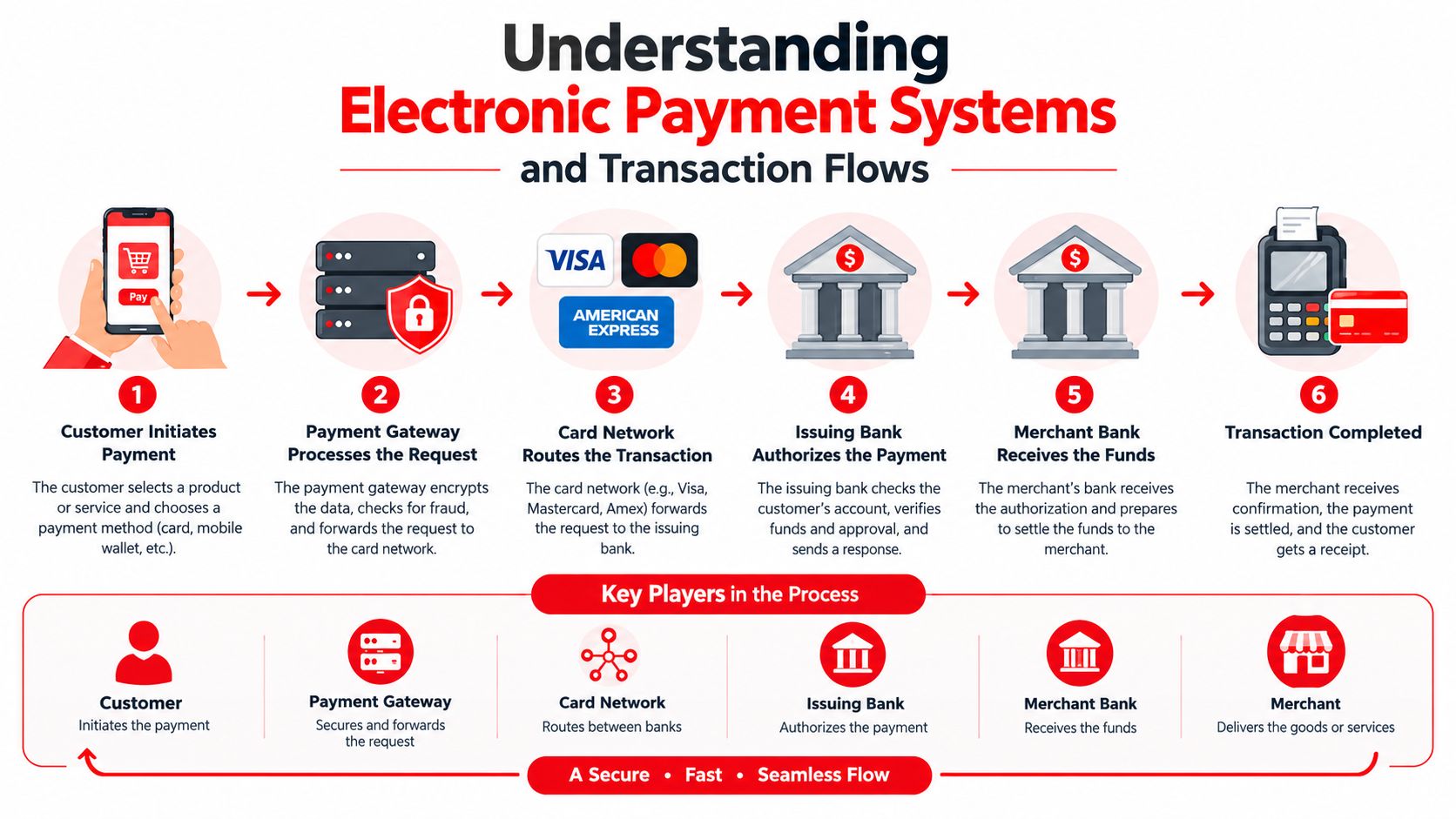
The lowest monthly subscription can still produce an expensive payment process. A repair shop needs to know where each transaction starts, who authorizes it, and how the result returns to the repair order.
The shop management platform stores the repair order and invoice. The payment gateway securely transfers payment information between the customer, processor, and shop payment setup. The merchant account receives card proceeds, while the acquiring bank settles those funds into the business bank account.
Customers may see one action, such as approving an invoice online. Behind it, several systems must exchange accurate information. Any gap can create manual work, delayed reconciliation, or an invoice that does not reflect the payment result.
Follow the transaction from approval to settlement
After estimate approval, a connected flow typically works like this:
- The customer approves the work. The approved estimate becomes the amount the shop expects to collect.
- The platform creates or updates the invoice. The approved total carries into the billing record without another manual entry.
- The gateway receives payment data. Card or bank details travel through a secured payment channel.
- The processor requests authorization. It checks whether the payment method can cover the transaction.
- The result returns to the shop system. An approval updates or closes the invoice. A decline prompts another payment attempt.
- Settlement reaches the merchant account. The acquiring bank moves the funds through the processor's settlement process.
- The platform records the transaction. The repair order, customer history, and financial record stay connected.
A disconnected setup breaks that chain. The customer pays through one tool, the invoice sits in another, and the bank statement becomes the only shared reference. Staff must then reconcile the records manually.
Use payment status as part of the repair order
Native integration does not remove processing fees or declined payments. It removes unnecessary typing and reduces the risk of marking a job paid before authorization succeeds.
Choose software that displays payment status beside the repair order. Service advisors should be able to confirm whether an online payment succeeded or whether a balance remains without searching several dashboards.
The best payment workflow makes the financial event part of the repair order, not a separate event that staff have to remember later.
That connection is what separates affordable software from a low-cost collection of disconnected tools.
Key Payment Types and Security Compliance Standards
A repair shop shouldn't choose software based only on whether it accepts cards at the counter. Customers may want to tap a card, use a mobile wallet, pay an online invoice, or send funds from a bank account. The platform should support the payment methods that match the shop's customers and service model without forcing staff into separate workflows.
Compare the main payment methods
Card-present payments work well at checkout. A terminal handles the physical card or contactless payment, and the system should attach the result to the correct repair order.
Online card payments help customers approve and pay from an invoice link. They reduce phone calls and let a service advisor request payment while the vehicle is still in the shop's workflow.
ACH payments move funds through a bank account rather than a card network. They may suit larger invoices or customers who prefer bank-based payments, but the shop needs clear status tracking because authorization and settlement aren't always experienced as one instant event.
Mobile wallets offer speed and convenience at the counter or through compatible online checkout. They can also reduce the need for customers to type card details manually.
The practical requirement is consistency. Each method should produce a visible, correctly matched record in the shop management platform.
PCI compliance protects the operation
PCI compliance refers to the security requirements that govern the handling of payment card data. A shop doesn't need to become a payments engineer, but it does need to understand whether the chosen platform keeps sensitive card information away from ordinary staff devices and improvised forms.
Tokenization is central to that protection. Instead of storing the actual card number in the shop's system, a payment provider replaces it with a unique token. The token can identify the saved payment method for an approved purpose without exposing the original card data to every system involved.
Cheap software can create risk when it sends customers to unsecured forms, stores sensitive data improperly, or leaves the shop responsible for technical controls it doesn't have the time or expertise to manage. A vendor should explain how payment data is handled, what the shop must do to remain compliant, and which security responsibilities belong to the provider.
Questions worth asking vendors
- Card storage: Does the platform store card numbers, or does a compliant provider tokenize them?
- Payment links: Can customers pay through a protected invoice flow?
- Access control: Can the shop limit payment and refund permissions by role?
- Audit history: Does the system record who created, changed, or refunded a payment?
- Processor choice: Can the shop use a suitable processor, or is it locked into one arrangement?
A low subscription isn't a bargain if it shifts security exposure and compliance work onto the shop.
Analyzing the True Costs and Benefits for Auto Repair Shops
Entry-level pricing in this category spans a wide range. Independent cloud platforms commonly position entry plans between about $29.99 and $199 per month, with ARI cited at $29.99 per month and Shop Boss at $199 per month. The gap reflects workflow depth, support, user access, and add-ons, not just visual design. (Capterra's auto repair software comparison)
A second comparison places the cheapest viable software in a value band of roughly $30 to $200 or more per month. More complete cloud suites commonly sit around $179 to $449 monthly, with advanced multi-location tiers reaching $799 or more. The same comparison connects lower sticker prices with limits involving seats, texting tiers, and quote-based upgrades.
Software Pricing Tiers vs. Hidden Limitations
| Pricing Band | Typical Monthly Cost | Common Limitations and Hidden Fees |
|---|---|---|
| Entry budget | Roughly $30 to $60 | Limited users, basic payment options, fewer automations, add-on charges |
| Value tier | Roughly $60 to $200+ | Texting limits, restricted integrations, extra-seat fees, quote-based upgrades |
| Feature-complete cloud | Roughly $179 to $449 | Higher subscription, but broader workflows and fewer disconnected tools |
| Advanced multi-location | $799 or more | More reporting and location support, with higher contract and implementation complexity |
The table shows why the cheapest auto repair shop software can't be judged by subscription alone. A shop paying less for software may pay more in staff time, processor markups, add-ons, or lost visibility into unpaid work.
Build a total-cost calculation
The calculation should include five lines:
- Monthly platform fee.
- Additional user and texting charges.
- Payment processing cost and any platform markup.
- Labor spent entering, checking, and reconciling transactions.
- Revenue delayed or lost when customers face payment friction.
Then compare those costs with the operational value created by faster approvals, automatic invoice updates, cleaner records, and fewer administrative steps. A platform with a higher subscription can produce a better return when it removes enough manual work and payment leakage.
Adoption makes this evaluation urgent. One market source reports that more than 68% of independent garages and auto service providers have implemented repair management software, while cloud installations account for 60% of deployments.
The winning purchase isn't the cheapest plan. It's the platform that leaves the shop with the lowest cost to complete a repair, collect payment, and keep the books accurate.
Integration Considerations with Shop Management Platforms
The cheapest software often becomes expensive at the handoff between systems. A service advisor creates an estimate, a technician completes the work, parts staff update availability, and the customer pays. If each action sits in a different application, every transfer can create delay, duplicate entry, or an incorrect balance.
Look for the swivel-chair workflow during evaluation. Staff move from the repair platform to a card terminal, then to an invoice tool and accounting software. They re-enter amounts, verify payment results, and return to the repair order. One mistyped figure or misapplied payment can attach the transaction to the wrong vehicle and consume more staff time than the software subscription saves.
The strongest integration keeps the repair order as the central record. An approved estimate should create the invoice, offer payment, and return the result to that same order. A successful transaction should update the customer balance. A failed attempt should remain visible to the employee responsible for collection.
Check the connections beyond checkout:
- Job status: The shop board shows whether a repair awaits approval, is in progress, is ready, or has been paid.
- Inventory records: Parts usage and ordering stay associated with the job.
- Customer history: The vehicle record retains the estimate, invoice, inspection, and payment event.
- Accounting export: Financial data reaches the accounting workflow without duplicate entry.
- Reporting: Revenue, outstanding balances, and payment activity use consistent records.
Accounting connections require close testing. Shops reviewing should apply the same standard here: confirm which records sync, the timing of each sync, and the treatment of corrections or refunds. A connector that exports invoices but omits payment status can still leave reconciliation work behind.
Use a complete repair scenario for the product demonstration. Ask the vendor to create an estimate, attach an inspection, order or allocate parts, collect an online payment, issue a correction, and display the resulting accounting record. Do not accept a demonstration limited to the payment terminal.
The platform should keep the repair order, payment status, parts activity, customer history, and financial reporting aligned. That alignment reduces revenue leakage because the system carries each transaction through the workflow instead of relying on memory, paper notes, and repeated data entry.
Real-World Examples of Workflow Transformation
The lowest monthly software fee can produce the highest operating cost when payments, inspections, invoicing, and job records sit in separate systems. An independent shop using inexpensive management software, a standalone card terminal, paper inspection sheets, and another invoicing tool may save on subscriptions while paying in staff time and missed approvals.
A typical repair exposes the weakness quickly. The service advisor copies an estimate into an invoice, sends it through a second tool, checks the terminal for payment, then updates the repair order manually. Online payments can remain unconfirmed, paper invoices can disappear, and technicians may wait for parts while the front desk re-enters transaction details. Customers may approve additional work by phone because the original digital process does not make approval and payment easy.
The fragmented workflow creates five practical bottlenecks:
- Inspections stay on paper: Customers cannot review technician findings or photos promptly.
- Estimates move slowly: Staff rebuild totals across multiple tools, creating correction risk.
- Payment status remains unclear: The terminal records a result, but the repair platform may not.
- Parts communication breaks down: Technicians have limited visibility while the front desk handles administrative cleanup.
- Job progress stays informal: Conversations and notes replace a shared view of each repair.
These gaps affect cash flow and customer confidence. A delayed approval postpones the repair and its revenue. Conflicting invoice information makes the final amount harder to trust.
A connected process changes the sequence. The technician completes a digital inspection with notes and photos. The advisor sends an estimate linked to the repair order. After approval, the customer receives a payment path tied to that job, so the transaction status remains visible to the team.
The Kanban-style Digital Shop Board gives staff a shared view from check-in through checkout. Technicians see assigned work, advisors see vehicles awaiting approval, and managers can identify jobs ready for payment without checking separate systems.
RedAppy is one example of a platform that combines digital inspections, instant estimates, one-click invoicing, online payments, parts ordering, inventory visibility, analytics, scheduling, and a branded website. The publisher reports that shops can save 10+ administrative hours per week and achieve strong first-year ROI. Treat those figures as claims to test against the shop's own records, payment volume, and workflow.
The return comes from fewer duplicate entries, shorter approval paths, and payment information that stays attached to the repair order. That is the transformation owners should measure, not the subscription price alone.
Recommended Next Steps for Software Adoption
Shop owners should test software against a real repair order before signing a contract. A polished dashboard proves very little if the platform can't connect estimate approval, parts activity, invoicing, payment, and accounting in one practical sequence.
A disciplined buying checklist
- Price the full stack: Include seats, texting, payment charges, integrations, setup, and migration.
- Trace one payment: Follow an online invoice from customer approval to settlement and reconciliation.
- Test user access: Confirm who needs a login and whether extra seats change the economics.
- Inspect security controls: Ask about PCI responsibilities, tokenization, refunds, and audit history.
- Check scalability: A solo mechanic, an independent multi-bay shop, and a multi-location chain need different permissions and reporting.
- Demand clear terms: Month-to-month pricing and transparent upgrades reduce switching risk.
- Review the operating features: Look for vehicle history, customer lookup, scheduling, digital inspections, AI repair assistance, analytics, parts ordering, and a branded customer website.
The cheapest auto repair shop software is the right choice only when it handles the shop's actual volume and payment process without expensive workarounds. A low monthly fee can't compensate for a platform that slows approvals, hides balances, or forces staff to reconcile every transaction manually.
Owners should review the RedAppy features, run a representative workflow, and compare the result with the current cost of fragmented tools. A detailed conversation is also worthwhile when the shop has unusual payment requirements, multiple locations, or a growing team.
RedAppy connects estimates, digital inspections, invoicing, online payments, parts and inventory workflows, scheduling, analytics, and a branded website in one shop management platform. Visit RedAppy to review the features and contact the team for a practical fit assessment based on the shop's payment flow and daily operations.
Ready to Transform Your Shop?
RedAppy helps auto repair shops create professional digital estimates with photos and videos, send them instantly via text or email, and get customer approvals in seconds. No credit card required to start.