
Data Migration Process for Auto Repair Shops
Most shop owners are told that a data migration process is mainly a technical cutover. Export the records, import them into the replacement system, test a few screens, and open the doors Monday morning. That advice misses where most of the damage starts. A migration usually goes wrong before the first customer, vehicle, or repair order moves, when nobody has confirmed what the old system stores or how the new system interprets it.
For an auto repair shop, the risk is operational, not abstract. A customer record can lose its vehicle relationship, a VIN can land in the wrong field, a repair order can retain parts but lose technician labor, and a labor rate can change meaning during transformation. Research on difficult database migrations found that only 6% were completed on time and only 6% reported zero downtime, while 46% caused at least five hours of downtime. The same research linked downtime to customer experience issues, lost revenue, and operational slowdowns. puts the business risk plainly.
Table of Contents
- Why Most Data Migrations Fail Before They Start
- Inventorying Your Shop Data Before the Move
- Field Mapping Examples for Auto Repair Data
- Migration Tools Scripts and Validation Controls
- Rollback Planning and Contingency Strategies
- Go Live Checklist and Post Migration Verification
Why Most Data Migrations Fail Before They Start
The popular weekend-switch mindset treats migration as one dramatic event. The safer approach treats it as a controlled project with three separate phases, plan, execute, and verify, rather than one large import. reinforces that verification is a distinct phase, because loading records doesn't prove that the target system can use them correctly.
Storage-migration research points to the same planning problem. 70% of surveyed customers reported schedule overruns of about 30%, and 64% reported average budget overruns of 16%. Only 64% completed migrations within 10% of the planned date. shows why a shop shouldn't treat the transfer window as the project. Planning, profiling, cleanup, mapping, testing, and contingency work consume the effort long before cutover.
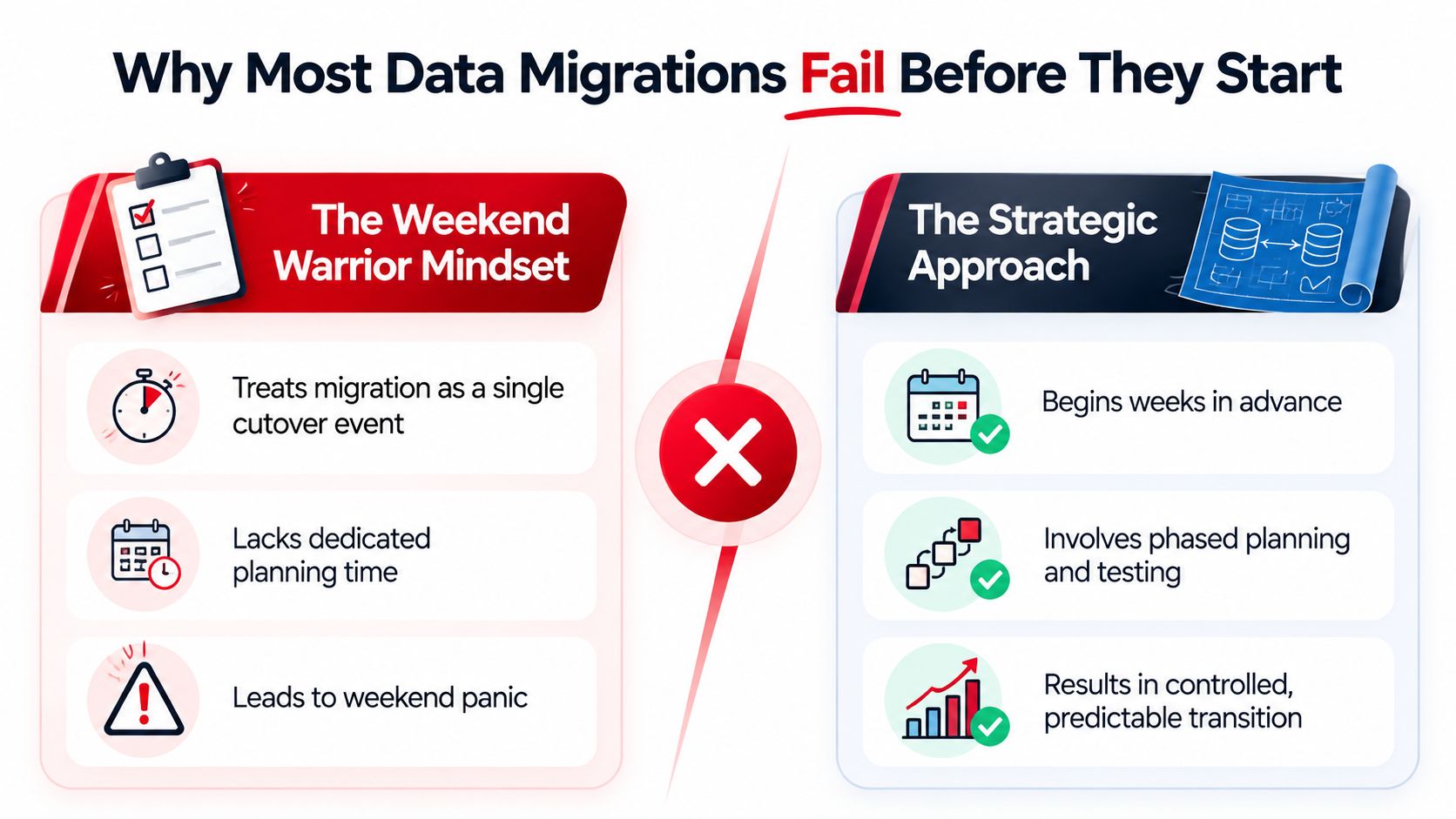
The three upstream failures
Complexity gets underestimated. Customer data rarely stands alone. One customer may have several vehicles, and each vehicle can have years of repair orders, inspections, declined work, payments, warranty notes, and attachments. A flat export may preserve names while losing the relationships that make the history useful.
Validation starts too late. A migration team may check whether records loaded, but not whether the right customer owns the right vehicle or whether an RO total still matches its labor and parts lines. Field-level validation needs to happen during mapping and dry runs, not after service advisors discover missing history at the counter.
Rollback remains vague. “The old system will still be there” isn't a rollback plan. A workable plan names the backup, the restoration method, the person who can approve a halt, and the exact conditions that require the shop to return to the legacy workflow.
A widely cited Bloor Research benchmark says 84% of data migration projects either fail to meet their objectives or significantly overrun their original time and budget estimates. The benchmark is cited in, and it supports a practical conclusion: discovery and scope control deserve more attention than selecting a flashy import tool.
Practical rule: If a shop can't explain where a source field goes, what happens when it is blank, and how the result will be checked, that field isn't ready to migrate.
For additional operational perspective, the provide useful background for teams planning a system transition. The core lesson is simple. The shops that keep operating are the ones that investigate first, test with realistic records, and define failure decisions before cutover night.
Inventorying Your Shop Data Before the Move
A clean field map starts with an honest inventory. Before anyone exports a file, the shop should document every data domain, where it lives, who owns it, and whether the replacement platform has a suitable destination. The inventory isn't clerical overhead. It reveals which records are connected, which fields are unreliable, and which historical material has no operational value.
Start with the domains that run the shop
Customer records should include names, addresses, phone numbers, email addresses, communication preferences, notes, and linked vehicles. Vehicle profiles need year, make, model, VIN, license plate, mileage history, ownership links, and any vehicle-specific notes. Repair order history usually contains more structure than an export preview suggests, including status timestamps, labor entries, parts, technician assignments, inspections, recommendations, payments, and attachments.
Parts and inventory deserve a separate review. A shop may hold OEM numbers, aftermarket numbers, supplier references, descriptions, costs, retail prices, bin locations, reorder points, and obsolete items. Labor rates can be even more difficult because the same number may mean different things for retail work, fleet work, warranty work, a technician classification, or a particular job category.
For every domain, capture measurable attributes such as row count, refresh frequency, schema, sensitive fields, null rates, duplicates, encoding issues, and value ranges. recommends this kind of profiling before extraction, along with field-level rules that are stored in versioned files.
Build the readiness scorecard
The shop manager, service advisor, technician lead, and migration owner should review the inventory together. A record that looks unimportant to an administrator may matter to a technician handling a comeback or a service advisor answering a warranty question.
| Data Domain | Record Count | Duplicates Found | Orphaned Records | Quality Issues | Migration Decision |
|---|---|---|---|---|---|
| Customers | To be measured | Review matching names, phones, and emails | Customers without vehicles or ROs | Missing contact details, inconsistent formatting | Clean and migrate active records |
| Vehicles | To be measured | Review repeated VINs and plates | Vehicles without a customer | Incomplete VINs, stale mileage, ownership conflicts | Validate VINs and repair links |
| Repair orders | To be measured | Review duplicated invoices or reopened ROs | ROs without a vehicle or customer | Missing labor, parts, totals, or statuses | Migrate validated history |
| Parts and inventory | To be measured | Review duplicate part numbers | Stock items without suppliers or bins | Obsolete numbers, inconsistent prices | Migrate active catalog, archive obsolete data |
| Labor rates | To be measured | Review repeated or conflicting rules | Rates without a category or context | Unclear warranty, fleet, or retail logic | Approve a target rate matrix |
| Attachments and inspections | To be measured | Review duplicate documents | Files without an RO or vehicle | Unsupported formats, missing dates | Migrate linked files where supported |
The decision column should separate migrate, clean then migrate, archive, and exclude. Moving every record “just in case” creates a new system full of duplicates and obsolete pricing. Excluding everything old creates a front desk that can't answer basic customer questions.
A readiness scorecard should also identify custom fields with no target equivalent. Those fields need an explicit decision, such as mapping to a note, creating a supported custom field, exporting to an archive, or retiring the information after management approval. The source should remain available for reference until the new workflow has proved stable.
Field Mapping Examples for Auto Repair Data
Field mapping turns a familiar shop record into a set of controlled transformations. The source system's field name isn't enough. The map needs the source field, target field, transformation rule, validation condition, and owner responsible for approving the result.
Customer and vehicle relationships
A customer export may split a name into first and last fields, while the target system expects a display name or separate fields with stricter rules. Multiple phones should be classified rather than concatenated into one note. A mobile number belongs in a contact field, a work number in another, and an unknown number should be flagged rather than assigned without distinction.
Communication preferences need special care. An opt-in value such as “Y,” “Yes,” or a checked box should map to the target's permitted consent value. Blank values shouldn't automatically become permission. The shop should decide whether blanks mean unknown, not opted in, or data requiring review.
VIN mapping has a hard operational consequence. A standard VIN contains 17 characters, so the transformation should remove accidental spaces only when the rule permits it, preserve meaningful characters, and reject incomplete or malformed values for review. VIN decoding results can differ between systems, so the vehicle's year, make, and model should be checked against the VIN rather than overwritten without review.
Ownership changes create another relationship problem. If the same vehicle appears under multiple customers, the shop needs a rule based on current ownership, historical ownership, or a documented relationship. Otherwise, a service advisor may open the right VIN and see the wrong customer contact details.
Parts, labor, and repair orders
Parts mapping often needs a cross-reference table. A proprietary source number may correspond to an OEM number, an aftermarket number, or several supplier codes. Transformation logic should preserve the source identifier in a reference field where possible, while assigning the target's preferred part number and pricing rule.
Labor rates should be mapped as rules, not merely copied as numbers. The map should identify technician classification, job category, and billing context. A retail brake job may use a different rate rule from fleet or warranty work, even when the source export presents each value as a simple amount.
Repair order history requires line-level testing. Labor operations, standard repair times, technician time entries, parts used, taxes, discounts, inspections, approvals, and payment status should retain their parent RO relationship. A total that matches by coincidence isn't enough if the underlying lines no longer support warranty review or customer questions.
| Data Entity | Source Field | Target Field | Transformation Logic | Common Pitfall |
|---|---|---|---|---|
| Customer | First name, last name | Customer name fields | Trim spaces, preserve separate values, flag blanks | Combining names into an unusable note |
| Customer | Phone 1, phone 2 | Mobile, work, or alternate phone | Classify by source label and normalize format | Overwriting a valid number |
| Customer | Marketing preference | Communication consent | Map approved values, leave unknowns for review | Treating blanks as consent |
| Vehicle | VIN | VIN | Validate character structure, preserve leading values, reject failures | Linking an incomplete VIN |
| Vehicle | Customer ID | Customer relationship | Resolve current and historical ownership rules | Creating orphaned vehicles |
| Parts | Source part number | Target part and cross-reference | Match OEM, aftermarket, and supplier identifiers | Losing the original supplier code |
| Labor | Rate and job category | Target labor matrix | Apply technician and billing-context rules | Treating every rate as retail |
| Repair order | Labor, parts, payments | RO child records | Preserve parent-child relationships and status logic | Importing totals without line detail |
The map should live in version-controlled rule files. That makes changes visible when a shop discovers that a source status called “closed” means “invoice pending,” or when a target system requires a separate field for technician time.
A repair order is not one record. It is a relationship among a customer, a vehicle, labor, parts, approvals, payments, and status history. Mapping only the visible header loses the story technicians and advisors need.
Migration Tools Scripts and Validation Controls
Tools should serve the migration design, not replace it. A small shop may use a vendor import utility for straightforward customer and vehicle records, while a more complex conversion may need an ETL tool, API connections, or custom scripts. The choice depends on the source format, target capabilities, transformation rules, attachment handling, and how much auditability the shop requires.
Match the tool to the control problem
An ETL workflow can extract source data, transform values, and load target entities in a defined sequence. API-based migration can be useful when the target system exposes supported endpoints and the shop needs controlled handling of relationships. Custom scripts can solve unusual mappings, but they also create maintenance responsibility, so every script needs ownership, documentation, logging, and version control.
Migration scripts and third-party configuration files should be versioned. also emphasizes explicit rollback steps, timelines, responsibilities, contingencies, checksums, and record counts. A script that changes a labor category should be traceable to the rule that caused the change.
Validation should run at multiple levels:
- Count reconciliation: Compare customer, vehicle, RO, part, labor, and attachment counts between source and target.
- Checksum comparison: Use checksums for applicable exports and record groups to detect changes that a visual sample may miss.
- Relationship checks: Find vehicles without customers, ROs without vehicles, labor lines without technicians, and parts lines without valid references.
- Business-rule checks: Confirm that totals, taxes, discounts, status values, and rate categories behave as the shop expects.
- Exception reporting: Send failures to a review queue instead of dropping them.
A simple example shows why counts matter. If the old system contains 12,450 customer records and the new system contains 12,447, the three-record difference must be explained before go-live. This example comes from the migration control guidance in the project requirements, not from a general assumption about shop data.
| Control Type | Purpose | Auto Repair Example |
|---|---|---|
| Record count | Detect missing or extra entities | Compare customer and vehicle totals |
| Checksum | Detect content changes | Compare exported RO groups before and after transfer |
| Schema check | Confirm field compatibility | Verify VIN, date, currency, and status formats |
| Referential integrity | Protect relationships | Find ROs without linked vehicles |
| Required-field rule | Prevent unusable records | Flag vehicles without valid VIN or customer link |
| Business-logic check | Test operational meaning | Recalculate an RO total from labor, parts, tax, and discount |
| Exception log | Make failures actionable | Assign rejected part mappings for review |
A validation dashboard doesn't need to be elaborate. It should show source counts, target counts, passed checks, exceptions, unresolved relationships, and the status of each migration run. For broader operational context, offers a useful reference when comparing tooling, documentation, and continuity controls.
RedAppy is one shop-management option that combines customer, vehicle, VIN, repair history, parts, inspections, scheduling, invoicing, and payment workflows in one platform. Its setup-and-migration workflow includes field-mapping review and data cleanup, which can be relevant when a shop wants the migration design and the day-to-day operating system considered together.
Rollback Planning and Contingency Strategies
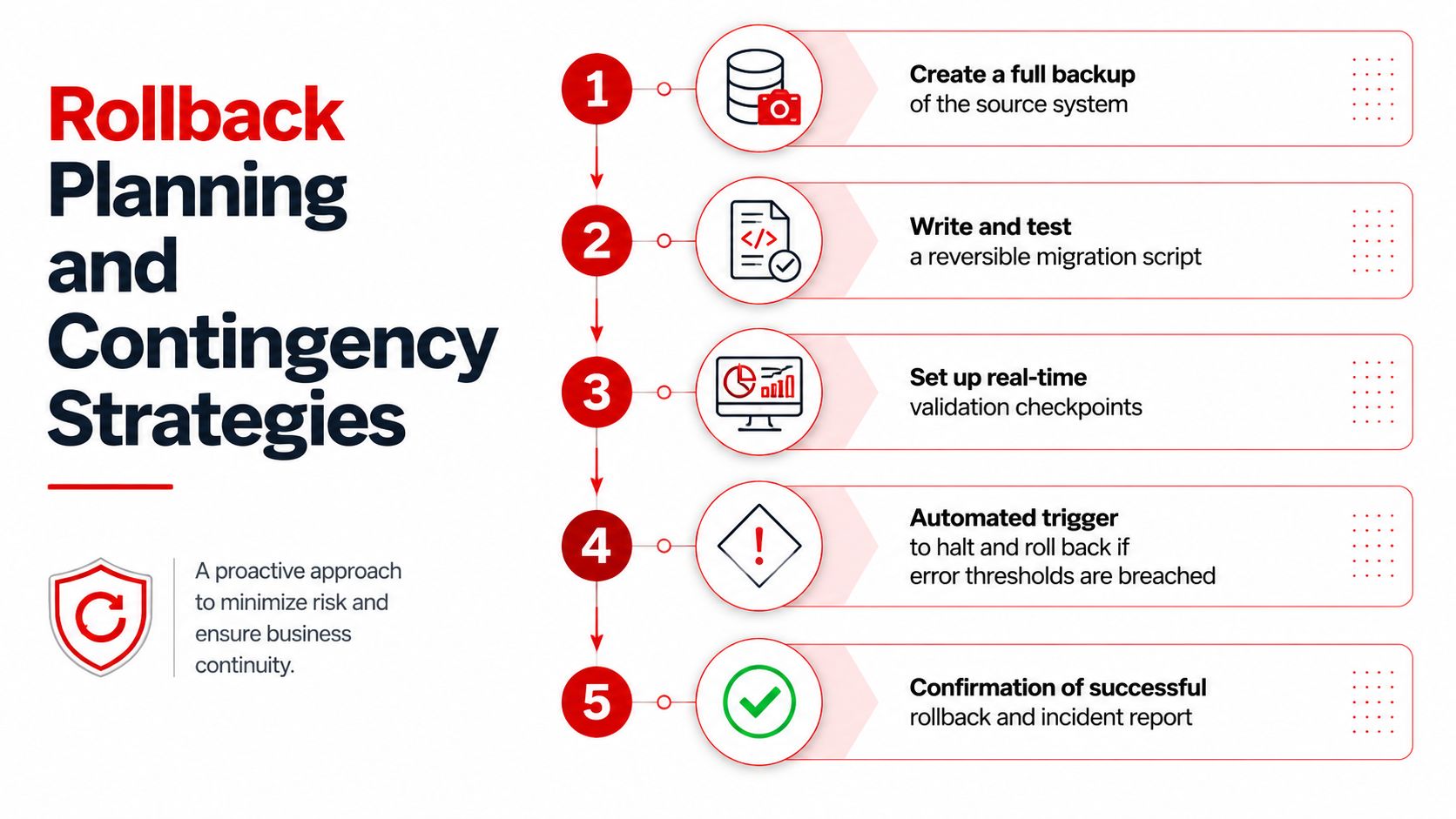
A rollback plan should read like an executable runbook, not a reassuring sentence. The source system needs a current, restorable backup, a defined read-only access policy, and a named owner who can approve restoration. The target system needs a scripted reversal or a controlled decision to stop loading additional data.
Define the stop conditions before cutover
A shop should establish thresholds before anyone starts the production run. The required decision criteria may include corruption exceeding 2%, critical VIN or customer-contact validation failures, or performance degradation that prevents service advisors from writing estimates and processing customers. These thresholds should be approved by operations and technical owners together, because a technically acceptable result can still be unusable at the front counter.
The rollback sequence should cover:
- Halt the migration and preserve logs.
- Record the last successful checkpoint.
- Notify staff using the agreed communication channel.
- Return the shop to the legacy system in read-write or controlled operating mode.
- Reconcile any appointments, approvals, payments, or notes created during the transition.
- Document the incident before changing the script or retrying.
A phased rollback can be useful when one domain fails. For example, a shop may retain customer and vehicle records in the target while reverting a problematic parts catalog, provided the systems can safely support that arrangement. That decision needs technical confirmation. Partial rollback can create duplicate truth if staff don't know which system owns a record.
Keep the shop informed
A time-boxed decision window prevents the team from debating indefinitely while customers wait. Staff should know whether to stop opening new ROs, where to record emergency notes, how to handle parts orders, and who communicates with vendors or customers.
The legacy system should remain accessible for emergency reference during the transition, but staff shouldn't enter conflicting updates in both systems without a reconciliation procedure. After rollback, the migration owner should preserve the failed output, validation report, logs, and decision record. A failed run becomes useful only when the team can identify whether the problem came from source quality, a mapping rule, a tool limitation, or an operational dependency.
Go Live Checklist and Post Migration Verification
Go-live is a controlled transition, not a switch-flip. A full dry run in staging should use production-volume data and exercise the complete path from extraction through transformation, loading, reconciliation, user acceptance, and rollback decision. recommends rerunning staging migrations until the results meet acceptance criteria, with current backups and a tested rollback plan.
Pre-flight controls
The final checklist should be short enough to use under pressure and specific enough to produce a yes or no answer.
- Mapping approval: Confirm every critical source field has an approved target, transformation rule, and validation test.
- User acceptance: Have service advisors, technicians, parts staff, and management sign off on real workflows.
- Backup readiness: Confirm the source backup is current and restorable, not merely present.
- Rollback access: Keep the procedure, credentials, contacts, and decision thresholds available to the cutover team.
- Operational freeze: Define when edits stop in the source system and how late changes will be captured.
- Communication: Give staff a clear instruction for appointments, ROs, payments, parts, and customer questions during the window.
Acceptance criteria should cover records migrated versus source, completeness, accuracy, schedule adherence, downtime, and cost variance. Industry guidance commonly cites 99.95% or higher data accuracy and 0 to 15 minutes of downtime as targets for high-quality migrations, though each shop should approve targets that match its system and operating needs. also identifies poor discovery, data-quality defects, and undocumented dependencies as recurring causes of failure.
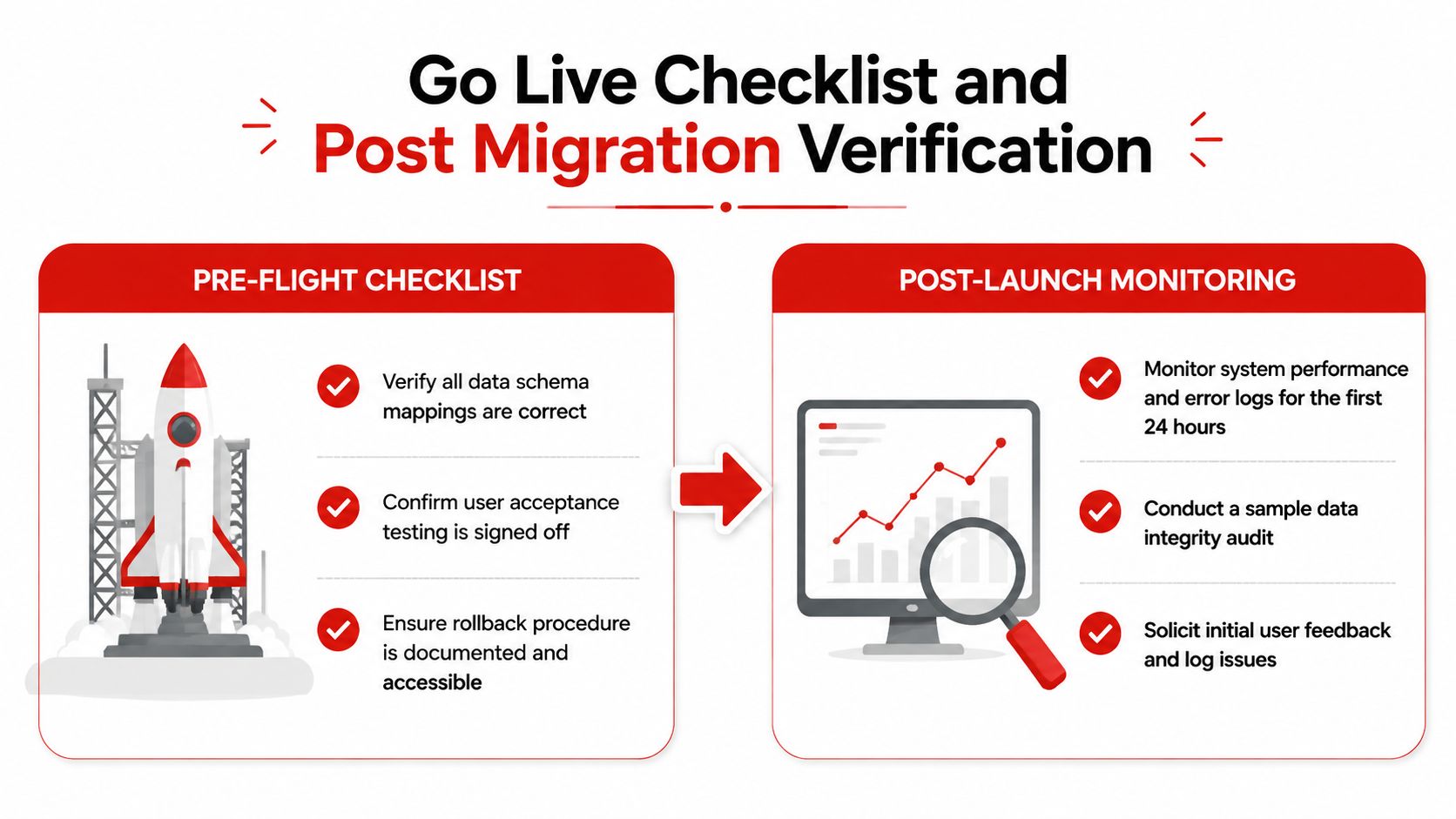
Verify the working shop after launch
Post-migration validation should sample customer lookup, VIN search, vehicle history, RO details, labor rates, parts availability, inspections, approvals, invoices, payments, reports, and downstream integrations. The team should monitor error logs, search behavior, staff questions, and performance during the first operating period, then log each issue with an owner and priority.
The shop shouldn't decommission the source system immediately. Keep it available through an agreed audit period, while staff confirm that the target supports daily work and historical questions. Optimization may include rebuilding indexes, tuning slow queries, adjusting permissions, revising workflows, and correcting edge cases that staging data didn't expose.
The migration is finished when the shop can write, approve, repair, invoice, and answer history questions without consulting two competing systems.
A shop preparing for a software transition can review RedAppy to see how its customer, vehicle, VIN, repair-order, parts, inspection, scheduling, invoicing, and payment workflows can support a more controlled migration. Visit the RedAppy contact page to discuss field mapping and cleanup, or review the RedAppy features before choosing the target system.
Ready to Transform Your Shop?
RedAppy helps auto repair shops create professional digital estimates with photos and videos, send them instantly via text or email, and get customer approvals in seconds. No credit card required to start.