
Estimate and Invoicing Software for Auto Repair Shops
Every shop has the same moment. The car is on the lift, the estimate is half-written, the customer is waiting on a call back, and someone at the counter is trying to remember whether the labor line on the paper form matched what happened in the bay.
That gap between approval and payment is where shops lose time, make avoidable mistakes, and sometimes leave money on the table. Estimate and invoicing software closes that gap by keeping the job, the parts, the labor, and the payment in one continuous workflow instead of a stack of disconnected tools.
Table of Contents
- Why Auto Repair Shops Need Modern Estimate and Invoicing Software
- Core Features That Drive Shop Efficiency
- Business Benefits That Show Up on the Bottom Line
- How to Choose the Right Software for Your Shop
- Implementation and Migration Checklist
- Common Mistakes That Undermine Your Software Investment
- ROI Examples and Recommended Next Steps
Why Auto Repair Shops Need Modern Estimate and Invoicing Software
A service advisor writes up a brake job by hand, circles a few parts on a paper form, then calls the customer for approval while another vehicle is already waiting at the front desk. Later, the same job gets typed again into an invoice system, maybe with different wording, maybe with a line item missed, maybe with a tax line added from memory.
That's not just messy. It creates friction at every handoff, from the first conversation to the final payment. Estimate and invoicing software replaces the retyping with a single digital thread, which matters because billing workflows work best when they preserve a single line-item structure from quote to invoice and automate the conversion of approved quotes into invoices, with status tracking and audit-friendly record keeping along the way, as described in.

Why paper breaks down in a real shop
Paper estimates work until the day the shop gets busy. Then handwriting gets hard to read, approvals get buried in voicemails, and the final invoice depends on who remembers what happened three hours earlier in the bay.
That's where the modern workflow matters. The stronger systems keep the quote structure intact, sync cleanly with accounting, and avoid manual re-entry, because that's where errors and lost revenue tend to show up, according to.
What the software actually replaces
A shop doesn't need another isolated billing app. It needs a single source of truth from the first estimate through final payment, with standardized line items so repeat services, materials, and bundles don't need to be rewritten on every ticket, as noted in.
That is why the right system feels more like operating infrastructure than a form-filler. It takes pressure off the front counter, helps technicians work from the same job data, and keeps the invoice aligned with what was approved and performed.
Practical rule: if the invoice can't be traced back to the original estimate without someone reconstructing it by hand, the workflow is already leaking time and trust.
Core Features That Drive Shop Efficiency
The best shop systems don't start with billing. They start with the vehicle.
A clean check-in, a well-documented inspection, and a quote that doesn't need to be rebuilt later are what make invoicing fast instead of fragile. Technical feature sets that improve estimate accuracy and cash flow include automated calculations for labor, parts markups, discounts, and multiple tax rates, plus real-time inventory integration and accounting or payment integrations, according to.
Digital check-in and inspection workflow
The front end matters because it sets the quality of everything that follows. Digital inspections with photos tied to the vehicle condition make the recommendation easier to understand, and they help service advisors explain what needs attention without relying on memory or shorthand.
A good system also keeps the vehicle record usable later. Customer lookup by name, plate, or VIN cuts repetitive entry, and a digital history gives the team a faster starting point on repeat visits.
Estimate building and approval controls
Estimate creation should be fast, but not sloppy. Automated labor, parts, and tax calculations reduce manual math, while line-item consistency keeps the estimate ready for later conversion.
That's especially useful when a job changes after approval. The best systems preserve the quoted structure, track revisions, and support change orders so the advisor isn't forced back into manual edits every time the scope shifts.
Invoice conversion and payment capture
The invoice should be a continuation of the approved estimate, not a separate document built from scratch. One-click conversion keeps the job data intact, then integrated payment capture closes the loop without a second round of phone calls.
That same logic applies to accounting handoff. If the payment, invoice, and bookkeeping pieces connect cleanly, the shop spends less time chasing reconciliation gaps and more time moving cars through the bay.
Shop visibility, parts, and history lookup
A Kanban-style shop board gives everyone the same picture of work in progress, which helps prevent the classic front-counter question, “Where is this car?” Parts ordering across multiple suppliers keeps the job moving when one source is out of stock, and real-time inventory helps invoices stay aligned with actual parts usage.
For readers comparing systems across borders or sourcing decisions, a practical reference like is useful when the business needs a clearer handle on cost breakdowns that affect the repair or resale conversation.
Field note: the features that matter most are the ones that reduce re-entry. Fancy dashboards don't help if the advisor still has to rebuild the ticket at checkout.
Business Benefits That Show Up on the Bottom Line
The financial gain from better software is rarely one dramatic change. It's a series of small leaks getting sealed.
The billing and invoicing software market reached $7.4 billion in 2025 and is projected to reach $18.9 billion by 2034, with a 10.9% CAGR for the 2026 to 2034 forecast period, while the software sub-segment represented $4.7 billion or 63.5% of revenue in 2025 and SMEs accounted for 54.2% of total revenue, according to. That tells you estimate-and-invoicing tools are already core infrastructure, not a niche convenience.
Time saved becomes capacity gained
In a shop, saved admin time doesn't disappear. It gets reassigned to follow-ups, customer updates, reminders, and parts coordination.
That matters because manual billing is full of avoidable drag, from retyping to missed steps to delayed approvals. Once the estimate flows straight into the invoice, the front office stops acting like a data-entry desk and starts acting like a revenue desk.
Better estimates support stronger approval behavior
Photo-rich digital inspections do more than look professional. They make the recommendation visible, which helps customers understand why the work matters.
That changes the conversation at the counter. Instead of asking a service advisor to defend a repair with words alone, the customer can see the condition, the parts, and the line-item context in one place. The result is usually less back-and-forth and a cleaner approval process.
Faster payment improves cash flow discipline
Integrated online payments matter because they shorten the distance between completed work and collected money. The invoice goes out with the job record, the customer pays through the system, and the shop closes the loop without a separate chase.
Real-time analytics also help owners stop guessing. Revenue, technician efficiency, average repair order, and repeat business are easier to act on when the numbers live inside the same workflow instead of getting assembled later from scattered reports.
The shops that benefit most are the ones that use the software as a working control system, not as a prettier version of their old paperwork.
How to Choose the Right Software for Your Shop
The right system for a one-bay garage isn't always the right system for a multi-location operator. The key is matching the software to the way the shop runs, not to a feature checklist built for someone else.
Selection criteria by shop type
| Criteria | Single-Bay Garage | Multi-Location Chain |
|---|---|---|
| Line-item integrity | Needs simple, reliable quote-to-invoice flow with minimal setup | Needs strict standardization so every store bills the same way |
| Change-order handling | Needs a clear way to revise jobs without rebuilding the whole ticket | Needs approval controls and revision tracking across locations |
| Mobile reliability | Needs dependable use in the bay, even with weak connectivity | Needs field access plus sync behavior that won't lose data |
| Accounting integration | Needs clean bookkeeping handoff without complex admin | Needs tighter reconciliation and reporting across entities |
| Parts and inventory | Needs enough integration to keep jobs moving | Needs broader supplier and inventory coordination |
| Workflow visibility | Needs a simple board or status view | Needs centralized oversight and role-based access |
| Pricing model | Needs something lean and easy to sustain | Needs scalability without forcing unnecessary modules |
A small shop usually wins by choosing simplicity and reliability. A chain usually wins by choosing controls, consistency, and reporting discipline.
What to prioritize if the shop is small
A single-bay or low-volume operation should care most about speed of adoption. If the advisor can create estimates quickly, capture signatures, and invoice without cross-checking three systems, the tool will get used.
The danger is overbuying features that sound useful but never get touched. Deep reporting, advanced approvals, and heavy governance can wait if the daily pain is still basic ticket flow.
What to prioritize if the shop is larger
A multi-location operation has a different problem. It needs consistency, especially around pricing, taxes, and approvals, or the accounting team ends up cleaning up avoidable differences from store to store.
That's why line-item integrity, change-order controls, and role-based visibility matter more as volume grows. A platform like RedAppy can fit that discussion because it combines estimates, invoicing, online payments, parts ordering, analytics, and a digital shop board in one workflow, but the deciding factor should still be how well the system matches the shop's actual operating model.
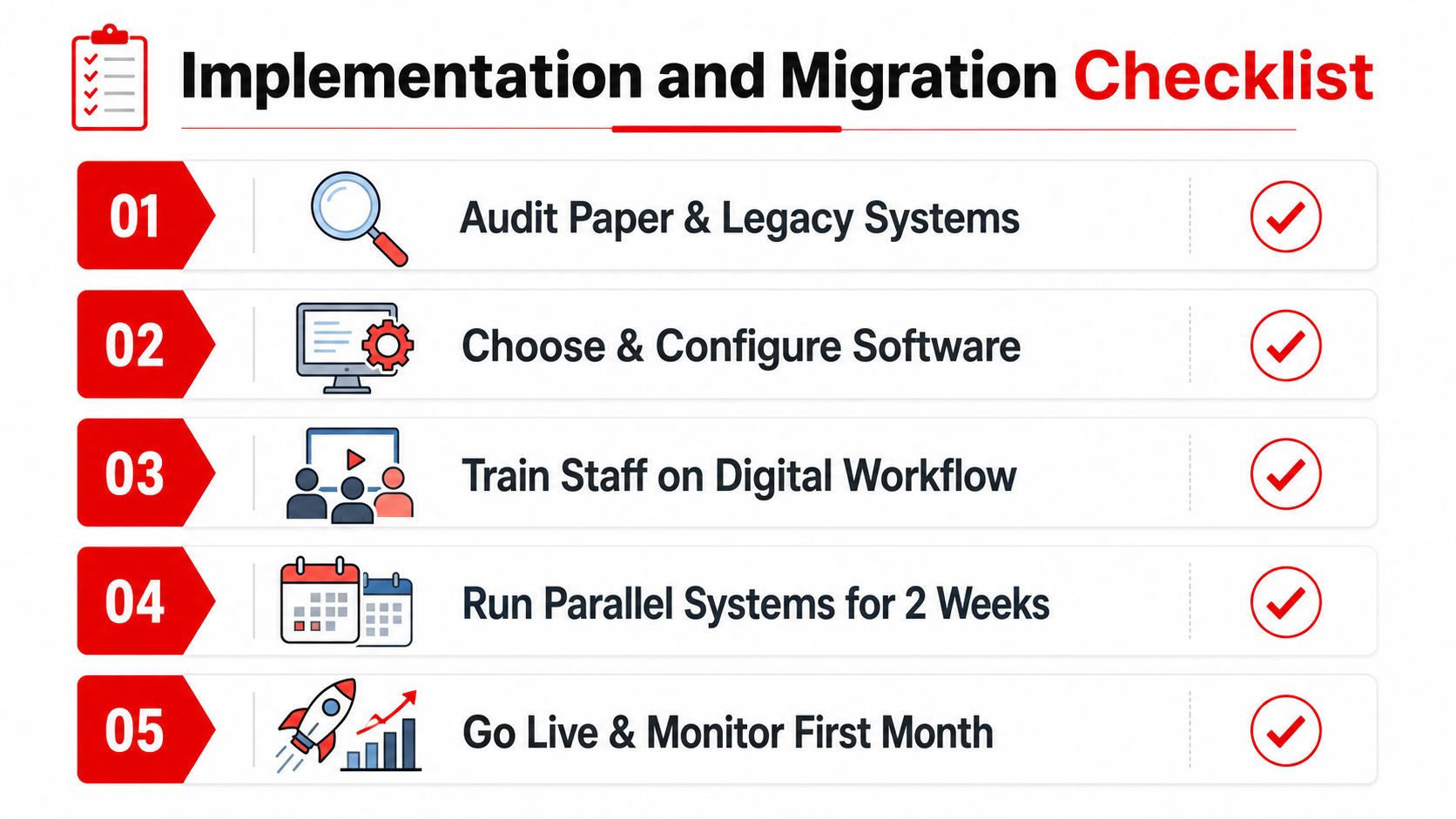
Implementation and Migration Checklist
A software rollout fails most often before launch, not after it. The usual problem is not the platform itself, it's sloppy preparation.
Before the switch
Start by cleaning up the services list. Standardized line items make it easier to estimate consistently, invoice accurately, and reuse the same descriptions across jobs instead of rewriting every ticket.
Then fix the data. Duplicate customer records, mismatched vehicle histories, and inconsistent pricing will follow the team into the new system if they're not corrected first. Tax rates, markups, and supplier connections should also be reviewed before any live work moves over.
During the first rollout
Training has to be specific to the role. Service advisors need to know how to build and revise estimates, technicians need to know how to document work in the bay, and managers need to know how to review workflow status without interrupting every job.
A parallel run helps reduce disruption. Keep the old method available long enough to catch mistakes, and name one power user who can answer questions fast when the team hits its first friction points.
Good migrations don't try to change everything at once. They stabilize the quote, the invoice, and the payment path first, then add more capability once the team trusts the process.
After go-live
The first month should be treated like a calibration period. Review what slowed people down, where the estimate template caused confusion, and which approvals took longer than expected.
Then tighten the setup. Refine templates, expand usage in stages, and watch the analytics for bottlenecks instead of waiting for complaints to pile up.
Common Mistakes That Undermine Your Software Investment
The most expensive mistake is treating the platform like a digital invoice pad. That mindset leaves half the value untouched.
A shop that only enters estimates but skips inspections, payment capture, or analytics is still working around the system instead of through it. The result is familiar, the front office still juggles paper, the techs still chase missing info, and the owner still doesn't have a clean view of performance.
The mistakes that show up most often
- Using the software halfway. The fix is to connect inspections, approval flow, invoicing, and payment collection so the job stays inside one process.
- Skipping the cleanup phase. Duplicate customer and vehicle records create confusion fast, especially when an invoice or history lookup doesn't match the last visit.
- Ignoring change orders. If the system can't handle revision flow cleanly, the team falls back to manual edits and risks billing gaps.
- Overlooking mobile reliability. If the bay can't use the tool in poor connectivity, adoption stalls and paper comes back.
- Undertraining the team. A system that is technically installed but poorly understood becomes shelfware.
The correction is usually simple, but it has to be deliberate. Configure the workflow around how the shop operates, then train for the exceptions, not just the happy path.
ROI Examples and Recommended Next Steps
A typical independent shop doesn't need a complicated return-on-investment model to see the value. If one staff member stops retyping tickets and starts handling customer follow-ups and service reminders, that time turns into better retention and fewer dropped opportunities.
Photo-rich inspections can also lift average repair order value by making recommended work easier to approve. Faster payment cycles improve cash flow, which makes parts stocking and job pacing less stressful when volume picks up.
The next move is practical. Review the feature set on the RedAppy features page, then use the RedAppy contact page to talk through fit, rollout, and a pilot in one bay or one location before a wider launch.
RedAppy gives auto repair shops one workflow for estimates, approvals, invoices, payments, parts, and shop visibility. If the current process still relies on retyping, phone-tag approvals, or disconnected systems, visit RedAppy and look at how a tighter quote-to-payment flow could fit the way the shop already works.
Ready to Transform Your Shop?
RedAppy helps auto repair shops create professional digital estimates with photos and videos, send them instantly via text or email, and get customer approvals in seconds. No credit card required to start.