
Garage Invoices: The Complete Guide for Auto Repair Shops
Garage invoices are the financial backbone of every auto repair shop. They document the work performed, justify the cost to customers, and create the paper trail your business depends on for tax compliance, warranty claims, and dispute resolution. Yet many shops still treat invoicing as an afterthought — a final step rushed through before handing back the keys.
That approach is costly. According to the, billing errors and incomplete documentation are among the leading causes of customer disputes in the auto repair industry. A poorly written invoice can erode trust, delay payment, and expose your shop to legal risk — while a well-structured one does the opposite.
This guide covers everything auto repair shops need to know about garage invoices: what they must include, how to structure them correctly, the legal requirements across different jurisdictions, and how modern shop management platforms like RedAppy replace manual paperwork with automated, professional invoicing that saves time and gets shops paid faster.
Table of Contents
- 1. What Is a Garage Invoice?
- 2. What a Garage Invoice Must Include
- 3. Types of Garage Invoices and When to Use Each
- 4. Manual vs. Digital Garage Invoicing: A Side-by-Side Comparison
- 5. How to Choose Garage Invoice Software (and What RedAppy Offers)
- Conclusion
- Frequently Asked Questions
1. What Is a Garage Invoice?
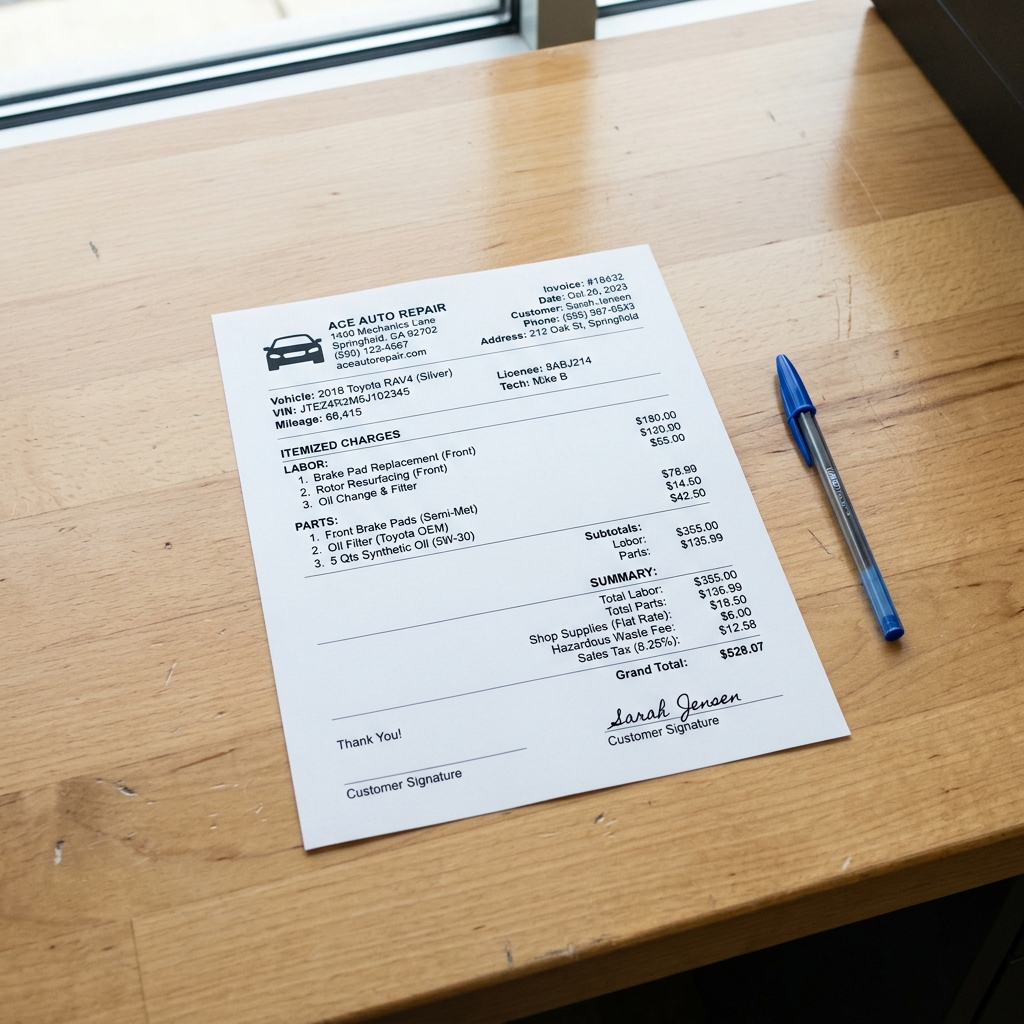
A garage invoice is a legally binding document issued by an auto repair shop that records the services performed, parts supplied, and total charges for a vehicle repair or maintenance job. It differs from a standard commercial invoice because it must account for two distinct cost categories — labor and parts — and typically includes vehicle-specific information that ties the bill to a particular car and customer interaction.
A garage invoice serves as a contract record, a warranty reference, and a financial document all at once.
In most jurisdictions, auto repair shops are legally required to provide an itemized invoice before collecting payment. In the United States, for example, the and various state-level auto repair acts — such as California's Automotive Repair Act — mandate written disclosure of labor charges and parts costs. Failure to comply can result in fines or loss of operating license.
How a Garage Invoice Differs from a Standard Invoice
A standard invoice records goods sold or services rendered in general terms. A garage invoice adds layers of specificity that reflect the technical and regulatory nature of vehicle repair.
| Feature | Standard Invoice | Garage Invoice |
|---|---|---|
| Itemized labor | Rarely required | Required by law in most states |
| Parts breakdown | Optional | Required, often with part numbers |
| Vehicle identification | Not applicable | VIN, mileage, make, model, year |
| Warranty disclosure | Optional | Expected and often legally required |
| Pre-authorization reference | Not typical | Linked to signed estimate or work order |
In practice, a garage invoice without vehicle details creates liability exposure. If a customer disputes work done on a specific vehicle, the invoice is the primary evidence of what was agreed upon and completed.
The Three Types of Garage Invoices
Auto repair shops use three core invoice types, each serving a different stage of the customer relationship.
1. Proforma Invoice (Estimate) A proforma invoice is issued before work begins. It outlines anticipated labor hours, expected parts, and projected total cost. It is not a demand for payment — it is a pre-authorization document. Most state repair laws require a signed estimate before any work starts. This document becomes the reference point for the final invoice.
2. Standard (Final) Invoice This is the primary invoice issued at job completion. It reflects actual labor time, parts used, applicable taxes, and the final total owed. It triggers the payment obligation and serves as the official record of the transaction.
3. Credit Invoice A credit invoice (sometimes called a credit memo) reduces or reverses a previously issued charge. In a shop context, this applies when a part is returned, a warranty repair is covered at no charge, or an overcharge needs correcting. It must reference the original invoice number to maintain a clear audit trail.
Issuing a credit invoice rather than simply adjusting an existing invoice protects both the shop's accounting records and the customer's right to a clear billing history.
Each invoice type connects to a specific moment in the job lifecycle — from initial estimate, through active repair, to final settlement or correction. Understanding when to use each one prevents billing disputes and keeps financial records clean.
2. What a Garage Invoice Must Include
A professional garage invoice must contain specific fields to be legally enforceable, financially accurate, and useful to both the shop and the customer. Missing even one critical element — such as a VIN or itemized labor breakdown — can delay payment, invite disputes, or create liability exposure.
Required Fields by Category
Shop and Customer Information
Every invoice must identify both parties clearly. Ambiguous or missing contact details are one of the most common causes of payment disputes.
- Shop name, registered business address, phone number, and email
- Unique invoice number (sequential numbering supports audit trails)
- Invoice date and payment due date
- Customer full name, address, phone number, and email
- Authorization signature line (confirms the customer approved the work)
Vehicle Information
In auto repair, the vehicle is central to the transaction. A standard invoice omits this — a garage invoice cannot.
- VIN (Vehicle Identification Number) — 17 characters, uniquely identifies the vehicle
- Year, make, model, and trim
- License plate number and state
- Mileage in and mileage out — required in many jurisdictions and useful for warranty tracking
Accurate mileage records protect the shop if a customer later claims damage occurred during a repair visit.
Labor Description and Charges
Vague entries like "general repair" are legally problematic and harder to collect on. Each labor line should stand on its own.
- Job description written in plain language (e.g., "Replace front brake pads and rotors — both sides")
- Flat rate or billable hours for each task
- Labor rate per hour (or flat rate fee disclosed separately)
- Labor subtotal
According to the, shops are required to provide customers with a written estimate before work begins and must disclose labor charges clearly on the final bill.
Parts and Materials
Parts should be itemized individually — not grouped into a single "parts" line.
| Field | Example |
|---|---|
| Part description | Front brake rotor, left |
| Part number | BR90042 |
| Quantity | 1 |
| Unit cost | $48.00 |
| Markup or retail price | $72.00 |
| Parts subtotal | $72.00 |
Some states require shops to offer to return replaced parts on request. Listing part numbers and descriptions supports compliance with those rules.
Taxes, Fees, and Totals
Tax rules vary by state — labor may be taxable in some jurisdictions and exempt in others. Parts are taxable in most U.S. states.
- Taxable labor subtotal
- Taxable parts subtotal
- Applicable tax rate(s) and calculated tax amount
- Shop supply fee (if charged — must be disclosed, not buried)
- Discounts (clearly labeled)
- Grand total due
Payment Terms and Warranty Disclaimer
These two fields are legally protective and often omitted from basic templates.
- Accepted payment methods
- Due date or terms (e.g., "Net 15" or "Due on pickup")
- Late payment fee policy, if applicable
- Warranty statement — covering both parts and labor, with duration and limitations
A written warranty disclaimer limits the shop's liability and sets clear expectations. Without it, customers can argue indefinitely about what was covered.
Minimal vs. Professional Invoice Format
The table below shows the difference between a compliant but basic invoice and a professional-grade document used by high-performing shops.
| Field | Minimal Invoice | Professional Invoice |
|---|---|---|
| Shop name and address | ✅ | ✅ |
| Invoice number | ✅ | ✅ |
| Customer name | ✅ | ✅ |
| VIN | ❌ Often missing | ✅ Always included |
| Mileage in/out | ❌ | ✅ |
| Itemized labor lines | Sometimes | ✅ Each job listed separately |
| Part numbers | ❌ | ✅ |
| Parts markup disclosed | ❌ | ✅ |
| Shop supply fee breakdown | ❌ | ✅ |
| Tax lines by category | ❌ | ✅ |
| Payment due date | Sometimes | ✅ Always included |
| Late fee policy | ❌ | ✅ |
| Warranty disclaimer | ❌ | ✅ |
| Authorization signature | Sometimes | ✅ |
| Digital payment link | ❌ | ✅ |
In practice, shops using professional-format invoices collect payment faster and face fewer post-repair disputes. The additional fields take seconds to complete in modern shop management software but can make the difference between a paid invoice and a collection problem.
and most state consumer protection agencies recommend itemized disclosure as a baseline standard for professional repair documentation.
3. Types of Garage Invoices and When to Use Each
A garage invoice is not a single document type. Shops use different invoice formats depending on where a job stands — before work begins, during repairs, after completion, or when a correction is needed. Using the right format at the right time protects the shop legally and sets clear expectations for the customer.
Proforma Invoice (Estimate or Quote)
A proforma invoice is issued before any work begins. It outlines the expected labor, parts, and total cost based on the shop's diagnosis. It is not a request for payment — it is a formal commitment to a price, pending customer approval.
In practice, proforma invoices are most useful for complex repairs where the customer needs to authorize the work or seek a second opinion. They also create a paper trail if a dispute arises over what was agreed before the job started.
A signed proforma invoice functions as a work authorization. Without it, a shop has limited legal standing if a customer disputes the price after the fact.
Common use cases:
- Engine or transmission replacements
- Pre-purchase vehicle inspections
- Insurance-related repair estimates
- Any job exceeding a shop-defined cost threshold (commonly $200–$500)
Work-in-Progress Invoice
A work-in-progress (WIP) invoice is issued while a job is still open. It reflects labor and parts recorded to date, without a final total. Shops use WIP invoices to communicate partial costs to customers — particularly on jobs that run longer than expected or require additional authorization.
This format is especially useful when a technician discovers additional faults mid-repair. Rather than calling the customer verbally, a WIP invoice gives them a written summary of added costs before the shop continues.
Common use cases:
- Multi-day repairs where additional damage is found
- Jobs requiring a supplement authorization mid-repair
- Fleet accounts that track spend across ongoing service visits
Final Invoice
The final invoice is the completed billing document issued at job completion. It consolidates all labor, parts, sublet work, shop supplies, and taxes into a single document and serves as the formal request for payment.
This is the most common invoice type in a repair shop. It should match or reference the original proforma so the customer can verify that final charges align with what was authorized. Any price changes from the estimate should be clearly noted with a reason.
Common use cases:
- Standard service and repair completion
- Fleet billing at the end of a service cycle
- Any job where all parts have been received and all labor is complete
Credit Invoice (Credit Note)
A credit invoice — also called a credit note — is issued to cancel or partially reverse a previous final invoice. It carries a negative value and is used when a shop overcharges, applies a discount retroactively, issues a refund, or corrects a billing error.
A credit note does not replace the original invoice. Both documents should remain in the shop's records so the audit trail stays complete.
According to accounting standards, credit notes must reference the original invoice number to be valid. This allows both parties to reconcile their records accurately.
Common use cases:
- Warranty repairs that cover a previously charged part or labor item
- Pricing corrections after an error is discovered
- Partial refunds when a job was not completed to the customer's satisfaction
- Goodwill adjustments on repeat customer accounts
Invoice Type Comparison Table
| Invoice Type | Issued When | Reflects Payment Due? | Primary Purpose |
|---|---|---|---|
| Proforma (Estimate) | Before work begins | No | Authorize work, set price expectations |
| Work-in-Progress | During open job | Partial / No | Communicate mid-job cost changes |
| Final Invoice | Job complete | Yes | Request full payment |
| Credit Invoice | After final invoice | Negative (refund/correction) | Correct errors or issue refunds |
Choosing the Right Format
Most routine shop visits — oil changes, brake jobs, tire rotations — move straight from a verbal or digital estimate to a final invoice with no intermediate documents needed. The proforma and WIP formats become essential on complex or high-value repairs where cost control and authorization matter.
Shops that use only one invoice type for every situation expose themselves to disputes, missed authorizations, and inaccurate financial records. Building a clear invoicing workflow around these four types eliminates ambiguity at every stage of the repair order.
4. Manual vs. Digital Garage Invoicing: A Side-by-Side Comparison
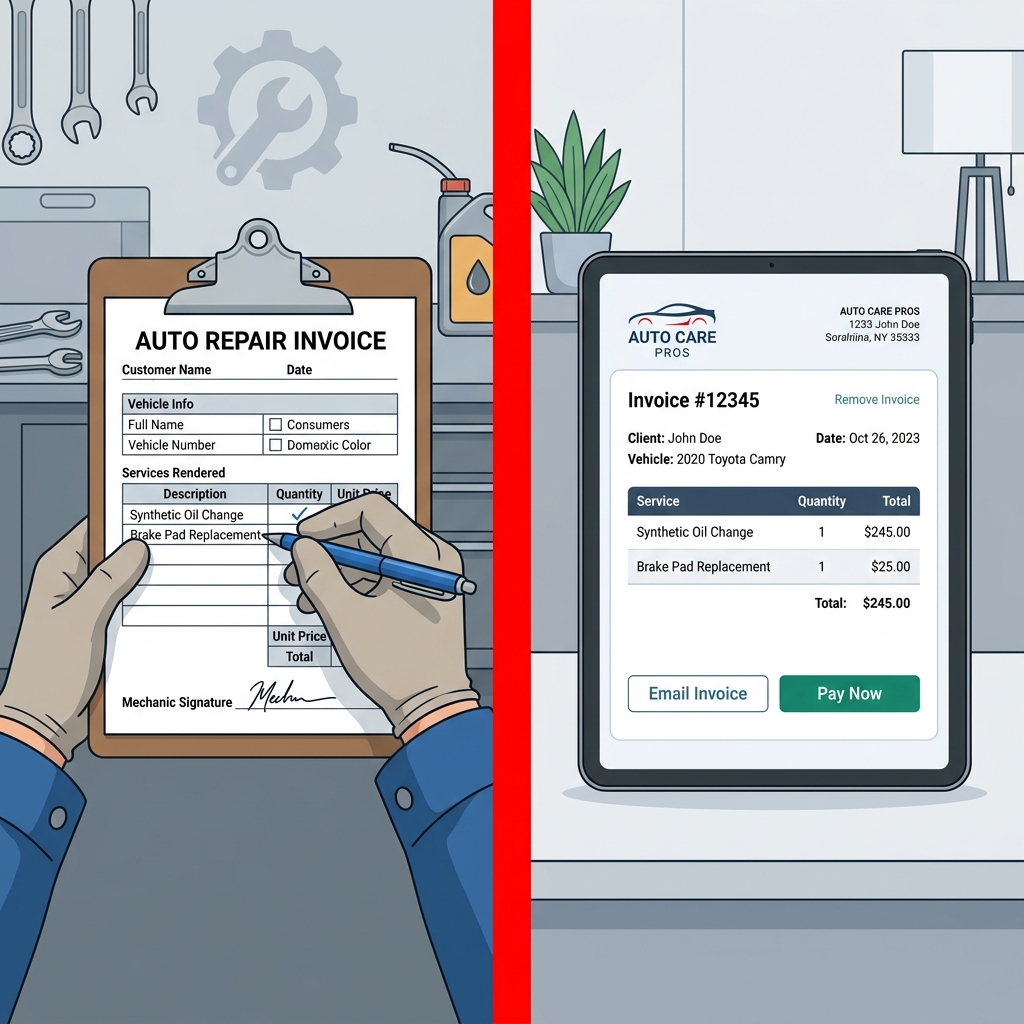
Manual invoicing — paper forms, Word templates, or spreadsheets — remains common in independent shops. Digital invoicing software has largely replaced it in higher-volume operations. The difference between the two methods touches every part of shop operations, from how long it takes to write up a job to how quickly a customer pays.
The Core Differences
Manual invoicing means creating each invoice by hand or from a static template. Every field — customer name, VIN, labor description, parts, tax calculation — is entered separately, with no connection to other shop data. Digital invoicing pulls information from a central database: customer records, vehicle history, parts catalogs, and labor times populate automatically.
Shops that switch from paper to digital invoicing report saving an average of 8–15 admin hours per week, according to industry surveys of small auto repair businesses.
The practical gap between the two systems is widest in three areas: accuracy, speed, and payment collection.
Detailed Comparison Table
| Factor | Manual (Paper/Spreadsheet) | Digital Invoicing Software |
|---|---|---|
| Invoice creation time | 15–30 minutes per job | 2–5 minutes with auto-populated fields |
| Calculation errors | High risk — manual math | Near-zero — automated totals and tax |
| Parts pricing | Requires manual lookup and entry | Pulls live supplier pricing in real time |
| Labor time accuracy | Relies on technician memory or printed guides | Integrated labor time databases |
| Payment speed | Cheque or cash; often delayed | Online payment links sent by text or email |
| Customer records | Separate filing system required | Stored automatically, searchable by name, plate, or VIN |
| Vehicle history | Paper folder per vehicle | Full digital history accessible instantly |
| Dispute resolution | Difficult — relies on paper trail | Easy — full audit trail with timestamps |
| Invoice duplication | Manual retyping required | One-click copy or template reuse |
| Storage and retrieval | Physical filing cabinets | Cloud-based, searchable by any field |
| Cost | Near zero (paper, printer) | Monthly subscription fee |
| Learning curve | None | Moderate — 1–4 weeks depending on platform |
Accuracy and Error Rate
Manual invoicing carries a measurable error risk., manual data entry errors affect approximately 3.6% of paper invoices. In a shop writing 20 invoices per week, that translates to roughly 37 incorrect invoices per month — each one a potential customer dispute or lost revenue.
Common manual errors include transposed part numbers, incorrect tax rates, and missed labor line items. Digital systems enforce consistent formatting and calculate all totals automatically, eliminating these categories of error entirely.
Payment Speed
Manual invoices are typically handed to the customer at pickup, which limits payment to cash or cheque at the counter. Digital systems generate a shareable invoice link that customers can pay by card or bank transfer before they arrive — or from their phone after they leave.
Businesses that send digital invoices with embedded payment links are paid an average of 14 days faster than those relying on paper invoices, according to data from payment platform.
For a shop carrying receivables on dozens of jobs, that speed difference has a direct effect on cash flow.
Record-Keeping and Compliance
Manual records degrade over time. Paper fades, files get mislabeled, and spreadsheets break when staff leave. Regulatory requirements in many jurisdictions — including itemized parts and labor disclosure — are difficult to prove from memory or reconstructed records.
Digital systems create a timestamped, searchable archive of every invoice, estimate, and payment. In the event of a warranty dispute or tax audit, the full record is retrievable in seconds. This is particularly relevant for shops that handle fleet accounts or insurance work, where documentation requirements are strict.
Honest Limitations of Digital Invoicing
Digital invoicing is not without drawbacks. Monthly subscription costs range from roughly $50 to $300+ per month depending on the platform and feature set. For a very low-volume shop — fewer than five jobs per week — the return on that cost may take time to materialize.
There is also a learning curve. Staff accustomed to paper systems need time to adapt to new workflows. In practice, most shops reach full proficiency within two to four weeks, but the transition period requires active management. Poorly configured software — with incorrect tax rates or missing parts markups — can create errors that are harder to detect than obvious manual mistakes.
When Manual Invoicing Still Makes Sense
For sole operators doing occasional work — a side business or hobby shop — a simple spreadsheet or free template may be sufficient. The provides structured formats that reduce the risk of missing fields without requiring a software subscription.
For any shop operating as a primary business, processing more than ten jobs per week, or managing multiple technicians, the time and accuracy costs of manual invoicing typically exceed the cost of a digital solution within the first few months of operation.
The next step — choosing the right software — requires evaluating which features actually matter for an auto repair environment, since general-purpose invoicing tools lack the parts integration, vehicle lookup, and inspection workflows that shop-specific platforms provide.
5. How to Choose Garage Invoice Software (and What RedAppy Offers)
Choosing garage invoice software means evaluating tools against the specific demands of an auto repair workflow — not just generic billing features. The right platform reduces admin time, integrates with parts ordering, and gets invoices to customers faster.
Key Criteria for Evaluating Garage Invoice Software
Not all invoicing software is built for automotive repair. A tool designed for general contractors or freelancers will lack the fields, integrations, and workflows that a shop actually needs.
Evaluate any platform against these criteria before committing:
- Ease of use — Can a service advisor create and send an invoice in under two minutes? A steep learning curve costs time and creates adoption resistance among staff.
- Estimate-to-invoice conversion — The software should convert an approved estimate into a final invoice without re-entering data. Manual re-entry is where errors occur.
- Parts ordering integration — In-platform access to parts suppliers with real-time pricing eliminates the need to cross-reference external catalogs and then manually enter part numbers and costs.
- Digital inspections — Photo-rich inspection reports that attach directly to the invoice increase customer approval rates and create a documented record of vehicle condition.
- Payment processing — Online payment links embedded in the invoice reduce collection time. According to, online invoices are paid an average of 11 days faster than paper invoices.
- Customer and vehicle management — Lookup by name, plate, or VIN should be instant. A shop processing 20+ repair orders per day cannot afford to manually search records.
- Pricing model — Month-to-month terms reduce risk for shops that are evaluating tools or experiencing seasonal revenue changes. Long-term contracts with large upfront costs create unnecessary financial exposure.
- Scalability — The platform should handle a single-bay garage and a multi-location operation without requiring a different product at each stage.
Software that handles estimates, inspections, and invoicing in one place eliminates the data handoffs where errors and delays are most likely to occur.
What RedAppy Offers
RedAppy is an all-in-one shop management platform built specifically for auto repair businesses. It addresses the full invoicing workflow — from the first customer call to final payment — without requiring third-party integrations for core functions.
One-click invoicing and estimate conversion. RedAppy converts an approved estimate into a finalized invoice in a single action. There is no re-entry of labor lines, part numbers, or customer details. This directly eliminates one of the most common sources of billing errors identified in the previous section.
Parts ordering across multiple suppliers. The platform provides real-time inventory and pricing from multiple parts suppliers within the same interface. Service advisors can source, price, and add parts to an invoice without leaving the platform. This is a significant operational advantage over general-purpose invoicing tools that have no parts catalog awareness.
Digital inspections linked to invoices. RedAppy's digital inspection tool captures photos and condition notes that attach directly to the repair order. Customers receive a transparent, visual record of what was found and what was fixed — which supports faster work approval and reduces invoice disputes.
Online payments. Invoices sent through RedAppy include embedded online payment options. Shops report faster collection times compared to paper invoices or payment-on-pickup workflows. This aligns with showing accelerating consumer preference for online payment methods.
Customer and vehicle lookup. Records are searchable by customer name, license plate, or VIN. Vehicle history is centralized, so any team member can pull a full service record instantly — useful when a returning customer calls about a previous repair.
AI Repair Assistant. RedAppy includes a built-in AI tool that provides labor time estimates, diagnostic guidance, and shop performance insights on demand. This supports accurate labor pricing directly at the point of invoice creation.
Analytics and reporting. Real-time dashboards track revenue, average repair order value, technician efficiency, and repeat business. These metrics help shops identify whether invoicing practices — such as incomplete service recommendations or low parts margins — are affecting revenue.
Feature Comparison: General Invoicing Tools vs. Auto Repair Platforms vs. RedAppy
| Feature | General Invoicing Software | Generic Shop Software | RedAppy |
|---|---|---|---|
| Estimate-to-invoice conversion | Limited | Yes | Yes (one-click) |
| Parts supplier integration | No | Sometimes | Yes (multi-supplier, real-time) |
| Digital inspections with photos | No | Sometimes | Yes |
| VIN / plate customer lookup | No | Yes | Yes |
| Online payment processing | Yes | Sometimes | Yes |
| AI labor time guidance | No | Rarely | Yes |
| Vehicle service history | No | Yes | Yes |
| Kanban job tracking board | No | Rarely | Yes |
| Branded shop website included | No | No | Yes |
| Month-to-month pricing | Varies | Rarely | Yes |
| Scalable to multi-location | Varies | Varies | Yes |
Pricing and Scalability Considerations
RedAppy operates on transparent, month-to-month subscription terms. There are no long-term contracts, which lowers the risk for shops evaluating the platform. The system scales from single-bay independent garages to multi-location operations without requiring a platform change.
In practice, shops report saving 10+ admin hours per week after moving to RedAppy — time previously spent on manual data entry, parts lookups, and chasing payments. Every subscription also includes a professional, branded website with contact forms, which supports customer acquisition alongside back-office efficiency.
A platform that handles inspections, estimates, invoicing, parts ordering, and payments in one place is not just a billing tool — it functions as operational infrastructure for the entire shop.
For shops comparing options, the critical question is not which tool produces the cheapest invoice, but which tool reduces the total cost of managing repair orders from intake to payment. Platforms like RedAppy are purpose-built to answer that question for auto repair specifically. For a step-by-step walkthrough of creating an invoice using both manual and digital methods, see how to create a garage invoice.
Conclusion
A professional garage invoice is more than a payment request. It is a legal record, a trust signal, and an operational tool — all in one document. How well a shop manages invoicing directly affects cash flow, dispute resolution, and customer retention.
The case for moving from manual to digital invoicing is straightforward. Manual processes introduce errors, slow payment cycles, and consume admin time that could be spent on billable work. According to, businesses that send digital invoices get paid up to twice as fast as those using paper-based methods. For a shop processing dozens of repair orders per week, that difference compounds quickly.
A single missed payment term or vague labor description can turn a profitable repair order into a collections problem or a customer dispute.
Digital invoicing closes those gaps. One-click invoice generation, integrated parts pricing, automatic tax calculation, and online payment links remove the manual steps where errors occur. The result is faster payment, cleaner records, and a more professional experience for the customer.
What to Prioritize Going Forward
If your shop is still using paper or spreadsheet invoicing, the most effective first step is standardizing your invoice format — even before switching tools. Every invoice should include:
- Full vehicle identification (VIN, make, model, year, mileage)
- Itemized labor with hours and rate
- Parts with part numbers and markup
- Payment terms and due date
- Warranty disclaimer
Once a standard format is in place, transitioning to shop management software becomes easier because the data structure is already defined.
Choosing the Right Tool for Your Shop Size
Not every shop needs enterprise-level software. The right tool depends on invoice volume, team size, and workflow complexity.
| Shop Type | Recommended Approach |
|---|---|
| Single-bay, low volume | Structured template or entry-level invoicing app |
| Independent shop, 2–5 bays | Purpose-built shop management software |
| Multi-location operation | Full platform with analytics and team management |
For independent and growing shops, a purpose-built platform eliminates the need to stitch together separate tools for invoicing, parts ordering, inspections, and payments. RedAppy is built specifically for this use case — combining one-click invoicing, estimate-to-invoice conversion, integrated parts ordering, and online payment processing in a single platform with month-to-month pricing and no long-term contracts.
Shops that consolidate invoicing, inspections, and parts ordering into one system typically recover more billable labor simply because nothing falls through the cracks.
From experience, the shops that see the strongest return on digital invoicing are those that also use it to close the loop with customers — sending photo-rich inspection reports alongside estimates, then converting approved work into a final invoice with a single click. That workflow, from digital inspection to online payment, is where modern shop management platforms deliver the most measurable value.
The shop management software market continues to mature, and the tools available today are far more accessible than they were five years ago. For most independent shops, the question is no longer whether to switch to digital invoicing — it is which platform fits the way the shop already works.
Frequently Asked Questions
What are the three types of invoices?
The three main types of invoices are standard invoices (the most common, detailing products or services rendered), proforma invoices (preliminary bills sent before work is completed), and credit invoices (issued to reflect refunds or adjustments to a previous charge). For garages specifically, standard and proforma invoices are used most frequently during the repair and estimation process.
What is the best billing software for a garage?
Leading billing software options for garages include Garage Hive, AutoLeap, and Mitchells & Butlers' GarageManager, with AutoLeap rated highly for its all-in-one job management and invoicing features. The best choice depends on shop size, with smaller garages often preferring simpler tools like Invoice Ninja or QuickBooks due to lower costs and ease of use.
Is there a good app for mechanic invoices?
Apps like AutoLeap, Tekmetric, and RepairShopr are well-regarded mechanic invoice apps, offering features such as digital job cards, parts tracking, labor time calculations, and customer-facing invoice delivery. Many offer free trials, with RepairShopr starting at around $49/month for small shops.
How can I create a free car invoice?
Free car invoices can be created using templates available on platforms like Invoice Simple, Zoho Invoice, or Microsoft Office, which offer downloadable and customizable garage invoice templates at no cost. Simply input your business details, labor charges, parts costs, and customer information, then export or email the finished invoice directly to your client.
Ready to Transform Your Shop?
RedAppy helps auto repair shops create professional digital estimates with photos and videos, send them instantly via text or email, and get customer approvals in seconds. No credit card required to start.