
How Winning Auto Repair Shops Stay on Top in 2026
Top shops stay competitive by replacing reactive chaos with proactive scheduling, and the strongest operators reach 85%+ labor utilization and 100%+ technician efficiency, with exceptional shops reaching 120%+ efficiency. Digital team scheduling makes that possible by assigning the right work to the right people before the day gets away from the front desk.
Monday morning usually exposes the problem. The phone rings with an emergency brake concern while two technicians are already behind, a service advisor searches several supplier portals for a part, and a whiteboard fills with arrows, crossed-out appointments, and unanswered questions. The shop may have enough demand, but demand alone doesn't create profitable growth. The team needs a reliable way to control capacity, communicate changes, and keep every vehicle moving.
That matters in a market where independent repair shops have room to grow. The U.S. Government Accountability Office reported that independent shop revenue grew about 43% from 2014 to 2022, according to the. The lesson isn't to bring in more cars. Shops scale when they capture demand, protect customer trust, and convert available labor into completed work without letting the operation collapse into improvisation.
Table of Contents
- The Chaos That Keeps Shops From Scaling
- Understanding Team Calendar Software for Auto Shops
- Manual Scheduling versus Digital Efficiency
- Key Performance Indicators for Scheduled Shops
- Implementing Team Calendar Software Successfully
- Integrating Scheduling into Complete Shop Management
- Common Mistakes to Avoid When Scheduling Digitally
The Chaos That Keeps Shops From Scaling
At 7:45, the first customer arrives early. One technician is waiting for a diagnostic decision, another vehicle is still occupying a lift, and the service advisor is handling a call while checking on a replacement sensor. Then someone asks whether the car will be ready by lunch.
That morning is rarely caused by a lack of demand. It usually starts with a schedule that records appointments without showing the constraints behind them. A paper book cannot confirm that the right technician, bay, equipment, and parts are available together. A whiteboard shows jobs but cannot alert the team when a diagnosis changes the plan. The owner fills every communication gap and becomes the bottleneck.

Why demand doesn't equal growth
A full parking lot can conceal weak scheduling. Vehicles wait for approvals, technicians search for information, and advisors promise completion times without seeing the live workload. The shop looks busy while billed hours fall short of the labor time available.
Independent repair shops provide roughly 80% of overall automotive repair capacity, with about 270,300 shops employing about 967,000 auto technicians in the United States, according to the. That scale also creates fragmentation. Without a shared schedule, small delays spread across bays, technicians, parts coordination, and customer updates.
Practical rule: A schedule should show who can do the work, where it will happen, and what must happen next.
Marketing can fill an empty bay, but it cannot correct a broken workflow. Owners assessing should compare incoming demand with technician hours, bay availability, and parts timing. Otherwise, more calls produce longer waits, missed promises, and staff frustration.
Team scheduling software gives the advisor a live view before those problems reach the customer. The team can assign work by skill, reserve the required resources, mark blocked time, and share changes as soon as a diagnosis or parts delay alters the plan. Surprises will still happen. They no longer have to disrupt the entire shop.
Understanding Team Calendar Software for Auto Shops
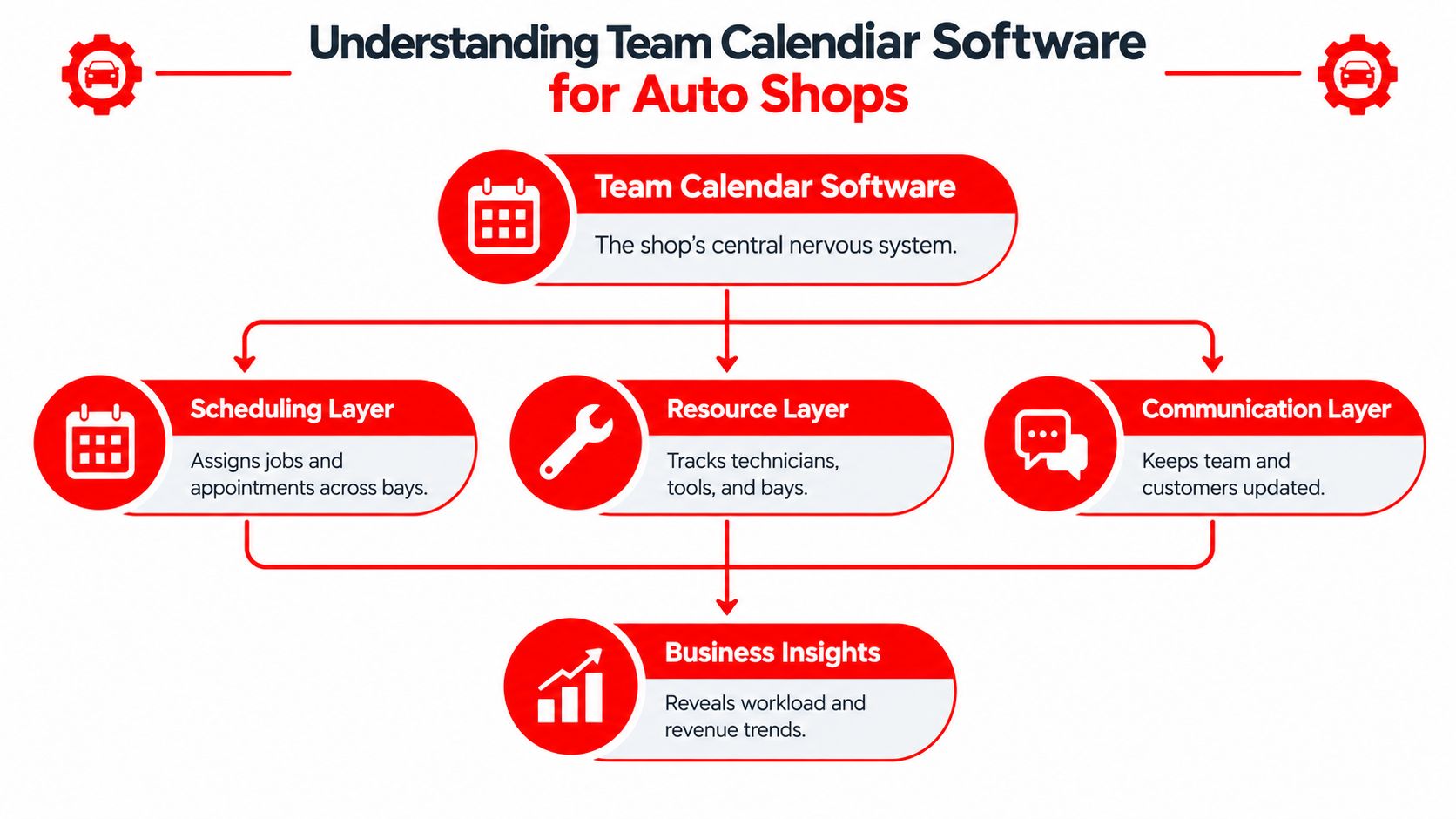
Team calendar software is more than an electronic appointment book. It acts as a shared operating view that connects appointments, technicians, bays, equipment, parts status, customer updates, and job progress.
Assign work against real capacity
The first requirement is skill-aware scheduling. A brake service, electrical diagnosis, alignment, and advanced driver assistance system procedure shouldn't be treated as identical calendar blocks. The advisor needs to match the job with a technician who has the required capability, then reserve the appropriate bay or equipment.
Resource allocation prevents a different kind of bottleneck. If two appointments require the same diagnostic tool or lift, the calendar should expose that conflict before both vehicles arrive. The software also needs to show blocked time for training, parts delays, inspections, and promised completion work.
Conflict management matters because a double-booking isn't just an administrative error. It creates a customer promise the shop can't keep and forces technicians to switch between jobs. A visible calendar lets the team move an appointment, assign another resource, or set a more realistic completion window.
Keep the whole team aligned
Mobile access allows technicians and foremen to see changes without waiting for a paper update or a walk across the shop. Recurring maintenance work can be tracked consistently, while integrations with shop management, parts ordering, and invoicing reduce duplicate entry.
Customer communication belongs inside the workflow. Consumer Reports found that 85% of surveyed customers said the initial problem was fixed the first time, 68% said the repair was completed in a day or less, and 91% said the work finished within the timeframe the shop originally predicted, as reported in this. A calendar won't create trust by itself, but it helps the shop make promises based on visible capacity and update customers when the plan changes.
The practical test is simple. If the advisor, technician, and owner see different versions of the day, the shop doesn't have a scheduling system. It has several disconnected reminders.
Manual Scheduling versus Digital Efficiency
Manual scheduling looks flexible until several people change the plan at once. A technician hears a verbal reassignment, an advisor writes a different note, and the owner works from an outdated appointment book. The problem is not the paper itself. It is the absence of one current operating record.
Digital scheduling gives the team a shared view of each job, including the assigned technician, expected duration, required resources, status, and next action. Changes remain visible, so accountability does not depend on who happened to hear a hallway conversation.
| Metric | Manual Methods | Digital Systems |
|---|---|---|
| Job assignment | Relies on memory, paper notes, or verbal updates | Matches work with technician skills and available resources |
| Schedule changes | Staff repeat the change to everyone affected | Updates appear in the shared workflow |
| Bay and equipment use | Conflicts emerge after the vehicle arrives | Resources can be reserved before the appointment |
| Customer promises | Based on judgment without current capacity | Based on workload and job progress |
| Performance review | Owners reconstruct events afterward | Managers compare planned and completed work |
The productivity difference
Industry benchmarks commonly place strong shops at 85%+ labor utilization and technicians at 100%+ efficiency. Exceptional performance can reach 120%+ efficiency, as described in these. Technician efficiency compares billed hours with actual hours worked, which makes scheduling a direct operating factor. Less waiting, searching, and unnecessary reassignment gives a technician more time to produce billed work during the same shift.
Those figures are targets, not guarantees. A calendar configured with inaccurate job times or incomplete resource rules can reproduce manual confusion in digital form. The benefit appears when the schedule reflects the work required and the front desk treats it as the shop's current source of truth.
The setup also requires judgment. A system may assign work efficiently on paper while ignoring a technician's diagnostic strength, a bay's equipment limits, or the time needed for a difficult repair. Managers still need to review exceptions and adjust the plan.
Paper notes remain useful for quick floor reminders and contingency plans. They become a liability when they are the only method for coordinating technicians, bays, suppliers, and customer commitments.
Key Performance Indicators for Scheduled Shops
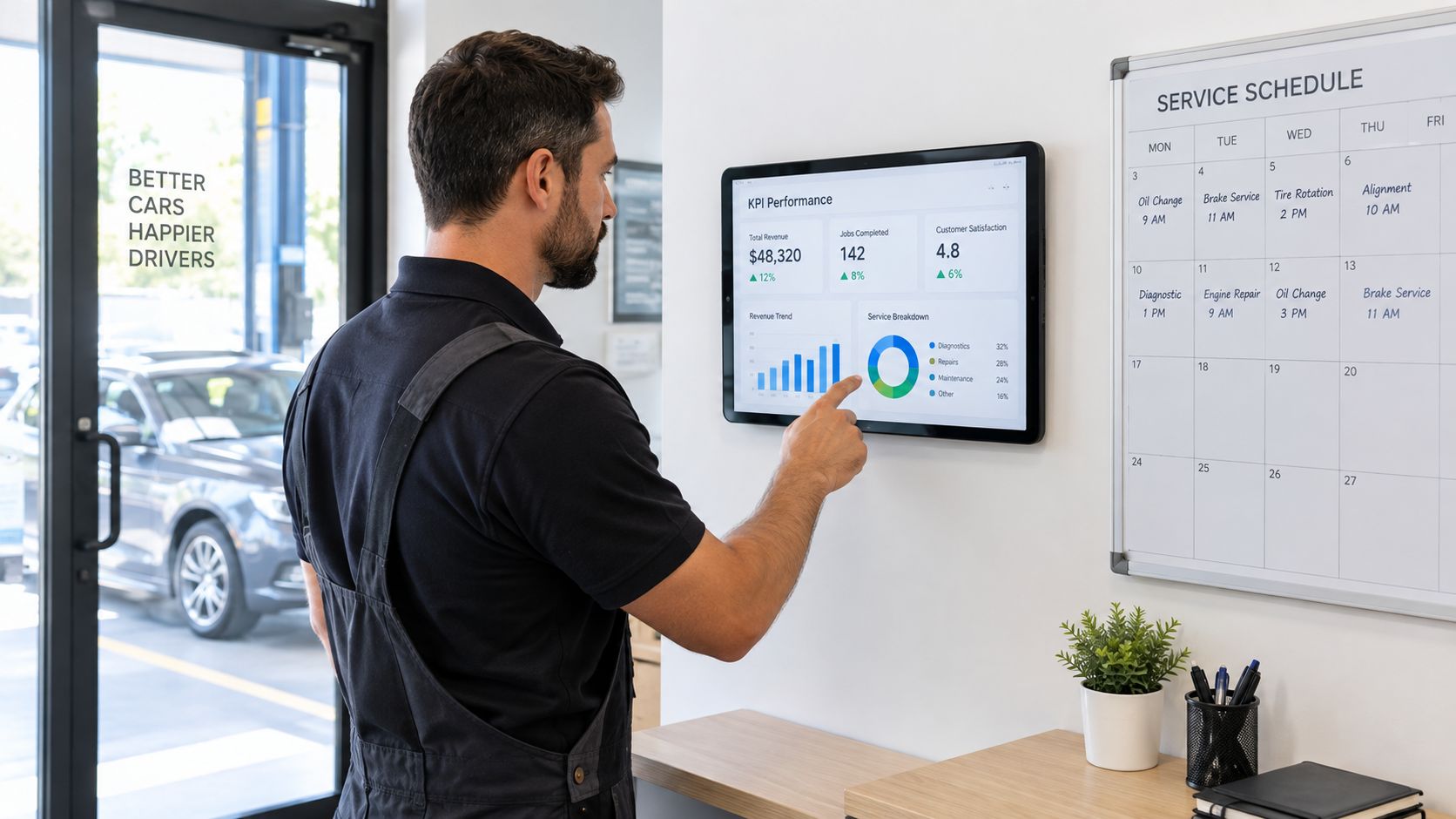
A full calendar does not prove a shop is running well. Managers need KPIs that connect staffing and appointment decisions with completed work, revenue, and customer promises.
Measure the schedule's financial effect
Track labor utilization and technician efficiency as operating signals, but avoid treating either figure as a verdict on a person. Utilization shows whether available shop time becomes productive work. Efficiency compares billed hours with actual hours worked. The places these measures alongside effective labor rate, Average Repair Order, and gross profit per hour.
A weak result can have several causes: open appointment gaps, parts delays, unsuitable assignments, repeated interruptions, or difficult diagnosis. Compare the KPI with the calendar record and the repair order before changing staffing or pressuring a technician. The schedule should help identify the constraint, not hide it behind a single score.
ARO adds a customer-level view of performance. It is total revenue divided by vehicles serviced. For example, if a shop produces $18,500 in weekly revenue from 42 repair orders, its ARO is about $440. Review that figure with car count, because revenue may increase through more visits, larger repairs, or both. The also identifies this calculation as a useful shop management measure.
Gross profit per hour helps expose a different scheduling problem. A busy bay can still produce weak returns if the work consumes too much time, requires repeated handling, or carries a poor margin. Compare profitable hours with the jobs and technician capacity that filled them, then adjust appointment mix where the pattern persists.
Customer measures keep financial KPIs honest. First-time fixes, turnaround, and promise accuracy show whether the schedule is serving customers or merely filling bays. A calendar that accepts more work than the team can finish transfers the cost to advisors, technicians, and waiting customers.
A useful management habit: Compare planned appointments with completed work and the reason for every major variance.
Review trends by technician, job type, bay, and delay reason. The goal is to correct repeatable constraints through better scheduling, training, equipment, or communication, rather than punish one difficult repair.
Implementing Team Calendar Software Successfully
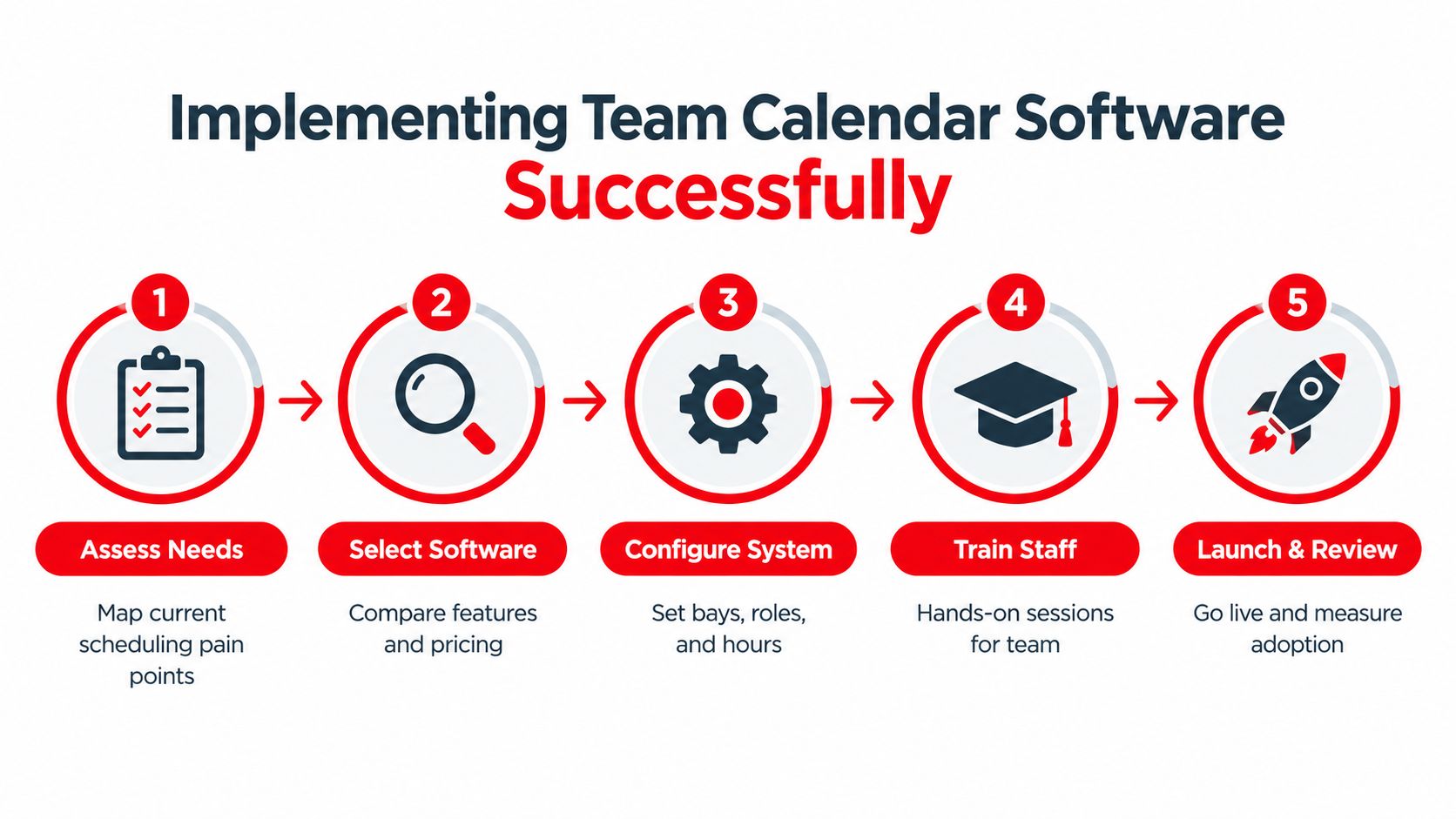
A digital calendar works when it mirrors the shop's real workflow. Implementation should begin with observation, not software configuration.
Map the current bottlenecks
List where appointments break down. Common examples include double-booked lifts, diagnostic jobs assigned without the right tools, parts delays that aren't visible to advisors, and customers promised completion times without checking technician availability.
Then define the minimum information every appointment needs. That may include vehicle details, concern, estimated labor, required skill, bay type, parts status, approval status, and promised time. A short, consistent record is more useful than a complicated form nobody completes.
Configure around the floor
Set up technicians, roles, bays, working hours, unavailable time, and common job categories. Avoid pretending every job takes the same time. Use realistic estimates and leave room for inspection, diagnosis, approval, and parts handling where those steps regularly affect the day.
A pilot with one advisor, a small group of technicians, or one service lane can expose problems before the entire shop depends on the new process. The team should test appointment creation, reassignment, mobile updates, customer notifications, and schedule changes.
Train for decisions, not buttons
Technicians need to know how to view assignments, update status, flag delays, and record what the next person needs. Advisors need a clear rule for when to move a job, revise a promise, request approval, or contact a customer. Owners should review adoption through completed workflow steps, not login counts.
The transition also needs a cutoff point. If staff keep a paper schedule “just in case” indefinitely, the shop maintains two conflicting systems. A brief fallback period can protect operations, but the team should decide which record controls each appointment.
Change sticks when the system removes work. If staff must enter the same job in several places, adoption will fade regardless of the training quality.
Review the first operational results with the team. Ask which delays the calendar exposed, which fields were unnecessary, and where a schedule change still required a phone call. Adjust the workflow while the experience is fresh.
Integrating Scheduling into Complete Shop Management
Scheduling becomes more valuable when it connects to the rest of the repair order. A vehicle shouldn't move through separate islands of appointments, inspections, estimates, parts, invoices, and payments. Each handoff creates an opportunity for missing information or delayed action.
A connected workflow starts when the customer contacts the shop. The advisor creates the repair order, assigns a preliminary slot, and records the concern. After check-in, the technician completes a digital inspection, attaches photos or videos, and sends recommendations for approval. Once the customer responds, the schedule can reflect the actual scope of work instead of the original assumption.
Digital inspection evidence supports that approval process. One industry source reports typical approval rates of about 45% to 55% without a consistent DVI process and about 65% to 75% with one, particularly when the report is sent quickly and tied to the estimate and approval workflow, according to.
Connect the job to the next action
Parts ordering should update the team's expectations. If a required part is unavailable, the advisor needs to know before promising completion. When the part arrives, the job can move from waiting to scheduled work without forcing staff to search through messages or memory.
A visual board helps the team see whether a vehicle is checked in, awaiting diagnosis, waiting for approval, waiting for parts, in repair, ready for inspection, or ready for payment. That visibility supports better decisions because the front desk can distinguish a full schedule from a collection of stalled jobs.
RedAppy provides this kind of connected workflow through a team calendar, a Kanban-style Digital Shop Board, digital inspections with photos and videos, instant estimates, invoicing, online payments, parts ordering, and analytics. The platform also includes vehicle history and customer lookup by name, plate, or VIN, so advisors can work from one customer and vehicle record rather than several disconnected tools.
The important trade-off is integration depth. Adding separate applications may provide specialized features, but staff then carry the burden of keeping records synchronized. A broader platform may reduce duplicate entry, provided it fits the shop's actual processes and gives each role a clear daily workflow.
The final payment should be part of the same chain as the original appointment. When the repair order, approval, schedule, invoice, and payment status stay connected, the shop can identify the actual cause of delay instead of blaming the calendar for every missed promise.
Common Mistakes to Avoid When Scheduling Digitally
Digital scheduling doesn't fix unclear operating rules. It can expose them faster.
The first mistake is building an elaborate workflow before the team understands the basic one. If every job requires excessive fields, several status changes, and duplicate notes, advisors will take shortcuts. Start with the information needed to assign, progress, approve, and complete the work.
The second is treating technician training as a software demonstration. A technician doesn't need a tour of every setting. The technician needs to know how to find the next job, report a delay, document a finding, and hand the vehicle back to the advisor.
Avoid these operating traps
- Overbooking for appearance: A full calendar means little if technicians can't complete promised work. Protect capacity for diagnosis, approvals, parts delays, and difficult repairs.
- Ignoring resource conflicts: Assigning two jobs to one lift or tool creates a physical bottleneck that no digital interface can hide.
- Leaving changes undocumented: Verbal schedule changes create different versions of the day. Require the person making the change to update the shared record.
- Skipping customer updates: Customers lose confidence when the shop knows about a delay but doesn't communicate it. The schedule should trigger a clear owner for that message.
- Measuring logins instead of outcomes: Adoption should be judged through accurate status updates, fewer avoidable conflicts, and better alignment between promised and completed work.
The final mistake is expecting the calendar to replace judgment. Experienced advisors still need to assess urgency, customer needs, diagnostic uncertainty, and technician capability. Software supplies visibility and consistency. People still make the service decision.
RedAppy connects team scheduling with digital inspections, estimates, parts ordering, invoices, payments, a visual shop board, and performance analytics in one shop management workflow. Visit RedAppy to see the available features, then contact the team through the RedAppy contact page to discuss how the system can fit the shop's current operation.
Ready to Transform Your Shop?
RedAppy helps auto repair shops create professional digital estimates with photos and videos, send them instantly via text or email, and get customer approvals in seconds. No credit card required to start.