
Implementation Best Practices for Auto Shops
Monday morning starts with a technician waiting for a parts lookup, a service advisor apologizing for an estimate delay, and an owner staring at two screens showing the same repair order. The new shop software went live, but the old habits came with it. Staff members enter information twice, inspections stay on paper, and nobody knows who has authority to fix the process.
That isn't a software problem alone. A shop management rollout changes how vehicles move, how technicians document work, how advisors sell repairs, and how parts reach the bay. The strongest implementation best practices treat the rollout as an operational change with a named owner, staged training, measurable decisions, and protected time after go-live.
Table of Contents
- Why Implementation Breaks and What to Plan Around
- Pre-Launch Planning and Stakeholder Roles
- Data Cleanup and Migration Done Right
- Configuring Inspections, Parts, and the Kanban Board
- Training, Change Management, and Pilot Rollout
- KPIs, Analytics, and Troubleshooting Pitfalls
- Post-Launch Optimization Checklist
Why Implementation Breaks and What to Plan Around
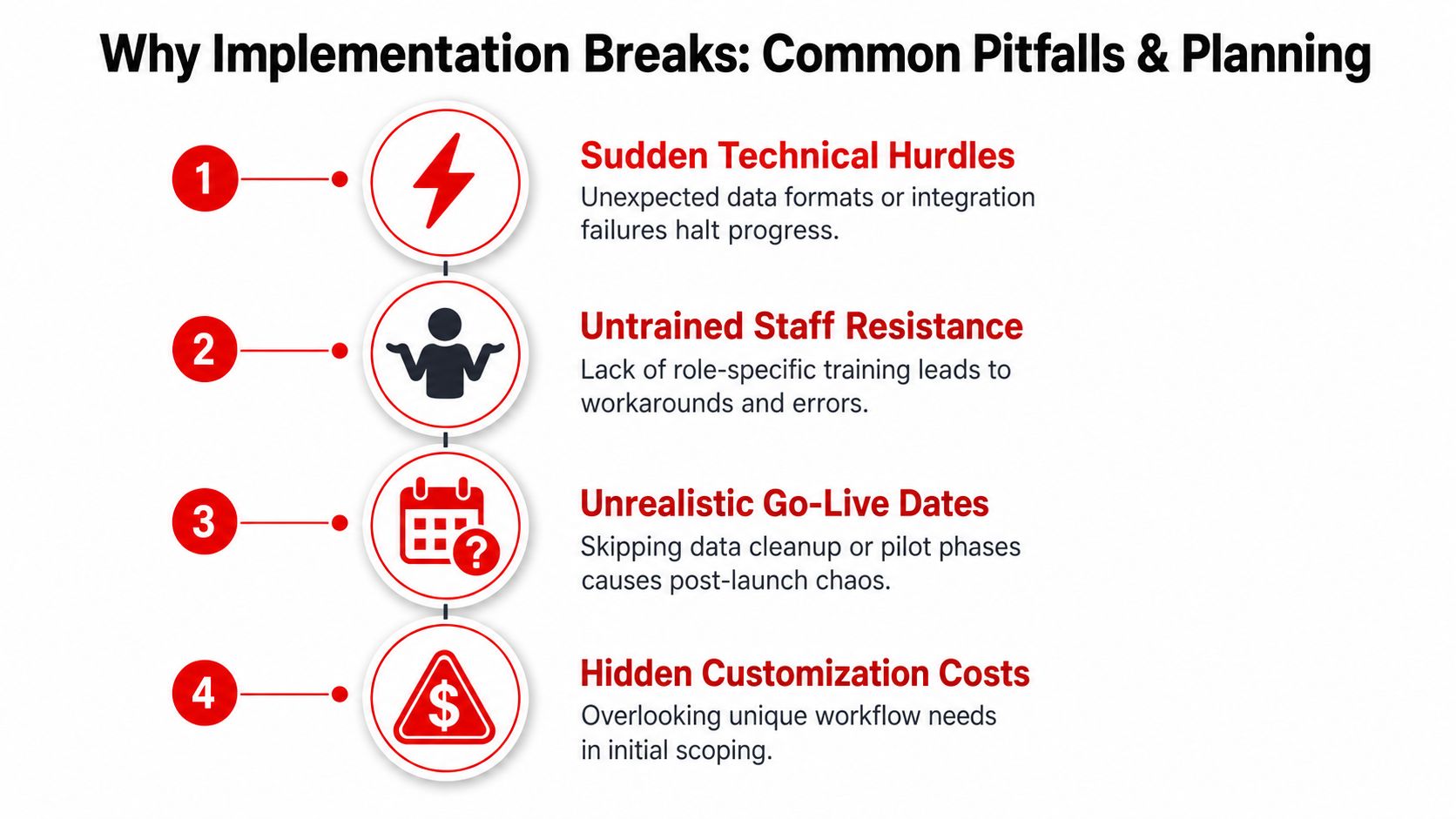
A rollout breaks when the owner treats it like an IT installation. Software can be configured correctly and still fail if technicians aren't trained on tablets, advisors don't trust digital estimates, or parts staff keep using a separate ordering process. The system then becomes another screen instead of the shop's operating method.
The predictable failure modes are easy to recognize:
- Parallel data entry: Staff keep the legacy system open and enter the same customer, vehicle, or repair-order information twice.
- Untrained technicians: Technicians receive a login but no practice with inspections, photos, notes, or status changes.
- No go-live owner: Everyone notices problems, but nobody has authority to assign fixes or reject distractions.
- Rushed migration: Duplicate customers, stale vehicles, incorrect parts pricing, and unfinished repair orders move into the new system.
- Skipped inspection workflow: The shop launches estimates and invoicing first, while the digital inspection process remains undefined.
Why execution deserves more attention
The familiar claim that 70% of change initiatives fail isn't supported by valid empirical evidence. A 2011 academic review found that the narrative lacked a reliable basis and shouldn't be treated as fact. More recent synthesis work, summarized in a, found success rates ranging from about 26% to 33% in McKinsey-style global surveys, around 30% in BCG work, and 12% in a Bain analysis of more than 24,000 initiatives. Only 12% sustained goals for more than three years, while 35% of value loss occurred during implementation.
The practical lesson is blunt. Configuration isn't the finish line, and a launch date isn't proof of adoption.
Practical rule: One named person owns the rollout, the change is staged over 4 to 6 weeks, and the shop protects a 30 to 90 day stabilization window from feature creep and floor-level chaos.
The fixes are straightforward: plan before configuration, clean the data, map the actual workflow, train each role on its daily work, pilot one operating lane, track KPIs, and tune the system only after the team has real usage to evaluate.
Pre-Launch Planning and Stakeholder Roles
The pre-launch sprint should last 2 weeks, with the service manager or owner-operator serving as the single point of accountability. That person doesn't need to perform every task, but must control the schedule, escalate blocked decisions, and stop staff from adding unrelated requests to the rollout.
The owner approves the budget, resolves scope disputes, and makes final decisions. The rollout lead manages the project schedule and vendor communication. The service advisor defines estimate presentation, customer approvals, declined-service follow-up, and payment workflows. The technician lead builds inspection templates and tests tablets or shop-floor devices. The parts manager validates supplier catalogs, pricing, core tracking, and purchase-order routines.
The kickoff checklist
A useful kickoff meeting ends with decisions, not enthusiasm. The team should:
- Confirm vendor scope: Write down included configuration, integrations, migration work, training, and support.
- Lock the go-live date: Choose a slow Monday and protect the preceding week for configuration rather than emergency work.
- Map current workflows on paper: Follow one repair order from phone call to payment, including exceptions such as declined work and backordered parts.
- Identify the pilot bay or shift: Select a manageable lane with staff who can give practical feedback.
- Assign data cleanup owners: Give customer, vehicle, parts, and historical repair-order cleanup to named people.
The week before launch shouldn't become a firefighting week. Block the calendar for rate configuration, tax checks, canned jobs, permissions, supplier connections, device testing, and pilot preparation. A rollout lead who has to squeeze those tasks between customer complaints and technician shortages is already working with an unrealistic plan.
Stakeholder Roles and Duties
| Role | Pre-Launch Responsibility | Go-Live Accountability |
|---|---|---|
| Owner | Approve budget, scope, decisions, and escalation path | Remove blockers and protect the rollout schedule |
| Rollout lead | Maintain schedule and vendor communication | Run issue triage and assign corrective actions |
| Service advisor | Map estimates, approvals, messages, and declined work | Ensure every RO follows the agreed customer workflow |
| Technician lead | Configure inspection templates and test devices | Coach technicians and verify inspection completion |
| Parts manager | Validate vendors, pricing, cores, and catalog data | Monitor ordering, receiving, and parts status |
A clean plan also defines what won't be changed during launch. Custom reports, cosmetic preferences, and nonessential integrations can wait. The first objective is a dependable flow from check-in to checkout.
Data Cleanup and Migration Done Right
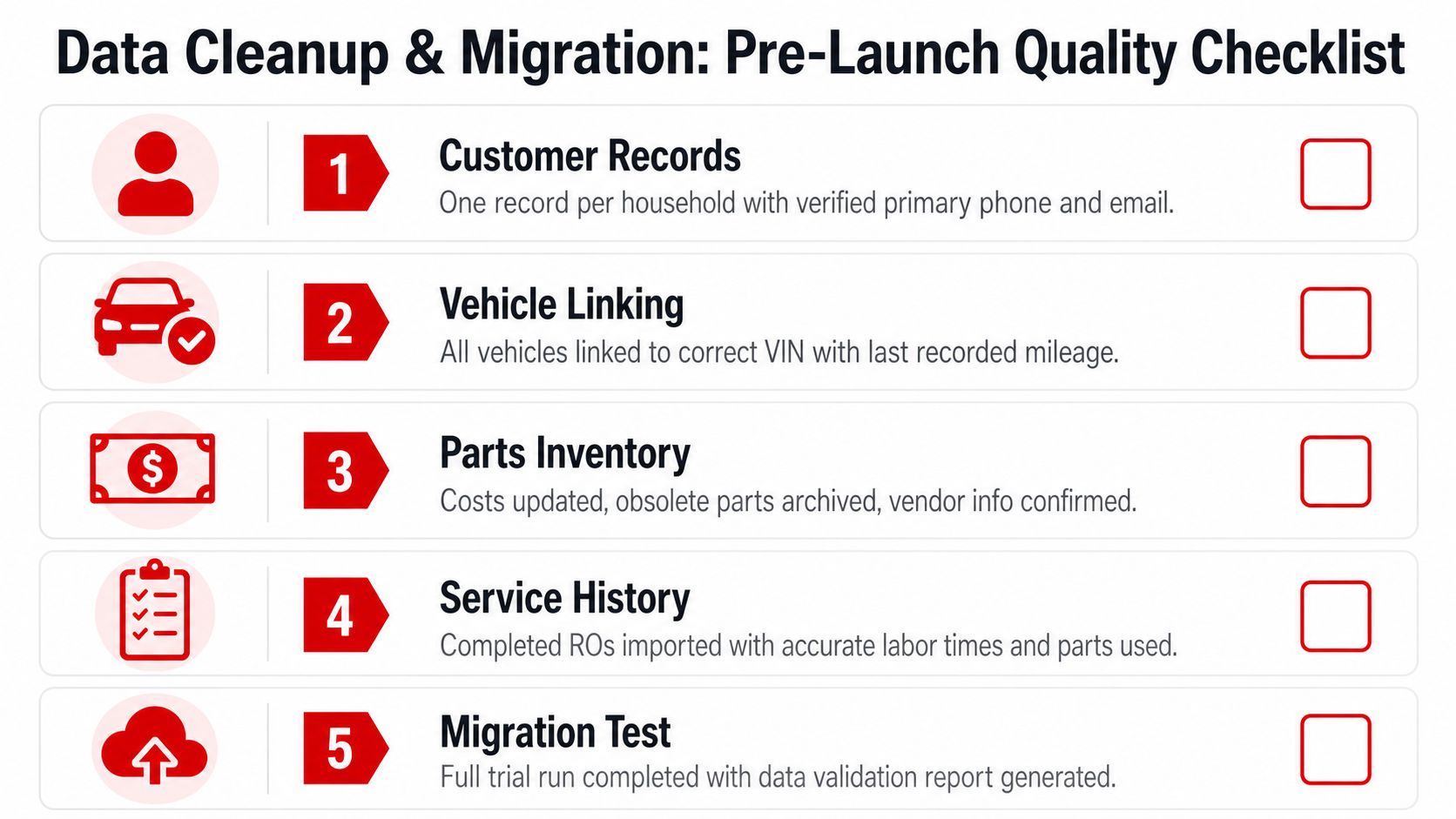
Migration is a data-quality project, not a database copy. A clean customer record means one record per household with a working phone number and email. A clean vehicle record links the vehicle to its VIN and current mileage. A clean parts catalog removes duplicates and connects descriptions to real vendor SKUs.
Historical repair orders need the same discipline. Closed ROs should be archived as history rather than reopened in the new workflow. Open work must be reviewed individually so an unfinished estimate doesn't arrive as a confusing half-completed job.
A shop-level cleanup checklist
Start with customer duplicates. Merge records that belong to the same household, remove placeholder vehicles, and confirm that vehicles are attached to the correct customer. Normalize part descriptions so “front pad,” “front brake pad,” and the supplier's abbreviated description don't create separate internal items.
Then validate the financial settings:
- Labor operations: Confirm labor op codes, labor rates, and canned jobs.
- Tax settings: Verify tax rates and how taxes apply to labor, parts, fees, and sublet work.
- Parts pricing: Check costs, sell prices, markup rules, obsolete parts, and supplier identifiers.
- Accounts receivable: Reconcile past-due invoices and decide which balances migrate.
- History cutoff: Choose whether older history moves into the new system or remains available through an archive.
The migration decision should serve daily work. Technicians need relevant vehicle history, while advisors need accurate customer and repair context. Moving every imperfect record creates clutter that staff will distrust.
Test before cutting over
Run a dry migration into a sandbox. Spot-check 25 random repair orders, confirm that parts pricing rolls correctly into a test estimate, verify labor operations, and inspect customer and vehicle links. The sample should include routine maintenance, diagnostic work, declined work, and an open RO if the system supports it.
Only after the dry run passes should the team schedule the live cutover for the night before go-live. Keep the old system available in read-only mode for lookups, not new data entry. That preserves historical visibility without allowing two competing workflows to survive.
The three signature workflows need their own migration checks. Digital inspections should have the right vehicle systems, parts ordering should use current supplier information, and the Kanban board should display active jobs in the correct starting columns. If any one of those fails, the shop will feel the problem immediately on the floor.
Configuring Inspections, Parts, and the Kanban Board
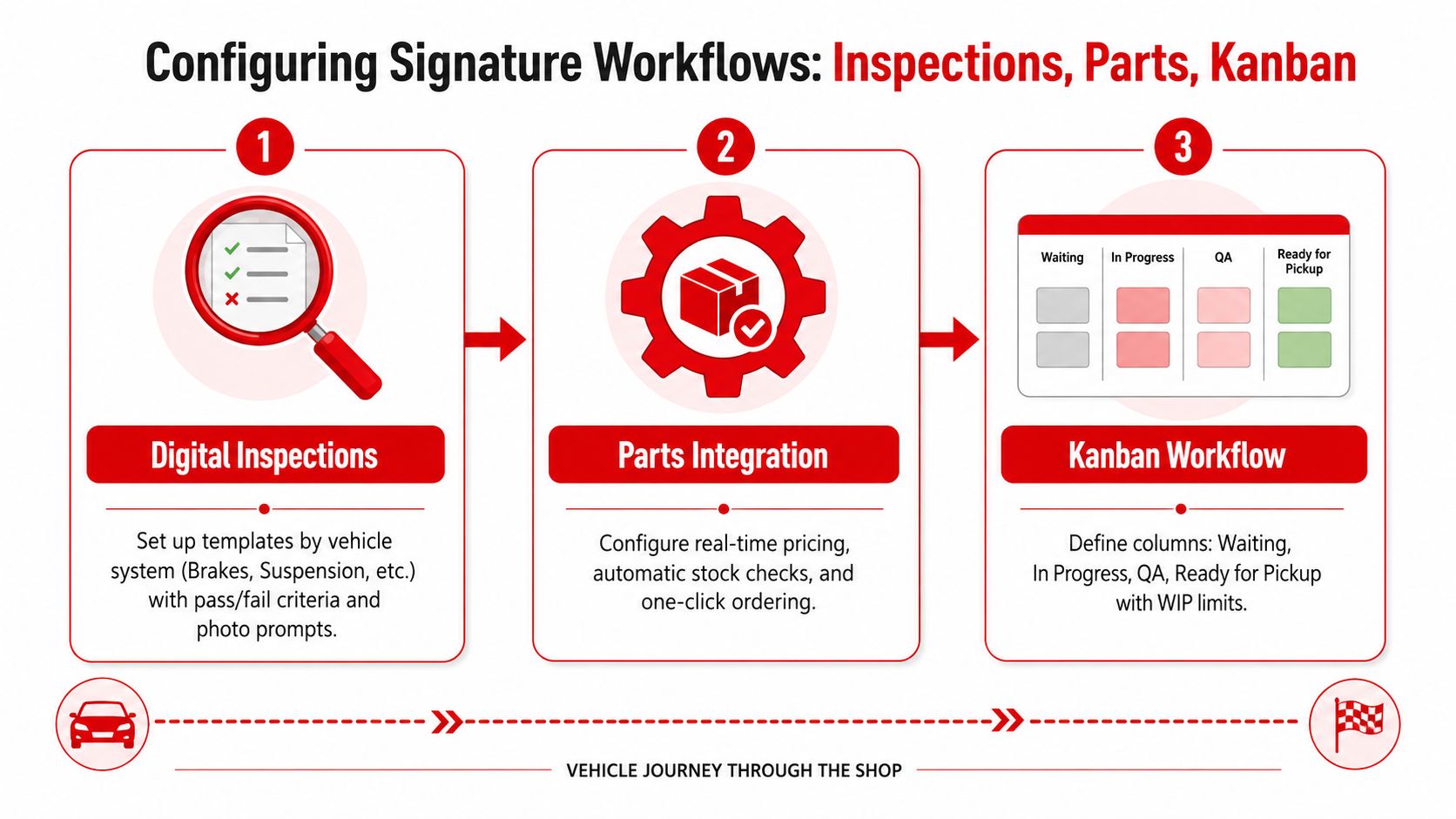
A shop's workflow needs configuration that technicians can recognize at a glance. Generic defaults rarely match the way a real bay operates, so the rollout team should configure three connected workflows, digital inspections, parts ordering, and the Kanban shop board, before asking staff to adopt the system.
Build inspections around decisions
A thorough digital inspection template should cover 50 to 80 items across major vehicle systems, including brakes, tires, suspension, steering, engine, transmission, electrical, fluids, belts, hoses, exhaust, HVAC, lights, and wipers, as outlined in. The template should use consistent green, yellow, and red scoring, with numeric thresholds for measurable items.
Set a practical photo standard of 20 to 25 photos per inspection, beginning with a full walkaround that captures the vehicle's four corners and windshield or glass, following the guidance in this. Require a photo and technician note for every failed item. Decide which red findings attach automatically to an estimate and which require advisor approval.
Speed matters, but rushed documentation creates weak approvals. One industry benchmark cited a 30-minute best-practice inspection time, while a measured median of 21 minutes was about 30% faster. At a shop running 12 inspections per day, that difference was estimated to save about 27 technician-hours per week. The same report found that inspections with 20 or more photos generated repair orders roughly 30% higher than inspections with five or fewer, according to this.
Make parts ordering visible
Configure supplier integrations first, then define a CSV fallback for outages. Set markup tiers by part category, establish technician approval limits, turn on low-stock alerts, and connect those alerts to the parts Kanban. A parts request shouldn't disappear inside an inbox. It should show who requested it, which vehicle needs it, whether it has been ordered, and whether receiving has posted it.
For shops that also manage vehicles outside the repair workflow, a resource on offers useful context on inventory visibility and vehicle records.
Make the board match the bays
Use columns that reflect physical reality:
Intake, Diagnosis, Awaiting Parts, In Repair, Quality Check, Ready for Pickup, and Delivered.
Set work-in-progress limits for each column. Configure automatic card aging with yellow at 24 hours and red at 48 hours, then define pull rules so everyone knows who moves the vehicle next.
A real RO might enter Intake after a morning drop-off, move to Diagnosis when the technician begins testing, shift to Awaiting Parts after the estimate is approved, and move into In Repair when the delivery arrives. After the repair, the technician moves it to Quality Check, the advisor confirms the invoice and customer message, and the vehicle reaches Ready for Pickup before final payment moves it to Delivered. That sequence eliminates the familiar question, “Who has the car now?”
Training, Change Management, and Pilot Rollout
Training should mirror the work, not the software menu. An advisor needs to practice presenting an estimate and following up on declined service. A technician needs to complete a tablet inspection, attach photos, write useful notes, and move the RO to the next board column. A parts employee needs to receive a purchase order and track a core return.
A timed inspection drill is useful because it exposes friction before customers are waiting. The training target should be completing one inspection in under 12 minutes, using the shop's actual template and device. Advisors should practice with prior ROs, not sample records that contain no awkward customer history.
Role-Specific Training Focus and Common Objections
| Role | Training Drill | Workflow Practiced | Common Objection |
|---|---|---|---|
| Service advisor | Present a prior RO estimate and send an approval request | Estimate, approval, declined-service follow-up | “Customers won't open the message.” |
| Service consultant | Dispatch a vehicle and send a customer text | Dispatch screen and customer templates | “The old phone call is faster.” |
| Technician | Complete a timed tablet inspection | Photos, notes, severity, and board status | “Paper was fine.” |
| Parts staff | Receive a PO and record a core return | Supplier ordering and receiving | “The catalog won't match our vendors.” |
| Owner or manager | Review a stalled RO and assign action | Dashboard review and escalation | “Nobody can run this without me.” |
The human objections need names and responses. The senior technician who prefers the old method needs a short, supervised job using the new inspection template. The advisor worried that automation will create unwanted upsells needs control over approval rules and a clear distinction between a recommendation and an automatic sale. The owner who keeps micromanaging needs a rollout lead with authority to run the issue queue.
Pilot with controlled pressure
Go live on the slowest Monday available. Keep the old system read-only for 48 hours so staff can look up history without returning to parallel entry. Limit the first week to two advisors and three technicians, then expand after the pilot team can complete the core workflow without workarounds.
Hold daily 15-minute standups during the first 10 business days, then reduce them to three per week through day 30. Each meeting should answer three questions: what stopped a vehicle, what workaround appeared, and which owner will resolve the issue. The stabilization window should be announced before launch, so staff know that feedback is expected and that “normal” resumes only after the process has settled.
KPIs, Analytics, and Troubleshooting Pitfalls
A dashboard is useful only when a manager makes a decision from it. Average repair-order value should drive the Tuesday parts order. Technician flag-hour rate should shape the Friday payroll review. Inspection-to-estimate conversion should determine the Monday advisor huddle. First-time fix rate should select the next technician training topic, while cycle time per Kanban stage should guide bay reassignment for the following week.
Organizations with excellent change-management practices were six times more likely to achieve transformation goals, with 73% success compared with 39% for organizations with poor practices, according to this. The same source reported a 51% success rate where teams tracked KPIs during implementation, compared with 13% where they didn't, showing why measurement and feedback loops belong in the rollout rather than after it.
Assign every metric to a decision
Build four practical dashboards:
- Revenue dashboard: Average RO value, labor sales, parts sales, and payment status. The service manager uses it to adjust parts ordering and customer payment conversations.
- Technician dashboard: Flag hours, sold hours, inspection completion, and first-time fix rate. The technician lead uses it to choose coaching topics.
- Parts dashboard: Parts profit margin, order status, stock alerts, and receiving exceptions. The parts manager uses it to negotiate vendors and correct markup rules.
- Flow dashboard: Inspection-to-estimate conversion, approval time, and cycle time by Kanban stage. The owner uses it to address bottlenecks and staffing.
Set an email cadence and assign a metric owner. Orphan KPIs create arguments because nobody can explain the number or act on it. Managers who want broader operational context can also review these, particularly when comparing repair flow with vehicle availability and service scheduling.
Troubleshoot from signals
Duplicate parts orders usually appear as repeated supplier confirmations or two open purchase records for one RO. The corrective action is to pause ordering, check the integration log and parts card, and restore the manual fallback until the connection is verified.
Paper inspections show up as missing photos, blank digital templates, or completed ROs with no inspection record. Charge every device, place a spare device in the pilot area, and require the technician lead to review completion before the vehicle leaves the bay.
A Kanban status graveyard shows too many cards sitting in Awaiting Parts or In Repair beyond the aging thresholds. Enforce WIP limits and assign the next card owner during the standup. Approval stalls at four in the afternoon when estimates have no response owner, so assign a named advisor or manager to conduct the daily 4 p.m. review.
Don't reopen the entire implementation scope for these problems. Fix the local control, confirm the signal disappears, and record larger feature requests for the monthly optimization meeting.
Post-Launch Optimization Checklist
Go-live is the start of operational improvement. The shop should use a 30-60-90 day rhythm that separates stability work from workflow tuning and revenue optimization. That prevents the team from chasing new features while basic data and status discipline remain unreliable.
Day 30 focuses on stability
The first review should be deliberately unglamorous. Audit incomplete repair orders, reconcile parts inventory counts against physical bins, verify technician clock-in accuracy, and identify any customer or vehicle records created with missing information.
The old read-only system should be retired once the team trusts the new history and lookup process. Keeping it available indefinitely encourages staff to bypass the new workflow. Any unresolved historical exceptions should be documented in the new system rather than preserved as a reason to maintain two operating methods.
Day 60 tunes the workflow
At this stage, managers have enough real usage to adjust the shop's configuration. Tighten digital inspection failure-to-find rates by revising unclear templates, removing redundant questions, or adding prompts where technicians consistently miss evidence.
Set Kanban WIP limits by bay using observed throughput rather than guesswork. Tune approval thresholds so the parts manager approves margin and exception risk, not routine paperwork. If a rule creates repeated manual intervention, change the rule and test it with the affected role.
Day 90 improves customer and revenue operations
Launch automated service reminders based on mileage intervals, enable text-to-pay on closed invoices, and compare the top five KPIs with pre-launch baselines. The review should identify which process now works reliably, which still depends on one person, and which customer-facing action deserves the next improvement.
A monthly optimization ritual keeps the platform connected to shop performance. Reserve one hour with the owner, rollout lead, service advisor, technician lead, and parts manager. Use a fixed agenda: review KPI decisions, inspect stalled workflow stages, audit data quality, choose one improvement, assign an owner, and set the next check.
The implementation best practices that matter most are not complicated. They make ownership visible, turn workflows into repeatable actions, and keep feedback tied to decisions. A shop that protects stabilization time will get more value from its system than one that keeps adding features while technicians still wait for parts information.
RedAppy connects digital inspections, estimates, invoicing, payments, supplier parts ordering, analytics, and a Kanban-style Digital Shop Board in one shop management platform. Visit RedAppy to review the workflow, or contact the team through the RedAppy contact page to discuss a rollout for a single-bay garage or multi-location operation.
Ready to Transform Your Shop?
RedAppy helps auto repair shops create professional digital estimates with photos and videos, send them instantly via text or email, and get customer approvals in seconds. No credit card required to start.