
Inventory Synchronization for Auto Repair Shops
A vehicle is already on the lift. The customer approved the work. The advisor quoted the job with confidence because the shop management system said the part was in stock. Then the technician walks to the shelf, checks the bin, checks the overflow area, checks the returns cart, and comes back empty-handed.
That single miss turns into a chain reaction. A bay stays tied up. The schedule slides. The customer waits for a callback nobody wants to make. The advisor starts calling suppliers, and the technician loses rhythm on the day's work. For many shops, that problem isn't bad luck. It's bad synchronization.
Inventory synchronization matters more in auto repair than most software articles admit. A repair shop doesn't just manage one neat product catalog. It deals with OE and aftermarket options, supplier-specific part numbers, VIN-dependent fitment, cores, fluids, shop supplies, and special orders that can wreck job profitability if the data is wrong at the moment someone needs it.
Table of Contents
- Why Your Parts Inventory Is Lying to You
- What Is Inventory Synchronization
- Key Synchronization Methods for Repair Shops
- Common Synchronization Challenges and Solutions
- Best Practices for Flawless Inventory Sync
- How RedAppy Solves Inventory Synchronization
- Your Implementation Checklist and Key Metrics
Why Your Parts Inventory Is Lying to You
Most shops don't have one inventory problem. They have four small ones happening at the same time.
One advisor reserves a brake kit for a waiting job. A technician grabs the same kit for another vehicle because the bin label still shows available stock. A supplier portal says an alternator is available, but the local branch sold the last one minutes ago. A return gets dropped on a shelf without being checked back into the system. By lunch, the software and the shop floor are telling two different stories.
That gap is common. Industry data shows that 68% of auto repair shops experience delayed parts due to poor inventory sync between internal systems and external supplier catalogs, according to. For a repair shop, “delayed parts” doesn't just mean a late package. It means idle labor, broken promises, and lower gross profit on jobs that should've run cleanly.
The repair shop problem is different
Retail advice usually assumes one catalog, one SKU, and one clean sales channel. Shops don't work like that.
A single repair order may involve:
- Fitment decisions: The right part depends on trim, engine, production split, or VIN.
- Supplier overlap: Three vendors may carry the same functional part under different numbers.
- Workflow timing: Advisors, technicians, and parts staff all touch inventory at different moments.
- Profit pressure: Every wrong order adds freight, return handling, and lost bay time.
Practical rule: If a part can be sold, reserved, installed, returned, or reordered without every system seeing the same change, the inventory count can't be trusted.
Shops that still patch this together with spreadsheets usually feel the pain first in dispatch and purchasing. That's why operations teams in other industries have moved away from disconnected planning tools. A useful parallel shows up in, which explains why operational decisions break down when teams rely on separate files instead of one shared system.
The bottom-line issue is simple. When inventory lies, labor waits.
What Is Inventory Synchronization
A service advisor quotes a water pump job at 10:15. The technician tears down the front of the engine at 11:30. By noon, the parts screen still says the pump is available, but the last one was already committed to another RO, and the supplier feed has not reflected the backorder yet. Inventory synchronization prevents that kind of miss.
Inventory synchronization keeps every system that touches parts aligned so quantity, status, cost, and location match the physical reality in the shop. For an auto repair business, that usually means the shop management system, supplier catalogs, purchase orders, receiving, returns, technician usage, and accounting all update from the same current record.
A better way to frame it is simple. The count is only part of the story. Shops also need to know whether a part is available for sale, reserved to a job, on order from Vendor A, superseded in Vendor B's catalog, or pending return credit.
One current parts record
In a healthy setup, the shop works from one current parts record. That record reflects what is on the shelf, what is tied to a repair order, what has been ordered, what was received, and what has already been installed.
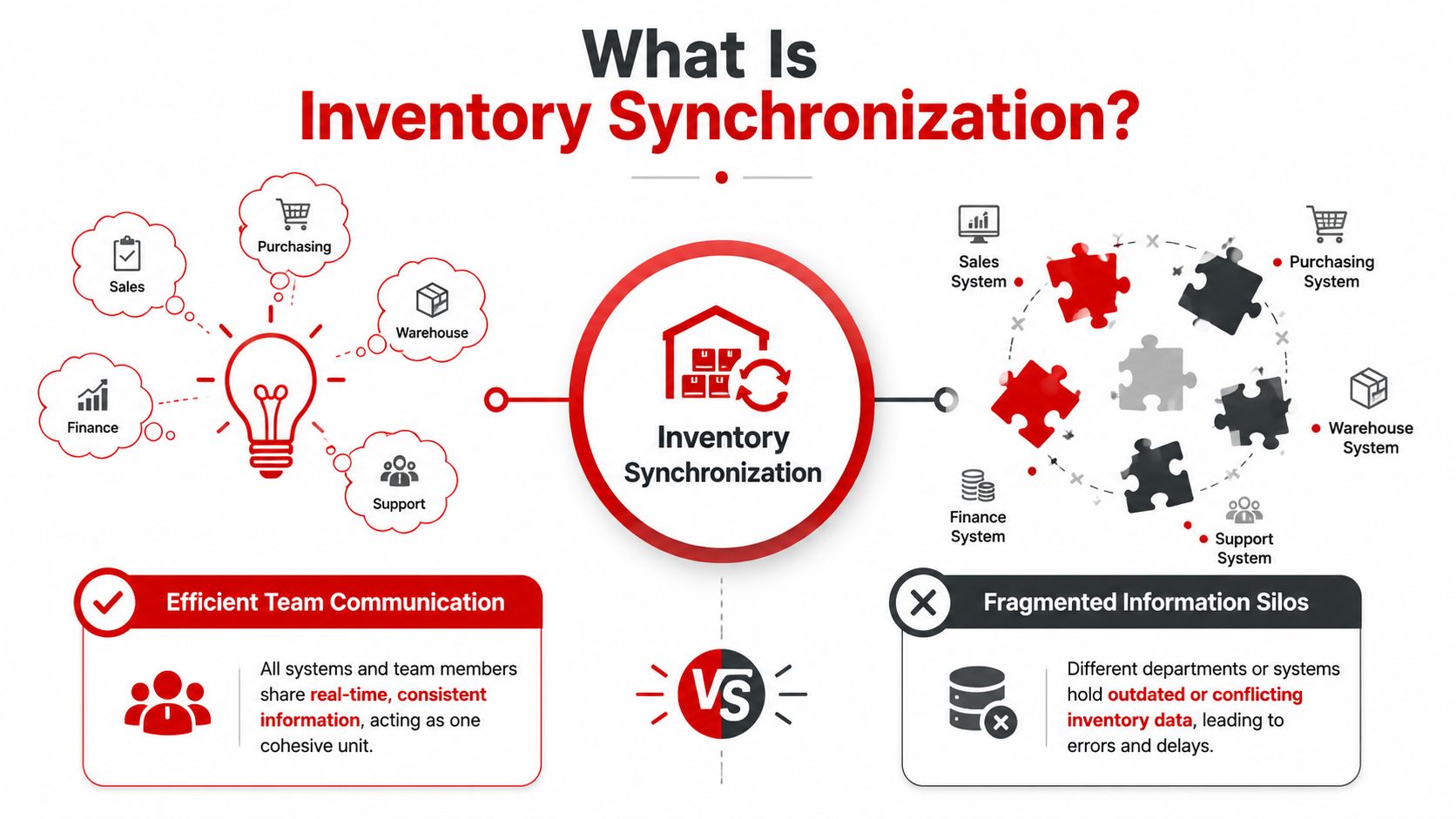
That matters more in repair shops than in standard retail because the same job may involve cross-references, VIN-based fitment checks, and multiple suppliers carrying equivalent parts under different numbers. If those records do not stay aligned, the shop can easily reserve the wrong part, buy the same item twice, or lose margin by using a higher-cost source when a better option was already available.
Good synchronization also has to follow the life of the part, not just the initial order. The system should react when a part is quoted, approved, ordered, partially received, scanned to a technician, returned to stock, sent back to a supplier, or written off. Otherwise, workarounds become the de facto system, and that's when errors multiply.
Tracking and synchronization are different jobs
Many shops already track inventory. That helps, but tracking alone does not protect job profit.
Tracking records what someone entered at one point in time. Synchronization keeps that information current everywhere it needs to be used. The difference shows up fast in day-to-day operations:
- Tracking only: The system shows two ignition coils on hand because nobody updated the count after one was assigned to a comeback job.
- Synchronization: Once the coil is reserved, scanned out, received, returned, or transferred, every connected screen reflects the same status.
For a busy shop, that difference affects more than convenience. It changes quoting speed, bay utilization, and gross profit. Advisors can promise work with fewer surprises. Parts staff spend less time calling vendors to clean up duplicate orders. Technicians stop waiting on parts that looked available only because one system was behind another.
Done right, inventory synchronization gives a shop one answer to a simple but expensive question: can this job be completed profitably with the parts we have and the suppliers we trust?
Key Synchronization Methods for Repair Shops
A service advisor quotes a brake job off one screen. The parts manager checks a different supplier portal. The technician starts teardown and finds the VIN-specific rotor option is not the one sitting on the shelf. That is the multi-supplier parts problem in one scene, and it is why the sync method has to match the part, the supplier, and the risk to the job.
Repair shops usually need two synchronization methods, not one. Common stock parts benefit from fast updates because they affect bay flow and customer promises. VIN-dependent, higher-cost, or special-order parts often need a more controlled process because a bad automatic update can turn into a wrong-order return, a margin hit, or a car stuck on a lift.
Real-time sync
Real-time sync updates connected systems as soon as a part event happens. That event might be a quote becoming an approved repair order, a purchase order being placed, a part being received, or a technician scanning it onto a job.
For a repair shop, the value is simple. Live updates reduce the gap between what the front counter sees, what the parts desk orders, and what is currently available for the car in the bay. That matters most when several jobs can consume the same item before anyone notices the count changed.
Real-time sync fits best when:
- Advisors quote from live availability
- Multiple bays draw from the same fast-moving stock
- Supplier inventory changes during the day
- The shop needs costs, counts, and job status aligned without manual re-entry
Use it for filters, pads, rotors, fluids, bulbs, wiper blades, common sensors, and other parts that move every day. It also helps with supplier price changes on common items, where an outdated cost can erode job profit before the invoice is closed.
The trade-off is integration quality. Real-time sync only works well if supplier feeds, catalog mappings, and part-number cross references are clean. If one vendor uses one number, another uses a supersession, and the catalog ties both loosely to the same application, bad data travels fast.
Scheduled sync
Scheduled sync updates inventory on a set cycle, such as every few hours or overnight. That slower pace is often the better choice for parts that need review before the system acts on them.
This method works well for expensive modules, low-turn components, cores, warranty replacements, and special-order parts tied to a VIN lookup. A shop does not need instant updates on every ECM or transmission unit sitting in purchasing review. It needs accuracy, cost control, and a chance to confirm fitment before the order becomes a problem.
Scheduled sync also helps when supplier data is inconsistent. Some vendor portals are strong on price but weak on live availability. Others update stock quickly but handle returns, supersessions, and partial fills poorly. In those cases, a review step protects the shop from trusting automation more than the supplier deserves.
Which method fits which part
Strong setups sort parts by operational risk, not by one blanket rule for the whole inventory file.
| Feature | Real-Time Sync (API/Webhook) | Scheduled Sync (Batch Update) |
|---|---|---|
| Update timing | Immediate after an inventory event | Runs on a set schedule |
| Best for | Fast-moving daily-use parts | Low-volume or review-heavy parts |
| Main advantage | Cuts the gap between physical and digital stock | Reduces noise for slower-moving categories |
| Main risk | More dependency on stable integrations | Data can be stale between refreshes |
| Shop impact | Better for live quoting and active bay scheduling | Better for controlled purchasing workflows |
| Supplier fit | Strong when vendor connections are reliable | Useful when vendor data is less predictable |
A practical rule works better than a technical one. Use real-time sync where a delay creates lost labor, stalled bays, or duplicate ordering. Use scheduled sync where a wrong part, wrong cost, or wrong supplier commitment hurts cash and gross profit more than a short delay.
Dedicated supplier integrations matter here too. If staff still bounce between catalogs, copy part numbers by hand, and rebuild the same order in multiple systems, synchronization stays weak no matter how good the software looks in a demo. Every manual handoff creates another chance for bad counts, wrong fitment, duplicate orders, and margin leakage.
Common Synchronization Challenges and Solutions
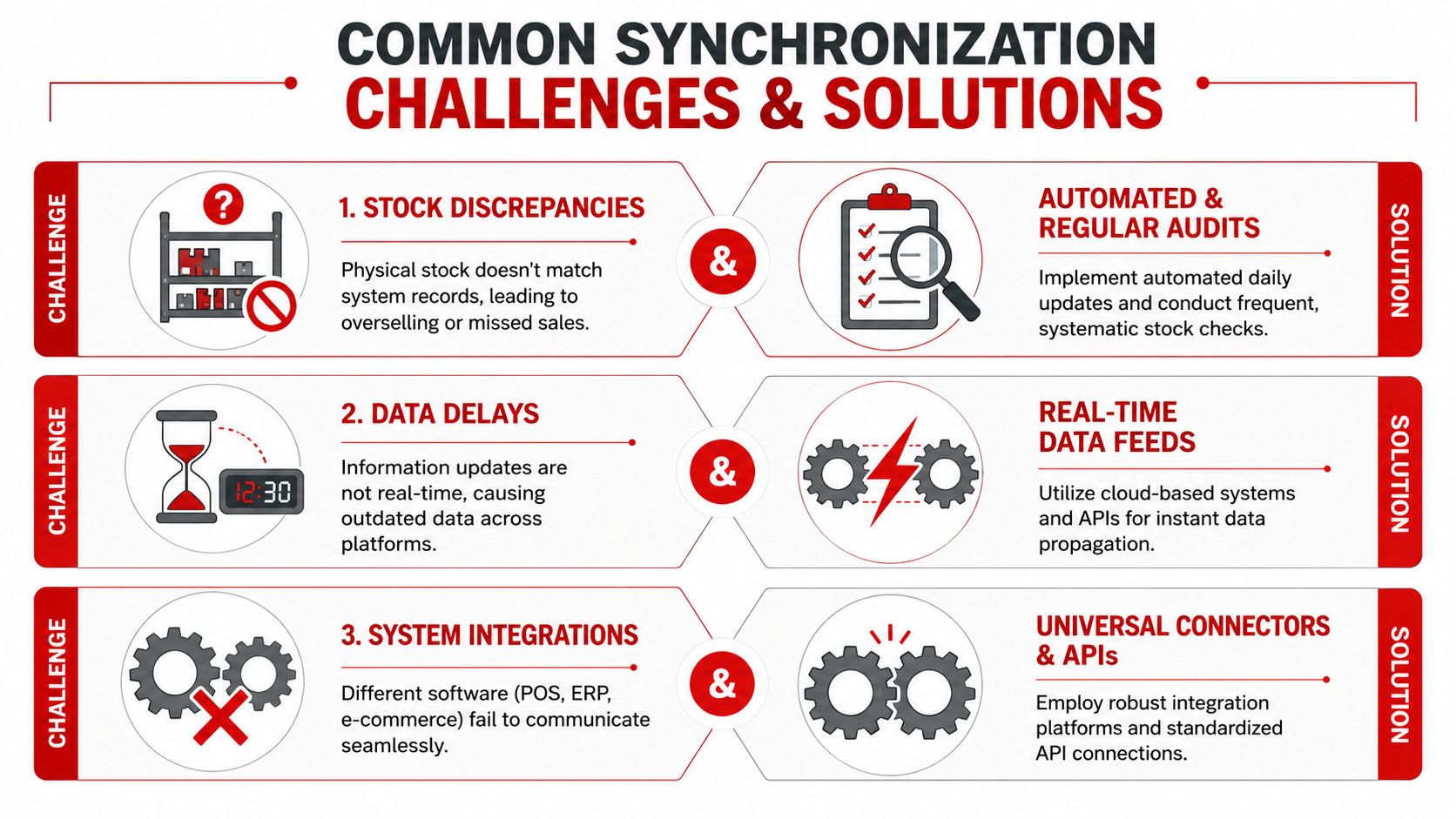
Shops usually run into the same three failure points. They show up under different names, but the mechanics are predictable.
Stock conflicts
A stock conflict happens when two people believe the same part is available for two different jobs. One advisor may quote the last water pump while another already attached it to a repair order that hasn't fully updated yet.
The fix is operational and technical. The system needs a reservation step that locks the part to a specific job as soon as it's committed. The team also needs one rule for when a part becomes “owned” by a repair order. Without that rule, everyone improvises.
A good shop rule is simple:
- Reserved means unavailable: Once assigned to an approved job, it's no longer open stock.
- Staged means physically separated: If possible, move it to the job bin.
- Released means visible again: If the job changes, the release should be explicit.
Data latency
Latency means the system eventually updates, but not fast enough to prevent mistakes. The count may be right ten minutes later, but that doesn't help when a customer is standing at the counter.
Synchronization offers substantial labor returns. Research shows that implementing synchronization strategies can reduce monthly manual inventory adjustments by 42.5% and lower the risk of inventory-related failures by 75%, leading to fewer installation errors and returns, based on.
If the digital record lags behind the physical part movement, the team starts creating workarounds. Workarounds become the real system, and that's when errors multiply.
The practical solution is to define which events must update instantly. Receiving, reservation, installation, return, and cancellation should not sit in a queue waiting for someone to reconcile them later.
SKU mapping
SKU mapping is the quiet killer in multi-supplier environments. A shop may call a part “ALT-HON-01,” while supplier A uses one number, supplier B uses another, and the OE catalog uses something else entirely. The same functional part can appear as three separate items unless the system maps them to a master record.
The answer is a master SKU structure:
- Create one internal part identity for each commonly used item.
- Attach supplier cross-references to that master record.
- Tie fitment notes, cost history, and preferred vendor rules to the same record.
This solves two problems at once. Staff finds parts faster, and purchasing can compare options without cluttering the inventory file with duplicates.
Best Practices for Flawless Inventory Sync
Strong inventory synchronization doesn't come from one integration. It comes from a handful of essential shop habits.
Build one master inventory record
Every part should have one primary record that the whole team trusts. That record should hold the internal part name, supplier cross-references, fitment notes when needed, and status such as on-hand, reserved, ordered, received, or consumed.
Without that master record, the shop ends up with shadow inventories. One lives in the software, one in the techs' heads, one in a notebook at the front desk, and one in the supplier account history.
A lot of the broader discipline overlaps with the principles covered in, especially around standardization and process consistency. Those ideas matter even more in a repair environment where part fitment and job timing are tied together.
Match sync speed to part behavior

One of the biggest mistakes is trying to use the same sync cadence for everything.
Use a simple parts policy:
- Fast movers: Keep these on the fastest practical sync. Think oil filters, air filters, brake pads, common fluids, clips, and bulbs.
- Controlled items: For expensive electronics or low-turnover components, add a review step before automatic reorder logic acts.
- Special orders: Treat these as job-specific from the moment they're approved. They shouldn't blur into general stock.
That approach keeps the system responsive where speed matters and calm where purchasing discipline matters more.
Use scans alerts and routine checks
In an auto repair environment, the easiest way to break sync is manual handling without system confirmation. Technicians pull a part, someone receives a box, someone moves an item, but nobody records it cleanly.
A stronger workflow uses scanning and automation wherever possible. notes that technicians need to be able to update inventory quickly with a simple scan and access part details such as make, model, and supplier categorization. also highlights barcode scanners, RFID tags, and automated alerts as core tools for real-time visibility and discrepancy reduction.
A practical routine looks like this:
- At receiving: Scan every inbound item before it hits the shelf.
- At issue: Scan it out when it goes to a job or a technician cart.
- At closeout: Reconcile uninstalled or returned items before the repair order is finalized.
- At day end: Review exceptions, not every line item. Focus on missing scans, negative counts, and pending receipts.
Shop-floor advice: The best inventory process is the one a busy technician will actually follow in under a few seconds.
How RedAppy Solves Inventory Synchronization
Most shop systems fall short in one of two ways. They either handle front-office workflow well but leave parts coordination weak, or they track parts in isolation and don't connect that activity to the actual repair process.
Where most shop systems break down
A repair shop needs parts data to move with the job. That means a supplier check shouldn't live in one disconnected browser tab while the estimate lives in another and the shop board lives somewhere else. When those pieces drift apart, advisors make promises on stale information and technicians get stuck waiting for updates.
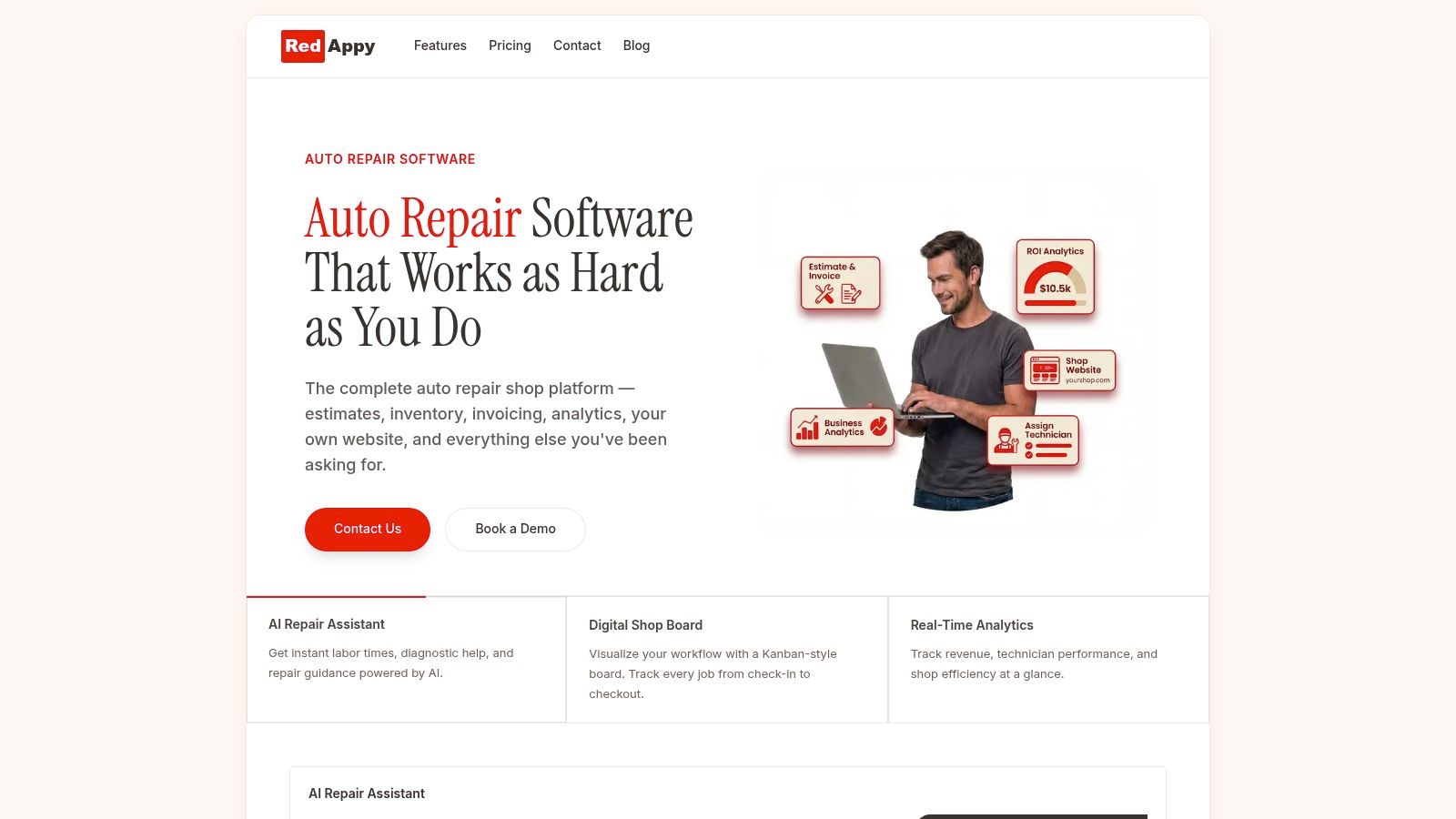
RedAppy is built around the shop workflow itself. It combines parts ordering across multiple suppliers with real-time inventory, a digital workflow board, estimates, invoices, vehicle history, and operational analytics inside one shop management platform.
That matters because the inventory question in a repair shop usually isn't just “Do we have it?” It's “Do we have it, does it fit this vehicle, is it already tied to another job, what did it cost last time, and will ordering it now keep the bay moving?”
What a connected shop workflow looks like
When a platform is designed for repair operations, inventory synchronization stops being a side function and becomes part of the daily workflow.
A connected setup should let the team:
- Check parts against live jobs: Inventory status stays visible in the same operational flow as the repair order.
- Order across multiple suppliers: Staff can compare and source without bouncing between disconnected tools.
- Keep the shop board honest: If a part is pending, received, or installed, the job status can reflect that reality.
- Review part performance: Managers can spot what moves fast, what sits too long, and what repeatedly causes delays.
That's where RedAppy fits well for independent shops and multi-bay operations. The platform is designed around repair shops that need one place to manage parts, jobs, team coordination, and customer communication without adding another layer of admin.
Owners who want to see how that works in practice can review RedAppy's feature set. Shops that want a direct conversation about workflow fit, supplier setup, or rollout can use RedAppy's contact page.
Your Implementation Checklist and Key Metrics
Inventory synchronization improves when the rollout is boring. Clean records, clear rules, and disciplined team habits beat flashy setups every time.
A practical rollout checklist
Use this sequence:
- Audit the current process. Identify where part data changes hands. Receiving, estimating, technician issue, returns, and final invoicing are the usual breakpoints.
- Choose the sync method by category. Fast movers need faster updates. High-cost and low-volume items may need controlled scheduling.
- Clean up duplicate part records. Build a master SKU structure before adding more integrations.
- Set reservation rules. Everyone should know when a part becomes committed to a job.
- Train for scan-based movement. If the workflow depends on memory, the count will drift.
- Create an exception review. Missing receipts, negative stock, and unmatched returns should be visible every day.
The metrics that prove it is working
The right KPIs are simple and operational. Industry best practices for inventory synchronization target data latency under 15 minutes and a data accuracy rate exceeding 98%, with stockout rate and order fulfillment cycle time also used to judge performance, according to.
For a repair shop, those metrics answer practical questions:
- Data latency: How long does it take for a real-world part movement to show up in the system?
- Accuracy rate: How often does the digital count match the shelf?
- Stockout rate: How often does a needed part interrupt an approved job?
- Order fulfillment cycle time: How quickly does a parts request move from need to ready-to-install?
If those numbers improve, the shop usually feels it before it measures it. Bays open faster. Advisors stop apologizing for missing parts. Technicians spend more time fixing cars and less time hunting for inventory.
RedAppy helps repair shops bring parts ordering, live inventory, estimates, invoicing, digital inspections, and shop workflow into one system. If the current process still depends on separate tabs, handwritten notes, or end-of-day cleanup, it's worth exploring RedAppy to see how a connected shop platform can reduce parts delays and keep jobs moving.
Ready to Transform Your Shop?
RedAppy helps auto repair shops create professional digital estimates with photos and videos, send them instantly via text or email, and get customer approvals in seconds. No credit card required to start.