
Mechanic Shop Management Software: The Ultimate Guide
The shop phone rings while a technician is waiting on labor time, a customer is asking whether the car will be ready by noon, and a paper work order has somehow vanished between the front desk and the bay. Someone scribbled a part number on a sticky note. Someone else entered the same customer info twice. By the end of the day, the shop owner isn't running a business. The business is running them.
That's why mechanic shop management software matters. It's not about buying more software. It's about stopping the daily leak of time, approvals, and profit that comes from disconnected processes. Shops that still rely on paper, whiteboards, spreadsheets, and memory usually know the pain already. What they need is a system that fixes it, not another sales pitch about “streamlining operations.”
Table of Contents
- Escaping the Chaos of a Paper-Based Shop
- What Is Mechanic Shop Management Software Exactly
- The Core Modules That Run Your Shop
- The Real-World ROI of Modern Shop Software
- Your Buyer's Checklist for Choosing the Right Software
- Rolling Out Your New System Without the Headaches
- From Wrench Turner to Business Operator
Escaping the Chaos of a Paper-Based Shop
A paper-based shop usually doesn't fail all at once. It slips. One missed authorization. One parts delay nobody communicated. One invoice that doesn't match the actual labor. Then the owner stays late fixing admin mistakes instead of reviewing margins, training staff, or getting home on time.
That chaos feels normal in a lot of independent shops because it has been normal for years. The front counter writes an estimate by hand. A technician asks for vehicle history that's sitting in a file cabinet. The service advisor calls the customer twice because there's no clean inspection workflow. Every small delay stacks on top of the next one.
Shops don't usually switch because they want technology. They switch because they're tired of hunting for information they should already have.
Mechanic shop management software fixes the root problem. It gives the shop one place to handle intake, job status, approvals, parts, invoicing, and customer communication. Instead of passing paper from person to person, the whole team works from the same live record.
That shift isn't a niche trend. The was valued at approximately USD 3.2 billion in 2025 and is projected to reach USD 8.7 billion by the end of 2034, with a CAGR of 11.8% between 2026 and 2034. That growth points to something simple. Shops are moving away from paper because digital systems solve real operating problems.
For owners trying to clean up records and present better service history, it also helps to understand how digital records compare with paper logbooks. AutoProv's guide on is worth reading because service history isn't just paperwork. It affects trust, resale conversations, and internal accuracy.
What Is Mechanic Shop Management Software Exactly
Mechanic shop management software is the air traffic control system for a repair shop. It doesn't turn wrenches, but it tells the whole operation where every job is, what's delayed, what's approved, who's working, what parts are missing, and what still hasn't been billed.
A weak shop runs on fragments. A strong shop runs on one source of truth.
The control tower role
This software centralizes the moving parts that usually get scattered across paper, memory, and disconnected tools. According to, it centralizes intake, estimating, work order workflows, technician status, scheduling, and invoicing so repair work moves through the shop without spreadsheet re-entry. That matters because re-entry is where mistakes start.
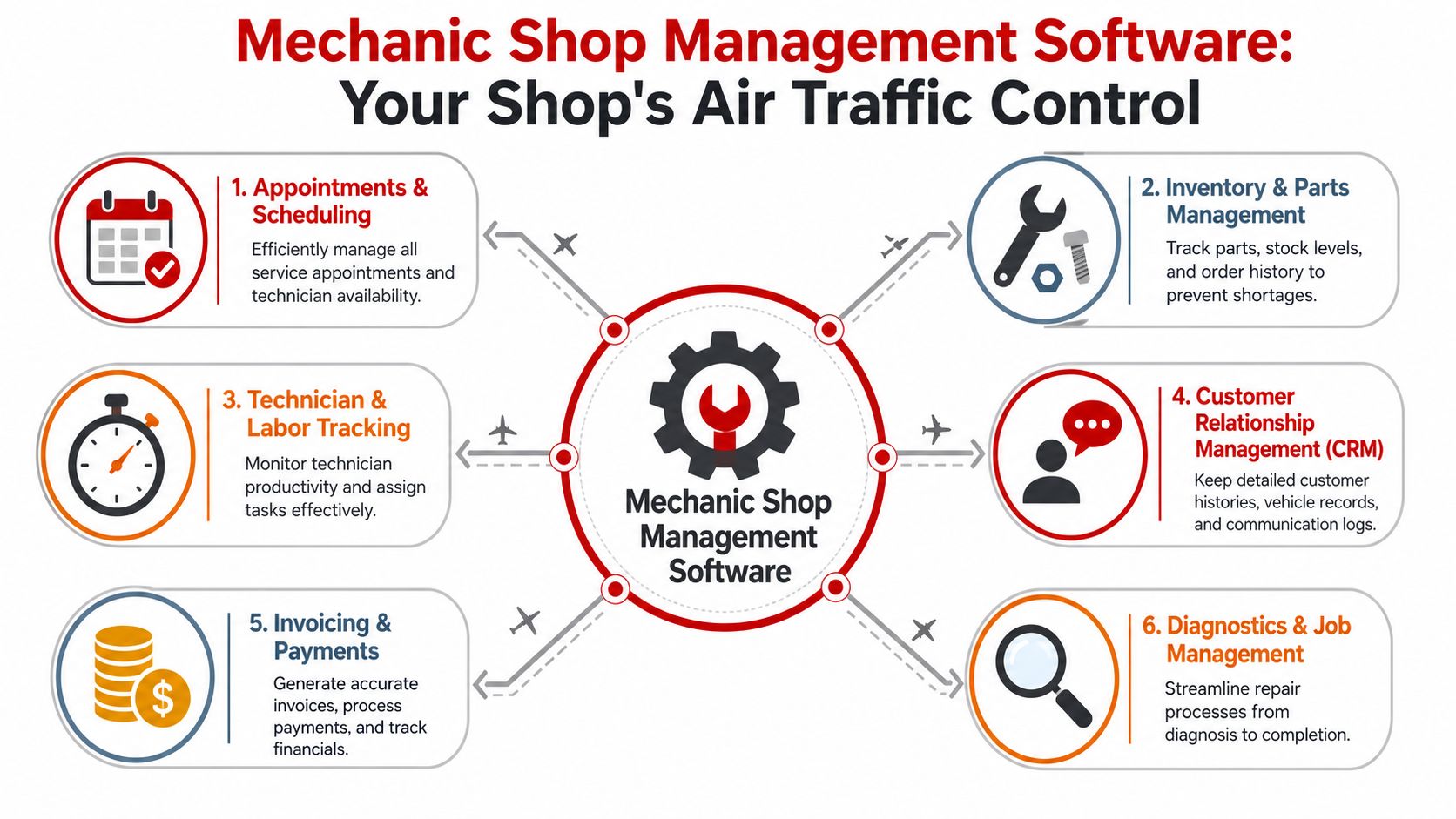
A good system should answer these questions instantly:
- What's in the shop right now and what stage each vehicle is in
- Who's available and who's overloaded
- What the customer approved versus what's still pending
- Which parts are needed and whether they've been ordered
- What needs to be invoiced before the vehicle leaves
When those answers live in one place, the front desk stops guessing and the bays stop waiting.
What it replaces in a real shop
Mechanic shop management software replaces several bad habits that owners often tolerate for too long.
- The whiteboard bottleneck: One person updates it. Everyone else depends on it. It's outdated half the day.
- The paper estimate trap: Handwritten notes get misread, misplaced, or never converted cleanly into an invoice.
- The memory-based process: A foreman remembers the delayed part until lunch, then forgets when the phones get busy.
- The spreadsheet maze: Customer history sits in one file, parts in another, and technician notes somewhere else entirely.
Practical rule: If the shop has to ask three people where a car stands, the system is broken.
The right platform connects the front office, the technicians, and the back office. It becomes the operating backbone of the shop, not just a digital filing cabinet.
The Core Modules That Run Your Shop
Owners get distracted by feature grids. That is the wrong test.
Judge the system by one standard. Does it remove delay, rework, and double entry from the work your team does every day? If a module looks good in a demo but creates extra clicks, extra training problems, or extra handoffs in the shop, skip it.
Digital inspections that turn findings into approved work
A service advisor should not have to sell a repair with vague notes and a rushed phone call. Customers approve work faster when the problem is visible and the recommendation is organized.
states that advanced DVI tools with photo-rich documentation and customer portal access increase work approval rates by 27–35% compared to paper-based estimates. That lines up with what happens in real shops. Clear photos, technician notes, and simple approval links cut confusion and speed up decisions.
A DVI module should include:
- Photo and video capture in the bay: Techs document the issue while the vehicle is in front of them.
- Red-yellow-green condition reporting: Advisors can present priority without turning every estimate into a speech.
- Mobile workflow for technicians: If inspections depend on a desktop later, consistency falls apart.
- Customer approval links by text or email: Waiting on voicemail kills momentum.
This module does more than raise approvals. It gives your team a repeatable process. That matters during onboarding because new advisors and new techs can follow the same inspection structure instead of making up their own.
Estimating, parts, and invoicing need to live in one workflow
Many software rollouts fail due to disconnected processes. The estimate lives in one screen, parts ordering happens somewhere else, technicians update status on paper, and the invoice gets rebuilt at the end. That is not a system. It is a digital version of the same old mess.
The right platform connects the full job flow:
- The advisor writes the estimate.
- Labor, parts, and notes stay attached to the repair order.
- Parts pricing and availability are checked inside the job process.
- The technician updates status from the floor.
- The invoice pulls from completed work without rekeying.
According to, effective auto repair software should link directly to parts suppliers for real-time pricing and inventory checks while also connecting to workshop equipment and technical publication platforms to automate job progress and notifications. Owners should treat that as the baseline. If your advisor still has to jump between screens, call around for routine parts checks, and manually rebuild invoices, the software is costing you labor.
One more point matters during selection and rollout. Shop management software is different from repair-information software. notes that shop management systems handle scheduling, invoicing, and customer history, while repair-information platforms handle labor times, wiring diagrams, and procedures.
Ask the vendor a blunt question. How does this system fit with the diagnostic and repair-information tools my team already uses on day one?
If the answer is fuzzy, expect double entry, slower adoption, and staff pushback.
Shop visibility for advisors, foremen, and owners
Good software gives each role the right view of the day. That is how you stop interruptions.
A service advisor needs job status, approvals, and customer history. A technician needs assigned work, notes, and parts status. A foreman needs bay load and stalled jobs. The owner needs revenue, invoicing status, and a clean view of workflow problems before they become payroll-heavy chaos.
| Role | What they need to see | Why it matters |
|---|---|---|
| Service advisor | Job status, approvals, customer history | Keeps communication tight and estimates accurate |
| Technician | Assigned work, notes, parts status | Cuts interruptions and keeps wrench time moving |
| Foreman | Bay load, stalled jobs, labor progress | Makes scheduling decisions faster |
| Owner | Revenue, invoicing status, workflow health | Turns the shop into a managed business |
highlights reduced back-and-forth through two-way texting, faster inspections, and better visibility through dashboards. Those features matter because they shorten handoffs and make accountability visible.
Owners who are should focus on these workflow modules first. They are the ones your team touches all day. They are also the hardest part to implement badly without feeling the pain immediately.
My recommendation is simple. Buy for process fit, not brochure depth. The modules that matter most are the ones your staff can adopt fast, use correctly under pressure, and connect to the tools you already depend on.
The Real-World ROI of Modern Shop Software
Software should pay for itself in operational control first. Financial return follows right behind it. Owners who only compare subscription price usually miss the actual cost, which is delay, rework, weak approvals, and admin time that doesn't produce revenue.
The most immediate return usually shows up in speed.
Where the return shows up first
reports that implementation of modern shop management software reduces average job cycle time by 18–22% through better scheduling, remote diagnostics, and automated customer communications. That's a serious operational gain because shorter cycle time means the same bays can complete more work without adding space.
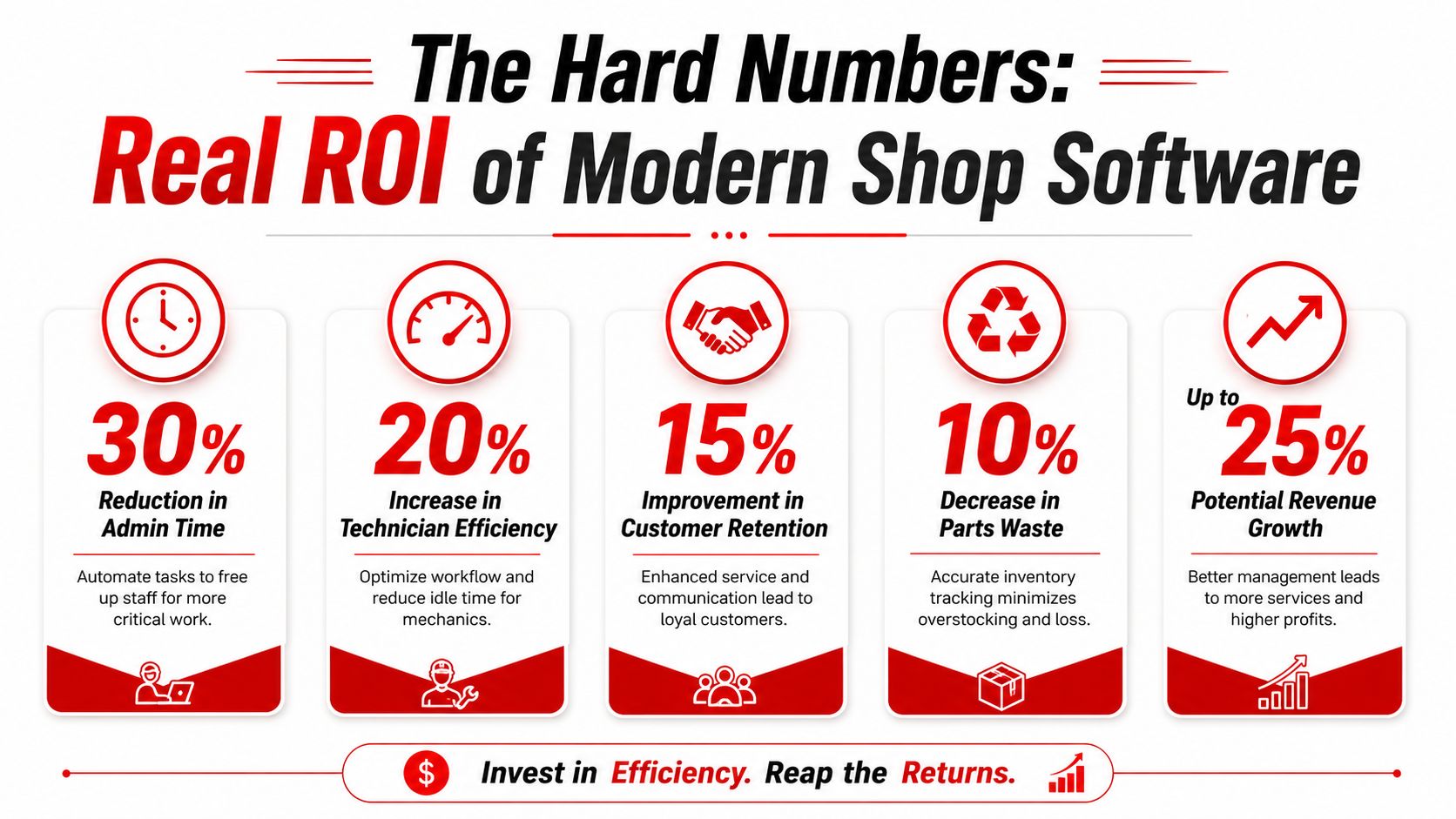
There are a few reasons that happens:
- Scheduling gets tighter: Advisors stop overloading one part of the day while leaving another part thin.
- Customer communication speeds up approvals: Less phone tag means less idle waiting.
- Technicians start work with clearer job data: They spend less time asking for missing information.
- Administrative handoffs shrink: Fewer disconnected steps means fewer stalled repair orders.
A shorter cycle time doesn't just improve workflow. It increases capacity. More completed jobs per bay is one of the cleanest paths to stronger revenue.
A shop doesn't need more bays to grow if the current bays stop sitting idle between decisions.
How an owner should think about payback
The best ROI calculation starts with three questions.
- How much time does the front desk spend on avoidable admin?
- How many jobs stall because approvals, parts, or status updates get delayed?
- How much recommended work is lost because the presentation is weak?
That framework is similar to broader service-business ROI thinking. OnRoute's guide to is useful here because it pushes the buyer to compare software cost against time recovered, process consistency, and operational throughput, not just monthly fees.
A disciplined owner doesn't buy software to “get organized.” They buy it to create measurable gains in:
- Bay utilization
- Approval speed
- Invoice accuracy
- Technician productivity visibility
- Customer communication quality
If those areas improve, the return isn't theoretical. It shows up in daily shop flow.
Your Buyer's Checklist for Choosing the Right Software
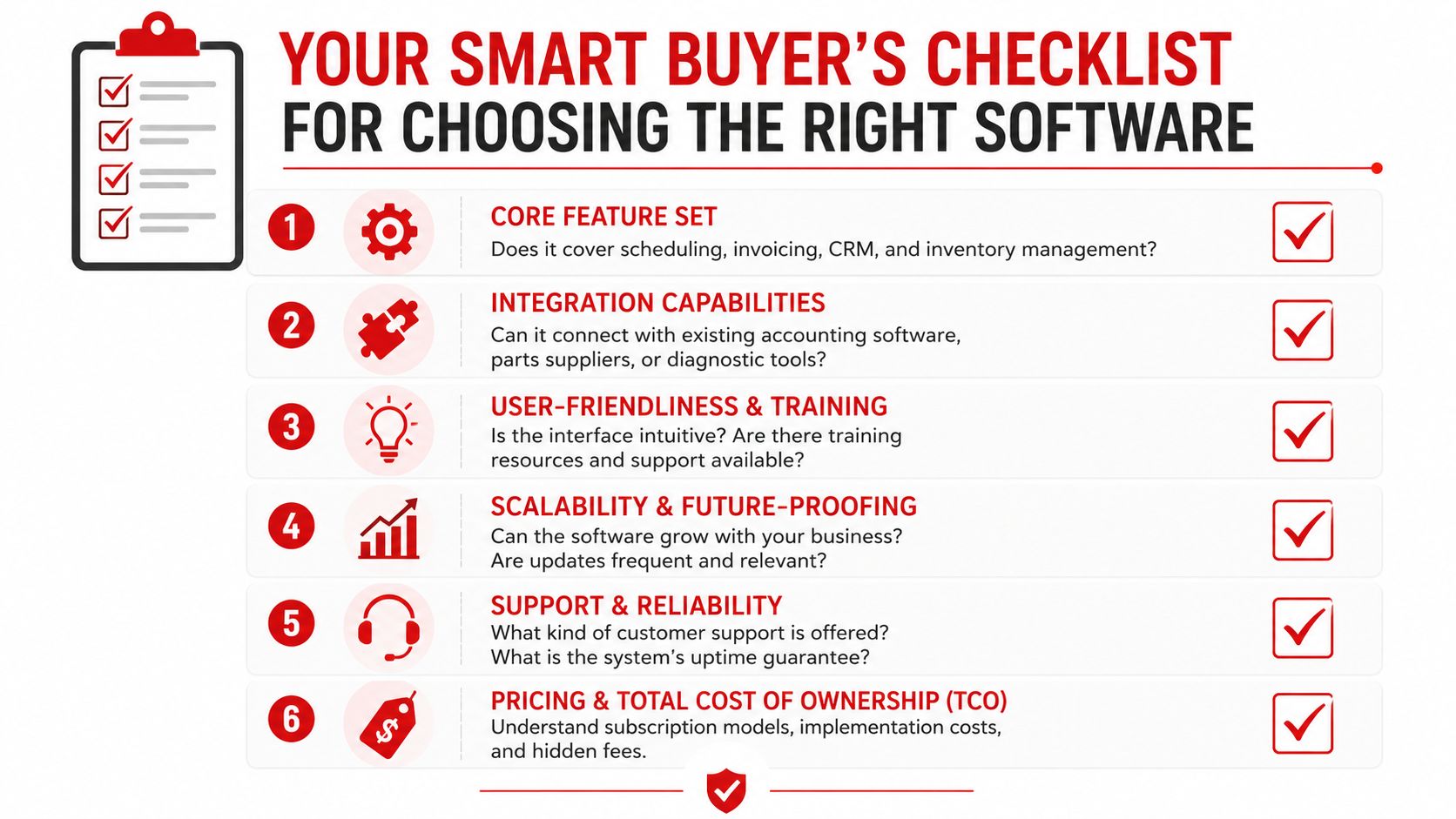
Most demos look polished. That's the trap. Every platform looks clean when a sales rep clicks through sample data. The real test is whether the software fits a working shop with interruptions, parts delays, staff habits, and old records.
The buyer should go into every demo with hard questions.
Questions that expose weak systems fast
Start with workflow fit, not brand reputation.
- Can the front desk learn it quickly: If service advisors need weeks to feel comfortable, adoption will drag.
- Does it support cloud access: Owners, advisors, and managers need visibility without being chained to one machine.
- Can it handle real parts workflows: Look for direct supplier connections, not just a place to type line items.
- Will it reduce double entry: If accounting, customer history, and invoices all need manual cleanup, the system isn't saving time.
- How clean is the communication flow: Two-way texting, digital approvals, and status updates should feel built in, not bolted on.
Support matters just as much as features. Small shops especially can't afford software that assumes they have an internal IT person.
A vendor should answer these without hesitation:
- What does setup involve
- What training is included for advisors and technicians
- How are imports handled for customers, vehicles, and inventory
- What happens if the team gets stuck during launch
- Whether pricing is clear or padded with add-ons and contract lock-in
The best demo question is simple. “Show the exact workflow for a vehicle from first call to paid invoice.”
Shop Management Software Buyer's Checklist
| Category | Key Question | Why It Matters |
|---|---|---|
| Core workflow | Can it handle scheduling, estimates, work orders, inspections, invoicing, and payments in one system | This is the foundation. Gaps create manual work |
| Integrations | Does it connect with parts suppliers, accounting tools, and other systems already used in the shop | Weak integrations create duplicate entry and missed data |
| Ease of use | Can advisors and technicians learn it without constant support | Adoption falls apart when the software feels heavy |
| Access | Is it cloud-based and usable from the front desk, bay, and off-site | Modern shops need visibility beyond one terminal |
| Support | What help is available during setup and after go-live | Good support prevents a slow, frustrating rollout |
| Pricing | Is pricing transparent and flexible, without hidden fees | A low sticker price can hide a high operating cost |
One more buying rule matters. Don't buy the platform with the longest feature list. Buy the one the team will use every day.
Rolling Out Your New System Without the Headaches
Monday morning, the bays are full, the phones are ringing, and your advisor is trying to learn a new screen while a technician asks where the labor times went. That is how bad rollouts start. The software is not the main problem. Weak implementation is.
Shops get in trouble when they treat setup like a side task. The system goes live before the data is cleaned up, the templates are built, or each role knows its daily workflow. Then the team blames the software, slips back to paper, and the owner is stuck paying for two systems at once.
The plug-and-play myth
found that 68% of small auto shops abandon new software features after 45 days due to incomplete automation setup, not because the software was missing features. It also identifies the most predictive ROI question as whether the shop can set up key tasks within 30 days without outside help.
That lines up with what happens in real shops. A platform gets purchased. Customer records come over half-clean. Prices and canned jobs are unfinished. The front desk gets a quick walkthrough. Technicians get almost none. By week two, everyone is working around the system instead of through it.
Implementation decides whether the software improves workflow or creates another layer of confusion.
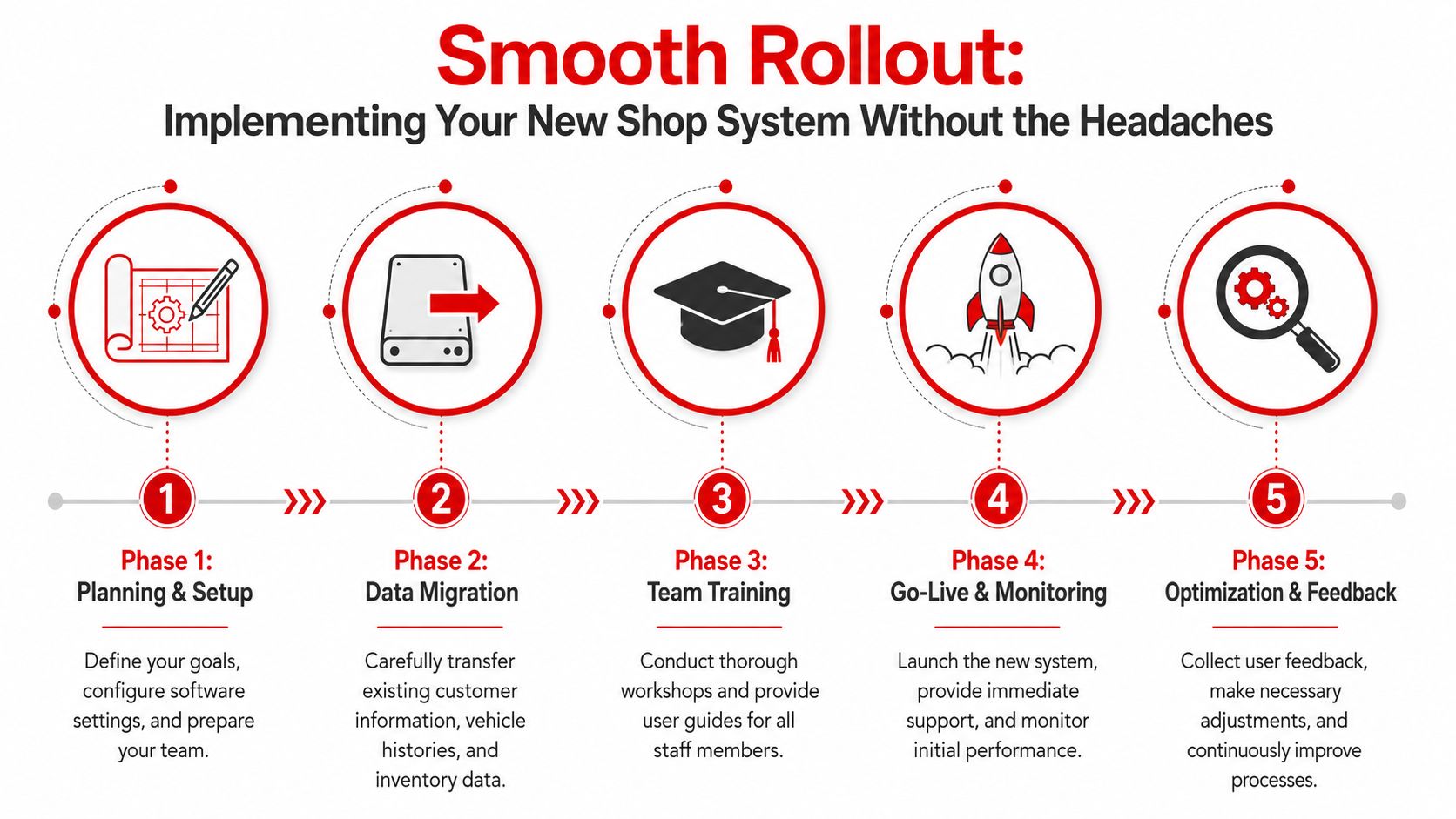
A Rollout Sequence That Works
Use a strict order:
- Clean the data first. Remove duplicates. Standardize customer names, vehicle records, plate formats, and common job descriptions.
- Build the core workflow before launch. Set up labor items, canned jobs, taxes, pricing rules, estimate templates, inspection forms, and invoice layouts.
- Train by role. Advisors need intake, estimates, approvals, and payments. Technicians need job views, inspections, notes, and parts requests. Managers need reporting, exceptions, and oversight.
- Pick a controlled go-live date. Launch during a lighter stretch, not at month-end and not during your busiest week.
- Hold daily reviews for the first two weeks. Track where the team gets stuck and fix it the same day.
Do not try to digitize every corner of the shop on day one. Start with the workflow that touches cash the fastest: estimates, repair orders, and invoicing. Once the team is using those steps consistently, add inspections, supplier connections, deferred work tracking, and reporting.
A phased launch is usually the better call for independent shops.
Set one clear rule before go-live. Decide what “live” means. If advisors are still writing paper estimates while technicians use the new system for notes, you have not launched. You have created duplicate work. Pick the cutoff points in advance so the team is not guessing.
Owner reminder: The first month is for consistent use. Perfection can wait.
The shops that get the best results treat onboarding as part of the purchase, not an afterthought. If the vendor cannot help you map data migration, template setup, role-based training, and first-week support, keep shopping. Features sell demos. Implementation changes the shop.
From Wrench Turner to Business Operator
The true payoff of mechanic shop management software isn't that the shop looks more modern. It's that the owner stops acting like the human patch for every broken process.
When intake, estimates, inspections, parts, invoicing, and communication run through one system, the shop gains control. The front desk gets cleaner workflows. Technicians get clearer job data. Customers get faster answers. The owner gets visibility instead of surprises.
That changes the role of the person in charge. They spend less time chasing paperwork and more time managing pricing, coaching staff, reviewing performance, and building a business that can scale.
A shop doesn't become better because it bought software. It becomes better because the software gives the team a system they can follow every day.
Shops that are ready to stop juggling paper, disconnected tools, and missed opportunities should take a close look at RedAppy. It's built to help modern repair businesses run the full workflow from first contact to final payment. For a closer look at what a complete platform should include, review the feature set. For direct guidance on rollout and fit, reach out through RedAppy's contact page.
Ready to Transform Your Shop?
RedAppy helps auto repair shops create professional digital estimates with photos and videos, send them instantly via text or email, and get customer approvals in seconds. No credit card required to start.