
Mobile Mechanic Apps: A Guide to Shop Efficiency & Growth
A mobile mechanic usually doesn't lose money on the wrench work. The leak starts after the job. Calls get missed while hands are covered in oil. Estimates sit in text messages. Parts get ordered from one screen, labor gets written on paper, and payment waits until the tech gets home and remembers to send the invoice.
That setup works for a while. Then it breaks the business.
Customers now expect the same convenience from vehicle repair that they get from every other service business. They want fast replies, clear quotes, digital approvals, photos, and easy payment. That's why mobile mechanic apps matter. They aren't a nice extra anymore. They're the operating system for a modern mobile repair business.
Table of Contents
- Why Mobile Mechanic Apps Are No Longer Optional
- Beyond Scheduling An All-in-One Business Command Center
- Essential Features That Transform Your Workflow
- The Tangible Payoff How Apps Boost Your Bottom Line
- A Practical Checklist for Choosing Your App
- Making the Switch Implementation Tips and Pitfalls to Avoid
- Your Next Step Toward a Smarter Mobile Business
Why Mobile Mechanic Apps Are No Longer Optional
A common scene plays out the same way. A mobile mechanic finishes a brake job in a customer's driveway, answers two missed calls, searches an old text thread for the parts price, and tries to remember whether the last customer already paid. By evening, the van is parked, but the workday isn't over. Invoices still need to be written, photos still need to be sorted, and tomorrow's route still lives in somebody's head instead of a system.
That isn't hustle. That's operational drag.

The broader market has already moved. One industry overview says mobile mechanic adoption has been growing at 15 times the rate of the total light-vehicle DIFM market, with participation more than doubling over the last five years, driven by digital tools and the normalization of on-site service during COVID-19, according to.
What changed in the field
The old model treated mobile service like an informal version of a shop. A van, a phone, and a stack of paper could get the work done.
The current model is different:
- Customers expect digital communication: They want updates, not voicemail tag.
- Approvals need proof: Photos and clear line items close jobs faster than verbal explanations.
- Payment has to happen on-site: If payment gets delayed, collection gets harder.
- Records need to stay searchable: Repeat business depends on accessible history.
Practical rule: If the business still runs on memory, paper, and scattered apps, it's already harder to scale than it should be.
This shift reaches beyond general repair. Niche mobile services such as show the same customer expectation. People booking field-based automotive help want speed, clarity, and professional communication from first contact to final payment.
Beyond Scheduling An All-in-One Business Command Center
Too many operators still think mobile mechanic apps are calendar tools with invoices bolted on. That's outdated thinking. A serious app isn't just for booking jobs. It should run the business from intake to payment.
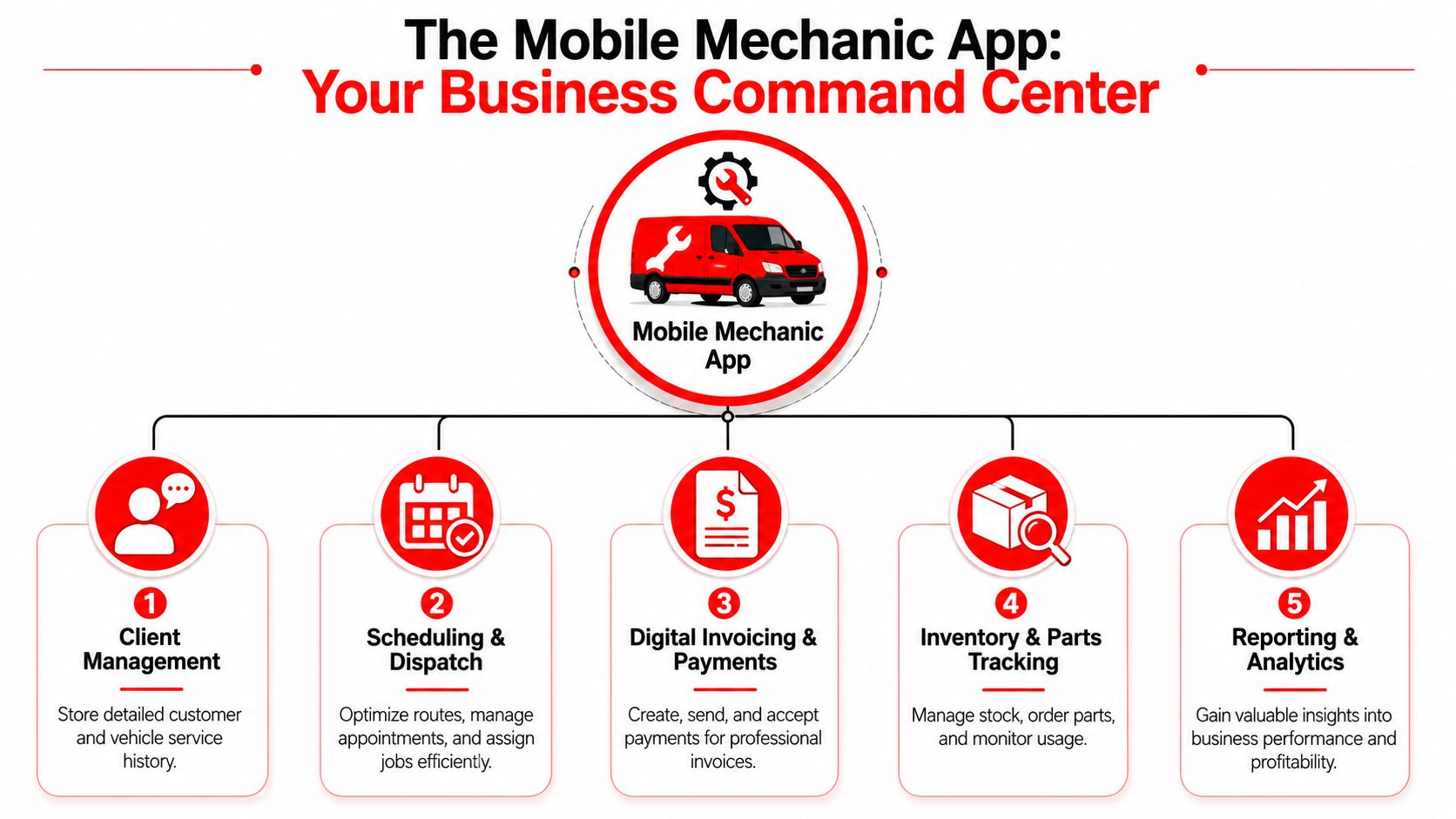
One platform description from shows what the category has become: online appointments, quotes, digital inspections, invoices, payments, labor guides, reminders, time tracking, and dashboard analytics in one operational stack. The same materials also note adoption across mobile mechanics, independent technicians, auto repair shops, and auto dealers, and an app-store listing says thousands of shop owners and mechanics trust the software.
What a real command center looks like
A proper mobile system should cover these core jobs without forcing the tech to jump between tools:
| Function | What it should handle |
|---|---|
| Customer records | Vehicle history, notes, prior work, contact details |
| Job workflow | Appointments, status changes, technician assignment |
| Sales process | Quotes, approvals, inspections, recommended work |
| Money flow | Invoices, payments, receipts |
| Operations | Labor guides, reminders, tracking, reporting |
That's the difference between a helper app and a business platform.
Why patchwork systems fail
A patchwork stack sounds cheaper until it starts leaking time. One app handles scheduling. Another sends invoices. A parts site lives in the browser. Photos stay on the phone. Notes go into text messages. Nothing connects.
That creates four predictable problems:
- Admin gets duplicated. The same customer and vehicle details get entered repeatedly.
- Errors multiply. Wrong parts, wrong labor line, wrong contact info.
- Approvals slow down. Evidence and pricing sit in different places.
- Owners lose visibility. It's hard to see what was quoted, approved, completed, and paid.
A mobile business needs a shop in its pocket, not a folder full of disconnected shortcuts.
A solo operator might tolerate software gaps for a while. A two-tech team won't. A growing shop definitely won't. Once multiple jobs are moving at once, the app has to act like a command center or the owner becomes the command center. That's the bottleneck.
Essential Features That Transform Your Workflow
A mobile app earns its keep when it removes a specific bottleneck. Judge every feature by one question. Does it cut admin time, speed quote approvals, reduce parts delays, or help you collect money faster? If the answer is no, skip it.
Digital inspections shorten the path to approval
Customers approve work faster when they can see the problem. A text explanation is weak. A photo with notes and a marked-up inspection is clear.
That matters on mobile jobs because the decision window is short. The vehicle is on site. The tech is there. If the customer has to wait for a separate estimate, dig through messages, or call back later, the job slows down and the extra work often dies on the spot.
According to, digital vehicle inspections with photo and video attachments, combined with multi-supplier parts lookup, can cut a long parts search down to minutes. The same principle applies to approvals. Evidence attached to the estimate removes friction and keeps the job moving.
Good inspection tools should let your tech do four things fast:
- capture photos and video at the vehicle
- attach findings to line items
- send the estimate without retyping notes
- store the inspection in vehicle history for the next visit
That last point gets overlooked. Saved inspection history helps a solo operator look organized, and it helps a growing shop keep standards consistent across multiple techs and locations.
Parts lookup should sit inside the estimate
Parts sourcing breaks workflow more than owners admit. The tech diagnoses the issue, leaves the job screen, opens supplier tabs, compares pricing, copies part numbers, and then rebuilds the estimate. That is wasted motion. It also creates mistakes.
A better system keeps diagnosis, estimating, and parts lookup connected. The tech documents the issue, adds labor, checks suppliers, and sends the quote from one workflow. Fewer handoffs mean fewer missed line items, fewer wrong parts, and less time stuck in the truck juggling apps.
For a solo mechanic, that means finishing the quote before leaving the driveway. For a two-tech team, it means the office does not have to clean up sloppy estimates later. For a shop adding more field service volume, it means parts ordering becomes repeatable instead of depending on one experienced employee who remembers where everything lives.
Offline access is required
Mobile repair happens in bad signal areas all the time. Fleet lots, parking structures, rural calls, industrial sites. If the app freezes without service, your process breaks in the middle of the job.
Offline access should cover actual work, not just read-only screens. Your tech needs to open the job, record notes, capture inspection results, and finish the visit before the device syncs later. Anything less will force the team back to paper, screenshots, and memory. That is how errors creep in.
If the app cannot handle low-connectivity jobs, it cannot support a real mobile operation.
Payments and signatures need to happen on site
Too many mobile operators still finish the repair, promise to send the invoice later, and hope the customer pays. That habit hurts cash flow and creates avoidable follow-up work.
The app should let the tech get approval, collect a signature, send the invoice, and take payment before leaving. That closes the loop while the customer is engaged and the value of the repair is still fresh. It also gives the owner a cleaner record of what was approved, completed, and paid.
This matters even more as the business grows. A solo tech can remember the details of a handful of open invoices. A multi-tech operation cannot. Once several people are quoting and billing every day, delayed invoicing turns into a reporting problem, a collection problem, and then a margin problem.
One connected system beats a stack of separate tools
The biggest workflow gain usually comes from consolidation. Every extra app adds one more login, one more sync issue, and one more place where job details get lost.
A platform should connect these functions in one operating flow:
- scheduling and dispatch
- inspections with photos
- estimates and customer approvals
- parts ordering and tracking
- invoices, signatures, and payment collection
- customer records and vehicle history
- reporting for the owner or service manager
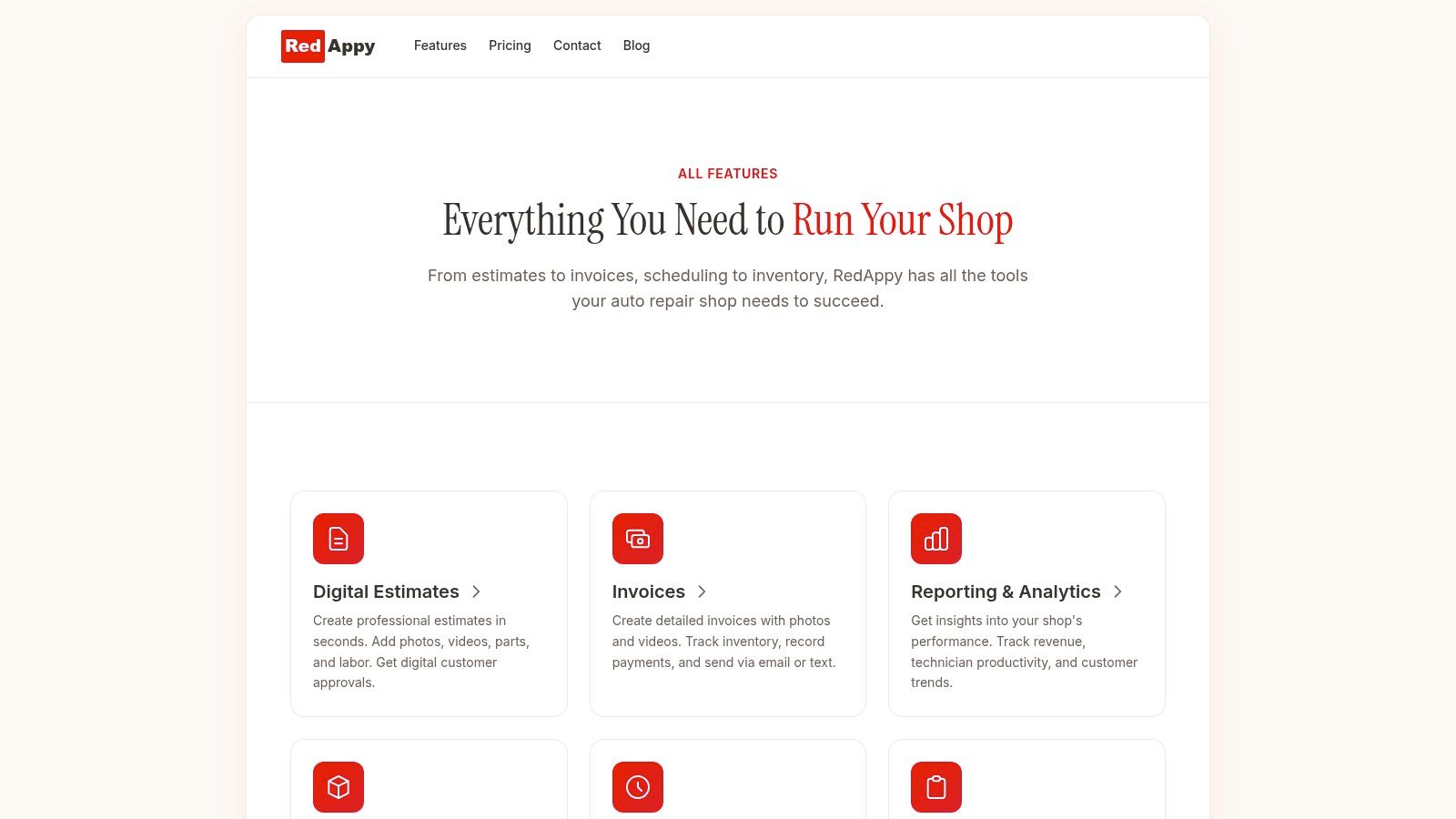
One option in this category is RedAppy's feature set for repair businesses, which includes digital inspections, estimates, invoices, payments, parts ordering, analytics, and vehicle history in one workflow. That setup makes sense because it reduces re-entry, keeps the job record complete, and gives the owner better visibility as the business grows from one tech to a team.
The right feature set is not about having the longest checklist. It is about building a process that still works when you add another van, another technician, or another location. Choose the app that keeps the entire job moving from first inspection to final payment without forcing your team to rebuild the same information at every step.
The Tangible Payoff How Apps Boost Your Bottom Line
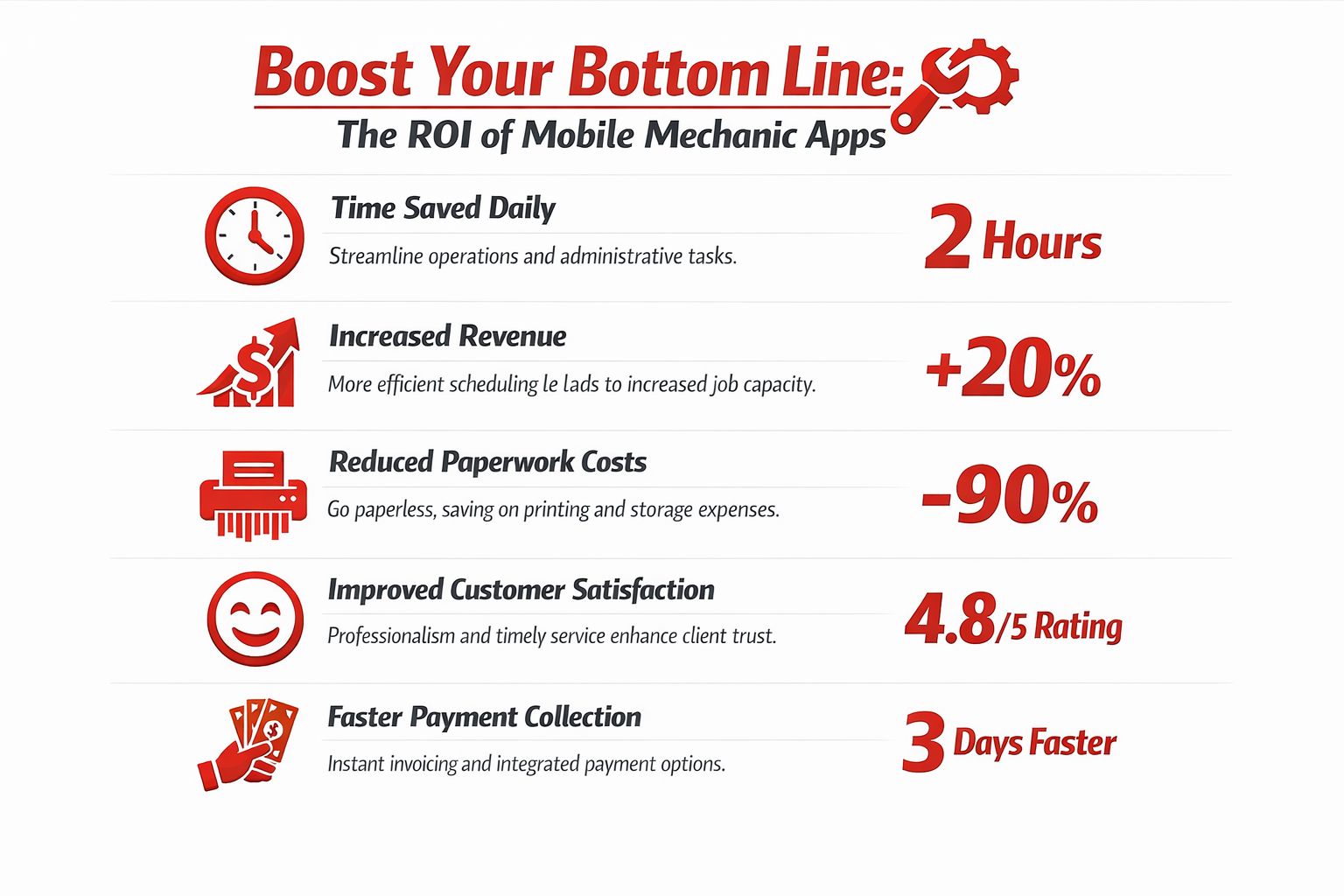
Software should earn its place in the business. If it only changes where paperwork lives, it's not enough. The primary payoff comes when mobile mechanic apps turn dead time into billed time, speed up approvals, and tighten payment collection.
Solo techs buy back time
A solo mobile mechanic usually wears every hat. Technician, dispatcher, estimator, cashier, and bookkeeper. That's why admin drag hurts this group the most.
When the workflow lives in one system, the owner spends less time:
- hunting down old job details
- rebuilding estimates after the visit
- chasing unpaid invoices
- manually updating customers
The gain isn't abstract. It shows up as more usable hours in the day and fewer jobs that spill into the evening.
Small shops tighten cash flow
A small garage with mobile service or a two-tech mobile team gets a different kind of return. The benefit is less about survival and more about control.
On-site invoicing and payment tools help close the transaction while the work is fresh. Digital inspections support cleaner approvals. Shared records mean the next team member can pick up the job without guessing.
Better software doesn't just save time. It shortens the distance between completed work and collected cash.
Growing operations standardize the business
The biggest jump happens when a business starts adding techs, vans, or locations. At that stage, the owner can't rely on memory or personal oversight anymore.
An app-driven workflow helps standardize:
| Business stage | Main payoff |
|---|---|
| Solo operator | Less unpaid admin |
| Small team | Faster approvals and cleaner billing |
| Growing operation | Consistent process and clearer visibility |
Without that structure, growth creates chaos. With it, the business can track what's quoted, what's approved, what's waiting on parts, and what's already paid. That's what makes scaling possible.
A Practical Checklist for Choosing Your App
Most software demos look polished. That doesn't mean the app fits mobile work. The wrong platform usually reveals itself when the conversation gets specific.
The biggest blind spot in app marketing is routing. As makes clear, value for a mobile mechanic depends on reducing windshield time and improving job density, not just handling quotes and invoices. That's the question many buyers forget to press.
Questions that expose weak software fast
A serious buyer should ask direct questions and insist on a live demonstration.
- How does routing work? Not “Do you have scheduling?” Ask how the system handles multiple on-site jobs across a day.
- What happens with poor signal? A vendor should show exactly what the tech can do offline.
- Can a quote turn into an invoice without re-entry? Rebuilding jobs by hand is wasted labor.
- How are photos attached to the customer record? If media handling is clumsy, approvals will be too.
- Can vehicle history be found quickly? A repeat customer call shouldn't trigger a scavenger hunt.
- How are parts handled in the workflow? Opening outside tabs all day is a red flag.
A useful supporting tool may still sit outside the main platform. For example, operators comparing travel logging options may want to if mileage isn't built into their current process. But the core workflow should stay centralized.
What to reject immediately
Some apps should be ruled out before the trial ends.
Desktop-first software with a weak mobile companion
If the phone app feels stripped down, the vendor built for a front desk, not a van.
Pretty invoicing with no operational depth
Invoicing matters, but it isn't enough. The app also needs inspections, approvals, records, and scheduling logic.
No answer on route density
If the vendor can't explain how the software helps reduce travel waste, the platform may be built for fixed-location shops.
Too many add-ons for basic work
Every extra tool creates another login, another sync issue, and another place for information to disappear.
The right test isn't “Does this app have a feature list?” It's “Can this app run a full day of mobile work without workarounds?”
Making the Switch Implementation Tips and Pitfalls to Avoid
Monday morning is where bad software rollouts get exposed. A tech is parked outside the first job, the customer record is missing half the history, the estimate template is wrong, and nobody knows whether to use the new app or the old process. That mess is not an app problem. It is a rollout problem.
The shops that switch well keep the first phase narrow and tied to daily cash flow. Start with the jobs you run every week, the templates your team uses all the time, and the approvals and payment steps that slow the day down. Leave old closed records and edge-case workflows for later. A mobile business does not need a perfect database on day one. It needs a working system that gets quotes approved faster, keeps jobs moving, and captures payment without confusion.
Roll out the core workflow first
Set up the process in the order your team operates.
- Import active customers and vehicles first: Bring over the records tied to current and upcoming jobs. Archive cleanup can wait.
- Build the top job templates early: Brake work, batteries, diagnostics, inspections, and common maintenance should be ready before launch.
- Configure estimate approval and payment collection before anything fancy: Those two steps affect cash flow immediately.
- Test offline use in the field: Your techs need to open job details, add notes, and keep working in weak-signal areas, then sync later.
- Run both systems briefly with a clear cutoff date: Parallel use is fine for a short window. Without a deadline, your team will keep living in both systems.
Start simple. Then tighten the process once the team is using it.
Mistakes that stall adoption
The usual implementation failures are predictable.
- Migrating everything at once: Full-history imports sound responsible. They usually waste time and delay launch.
- Buying software before defining the workflow: Decide who builds estimates, who sends approvals, who orders parts, and who closes invoices. The app should support that chain, not force your team to guess.
- Skipping technician input during setup: Field techs know where the extra taps are. If they are ignored, they will go back to notes apps, texts, and paper.
- Leaving ownership vague: One person should own templates, user permissions, data cleanup, and go-live issues.
- Training once and calling it done: Give the team a short workflow-based training session, then fix the friction points you see in the first week.
This matters even more as the business grows. A solo operator can survive with memory and improvisation. A two-van team starts to feel the cracks. A larger mobile operation or multi-location shop gets hit with inconsistent quotes, missed follow-up, duplicate data entry, and sloppy handoffs unless the process is standardized inside one system.
Good implementation is operational cleanup. Get the scheduling, approvals, job records, parts flow, invoicing, and payment steps working in one place first. That is how a mobile mechanic app stops being another tool and starts acting like the system the business runs on.
Your Next Step Toward a Smarter Mobile Business
Mobile mechanic apps aren't about looking modern. They're about stopping the daily leakage that comes from scattered tools, slow approvals, poor records, and delayed payment.
The strongest operators use software to remove friction from the whole chain. Intake, scheduling, inspections, quoting, parts, invoicing, payment, and reporting all need to connect. That's what turns a busy mechanic into a scalable business.
For solo techs, that means less unpaid admin. For small garages, it means tighter workflow and cleaner cash collection. For larger operations, it means standard process across more people, more jobs, and more moving parts.
The old way is still possible. It's just expensive in all the hidden places.
RedAppy gives repair businesses one place to manage estimates, inspections, invoices, payments, parts, analytics, and customer history. Shops that want to see how that workflow looks in practice can explore RedAppy or start a direct conversation through the contact page.
Ready to Transform Your Shop?
RedAppy helps auto repair shops create professional digital estimates with photos and videos, send them instantly via text or email, and get customer approvals in seconds. No credit card required to start.