
Mobile Mechanic Business Cards: 15 Examples, Templates & Design Tips That Win Customers
A worn-out business card sitting in a glove compartment has landed more repeat customers than most social media campaigns ever will. Mobile mechanic business cards are one of the cheapest, most powerful marketing tools in the trade — yet most shops hand out something forgettable. According to, print advertising still drives purchasing decisions for millions of consumers, and a well-designed card is print advertising that fits in a wallet.
The difference between a card that gets saved and one that gets tossed comes down to a handful of design choices. The right layout, the right words, and a clear call to action can turn a stranger's breakdown into a loyal customer. Get those details wrong, and you've spent money on something that ends up in a parking lot puddle.
This article covers 15 real-world examples and templates — from minimalist designs to bold, photo-heavy cards — along with the design principles that make each one work. You'll also find tips on what to include, what to cut, and how to pair your card with a professional digital presence so every referral you earn has somewhere to land.
Table of Contents
- 1. What Makes a Mobile Mechanic Business Card Actually Work
- 2. Mobile Mechanic Business Card Examples at a Glance
- 3. The 8 Best Business Card Designs for Mobile Mechanics (With Takeaways)
- 4. What to Write on Your Mobile Mechanic Business Card (Copy & Slogans That Convert)
- 5. Where and How to Print Mobile Mechanic Business Cards (Without Wasting Money)
- Conclusion
- Frequently Asked Questions
1. What Makes a Mobile Mechanic Business Card Actually Work
A great mobile mechanic business card does one thing a shop-based card doesn't have to: it proves you travel. A shop address communicates location by default. Without one, your card has to work harder — communicating trust, service area, and a clear call to action in the space of a credit card.
The Non-Negotiables
Every card that actually generates calls shares the same foundation. Miss any of these and you're handing someone a forgettable piece of paper.
- Name and title — "Mobile Mechanic" or "Mobile Auto Technician" should appear prominently. It tells people immediately what you do.
- Phone number — The primary CTA. Make it the largest text element after your name.
- Service area — "Serving [City] and surrounding areas" removes the question "Do you come to me?" before it's even asked.
- One clear action — Call, scan, or text. Pick one. Cards that list three options get ignored.
- Specialty or unique hook — Fleet service, EV repair, diesel, or "certified ASE technician" adds immediate credibility.
Why "I Come to You" Has to Be Obvious
According to the, mobile repair is one of the fastest-growing segments in the auto service industry. But most people still default to thinking mechanics have a shop. Your card is the first chance to reframe that assumption.
In practice, the most effective mobile mechanic cards use visual cues — a van silhouette, a wrench icon with a road beneath it, or a tagline like "We Come to You" — to make the mobile nature unmistakable at a glance.
The person receiving your card shouldn't have to read it twice to understand that you travel to them.
Contact Info Hierarchy
The order of information on your card shapes how quickly someone acts. Based on tested layouts, this sequence converts best:
- Your name / business name
- Phone number (large, bold)
- Service area
- Website or QR code
- Secondary services or certifications
Putting your logo or a decorative element first is a common mistake. Aesthetics should support the hierarchy, not override it.
The One Action Rule
Cards that try to do too much — call us, visit our website, follow us on Instagram, email us, text us — end up doing nothing. Choose the single action most likely to convert a cold contact.
For most mobile mechanics, that's a phone call. For mechanics targeting younger customers or fleet clients, a QR code linking to an online booking page or digital estimate form outperforms a phone number alone.
If your card has more than two CTAs, it has zero.
This single-action principle directly connects to what you'll see across the 15 examples in the next section — the cards that work best all make one thing obvious above everything else.
2. Mobile Mechanic Business Card Examples at a Glance
A quick scan of the market shows a wide range of business card styles mobile mechanics are using right now. Some work. Some get tossed in a glove box and forgotten. This table gives you a fast way to compare 15 real templates and styles so you can find the right fit before you spend a dollar on printing.
| # | Style | Best For | Key Design Element | Est. Print Cost (250 cards) | Where to Get It |
|---|---|---|---|---|---|
| 1 | Bold Tire & Wrench | General mobile mechanics | Large automotive icon, dark background | $20–$35 | Vistaprint, Canva Print |
| 2 | Clean White Minimalist | Premium/luxury clients | Lots of white space, single accent color | $25–$40 | MOO, GotPrint |
| 3 | QR Code–Forward | Tech-savvy customers | QR code takes up 40%+ of card face | $20–$35 | Vistaprint, Popl |
| 4 | Metallic Finish | High-end positioning | Gold or silver foil on logo/name | $50–$90 | MOO, local print shops |
| 5 | Van/Truck Silhouette | Roadside & fleet clients | Vehicle outline as central graphic | $20–$35 | Canva Print, GotPrint |
| 6 | Bilingual English/Spanish | Diverse service areas | Two-language layout, both sides used | $20–$40 | Vistaprint, local printers |
| 7 | Inspection Checklist Flip Side | Upselling services | Back of card = mini service checklist | $25–$45 | MOO, local printers |
| 8 | Loyalty Punch Card Hybrid | Repeat customer retention | Punch or stamp boxes on reverse side | $25–$45 | GotPrint, local printers |
| 9 | Dark Matte (Soft-Touch) | Upscale, memorable feel | Velvety texture, white or gold ink | $45–$80 | MOO, local print shops |
| 10 | Bold Color Block | Standing out in high-volume areas | Two-tone split design (e.g., red/black) | $20–$35 | Canva Print, Vistaprint |
| 11 | Fleet/Commercial Focus | B2B fleet accounts | "Fleet Services" headline, space for account rep name | $20–$40 | GotPrint, local printers |
| 12 | Diesel Specialist | Diesel truck mechanics | Truck/diesel icon, "Diesel" in large type | $20–$35 | Vistaprint, Canva Print |
| 13 | EV-Ready Design | EV and hybrid mechanics | Lightning bolt icon, clean tech aesthetic | $25–$40 | MOO, Canva Print |
| 14 | Digital NFC Card | Networkers, events | Tap-to-share contact, no paper needed | $15–$60 one-time | Popl, HiHello |
| 15 | Rounded Corner Premium | General, all audiences | Soft corners add a polished, modern feel | $30–$55 | MOO, GotPrint |
Print costs are based on standard 3.5" × 2" cards at 250-unit quantities. Specialty finishes, thicker stock, or two-sided full color will push costs toward the higher end or beyond.
A few patterns stand out when you look at this list together. The lowest-cost options (Vistaprint, Canva Print) work well for high-volume handouts — think parking lots, gas stations, roadside stops. The premium options (MOO, local foil printers) are better when you're building a brand people remember and refer.
Learn what else mobile mechanics can do to look professional from first call to final invoice
The digital NFC card (row 14) is worth singling out. According to, NFC business cards have a tap-to-save rate significantly higher than paper cards get scanned — and they never run out. For mechanics who work events or fleet yards, one card does the job indefinitely.
The bilingual design (row 6) is underused. In markets where a significant share of customers speak Spanish as a first language — which includes major metro areas across the U.S. Southwest, Southeast, and beyond — a bilingual card signals respect and accessibility in a way that words alone can't.
Specialty trade cards (diesel, EV, fleet) consistently outperform generic "mobile mechanic" cards when the target customer is a niche buyer. Specificity builds trust faster than a long service list.
Use this table as a shortlist. The next section walks through the eight strongest examples in detail, with the design reasoning and takeaway behind each one.
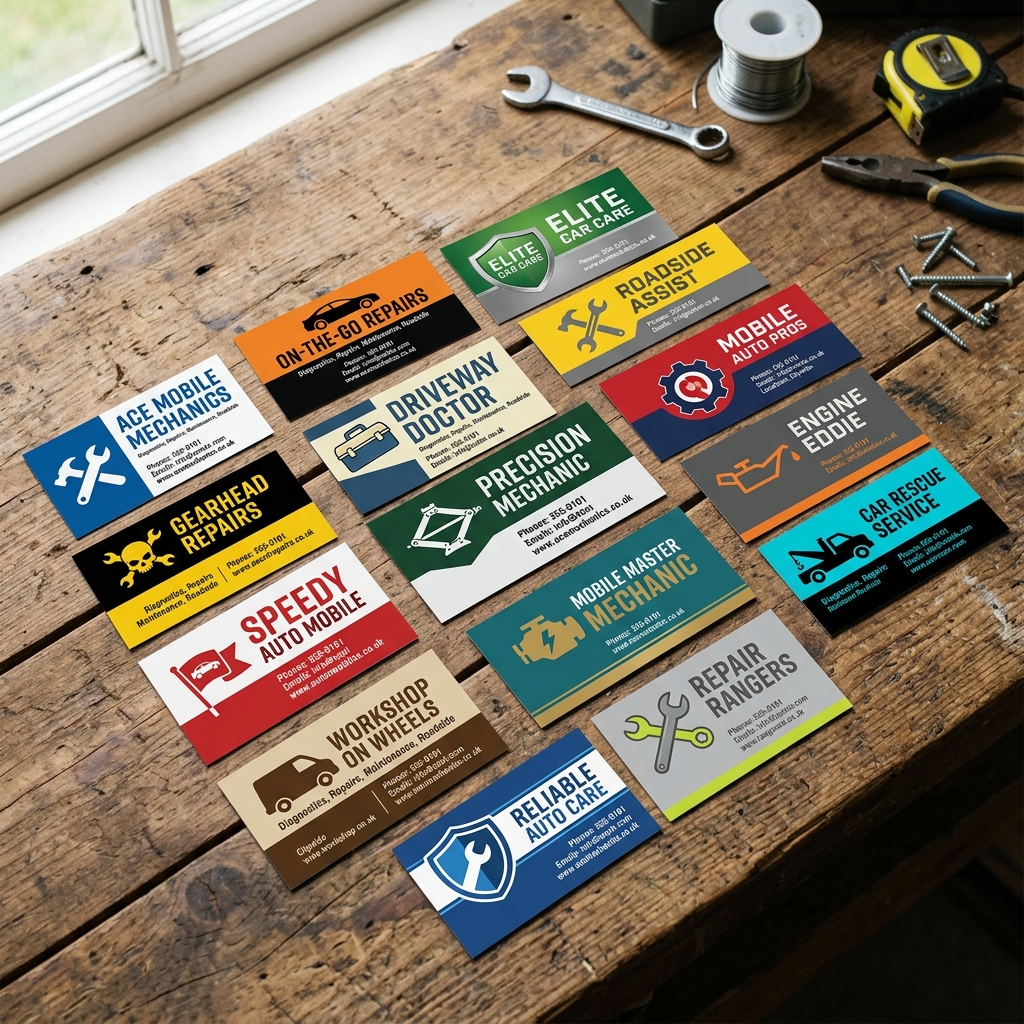
3. The 8 Best Business Card Designs for Mobile Mechanics (With Takeaways)
Eight card designs rise above the rest when you look at what actually drives calls and conversions for mobile mechanics. Each one solves a specific problem — whether that's building trust fast, reaching a new customer segment, or making it dead simple to book a job.
1. Bold Tire or Wrench Imagery Card
A dark background — navy, charcoal, or black — anchors a large tire tread or wrench graphic on the front. The mechanic's name and phone number sit in clean white type. Nothing else competes for attention.
This design works because it communicates the trade in under a second. According to a, people form first impressions in milliseconds. A bold visual does the explaining so your copy doesn't have to.
Best for: General mobile mechanics building brand recognition in competitive markets.
The image should show what you do, not decorate the card. If a stranger can't guess your trade from the graphic alone, change the graphic.
Takeaway: Lead with a single strong image tied to the work, not generic clip art. A real photo of your van or a custom tool illustration beats stock icons every time.
2. Clean White-Space Minimalist Card
White or off-white stock, small logo in the top left, name in a modern sans-serif font, and three contact details stacked on the right. That's it. No background image, no color fills, no clutter.
Minimalist cards photograph well, age well, and look premium without premium pricing. They also stand out in a stack of loud automotive designs — which is exactly the point.
Best for: Mobile mechanics targeting higher-income residential customers or luxury vehicle owners.
Clean design signals confidence. It says you don't need to shout because the work speaks for itself.
Takeaway: Resist the urge to fill every inch of the card. White space is not wasted space — it's what makes your name and number land.
3. QR Code-Forward Card
The front carries minimal info: your name, a short tagline, and a prominent QR code. The back lists your top three services and a single instruction: "Scan to book online."
This design turns a passive card into an active lead generator. When the QR code links directly to a booking page or digital estimate form, you shorten the path from "interested" to "booked.", QR code usage in the U.S. more than doubled between 2018 and 2022, and smartphone scanning is now a mainstream habit.
Best for: Mechanics who offer online booking or have a shop management platform with a customer-facing portal.
A QR code is only as good as where it points. Link it to a page that loads fast, looks professional, and makes it easy to request a job.
Takeaway: Test your QR code before printing 500 cards. Scan it yourself on three different phones. If the landing page is slow or confusing, fix that first.
4. Metallic Finish Premium Card
A foil-stamped logo or metallic ink treatment on the name gives this card a tactile quality people notice and remember. The rest of the design stays restrained so the finish does the heavy lifting.
Premium finishes run $40–$80 per 100 cards compared to $10–$20 for standard stock — but the perception shift can justify the cost when you're quoting $800 transmission jobs, not $30 oil changes.
Best for: Mobile mechanics specializing in European vehicles, classic car restoration, or fleet contracts where the client is a business owner or fleet manager.
| Finish Type | Avg. Cost per 100 | Turnaround | Wow Factor |
|---|---|---|---|
| Standard matte | $10–$15 | 3–5 days | Low |
| UV gloss | $18–$25 | 5–7 days | Medium |
| Soft-touch laminate | $25–$40 | 7–10 days | High |
| Foil/metallic | $40–$80 | 10–14 days | Very High |
Takeaway: Match your finish to your customer. A foil card handed to a budget oil-change customer is wasted. Handed to a fleet operations manager, it's an edge.
5. Bilingual English/Spanish Card
English on the front, Spanish on the back — or both languages sharing the front in equal weight. The design mirrors itself: same logo, same services, same CTA, different language.
Hispanic adults make up a significant share of vehicle owners in many U.S. markets. In areas where Spanish is widely spoken, a bilingual card isn't just thoughtful — it's a direct revenue strategy. It signals that communication won't be a barrier, which is a real concern for many customers when choosing a mechanic.
Best for: Mechanics operating in Texas, California, Florida, Arizona, or any market with a large Spanish-speaking population.
Language is trust. When a customer sees their language on your card, you've already cleared the first hurdle.
Takeaway: Use a professional translator, not Google Translate, for the Spanish copy. A small error undermines the entire trust signal the card is trying to build.
6. Van or Truck Silhouette Branding Card
A custom illustration of your actual service vehicle — side profile, wrapped with your logo — runs across the bottom third of the card. Your name and number anchor the top.
This design reinforces the "I come to you" message visually without a single word about service area. The van is the proof. It's also more memorable than any text claim because it's concrete and specific to you.
Best for: Mobile mechanics with a branded vehicle wrap who want card-to-van visual consistency.
Takeaway: Commission a simple vector illustration of your van from a designer on Fiverr or 99designs for $50–$150. Use it across cards, your website, and social profiles for instant brand cohesion.
7. Inspection Checklist Flip-Side Card
The front is your standard contact card. The back prints a short checklist — "Free 27-Point Inspection Included With Every Visit" — with seven to ten items listed in two columns. Think tires,
4. What to Write on Your Mobile Mechanic Business Card (Copy & Slogans That Convert)
The words on your card do more selling than the design. A sharp logo gets attention, but the right copy is what makes someone save your number instead of toss your card in the glovebox.
The Three C's Framework for Card Copy
Mechanics diagnose problems using Concern, Cause, and Correction — and your card copy can follow the same logic. Give the customer a clear problem they recognize, show you're the solution, and tell them exactly what to do next.
Your card should answer three silent questions every potential customer has: "What do you do?" "Can you help me?" "How do I reach you?"
That framework keeps your copy tight and purposeful.
Headline Copy: The First Line That Does the Heavy Lifting
Your headline sits right under your name or logo. It has to communicate your core value in five words or fewer.
| Headline | Why It Works |
|---|---|
| "We Come to You" | Solves the mobility question instantly |
| "Mobile Auto Repair, On Your Schedule" | Addresses convenience, the #1 reason people hire mobile mechanics |
| "Your Driveway. Your Timeline." | Punchy, customer-focused, memorable |
| "Roadside to Driveway — We Fix It All" | Covers the range of situations without listing services |
| "No Shop. No Hassle. Just Fixed." | Handles a common objection before it's raised |
From experience, headlines that mention the customer's location or schedule outperform generic phrases like "Quality Auto Repair" or "Trusted Mechanic." Those words are on every shop card in the zip code.
Slogans That Actually Generate Calls
A slogan is one layer below the headline — it reinforces your brand personality and sticks in memory. Here are real slogan examples with the reasoning behind each.
"Fixing Cars Where You Are" Simple, literal, and impossible to misread. Works especially well for first-time customers who've never used a mobile mechanic before.
"Your Mechanic, Minus the Wait" Targets the biggest pain point of traditional shops: time. According to AAA, the average car owner spends 4+ hours getting a vehicle serviced when you include drop-off, waiting, and pickup. This slogan speaks directly to that frustration.
"We Park at Your Problem" Slightly playful, still professional. It implies action and arrival — both important signals for mobile service.
"Repairs That Come Standard — At Your Door" Works well for mechanics positioning themselves as thorough and professional, not just convenient.
"The Mechanic Who Shows Up" Honest and disarming. It plays on reliability, which is the #1 trust factor customers cite when choosing any service provider.
"Keeping [City Name] Rolling" Geographic specificity builds local credibility fast. Swap in your actual city or neighborhood for instant community connection.
Slogans that name a specific pain point — waiting, towing, shop hassle — consistently outperform slogans built around vague claims like "quality" or "excellence."
What to Include in Your Service List
Don't list everything. Pick your top three to five services and write them clearly.
Strong examples:
- Oil Changes & Tune-Ups
- Brake Repair & Pad Replacement
- Battery Replacement
- Pre-Purchase Inspections
- Roadside Assistance
Weak examples:
- "Full-Service Auto Repair" (too vague)
- A list of 12 services in 8pt font (impossible to read, looks desperate)
In practice, a three-item service list reads faster and feels more confident than an exhaustive menu. If you specialize — fleet vehicles, diesel, EV — lead with that. Specialization is a selling point, not a limitation.
CTA Copy: Tell Them Exactly What to Do
A call to action is the instruction at the bottom of the card. Most mechanics skip this or write something passive like "Call Anytime." That's a missed opportunity.
CTAs that convert better:
- "Scan to Book in 60 Seconds" — pairs with a QR code, sets a low-effort expectation
- "Call or Text for a Free Quote" — texting option matters, especially for under-40 customers; that 9 in 10 consumers prefer texting a business over calling
- "Save This Number — You'll Need It" — confident, almost playful, very memorable
- "Book Online 24/7" — signals professionalism and removes the friction of business hours
Match your CTA to where the lead lands. If you're handing out cards at a parking lot or community event, "Scan to Book" with a QR code works best. If your audience skews older, "Call or Text" is safer.
What NOT to Put on Your Card
Just as important as what to include:
- Your entire service menu — if it needs a font smaller than 8pt, cut it
- Vague taglines — phrases like "Honest, Reliable, Affordable" appear on approximately every mechanic's card and mean nothing without proof
- Multiple phone numbers — one number, one action
- Long URLs — use a QR code or a short link like yourname.com/book instead of something like
- Certifications listed in paragraph form — if you're ASE certified, say "ASE Certified" in bold. That's it.
Putting the Three C's Into One Card
Apply the diagnostic framework to your copy as a final check:
- Concern (headline): "Stuck With a Dead Battery?"
- Cause (slogan/subhead): "Most breakdowns happen at the worst possible time."
- Correction (CTA): "Call or text — we're there in under an hour."
That's a complete persuasion sequence in three lines. It mirrors exactly how a good mechanic explains a repair, and it works the same way on a business card.
You can also use this framework to write your inspection checklist copy or your estimate templates — the same clear thinking that wins trust on a card wins trust throughout the job.
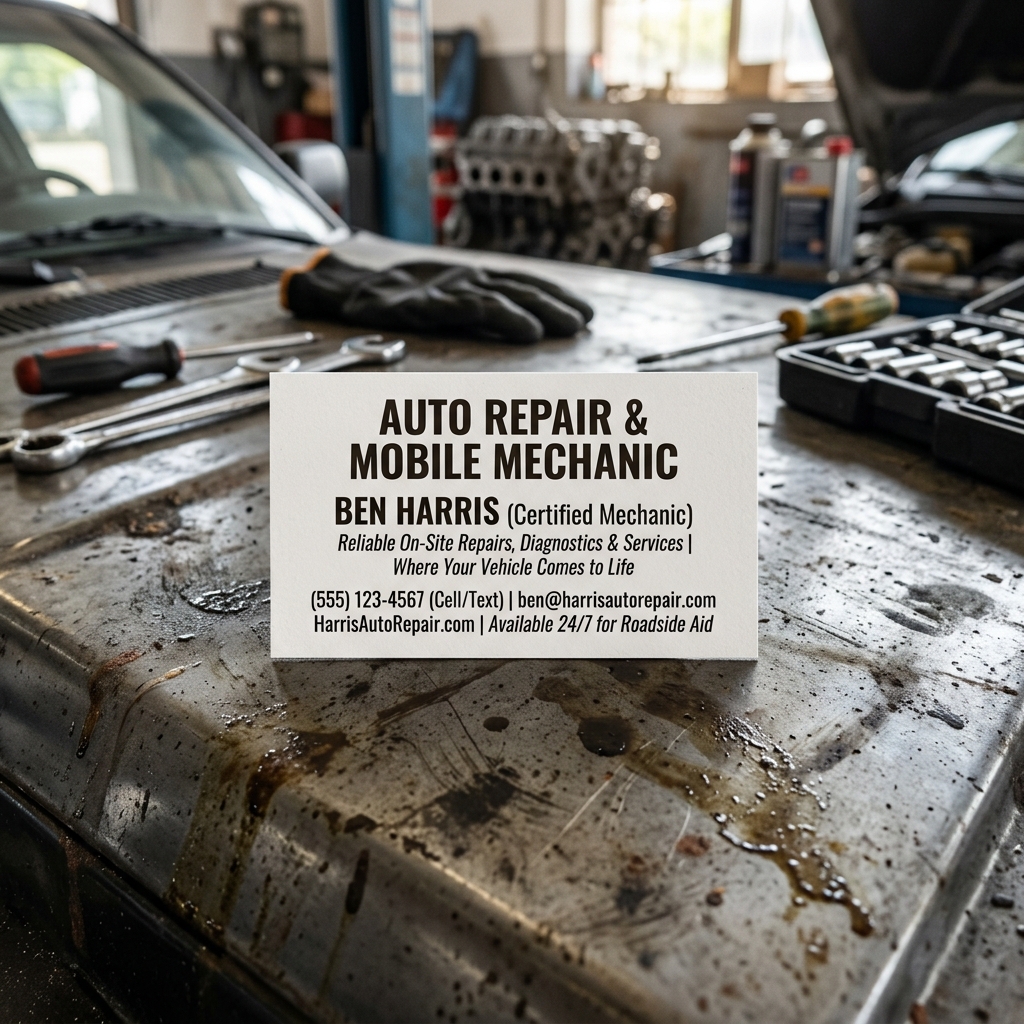
5. Where and How to Print Mobile Mechanic Business Cards (Without Wasting Money)
Printing your cards the wrong way is one of the fastest ways to waste money as a mobile mechanic. Order too few and you run out at the wrong moment. Order too many from the wrong vendor and you're stuck with cards that don't represent your brand well.
Here's how to make a smart call on where, what, and how much to print.
Print Vendors Compared
| Vendor | Best For | Starting Price (250 cards) | Turnaround | Finish Options |
|---|---|---|---|---|
| Budget-friendly first run | ~$14–$25 | 5–10 business days | Matte, gloss, UV, soft-touch | |
| Moo | Premium feel, small batches | ~$35–$55 | 5–7 business days | Soft-touch, gloss, luxe (thick) |
| GotPrint | High volume, trade quality | ~$18–$30 | 3–7 business days | Matte, UV gloss, silk |
| Local printer | Rush jobs, custom requests | Varies | 1–3 business days | Depends on shop |
| Canva Print | Design + print in one workflow | ~$20–$35 | 7–10 business days | Matte, gloss |
For most mobile mechanics starting out, Vistaprint or GotPrint offer the best cost-per-card ratio on a first run of 250–500 cards.
Finish Options and What They Actually Mean
The finish you pick changes how your card feels in someone's hand — and how they remember you.
- Matte: Flat, no shine. Easy to write on (useful if you want to jot down appointment times). Clean and professional.
- UV gloss: High-shine coating over the full card. Colors pop. Not writable. Works well for bold, image-heavy designs.
- Soft-touch: Velvety feel, premium tactile impression. Costs more but stands out. A good fit for mechanics going after higher-ticket customers.
- Spot UV: Gloss applied to specific areas only (like your logo). Adds dimension without covering the whole card.
Honest limitation: Premium finishes like soft-touch or spot UV typically add $15–$30 to a 250-card order and can add 2–4 business days to turnaround. If you need cards fast, stick with standard matte or gloss.
Digital Business Card Options
Physical cards still dominate in automotive, but digital cards are gaining ground — especially for fleet clients and corporate accounts that prefer digital records.
- : NFC-enabled card or wearable. Tap your phone or card to someone else's phone and your contact info transfers instantly. Around $15–$20 for the device, then a free or paid app tier.
- HiHello: App-based digital card you can text, email, or share via QR code. Free tier available. Good for mechanics who work events or fleet lots.
- Linktree or a simple landing page: A QR code that routes to a page with your number, booking link, and Google review link does the same job at nearly zero cost.
Digital cards don't replace physical ones for most mobile mechanic use cases — they complement them. Hand someone a physical card, but make sure the QR code on it leads somewhere useful.
QR Code Strategy That Actually Converts
A QR code is only valuable if it sends people somewhere worth visiting. From experience, these are the three destinations worth linking to:
- Your booking page — The highest-converting destination. If you have an online scheduling link, this is where the QR should go.
- Your Google Business Profile — Great for building reviews. Ask customers to scan and leave a review right after a job.
- Your branded website — Works well if the site is clean, mobile-optimized, and includes a contact form or call button.
Use a tool like or Canva's built-in QR feature to create a trackable code. A dynamic QR code lets you change the destination URL later without reprinting your cards.
How Many Cards to Order (And When to Reorder)
| Situation | Recommended Quantity |
|---|---|
| Just starting out, testing the design | 100–250 |
| Established mobile mechanic, active area | 500 |
| Fleet work, high-volume handoffs | 1,000+ |
| Leaving cards at auto parts stores, waiting rooms | 250 per location |
Print costs drop significantly at higher quantities. GotPrint's price per card at 1,000 units is roughly 40–50% cheaper than at 250. If you're confident in your design, ordering 500 at once almost always makes financial sense.
One practical tip: Keep 20–30 cards in your van at all times, not just your wallet. Jobs come from neighbors watching you work, people in parking lots, and bystanders — not just the customer you're there to serve.
Conclusion
A great business card gets the phone to ring. But the call is just the beginning.
Everything covered in this article — the bold imagery, the clean copy, the QR code linking to your booking page — serves one purpose: getting a stranger to trust you enough to reach out. What happens next decides whether that trust becomes revenue.
The card opens the door. Your system has to close it.
The best mobile mechanics understand this. They pair a sharp, well-designed card with a workflow that looks just as professional on the backend. When someone scans your QR code and lands on a clean booking page, gets a digital estimate within minutes, and receives a photo-rich inspection report before approving work — that's when trust becomes a paid invoice.
Here's a quick recap of what works:
- Lead with your service area — "I come to you in [City/Region]" removes the biggest question customers have
- One clear CTA — a phone number, a QR code, or a booking link (not all three competing for attention)
- A tagline that solves a problem — "Stuck? We'll come to you." outperforms "Quality Auto Repair" every time
- A finish that matches your positioning — soft-touch matte for premium, UV gloss for bold automotive branding
- A flip side that works harder — inspection checklists, loyalty punches, or a service menu turn your card into a tool
On the copy side, the mechanics who get the most callbacks keep it simple: name, specialty, area, one hook, one action. The three C's framework — Concern, Cause, Correction — applies here too. Your card should signal that you understand the customer's problem, you have the answer, and you make it easy to take the next step.
For printing, is worth the extra cost if you want premium finishes that reflect high-end positioning. Vistaprint works well for volume runs on a budget. And a digital card through Popl or HiHello makes sense if you're working fleet accounts or corporate clients who rarely carry wallets.
None of it matters, though, if the lead falls through the cracks after contact. Mobile mechanic software like RedAppy gives you the backend to match your frontline impression — branded website, digital inspections, instant estimates, and online payments all in one place. According to RedAppy, shops using the platform save 10+ admin hours per week, which means more time on jobs and less time chasing paperwork.
A business card is a promise. The right tools help you keep it.
Start building your mobile mechanic workflow before your next batch of cards goes to print — because the system behind the card is what turns a good first impression into a loyal repeat customer.
Frequently Asked Questions
How much should a mobile mechanic charge per hour?
Mobile mechanics typically charge between $70–$150 per hour, depending on location, specialty, and experience level. Rates are often lower than traditional shops since overhead costs are reduced, but complex diagnostics or specialty vehicles can push hourly rates higher.
What are some creative business card ideas for a mobile mechanic?
Effective mobile mechanic business cards often include a bold tire or wrench graphic, a QR code linking to booking or reviews, and a tagline that emphasizes convenience. Using durable, laminated or metal-finish cards helps reinforce a professional, reliable image. Adding a "Services" checklist on the back gives potential customers immediate value.
What are some good slogans for mobile mechanics?
Popular slogans include "We Come to You," "Your Driveway Is Our Shop," and "Repair Without the Runaround." Strong taglines highlight the core benefit of mobile service — convenience — while reinforcing trust and expertise. Short, memorable phrases like "Fixed Fast, Right Where You Are" tend to work best on business cards.
What are the three C's in mechanics?
The three C's in mechanics stand for Condition, Cause, and Correction — a diagnostic framework used to document vehicle repair work. "Condition" describes the customer complaint, "Cause" identifies the root problem, and "Correction" outlines the repair performed. This structure is standard in automotive service writing and repair orders.
Ready to Transform Your Shop?
RedAppy helps auto repair shops create professional digital estimates with photos and videos, send them instantly via text or email, and get customer approvals in seconds. No credit card required to start.