
Online Invoice Create: A Guide for Auto Repair Shops
A repair order closes, the vehicle is ready, and the front desk prints a plain invoice that lists “labor,” “parts,” and a total. Ten minutes later, the customer is at the counter asking why the charge is higher than expected, which part was installed, and whether the inspection note was included. The advisor starts explaining from memory, the tech gets interrupted, and payment slows down.
That scene plays out in small shops every day. The problem usually isn't the work. It's the invoice. A weak invoice creates doubt right at the moment the shop is trying to collect money and send a customer out feeling confident.
For an auto repair business, online invoice create isn't just about replacing paper with a PDF. It's about building a clear, shop-ready billing process that shows what was done, why it was needed, what parts were used, how taxes were applied, and how the customer can pay without friction.
Table of Contents
- Why Your Shop Needs More Than a Generic Invoice Template
- Building Your Perfect Auto Repair Invoice
- Detailing Labor Parts and Proof of Work
- Applying Taxes Discounts and Shop Fees Correctly
- Sending Invoices and Getting Paid Instantly
- Automating Your Invoicing to Save Hours Every Week
Why Your Shop Needs More Than a Generic Invoice Template
A generic invoice template looks fine until something goes wrong. The customer asks which axle got the brake work. A warranty issue comes up later. A bookkeeper tries to match the invoice to the vehicle history and finds no VIN, no mileage, and no clean breakdown of labor versus parts. What seemed “good enough” at the counter turns into rework later.
That's why a proper online invoice matters so much in a repair shop. It does more than request payment. It documents the job, supports the estimate, reduces arguments, and gives the customer a cleaner reason to trust the bill.
The broader shift is already happening across industries. The global e-invoicing market was valued at approximately $18.5 billion and is projected to reach $70.3 billion by 2034, with e-invoicing becoming a legal requirement in over 80 countries, according to. For repair shops, that doesn't mean every invoice has to become complicated. It means digital-first billing is becoming standard business practice.
The real cost of a weak invoice
The biggest cost isn't paper, toner, or filing cabinets. It's interruption.
A vague invoice forces service advisors to explain charges after the job is done. It forces technicians to stop what they're doing and answer questions they already answered during inspection. It forces managers to handle avoidable disputes that started because the invoice didn't tell the full story.
Practical rule: If the customer needs a verbal explanation to understand the final bill, the invoice is underbuilt.
A strong online invoice create process fixes that by making the final document carry more of the load. When the labor is clear, the parts are listed properly, and the proof of work is attached, the invoice stops being a weak handoff and starts acting like a final service report.
Why repair shops need a different standard
Plumbers, consultants, and freelancers can often invoice with a simple service description and a total. Auto repair shops can't. Vehicles have identifiers, repairs have technical details, and taxes can differ across parts and labor. Shops also deal with authorizations, warranty notes, and comeback prevention.
That's why the right system isn't a generic template with a logo on top. It's a repair-specific workflow built to reflect how the shop works.
Building Your Perfect Auto Repair Invoice
Most invoice builders were made for general business use. They can send a bill, but they don't think like a service advisor. They don't expect a VIN, labor code, mileage in and out, or repair authorization details. That gap matters more than most shops realize.
Adobe's invoice creator page highlights the broader template approach, but the industry-specific gap is the core issue here. Most free online invoice creators offer generic templates lacking fields for VIN, labor codes, or state-mandated disclosures. A reported 68% of independent auto shops face invoicing errors due to these missing legal fields, and 92% of “free invoice generator” guides ignore those requirements, as noted in.
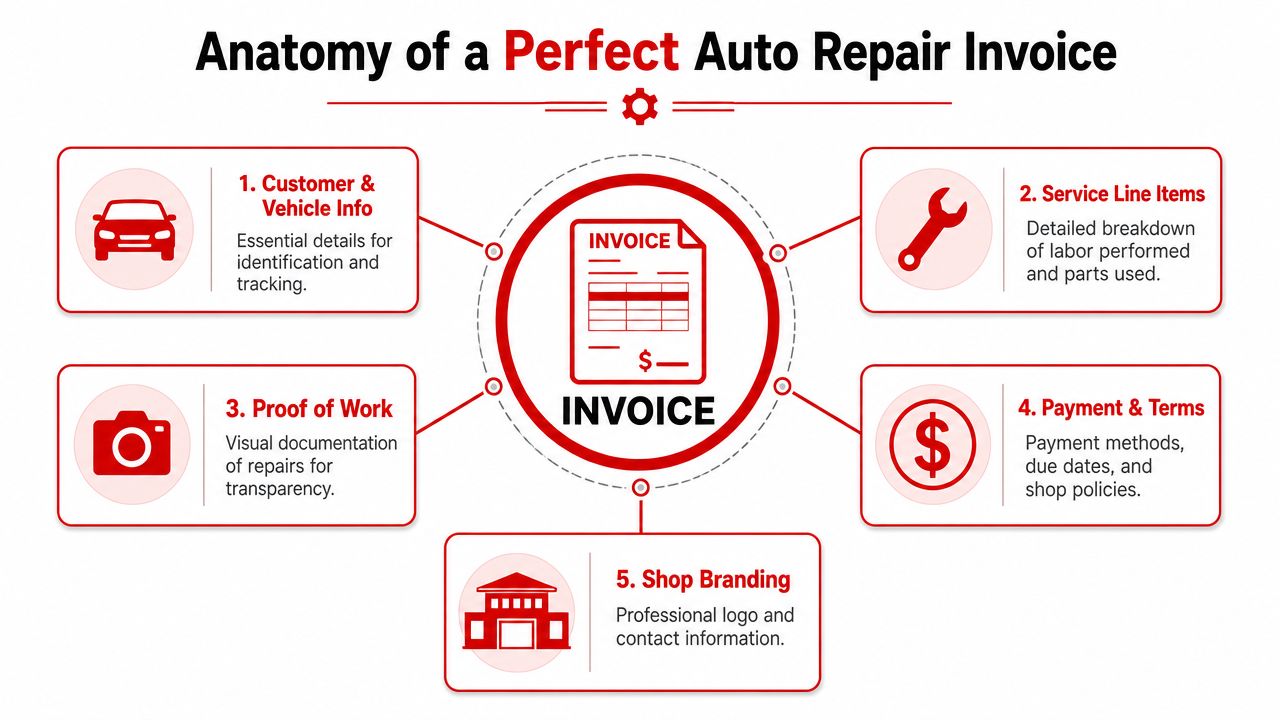
The easiest way to audit an invoice is to split it into two groups. The first group protects the shop. The second improves presentation.
The fields that prevent trouble
These fields aren't optional in a working shop environment:
- Customer identity: Full name, phone, and contact details so the invoice ties cleanly to the repair order.
- Vehicle identity: VIN, plate, make, model, and mileage so there's no doubt which vehicle received the work.
- Job-specific line items: Labor descriptions, parts used, quantities, prices, and totals.
- Invoice numbering: Each invoice needs a unique sequential number. Random numbering creates accounting headaches.
- Timing fields: Issue date and service completion details should be clear and separate in the workflow.
- Authorization and policy notes: Space for approvals, warranty language, and required shop disclosures.
A good technical foundation matters too. The invoice system should separate database work from document generation and enforce unique, sequential invoice numbers at the database level, a best-practice approach described in. That sounds technical, but the shop impact is simple. Fewer duplicate invoices, cleaner reporting, and less reconciliation pain.
What belongs on every invoice
The presentation layer still matters. It's just second to compliance and clarity.
| Field | Generic Template | Auto Repair Essential |
|---|---|---|
| Customer name | Usually included | Must be tied to vehicle owner or authorized contact |
| Vehicle VIN | Usually missing | Required for accurate vehicle identification |
| License plate | Usually missing | Useful for quick matching at the counter |
| Mileage in and out | Usually missing | Important for service records |
| Labor codes | Rarely supported | Needed for internal clarity and cleaner customer explanations |
| Parts details | Often basic | Should include specific part descriptions and pricing |
| Warranty disclosures | Often missing | Needed where shop or state requirements apply |
| Shop branding | Common | Helpful, but secondary to repair detail |
| Payment terms | Common | Must be visible and easy to understand |
For shops that want a cleaner handle on invoice wording and tax invoice basics, is a useful outside reference. It helps when a shop wants to tighten document structure without overcomplicating the customer-facing layout.
A good auto repair invoice answers the customer's next question before they ask it.
Detailing Labor Parts and Proof of Work
The line-item section is where invoices either earn trust or lose it. “Repair service completed” might be enough in another trade. In auto repair, it usually creates friction. Customers want to know what was replaced, how much labor was charged, and whether the recommendation matched the inspection.
For repair work, invoices need explicit line items for billable hours, service descriptions, and part prices, and the best workflows use templates that auto-populate those fields so staff don't miss details like diagnostic codes or part numbers, as explained in.
A shop-ready invoice should read like the final version of the estimate, not like a cashier receipt.
Why vague line items create pushback
Customers rarely push back on a charge that they fully understand. They push back on short labels.
“Brake job” is weak. “Front brake pad replacement, rotor service, road test” is better. “Brake job with labor” leaves room for questions. Separate labor entries with clear descriptions close that gap.
A stronger parts and labor layout usually looks like this:
- Labor line: Use a service description that reflects the work performed, not shop shorthand.
- Hours entry: Show billable hours clearly so the customer sees what labor they're paying for.
- Parts line: List each part with a specific description. Part numbers help internally and reduce confusion later.
- Grouped totals: Keep labor, parts, fees, tax, and discount logic easy to follow.
The other common mistake is cramming too much into one line. When shops bundle multiple operations into a single charge, the invoice gets shorter, but disputes get longer.
“If the advisor can't read the line item out loud without translating it, the customer won't trust it.”
How proof of work changes the conversation
Photos are one of the most underused invoice tools in auto repair. They don't replace inspection notes. They support them.
When a digital vehicle inspection shows a leaking component, worn pad thickness, cracked belt, or damaged tire, attaching that proof to the estimate helps the sale. Carrying that same proof through to the invoice helps the collection. The customer sees that the final bill matches visible evidence, not just a typed recommendation.
That's especially useful when the customer isn't at the shop, when a family member pays on behalf of the driver, or when approval happened earlier in the day and the details are no longer fresh.
A solid proof-of-work workflow should include:
- Inspection photos tied to the repair order
- Clear service notes linked to the approved job
- Invoice line items that mirror the approved estimate
- A final customer document that can be viewed on phone or desktop
Shops don't need flashy invoices. They need invoices that defend themselves.
Applying Taxes Discounts and Shop Fees Correctly
Tax handling is where generic invoice tools break down fast in auto repair. A simple invoice app might let the shop apply one tax rate to the full total, but that's often not enough. Repair shops commonly deal with different treatment for parts, labor, fees, and special items, and the invoice needs to reflect that accurately.
Billdu's invoice generator guidance notes that tax rate application is a mandatory mechanic in online invoicing, and that auto repair shops often need to apply taxes differently across line items rather than at the invoice level, which is why is so relevant here.
Separate tax logic by line item
This is the practical rule that keeps invoices clean. Don't think about tax only at the bottom of the invoice. Think about it while building each charge.
Parts often need one treatment. Labor may need another. Shop supplies or environmental charges may need their own logic depending on local rules. If the software can't isolate those categories, the front desk ends up doing manual math or workarounds, which is where mistakes start.
A better setup includes:
- Parts as individual taxable or non-taxable lines: This gives the shop control where local rules differ.
- Labor as its own category: Don't bury labor inside a bundled charge if tax treatment differs.
- Fees separated from core repair work: Shop supplies, disposal charges, and similar items should never appear as mystery add-ons.
- Discounts shown before the final total: Customers should be able to see what was discounted and how it affected the bill.
Fees and discounts need plain language
A customer will usually accept a fee that's disclosed clearly. The frustration starts when the invoice introduces a charge with no explanation. “Misc.” is one of the worst line labels a shop can use. It reads like padding.
Instead, label fees in a way that reflects the work or policy behind them. If the shop applies a discount, show the source of that discount just as clearly. Seasonal offer, goodwill adjustment, or approved promotion all read better than a silent reduction hidden in the math.
Shop-floor advice: If a fee would need a speech at pickup, it needs a better label on the invoice.
The goal isn't just compliance. It's a bill that a customer can scan quickly and accept without suspicion.
Sending Invoices and Getting Paid Instantly
A strong invoice still won't help much if the shop sends it in a clumsy way. Delivery is part of collections. The faster the customer can open, review, and pay the invoice, the less drag there is between finished work and collected revenue.
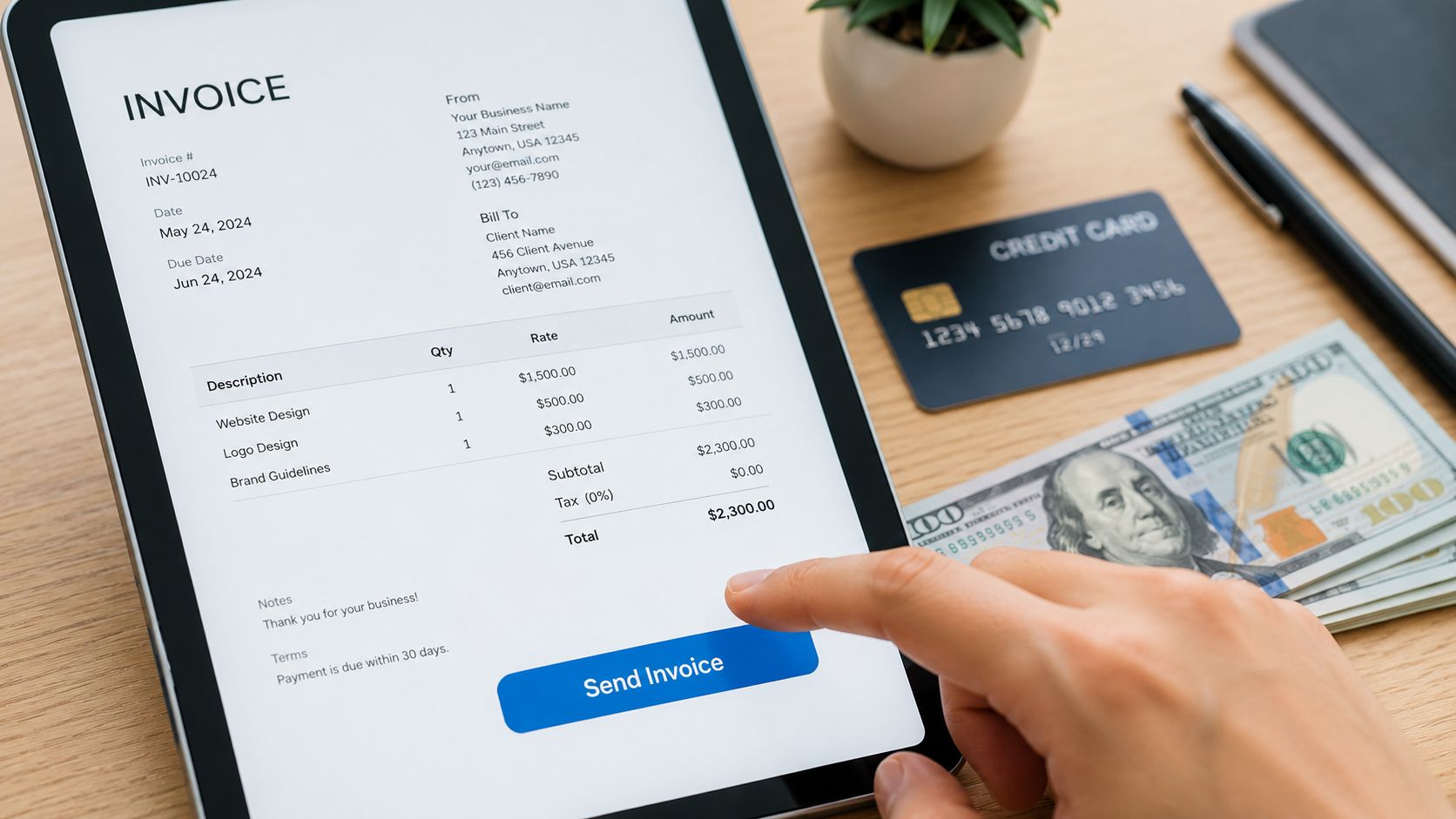
The most common pitfall behind payment delays is the lack of a clear, clickable payment link inside the invoice. Embedding that option reduces time-to-pay by letting the customer complete the transaction immediately, according to.
That one feature changes the invoice from a document into an action.
Delivery matters as much as layout
Emailing a PDF attachment is still common, but it creates friction. The customer has to open it, figure out how to pay, and sometimes call the shop back with questions. Sending a digital invoice with a payment link is cleaner. Sending it by text can be even better for many repair customers because that's where they'll see it.
The best delivery workflow does three things well:
- It arrives quickly: Send the invoice as soon as the work is complete.
- It opens easily on a phone: Most customers won't be at a desktop when the invoice arrives.
- It includes payment in the same view: No separate portal hunt, no extra steps.
Wicked File also highlights the value of digital invoice delivery with read receipts and payment links for auto repair shops. That kind of helps staff follow up based on customer behavior, not guesswork.
Use tracking to follow up at the right time
A read receipt is more than a nice feature. It tells the advisor what happened after send.
If the customer opened the invoice but didn't pay, that's a very different follow-up than a customer who never saw it. The first may need a quick clarification. The second may need a resend. Static PDF workflows hide that difference.
A better follow-up rhythm looks like this:
- Invoice sent immediately after service completion
- Customer opens invoice on mobile
- Payment link is available in the same screen
- Staff sees whether the invoice was viewed
- Follow-up happens with context, not guesswork
Prompt delivery also matters. Sending the invoice while the service is still fresh helps avoid the customer forgetting what was approved or performed. That matters in repair because the details fade quickly once the vehicle is back on the road.
Automating Your Invoicing to Save Hours Every Week
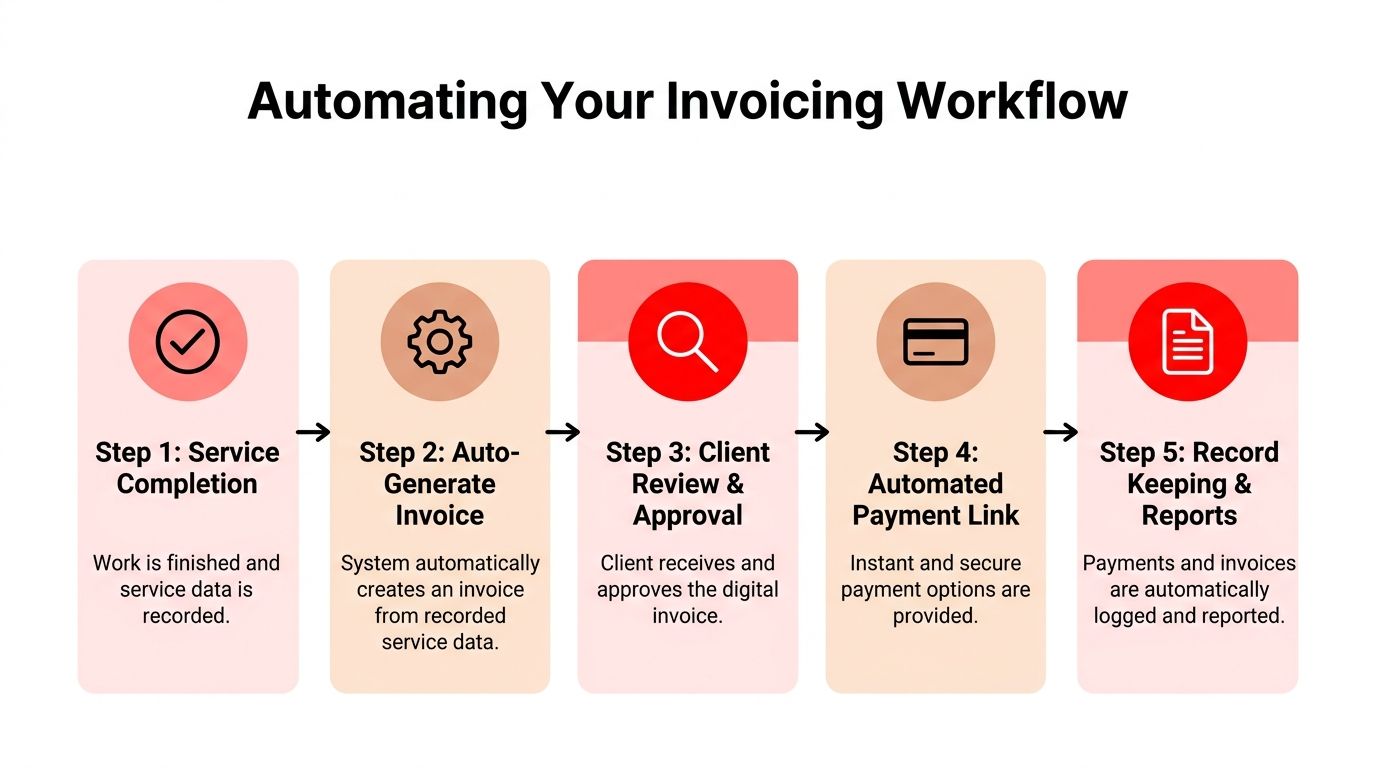
The ultimate win isn't creating one excellent invoice. It's building a shop process where invoices generate from completed work, carry approved details forward, reach the customer fast, accept payment smoothly, and record the result without double entry.
That's where online invoice create becomes operational instead of administrative. The invoice stops being a separate task and becomes the last connected step in the repair order.
Build one connected workflow
Manual invoicing usually breaks in the handoffs. The estimate sits in one system. Photos live on a phone. Payment happens elsewhere. Bookkeeping gets updated later, if someone remembers. Every extra handoff creates delay, inconsistency, or missed details.
An automated workflow removes those weak points:
- Service completion triggers invoice creation: Approved labor, parts, and notes carry over automatically.
- Customer communication happens from the same system: No copying totals into a separate tool.
- Payment collection connects to the invoice: The customer can act right away.
- Status tracking stays visible: Staff can see sent, viewed, paid, or overdue activity.
- Records flow into reporting and accounting: That cuts down on duplicate data entry.
Shops that are comparing finance-side systems may also want a broader view of accounting automation. This guide to is useful for understanding how bookkeeping tools fit into a more automated back office.
What to look for in a shop system
A repair shop doesn't need more apps. It needs fewer disconnected ones.
The right setup should support repair orders, estimates, inspections, invoice generation, payment collection, and reporting in one place. It should also make invoice data searchable by customer, plate, or VIN so the front desk can answer questions quickly. That's what saves time week after week.
One more point matters at the process level. Invoice timing should be deliberate. Best practices for invoicing workflows call for sending invoices promptly, ideally the same day work is delivered, because delay hurts approval and payment momentum. In a busy shop, automation is the easiest way to make that happen consistently.
Systems don't save time by being “advanced.” They save time by removing repeat decisions from the front desk.
A shop that automates invoice creation, sending, reminders, and record keeping gives its staff more room to sell work, update customers, and move vehicles through the bays instead of chasing paperwork.
Shops that want a cleaner invoicing process without piecing together generic tools can explore RedAppy features built for modern auto repair workflows or reach out through the RedAppy contact page to see how a connected shop system can handle estimates, inspections, invoicing, payments, and reporting in one place.
Ready to Transform Your Shop?
RedAppy helps auto repair shops create professional digital estimates with photos and videos, send them instantly via text or email, and get customer approvals in seconds. No credit card required to start.