
Online Payments Options for Auto Repair Shops Explained
A lot of shops are stuck in the same bad scene. The repair order is finished, the customer is ready to leave, the keys are sitting there, and the only thing slowing everything down is payment. The advisor is flipping the screen around, the terminal is lagging, the customer asks if there's a payment link, and someone in the back is waiting to close the ticket so the next car can move in.
That's not a fintech problem. That's a shop-floor problem.
For an auto repair shop, online payments options only matter if they shorten handoff time, clean up deposits, and get money into the account without turning the front counter into a bottleneck. If a payment method looks modern but creates more clicks, more declined transactions, or more reconciliation work, it's the wrong tool. The right setup is the one that fits how the advisor sells work, how the technician hands off jobs, and how the owner watches cash flow.
Table of Contents
- Why Online Payments Now Decide the Repair Shop Experience
- The Main Online Payments Options Available to Repair Shops
- Comparing Cards, ACH, Wallets, and Payment Links for the Bay
- Fees and Approval Rates That Quietly Shape Shop Margins
- Security, PCI, and Fraud Risk for Online Card Acceptance
- Connecting Payments to Your Shop Management Workflow
- Choosing the Right Online Payments Options for Your Shop
Why Online Payments Now Decide the Repair Shop Experience
At 10:15 on a busy Saturday, the repair is finished, the customer is at the desk, and the advisor should be closing the RO in under a minute. Instead, the customer asks for a payment link, the terminal freezes, and the advisor starts improvising. That one bad handoff backs up the counter, delays the next write-up, and keeps a finished car parked longer than it should be.
That is the repair shop experience now. Payment is part of the job, not the cleanup after it.
The payment step now shapes the whole visit
Customers judge the last two minutes hard. If estimate approval happens by text, they expect payment to work the same way. If they can tap, click, or pay from a phone everywhere else, they expect your shop to keep up. A clunky checkout makes the whole visit feel old, even if the repair work was solid.
The broader shift is obvious in the numbers. McKinsey estimated the payments industry generated $2.5 trillion in revenue from $2.0 quadrillion in value flows and supported 3.6 trillion transactions worldwide (McKinsey global payments report). For a repair shop, that matters for one reason. Digital payment behavior is now normal behavior, and customers bring that expectation right to the service counter.
What changes inside the shop when payments are set up right
Online payments options are not a branding upgrade. They are a workflow decision.
A good setup lets the advisor collect a deposit when the work is approved, send a payment link when the car is ready, and close the invoice before pickup if the customer is sending someone else. That cuts dead time at the counter. It also reduces the usual scramble between the front desk, the tech waiting on signoff, and the owner trying to match deposits later.
A bad setup does the opposite.
- Advisors lose selling time: They chase balances instead of calling the next declined job or following up on recommended work.
- Technicians lose bay flow: Completed cars sit because release is tied to a slow or awkward payment step.
- Owners lose cash control: Deposits, partials, and final payments end up split across devices, inboxes, and handwritten notes.
Practical rule: If your shop can text an estimate but cannot collect payment from that same thread, your process is wasting time.
Digital payment use is now common across both high-income and developing markets, according to World Bank findings summarized in this. Shops do not need the percentages. They need the takeaway. Customers already know how they want to pay, and they notice fast when a shop makes that harder than it should be.
The shops that handle this well do one simple thing. They treat payment as part of dispatch, approval, handoff, and closeout. That is why online payments now decide more than convenience. They decide how fast the front counter moves, how cleanly the bay turns over, and how quickly cash hits the bank.
The Main Online Payments Options Available to Repair Shops
A service advisor closes the job, the tech is done, the car is ready, and pickup still stalls because payment does. That is not a payments problem. It is a workflow problem. The payment methods you offer decide whether the front counter clears fast, whether cars leave on time, and whether money lands where your office can reconcile it.
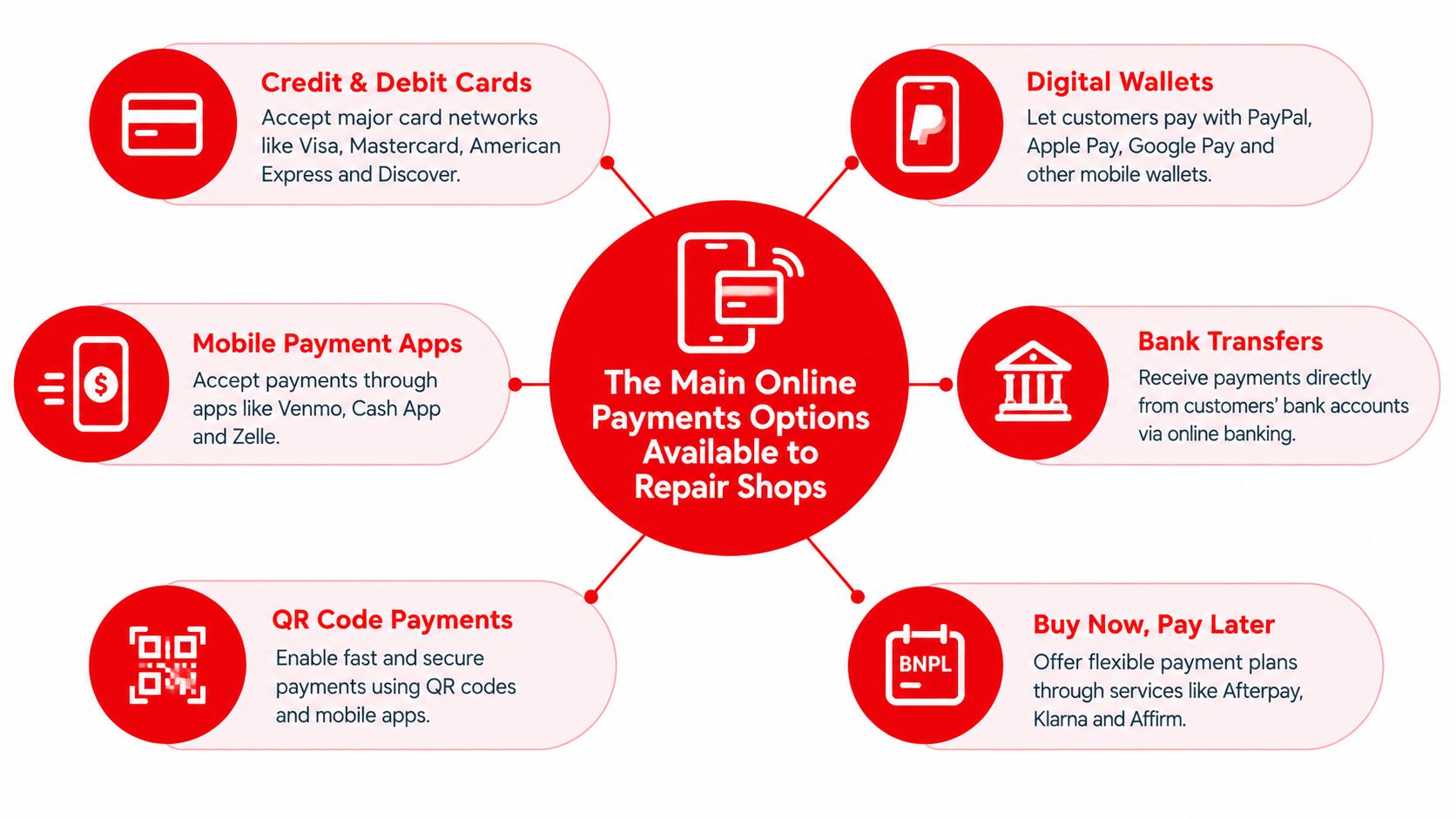
Online payments options are the ways a customer can pay without standing in front of one card terminal. For a repair shop, each option changes a different part of the day: estimate approval, parts deposit, pickup, after-hours release, fleet billing, or repeat service.
The default lane
Card payments come first. Set them up before you get fancy with anything else.
Cards cover the widest range of real shop transactions: a deposit when the customer approves work by phone, a final invoice sent by text, a card-on-file charge for a repeat account, or a standard pickup at the counter. ResearchAndMarkets, summarized by Business Wire in a U.S. digital payments report summary, noted that almost 95% of small businesses still accept cards. No surprise. If your shop makes cards hard to use, you create your own bottleneck.
Cards fit:
- Counter checkout
- Deposits on approval
- After-hours invoice collection
The cheap lane for bigger tickets
ACH and bank transfers are for jobs where fee control matters more than instant convenience.
Use ACH for commercial accounts, fleet billing, large parts deposits, and higher-dollar invoices that would sting on card fees. Do not push ACH on a retail customer trying to grab keys on the way home. That slows pickup, confuses the handoff, and puts the advisor back in chase mode if the customer never completes the transfer.
ACH fits:
- Estimate approval with deposit
- Post-repair invoicing
- Fleet and commercial billing
The fast lane on a phone
Mobile wallets like Apple Pay and Google Pay reduce typing and reduce drop-off. That matters at two moments shops deal with every day: the customer approving from a phone and the customer paying while walking to the counter.
Wallets still run through card rails, but the experience is cleaner. Fewer fields. Fewer mistyped numbers. Less friction when a spouse or family member is paying remotely on mobile. Global payments reporting also shows wallets now dominate online checkout in many markets, including several Asia-Pacific countries tracked in a major. The shop takeaway is simple. If your invoice opens on a phone, wallet buttons help close the job faster.
Wallets fit:
- Counter checkout
- Quick-pay deposits
- Invoice links opened on a phone
The remote lane
Payment links and digital invoicing are what fix the handoff when the payer is not physically in the building.
This is the method that saves the advisor time. Instead of reading card numbers over the phone or waiting for someone to call back, the advisor sends a link by text or email, the customer pays, and the RO can move toward closeout. It works especially well for after-hours pickup, family-member payments, and approvals that need money attached before parts get ordered.
Shops using Square at the front desk often pair scheduling and reminders with so customer communication and payment timing stay tighter.
Payment links fit:
- Text-to-pay closeout
- Remote payments from a spouse or business office
- After-hours release workflows
The repeat-account lane
Recurring billing and stored cards make sense for service plans, repeat fleet work, and commercial customers that come back every month.
The key is tokenized storage inside your processor or shop system. Do not store card numbers in notes, on paper, or in someone's inbox. Stored credentials cut repeat friction for the advisor and make scheduled charges, deposits, and follow-up work much easier to collect.
This lane fits:
- Fleet maintenance programs
- Service memberships
- Repeat commercial accounts
The backup lane
Virtual terminals and text-to-pay are backup tools. They solve real pickup problems, but they need rules.
A virtual terminal helps when the cardholder is remote and the shop still needs to take payment today. Text-to-pay helps when the customer ignores email but responds to a phone buzz in two minutes. Both are useful. Both can also create more fraud risk and more keyed-entry declines if your staff uses them as a shortcut for every transaction.
Use them for exceptions, not as your main process.
The right mix for most repair shops is straightforward: cards first, payment links right behind them, wallets for mobile convenience, ACH for larger or commercial invoices, then stored cards and virtual terminal tools where they fit the workflow. That setup does more than add payment options. It clears the counter, supports cleaner technician handoff, and gets cash collected with less chasing.
Comparing Cards, ACH, Wallets, and Payment Links for the Bay
Most shops don't need six active payment methods on day one. They need the four that move money without slowing down the bay. Those are cards, ACH, mobile wallets, and payment links. Everything else is a support tool around those four.
What matters at the counter
The counter only cares about four things: how fast funds arrive, what the transaction costs, whether the payment gets approved, and whether the method fits the repair job. That's it. Fancy feature lists don't matter if the advisor still has to chase people down.
| Online Payment Options vs. the Repair Shop Counter | Speed to Funds | Typical Cost | Approval on $300–$2,500 Ticket | Best Fit Repair Job |
|---|---|---|---|---|
| Card payments | Fast | Higher than ACH | Strong for in-person and standard retail tickets | Walk-in retail repairs, pickup payments, same-day closeout |
| ACH and bank transfer | Slower than cards | Lower than cards | Depends on customer bank setup and pre-authorization | Fleet invoices, large parts deposits, commercial accounts |
| Mobile wallets | Fast | Similar to underlying card rail | Often smoother than manual card entry because the credential path is cleaner | Quick-pay jobs, younger mobile-first customers, front-counter handoff |
| Payment links and digital invoicing | Varies by underlying method | Varies by rail used | Good when paired with cards or wallets and sent cleanly by text or email | After-hours pickup, remote payers, insurance or warranty follow-up |
The blunt recommendation
Cards are still the workhorse. They win when the vehicle is ready now and the shop needs to release it now. But cards also carry the heaviest fee pressure, especially once the payment moves online or gets keyed in remotely.
ACH should be treated as a targeted tool, not a universal answer. It's useful for large invoices and commercial billing. It's clumsy for hurried retail checkout.
Wallets aren't a gimmick. They're a cleaner way to ride the card rail. In markets where mobile payment behavior is stronger, that matters even more. In Australia, online payments reached about 20% of all consumer payments, mobile-app payments made up almost half of online payments, and the share of people making at least one online payment in a diary week rose to 68% from 64%. In the UK, 52% of respondents made at least one online payment per week, while debit cards remained the top preferred method at 33%.
Where links earn their keep
Payment links are the practical winner for remote closeout. The advisor sends the invoice. The customer pays from work, from home, or from the parking lot. The shop closes the ticket without a phone chase.
Some shops also pair payment links with loyalty tools. If the business is experimenting with repeat-visit incentives, tools that can make return-customer programs easier to use on a phone.
A good payment stack usually isn't one rail. It's cards for speed, ACH for selected bigger invoices, and payment links or wallets to remove friction.
Fees and Approval Rates That Quietly Shape Shop Margins
Most shops focus on the posted processing rate and miss the stuff that drains margin. The card cost stack includes interchange, card network assessments, and processor markup. Then the processor layers on all the junk nobody notices at signup. Statement fees, PCI non-compliance fees, gateway fees, monthly minimums, batch fees, and terminal rental all pile onto the same repair order margin.
What shops should inspect on every statement
A processor can advertise one rate and bill another effective rate once the transaction is keyed, card-not-present, rewards-heavy, or missing data fields. Shops should assume nothing and read every line.
| Typical Online Card Cost Stack for a Repair Shop | Card-Present Range | Card-Not-Present Range | What Triggers It |
|---|---|---|---|
| Interchange | Lower than online keyed entry | Higher than in-person acceptance | Card type, rewards category, channel |
| Assessment | Applies | Applies | Card network charges |
| Processor markup | Varies by contract | Usually higher on remote payments | Provider pricing model |
| Gateway fee | Sometimes bundled | Sometimes separate | Online invoice or hosted payment flow |
| PCI fee or non-compliance fee | May apply | May apply | Merchant compliance status |
| Statement or monthly fee | May apply | May apply | Account billing setup |
| Batch fee | May apply | May apply | Settlement batching |
| Terminal rental | Applies if hardware is leased | Not always relevant | Counter hardware agreement |
Approval rates matter more than shops think
The more painful margin leak is failed authorization.
Industry sources describe online authorization rates around 85% as a good benchmark, and note that ecommerce approvals run about 10% below in-store purchases. Another industry processing source reports about 98% Visa authorization for card-present transactions and around 80% for card-not-present online payments. The exact figure will vary by processor, customer mix, and risk settings, but the message is the same. Remote card payments decline more often than counter payments.
That changes how a shop should build checkout. A keyed card number on a phone invoice is usually the weakest route. A tokenized saved card or a wallet-backed payment path often gives the issuer a cleaner signal and a better chance of approval.
The practical margin view
A tiny fee increase hurts. A steady stream of avoidable declines hurts more. One pushes cost up. The other delays pickup, creates second collection attempts, and burns advisor time.
Shops should benchmark for:
- Whether card-not-present pricing is clearly separated from in-person pricing
- Whether monthly add-on fees are itemized
- Whether debit surcharge limits are handled correctly by the provider
- Whether the contract locks pricing for too long
If a processor can't explain why remote payments are declining, the shop is flying blind.
Long contracts are usually where the bad pricing hides. Shops should prefer clean terms and statement clarity over teaser rates that unravel once online invoices start flowing.
Security, PCI, and Fraud Risk for Online Card Acceptance
Security gets overcomplicated fast. For a repair shop, the simple goal is to keep card data out of the shop's hands as much as possible. That keeps PCI scope smaller and lowers the chance that the front desk turns into a card-storage liability.
Keep the shop out of card storage
SAQ A is the lane most shops should want. That usually means using fully hosted payment pages or secure payment links where the processor handles the sensitive card collection. SAQ A-EP and SAQ D bring more responsibility and more risk because the shop's own systems become more involved in card handling.
That's why hosted pages, embedded secure iframes, tokenization, and point-to-point encryption matter. They don't just sound technical. They reduce how much raw card data touches the shop's systems and staff.
Fraud is heavier online than at the terminal
Online card acceptance comes with a higher fraud burden. The Federal Reserve's Payments System Research briefing reports the average U.S. debit card-not-present fraud rate rose from 26.1 basis points to 41.6 basis points. Another Federal Reserve summary shows card-not-present fraud was 0.061% of purchase transactions with an average loss of $73 per fraudulent transaction. In Europe, card-not-present fraud accounted for approximately 84% of total card-fraud value.
Repair shops see that risk in familiar forms:
- Card-testing bursts against open payment links
- Refund scams where someone wants money sent back to a different account
- Synthetic identity attempts pairing stolen payment details with believable vehicle information
Controls every shop should turn on
- Hosted payment pages only: Keep card entry off the shop's own forms when possible.
- AVS and CVV enforced: Don't leave basic card verification optional.
- Daily batch review: Someone at the front office should review unsettled and odd-looking transactions every day.
- Velocity checks: Watch repeated attempts from the same IP, email, or payer pattern.
- Dual approval for refunds: Especially for larger deposit reversals.
- Documented incident response: Staff should know who freezes links, contacts the processor, and reviews the ticket trail.
Online payments options should make checkout easier, not fraud easier.
Connecting Payments to Your Shop Management Workflow
The biggest payment mistake a shop can make is treating payments like a separate island. One vendor handles repair orders. Another handles payments. A third app sends invoices. Then staff members become human glue between systems that should've been connected from the start.
That setup always creates double entry. The advisor updates the estimate in one place, sends the invoice from another place, and checks settlement in a processor portal that doesn't talk back to the repair order. Refunds get logged late. Deposits get written into notes. Partial payments disappear until someone reconciles them by hand.
The better workflow
Payment should sit inside the same workflow as the repair order.
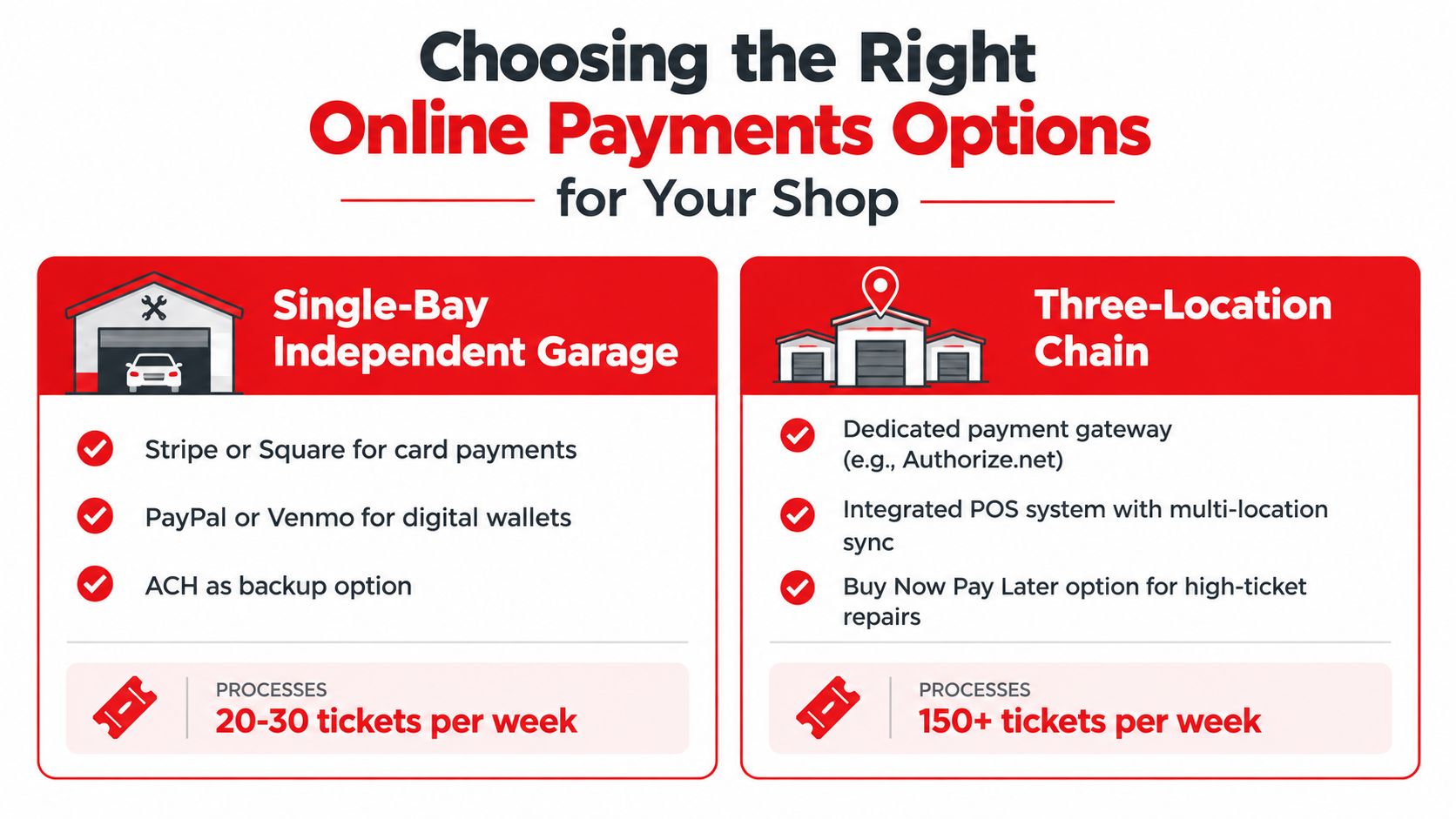
The clean sequence looks like this:
- The shop sends the estimate by text or email.
- The customer approves from a phone.
- The shop captures a deposit against the repair order if needed.
- The technician updates labor lines and additional work.
- The advisor sends the final invoice with a payment link.
- The customer pays before pickup or from the driveway.
- The system marks payment status back on the ticket and closes the job correctly.
That matters because every handoff stays visible. The advisor sees balance due. The front counter sees deposits already collected. The owner sees whether open tickets are unpaid or just waiting to settle.
Why integrated beats separate
A separate processor portal can collect money, but it usually doesn't manage accountability. The ticket still has to be updated. The customer record still has to reflect the payment. The reporting still has to be reconciled. If that doesn't happen automatically, the shop burns admin time and creates errors.
One example in this category is RedAppy, which ties payments, repair orders, customer records, and reporting into one database so partial payments, refunds, and chargeback-related records post back to the ticket instead of living in a separate portal. That's the model shops should look for whether they choose RedAppy or another integrated system.
The shop doesn't need another dashboard. It needs one repair order that shows what was approved, what was done, and what got paid.
Choosing the Right Online Payments Options for Your Shop
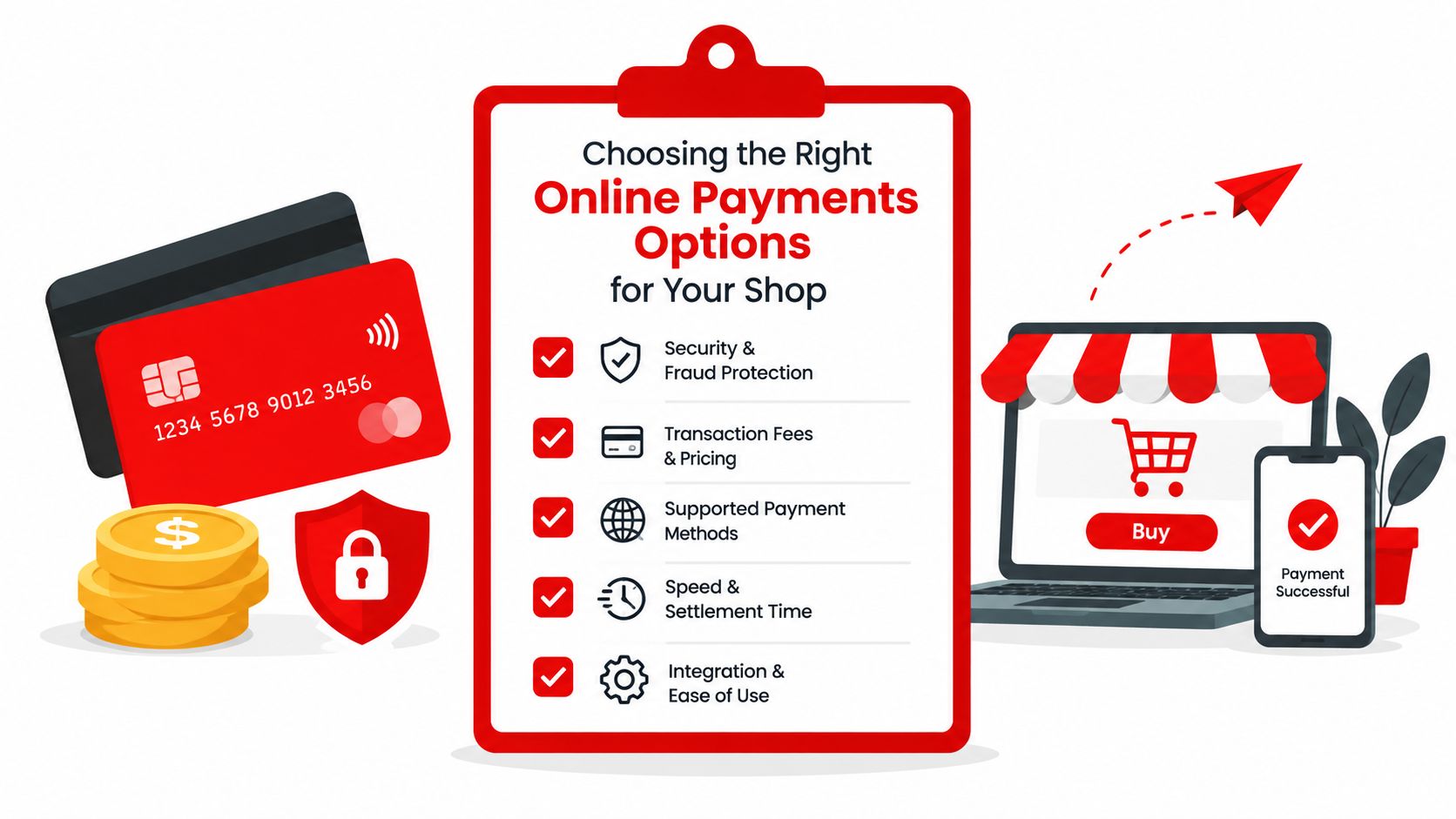
The right payment stack depends less on trend talk and more on how the shop runs. A single-bay garage doesn't need the same setup as a multi-location chain with central billing, phone payments, and fleet accounts.
Single-bay independent garage
A smaller shop should start lean. Turn on the methods that remove the most friction first.
The smart base stack is:
- Card-present and card-not-present card acceptance: This covers the counter, pickup, and remote closeout.
- One mobile wallet option: Useful for faster phone-based payments and cleaner checkout.
- Payment links on estimates and final invoices: This is the easiest operational upgrade for most small shops.
- ACH later, not first: Add it when fleet work, large deposits, or insurance-heavy billing makes it worthwhile.
This kind of shop should keep the rule simple. If a payment method isn't helping collect deposits or speed up handoff, it can wait.
Multi-location chain
A larger operation needs more control, not just more ways to take money.
Priority tools are:
- Tokenized recurring billing: Useful for fleet service, repeated maintenance accounts, and approved commercial billing.
- Virtual terminal access with role controls: Some staff need it. Everyone shouldn't have it.
- Centralized reporting across locations: Deposits, refunds, and partial payments have to be visible at the group level.
- Tighter permissions: Refund authority, voids, and manual entry need role-based limits.
Three questions before signing anything
- What's the average ticket size? Bigger tickets can justify ACH and stronger deposit workflows.
- How much of the book is fleet or insurance invoicing? Commercial billing changes the mix fast.
- How do customers receive estimates today? If the shop already texts and emails estimates, payment links should be attached to that same path.
The point isn't to enable every online payments option. The point is to enable the ones that fit the shop's real workflow first.
A shop that wants the clean version of this decision should review the RedAppy features tied to estimates, invoicing, and payment handling, or skip the guesswork and contact the team for a setup recommendation based on ticket flow, billing mix, and checkout process.
RedAppy gives auto repair shops one system for estimates, repair orders, invoicing, and online payments so the payment step doesn't get stranded in a separate processor portal. Shops that want tighter handoff, cleaner deposit tracking, and less front-desk reconciliation should visit RedAppy and see how the workflow fits their counter and bay operations.
Ready to Transform Your Shop?
RedAppy helps auto repair shops create professional digital estimates with photos and videos, send them instantly via text or email, and get customer approvals in seconds. No credit card required to start.