
Purchase Order Automation for Auto Repair Shops
The parts phone rings while a technician waits on a lift, a service advisor is scrolling supplier portals, and a counter note says the brake kit is “almost here,” except nobody knows which vendor has it. A core charge never got logged, one box shipped in the wrong unit of measure, and the customer is already asking why the car isn't ready. That's the daily mess purchase order automation is meant to clean up.
For an independent repair shop, the problem usually isn't that parts aren't being ordered. The problem is that ordering lives across calls, texts, spreadsheets, inboxes, and a lot of memory. Purchase order automation replaces that scramble with a controlled workflow that creates, routes, approves, transmits, and matches purchase orders without manual intervention, while preserving the details that make a PO valid and auditable, like quantities, prices, delivery dates, and payment terms, as defined in.
Table of Contents
- Why Manual Parts Ordering Is Slowing Your Shop Down
- Business Benefits of Automating Purchase Orders
- How Purchase Order Automation Works
- Your Implementation Roadmap for Automated Parts Ordering
- Common Pitfalls and How to Avoid Them
- Measuring ROI and Tracking the Right KPIs
- How RedAppy Enables Purchase Order Automation for Your Shop
Why Manual Parts Ordering Is Slowing Your Shop Down
A service advisor shouldn't need 45 minutes to find one part, yet that's exactly what happens when the ordering process is split across suppliers, inboxes, and a couple of staff members who happen to know “how this vendor likes it.” The job keeps moving, but only on the surface. Behind the counter, the shop is burning time on rework, callbacks, and endless follow-up.
The real cost is hidden in the workflow
The worst part of manual ordering is that it creates small failures that don't look urgent in the moment. A supplier ships the wrong unit of measure, a core return doesn't get tracked, or a line item is entered by hand with a part number that doesn't match the catalog. Each miss forces someone to stop, call around, and patch the gap before the bay can move forward.
That delay hits more than the parts counter. A stalled order can leave a technician waiting, stretch a repair order into another day, and add friction to the customer conversation. In a shop, that means less bay utilization, more distractions at the front desk, and more chances for a customer to hear, “We're still waiting on the right part.”
Manual parts ordering doesn't just waste time, it multiplies exceptions. The more suppliers and special cases involved, the more likely the same error gets repeated in a different form.
What automation changes in practice
In a clean workflow, the service advisor enters a request once, the system checks the part data, and the approved order goes to the supplier without anyone copying and pasting the same details three different ways. That's the practical value of purchase order automation, not a fancy dashboard, but a tighter path from request to issued PO to matched invoice. Oracle describes automated order creation as converting an approved requisition into a purchase order and sending it to the supplier with no manual intervention in its automated purchasing process documentation.
For an auto repair shop, that matters because the work is not just sending an order. It's making sure the right rotor, filter, sensor, or kit is attached to the right job, billed correctly, and tracked through the repair life cycle. When the system handles the routine pieces, staff can focus on exceptions that need judgment.
Business Benefits of Automating Purchase Orders
The clearest benefit is cost control. A major benchmark found that best-in-class procurement organizations process purchase orders for $17.29 each on average, compared with $73.83 for bottom-quartile peers, a 77% cost advantage tied to deeper automation adoption, with a median cost of $42.61 per PO across the broader market. That gap is large enough to matter in any parts-driven operation, because every unnecessary touch shows up as labor time somewhere.
Cost savings show up as faster throughput
In a repair shop, lower PO cost doesn't sit in a finance spreadsheet by itself. It shows up as fewer minutes spent retyping vendor details, less time chasing corrections, and less delay between estimate approval and parts arrival. The shop doesn't need a giant enterprise purchasing team to feel the effect, because even one advisor or parts person can spend a surprising amount of the day on order admin.
The broader supply-chain data makes that drain easy to see. Manual purchase orders and invoices still consume an average of 18 days per transaction and cost between $15 and $40 per invoice, while electronic purchase orders plus automated three-way matching can reduce processing time by 70% and cut error rates from 4% to under 0.5%. Those figures describe a back office problem, but the shop impact is front-and-center, because slow parts flow blocks work in the bays.
Better control means fewer comebacks and cleaner supplier conversations
Automation also helps because it reduces data-entry mistakes before they become repair mistakes. When the part description, quantity, and unit of measure are captured correctly, there's less room for a wrong shipment to sneak through. That matters with core returns, set pricing, and mixed supplier catalogs, where one small mismatch can create a bigger mess at receiving or billing.
A useful way to think about the payoff is this, fewer manual touches create fewer places for blame to get lost. The advisor sees the request. The parts order gets issued consistently. The invoice ties back to the order. And when a supplier makes a mistake, the shop has a cleaner trail to resolve it fast.
Practical rule: automate the part of the process that repeats every day, then leave the exception handling visible so staff can still intervene when a vendor sends something odd.
How Purchase Order Automation Works
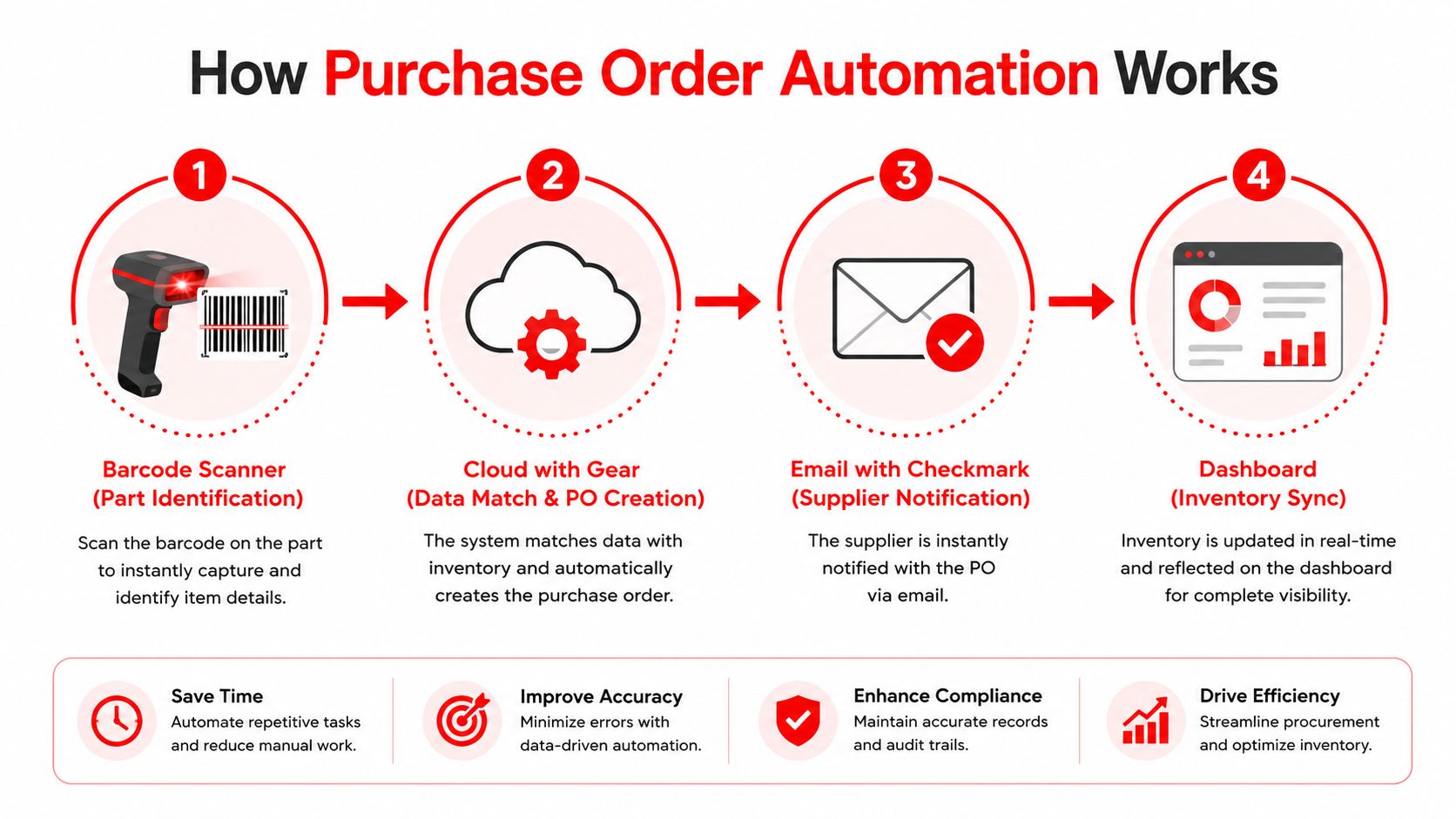
A parts request comes in, the system checks it, an approved purchase order is created, and the supplier gets it without anyone retyping the same details into another screen. That is the basic handoff between a busy repair counter and a purchasing process that can be tracked.
The technology stack behind the scenes
Most modern systems combine OCR, AI/ML, cloud workflow, and ERP or accounting integration to reduce repetitive entry across requisition intake, PO creation, approval routing, three-way matching, and payment workflows, as described in. OCR reads header data and line-item details from forms or invoices. The workflow engine then checks those fields against rules before the request moves ahead.
That matters in auto repair because parts data is rarely clean. A brake rotor may appear by SKU in one system and by supplier description in another. A job can also carry taxes, discounts, delivery terms, and a unit-of-measure detail like each, set, or axle pair. If those fields are not checked early, the shop pushes the error from the front end to receiving or billing.
What gets checked before the order leaves
Oracle's automated order creation model is useful here because it shows the control point clearly. The approved requisition becomes a purchase order only after the rules pass, and enterprise implementations often validate fields such as UNSPSC taxonomy, Incoterms, company codes, and cost centers before release. In a repair shop, the same logic applies to part numbers, quantities, supplier terms, and internal cost allocation, all checked before the PO goes out.
That design choice matters more than screen design. A scanned paper form still leaves people to catch mistakes later. Structured validation catches them before the supplier ever sees the order, which is where the work gets easier to control.
The supplier-facing side also needs matching controls. 2-way or 3-way matching compares the PO against receiving records and invoices before payment, so the shop does not pay for what it did not receive or what it received incorrectly. For anyone trying to understand the broader AP side of this workflow, the concept is closely related to, but the purchase-order step is where the buying rules start.
Your Implementation Roadmap for Automated Parts Ordering
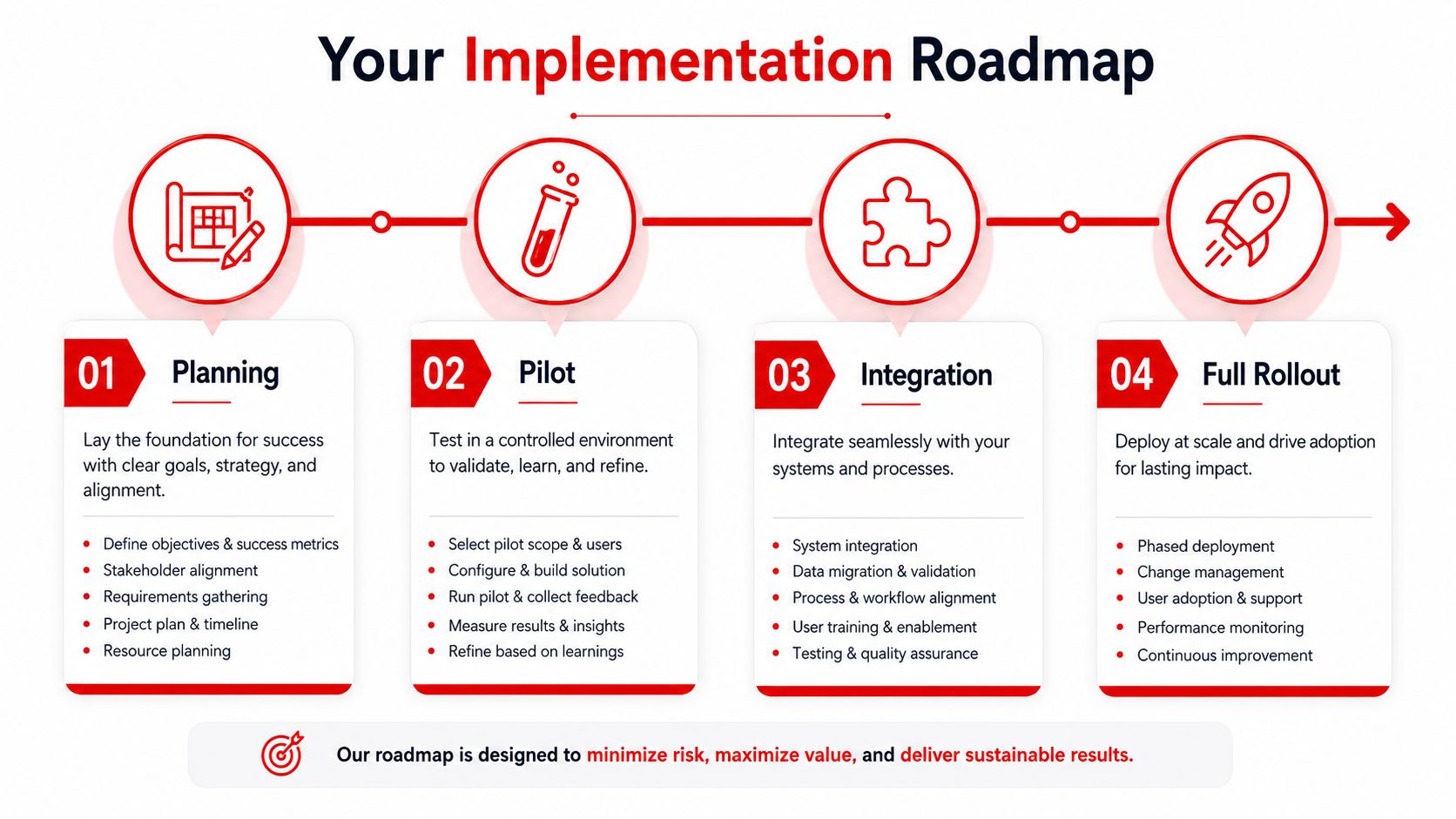
A good rollout starts by admitting the shop doesn't need to automate everything at once. The fastest way to break trust is to launch a new system that can't handle normal repair-shop chaos, like partial deliveries, back-ordered parts, and a supplier who insists on a different naming convention than everyone else uses. The safer path is gradual.
Start with the process, not the software
The first move is to map the current parts workflow from request to receipt to invoice. That means tracing who asks for the part, who approves it, who places the order, and who confirms that the shipment matches the ticket. If the process still depends on tribal knowledge, automation will only expose the gaps faster.
Next, standardize the request form so every requisition asks for the same core details. Part number, vehicle reference, supplier, quantity, and any core return detail should be entered the same way every time. That reduces the number of ways a simple order can go sideways.
Roll out in a controlled sequence
A practical sequence is easy to follow.
- Pilot one lane first. Start with one supplier, one department, or one category of parts. That keeps the blast radius small.
- Automate approval routing. Use thresholds or categories so routine orders move quickly and exceptions get attention.
- Add 2-way or 3-way matching. Confirm what was ordered against what was received and invoiced.
- Connect master data. Align SKU codes and units of measure across the systems that feed the order.
- Test read-only before full release. Let the team verify the data without allowing live changes.
That sequence lines up with the implementation guidance in, which also recommends measuring cycle time, match rates, and cost per order against a baseline before broad rollout. The point is to prove the workflow works in the actual shop, not just in a demo.
Keep people in the loop where judgment matters
The best implementation model is still hybrid. The system should handle routine orders, while staff review exceptions, urgent cases, and messy supplier responses. That approach is also why phased rollout, sandbox testing, and parallel runs keep showing up in practical guidance, including.
Useful threshold: if a rule creates more stalled orders than it prevents, the rule is too rigid for a repair shop.
Common Pitfalls and How to Avoid Them
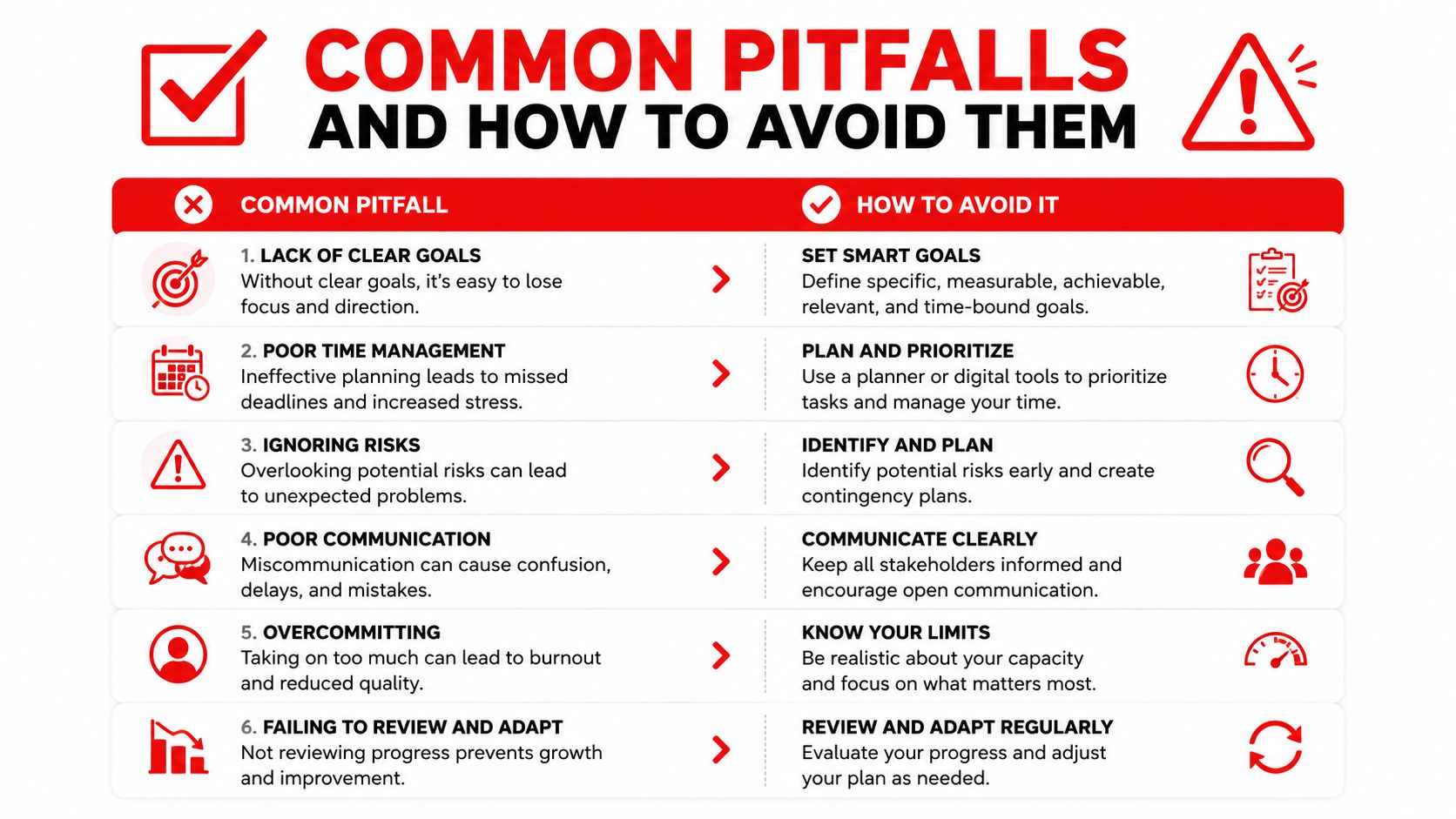
The biggest mistake is believing “zero-touch” means “no exceptions.” Real shops deal with partial shipments, supplier portal fragmentation, UOM mismatches, and vendor data that wasn't clean to begin with. A system can automate the happy path, but it can't pretend the messy parts don't exist.
Dirty vendor data breaks clean workflows
If supplier names, part codes, and billing terms are inconsistent, the system can create duplicates or route orders to the wrong place. That's why vendor master cleanup has to happen before go-live, not after the first failed match. Shops that skip this step usually spend the next month untangling data problems instead of saving time.
A second trap is over-automating approvals. If every urgent order has to climb through too many checks, the shop just moves the delay from the phone to the software queue. Control still matters, but approval thresholds need to fit how a busy repair business works.
Staff workarounds are a process failure, not a people problem
When technicians or advisors bypass the system and call suppliers directly, the workflow loses visibility. The fix isn't just a warning email. The shop needs a clear rule that all parts requests and approvals go through one channel, because otherwise the system can't match orders, receipts, and invoices accurately.
Exception handling deserves its own attention too. A partial shipment, an unlogged core return, or a receipt that doesn't line up with the PO should surface in a visible queue instead of disappearing into email. That's where the hybrid model wins, because staff can fix edge cases without reopening the entire process.
For broader controls around those kinds of mistakes, the logic behind is helpful, because purchase order automation works best when the shop treats ordering, receiving, and payment as one controlled chain rather than separate chores.
Measuring ROI and Tracking the Right KPIs
A clean ROI read starts with a small scorecard, not a giant dashboard. Shop owners rarely need fifty metrics. They need a few numbers that show whether the new process is faster, cleaner, and easier to control than the old one.
| PO Automation KPI Scorecard | Manual Baseline | Automated Target | How to Measure |
|---|---|---|---|
| Cost per purchase order | Higher and inconsistent | Lower and more stable | Divide labor and processing costs by number of POs |
| Cycle time | Slow, with frequent delays | Shorter and more predictable | Measure request to receipt or approval to issue |
| Three-way match rate | Frequent manual review | Higher automated match rate | Compare PO, receipt, and invoice matches |
| Exception rate | Hidden in inboxes | Visible and tracked | Count orders that need human intervention |
| Supplier fill rate | Hard to verify quickly | Easier to monitor | Track shipped versus ordered quantities |
Use the right baseline
The best comparison is the shop's own process before automation. That makes it easier to see whether delays come from the supplier, the advisor, or the workflow itself. A baseline from your own floor also helps separate normal variance from a real improvement.
External benchmarks can still help frame the size of the problem. A on purchase order and invoice automation found manual processing can take 18 days per transaction, cost $15 to $40 per invoice, and that electronic purchase orders with automated three-way matching can cut processing time by 70% and error rates from 4% to under 0.5%. Those figures will not map perfectly to every repair shop, but they explain why small savings in ordering and matching can add up over a busy month.
Tie the KPI sheet to shop outcomes
If cycle time drops, bays clear faster. If the match rate improves, fewer invoices need manual review. If exception rate becomes visible, the counter staff can focus on the orders that need judgment instead of babysitting every request.
The metric sheet only helps if the numbers connect back to day-to-day shop work. A system that ties parts ordering, repair orders, and invoicing together makes the figures easier to trust because the same transaction does not get typed into three different places. Once the numbers are visible, the shop can compare supplier behavior, labor time spent on exceptions, and invoice cleanup against the manual process and make purchasing decisions from actual shop data instead of guesswork.
How RedAppy Enables Purchase Order Automation for Your Shop
A parts order breaks down fast in a real shop. One supplier sends a partial shipment, another uses a different unit of measure, the core return gets missed, and someone at the counter has to reconcile all of it before the repair order can move. RedAppy is built for that kind of day, with parts ordering across multiple suppliers, real-time inventory, and one-click invoicing that keep PO activity connected to the rest of the repair order. The Kanban-style Digital Shop Board and real-time analytics also help owners spot stalled jobs before the delay turns into a customer complaint.
The platform adds context where parts decisions usually go sideways. Vehicle history, customer lookup by name, plate, or VIN, and the AI Repair Assistant help keep each order tied to the right job. Labor times, diagnostic guidance, and shop insights stay close at hand, so the team is not digging through separate systems while a car sits on the lift. Transparent pricing and month-to-month terms also make adoption easier for a single-bay garage that wants better control without taking on a rigid enterprise setup.
RedAppy fits shops that want to cut touches without creating a new layer of admin work. A cleaner PO workflow matters most when the shop is juggling parts availability, invoice matching, and the usual exceptions that never show up in a tidy demo. Visit RedAppy to see how the platform supports parts ordering, invoicing, and day-to-day shop control, or ask for a walkthrough that fits the way the shop already runs.
Ready to Transform Your Shop?
RedAppy helps auto repair shops create professional digital estimates with photos and videos, send them instantly via text or email, and get customer approvals in seconds. No credit card required to start.