
Resource Allocation Optimization for Auto Repair Shops
Monday starts the same way in too many repair shops. A bay is open, but the wrong car is sitting in it. One technician is waiting on a part that should've been staged yesterday. Another tech is done early and asking what's next, while the service desk keeps apologizing to a customer whose car is still not ready.
That mess usually isn't about lazy people or a bad team. It's about resource allocation optimization, the quiet skill of putting the right bay, tech, part, and job in the right place before the day turns into rework. Operations research showed long ago that scarce resources can be allocated more efficiently with math, and George Dantzig's simplex method made large-scale constrained optimization practical for business and industry later on. Repair shops live that same problem every day, just with lifted trucks, waiting customers, and parts that arrive when they feel like it.
Table of Contents
- Why Most Shops Lose Capacity Every Single Day
- Measuring Your Current Resource Use
- Prioritizing Jobs So the Right Car Gets the Right Bay
- Scheduling Technicians and Bays for Maximum Throughput
- Streamlining Parts Allocation Across Suppliers
- Using RedAppy to Run the Playbook Every Day
- Turning Resource Allocation Into a Weekly Habit
Why Most Shops Lose Capacity Every Single Day
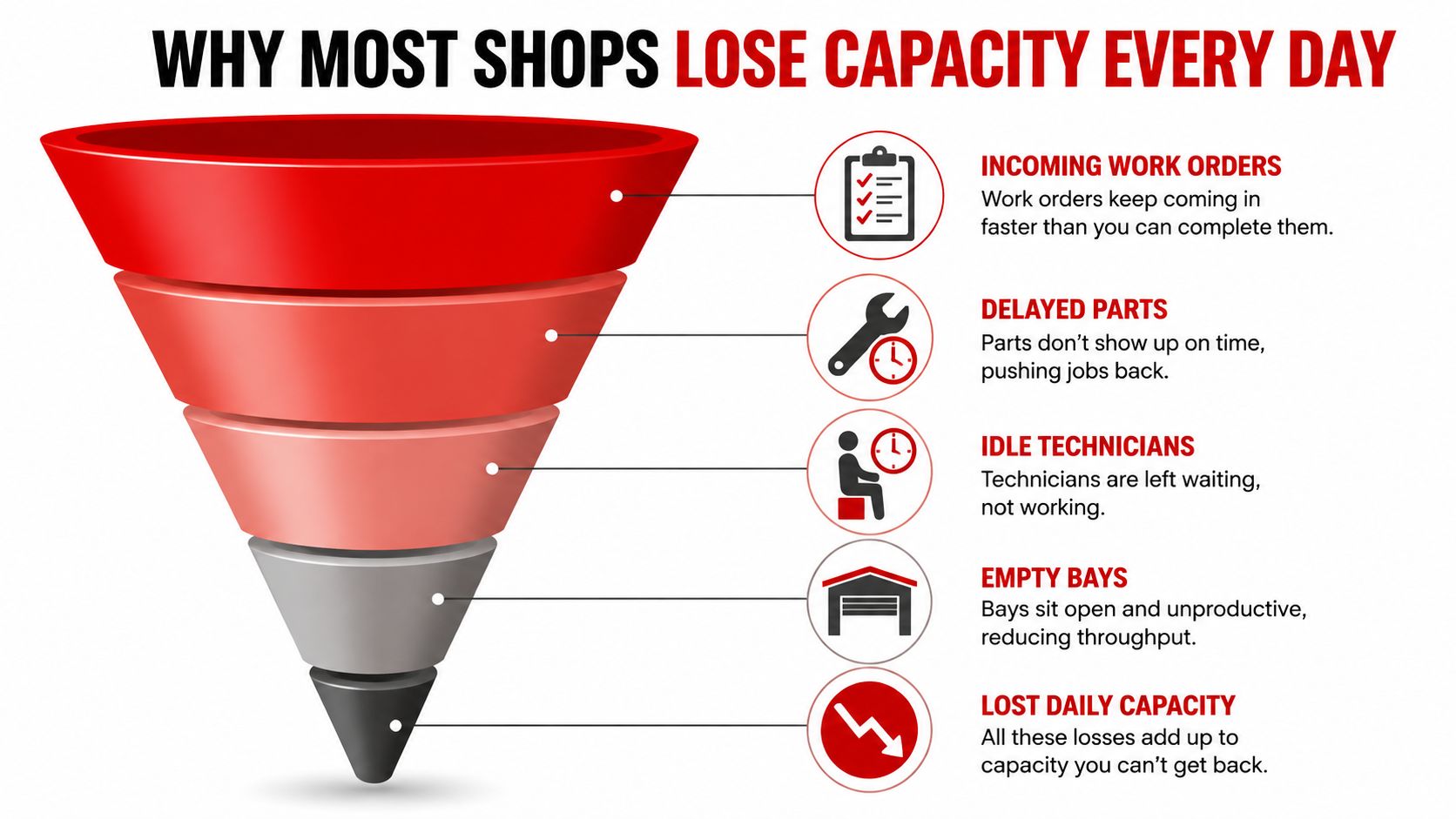
The loss usually starts before the doors even open. A service writer books a diagnostic in the same window as a brake job, a tech is pulled to help with intake, and a bay sits half-used because the needed part is still on backorder. By noon, the schedule looks busy, but the shop has already leaked hours in little pieces. That's the same pattern behind poor allocation in any constrained system, except a repair shop feels it immediately in stalled cars and unhappy callbacks.
The hidden drains show up as normal shop noise
A tech waiting on another tech's teardown isn't a staffing problem, it's a sequencing problem. A bay tied up by one long job while three quicker jobs stack up behind it is a flow problem. Parts that get ordered twice because nobody checked supplier stock first are an allocation problem.
The hard part is that all of this looks like “a busy day.” In reality, it's lost daily capacity. Industry guidance on utilization says resource utilization is the share of available capacity used, and mature optimization programs use that idea to keep unallocated spend low and forecasts accurate. The shop version is simpler, if the right work is not moving through the right bay at the right time, the shop is paying for idle motion.
Practical rule: if a job is waiting for a person, a part, or a bay, the schedule is already wrong.
The fix is not working harder
Most owners try to solve these leaks by pushing the team faster. That usually backfires. Resource optimization guidance warns that sustained utilization above 90% is a warning sign for burnout and quality loss, while below 60% points to revenue underuse, and utilization alone can hide skill mismatches and estimation errors. In a shop, that means a veteran tech buried in easy work or a junior tech handed a job that should've gone to someone else.
A better floor-level view is to treat the shop like a chain of constrained assets. Bays, skilled technicians, parts flow, and vehicle intake all have to line up. If one link slips, the whole day slows down.
That's why resource allocation optimization matters in a repair shop more than a generic business office. It's not about squeezing every person harder. It's about clearing the bottlenecks that keep good work from turning into finished tickets.
Measuring Your Current Resource Use
Before changing the schedule, the shop needs a clean baseline. The right numbers are not complicated, but they do need to be the right ones. Industry guidance points to utilization rate, billable utilization, forecast accuracy, and cost variance as core measures because they reveal whether capacity is being used productively or wasted.
The four numbers that matter in a repair shop
Start with technician billable utilization, because that shows whether paid labor is turning into billed work. Then look at bay occupancy, which tells you how much of the open day the bays are carrying jobs. Add parts order-to-arrival time, since a perfect schedule dies fast when parts show up late. Finish with average turnaround by job type, because not all jobs should move at the same pace.
Industry benchmarks put healthy billable utilization around 70 to 85%, and healthy forecast accuracy at least 85% planned-vs-actual in practical scheduling work. Workflows that use utilization analysis often aim for around 60 to 80% compute use or 80 to 90%+ spend allocation in their own context, with unallocated spend ideally below 10%. The shop lesson is the same, full is not the target, controlled flow is.
A bay that looks full all day can still be underperforming if the wrong jobs are sitting in it.
A simple two-week tracking sheet is enough
A shop management system can pull most of this automatically, but paper shops can track it with a clipboard and discipline. Write down when each job enters a bay, when a tech starts active labor, when parts are ordered, and when the car leaves. Two weeks of that is enough to see where the leak lives.
| Healthy Benchmarks for Shop Resource Use | ||
|---|---|---|
| Metric | Healthy Range | Red Flag |
| Technician billable utilization | 70 to 85% | Below 60% or above 90% |
| Bay occupancy | High enough to keep flow steady, not so high that jobs clog | Bays full of stalled work |
| Parts order-to-arrival time | Short enough to protect the promise date | Jobs waiting while parts are still in transit |
| Forecast accuracy | At least 85% planned-vs-actual | Repeated schedule misses |
The red flag is not low activity by itself. It's mismatched activity. A busy shop can still waste hours if the wrong people are doing the wrong jobs, or if the plan keeps ignoring parts timing. Once the baseline is visible, the next move is to sort jobs by value and fit, not just by who shouted first.
Prioritizing Jobs So the Right Car Gets the Right Bay
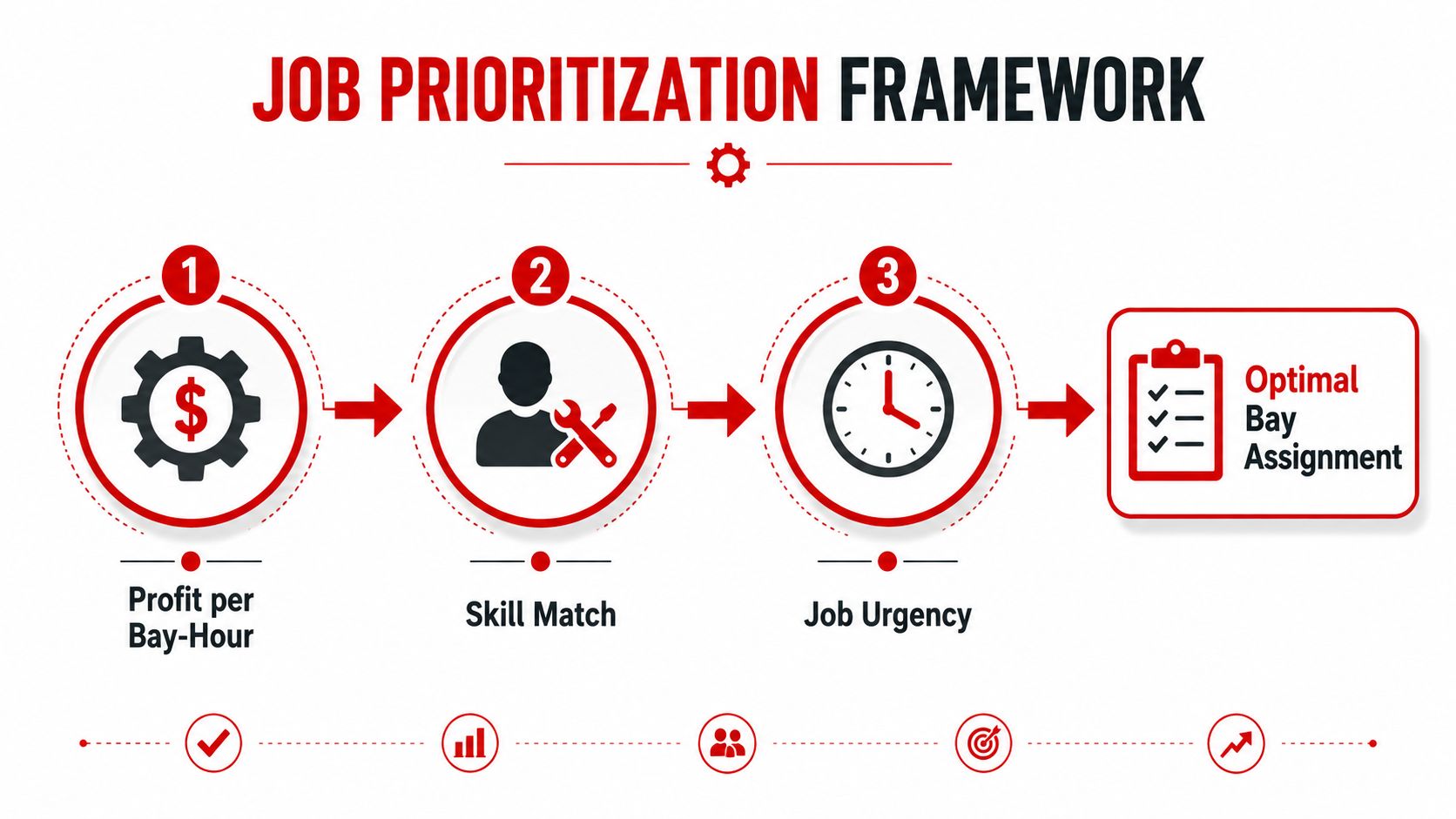
A repair shop can't schedule every job the same way. A quick oil change, a transmission diagnosis, and a no-start electrical hunt each consume the shop in a different way. The best schedule starts by ranking work through three filters, profit per bay-hour, skill match, and job urgency.
Rank the work, not the noise
Profit per bay-hour is the fastest way to see which job deserves scarce space. A high-ticket repair that ties up a bay for a long block has to earn its place, while a small job that can turn fast may be a better fit for an opening that would otherwise go dark. Skill match matters just as much, because an available tech isn't always the right tech.
A strong prioritization board makes that visible. Kanban-style flow works well in shops because it shows jobs moving from intake to delivery without hiding the bottleneck in a spreadsheet. It also reduces the classic service counter problem where the loudest customer appears to be the highest priority, even when the bay plan says otherwise.
Practical rule: if two jobs have the same promise date, the one that best fits the available technician and bay should go first.
A morning schedule gets fixed by changing the order
A chaotic morning often has the same shape. A big diagnostic lands beside a quick maintenance job, and the service desk keeps one bay occupied while a better-fitting job waits. Move the diagnostic to the tech with the right skill, slide the quick job into the opening bay, and the whole board breathes again. The change is not magic, it's just better matching.
This is also where customer communication gets easier. When the shop can explain that a job is scheduled because it fits the right technician and the promised-ready time, the front desk spends less time defending delays. That matters because the schedule stops looking arbitrary.
For a useful comparison outside auto repair, scheduling systems in other service businesses also rely on matching the right resource to the right time slot. A practical overview of how that works can be seen in, where availability and fit matter more than just filling a calendar.
The main thing is to stop treating every open slot as equal. Once jobs are ranked by profit, skill, and urgency, the bay assignment stops being a guessing game and starts acting like a plan.
Scheduling Technicians and Bays for Maximum Throughput
The daily schedule should not be built once and forgotten. A good shop schedule starts the night before, gets a quick correction in the morning, and stays flexible enough to move when a job runs long or finishes early. Industry guidance on practical allocation says to define demand by role and phase-based hours, assess supply using current allocations plus time off and non-billable work, then resolve cross-project conflicts before confirming assignments. The shop version is the same idea with grease on it.
Build the day around skill, not habit
A senior diagnostic tech should not be used like a general-purpose air hose. Match high-complexity work to the people who can finish it without extra handoffs. Leave room for a swing bay when the estimate is uncertain, because diagnostics and hidden damage will create surprises.
That swing bay matters more than owners expect. It keeps the rest of the board from collapsing when a job turns into a deeper tear-down. Without it, every surprise becomes a scheduling emergency.
The best schedule has one place where uncertainty can land without crushing the rest of the day.
Use a three-step cadence
The cadence should stay simple enough for the whole team to remember.
- Night before. Lock the base schedule, assign the obvious work, and flag jobs that need special skills or a part confirmation.
- Morning huddle. Compare the plan with reality, because one late approval or one missing part can change the order before the first wrench turns.
- Live check-ins. Rebalance when a job ends early, slips long, or exposes new work.
That rhythm keeps the day from drifting. It also prevents the classic mistake of stacking heavy jobs back-to-back on the same tech. A mid-level tech can often take the diagnostic that doesn't need the senior person's full attention, which frees the senior tech for the high-margin engine work that would otherwise wait.
The broader scheduling idea is simple, but hard to keep in practice. A plan that can't absorb a surprise isn't a plan. It's wishful thinking with a calendar attached.
Streamlining Parts Allocation Across Suppliers
Parts are where many shops bleed time. A bay can be ready, a tech can be available, and a job can still stall because the part is sitting with the wrong supplier or wasn't checked before the order went out. That's why parts need to be treated as a resource to allocate, not just an item to buy.
Stage the fast movers and hold the bay wisely
Fast-moving parts belong on the shelf if they keep jobs moving. Filters, common brake wear items, and other repeat parts should be stocked according to how often they delay promise dates. Slower or unusual items are different, they can be special-ordered, but only if the schedule can absorb the wait without wrecking the day.
The basic rule is plain, if a part delays a promised-ready car, the cost of the delay usually matters more than the shipping premium. That means the cheapest decision is not always the lowest invoice price. It's the decision that protects the delivery promise with the least disruption.
Multi-supplier routing helps here because stock can be checked across vendors before the order is placed. That cuts down on the expensive habit of paying for overnight shipping after someone discovers the first source is out.
Route orders with the schedule in mind
A shop that uses supplier visibility well can choose between substitution, special order, or waiting based on how much the car is already committed. If an in-stock equivalent keeps the job moving and meets the repair need, that may be the better call. If the car can wait without affecting the promise, a slower route may be fine.
For a practical systems view of ordering across multiple products, the is a useful example of how multi-source ordering logic can keep inventory decisions cleaner without turning every order into a manual hunt. The principle is relevant even if the shop never uses that exact tool.
The payoff is less waiting and fewer do-overs. A shop that combines smarter staging with supplier routing can stop treating parts delays like an unavoidable tax. The schedule gets steadier because parts are being allocated with the same care as labor and bays.
Using RedAppy to Run the Playbook Every Day
A good allocation playbook breaks down fast if it depends on memory alone. Shops need one place where the work board, labor guidance, customer history, and schedule all live together. That's where RedAppy fits, not as a slogan, but as the system that keeps the daily plan from scattering.

Match each workflow to the right tool
The Digital Shop Board gives the front desk and the back bay the same live view of check-in, in-progress work, and checkout. The AI Repair Assistant helps pull labor times and diagnostic guidance when the team needs a fast answer instead of another guess. Real-time analytics keep technician efficiency, average repair order, and revenue per bay visible so the owner can spot drift before it becomes a bad week.
The team calendar centralizes technician schedules, which matters because labor allocation breaks when time off, training, and actual assignments live in separate places. Vehicle history and customer lookup by plate or VIN act like memory for the shop, so the same car doesn't get re-diagnosed from scratch every visit. That reduces repeat lookups and makes the allocation plan stronger because the shop knows what it has already learned about the vehicle.
A Monday review keeps the system honest
A short weekly review works better than a monthly cleanup. The owner or manager can ask three questions every Monday morning. Where did the shop lose capacity last week. Which job mix threw the schedule off. What one change will be tested this week.
That rhythm makes the numbers useful. It also keeps the team focused on the same simple objective, move the right work through the right resources without burning the crew out. For shops that want a closer look at the platform's full workflow, the RedAppy features page shows how the pieces connect, and the RedAppy contact page is the fastest way to ask for a walkthrough for a specific bay setup.
Turning Resource Allocation Into a Weekly Habit
Resource allocation optimization doesn't get finished. It gets maintained. The shops that handle it well treat it like a standing review, not a one-time fix, because capacity leaks keep returning in new forms.
A 30-minute Monday check is enough to start. Ask where capacity slipped, which job mix caused the trouble, and what one rule will change this week. Keep an eye on utilization, but don't worship it, because high utilization alone can hide burnout, skill mismatch, and bad estimates.
The best shops stay honest about the trade-offs. Efficiency matters, but so do quality and team health. Start small, measure what happened, and adjust the schedule before the day starts leaking again.
If the shop is ready to stop guessing at bay flow, technician load, and parts timing, RedAppy can help organize the whole playbook in one place. Visit RedAppy to see how the Digital Shop Board, analytics, AI guidance, and scheduling tools fit the way a real repair shop works. If a walkthrough would be more useful, the team can show how it maps to a specific shop's daily bottlenecks and capacity goals.
Ready to Transform Your Shop?
RedAppy helps auto repair shops create professional digital estimates with photos and videos, send them instantly via text or email, and get customer approvals in seconds. No credit card required to start.