
Optimize Auto Repair: Shop Inventory Management Software
A lot of shops are still running parts control on habit. One shelf has oil filters. Another corner has brake pads. The service advisor knows which vendor usually has the better price on an alternator, and one technician remembers that a water pump was ordered last week but never marked against the job. It works until it doesn't.
Then the problems stack up fast. A job sits on a lift waiting for a part that was supposed to be in stock. A core return gets missed. A canceled repair leaves an expensive component on the shelf with no clear process for returning it. The invoice closes, but the inventory never adjusts. That's where shop inventory management software stops being a nice extra and starts acting like an operating tool.
Table of Contents
- What Shop Inventory Management Software Actually Does
- Essential Features Your Auto Repair Shop Needs
- The Real-World Benefits for Your Bottom Line
- How to Choose the Right Software A Selection Checklist
- Common Pitfalls in Shop Inventory Management
- How RedAppy Solves These Challenges
- Key Performance Indicators to Track for Success
What Shop Inventory Management Software Actually Does
Shop inventory management software is the control tower for everything related to parts. It tracks what came in, what's committed to a repair order, what's sitting on a shelf, what needs to be reordered, and what should never have been kept in stock in the first place.
That matters because an auto repair shop doesn't manage inventory like a retail store. It handles stocked consumables, special-order components, returns, core charges, supplier substitutions, and parts tied directly to labor flow. If the inventory system sits outside the shop workflow, the team ends up entering the same information twice and still missing things.
A modern system connects the parts process to the rest of the business. The estimate pulls in the part. The job reserves it. Receiving marks it in. The invoice closes it out. If the part goes back, the system should record that too.
The control tower for parts flow
This visual shows the job clearly.
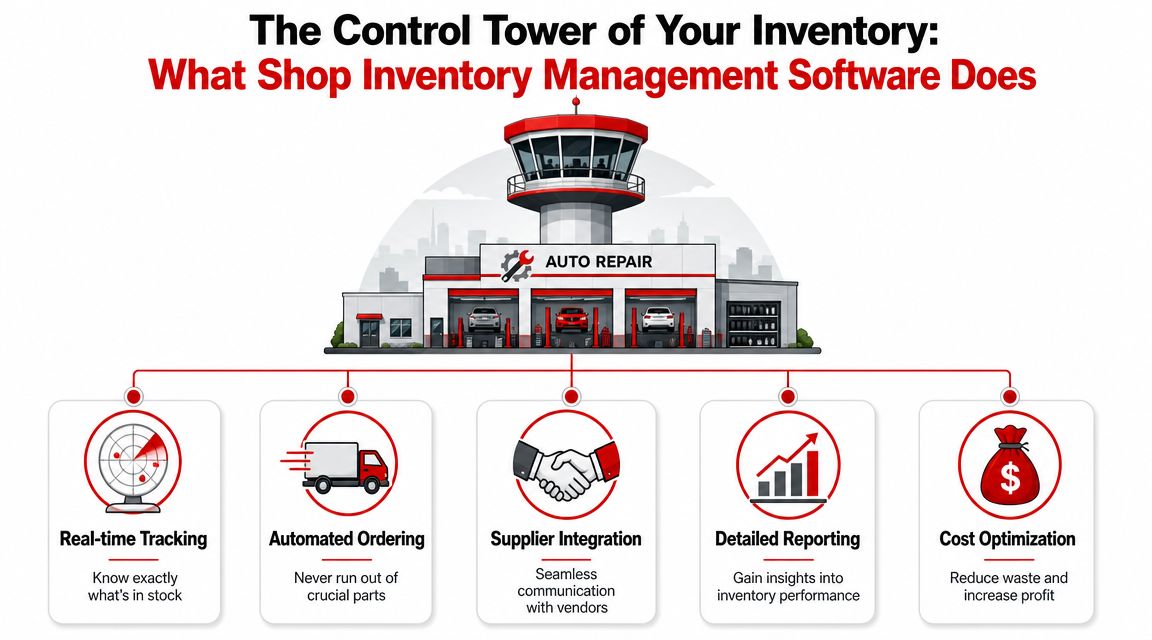
A solid setup usually covers five operational jobs:
- Real-time tracking keeps shelf counts tied to actual movement, not memory.
- Ordering control helps the front counter stop guessing when to restock filters, fluids, and common service items.
- Supplier coordination keeps pricing, availability, and ordering in one place instead of spread across calls, tabs, and handwritten notes.
- Reporting shows what moves, what sits, and where money is getting trapped.
- Cost control cuts down on duplicate ordering, rush freight, and dead stock.
Practical rule: If a part can move through the shop without touching the software, the system won't stay accurate.
The broader market has already moved this direction. Cloud deployment holds 65.51% of inventory software revenue share, while only 18% of small businesses use dedicated inventory management software, according to. That gap explains why many smaller repair shops still feel stuck between paper habits and modern expectations.
There's a similar lesson on the customer side. Shops that tighten operational systems often discover that lead handling needs the same discipline, which is why some owners also when cleaning up front-office workflow.
Why manual tracking breaks down
Spreadsheets look cheap. Whiteboards feel simple. Neither survives real shop traffic.
Three things usually break first:
- Shared visibility disappears. The advisor, technician, and manager each think they know what's on hand, but none of them are looking at the same live number.
- Special orders get messy. A part arrives, gets set aside, and later nobody knows whether it belongs to an open job, a canceled estimate, or stock.
- Returns fall through the cracks. Credits, cores, and warranty items get handled “later,” which usually means margin leaks out slowly.
Manual systems also depend on the right person being present. Good software depends on process instead of memory. That's the key shift.
Essential Features Your Auto Repair Shop Needs
Most software demos look fine until a shop starts asking repair-shop questions. Can the system handle one part number from multiple suppliers? Can it tell the difference between stocked brake cleaner and a job-specific steering rack? Can it push the part from estimate to invoice without someone retyping it?
Those are the features that matter.
Features that solve daily parts problems
Start with real-time stock movement. When a technician pulls a part for a job or receiving checks in a delivery, the software should update inventory immediately. That's the core of accuracy. explains that automatic updates reduce phantom inventory and help prevent both stockouts and overstocking.
A capable shop system should also include:
- Multi-supplier lookup and ordering so the advisor can compare availability and place an order without calling around for every routine part.
- Parts tied to repair orders so items aren't floating separately from the work they were bought for.
- Barcode or scan-based receiving because receiving errors create inventory problems that don't show up until the next job.
- Return and exchange handling so a wrong part doesn't just vanish from one screen and reappear nowhere else.
- Location awareness for shops with multiple stock rooms, vans, or locations.
The feature list matters less than the workflow path. If the team has to leave the estimate screen, open another tool, and then manually reconcile the result, the software is adding steps instead of removing them.
What matters more than a long feature list
A lot of platforms advertise inventory. Fewer handle shop-specific inventory behavior.
Here's the difference:
| Shop need | Weak system | Useful system |
|---|---|---|
| Common consumables | Tracks count only | Supports reorder logic and quick receiving |
| Special-order parts | Logs purchase only | Ties order to vehicle and repair order |
| Multi-vendor sourcing | Manual comparison | Shows supplier options inside workflow |
| Returned items | Removes from invoice | Classifies return and updates inventory status |
| Core parts | Notes it externally | Tracks charge, return, and credit path |
The strongest feature isn't flashy. It's clean movement between estimate, order, receive, install, invoice, and return.
If that chain breaks, the team starts using side notes, text messages, and memory again. Once that happens, the software becomes a reference screen instead of a management system.
The Real-World Benefits for Your Bottom Line
Shops don't make money because they own software. They make money because the software keeps parts from slowing down labor, tying up cash, or slipping through the billing process.
That's why the payoff usually shows up in operations first and financials right after.
Where the money shows up
The first gain is usually fewer delayed jobs. When the team knows what's accurately in stock and what's already committed, bays don't get blocked by missing parts that the system falsely showed as available.
The second gain is better cash use. Shops often carry too much of the wrong inventory. Good software makes slow-moving items visible, so managers can stop reordering shelf sitters and focus on the parts that support current work.
This visual captures the core business case.
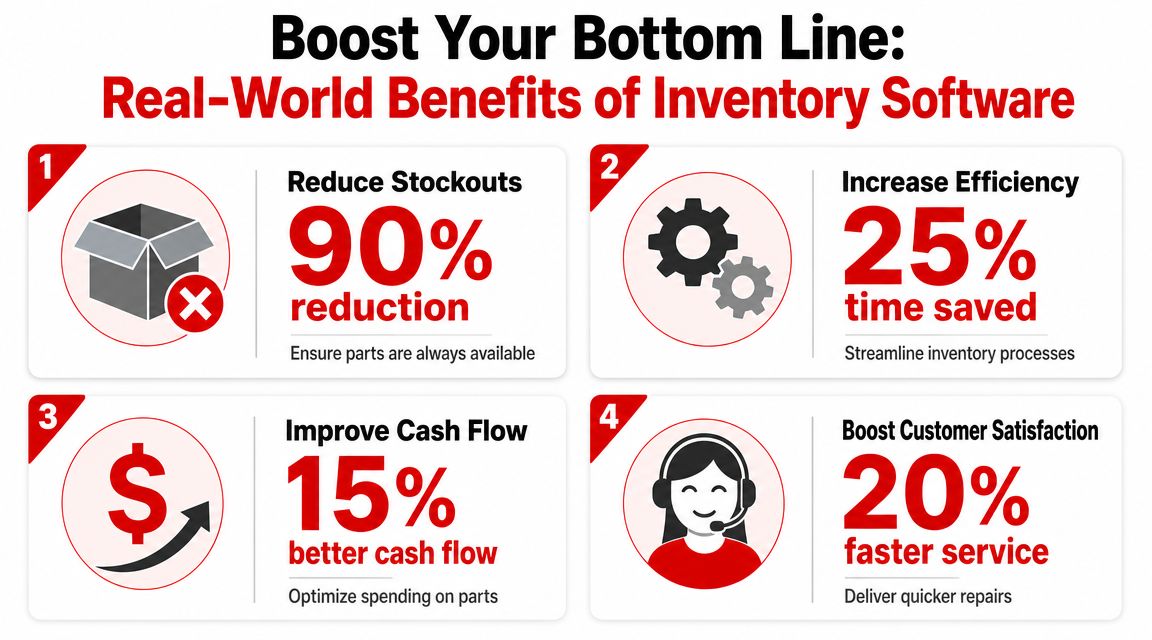
Other bottom-line gains usually include:
- Cleaner invoicing because installed parts are less likely to be missed.
- Less rush ordering because replenishment gets handled before the shelf is empty.
- Faster advisor response because pricing and availability are easier to access.
- Better technician flow because jobs don't stall waiting on preventable parts issues.
When a shop fixes inventory flow, it often thinks it solved a parts problem. In practice, it solved a labor utilization problem too.
Why shops are making the switch
The demand behind these tools is large enough that the market keeps expanding., driven by demand for real-time visibility, automation, and integration with core operations.
That growth matters because it reflects a practical shift. Inventory software used to be treated like a back-office recordkeeping add-on. In working shops, it now affects scheduling, purchasing, technician efficiency, and profit recovery on every closed ticket.
How to Choose the Right Software A Selection Checklist
Choosing shop inventory management software gets easier when the demo is forced into real shop scenarios. Don't ask whether it can “manage inventory.” Ask what happens when a control arm is ordered from one supplier, backordered, replaced with another brand, installed on a live RO, and then sent back under warranty later.
Weak systems stumble there.
Questions that expose weak systems
Use questions that test decision quality, not just screen design.
Ask how the software helps decide whether a part should be stocked, ordered on demand, or transferred from another location. That answer says more than a polished dashboard ever will.
One of the most overlooked checkpoints is replenishment logic. points to the core issue: software should help forecast demand, set reorder points differently for consumables and job-specific parts, and manage supplier trade-offs around speed and price.
That matters in auto repair because not all parts should be treated the same. Oil filters and shop supplies belong in a regular stocking process. A rare electronic module probably doesn't.
A practical checklist for shop owners
This checklist is a good starting point.
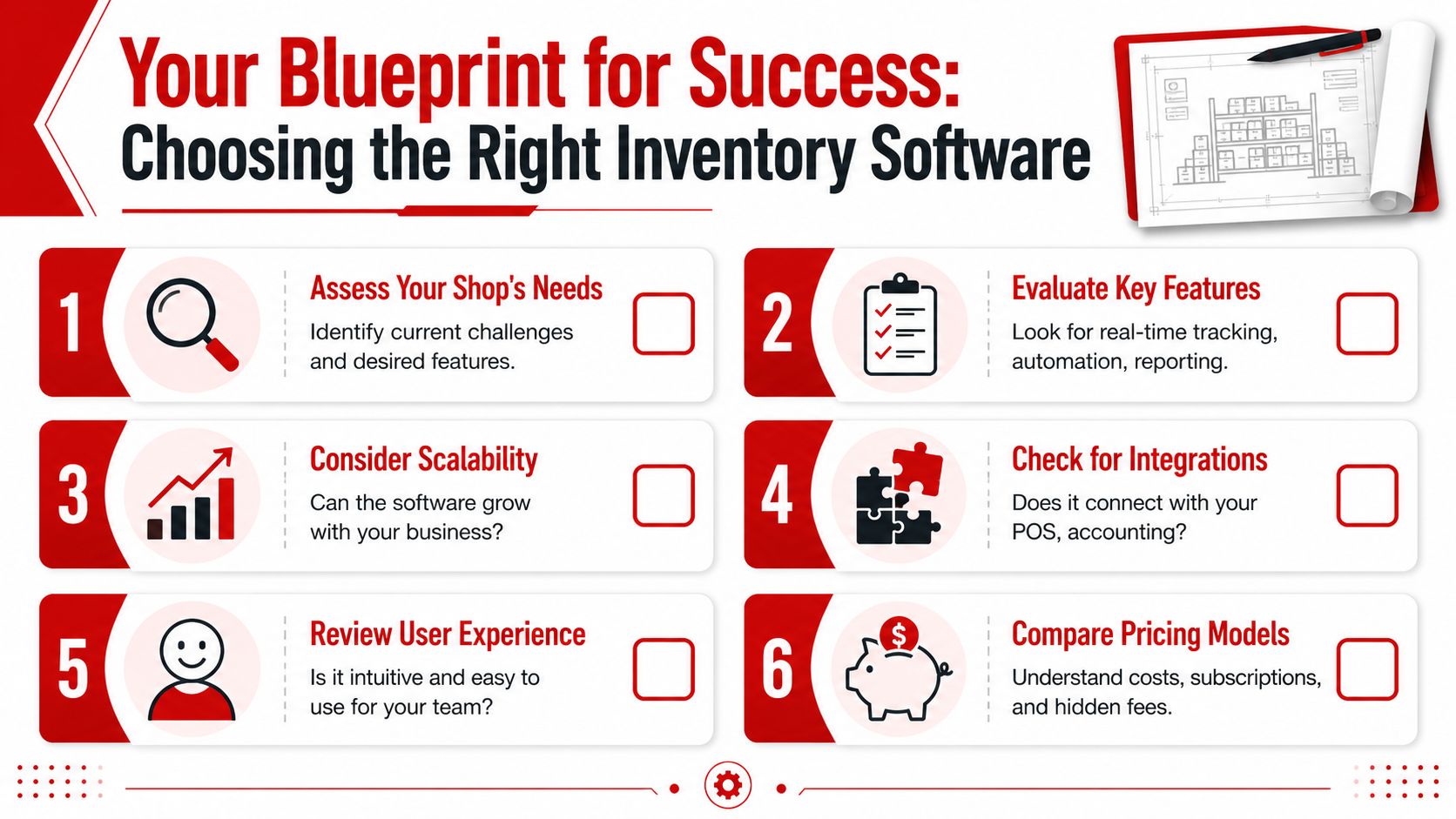
Use it against actual shop workflow:
- Check supplier handling. Can the team compare vendors, record delivery timing, and switch sources without breaking the estimate?
- Check accounting and invoice flow. If parts usage doesn't flow cleanly into billing, profit gets understated.
- Check return status options. Returned parts shouldn't all go back to “available.”
- Check multi-location logic. A growing shop needs transfer visibility, not separate inventory islands.
- Check receiving discipline. If the system allows sloppy receiving, stock accuracy will drift fast.
- Check reporting usability. Managers need reports they'll open, not a giant library nobody uses.
A single-location shop may care most about speed at the front counter and clean stock counts. A multi-location operation usually needs stronger location visibility, transfer control, and supplier consistency across sites.
Shortlist software only after running those scenarios. A nice interface won't save a weak parts workflow.
Common Pitfalls in Shop Inventory Management
A shop can buy decent software and still run inventory badly. Most failures come from process gaps, not the tool itself.
The common mistake is assuming software automatically creates discipline. It doesn't. It only records what the team does.
Where shops lose control
The first failure point is setup. If part names, units, categories, or supplier records are messy at the start, the shop builds confusion into the system from day one.
The second is technician usage. If parts leave the shelf without being tied to a job, the count becomes fiction. It doesn't matter how strong the dashboard is after that.
The third is reverse logistics. highlights why this matters. Shops deal with used parts, warranty claims, and core returns, and those items can distort inventory value if the software can't classify them properly.
Fixes that actually hold up
A workable fix usually looks boring, which is why it works.
- Clean the item master first. Standardize naming, supplier references, and categories before the team starts scanning or ordering.
- Require job-level part logging. Every installed item must connect to a repair order, even small shop supplies if they affect margin tracking.
- Create return statuses. Use statuses such as inspection hold, vendor return, core pending, and back to stock instead of one generic return bucket.
- Review stale inventory regularly. Managers should look for items that haven't moved and decide whether to return, reclassify, discount, or write them off.
- Train the counter and the floor together. Advisors, managers, and technicians all touch the same inventory chain.
A returned part isn't the same as an available part. Shops that treat them as identical usually overstate inventory and miss credits.
One more trap shows up in shops that “trust the shelf” more than the system. Once that mindset takes over, the software stops driving behavior. Then the business drifts back to side notes and memory. Accuracy drops from there.
How RedAppy Solves These Challenges
Some shops try to solve inventory with a standalone stock app and then handle estimates, inspections, job progress, and invoicing somewhere else. That usually creates duplicate entry and missed handoffs.
A more practical setup is one system that keeps the part attached to the job all the way through.

One workflow instead of separate tools
RedAppy's feature set is one example of that approach. It combines parts ordering across multiple suppliers with estimates, invoicing, digital inspections, analytics, and a digital shop board, so the team doesn't have to bounce between disconnected systems.
That matters in a repair shop because inventory problems rarely start as “inventory-only” issues. They start when:
- a part gets added to an estimate but not ordered,
- a delivered component isn't tied back to the right vehicle,
- a technician installs something that never reaches the invoice,
- a return or core credit sits outside the system.
When the software keeps those steps connected, the workflow is simpler. Parts can be added to the estimate, received into the system, and deducted from stock when the work is completed. That reduces double entry and gives managers a clearer view of what the shop owns versus what has already been committed.
For shops comparing options, the useful question isn't whether a platform has an inventory module. It's whether the module lives inside the actual repair process. If it doesn't, the team ends up doing manual reconciliation again.
Key Performance Indicators to Track for Success
Inventory control improves when managers watch the right numbers. Not just counts. Counts alone can look fine while cash is tied up in the wrong parts and jobs still stall waiting for missing items.
Numbers that tell the truth
A short KPI set usually works better than a giant report stack.
- Inventory turnover shows which items move and which ones are sitting too long. Slow-moving stock needs a decision, not a longer stay on the shelf.
- Stockout rate reveals how often the shop doesn't have what scheduled work requires. If it happens often, the issue may be reorder timing, receiving delays, or bad stocking rules.
- Carrying cost pressure shows how much money is trapped in inventory that isn't supporting near-term labor.
- Parts-to-invoice capture checks whether installed parts consistently make it onto closed tickets.
- Return and core recovery tells the shop whether credits, returns, and recoverable value are being handled cleanly.
- Technician delay linked to parts exposes how often workflow breaks because the right item wasn't available when the car was ready.
A useful KPI review should answer simple management questions. What should the shop stock? What should it special-order? Which suppliers are helping turn jobs faster, and which ones are causing delays?
The software should make those patterns visible. If it doesn't, the shop is still managing by feel.
A shop that wants cleaner parts flow, tighter invoicing, and fewer inventory surprises can review RedAppy or reach out through the contact page to see how its workflow fits a real repair operation.
Ready to Transform Your Shop?
RedAppy helps auto repair shops create professional digital estimates with photos and videos, send them instantly via text or email, and get customer approvals in seconds. No credit card required to start.