
Shop Management Programs: A Complete Guide for 2026
The phones are ringing, two estimates are half written, a technician is waiting on a part number, and the end of the day still has not started. That is usually the moment a shop owner realizes paper, spreadsheets, and memory can't carry the whole operation anymore. Shop management programs exist for that exact pressure point, because the job is bigger than keeping cars moving. It also has to keep estimates, repair orders, invoices, payments, inventory, scheduling, and reporting aligned in one place, instead of scattered across the counter and the back office.
Modern systems changed because manual workflows break down fast once volume rises. A good setup replaces retyping and chasing paper with automation and real-time visibility, so the counter team can see what's approved, what's stalled, and what still needs attention. That shift matters in a market that's part of a broader retail software category valued at USD 11 billion and projected to reach USD 24 billion by 2034, which implies a 9.1% CAGR over the period.
A shop owner also has to think past the software itself. Phones, scheduling, and customer updates are part of the same operational chain, which is why it helps to compare software choices alongside communication tools like. The rest of this guide is the practical version of that conversation: what a system should do, what creates friction, and what hidden costs usually show up after the demo.
Table of Contents
- Why Auto Repair Shops Need Modern Management Systems
- Core Features That Drive Shop Efficiency
- Measurable Benefits and Real-World ROI
- How to Evaluate Vendors Beyond Feature Lists
- Implementation and Migration Roadmap
- Common Pitfalls and How to Avoid Them
- Making Your Decision and Next Steps
Why Auto Repair Shops Need Modern Management Systems
The typical failure point is easy to recognize. The front counter has paper estimates stacked beside a ringing phone, a technician is asking whether a vehicle has been approved, and somebody is searching for a repair order that was “just here a minute ago.” By closing time, the owner is trying to rebuild the day from memory and receipts. That kind of scramble is exactly why shop management programs became a core digital category, because they pull the work into one system instead of forcing everyone to chase information across paper, whiteboards, and disconnected files.
From scattered tasks to one operational record
These platforms matter because they consolidate estimates, repair orders, invoices, payments, inventory, scheduling, and reporting into one workflow. The benefit is not just convenience, it is continuity. Once a job starts in one place and finishes in the same place, the shop is less likely to lose context, duplicate work, or wait until month-end to understand what happened.
The measurable side comes from data that shows modern auto-repair systems can track average repair order, car count, sold work by technician, technician efficiency, close ratio, declined jobs, and gross profit across parts and labor in real time. That changes management from after-the-fact bookkeeping into day-by-day decision-making.
Practical rule: if a shop can't see job status, technician output, and margins without rebuilding the day manually, the system is still acting like filing software, not management software.
Why the market moved this way
The shift toward digital shop management isn't isolated. It sits inside a larger retail software trend where owners want automation, not just recordkeeping. The market data above shows why vendors keep adding reporting, payments, and workflow tools. Shops are expected to move faster, answer customers sooner, and keep better records with fewer people doing more work.
That is also why integration matters so much. ALLDATA Shop Manager, for example, is built to create estimates, repair orders, and invoices, while letting the user toggle between OEM repair data and work documents and order parts from suppliers such as AutoZone. That kind of architecture cuts clerical drag because the advisor or technician isn't re-entering the same vehicle data three times.
A modern shop doesn't need software for the sake of software. It needs a system that keeps the day from fragmenting. That is the lens for every section that follows.
Core Features That Drive Shop Efficiency
A strong system is built around jobs, not around screens. If the software makes the advisor bounce between tabs, pull up old notes separately, and retype vehicle data into three places, it slows the shop while pretending to organize it. The features that matter are the ones that remove those handoffs and make the cost of running the day visible.
Features that clear bottlenecks
Digital inspections matter because photos and clear notes reduce the back-and-forth that happens when customers cannot see the issue. When the advisor can attach images to the recommendation, approval conversations get cleaner and the shop stops relying on verbal explanation alone. That also lowers the risk of a misunderstanding that turns into a comeback or a discount.
Instant estimates matter for the same reason. Systems that pull in labor time lookups and let the team build estimates quickly reduce the lag between diagnosis and approval, and that lag is where jobs sit idle. The hidden cost is not only speed, it is the extra follow-up time when a job has to be rebuilt after the customer already asked for clarity.
One-click invoicing prevents transcription errors. If the final invoice mirrors the approved work instead of being rebuilt by hand, the office spends less time correcting line items and more time closing the ticket. It also keeps the shop from absorbing small mistakes that look minor on one RO and become expensive when they pile up.
The parts, payment, and board view
Other features improve flow across the whole shop:
- Online payments shorten the finish line, because billing does not have to wait on manual card handling or separate checkout steps.
- Parts ordering across multiple suppliers helps the advisor compare availability without jumping between vendor sites.
- Real-time inventory tracking reduces the chance of promising a bay release before the parts are in hand.
- Kanban-style digital shop boards make every job visible from check-in to checkout, which keeps the whole team aligned on status.
- Vehicle history tracking and lookup by name, plate, or VIN save time every time a repeat customer calls.
- Team calendars centralize scheduling so advisors and techs are not working from different versions of the week.
The built-in AI Repair Assistant in RedAppy is an example of how this category is evolving. It provides labor times, diagnostic guidance, and shop insights on demand, which can help an advisor get to the right information faster without hunting through multiple reference tools. RedAppy also combines digital inspections, instant estimates, one-click invoicing, online payments, parts ordering, real-time inventory, and a Kanban-style Digital Shop Board in one workflow, so the job does not have to be rebuilt from scratch between steps.
If a feature does not remove a specific manual step, it is usually a nice-to-have, not a workflow driver.
Measurable Benefits and Real-World ROI
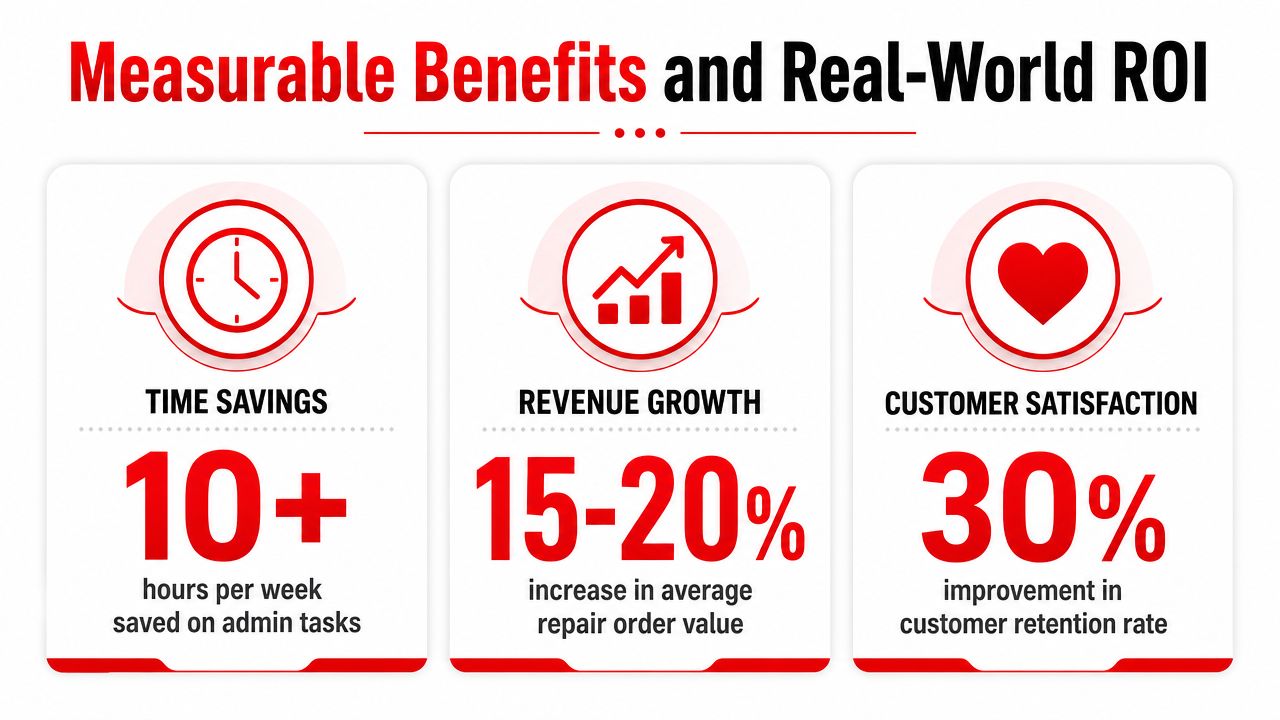
A lot of software pitches talk about “efficiency,” but shop owners need numbers they can watch. The useful metrics are usually operational, not flashy. They show up in less admin work, better pricing discipline, cleaner approvals, and fewer jobs sitting half-finished because somebody missed a handoff.
What becomes measurable once the shop is digital
The most obvious win is administrative time. RedAppy says typical results include saving 10+ admin hours per week, which lines up with what happens when estimates, invoices, payments, and parts work live in one place rather than on separate tabs and paper stacks. That kind of time recovery doesn't come from one magic feature, it comes from removing repeated data entry and cleanup.
The other payoff is margin visibility. When a system tracks average repair order, car count, technician efficiency, close ratio, declined jobs, and gross profit across parts and labor, managers can see whether a problem is pricing, process, or productivity. That matters because a shop can look busy and still miss profit if labor is underpriced or declined work is not followed up.
Pricing gets sharper when labor economics are real
One of the most useful pieces of buying guidance is calculating a technician's loaded labor cost by dividing total annual employment cost by annual billable hours. That figure is more honest than a flat shop rate because it reflects wages, overtime, payroll taxes, benefits, insurance, and training. When the software's reports reflect those economics, owners can set labor matrices that match reality instead of guessing.
A practical example is simple. If the system shows strong car count but weak close ratio, the issue may be estimate presentation. If technician efficiency is weak but the board is full, the issue may be job mix or process bottlenecks. If gross profit looks thin on parts and labor, the shop may be doing good volume at the wrong price.
Real-time visibility beats month-end surprises
Good systems let managers monitor performance by day, advisor, technician, or location rather than waiting for month-end totals. That makes a difference in a busy shop because corrective action happens while the problem is still fixable.
A shop should treat the dashboard as a control panel, not decoration. If it is not helping the owner spot underpriced labor, declined work, or stalled approvals early, the software is underused.
How to Evaluate Vendors Beyond Feature Lists
Most demos look polished. The harder question is what happens after the signature, when the shop is trying to change how it works. That is where hidden costs show up, and where a cheap-looking option can become expensive in practice.
Questions that expose real vendor quality
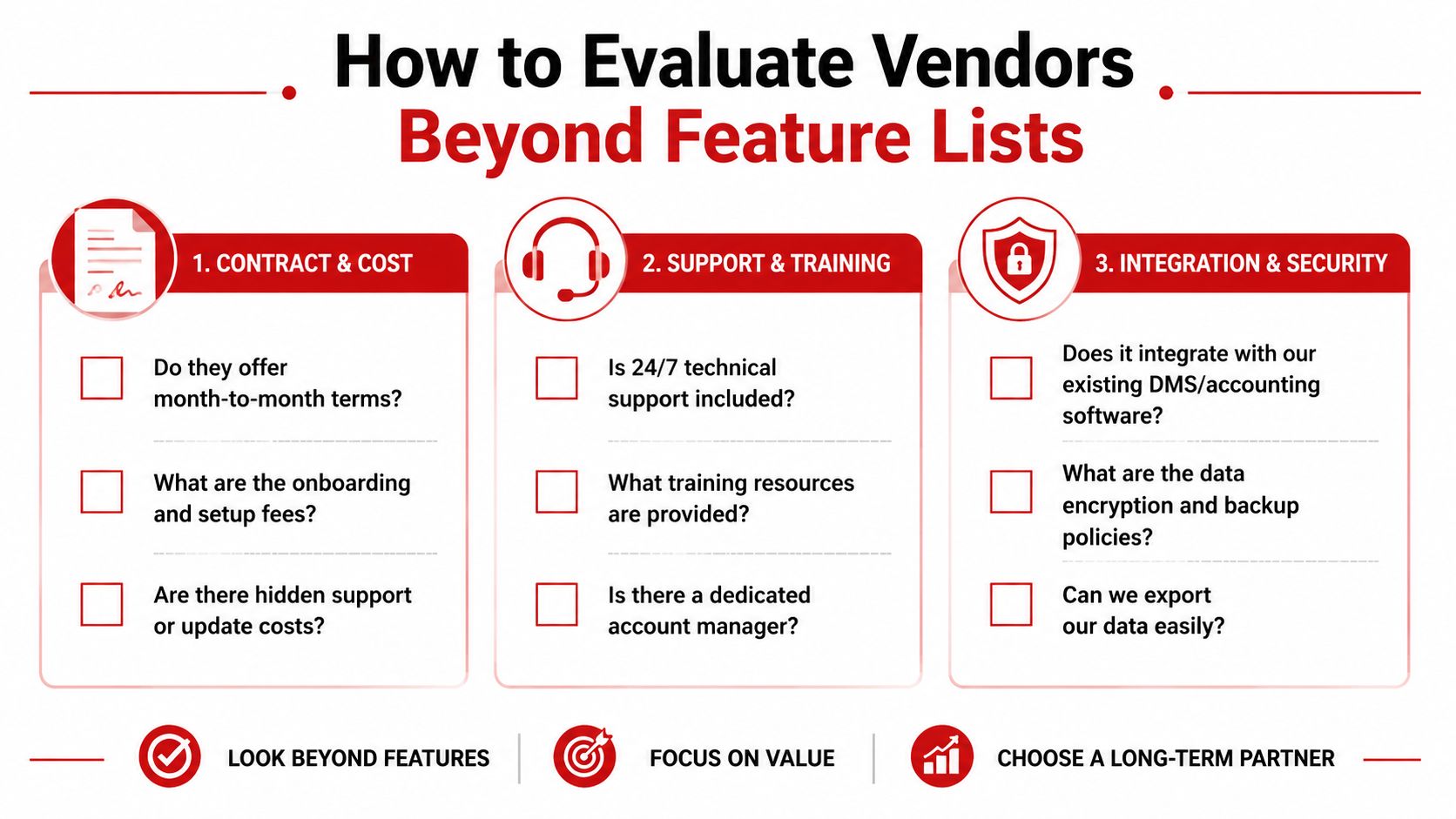
A solid vendor conversation should start with contract terms. Month-to-month or long-term, onboarding charges, support fees, automatic updates, and current-customer references all matter more than the demo screen. Fullbay's buying guidance points directly to those questions, which is a clue that they come up often in real buying decisions.
Then the buyer has to check implementation burden. Data migration, advisor training, technician training, and the time needed to get the team comfortable can be larger than the feature comparison itself. If the vendor can't explain rollout steps clearly, support quality is probably weaker than the sales call suggests.
Total cost of ownership is bigger than sticker price
True cost includes hardware, payment processing, implementation fees, and add-on modules, not just the monthly subscription. A system can look affordable until reporting, payments, integrations, and extra users are added.
A practical evaluation checklist helps:
- Contract terms: confirm whether the agreement is flexible or restrictive.
- Setup and migration: ask what the vendor does versus what the shop must do.
- Training support: find out whether service advisors and techs get real onboarding or just a help article library.
- Integration fit: verify accounting, payment, and parts connections before purchase.
- Data export: make sure the shop can leave later without losing control of its records.
Responsiveness during sales matters
Sales responsiveness is a preview of post-sale support. If emails sit unanswered before purchase, that pattern usually continues when the shop is under pressure. A vendor that explains edge cases plainly is usually better than one that only talks about polished defaults.
RedAppy is one example of a platform positioned with transparent pricing, month-to-month terms, and customization options, which makes it easier to compare against vendors that bundle hidden friction into the contract. The point is not to chase the flashiest feature list. The point is to buy a system that can survive contact with real operations.
Implementation and Migration Roadmap
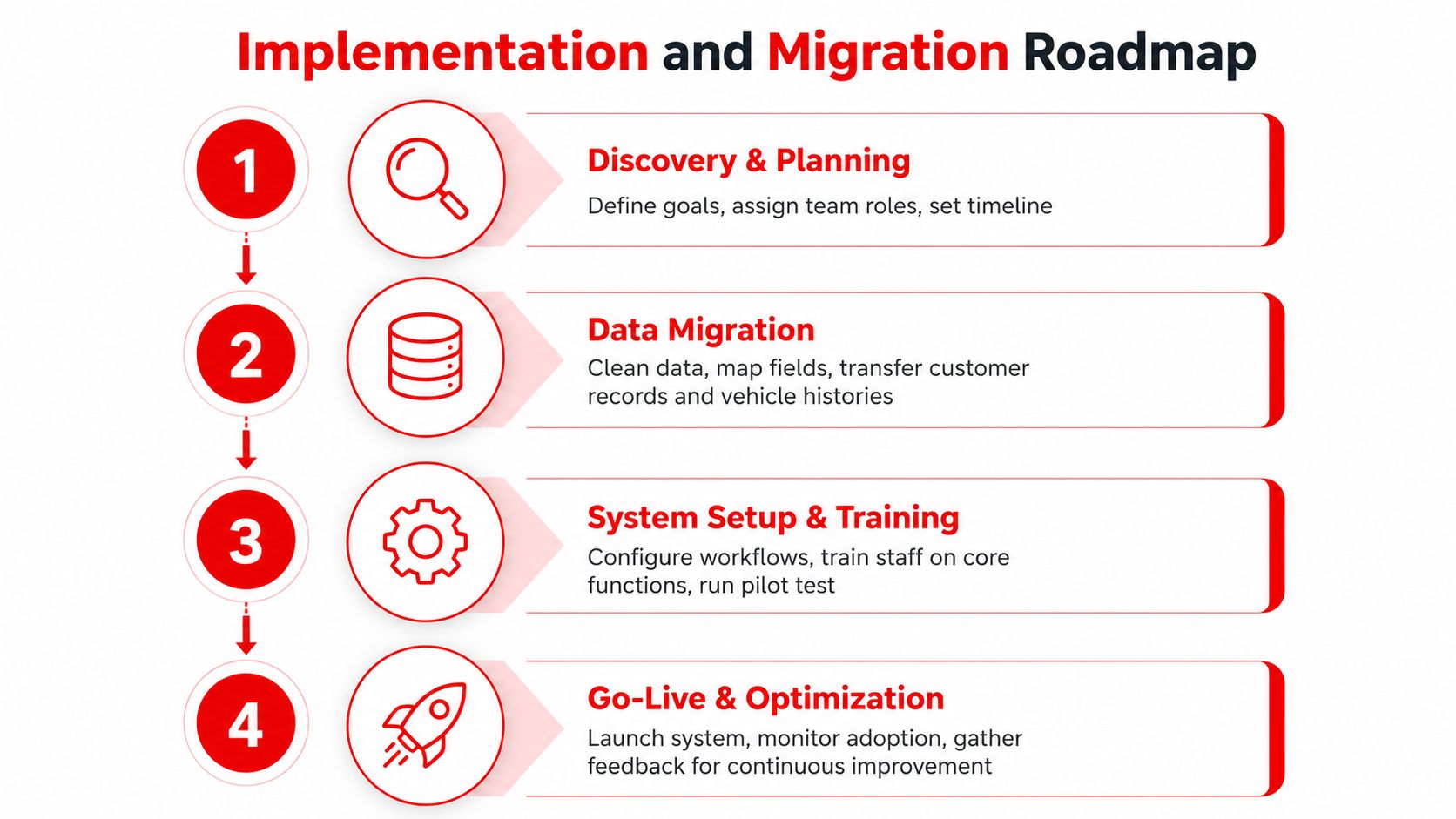
Implementation is where a lot of shops lose momentum. The system itself may be solid, but the team is still trying to run the business while learning a new workflow, cleaning bad data, and keeping customers moving. A careful rollout prevents the software from becoming another source of chaos.
Start with discovery and data cleanup
The first move is not configuration, it is cleanup. Customer records, vehicle histories, and parts catalogs should be reviewed before migration so duplicate entries and incomplete data don't get imported as-is. If old spreadsheets are messy, the new system will only make that mess easier to stare at.
Migration should include a field-mapping review so the shop knows where each legacy item goes in the new structure. That matters because a customer record is only useful if the history attached to it is reliable. Garbage in still creates garbage out.
Train roles, not just software
Service advisors need practice with sample repair orders, estimates, approvals, and invoicing before go-live. Technicians need to understand how their work shows up in the system, especially if the software tracks sold work, job status, or labor flow. Front-desk staff need to know where to look for customer history, calendar entries, and payment status.
The best rollout does not dump every function on day one. It starts with core daily work, then adds deeper tools once the team is comfortable. That keeps the shop from trying to relearn the entire operation during its busiest hours.
Set up the integrations that keep the workflow clean
The system should be connected to accounting software, parts suppliers, and payment processors before the team depends on it. If those links are left until after launch, the shop ends up with duplicate entry all over again, just in a more expensive format.
Good implementation rule: digitizing a broken paper process only produces faster broken paper.
A small shop may get through setup faster than a multi-location business, but both need the same discipline. The right workflow design turns the software into the operating system of the shop, not just a digital filing cabinet.
Common Pitfalls and How to Avoid Them
The biggest mistake is assuming software failures are mostly technical. In practice, most failures are operational. They come from weak planning, weak training, or buying a system that looks affordable but creates new costs after go-live.
The usual failure points
Underestimating training time is a common one. If advisors and technicians are rushed through setup, they fall back to old habits and the software only captures part of the job. That leads to uneven data and frustrated staff.
Ignoring pricing matrices is another problem. If labor rates and rules are not configured correctly from the start, the system can produce clean-looking invoices that still miss the shop's actual labor economics. That is why the loaded labor cost approach matters in the earlier section.
A third mistake is waiting too long to address integration needs. Payment, accounting, and parts connections should be planned up front, not after the team is already working around gaps.
Avoid lock-in before it becomes expensive
Vendor lock-in usually hides in the contract and the export process. If the shop cannot export customer data, vehicle histories, and job records in a usable format, switching later becomes costly and disruptive. That is also why support terms, update policies, and add-on fees should be checked before purchase, not after the renewal notice arrives.
Security needs the same discipline. Backup routines, role-based access, and payment handling should be set from day one. A system that stores operational data but leaves access loose creates risk the shop does not need.
Use proof before full rollout
Pilot testing with a small team is usually smarter than a full-bay switch on day one. It gives the owner a chance to see where staff gets stuck, which reports are missing, and whether the workflow really fits the shop's pace. A pre-implementation checklist and a written standard operating procedure reduce guesswork.
The cleanest implementation is not the fastest one. It is the one that can be measured, corrected, and repeated without disrupting the whole front counter.
Making Your Decision and Next Steps
A shop owner deciding on a system should weigh four things together, not separately, features, total cost of ownership, vendor reliability, and implementation complexity. A platform that looks strong on paper can still be the wrong choice if it requires more staff training than the team can absorb or if it can't scale with future growth.
The easiest next step is to request demos that use the shop's real workflow, not a vendor's ideal scenario. Then ask about contract terms, data export, setup fees, and support response paths before comparing polish. A good system should adapt to the way the shop already works, not force a wholesale rebuild just to use it.
For owners evaluating options, RedAppy is one platform to review because it combines digital inspections, estimates, invoicing, payments, parts ordering, analytics, and scheduling in one workflow. Shops that want to see how modern shop management programs operate in practice can also explore RedAppy and see whether the fit makes sense for their counter, bays, and growth plan.
RedAppy brings shop management, digital inspections, approvals, payments, parts ordering, and reporting into one operating system for repair businesses that want fewer handoffs and clearer visibility. If the goal is to reduce admin drag and make the shop easier to run, RedAppy is worth a direct look, especially for owners comparing total cost of ownership against feature lists.
Ready to Transform Your Shop?
RedAppy helps auto repair shops create professional digital estimates with photos and videos, send them instantly via text or email, and get customer approvals in seconds. No credit card required to start.