
Unlock Efficiency: Best Shop Management Software 2026
The day usually starts the same way in a busy repair shop. A service advisor is answering a ringing phone while trying to find yesterday's repair order. A technician is waiting on parts that may or may not have been ordered. A customer wants an update, but nobody can tell at a glance whether the vehicle is still in inspection, waiting for approval, or already in the bay.
That kind of friction doesn't just feel messy. It slows the whole shop down. Work gets approved later, invoices go out later, and people spend too much time chasing information that should already be in front of them.
Modern shop management software changes that workflow from the front counter to final payment. Its true value isn't a prettier screen. It's having one operating system for check-in, inspections, estimates, parts, labor tracking, invoicing, and reporting so the shop stops relying on memory, paper stacks, and side conversations.
Table of Contents
- Moving Beyond Pen and Paper in Your Auto Shop
- What Is Shop Management Software Really
- Core Features That Transform Shop Workflows
- Calculating the Real ROI of Your Software Investment
- A Practical Checklist for Choosing the Right Software
- Your Roadmap to a Smooth Software Implementation
- Frequently Asked Questions About Shop Software
Moving Beyond Pen and Paper in Your Auto Shop
A paper-run shop can survive for a long time. It just can't stay efficient while volume grows. The problems show up in small ways first. A handwritten note goes missing. A tech asks whether a job is approved. Someone orders the wrong part because the vehicle details were copied over twice and entered differently each time.
By midday, those little misses pile up. The front desk is buried in callbacks. The bays are full, but nobody has a clean view of which jobs are waiting on parts, waiting on customers, or ready for final invoice. Shops don't lose money only on bad work. They lose money in the gaps between steps.
This is why the move to digital systems isn't just a trend. The auto repair software segment is projected to grow from $3.4 billion to $8.6 billion by 2033, advancing at a CAGR of 14.2%, and that shift reflects a structural change in how shops run daily operations, including reducing administrative overhead by 10+ hours per week and increasing work approval rates, according to.
Where paper breaks down first
Most shops feel the strain in the same places:
- Check-in gets sloppy: Vehicle details, symptoms, and promised times are spread across forms, sticky notes, and memory.
- Scheduling turns reactive: One delay throws off the board because there isn't a live view of technician workload and bay status.
- Parts handling slows repairs: Staff members call vendors, compare options manually, then wait to update everyone else.
- Cash-out takes too long: Estimates, approvals, labor notes, and invoice details live in separate places.
Practical rule: If a shop has to ask three people where a vehicle stands, the workflow is already costing time.
The fix isn't just digitizing the old paperwork. It's rebuilding the handoff between advisor, technician, parts desk, and customer so the status of the job is visible without a meeting.
For shops trying to, that broader mindset matters. The point isn't replacing a clipboard with a tablet. The point is removing repeat admin work that steals time from selling labor, turning bays, and communicating clearly with customers.
What Is Shop Management Software Really
Shop management software is the operating layer that connects the front counter, the bay, and the office. The simplest definition is this. It gives the shop one place to create the job, track the work, manage parts, document inspections, invoice the customer, and read the numbers afterward.
That sounds straightforward, but most struggling shops aren't using one system. They're using a patchwork. The calendar is in one app. Customer history is in another. Parts are checked on vendor websites. Labor is tracked on paper or whiteboards. Invoices live in accounting software. Nobody has a clean, shared picture of the job.
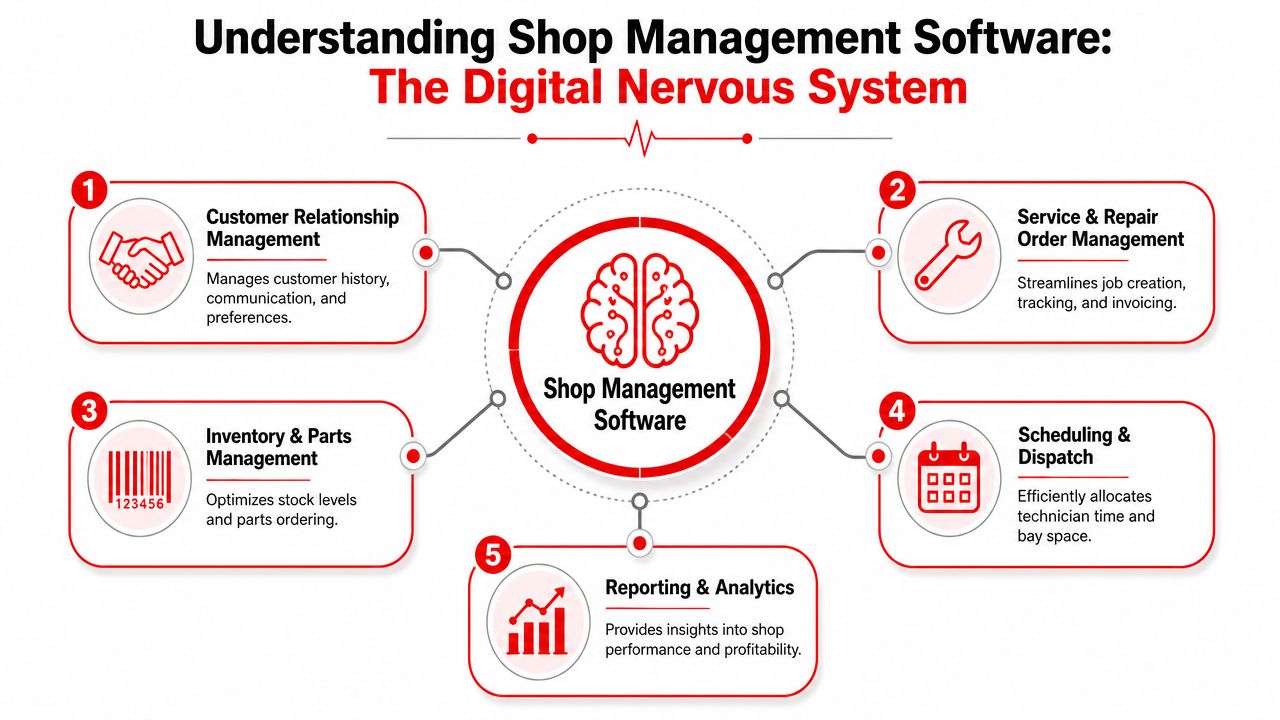
One system instead of five disconnected tools
A good way to think about modern shop management software is as the shop's digital nervous system. Every action sends a signal somewhere else.
When the advisor creates an estimate, the technician can see the job. When the technician finishes an inspection, the advisor can send photos to the customer. When parts are added, the invoice updates. When labor is tracked correctly, payroll data is cleaner. That connected flow matters because, as noted in, cloud-based shop management software that links estimate, inspection, labor tracking, invoicing, and accounting in one real-time interface helps shops stop losing margin on parts, reduce customer no-shows, and get cleaner payroll data.
A disconnected setup does the opposite. Staff members re-enter data, guess at job status, and fill gaps with text messages and hallway conversations.
Why connected workflow matters
The strongest systems aren't built around isolated features. They're built around handoffs.
Consider the difference:
| Workflow step | Old process | Connected software process |
|---|---|---|
| Customer check-in | Notes on paper, details entered later | Customer and vehicle info captured once |
| Inspection | Tech writes findings, advisor rewrites them | Findings move directly into estimate |
| Parts | Vendor calls and manual updates | Parts and pricing stay tied to the job |
| Invoicing | Labor and parts re-entered at the end | Invoice builds from work already logged |
That single source of truth is also why these platforms matter outside a single repair order. Shops that handle service fleets or multiple vehicles under one account often run into the same coordination problem at a larger scale. Anyone comparing operational tools across mobile assets may also find it useful to review the, because the same principle applies. Visibility and control improve when work, assets, and communication live in one system.
Core Features That Transform Shop Workflows
Features only matter when they remove friction from a real job. A long feature list doesn't help if the service advisor still has to bounce between screens, the technician still waits on updates, and the customer still gets vague answers.
The most useful shop management software tools change the shape of the day. They make the next step obvious.
Digital inspections that move work forward
Digital vehicle inspections are one of the first places a shop feels the difference. The technician documents the condition with photos, notes, and recommended work. The advisor doesn't have to translate rough handwriting or chase the tech for details between jobs.
That matters because reliable shop management systems need digital inspections with photo-rich documentation to approve more work, along with labor tracking and dashboards that show progress from check-in to checkout, as discussed in.
Photos don't sell by themselves. Clear findings, tied to a clean estimate, give the customer a reason to say yes.
What doesn't work is a system that stores inspection photos in one area and leaves the estimate in another. The advisor ends up rebuilding the story manually. That kills speed and usually weakens approval conversations.
Estimates and invoices without rekeying
Estimate speed matters because customers decide faster when the quote is accurate and easy to understand. Good software turns inspection findings into line items, keeps labor and parts organized, and moves approved work into an invoice without duplicate entry.
A weak setup usually fails in one of two ways:
- Too many steps: Advisors have to rebuild the same job more than once.
- Too little structure: Notes are free-form, so invoices come out inconsistent and hard to defend.
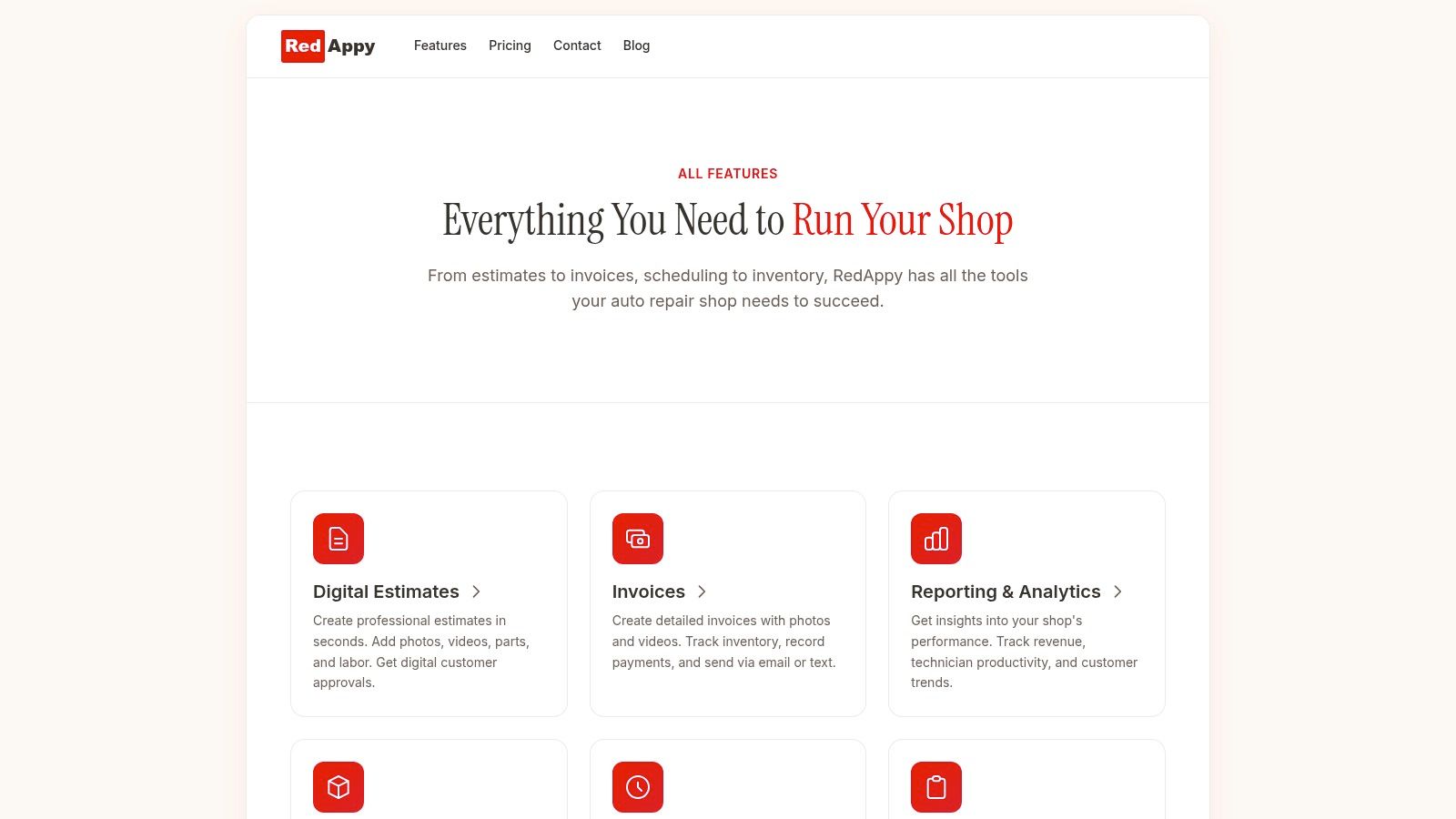
One all-in-one example is RedAppy's feature set, which includes digital inspections, estimates, invoicing, online payments, parts ordering, inventory, analytics, and a Kanban-style shop board in one platform. Tools like that are useful because they keep the job moving instead of forcing the team to export, copy, and re-enter information.
Parts and inventory control inside the repair order
Parts handling is where many shops lose time and margin. Someone checks stock manually, calls a supplier, writes down an ETA, then forgets to update the repair order. The vehicle sits, the customer waits, and the tech gets pulled onto another job.
Integrated vendor and inventory tools reduce that kind of delay. According to, advanced shop management software can reduce job-stuck incidents by up to 30% when real-time inventory tracking and supplier data are integrated into the workflow.
The practical benefit is simple. The parts status belongs inside the job, not in someone's notebook.
A shop board that shows what is stuck
The digital shop board is one of the most underrated tools in a busy operation. It gives the team a live picture of every repair order and where it sits right now. Not earlier this morning. Not after someone updates a whiteboard. Right now.
A useful board should show:
- Job stage: Checked in, inspecting, awaiting approval, waiting on parts, in progress, ready for pickup.
- Assigned technician: So the advisor knows who owns the work.
- Bottlenecks: Delayed parts, unanswered approvals, labor overrun.
- Priority changes: Walk-ins, tow-ins, and same-day promises.
When a shop board is done well, fewer people ask for status updates because the answer is already visible.
Calculating the Real ROI of Your Software Investment
Shops often evaluate software the wrong way. They compare the monthly fee to the cost of doing nothing, as if the current process is free. It isn't. Manual systems cost money every day through wasted labor, delayed approvals, slower invoicing, and avoidable miscommunication.
The better approach is to measure what the software changes in the workflow and attach value to those changes.
Start with labor and admin time
Admin time is the first place to look because it's easy to spot. If the advisor is rebuilding estimates from inspection notes, checking on parts by phone, and manually updating customers, the shop is paying skilled people to do repetitive coordination work instead of revenue-producing work.
The second place is technician flow. According to, cloud-based platforms increase technician turn-around time by 15-20% when labor time guides are embedded directly in service orders. The same source says estimate preparation time drops by about 25 minutes per repair order, and shops using these tools see a 12% higher repeat business rate because faster, more accurate estimates build trust.
That doesn't mean every shop gets the same result on day one. It means the mechanism is real. When labor times, parts visibility, and estimate creation live inside the repair order, the team spends less time hunting for information.
Look at trust, approvals, and repeat visits
ROI also shows up in places that owners feel before they calculate them.
A cleaner inspection-to-estimate process usually leads to better customer conversations. Customers can see what the shop found. Advisors can explain the recommendation without translating a technician's shorthand. Invoices go out faster because the job is already documented inside the system.
A practical ROI review should include these questions:
- How many staff hours disappear into admin each week?
- How many jobs sit idle because parts or approvals aren't visible?
- How long does it take to move from completed work to paid invoice?
- How often do customers come back because the process felt organized and trustworthy?
Bottom line: Subscription cost is visible. Workflow waste usually isn't. The shops that calculate both make better software decisions.
A Practical Checklist for Choosing the Right Software
Software demos can be misleading. Almost every platform looks clean during a guided walkthrough. A crucial test is whether the system matches how a repair shop functions when phones are ringing, bays are full, and two customers want answers simultaneously.
A strong evaluation process starts with questions that force the vendor to show workflow, not just screens.
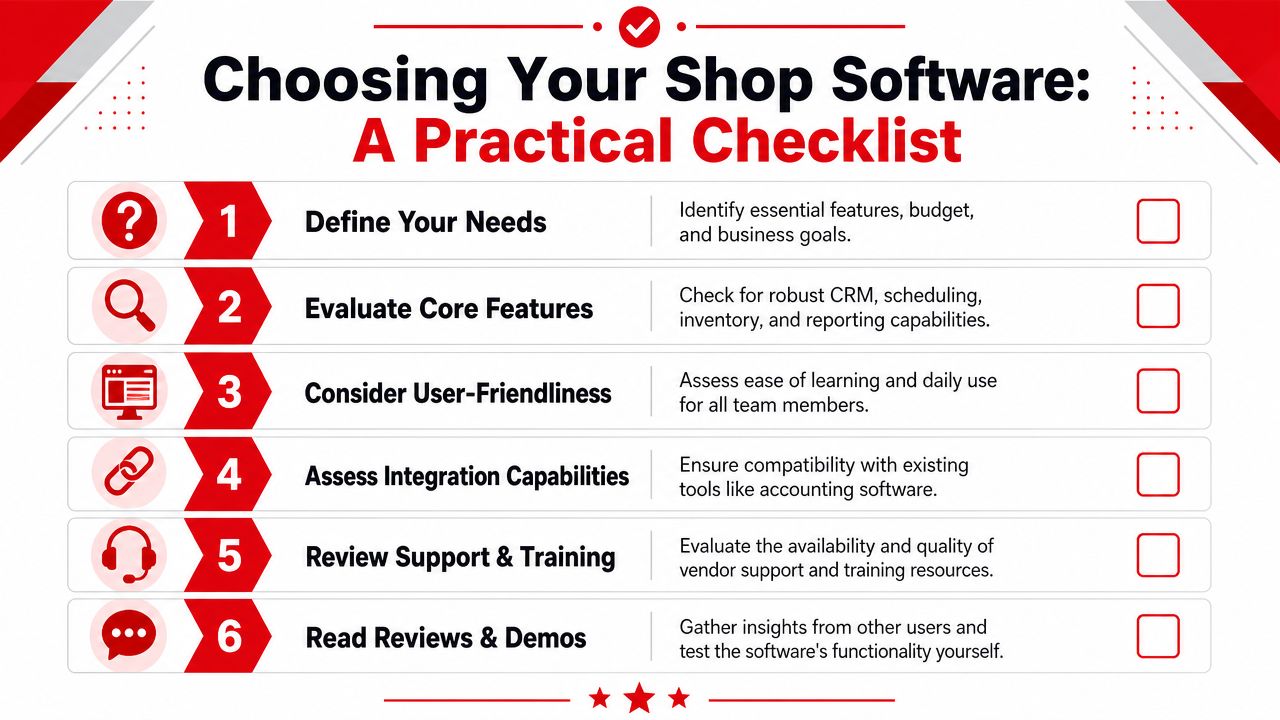
Questions that expose weak systems fast
Top-tier repair shop software should include integrated inventory management with parts tracking, automated invoicing and payment processing, and a user-friendly interface that helps new team members get productive without long training periods, based on.
Use that as a filter. Then ask sharper questions.
- Can the team run the whole job in one place? If the estimate, inspection, parts, and invoice are split across separate modules that don't flow cleanly, the shop will feel it every day.
- How does the system handle parts status? A vendor should show stock, ordering, and job-level parts tracking tied directly to the repair order.
- What does the tech see? A good interface for advisors isn't enough if technicians have to fight the screen to log labor or update job status.
- How easy is training? If a new advisor or tech needs heavy hand-holding for routine tasks, adoption will stall.
- What happens when the shop grows? Multi-location visibility, shared customer history, and standardized workflow become more important once a second shop or mobile unit enters the picture.
What a good demo should prove
The best demos follow a real repair order from start to finish. Vendors should be able to show the full chain, not isolated features.
A useful demo should include:
| What to ask for | Why it matters |
|---|---|
| Customer check-in and vehicle lookup | Shows whether the front desk can move quickly |
| Digital inspection and photo attachment | Reveals how work gets approved |
| Parts sourcing inside the job | Exposes whether the workflow breaks during procurement |
| Invoice creation from completed work | Confirms whether the platform cuts duplicate entry |
Ask the vendor to show one complete workflow with a brake job or drivability concern. If they stay at the feature-tour level, they may be hiding friction.
For shops comparing options side by side, it helps to see the actual workflow screens and ask direct implementation questions. A deeper product view is available through contacting the RedAppy team if a live discussion would help clarify fit, setup, and day-to-day use.
Your Roadmap to a Smooth Software Implementation
Most shop owners don't fear software itself. They fear disruption. They worry the phones will keep ringing while the team is stuck learning a new system, old data won't transfer cleanly, and productivity will drop at exactly the wrong time.
That risk is real if the rollout is rushed. It stays manageable when the shop treats implementation as an operational change, not just a software login.
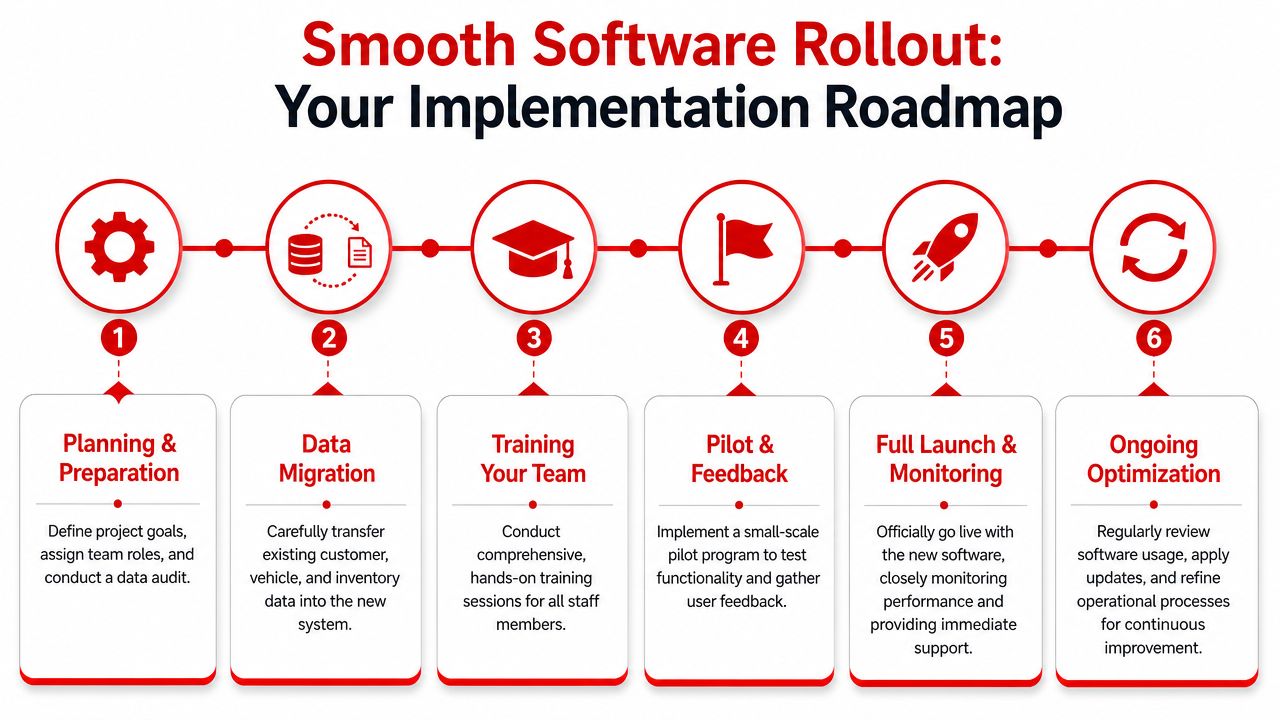
Prepare before the first login
Preparation does more than speed up setup. It prevents old messes from being imported into the new system.
Start with the records the shop uses every day. Clean customer names, phone numbers, vehicles, common services, labor items, and inventory data. Standardize the terms the team uses for job stages and recommendations. If one advisor writes "awaiting parts" and another writes "parts ordered," reporting and visibility get muddy fast.
Before launch, define a few must-haves:
- Who owns customer data cleanup
- Who approves workflow stages
- Which repair order statuses the whole team will use
- How inspections will be documented and sent
- How payments and final closeout will be handled
Roll out in phases, not all at once
A phased launch usually works better than flipping every process on the same day. Start with the front counter and repair orders. Then bring inspections, parts, and reporting into the new routine once the team is stable.
That approach works because people learn faster with live repetition than with a long training session disconnected from the job. Advisors should practice customer intake and estimate creation on real vehicles. Technicians should log labor and inspection findings on active work, not dummy tickets.
A practical rollout often looks like this:
- Week one focus: Check-in, customer records, and basic repair order flow.
- Next priority: Inspections, photos, approvals, and job status updates.
- Then tighten up: Parts ordering, invoicing, payment collection, and reporting review.
Early wins matter. When the team sees one daily headache disappear, resistance drops fast.
A good software partner helps the shop pace the change, answer workflow questions, and adjust the setup after the first real week of use. Implementation goes smoother when the team isn't trying to master every feature at once.
Frequently Asked Questions About Shop Software
What happens to shop data if the business switches providers later
That question should be asked before signing anything. A shop should confirm who owns the customer records, vehicle history, inspection data, invoices, and reporting records. The vendor should explain what can be exported, in what format, and how that process works if the business leaves. If the answer is vague, that's a warning sign.
Is cloud-based software secure enough for customer and financial information
A serious provider should be able to explain its security practices clearly and without evasive language. Shop owners should ask about access controls, backups, permission settings, and how updates are handled. Cloud-based doesn't automatically mean risky. In many cases, it means the provider manages protection and updates more consistently than a local setup would.
Can shop management software handle growth and a second location
It can, if the platform was built to support shared records, multi-user access, and location-level visibility. The key question isn't whether a second shop can be added. It's whether the workflow stays clear when more technicians, advisors, and vehicles enter the system. Multi-location growth exposes weak software fast.
What support should a shop expect after signing up
Support should continue after onboarding. Shops need help with training, workflow refinement, issue resolution, and occasional setup changes as operations evolve. A vendor that disappears after implementation creates friction for the whole team. Ask how support is delivered, who responds, and what kind of help is available when the shop is busy.
Shops don't need more disconnected tools. They need a workflow that holds together from check-in to cash-out. If the goal is to see how that looks in practice, RedAppy is an all-in-one option built for auto repair shops, with digital inspections, estimates, invoicing, parts ordering, inventory tracking, analytics, and a live shop board. For a closer look at fit and setup, the simplest next step is to review the platform or reach out through the contact page.
Ready to Transform Your Shop?
RedAppy helps auto repair shops create professional digital estimates with photos and videos, send them instantly via text or email, and get customer approvals in seconds. No credit card required to start.