
Shop Manager Program: Boost Efficiency & Grow Your Shop
The phone is ringing. A customer is waiting on an estimate. A technician is asking where the repair order went. Someone at the front desk is retyping an invoice that was already written once by hand. Parts are getting called in from memory, and nobody is fully sure whether the ordered component is already on a shelf, on a truck, or still on backorder.
That's what many shops still deal with every day. The problem usually isn't effort. The team is working hard. The problem is that the workflow itself is broken. Paper moves slower than the shop does, and disconnected tools force people to stop wrenching, stop advising, and stop selling while they hunt for information.
A Shop Manager Program fixes that at the process level. It isn't just software for invoices. It's an operating system for the shop floor, the front counter, and the customer handoff.
Table of Contents
- Is Your Auto Shop Stuck in Paperwork Chaos
- What Is a Shop Manager Program
- Core Features That Run Your Shop
- Digital inspections that turn findings into approvals
- Estimates and invoices that don't require rework
- Integrated payments that speed up pickup
- Parts ordering that doesn't live in someone's head
- A job board that exposes bottlenecks early
- Reporting that helps a manager act instead of guess
- AI assistance that supports the team at the point of work
- The Business Case and ROI for Your Shop
- How to Choose the Right Shop Manager Program
- Implementation and Avoiding Common Pitfalls
- Build Your Future-Proof Auto Repair Shop
Is Your Auto Shop Stuck in Paperwork Chaos
A lot of shop owners don't notice how much friction they've accepted until a busy day exposes all of it at once. The advisor is juggling a paper check-in sheet, a handwritten estimate, a text thread with a customer, and a sticky note about parts availability. Meanwhile, a technician loses momentum because the next step depends on someone up front answering a question.
That kind of shop can still do good repair work. It just can't move cleanly.
The bigger issue is that paper creates duplicate work. The same vehicle details get written at check-in, copied to the repair order, repeated on the estimate, then typed again onto the invoice. Every handoff adds delay, and every delay creates another opening for missed labor, missed parts, or missed communication.
Shops rarely have a technician problem when jobs stall. They usually have an information problem.
That's why modern systems replaced the old stack of clipboards, printed calendars, and disconnected files. The move from paper-heavy administration into integrated digital systems happened as shop platforms began combining estimates, repair orders, invoices, and parts ordering into one workflow, creating what Snap-on ShopKey describes as a.
What the chaos really costs
A paper-run process doesn't only create clutter. It causes specific operational bottlenecks:
- Repair orders get delayed: A tech can't move forward if the approved line item is sitting at the front desk.
- Estimates go stale: Parts and labor updates don't flow through automatically, so advisors spend time rebuilding the same job.
- Invoices become cleanup work: End-of-day billing turns into a second shift of data entry.
- Customer updates get missed: If communication lives in memory or separate notes, someone eventually forgets to call.
What changes when the workflow is unified
A proper Shop Manager Program puts those steps into one trackable path. The customer record, vehicle history, estimate, approved work, parts status, technician notes, and final invoice all live in the same place. The shop stops chasing paperwork and starts moving jobs through the bays with fewer interruptions.
For most shops, that's the significant upgrade. Less clerical drag. Fewer dropped details. More time spent on work that gets billed.
What Is a Shop Manager Program
A Shop Manager Program is the central operating system for an auto repair business. It connects the front desk, the technicians, the parts process, the customer record, and the final payment so the whole shop works from one source of truth instead of five disconnected ones.
The easiest way to think about it is this. If the shop were a body, the Shop Manager Program would be the central nervous system. The service advisor enters a concern. The technician sees it. Parts gets tied to the job. Status changes show up immediately. The invoice reflects the actual work performed instead of whatever someone remembers.
What it replaces
Without an integrated system, shops usually patch together several tools:
- Paper work orders for the bays
- A calendar app for appointments
- A separate card terminal at checkout
- Text messages and phone calls for customer updates
- Standalone spreadsheets for tracking parts or technician activity
That setup can function for a while. It breaks down when car count rises, when multiple advisors touch the same job, or when the owner needs clean visibility into what's happening.
What it should do every day
A real Shop Manager Program should help the team do three things better.
First, it should capture work clearly. That means customer details, VIN, service history, complaints, recommendations, and approvals all live in one record.
Second, it should move work without extra handling. A good estimate should become a repair order without retyping. Approved work should flow to the invoice without rebuilding the ticket. Parts should tie back to the job they belong to.
Third, it should show the current status of the shop. Not a guessed status. Not what the whiteboard said an hour ago. The actual status.
Practical rule: If a system still forces the team to write something on paper first and enter it later, the shop is still paying twice for the same task.
Some platforms are built around one specific style of shop. Others support general repair, tires, brakes, diagnostics, fleet, or multi-location operations. RedAppy is one example of an all-in-one option that includes digital inspections, estimating, invoicing, payments, parts ordering, analytics, and a visual shop board, which is why tools like that are often evaluated by shops trying to cut down on back-and-forth admin work. A practical way to see how that kind of setup works in one place is the RedAppy features page.
The important part isn't the feature list on a sales page. It's whether the system reduces interruptions inside the actual workday. If it doesn't save steps at the counter, in the bay, and at pickup, it isn't managing the shop. It's just adding another screen.
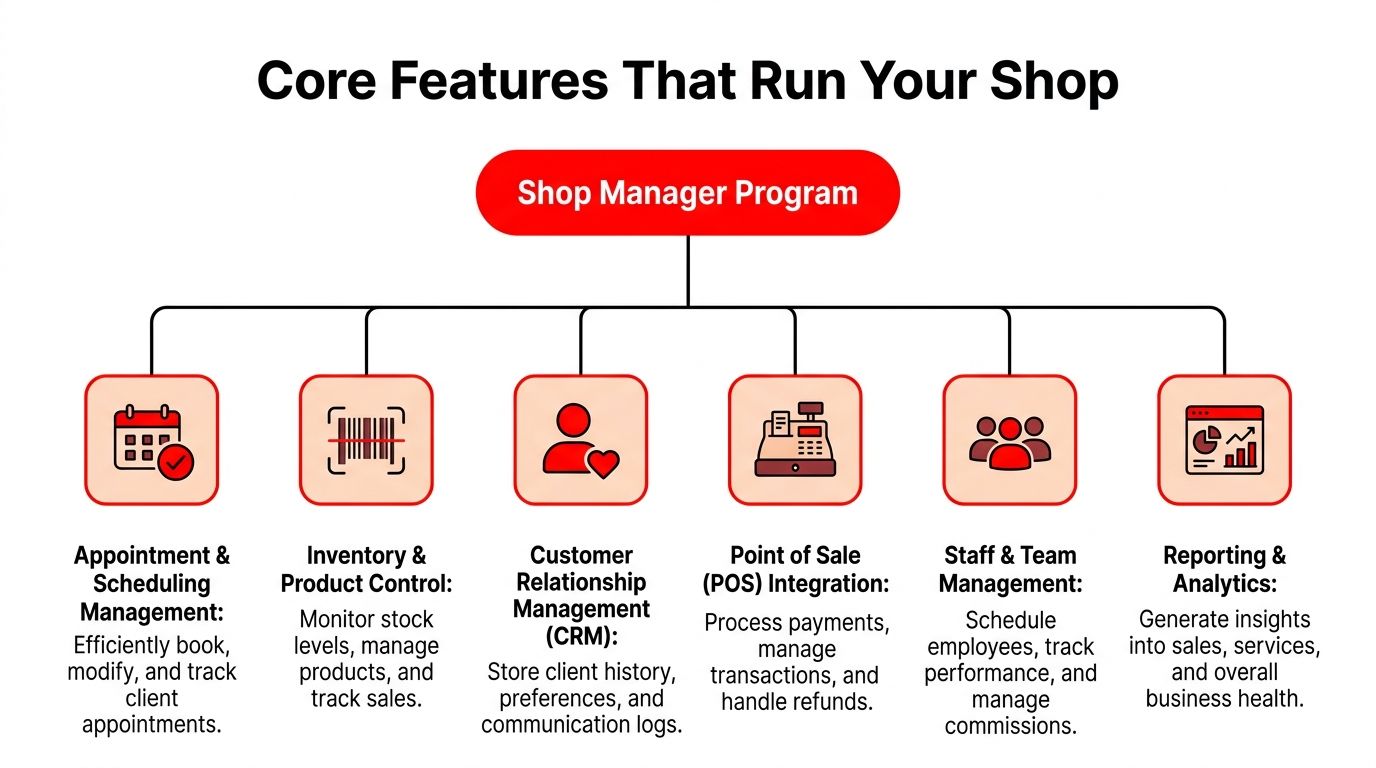
Core Features That Run Your Shop
The strongest Shop Manager Programs don't win because they have more buttons. They win because each feature removes a specific bottleneck that slows the shop down.
Some features help the front desk sell approved work faster. Some protect gross profit on parts and labor. Some reduce the amount of time a technician spends walking instead of repairing. The value is always tied to a real shop-floor problem.
Digital inspections that turn findings into approvals
Digital inspections matter because they change how the shop presents work. A technician can attach photos, note wear conditions, and flag safety concerns in a format the advisor can use. The customer sees what the shop sees.
That solves a common bottleneck. In many shops, recommended work dies at the counter because the advisor has to explain a technical condition from memory. A photo-backed inspection gives the advisor something concrete to present, and it cuts down on the “let me think about it” response that often comes from uncertainty rather than price alone.
It also reduces disputes later. When the inspection record shows the condition at the time of service, the shop has documentation instead of a verbal recollection.
Estimates and invoices that don't require rework
Instant estimates and one-click invoicing sound like convenience features, but they're really anti-rework tools. If the estimate, repair order, and invoice are connected, the staff doesn't have to recreate the same job three times.
That fixes one of the most common leaks in a busy store. Advisors get interrupted, then rebuild invoices at closing, then discover that a labor line or shop supply item never made it from the worksheet to the final bill. Integrated estimating and invoicing reduce that hand-entry risk and make checkout smoother.
A good setup also helps with consistency. Labor descriptions, canned jobs, taxes, parts, and notes show up in a repeatable format instead of depending on who wrote the ticket.
Integrated payments that speed up pickup
Payment is often treated like the very end of the process. In reality, it affects bay flow. If a finished vehicle can't be closed out quickly, it sits. The customer waits. The advisor gets tied up. The next handoff slows down.
Integrated payments remove that bottleneck by letting the shop close the loop inside the same system where the job was managed. The invoice is already there. The customer record is already there. The transaction doesn't need a second device and a second reconciliation routine.
For shops offering remote payment options, that can also shorten the lag between completion and pickup, especially when the customer is at work and wants to handle the bill before arriving.
A vehicle that's repaired but not picked up is still consuming operational space.
Parts ordering that doesn't live in someone's head
Parts control is where many otherwise capable shops get messy. One person knows which vendor usually has stock. Another person remembers that a certain customer's vehicle is waiting on a special order. None of that is reliable if it lives only in memory.
Centralized parts ordering fixes this by tying ordered parts, vendor choices, and status directly to the job. Advisors don't need to ask around to find out whether the brake kit is ordered. Technicians don't start tear-down assuming all components are already in-house. Managers can see which jobs are held up by supply issues rather than labor availability.
This also helps avoid duplicate orders, missing returns, and pricing surprises that only show up at invoicing.
A job board that exposes bottlenecks early
A Kanban-style job board does something a printed schedule can't. It shows flow. The team can see which cars are checked in, waiting on diagnosis, waiting on approval, waiting on parts, in progress, ready for QC, or ready for delivery.
That visibility matters because bottlenecks are easier to fix when they're visible early. If three vehicles are all sitting in “waiting approval,” the advisor knows where to focus. If two techs are blocked by parts while one bay is overloaded, the foreman can rebalance work before the afternoon gets away from the team.
The board also changes manager behavior for the better. Instead of asking everyone for status updates, the manager can coach from a live workflow view.
Reporting that helps a manager act instead of guess
Analytics only matter when they lead to action. A useful Shop Manager Program should show which jobs are dragging, which advisors close work cleanly, which technicians stay productive, where invoices stall, and how repeat customers move through the business.
That helps managers answer practical questions:
- Where is the day getting stuck
- Which service categories are profitable
- Which cars are waiting too long for approval
- Whether the team is building complete tickets
Weak reporting forces owners to manage by feel. Strong reporting gives them a way to spot operational habits before they become recurring losses.
AI assistance that supports the team at the point of work
AI tools in shop software are only useful when they remove delay. The right use isn't flashy copywriting. It's helping the team get labor times, diagnostic guidance, or shop insights without bouncing between systems.
For a technician or advisor, that means fewer pauses during estimate building and less hunting for the next step. For a manager, it can mean faster answers when reviewing productivity, recommendations, or job patterns. The useful version of AI supports the workflow already in motion. It shouldn't force the team into a separate process just to use it.
When software features are evaluated this way, the buying decision gets clearer. The question stops being “What functions are included?” and becomes “Which bottlenecks disappear if the team uses this every day?”
The Business Case and ROI for Your Shop
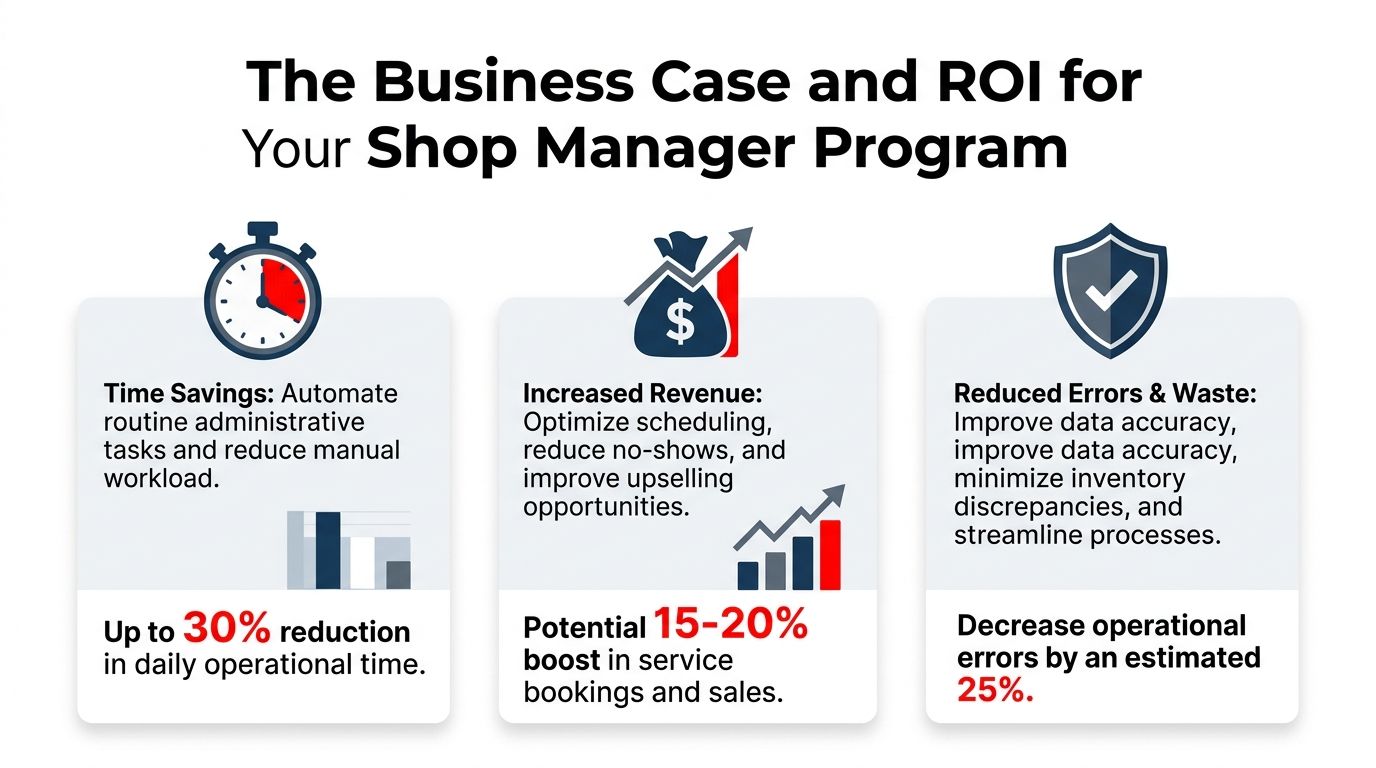
Most shop owners don't need another abstract argument about technology. They need to know whether a Shop Manager Program gives time back, supports better sales execution, and makes the customer experience cleaner.
That's the business case. Not hype. Operational advantage.

Time is the first return
The fastest payback usually comes from reducing wasted motion. Cloud-based shop management systems give technicians and managers real-time access to work orders and inventory from any device, which can shorten cycle time and improve throughput by eliminating trips to the front desk, as described in Fullbay's overview of.
That matters in real life because small delays pile up. A technician walks up front to ask whether a part arrived. An advisor leaves the counter to check on status. A manager interrupts two people just to find out whether a vehicle is ready for delivery. None of those moments look expensive alone. Together, they eat the day.
Revenue improves when the process gets cleaner
More approved work often comes from better presentation, not harder selling. When the shop documents findings clearly, builds estimates quickly, and follows up while the customer is still engaged, the advisor has a much better shot at getting a decision.
Missed calls are part of that equation too. A shop can do excellent work in the bay and still lose easy revenue at the front end if incoming calls aren't handled consistently. For owners who want a practical outside perspective on that problem, are worth reviewing because they focus on what happens when brake jobs, oil changes, and other common opportunities never make it onto the schedule.
Trust improves when customers can see the work
Customers don't always question the repair itself. Often, they question what they can't verify. A digital workflow helps because it makes the process easier to follow. Inspection results are documented. Recommendations are tied to the vehicle. The final invoice reflects the work that was approved.
Clean process builds confidence before the customer ever asks for proof.
That trust has a practical return. Pickup conversations are smoother. Disputes are easier to resolve. Advisors spend less time defending the ticket and more time guiding the next service decision.
A Shop Manager Program earns its keep when it reduces confusion for the team and uncertainty for the customer at the same time. That's why the ROI conversation shouldn't start with software price. It should start with friction, because friction is what the shop is already paying for every day.
How to Choose the Right Shop Manager Program
Buying the wrong system creates a different kind of chaos. The shop ends up with a tool that looked polished in a demo but doesn't match the way the team works. Good selection starts with operational fit, not feature overload.
A lot of vendors talk about all-in-one capability. That sounds good until the shop asks what happens to existing accounting tools, parts workflows, or repair information systems already embedded in daily operations. That question matters because data migration risk and interoperability often get less attention than they should, even though shops frequently need to keep specialized tools in place. Protractor highlights this issue in its discussion of.
Questions that separate a real fit from a sales demo
The easiest way to pressure-test a Shop Manager Program is to ask direct shop-floor questions.
- How will advisors use it during a rush: If estimate building takes too many clicks, the team won't stick with it.
- How will technicians interact with it in the bay: If it isn't practical on a tablet or phone, status updates won't stay current.
- What happens to existing customer and vehicle records: A migration plan should be clear before any agreement is signed.
- Can the shop keep outside tools it already depends on: Some shops need accounting, parts, or repair-data systems to stay in place.
- What does support look like after go-live: Training matters, but post-launch help matters more.
If a vendor gives polished answers on features but vague answers on migration, support, and workflow fit, the shop should keep looking.
Key Evaluation Criteria for a Shop Manager Program
| Criterion | What to Ask | Why It Matters |
|---|---|---|
| Ease of use | Can an advisor write an estimate quickly, and can a technician update job status without a workaround? | If the team avoids the system, the process falls back to paper and verbal updates. |
| Cloud access | Can staff access work orders, schedules, and job status from the counter, bay, and mobile devices? | Real-time access keeps work moving without constant back-and-forth. |
| Parts workflow | Does the system connect estimates, vendor ordering, and job status in one place? | Parts delays become visible faster, and duplicate ordering is less likely. |
| Payment and invoicing | Can approved work flow cleanly into the final invoice and payment step? | Checkout gets faster, and fewer billing details are missed. |
| Reporting | What can the owner or manager see daily without exporting data into spreadsheets? | The system should help managers act on problems, not assemble reports by hand. |
| Integration | Which current tools can stay, and what data can be imported safely? | Replacing everything at once creates risk that many shops don't need to take. |
| Support and onboarding | Who trains the team, and how are issues handled after launch? | Adoption depends on help during the first weeks of real use. |
| Pricing clarity | What's included, what costs extra, and what changes as the shop grows? | Hidden add-ons can turn a manageable subscription into an unpleasant surprise. |
A smart buying process includes the advisor, at least one technician, and the person who closes the books. Each role sees a different failure point. If only the owner evaluates the software, the shop often misses the friction that shows up during the actual workday.
Implementation and Avoiding Common Pitfalls
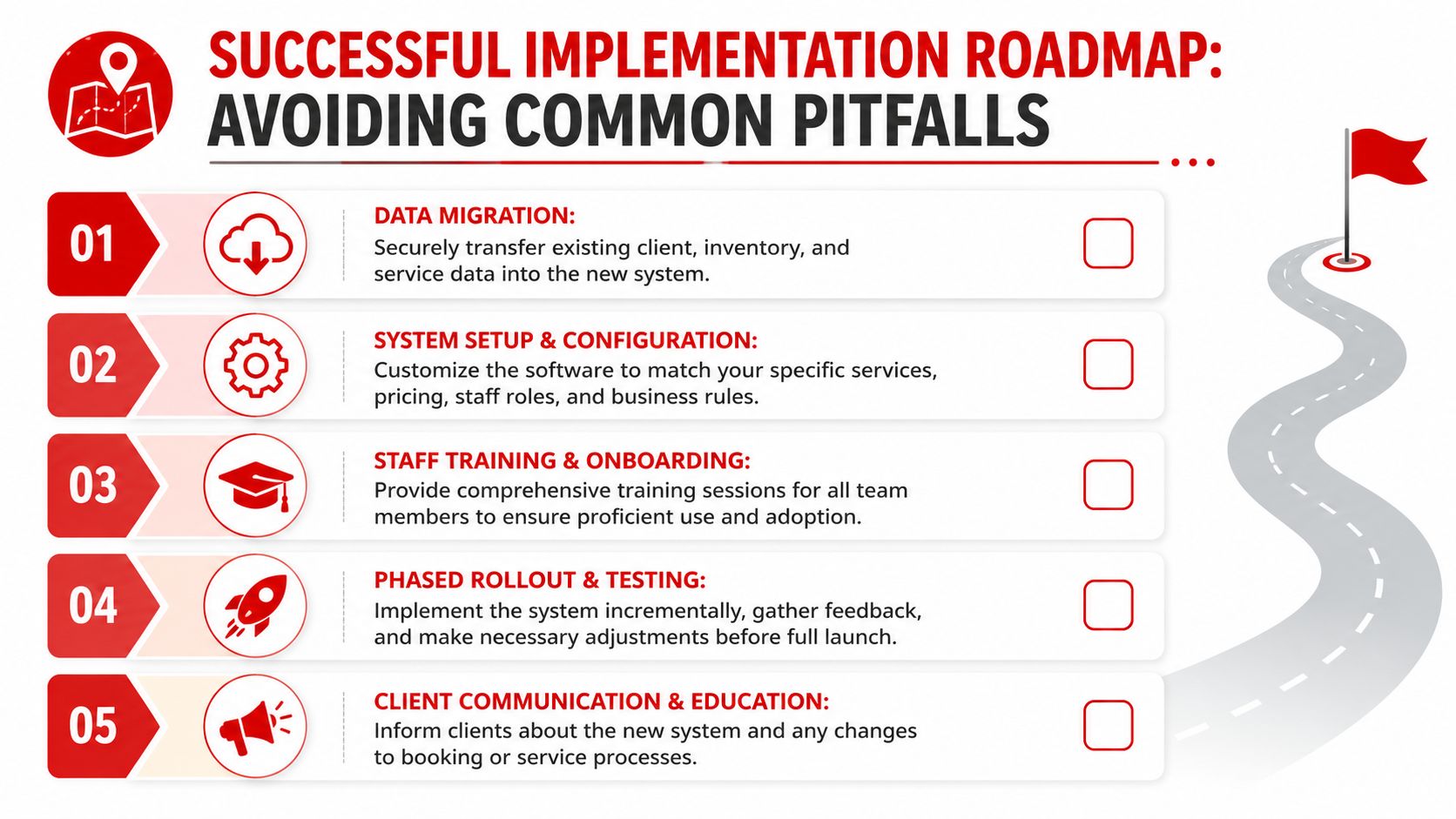
A Shop Manager Program doesn't fail because the software exists. It fails when the rollout is rushed, the data is sloppy, or the team keeps one foot in the old process. Clean implementation is what turns a purchase into a working system.
A simple rollout that works
A straightforward rollout usually works better than a dramatic switch.
Data prep
Clean the customer list, vehicle records, labor items, canned jobs, pricing rules, and inventory data before import. Bad data transferred into a new system is still bad data.Team training
Train by role. Advisors need check-in, estimates, approvals, and checkout. Technicians need inspections, notes, and status updates. Managers need reporting, job flow visibility, and exception handling.Go-live
Start with a controlled launch. Pick a clear date, use the new workflow consistently, and assign one point person to answer internal process questions during the first stretch.
Three mistakes that slow adoption
Trying to customize everything on day one
Use the core workflow first, then fine-tune once the team has real usage behind it.Letting staff fall back to paper for convenience
Set a firm rule on which process is now official, or the shop will end up maintaining two systems at once.Training once and calling it done
Reinforcement matters. Short follow-up sessions after launch usually fix more than one long meeting before launch.
The cleanest implementation isn't the fastest one. It's the one the staff actually follows on a busy Tuesday.
When a shop wants help mapping the transition, vendor guidance matters. A practical next step is to reach out through RedAppy contact and ask specific rollout questions about data setup, staff training, and day-one workflow expectations.
Build Your Future-Proof Auto Repair Shop
A modern repair business can't rely on memory, paper stacks, and constant verbal handoffs forever. That setup creates drag at every stage of the job. Check-in gets messy. Approvals slow down. Parts status gets fuzzy. Pickup turns into a scramble. The shop works hard, but the workflow keeps fighting the team.
A strong Shop Manager Program changes that by giving everyone the same live picture of the job. The advisor sees the estimate and approval status. The technician sees the work order and inspection flow. The manager sees where the bottlenecks are before the whole day backs up.
That kind of consistency also shapes how customers judge the shop. Clear communication, visible documentation, and smoother handoffs feel more professional because they are more professional. For a quick outside example of how customer trust shows up in public feedback, it's useful to review and notice how often service quality and communication show up together.
The shops that stay competitive aren't just good at repairing vehicles. They're good at moving information cleanly from first contact to final payment. That's what lets them scale without becoming disorganized.
If a shop is ready to replace paper chaos with a cleaner workflow, the next step is simple. Review how RedAppy handles inspections, estimates, invoicing, parts, payments, and shop-board visibility, or reach out for a direct conversation about what the current process is getting wrong and how to fix it.
Ready to Transform Your Shop?
RedAppy helps auto repair shops create professional digital estimates with photos and videos, send them instantly via text or email, and get customer approvals in seconds. No credit card required to start.