
Tire Shop Management Software the Complete Guide
The counter is busy, a driver is waiting, and the tire the customer asked for is nowhere where the bin sheet says it should be. The service advisor is checking fitment on one screen, inventory on another, and a handwritten note that might already be wrong. That mess is exactly why tire shop management software exists, and why generic shop software usually falls short the moment the job turns into a tire-specific lookup instead of a simple repair order.
Table of Contents
- What Tire Shop Management Software Does
- Core Features Every Tire Shop Needs
- Benefits That Show Up on the P&L
- How to Choose the Right Platform for Your Shop
- Pricing Models and Real ROI Numbers
- Implementation and Migration Checklist
- Putting It All Together and Next Steps
What Tire Shop Management Software Does
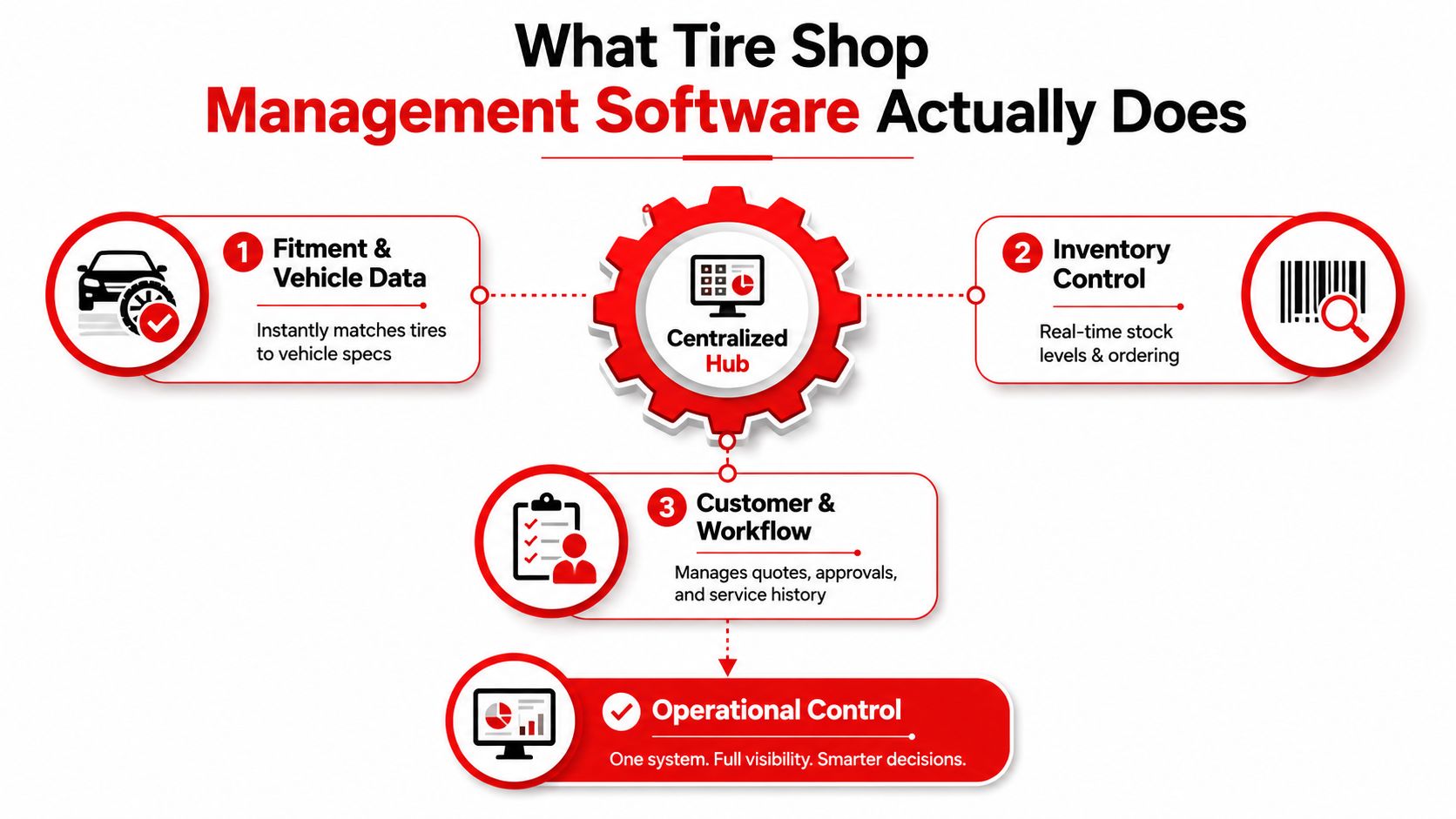
A tire counter gets chaotic fast. One customer wants an OE match, another needs a staggered setup, a third is asking whether the tires that arrived this morning are on the shelf or already promised to someone else. A good system cuts through that scramble by becoming the shop's operating system, from the first call to the final invoice.
Why generic shop software misses the mark
Generic auto repair software usually thinks in repair orders, labor lines, and standard parts workflow. Tire work is different. The shop needs size-based lookup, DOT tracking, seasonal storage, and job cards that reflect mounting, balancing, and rotation without forcing staff to improvise every time.
A purpose-built tire platform handles the details that protect the sale. It tracks inventory by tire size, tread pattern, brand, shelf location, and on-order status, not just by SKU, because a counter person needs to find the right match in a few clicks and avoid selling stock that does not exist on the floor. It should also pull live distributor pricing and availability at the counter, so the gross margin reflects current cost instead of being rebuilt later, and it should support vehicle fitment lookup, including staggered and OE fitments, so the wrong tire does not go out the door.
Practical rule: if the software can't show what fits, what's in stock, and what it costs right now, it is not controlling the tire sale. It is only recording it after the fact.
The market already has real weight, which matters because this is not a guessing game. The global tire shop software market was estimated at USD 1.29 billion and is projected to reach USD 2.98 billion by the projection horizon, growing at a 9.8% CAGR, with North America at about 38% of revenue and Europe at 29% in the cited report. That concentration shows buyers are not experimenting. They are replacing messy workflows with systems that already have real traction.
Tire Guru's platform numbers point in the same direction. It says its software has supported 105 million repair orders created, $62 billion in repair orders processed, and 46 million tires sold by its customers, with over 180 reports built into the platform. That is not the profile of a simple cash register. It is a data-heavy operating layer.
For a useful comparison point on organized service menus, see. The same discipline applies here, the menu has to be readable enough that staff can quote without interpretation.
Core Features Every Tire Shop Needs
A tire advisor should not need to think in software terms. The screen should mirror the sale: identify the vehicle, confirm the fit, verify stock, quote the right tire, and close the job without guessing. If a platform forces staff to bounce between modules, it's already slowing the counter.
Start with fitment and inventory, not flashy extras
The first feature that matters is inventory by tire size, then brand, tread pattern, shelf location, and on-order status. That structure is what lets staff find the exact product fast, rather than scrolling through a generic item list that assumes every tire is interchangeable. The second feature is vehicle fitment lookup, including staggered and OE fitments, so the system supports the sale instead of asking the advisor to memorize exceptions.
The next must-have is live distributor pricing and availability at quote time. If pricing is stale, the shop can still sell, but the margin math is fiction. A good workflow keeps the quote honest before the customer approves the job. For a useful comparison point on organized service menus, Derek's Auto Detail has a practical primer on, and the same discipline applies here, the menu has to be readable enough that staff can quote without interpretation.
Build the tire-specific workflow into the bay
Tire software also needs DOT number tracking, mounting and balancing job card templates, seasonal storage management, and customer vehicle history. Those features sound basic until a shop has to trace a warranty issue, find a stored set, or repeat the right service package for a returning driver. In tire work, recordkeeping is not admin fluff, it's what keeps the job from getting repeated.
Good software should make the advisor faster, the technician clearer, and the owner less dependent on memory.
| Capability | Tire-Specific Software | Generic Shop Software |
|---|---|---|
| Tire lookup | Searches by size, brand, tread pattern, and fitment | Often centered on SKU or generic parts search |
| Pricing at quote time | Pulls live distributor pricing and availability | May require manual price checks |
| Inventory control | Tracks shelf location, on-order status, and DOT details | Usually broad parts tracking only |
| Job workflow | Built for mounting, balancing, rotation, and storage | Built around standard repair orders |
| Fitment support | Handles OE and staggered fitments | Often limited or bolt-on only |
A tire shop also needs software that can keep the customer record tied to the vehicle record without extra work. That history matters for repeat sales, storage customers, and seasonal changeover reminders. If the platform can't hold that relationship cleanly, it's already behind.
Benefits That Show Up on the P&L
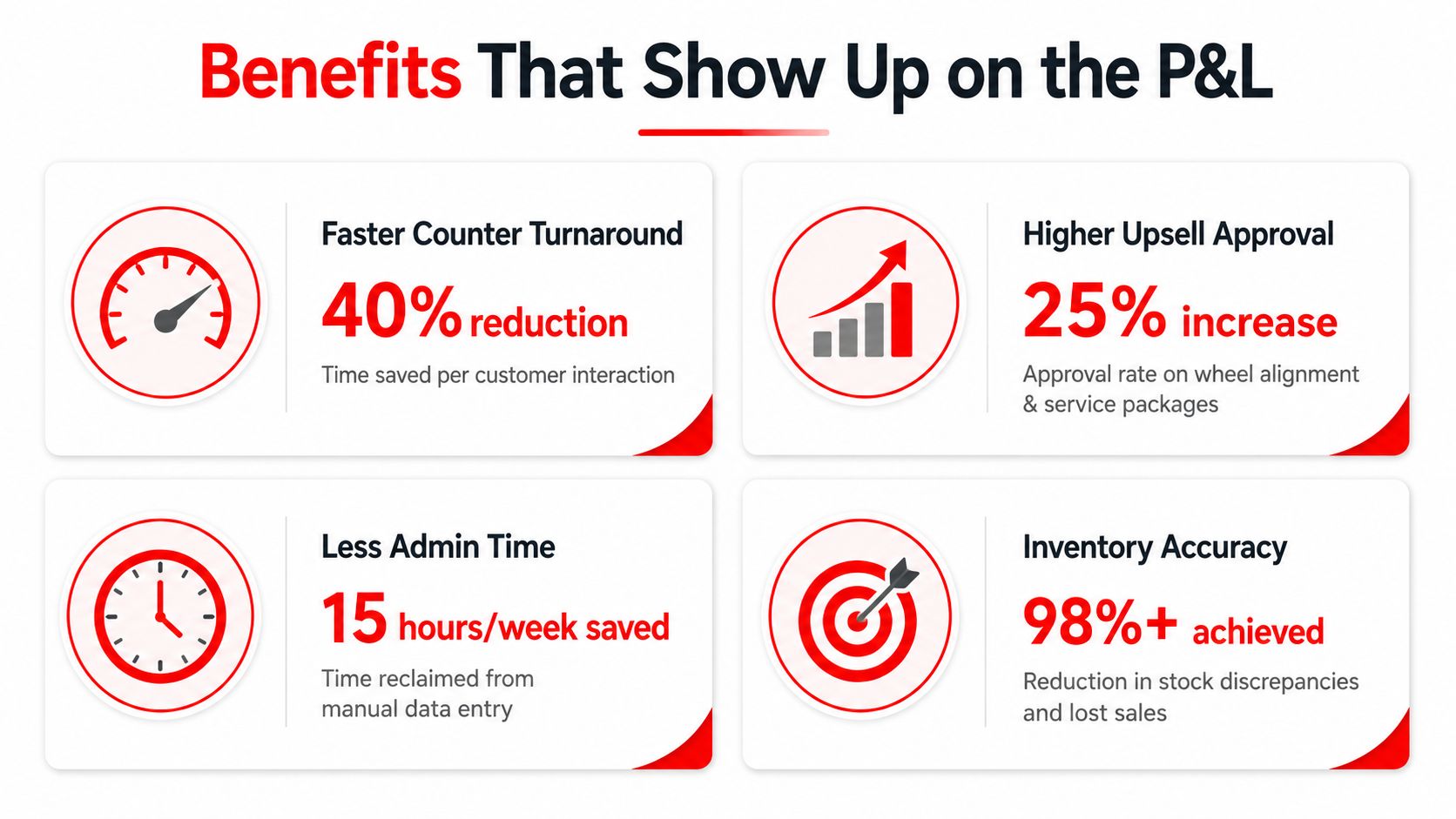
A tire shop feels the payoff first at the counter. When the advisor can check fitment, stock, and cost in one pass, the line keeps moving and the phone stops bouncing between “let me check” and “call you back.” That is not a soft efficiency gain. It means more completed estimates in a shift and fewer good opportunities slipping away.
Revenue improves when mistakes drop
Higher approval rates on upsells usually come from cleaner quoting, not louder selling. When the estimate is tied to the right vehicle, the right tire, and live availability, customers trust the proposal faster. That trust does more for close rates than a polished script because it removes friction before the objection starts.
Fewer comebacks are another direct profit lever. A mis-sold fitment burns bay time, creates awkward conversations, and forces rework that never should have happened. Tire software that checks vehicle compatibility and keeps inventory details tight cuts off that failure point before the car gets back on the lift, which protects labor and keeps the shop's reputation intact.
Admin savings matter more than owners admit
Less admin time lost to manual lookup is where many shops get margin back. The advisor stops spending the afternoon cross-checking inventory sheets, calling suppliers twice, or rebuilding a quote after the fact. That time goes back into selling, scheduling, and getting the right tire on the right car without delay.
The category has also grown well beyond a simple point-of-sale tool. Tire Guru shows the scale of modern systems with features like 105 million repair orders created and over 180 reports. The point is not the headline numbers. The point is that serious platforms now handle reporting and control in ways generic shop systems usually do not.
The first win is usually not a dramatic transformation. It is a cleaner desk, fewer interrupted calls, and fewer mistakes that need a manager's attention.
Inventory control also has a real effect on usable space. When the team knows what belongs on the floor, what belongs in storage, and what is already committed, dead stock stops eating room. In a tire shop, that matters fast because seasonal inventory, odd sizes, and poor labeling can turn good space into clutter.
The market data points in the same direction. A Dataintelo market report shows this is a mature software category, not a niche add-on. For an independent shop, the year-one win is straightforward. Cut quote friction, cut fitment errors, and cut the time spent chasing inventory. That is where the P&L starts to move.
How to Choose the Right Platform for Your Shop
A short demo can make any platform look capable. The key test is whether the system handles the work that drives a tire shop's profit, without pushing staff into workarounds. Buyers should score software on the same tasks the counter team faces every day, not on brochure language or generic auto repair claims.
Use a hard checklist, not a gut feeling
Start with fitment data depth. If the vendor cannot show a live database with accurate specs for the makes your shop sees, keep looking. Then check inventory granularity. A serious platform should track by size, brand, speed rating, tread pattern, shelf location, and on-order status, because tire sales live and die on those details.
Next comes multi-location support for shops with more than one store. The software should share customer and vehicle records, account balances, and live inventory across locations, while still keeping sales reporting separate by store and by company. That matters for operators who transfer stock between locations or need one clean view of the business.
Watch the red flags closely
The biggest warning sign is a vendor that will not open the fitment database during a live demo. If they avoid that, they are hiding something. Contracts that lock the shop in before the system has proven itself are another problem, and so are pricing structures that punish growth with seat fees every time a new advisor logs in.
A practical shortlist should also include distributor integrations, workflow and reporting, and mobile access for the bay. RedAppy is one example in this space, and the useful question is whether it supports the tire-specific work your shop needs, like digital inspections, instant estimates, one-click invoicing, online payments, multi-supplier parts ordering, and a Kanban-style digital shop board (RedAppy features). Compare that against tire-shop needs first, then judge whether the rest is just packaging.
| Selection Criterion | Ideal Fitment Database Behavior | Revenue Impact |
|---|---|---|
| Fitment data depth | Live, searchable vehicle matching | Prevents wrong-tire sales |
| Inventory granularity | Size, brand, location, and status tracking | Stops phantom stock problems |
| Multi-location support | Shared records and transfer visibility | Keeps chain operations aligned |
| Distributor integrations | Live pricing and ordering support | Protects margin at quote time |
| Workflow and reporting | Clear quotes, approvals, and sales reporting | Keeps the counter moving |
Single-location shops should keep the focus on speed and fitment accuracy. Multi-location shops should put more weight on shared inventory, transfer logic, and company-wide visibility. Everything else is window dressing.
Pricing Models and Real ROI Numbers
A tire shop can sign a low monthly contract and still waste money if the software misses the work that drives sales. That is the mistake. Judge the platform by whether it cuts admin labor, reduces quoting errors, and keeps tire inventory under control by size, brand, and storage status.
Know which pricing model grows with you
Flat monthly subscriptions are easy to understand, but they can hide the actual cost if important features sit behind extra fees. Per-user pricing looks cheap at first and becomes painful as more advisors and managers need access. Per-location pricing fits multi-store operators better, while add-ons only make sense if they are genuinely optional and do not turn into must-have charges for basic use.
If a vendor cannot show total cost as the shop grows, the quote is incomplete.
The billing model matters, but the workflow matters more. A single-bay garage moving off spreadsheets usually feels the gain first in fewer interruptions at the counter and fewer mistakes in customer notes, fitment checks, and invoicing. A multi-location operator gets more value from shared inventory, transfer visibility, and consistent pricing across stores, because duplicate stock and stale pricing eat margin fast.
For an independent shop, the practical year-one goal is simpler. Use software to save staff time and reduce quote errors, then measure whether those savings cover the subscription and setup costs. For a larger operator, compare the fee against the cost of one bad pricing cycle, one missed inventory transfer, or one advisor spending too long on manual checks. That is the right test.
Compare the bill to the work it removes
ROI is easy to calculate if you stay specific. Start with the hours the system removes each week, multiply that by the loaded hourly cost of the staff member doing the work, and compare the result to the software bill. Then add the money protected by fewer pricing mistakes, fewer duplicate records, and fewer stockouts on the exact tire sizes your shop sells most often.
A simple formula works well:
Monthly ROI = labor saved + margin protected from errors + inventory losses avoided - software cost
If an advisor spends time rekeying quotes, checking stock by phone, or fixing invoice mistakes, that time has a cost. If the platform shortens those tasks, the savings show up quickly. If it also stops your counter staff from quoting the wrong tire size or selling stock that is not on the shelf, the margin protection is even better.
The market size, with USD 1.29 billion in estimated value and a projected 9.8% CAGR, shows that buyers are paying for operational control, not decoration. That matters because tire shops do not win on flashy software. They win when the counter moves faster, the fitment lookup is accurate, and seasonal inventory does not get lost in the system.
The strongest financial case is usually plain and measurable. Fewer manual checks, faster quotes, cleaner invoices, and less time spent hunting down inventory details all show up in the numbers. That is how software stops being overhead and starts protecting margin.
Implementation and Migration Checklist
Most software failures happen before the first live invoice, not after it. The shop skips the cleanup, rushes the cutover, and then blames the platform when staff can't find records or pricing logic behaves badly. A disciplined launch avoids that mess.
Before go-live
Clean customer and vehicle records first. Duplicate names, bad phone numbers, missing VINs, and sloppy notes will become bigger problems once the new system is live. Then map legacy SKUs to the new catalog, especially for tire size, brand, and season-specific inventory, so the shop does not import confusion.
Lock down distributor integrations before the switch. If pricing and availability feeds are not working, the front counter will fall back to manual checks on day one. Also define who owns the setup, because software rollouts fail when everyone thinks someone else is handling it.
On cutover day
Run the old and new systems in parallel long enough to spot gaps. Do spot counts on inventory, especially high-turn tires and any stored sets that matter to seasonal business. Keep a rollback plan ready in case pricing, taxes, or vehicle histories are not behaving as expected.
In the first 30 days
Coach staff by role, not by feature list. Advisors need quoting speed, technicians need job clarity, and owners need reconciliation discipline. End-of-day checks should become routine immediately, because sloppy daily habits are hard to fix after the team settles into the new system.
The last step is a 30-day review of pricing rules and approval scripts. That review catches the places where staff still hesitate or where the software is technically live but not yet being used cleanly. If the platform has to be taught twice, the rollout is too loose.
Putting It All Together and Next Steps
The right decision starts with three answers. First, which tire workflows matter most, fitment, seasonal storage, inventory control, or quoting. Second, what success should look like in the first 90 days. Third, who on the team owns the rollout and enforces the new process.
Shops that buy on feature count alone usually end up disappointed. Shops that buy around outcomes tend to keep the system because it makes the counter cleaner, the bay clearer, and the reporting more trustworthy. That is the core value of tire shop management software, not the menu of features, but the discipline it gives the business.
For a closer look at one concrete platform, review RedAppy and compare its features against the tire-specific workflow your shop runs. If the fitment, inventory, and quoting flow line up with your counter, the next step is a direct walkthrough with the team that will support the rollout.
If you're ready to stop guessing at fitment, inventory, and quote accuracy, visit RedAppy and review the platform features against your day-to-day workflow. If the setup looks like a fit, use the contact page to get a personalized walkthrough and see how the system would handle your shop's tires, customers, and approvals.
Ready to Transform Your Shop?
RedAppy helps auto repair shops create professional digital estimates with photos and videos, send them instantly via text or email, and get customer approvals in seconds. No credit card required to start.