
Truck Shop Management Software: The Complete Buyer's Guide
At 7 a.m., the bays are already full, the first truck is waiting on approval, and a service writer is still trying to match yesterday's estimates to today's parts calls. One trailer is half checked in, a tech is asking where the DEF pump went, and someone in the office is digging through paper because the invoice history isn't where it should be. That's the reason shops start looking at truck shop management software, not because they want another system to babysit, but because the floor is already losing time, labor, and control.
The right platform does more than store work orders. It gives a heavy-duty shop a way to move trucks, trailers, parts, approvals, and billing through one controlled workflow, which is exactly where the money is made or lost. For a broader operations lens on asset tracking and maintenance discipline, a is a useful way to think about the same problem from the maintenance side.
Table of Contents
- What Truck Shop Management Software Solves
- How Truck Shop Software Differs From Generic Auto Shop Systems
- Core Features That Drive Real Shop Performance
- Evaluating Vendors and Asking the Right Questions
- Implementation and Migration Without Disrupting the Floor
- ROI and Use Cases for Independent and Multi-Location Truck Shops
- Security, Integrations, and the Next Step for Your Shop
What Truck Shop Management Software Solves
A truck shop without the right system usually looks busy but disorganized. Estimates sit unfinished, customers wait on callbacks, technicians walk the floor hunting for parts, and a service writer gets stuck reconciling notes, labor lines, and invoice details. The shop feels active, but too much of that activity never becomes billed work.
Truck shop management software closes that gap. It ties intake, scheduling, work orders, parts, technician time, and invoicing into one operational path, so the shop can see where work is stuck instead of guessing. Heavy-duty guidance frames the payoff plainly, well-implemented systems commonly produce 15% to 30% increases in billed labor hours, shops often see measurable ROI within three to six months, and some report an extra $600 to $1,000 in monthly gross profit from lower no-shows and higher average repair order values, all because administrative friction drops out of the process.
The deeper job is labor capture
Most owners think they need better software because the office is messy. That is part of it, but the deeper issue is labor leakage. If a technician works on a truck and the time does not get captured cleanly, the shop eats the cost.
Practical rule: if a workflow makes a tech stop mid-job to ask the office what to do next, the software is already failing.
The best systems reduce that friction by making the next action obvious. A strong board, clear work order status, and consistent invoicing discipline reduce the chance that useful labor disappears into admin noise. That is why this category matters for owners who want better throughput without piling on more back-office work. It also supports the tractor-and-trailer asset tracking and compliance discipline that heavy-duty shops need, which is why buyers who want a broader operations framework often start with.
How Truck Shop Software Differs From Generic Auto Shop Systems
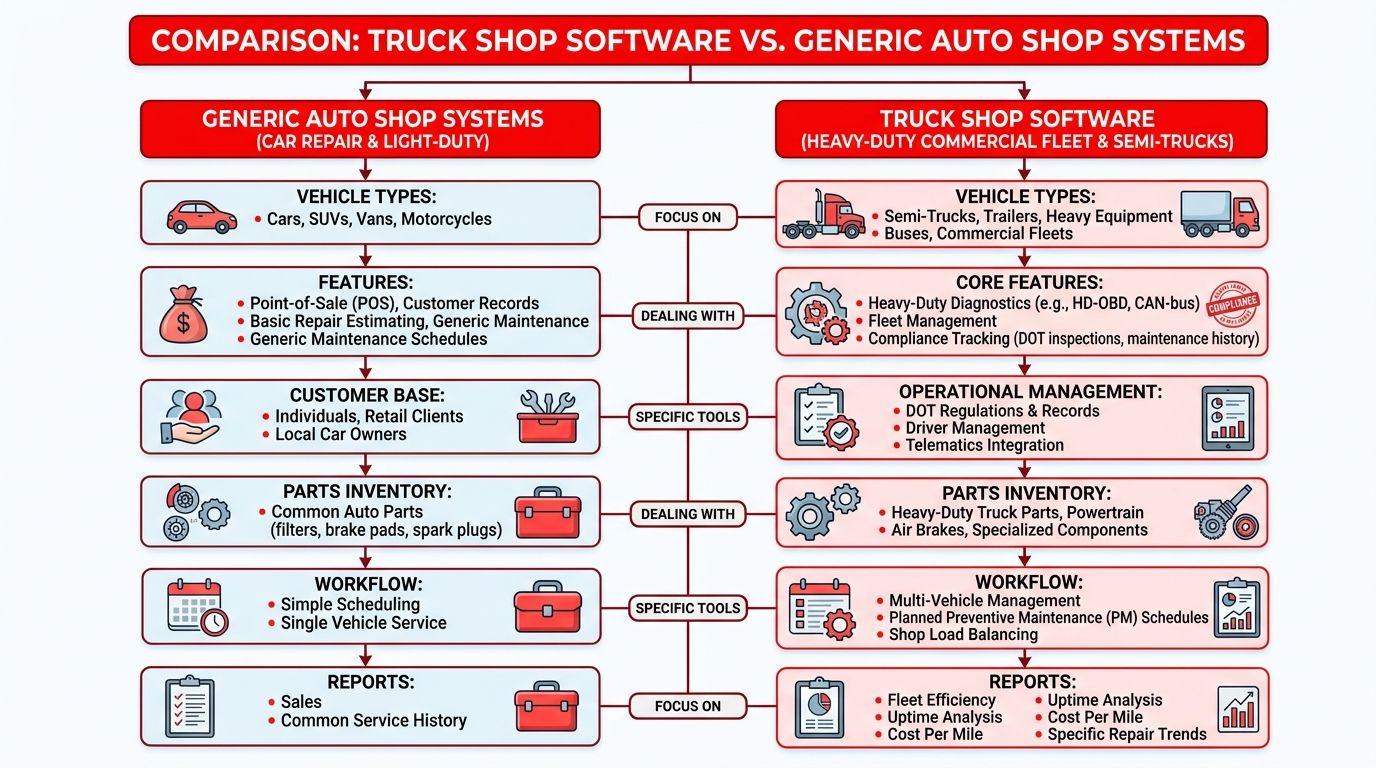
Generic auto-shop software usually starts with one vehicle record, one repair order, and one billing path. That works until the job involves a tractor, a trailer, and sometimes auxiliary equipment that all need different histories, inspections, and compliance handling. Heavy-duty software has to model those as separate regulated assets, which is why the category can't just be a light-duty tool with diesel branding slapped on top.
Why the asset model changes everything
A heavy-duty shop needs multi-asset jobs. One ticket might touch a tractor for a driveline issue, a trailer for brake inspection, and another asset for preventive maintenance. If the system can't separate those records cleanly, history gets muddy, compliance gets harder, and the shop loses traceability.
The same logic applies to DOT compliance records, DVIR workflows, and maintenance triggers. Time-based preventive maintenance alone is too blunt for commercial vehicles, because mileage, inspections, and defects drive service needs more accurately than a calendar does. Fleet-account billing across Class 4-8 vehicles also changes the workflow, because one customer may need consolidated billing, contract terms, and detailed job history that a generic auto system just doesn't handle well.
What buyers should look for instead
A good system should handle the shop's real structure, not a simplified version of it.
- Separate asset records: Tractor, trailer, and related equipment should each keep their own identity and service history.
- Compliance-linked workflows: Inspection defects should lead into repair operations without extra manual copying.
- Mileage and inspection triggers: Preventive maintenance should fire from usage and inspection data, not only dates.
- Commercial billing support: Fleet terms and detailed invoices should fit the way commercial customers pay.
A 2026 overview also notes that truck and trailer repair software should treat those assets separately and connect inspection workflows directly into repair work, even though much of the public discussion still stays generic around work orders and inventory. That distinction matters more than most demos admit.
Core Features That Drive Real Shop Performance
The features that matter are the ones that reduce labor leakage, shorten approval time, and stop parts from becoming bottlenecks. Shops waste money when scheduling, technician time, parts allocation, and invoicing live in different places. Industry guidance for heavy-duty operations points to real-time technician availability, wrench-time tracking, automated labor-rate, tax, and discount calculations, plus real-time inventory with multi-location transfers and automated reordering, because disconnected systems create unbilled labor, delayed approvals, and parts shortages that drag out turnaround time.
Features that move money, not just screens
Scheduling should show who is available, not who is theoretically on the clock. If a manager can't see capacity in real time, bays get overbooked or underused. That turns a shop board into decoration instead of a control system.
Time capture matters just as much. When technician time is tied directly to the work order and labor rate, the office stops reconstructing jobs after the fact. Inventory discipline matters too, because a missing part can turn a same-day repair into a stranded truck and a missed promise.
Digital inspections and one-click invoicing compress the approval cycle. If a customer sees clear findings fast, the service writer can get authorization sooner. That's not a soft convenience. It keeps work from sitting in limbo.
Feature categories and the shop metric each one moves
| Feature Category | Shop Metric Affected | Typical Impact |
|---|---|---|
| Real-time scheduling and dispatch | Bay utilization | Less idle time, cleaner workload balance |
| Technician time capture | Billed labor hours | Fewer missed minutes and cleaner payroll to invoice matching |
| Parts inventory with multi-location transfers | Turnaround time | Fewer delays from missing or misplaced stock |
| Digital inspections and approvals | Authorization speed | Faster customer decisions on needed repairs |
| Automated invoicing | Cash flow | Shorter path from completed work to billed work |
Operational truth: a feature is only valuable if it changes what the manager sees before the day gets away from them.
That's the filter. Shops don't need more menus, they need fewer blind spots.
Evaluating Vendors and Asking the Right Questions
A vendor demo should feel like a stress test, not a tour. The buyer's job is to see whether the platform can handle the shop's actual work pattern, especially around mixed assets, fleet billing, and workflow visibility. If the answers stay generic, the system probably is too.
Ask for heavy-duty scenarios, not feature slogans
The first question is simple. Can the system model a tractor and trailer as separate assets on one job without creating a mess in history or billing? If not, the core design is wrong for a heavy-duty shop.
Next, ask how preventive maintenance triggers work. If mileage, inspection findings, and defects can't drive maintenance alerts, the platform is likely too light-duty for commercial work. Then ask about billing structure. Fleet customers often need terms, consolidated invoicing, and detailed records, so the software has to support that without workarounds.
A Kanban-style board is another good test, because it shows whether the shop can view every job from check-in to checkout without living in a stack of open tabs. RedAppy is one example of a cloud-based shop management platform that combines digital inspections, instant estimates, one-click invoicing, online payments, real-time inventory across multiple suppliers, and a Kanban-style Digital Shop Board, so it's a practical reference point when comparing workflows to the criteria above.
What to press on before signing
- Workflow fit: Ask to see your exact intake-to-invoice process, not a generic demo path.
- Asset handling: Confirm how the system stores tractor, trailer, and equipment history separately.
- Billing logic: Check whether fleet terms and commercial invoices are native or patched in later.
- Pricing clarity: Insist on transparent pricing and clear contract terms.
- Real rollout support: Ask how the vendor handles training, data setup, and first-week troubleshooting.
A platform that can't survive those questions probably won't survive the floor.
Implementation and Migration Without Disrupting the Floor
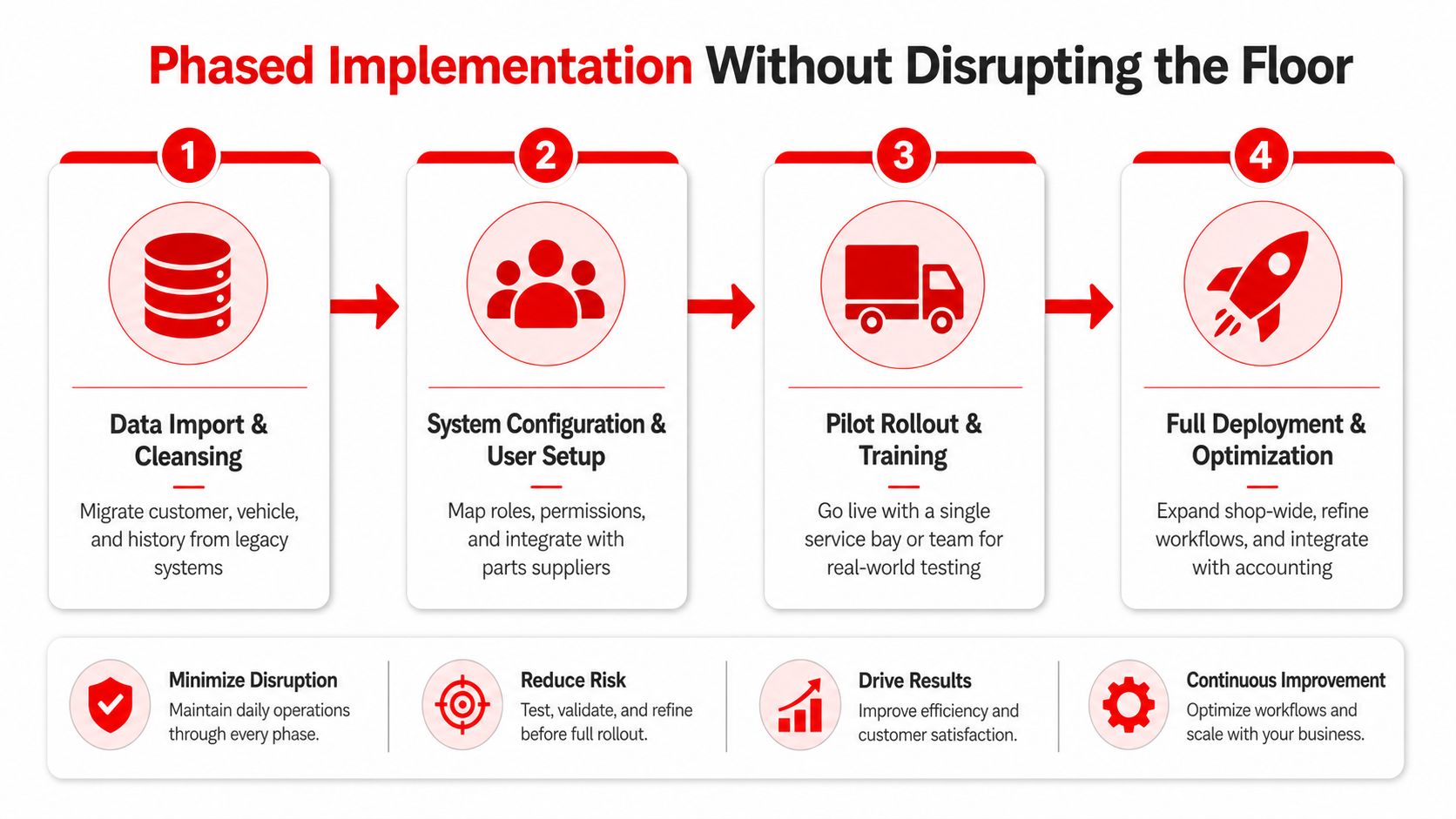
The shops that fail during rollout usually fail because they try to flip the switch too fast. Data is imported badly, old customer records are left dirty, parts catalogs are never cleaned up, and techs are asked to change their habits before the system is ready. A truck shop cannot pause operations for a software change, so implementation has to protect the workday first.
Start with data, not buttons
Customer records, vehicle history, vendor files, and existing repair history should be cleaned before migration. If bad data goes in, bad data comes out, and staff loses confidence immediately. That's why the first phase should be import and cleansing, not feature exploration.
Next comes role setup. Service writers, technicians, parts staff, and managers should each get the permissions and screens they need. Supplier integrations belong here too, because parts ordering is too important to leave half configured.
Roll out in layers
A soft launch on a single bay or one team is the safer move. That lets the shop test time tracking, approvals, and invoicing under real pressure without risking the whole operation at once. Once the workflow holds, the platform can expand shop-wide and connect more tightly to accounting.
Common mistakes are easy to spot:
- Parallel running too long: Staff keeps using the old process because the new one never fully replaces it.
- Skipping technician training: Techs revert to memory when the system feels slower than the old habit.
- Ignoring parts cleanup: Duplicate or stale items make inventory and invoicing unreliable.
- Rushing full deployment: A half-working system across the whole shop creates more friction than it removes.
The right rollout respects the floor's pace. It doesn't demand perfection on day one, it builds trust one workflow at a time.
ROI and Use Cases for Independent and Multi-Location Truck Shops
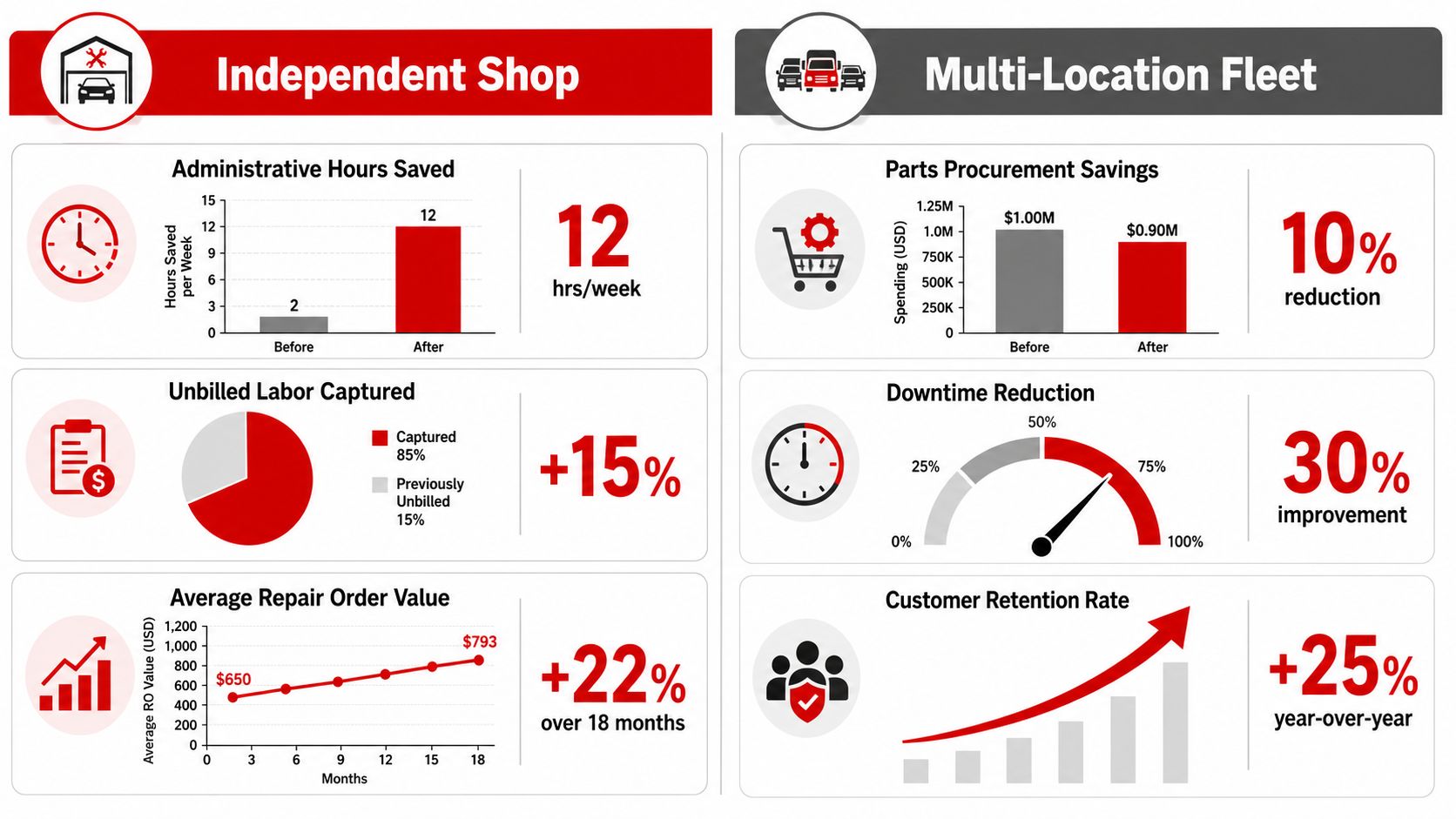
The ROI case is different depending on the shop's size. An independent heavy-duty shop usually cares about labor capture, admin load, and faster approvals. A multi-location operation cares more about consistency, reporting, and whether managers can run the same playbook across sites without drifting into local habits.
Independent shops should look at labor first
The most direct ROI driver is billed labor. If the software helps remove admin friction and capture more of what technicians already produce, the payoff shows up quickly in the labor line. That benchmark of 15% to 30% increases in billed labor hours is the kind of number that changes the conversation, because it ties software to work already happening in the bays.
The other part is approval speed. Faster digital inspections and cleaner estimates help more jobs move from waiting to authorized. That can also support the benchmark note that some shops see an extra $600 to $1,000 in monthly gross profit from fewer no-shows and higher average repair order values.
Multi-location shops need standardization
Chains and groups don't just buy software, they buy control. A centralized system gives leadership the same reporting logic, the same workflow structure, and the same customer experience across locations. That matters when managers need to compare locations without wondering whether each shop is tracking jobs differently.
If the locations can't be compared on the same definitions, the dashboard is lying.
That's the reason multi-location groups invest. They want a standard way to see technician productivity, parts activity, and job progress across the whole network. Independent shops still benefit from that structure, but groups feel the pain sooner because inconsistency multiplies faster.
A quick way to think about payback
Look at three buckets, labor captured, admin time saved, and faster billing. The benchmark data already shows why this category can pay back in months, not years, when it removes friction from work order creation, time tracking, and invoicing. If a platform can't point to gains in those three areas, it's probably not worth the disruption.
Security, Integrations, and the Next Step for Your Shop
Security and integration are usually the last questions buyers ask, but they should be near the top. A cloud platform has to protect customer data, preserve job history, and keep the office connected to parts suppliers and payment tools without turning the shop into an IT project. If the vendor can't explain access control, backups, and user permissions clearly, the shop is taking on avoidable risk.
The integration question is just as important. A heavy-duty shop needs parts ordering, accounting sync, payment processing, and fleet workflows to line up cleanly, or staff ends up retyping the same information in several places. That's where the software either becomes a control center or another island of admin work.
For buyers evaluating RedAppy, the useful lens is straightforward. Review the features page to see how the platform handles digital inspections, instant estimates, one-click invoicing, online payments, real-time inventory across multiple suppliers, and the Kanban-style Digital Shop Board, then use the contact page to ask how those workflows map to tractor-trailer asset handling, fleet billing, and the shop's current migration plan. The right conversation is not about flashy screens, it's about whether the system can fit the way the floor works.
If the software is going to earn its place, it has to do three things well. It has to protect the data, connect the tools the shop already depends on, and scale from a single bay to a multi-location operation without forcing a rebuild later. Shops that want that kind of fit should review the platform options carefully, compare them against their own workflow, and then talk to RedAppy through the features page or the contact page for a walkthrough tied to their operation.
A CTA for RedAppy.
Ready to Transform Your Shop?
RedAppy helps auto repair shops create professional digital estimates with photos and videos, send them instantly via text or email, and get customer approvals in seconds. No credit card required to start.