
How Vehicle Repair Estimate Software Boosts Shop ROI
A brake-noise complaint can become a stalled repair order. The technician finds worn pads and rotors, the advisor prepares an estimate, and the customer must approve the work before repairs begin. If the approval remains in voicemail, the technician waits while the advisor spends time seeking an answer.
The global auto collision estimating software market is growing rapidly as shops seek connected digital workflows from the first customer contact through final payment. Vehicle repair estimate software brings vehicle data, labor times, parts, inspection evidence, customer approvals, invoices, and payments into one workflow.
That connection matters because the estimate is more than a document showing a total. It is the financial center of the repair order, linking the technician's findings with the advisor's recommendation, the customer's authorization, and the shop's final bill. It works like a shared job folder: each approved detail remains available to the people who need it.
With those details connected, an advisor can prepare a clearer recommendation, a customer can make a better-informed decision, and the back office can work from a cleaner record. The shop also reduces duplicate entry between the estimate, repair order, invoice, and payment process.
Table of Contents
- What Faster Approvals Mean for Repair Shops
- Understanding Vehicle Repair Estimate Software
- Core Features That Connect the Repair Workflow
- How Shops Use Estimate Software in Practice
- Business Benefits and Practical ROI
- Choosing and Implementing the Right Platform
- How RedAppy Supports the Full Repair Journey
What Faster Approvals Mean for Repair Shops
At the service desk, an advisor may have a vehicle on a lift, a technician ready to begin, and a customer who's already left for work. The technician reports that the brake pads are worn and the rotors need replacement. The advisor adds labor, parts, taxes, and any relevant notes, then tries to reach the customer by phone.
That sequence creates a pressure point. A missed call can leave a repair order waiting even when the shop has the information needed to proceed. The advisor may call again, send a message, update a handwritten note, and later re-enter the same information into an invoice or shop management system. Each handoff creates another opportunity for a missed line, an incorrect price, or an unclear authorization.
The approval chain has several moving parts
A connected estimate workflow compresses the chain without removing the human decision:
- The technician records the finding. Photos, notes, inspection results, and recommended operations attach to the vehicle's job record.
- The advisor builds the estimate. Labor, parts, pricing, and customer-friendly descriptions appear together.
- The customer reviews the recommendation. A digital estimate can show what the vehicle needs and why.
- The customer approves or declines the work. The response becomes part of the repair record.
- The advisor releases the approved work. The technician sees the authorized operations, while the invoice can draw from the same lines.
The customer still controls the decision. The difference is that the customer doesn't have to reconstruct the recommendation from a rushed phone conversation.
Practical rule: A shop should measure the time between estimate delivery and customer authorization, not just the time required to write the estimate.
Faster approvals can help a shop close more work in progress during the day, return vehicles on schedule, and reduce repeated follow-up calls. They can also improve confidence because customers see a clearer connection between the inspection evidence and the proposed repair.
The same principle appears in other approval-heavy workflows. For a useful comparison of how digital routing can reduce manual chasing, service advisors can review. In a repair shop, the approved estimate plays a similar operational role, except it also drives parts ordering, technician instructions, invoicing, and payment collection.
Understanding Vehicle Repair Estimate Software
A traditional shop file can feel like a thick binder assembled over the life of a repair order. One section holds vehicle history, another contains a parts price book, a labor time guide sits nearby, inspection notes live on a clipboard, and customer approvals are scattered across phone logs and emails.
Vehicle repair estimate software replaces those disconnected references with a digital workspace. The advisor can identify the vehicle, select repair operations, attach parts and labor, add inspection evidence, communicate with the customer, and carry the approved work into invoicing without rebuilding the record from scratch.
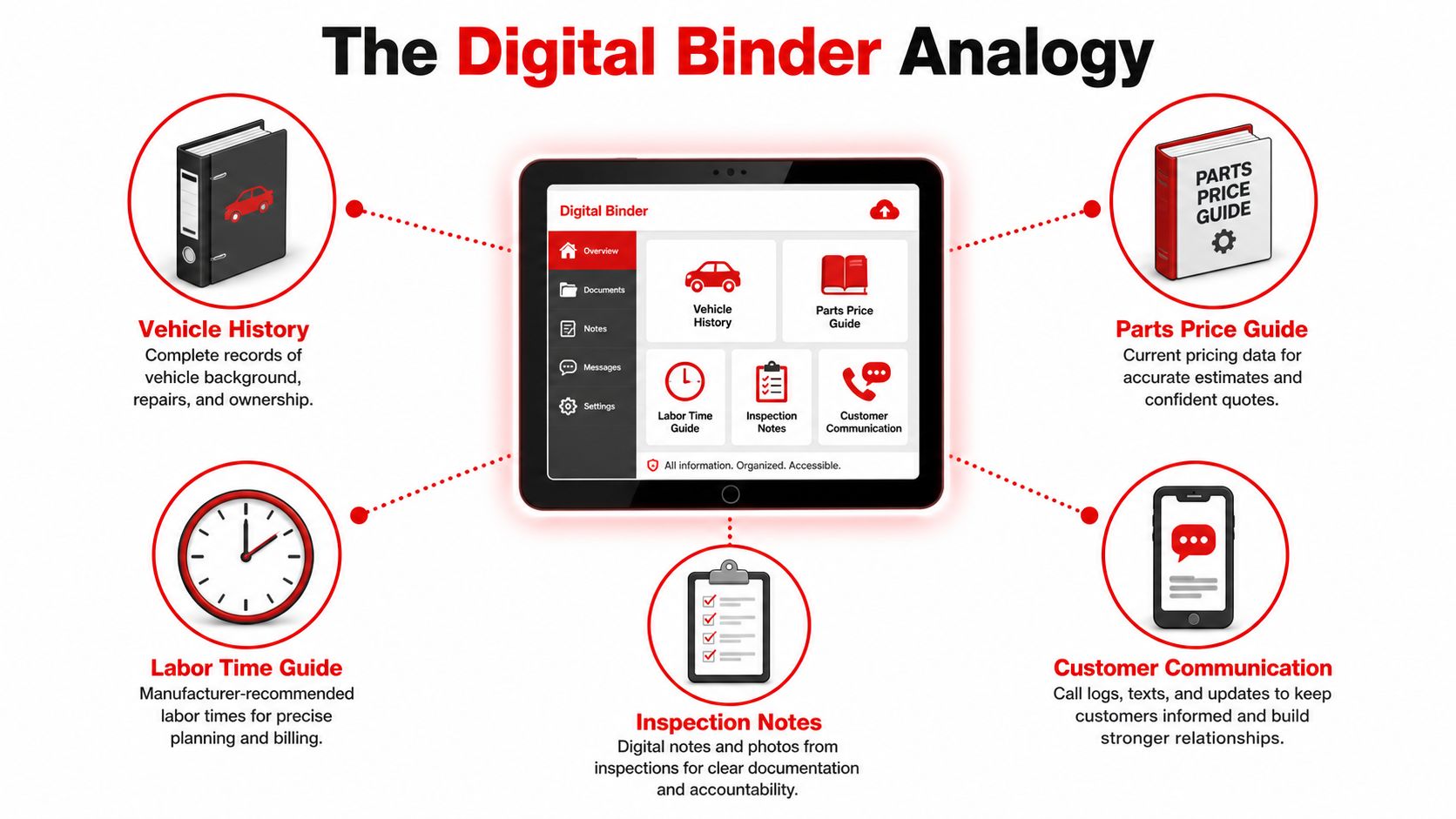
How the digital binder works
The workflow becomes easier to understand when each traditional shop task has a digital counterpart:
- Vehicle identification: The advisor uses the vehicle information, including VIN details where supported, to start the correct job record.
- Labor guidance: The system presents labor operations and time references so the advisor isn't estimating hours from memory.
- Parts selection: Integrated catalogs can connect part descriptions, suppliers, availability, and pricing to the estimate.
- Inspection evidence: Technician notes, photos, measurements, and videos can support a specific recommendation.
- Customer communication: The advisor sends the estimate through a digital channel and receives an approval, decline, or question.
- Final billing: Approved lines flow toward the repair order and invoice, reducing the need to retype the same services.
Mitchell states that its estimating platform combines labor times, OEM parts pricing, and parts diagrams on one page, while MOTOR says its work-time standards are validated against OEM procedures and expert review. That combination matters because a technician's finding, the advisor's estimate, and the customer's approval need to describe the same repair.
The technology becomes valuable when it removes cross-checking rather than placing paper forms on a screen. A disconnected digital estimate may still leave an advisor copying approved lines into another system. A connected platform treats the estimate as a live job record that carries authorized work through the rest of the repair journey.
Estimates are still estimates
An estimate is a financial plan based on the information available at that stage. A teardown or deeper inspection can reveal related work, unavailable parts, or additional damage. The shop should document those changes clearly, explain the reason for the revision, and obtain approval before performing work outside the original authorization.
That process protects both sides. The customer sees what changed, and the shop keeps a traceable record of the decision.
Core Features That Connect the Repair Workflow
The strongest platforms connect the work of three people who see the same vehicle differently. The technician needs accurate documentation, the advisor needs a clear commercial workflow, and the customer needs enough evidence to make a confident decision.
A digital vehicle inspection starts with the technician. Photos, measurements, and notes can attach to the relevant recommendation instead of sitting in a separate gallery or paper file. Mitchell describes photo-based estimating as a real claims and repair workflow, where appraisers can create estimates from submitted photos for minor damage and request additional images through a unique link sent by email or text.
Labor time libraries address a different problem. Advisors can select the correct operation instead of guessing how long a repair should take, while technicians receive a more consistent description of the work. Mitchell's estimating data includes 5 million labor times, 3.5 million OEM parts, 3 billion validated job records, 470 vehicle-specific repair jobs, and 500,000 searchable terms, according to the company information cited in.
Parts integration adds another practical layer. The advisor can check supplier catalogs, compare available options, and include part numbers and prices in the estimate. This reduces the risk of promising a repair before confirming that the required part can be sourced.
Customer approval should be specific. A clear estimate can separate urgent repairs from recommended work and let the customer approve or decline individual lines. That approach gives the advisor a better conversation record and avoids the uncertainty created by a vague “approved” message.
Invoicing and payments complete the financial path. When the invoice draws from approved estimate lines, the shop avoids rekeying services and parts. Integrated payment processing then gives the customer a direct way to settle the balance without forcing staff to reconcile a separate system manually.
| Feature | Technician Impact | Advisor Impact | Customer Impact |
|---|---|---|---|
| Digital inspections | Adds photos, notes, and measurements to findings | Sends evidence with the recommendation | Sees why a repair is being proposed |
| Labor time guides | Works from defined operations | Builds more consistent labor lines | Receives a clearer explanation of labor |
| Parts catalogs | Links the repair to the required component | Checks fitment, price, and availability | Can review what part choice affects the estimate |
| Digital approvals | Sees authorized work before starting | Tracks accepted, declined, and pending lines | Makes decisions without relying on phone tag |
| Invoicing | Confirms completed operations | Converts approved work into a bill | Receives a charge tied to the authorization |
| Online payments | Reduces end-of-job paperwork | Collects and records payment in the job flow | Pays through a convenient digital channel |
Shop owners evaluating these connections can also use as a broader reference for thinking about maintenance workflows, records, and operational coordination. The central test remains simple: does each feature pass information forward, or does it create another isolated screen?
How Shops Use Estimate Software in Practice
A multi-point inspection shows the value of connected data quickly. The technician checks the vehicle, records a worn belt with a photo, and adds a plain-language note. The advisor reviews the finding, confirms the required labor and parts, and sends the customer an estimate that includes the visual evidence.
The customer can approve the immediate work and decline a non-urgent recommendation for later. That response gives the advisor a documented plan, and the technician sees which operations are authorized. The vehicle doesn't need to wait for a long explanation assembled from separate notes.
Hidden damage requires a controlled change
Collision work often changes after disassembly. A technician may remove a bumper cover and find a damaged bracket that wasn't visible during the initial inspection. The technician photographs the new finding, adds the related operation, and links the evidence to a supplement request.
The advisor can send a revised estimate to the customer, insurer, or adjuster, depending on the job. Instead of creating a second document with unclear connections to the first, the shop keeps the original estimate, the new evidence, and the updated approval path in one record.
Fleet work benefits from itemized control
A fleet manager may authorize maintenance across several vehicles but still need each vehicle's work itemized. The advisor can create a separate job record for each vehicle, attach inspection findings, list labor and parts, and route the approval to the responsible contact.
That structure helps the fleet manager compare recommendations without sorting through a combined invoice. It also gives the shop a repeatable handoff from check-in to scheduling, parts ordering, repair completion, and billing.
Across all three examples, the software doesn't replace the technician's judgment or the advisor's communication. It reduces the number of times each person has to copy information, search for a missing note, or explain why a revised total differs from the original.
Business Benefits and Practical ROI
A repair order often starts with an estimate, but its financial effect continues through approval, parts ordering, invoicing, and payment. A connected workflow can shorten authorization delays, reduce repeated data entry, and give the back office a clearer record of what the customer approved. The benefit is not one faster screen. It is fewer handoffs around the job's financial center.
Owners should measure changes against the figures they already use to evaluate performance. That makes the ROI discussion practical and helps separate software results from seasonal demand, staffing changes, pricing updates, or a shift toward larger repairs.
A simple measurement model
Before rollout, an owner can record a baseline from management reports and daily operating logs:
- Approval speed: Measure the time from estimate delivery to customer response.
- Approval rate: Compare approved estimates with estimates sent.
- Average repair order: Track completed repair order value, while accounting for vehicle mix and pricing changes.
- Administrative effort: Record time spent copying estimates, following up, correcting invoices, and reconciling payments.
- Estimate-to-final variance: Review how often the final invoice changes because of missed parts, labor, or additions without recorded authorization.
After implementation, review the same measures over a consistent operating period. A shop can then ask whether approvals moved faster, staff spent less time correcting records, and approved work flowed into billing with fewer manual steps.
| Metric | Before Estimate Software | After Estimate Software |
|---|---|---|
| Approval handling | Phone calls, voicemails, and manual notes | Digital delivery with a recorded response |
| Estimate preparation | Separate labor, parts, and inspection references | Connected vehicle, labor, parts, and evidence record |
| Invoice creation | Approved work may be re-entered | Approved estimate lines can flow into billing |
| Supplement handling | New information can become a separate document | Added evidence and revised authorization stay with the job |
| Payment collection | Staff may reconcile another payment system | Payment can remain connected to the repair record |
| Management review | Manual comparison across files | Reports can expose approval, ARO, and workflow patterns |
The table also shows where value can appear beyond revenue. A digital response creates an approval record. Connected estimate lines reduce the chance that billing staff rebuild the order from separate notes. A shared repair record can make payment reconciliation and management review easier.
A sound business case compares subscription and implementation costs with saved administrative time, fewer corrections, faster authorization, and clearer workflow visibility. Owners can also monitor movement in approved work and average repair order value, while checking whether other business changes influenced those results. This approach replaces an unsupported promise of instant payback with a reviewable operating case.
Choosing and Implementing the Right Platform
A shop can choose an impressive estimator and still lose time if it does not match the existing operation. The estimate is the financial center of the repair order, so evaluation should follow the job from vehicle check-in through final payment, not stop at the estimate screen.
Test the connections first
Ask each vendor to demonstrate one realistic repair order instead of presenting a feature list. The demonstration should show vehicle lookup, inspection evidence, labor selection, parts sourcing, customer approval, an added repair, invoice creation, and payment recording. This sequence reveals whether approved estimate lines continue through the back office or require staff to rebuild the order.
Confirm connections with the parts catalogs, supplier accounts, accounting tools, and shop management systems already in use. If advisors must export information and re-enter it elsewhere, the integration may add another handoff rather than remove one.
Data quality also needs specific questions. Mitchell's estimating guide grew from coverage of about 180 car and light truck models in 1974, to 275 by 2000, and to nearly 400 light-duty vehicles in its current guide, according to. Qapter says its database covers over 98% of vehicles on the road, supports VIN-based lookups back to 1970, and updates pricing weekly, as described on its. These examples point to three checks: vehicle coverage, source quality, and update frequency.
Protect access and train around real jobs
Review role-based access, data handling, audit trails, backups, and the vendor's process for protecting cloud records. Advisors may edit estimates, technicians may add inspection findings, and owners may review financial reports. Permissions should match those responsibilities, while limiting unrestricted control over customer and financial data.
Training should follow the shop's working sequence:
- Start with digital inspections and photo attachments.
- Add estimate creation and customer approvals.
- Introduce parts ordering, invoicing, and payments.
- Review reports and correct workflow gaps.
Use the first 90 days as an internal measurement period. Track approval rate, average repair order movement, administrative hours saved, and the difference between the estimate and final invoice. Review those measures with notes about staffing, pricing, seasonality, or other operational changes, so the platform's effect is not confused with unrelated business shifts.
How RedAppy Supports the Full Repair Journey
RedAppy is an all-in-one shop management platform that connects digital inspections, instant estimates, parts ordering, invoicing, online payments, scheduling, and reporting within a shared workflow. Its estimate tools support customer and vehicle details, services, parts, labor pricing, photos, videos, and digital approval by signature.
For the parts stage, RedAppy connects ordering across multiple suppliers with real-time inventory information. Its workflow also includes vehicle history, customer lookup by name, plate, or VIN, a team calendar, and a Kanban-style Digital Shop Board that shows jobs from check-in through checkout. Those capabilities align the estimate with the operational record instead of leaving the advisor to move information between separate tools.
The platform includes an AI Repair Assistant for labor times, diagnostic guidance, and shop insights. Owners can use real-time analytics to review revenue, technician efficiency, average repair order, and repeat business, then compare those results with the baseline established before rollout.
Security and accountability should still be verified during a platform demonstration. RedAppy describes role-based access, audit trails, and cloud-based data protection as part of its approach to handling shop information. A manager should ask how permissions are configured, how changes are recorded, and how the platform supports backups and data recovery.
A practical next step is to demonstrate one complete repair order, including a photo-rich inspection, estimate approval, parts selection, invoice, and payment. Shop owners can then compare the workflow against the criteria above and decide whether a demo, trial, or direct conversation fits their operation.
RedAppy connects inspections, estimates, parts, labor, approvals, invoicing, and payments so repair shops can manage the estimate as the financial center of each job. Visit RedAppy to review the platform, explore its features, and contact the team about a workflow demonstration for a single shop or multi-location operation.
Ready to Transform Your Shop?
RedAppy helps auto repair shops create professional digital estimates with photos and videos, send them instantly via text or email, and get customer approvals in seconds. No credit card required to start.