
What Is a Repair Order: Auto Shop Guide & Best Practices
Monday morning in a busy shop usually looks the same. Keys are stacked at the counter, a service advisor is translating a customer complaint from a sticky note, a technician is asking whether the brake job was approved, and someone is already looking for a work order that was just on the desk a minute ago.
That kind of chaos doesn't come from lack of effort. It comes from weak process. In most shops, the repair order is supposed to be the tool that holds the day together, but too often it's treated like paperwork instead of what it really is.
A repair order is the operating system for the job. It records what the customer asked for, what the shop found, what was approved, what parts and labor were used, and what the customer is paying for. Consumer and industry references also describe it as the signed document that authorizes work and becomes the basis for invoicing and a legal or contractual record between the customer and the shop, as outlined in.
For owners asking what is a repair order, the short answer is simple. It's the single record that connects communication, production, billing, and liability. When that record is clean, the shop runs better. When it's sloppy, problems multiply fast.
Table of Contents
- The Most Important Piece of Paper in Your Shop
- Anatomy of an Effective Repair Order
- Paper Piles vs Digital Dashboards
- The Repair Order Workflow from Start to Finish
- Legal Considerations and Customer Trust
- How Digital ROs Transform Shop Efficiency
- Make the Repair Order Your Competitive Advantage
The Most Important Piece of Paper in Your Shop
A lot of shops still run on memory, hallway conversations, and handwritten notes. That works until the front counter gets slammed, a technician starts the wrong job, or a customer says they never approved the extra work. Then everyone realizes the shop doesn't have a paperwork problem. It has a control problem.
The repair order fixes that when it's used properly. It gives one place for the complaint, one place for the findings, one place for approvals, and one place for the money tied to that visit. Without that single source of truth, even good teams start stepping on each other.
Practical rule: If a job detail isn't on the repair order, the shop should assume it doesn't exist.
That matters beyond the current visit. A complete RO creates service history that protects the customer and the business later. Shops that document well make it easier to verify what was done, when it was done, and why it was done. That becomes valuable when vehicles are sold, warranty questions come up, or a dispute lands at the counter. Good records also matter for, because service history only helps when the original documentation is clear.
What the RO really does
The repair order isn't just a form. In a functioning shop, it does three jobs at once:
- It authorizes work. The customer is saying, in writing, what the shop can inspect or repair.
- It coordinates the team. Advisors, technicians, parts staff, and cashier all work from the same job record.
- It captures revenue. Every labor line, part, sublet item, and recommendation lives or dies on the RO.
Shops that treat the RO as a throwaway document usually create their own bottlenecks. Shops that treat it as the center of the operation usually run cleaner, communicate better, and miss fewer billable items.
Anatomy of an Effective Repair Order
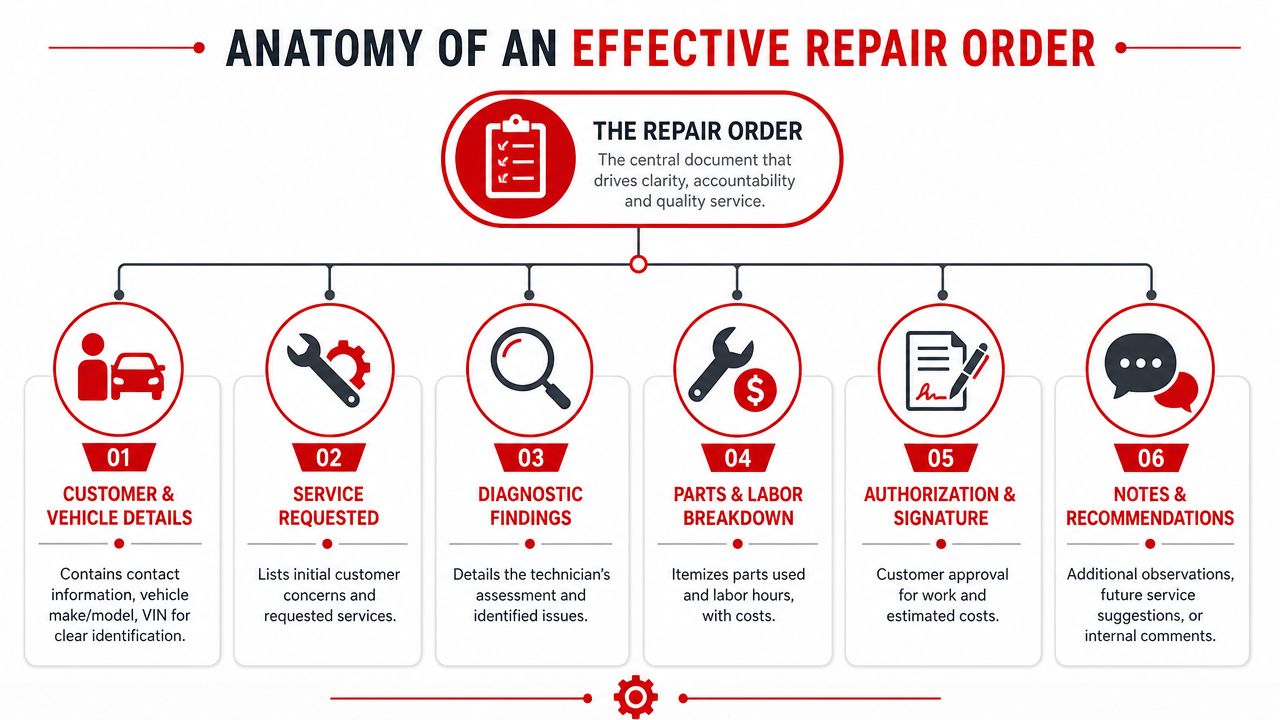
An effective repair order lets any trained person step into the middle of a job and understand it fast. The advisor should see what the customer asked for. The technician should see what needs to be tested or repaired. The office should see what was approved, what was billed, and what still needs follow-up. In a modern shop, that same RO also feeds the systems that track inspections, parts, labor sales, and service history.
This visual breaks down the core structure.
Customer and vehicle details
Start with accurate identification. This is basic, but plenty of shop mistakes begin right here.
A usable RO includes the customer's contact information and the vehicle details that remove doubt. That means year, make, model, VIN, plate, and current mileage. If your team handles fleet work, add unit number and approval contact. If the car was towed in, note that too. Those details change how the job gets handled.
Small errors here create expensive confusion. The wrong phone number slows approvals. The wrong VIN pulls the wrong history. Missing mileage weakens future recommendations and warranty conversations. Shops that want cleaner repeat business and fewer avoidable callbacks need this section filled out the same way every time.
A practical intake standard includes:
- Customer information: Full name, best phone number, and preferred contact method.
- Vehicle identification: Year, make, model, VIN, plate, and mileage.
- Visit context: Whether the vehicle was dropped off, waiting, towed in, or tied to a prior concern.
Complaint, cause, and correction
This section is where weak documentation usually shows up first.
The customer complaint needs to be written in plain language and tied to a real symptom. “Grinding noise when braking” gives the technician something to test. “Needs brakes” skips a step unless the customer came in asking for a brake service by name. Good advisors know the difference.
Then the technician records the findings. After that, the RO should show the correction. Keeping those pieces separate helps the shop diagnose correctly, sell correctly, and document correctly. It also keeps the record usable months later when no one remembers the original conversation at the counter.
| RO element | What it should capture | Common mistake |
|---|---|---|
| Customer complaint | What the customer noticed | Writing the shop's diagnosis too early |
| Technician findings | What inspection and testing confirmed | Using vague phrases like “checked ok” |
| Correction | What the shop recommends doing | Skipping the action taken or parts replaced |
A strong RO separates symptom, diagnosis, and repair. That separation protects the shop when questions come up later.
Money, approval, and notes
The financial side of the RO has to be clear enough to bill from, defend from, and review later. Parts, labor, fees, and sublet work should be listed in a way the customer can follow and the shop can audit. If the line is too vague to explain at pickup, it is too vague to put on the RO.
The financial impact is significant because the repair order is where sold work becomes recorded revenue. It is also where missed labor lines, undocumented sublet charges, and unapproved add-on work slip through if the process is loose. Shops do not lose margin only on big mistakes. They lose it one incomplete line at a time.
That does not mean every RO has to be long. It means every RO has to be complete, readable, and current.
The final checklist usually includes:
- Parts and labor lines: Enough detail to support the estimate and final invoice.
- Authorization: Clear customer approval before work begins or before additional work is added.
- Notes and recommendations: Relevant observations, declined work, maintenance reminders, and internal comments that support continuity on the next visit.
The repair order moves beyond simple paperwork to become the shop's working record. In a paper process, notes often get split across clipboards, inspection sheets, and invoices. In a digital process, the RO can hold approvals, technician findings, photos, recommendations, and billing in one place. That gives the front counter faster answers, gives the technician cleaner history on the next visit, and gives the owner a better view of what the shop is producing.
What fails is shorthand nobody else can read, missing approvals, or notes that live only in someone's memory. What works is documentation that stands on its own and feeds the rest of the operation.
Paper Piles vs Digital Dashboards
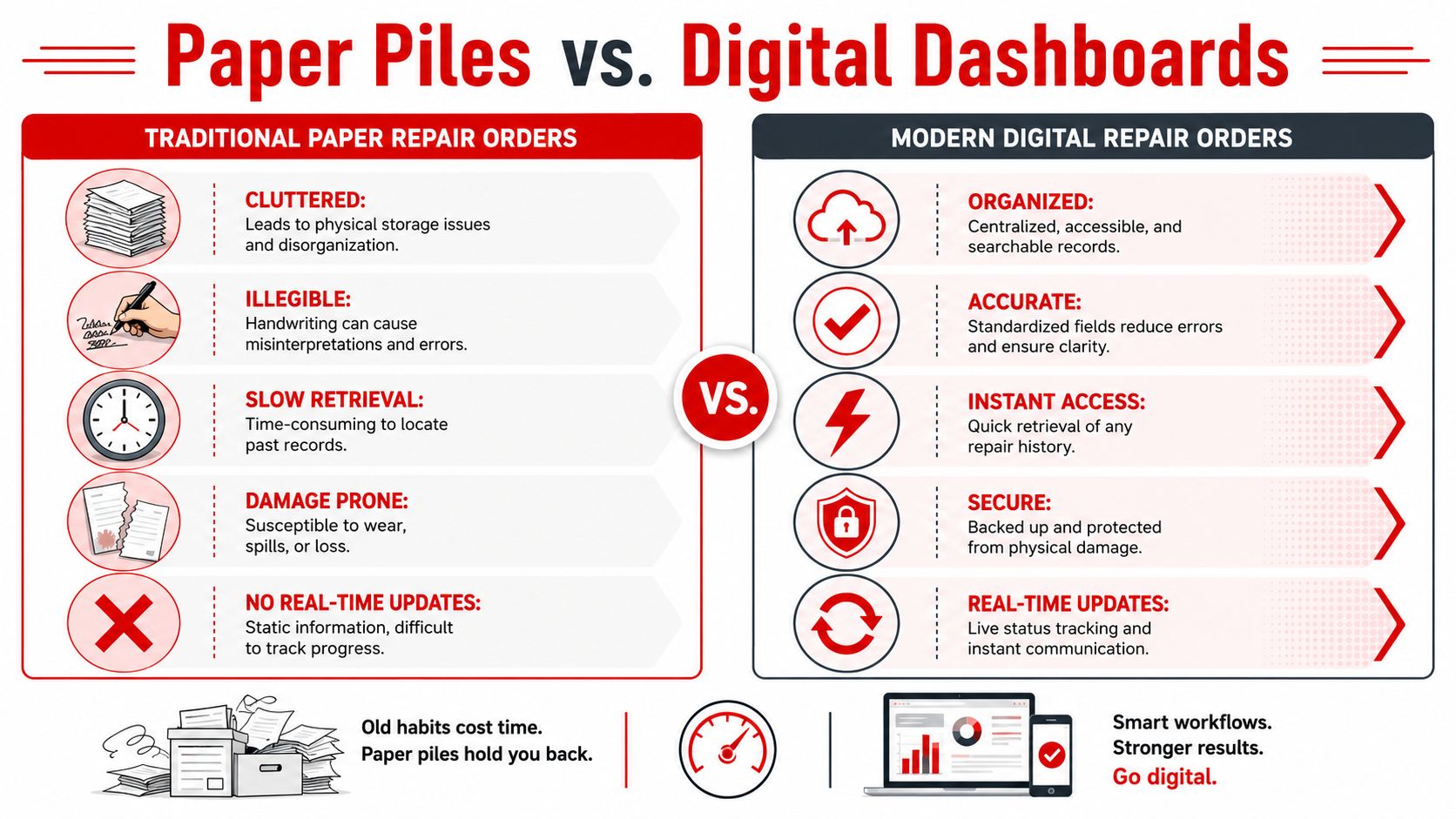
Paper repair orders still exist because they're familiar. They feel simple, and they don't require changing habits. But paper has a hidden cost. It slows the front counter, makes follow-up harder, and turns basic recordkeeping into a scavenger hunt.
The difference becomes obvious when the shop gets busy.
Where paper still hurts
Paper tends to break in the same places every time. Handwriting gets misread. A note gets left on the wrong clipboard. A technician writes findings in one place while the advisor updates the estimate somewhere else. Then someone has to re-enter all of it into another system or file cabinet.
The biggest problems with paper are usually operational, not nostalgic:
- Search is slow. Looking up prior work takes time when the team needs answers now.
- Documentation is thin. Paper doesn't naturally support photos, videos, and standardized inspection results.
- Version control is messy. Extra work gets approved by phone, but the paper copy at the front doesn't reflect it yet.
- Storage becomes friction. Old records matter, but paper archives are hard to search and easy to lose.
A paper RO can still document a job. It just doesn't help manage the job very well once the day gets moving.
What digital changes in daily operations
A digital repair order turns the same record into a live workflow tool. The advisor creates the job once. The technician adds findings directly to the record. The estimate updates from the same source. Photos and videos can attach to the same file. The final invoice pulls from work already documented instead of being rebuilt from scratch.
That's the key shift. The RO stops being a static form and becomes the current state of the job.
A practical comparison looks like this:
| Paper process | Digital process |
|---|---|
| Notes live on one sheet or several copies | Notes stay in one shared record |
| Past history requires manual retrieval | Past history is searchable |
| Approval details may sit in texts or memory | Approval stays attached to the job |
| Inspection evidence is separate or missing | Photos and findings stay tied to the RO |
Shops don't switch to digital because screens look modern. They switch because shared visibility cuts mistakes and wasted motion.
For owners asking what is a repair order in a modern shop, this is the answer that matters most. It's no longer just the paper the customer signs. It's the data hub that runs the visit.
The Repair Order Workflow from Start to Finish
A car gets checked in at 8:00. By 10:30, the technician has findings, parts has priced the job, and the customer is waiting on a call that still has not gone out because the advisor is piecing the estimate together from handwritten notes, a text thread, and a verbal update. That is how an ordinary repair order turns into lost production time.
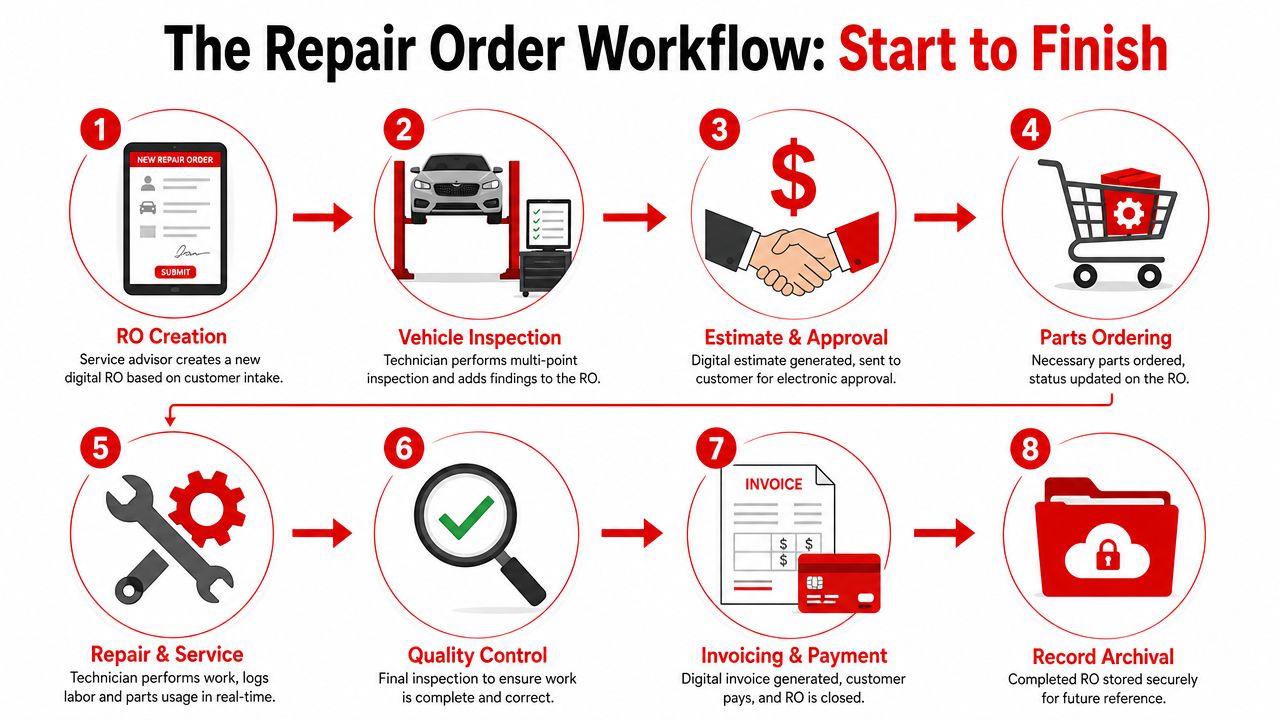
A good workflow keeps the RO moving at the same pace as the job. In a well-run shop, the repair order starts as the customer's request, becomes the technician's work record, and finishes as the invoice and service history. One record. No rebuilding.
From check-in to approval
The workflow starts at write-up, and bad write-up creates problems all day. The advisor needs the customer's concern in plain language, accurate vehicle information, mileage, contact details, and the reason the vehicle is in the shop right now. If that entry is vague, diagnosis slows down and the estimate gets fuzzy.
Next, the technician inspects the vehicle and documents findings inside the same RO. That point matters more than newer owners often realize. If findings live on a clipboard, in a bay notebook, or in the technician's head, the advisor has to translate and rebuild the job before asking for approval. That wastes time and increases the chance that labor, parts, or recommended work get missed.
Approval is the hinge point. Shops either keep control here or lose momentum. The customer needs a clear estimate, a clear explanation of what is confirmed versus still pending, and a documented yes or no. Digital systems help because photos, inspection results, labor lines, and notes stay attached to the same record the customer is approving.
From active repair to closed invoice
Once the customer approves the work, the RO becomes the operating document for the rest of the visit. It shows what the shop agreed to do, what parts should be ordered, who is assigned, and what still needs attention. If the team has to ask, “What are we doing on this car?” the RO is not doing its job.
That discipline matters even more when car count is soft and every ticket has to be billed cleanly. Analysts at Cox Automotive found lower repair order volume alongside higher repair order revenue in U.S. franchised dealerships in its. For an independent shop, the takeaway is practical. Fewer mistakes, tighter documentation, and cleaner closeout protect gross profit on every car.
A clean closeout usually follows this sequence:
- Repair completed: The technician records the work performed, not just the original plan.
- Quality control performed: The shop verifies the fix and checks that the documentation matches the actual job.
- Invoice generated: Charges pull from the completed RO so billed labor, parts, and sublet are not recreated from memory.
- RO closed and archived: The final record stays tied to the vehicle and customer for future service, warranty questions, and shop history.
This is the point where the repair order stops being a piece of paper and starts acting like the shop's control center. In a digital process, status changes, approvals, technician notes, parts activity, and final billing all stay connected. That cuts handoffs, reduces missed charges, and gives the owner a record that is useful after the car leaves, not just while it is on the lot.
Legal Considerations and Customer Trust
A repair order is a business document, but it also carries legal weight. Shops that treat it casually usually discover the problem when a customer disputes a bill, questions an added service, or claims work was done without approval.
That's why the authorization line matters so much. If the customer hasn't clearly approved the work, the shop is exposed. Verbal understandings are weak. Memory is weaker. A complete RO gives the shop a defensible record of what was requested, what was found, what was recommended, and what was accepted.
Why authorization matters
The simplest way to think about it is this. The repair order is the agreement that connects a customer's vehicle to a shop's actions. It isn't just for accounting.
A disciplined process usually includes:
- Initial authorization: Permission to inspect, diagnose, or begin the approved work.
- Change authorization: Approval for added work discovered during diagnosis.
- Final accuracy: A closed RO that matches what the customer authorized and what the shop performed.
What doesn't work is adding work because “they probably want it done anyway,” or relying on a phone conversation that nobody documented properly.
The shop's best defense in a dispute is rarely a speech at the counter. It's a clean repair order.
Why detail builds trust
Customers don't see labor guides, technician workflow, or parts sourcing. They do see whether the shop explains the job clearly. A detailed RO supports that transparency. It helps justify the bill because the customer can follow the story from concern to finding to repair.
This is also why enterprise systems treat the repair order as more than a bill. SAP describes a repair order as a sales document for the business processes involved in processing faulty goods, including diagnostics, repair actions, labor confirmation, parts used, and return logistics, as shown in. Even though a local auto shop isn't running a global enterprise system, the logic is the same. The RO controls execution and supports auditability.
For newer owners, the practical takeaway is simple. Sloppy repair orders don't just create confusion. They create liability. Clean repair orders build trust before a disagreement starts.
How Digital ROs Transform Shop Efficiency
Digital repair orders matter because they create discipline without adding more meetings, more whiteboards, or more front-counter guesswork. A good system makes the right information visible to the right person at the right time.
That changes how the whole shop works.

The RO becomes a control point
In advanced maintenance environments, repair orders are treated as chain-of-custody documents with strict preconditions so teams don't start work on the wrong item or lose track of ownership and status. IFS Maintenix describes repair orders as documents created to send unserviceable parts to a vendor, with controls such as supply location, repair-required condition, uninstalled status, and no lock status in its. Auto repair shops don't use the same terms, but the operating principle applies directly. The RO should prevent the wrong work on the wrong vehicle at the wrong time.
That's where digital tools earn their keep. The job can carry photos, inspection results, labor entries, parts status, recommendations, and approvals in one place. A digital shop board can show where each car stands without someone walking the building to ask. Integrated estimates and invoices reduce duplicate entry. History lookup helps the team recognize repeat concerns quickly.
One option in this category is RedAppy's shop management features, which include work orders, digital inspections, estimates, invoicing, parts ordering, analytics, and a digital shop board tied to the job record.
Better visibility changes behavior
The biggest gain from digital ROs isn't cosmetic. It's behavioral. Advisors stop chasing technicians for missing notes. Technicians stop waiting for printed updates. Managers stop guessing where the bottleneck is. Everyone works from the same live job record.
That also creates better conditions for coaching and performance management. Shops that want stronger dispatch, cleaner handoffs, and fewer stalled cars need a better way to see labor flow. For owners looking at, the core lesson is familiar. Visibility changes output when the team can see where time is being lost.
A digital RO supports that by making these questions easier to answer:
- Which cars are waiting on approval
- Which jobs are waiting on parts
- Which technician notes are incomplete
- Which billed items haven't been documented clearly
- Which declined services should be followed up later
Better shop efficiency usually starts with fewer handoffs, fewer blind spots, and fewer places for information to die.
Shops don't need more software for its own sake. They need one reliable record that keeps the work, the communication, and the billing connected.
Make the Repair Order Your Competitive Advantage
A shop owner asking what is a repair order usually expects a simple definition. The useful answer is bigger than that. The repair order is the record that holds together customer communication, technician execution, parts usage, approvals, billing, and future service history.
When it's weak, the shop feels disorganized even if the team is talented. When it's strong, the shop looks more professional, bills more accurately, and handles problems with far less drama.
Paper can document a transaction. A well-managed digital RO can run an operation. That's the shift. The repair order stops being something the shop fills out and becomes something the shop runs on.
For newer owners, that changes the priority list. The goal isn't to create prettier paperwork. The goal is to create one clean system for intake, diagnosis, approvals, repairs, and final payment. The shops that do that consistently don't just reduce friction. They build trust, protect margin, and create a better customer experience without depending on memory or heroics.
If the current process still depends on clipboards, sticky notes, and constant verbal updates, it may be time to tighten the system. Contact RedAppy to discuss how a digital repair order workflow could fit the way the shop already operates.
Ready to Transform Your Shop?
RedAppy helps auto repair shops create professional digital estimates with photos and videos, send them instantly via text or email, and get customer approvals in seconds. No credit card required to start.