
What Is Real Time Analytics
Monday starts with three cars already waiting, two technicians asking about parts, one customer calling for an update, and the front desk trying to remember which estimate still needs approval. By lunch, the shop owner knows the day feels busy, but doesn't know the most important part. Is the shop busy in a profitable way, or just noisy?
That's the gap real time analytics fills.
For an auto repair shop, it means seeing what's happening in the business while it's happening. Not after the week ends. Not after someone builds a report. It's closer to the dashboard in a vehicle than a stack of old paperwork. A shop owner can spot a stalled job, a slow approval, an empty bay, or a revenue dip while there's still time to fix it.
Table of Contents
- Stop Driving Your Shop Looking in the Rearview Mirror
- Real Time Analytics vs Batch Analytics
- How Real Time Analytics Actually Works
- Key Metrics Your Shop Can Track in Real Time
- Real Time Analytics in Action with RedAppy
- How to Get Started with Real Time Analytics
- The Future of Shop Management Is Live Data
Stop Driving Your Shop Looking in the Rearview Mirror
A lot of shop owners run the business with delayed visibility. They look at yesterday's numbers, last week's technician output, or month-end totals and try to make decisions for today. That's like diagnosing a misfire by reading old notes instead of checking what the engine is doing right now.
A familiar example shows up at the front counter. A service advisor thinks the day is on track because the schedule is full. Later, the owner finds out one big job sat waiting on parts, another estimate was viewed but not approved, and a bay stayed open longer than anyone realized. The shop was active, but the activity wasn't managed in the moment.
Real time analytics changes that working style. It gives a live view of the shop floor, the front desk, and the money moving through the day. Instead of guessing whether the team is productive, the owner can see where work is flowing, where it's stuck, and what needs attention first.
What that looks like in a shop
A live system can help a shop owner answer practical questions fast:
- Are bays moving: Is work progressing or piling up in one stage?
- Are estimates turning into approved jobs: Or are customers waiting too long for a follow-up?
- Is today's revenue building normally: Or is the shop falling behind pace?
- Are technicians staying productive: Or is one person blocked by parts, approvals, or dispatching?
Shops don't lose time only from major problems. They lose it from small delays that nobody sees soon enough.
This shift is happening across many industries, not only automotive. For readers curious how live decision-making is also changing other operational environments, this piece on gives a useful comparison. The tools differ, but the business lesson is similar. Better visibility leads to faster, more confident action.
Real Time Analytics vs Batch Analytics
The easiest way to understand what is real time analytics is to compare it with the older way most businesses handle reporting.
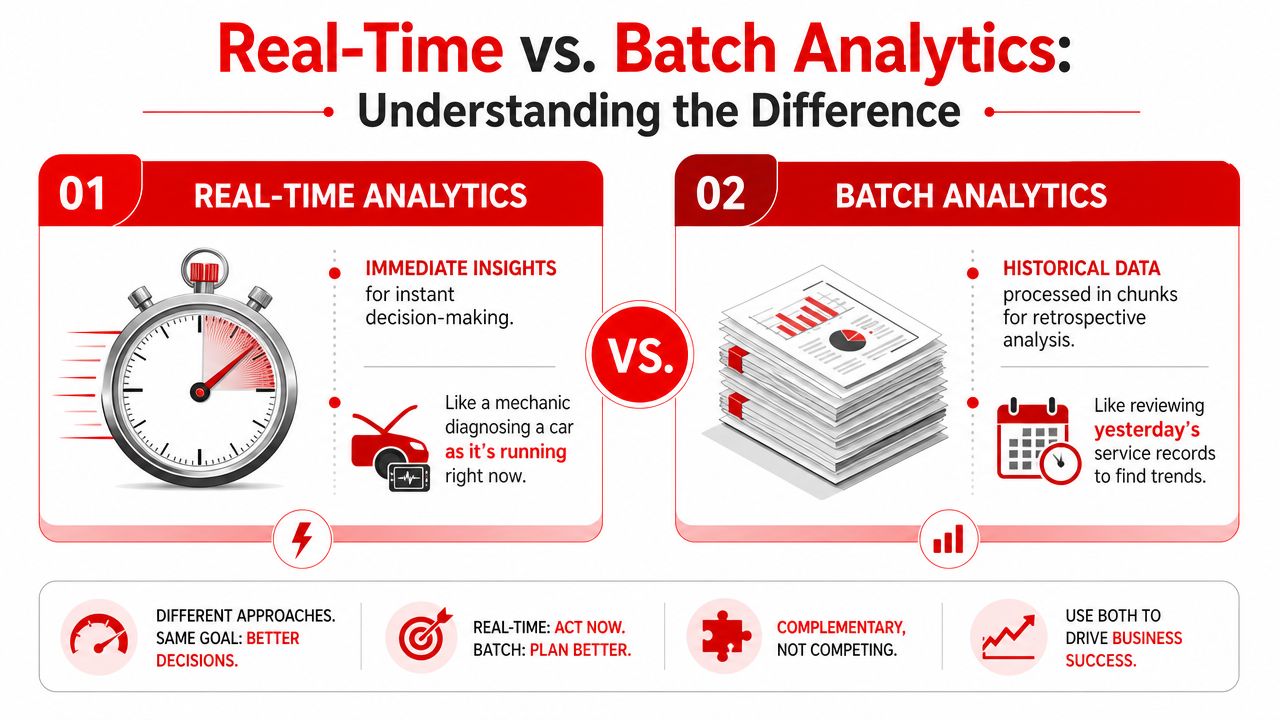
The scanner analogy
Real-time analytics is like plugging in a live scan tool and watching data from a running engine. Readings change as the vehicle runs, so the technician can react immediately.
Batch analytics is more like reviewing stored records later. That still has value. It helps with trends, historical review, and bigger planning decisions. But it doesn't help much when a problem needs attention now.
The main difference is latency, which means the delay between an event happening and the business seeing it. Confluent explains that real-time analytics analyzes data as soon as it is generated, letting organizations act in seconds or minutes instead of days or months, and describes the core shift as moving from storing data first to analyzing data in-flight in.
Side by side in a repair shop
| Situation in the shop | Real-time analytics | Batch analytics |
|---|---|---|
| Technician finishes a job | The board updates quickly, and the next car can be assigned | The result shows up later in a report |
| Customer hasn't approved an estimate | The advisor can follow up while the customer is still deciding | The missed approval appears after the chance has passed |
| Bay sits empty | The manager can spot idle capacity and move work | The idle time is discovered later |
| Revenue is behind pace | The owner can make same-day adjustments | The owner learns about it after the day is over |
Why the difference matters
For an auto shop, time delays have consequences. A delayed estimate follow-up can turn into lost work. A delayed parts update can create a backup in the bays. A delayed view of technician output can hide scheduling problems until the whole afternoon is off track.
Practical rule: If the shop can still act on the information today, live visibility matters more than a later report.
Batch reporting isn't useless. It's still helpful for reviewing longer patterns, comparing periods, and planning staffing or pricing changes. But it answers, “What happened?” Real-time analytics answers, “What's happening, and what should the team do next?”
How Real Time Analytics Actually Works
The technology sounds complicated until it's translated into shop language. In practice, the flow is simple. Data comes in, the system processes it, and useful signals show up where the team can act on them.
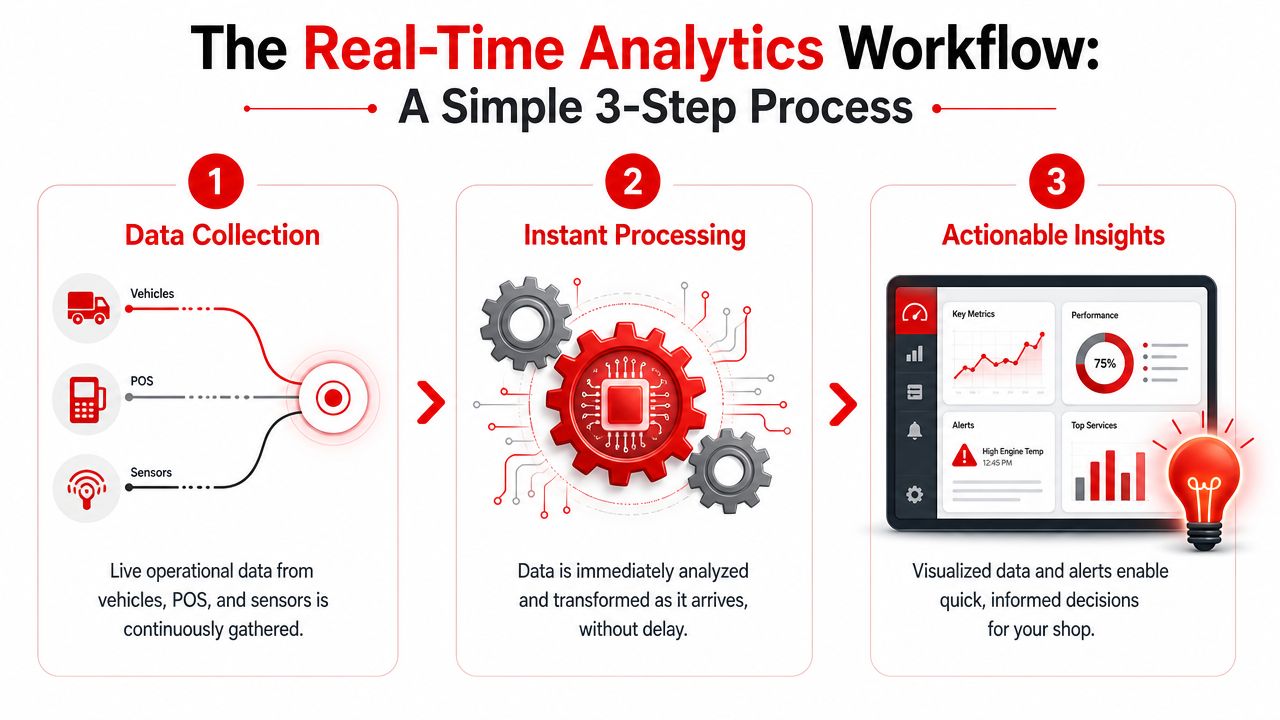
IBM notes that real-time analytics platforms typically ingest continuous high-frequency data streams from sources like app activity and transactional systems, combine them with historical data, and use dashboards to turn raw events into action while events are still unfolding, as described in.
Data flows in from daily shop activity
An auto shop already creates data all day long. Every check-in, estimate, parts order, inspection update, invoice, payment, and job status change creates a signal.
Those signals can come from places like:
- Digital inspections: A technician marks needed work or attaches photos
- Estimates and approvals: A customer opens a quote or approves a job
- Parts activity: A needed part is ordered, delayed, or received
- Scheduling and dispatching: A vehicle moves from waiting to in progress to ready
None of this requires a data scientist standing in the corner. The shop is already producing the information.
The software processes it quickly
This is the part many owners assume must be highly technical. Behind the scenes, the system is organizing incoming events and updating what matters. It's checking status changes, matching them to jobs, and refreshing dashboards or alerts.
A simple way to think about it is this:
- The event happens. A tech closes an inspection or a payment is recorded.
- The platform recognizes the event. It connects that change to the job, customer, or metric.
- The view updates. A board changes status, a dashboard refreshes, or an alert is triggered.
Real-time doesn't always mean lightning-fast for every task. It means fast enough to support the decision that matters.
Action comes out the other side
The final step is where owners feel the benefit. The system turns activity into something readable and useful.
That can include:
- Live dashboards showing shop flow, sales pace, and job status
- Alerts when a task is delayed or needs follow-up
- Visual boards that show where every vehicle is in the process
- Operational views that help the team decide who should do what next
A shop owner doesn't need to understand the plumbing underneath. What matters is that the business stops relying on memory, whiteboards, sticky notes, and end-of-day cleanup to understand what's going on.
Key Metrics Your Shop Can Track in Real Time
A live dashboard is only helpful if it shows the right things. Most shop owners don't need a hundred charts. They need a short list of numbers and signals that help them make better decisions during the day.
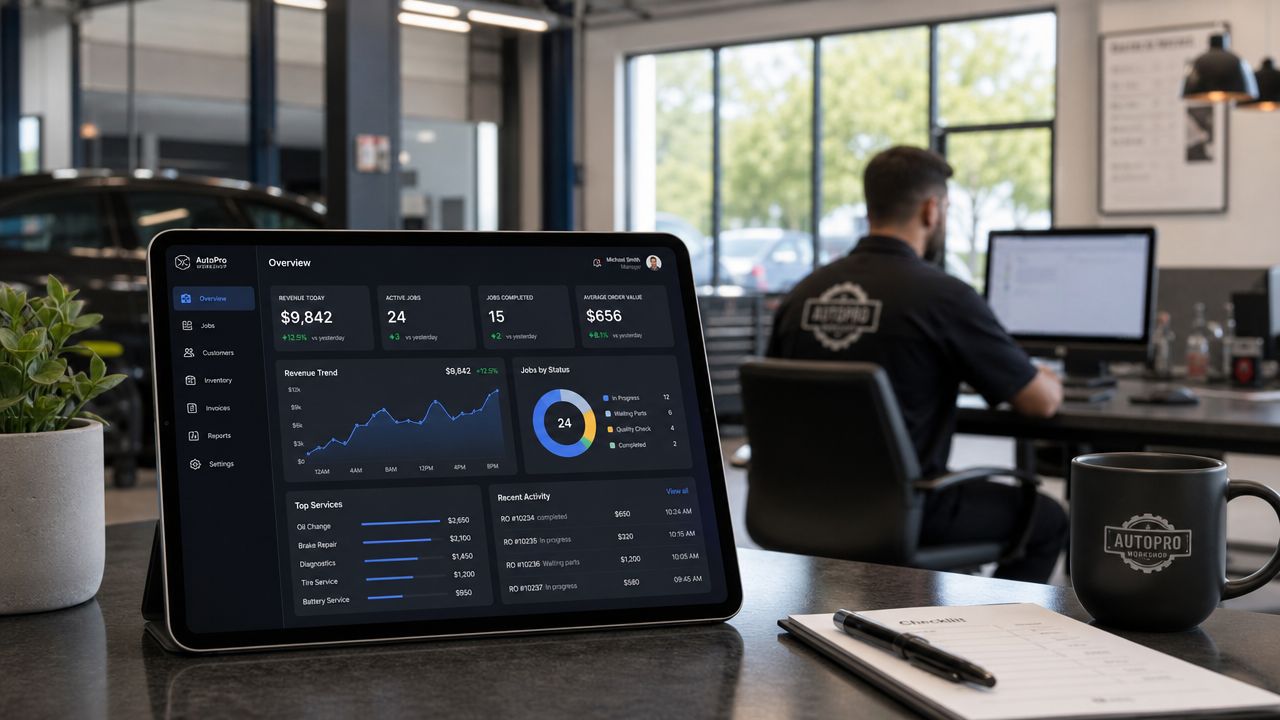
One common point of confusion is whether every metric needs instant updates. It doesn't. ClickHouse notes that some use cases need millisecond or very fast updates, while many business workflows are fine with minute-level freshness. It also gives an automotive-relevant example: instant alerts can matter for a parts delay, while overall efficiency reporting can be near-real-time, as explained in.
Metrics that need fast visibility
Some shop metrics are most valuable when they update quickly because the team can still change the outcome.
Estimate approval status
If an estimate has been sent but not approved, the front desk can follow up before the customer moves on. This is a live sales issue, not just a reporting item.Bay status
An open bay with no vehicle in it means lost production time. A manager who sees that quickly can pull the next job forward.Parts delays
If a critical part hasn't arrived, the shop can reshuffle work instead of letting a technician stall out.Job stage movement
When a vehicle sits too long in one stage, someone can investigate whether the delay is paperwork, parts, customer communication, or technician capacity.
Metrics that are useful with near real-time freshness
Other measures still help a lot even if they refresh on a slight delay.
Average repair order
This shows whether the shop is building solid tickets or filling the day with low-value work. If it looks soft by midday, the service team can tighten inspection follow-up and recommendation quality.
Technician efficiency
This helps a manager spot imbalance across the team. One technician may be overloaded while another is waiting. A live or near-live view supports smarter dispatching.
Revenue pace
A shop owner often wants to know whether the day is building normally. This isn't always a sub-second decision. Minute-level updates are often enough to show whether the day is healthy or needs attention.
Invoice and payment flow
When invoices are going out and payments are being collected smoothly, cash flow stays cleaner. A lag in this area often points to a process issue at the front desk rather than a lack of work.
A simple way to organize shop metrics
| Metric | Best use in the shop | How it helps |
|---|---|---|
| Estimate approvals | Fast follow-up | Prevents work from going cold |
| Bay occupancy | Immediate workflow decisions | Reduces idle time |
| Parts status | Dispatch adjustments | Avoids technician bottlenecks |
| Technician efficiency | Near-live management view | Balances workloads |
| Revenue pace | Midday business check | Supports same-day adjustments |
| ARO | Service advising quality | Highlights ticket strength |
A useful dashboard doesn't show everything. It shows what helps the team act before the day is lost.
The most effective shops choose a handful of live indicators tied directly to workflow, approvals, and production. That keeps the system practical instead of overwhelming.
Real Time Analytics in Action with RedAppy
The value of live data becomes clearer when it's attached to ordinary shop moments.
Tinybird describes real-time analytics as a streaming architecture that processes events with seconds or less of latency, while batch systems often run in minutes or hours. It also notes that this low latency matters for time-sensitive workflows like operational monitoring and automated alerts in.
A normal morning at the front desk
A service advisor checks the board and sees one technician has just wrapped up a brake job. Because the board updates quickly, the advisor doesn't need to walk the shop or make three calls to confirm the bay is free. The next waiting vehicle can be moved in without delay.
That one small improvement affects more than bay usage. It shortens customer wait time, reduces confusion between the counter and the floor, and keeps technicians from standing around waiting for the next assignment.
A stalled approval that shouldn't wait
Another common situation happens with larger estimates. A customer receives the quote, opens it, and then goes quiet. If the team only reviews approvals later, the moment may pass.
With a live system, the service advisor can follow up while the customer is still engaged. The issue might be a simple question about priority, timing, or payment. Fast follow-up often matters more than perfect wording.
Revenue and workflow on one screen
Some platforms combine daily workflow and business performance in the same operating view. In one system, that might include:
- A digital shop board that shows jobs moving from check-in to checkout
- Live revenue visibility as invoices are issued and paid
- Technician performance views that highlight who is productive and who is blocked
- Customer and vehicle lookup that keeps history available without digging
A platform such as RedAppy's shop management features fits the topic very well. It combines tools like a Kanban-style Digital Shop Board, digital inspections, invoicing, parts ordering, and real-time analytics inside one shop workflow. For an owner, that matters because live insight is most useful when it sits inside the same place where the team already works.
A dashboard has value only if it leads to action. In a shop, action usually means calling the customer, moving the car, reassigning work, or clearing a blocker.
Why integrated systems matter
A shop can try to patch together separate tools for scheduling, estimates, payments, reporting, and workflow. The problem is that delayed or disconnected information creates blind spots.
When the board, invoices, inspections, and analytics all speak to each other, the owner gets a clearer live picture. That doesn't make the day less busy. It makes the busy day easier to manage.
How to Get Started with Real Time Analytics
Most shop owners don't need a giant technology project. They need a clean starting point. The smartest approach is to begin with one business problem and build from there.
Start with the decision that needs to happen faster
A shop should first ask where delays are hurting the business most.
Examples include:
- Slow estimate approvals: Work is available, but customers aren't saying yes quickly
- Uneven technician productivity: Some bays are overloaded while others go quiet
- Weak day-to-day revenue visibility: The owner doesn't know how the day is shaping up until it's over
- Customer wait time problems: Cars are in the building, but workflow isn't moving cleanly
That first choice matters because it tells the shop what kind of live visibility is useful. Without that focus, dashboards become cluttered and ignored.
Check where the data gets stuck
Many shops already have the needed information. It's just trapped in too many places.
A quick review often reveals common bottlenecks:
| Question | What to look for |
|---|---|
| Where are job statuses tracked | Whiteboard, memory, separate spreadsheet, or software |
| How are approvals monitored | Manual follow-up or visible live status |
| Can the team see bay flow easily | Clear board or constant verbal check-ins |
| Are revenue and invoices visible during the day | Live dashboard or end-of-day reporting only |
If the answer to most of those questions depends on memory or manual updates, the shop has a visibility problem more than a data problem.
Choose software that fits the operation
The simplest path is usually an all-in-one platform with built-in workflow and analytics, rather than stitching together several disconnected tools. Separate apps can create gaps between the front counter, technicians, parts, and accounting.
A good fit should help a shop do three things well:
- Capture events automatically from normal daily work
- Display useful live signals without technical setup
- Support immediate action from the same screen where the team already works
A shop owner who wants to compare options, ask workflow questions, or see how a live setup would fit the business can contact the RedAppy team. That kind of conversation is usually more helpful than trying to decode feature lists alone.
The Future of Shop Management Is Live Data
A modern shop can't afford to run only on hindsight. End-of-day and end-of-week reports still have a place, but they don't help much when a bay is empty now, an estimate is cooling off now, or a technician is waiting now.
That's why the answer to what is real time analytics isn't “faster reporting.” It's a different way of running the business. The owner sees the operation while it's moving, catches issues earlier, and makes decisions before small delays turn into lost time and lost revenue.
For auto repair shops, this shift is practical, not abstract. It touches dispatching, approvals, parts coordination, invoice flow, and daily production. It helps the team move from reacting late to managing actively.
Shops that adopt live visibility don't become less human or more complicated. They usually become clearer. The front desk knows what needs attention. The floor moves with fewer surprises. The owner spends less time guessing.
A shop that wants a clearer view of bays, approvals, revenue, and technician flow can explore RedAppy to see how an all-in-one platform handles real-time analytics inside everyday shop operations.
Ready to Transform Your Shop?
RedAppy helps auto repair shops create professional digital estimates with photos and videos, send them instantly via text or email, and get customer approvals in seconds. No credit card required to start.