
Appointment Availability Guide for Auto Repair Shops
The phones start before the first bay is ready. One customer wants the next brake appointment, another has arrived for a promised diagnostic, and an advisor is trying to fit a walk-in between two jobs that already depend on parts delivery. The calendar shows a few open spaces, but the shop knows those spaces may disappear as soon as a technician, vehicle, or delayed part changes the plan.
That tension is why appointment availability feels harder than marking an hour as open. A useful appointment must match the shop's actual technician time, bay capacity, service type, parts readiness, and ability to receive the customer's request. When those pieces line up, the shop can keep work moving without making promises the team can't keep.

Table of Contents
- Introduction Why Appointment Availability Feels Harder Than It Looks
- What Appointment Availability Really Means in an Auto Repair Shop
- Why Appointment Availability Matters for Revenue and Customer Trust
- Common Scheduling Challenges That Shrink Your Real Availability
- How to Optimize Appointment Availability Without Overbooking
- How to Display Availability So Customers Can Book With Confidence
- Putting It All Together for Smoother Scheduling and Fuller Bays
Introduction Why Appointment Availability Feels Harder Than It Looks
A customer doesn't see technician utilization, bay assignments, parts status, or inspection queues. The customer sees a choice such as “Thursday morning” or “next available appointment.” If the shop displays an opening that can't support the promised work, the customer experiences the problem as a missed promise, not as a capacity calculation.
The reverse problem is just as costly. A shop may hide every uncertain slot, send callers to voicemail, or show only broad messages such as “call for availability.” That protects the calendar, but it also creates friction. A customer who can't get a clear answer may contact another shop before an advisor has time to call back.
The calendar is only the visible layer
Appointment availability has two sides:
- Capacity: Whether the shop has the technician hours, bay time, equipment, and service window required for the job.
- Conversion: Whether a customer can find, understand, and secure that opening without abandoning the process.
A calendar can have empty spaces and still offer poor availability. It can also look full while the shop has enough specialized capacity for a different service. Treating every opening as interchangeable leads to the wrong promises.
This guide follows the practical path an owner or advisor can use: define a real slot, understand the business impact, identify the traps that shrink usable capacity, build buffers, confirm parts, and publish clear choices online. The aim isn't to fill every minute. It's to create a schedule the team can execute calmly.
What Appointment Availability Really Means in an Auto Repair Shop
Appointment availability means the shop can offer a specific service at a specific time and has a realistic path to completing that service. An open square on a calendar is only a starting signal. The actual decision depends on who will perform the work, how long the job may occupy a bay, what tools are needed, and whether the required parts can arrive in time.
A restaurant analogy makes the difference easier to see. A host may see an empty table, but the restaurant can't seat another party if the kitchen is overloaded, the right ingredients are missing, or the dining room has no staff to serve them. Auto repair works the same way. An open calendar slot is like an empty table. True availability includes kitchen capacity, not just seating.
Four questions define a usable slot
Before an advisor offers an appointment, the shop should answer four simple questions:
- Who can do the work? A general maintenance technician and a diagnostic specialist aren't interchangeable. A slot is weaker if it depends on a technician who's already committed elsewhere.
- How much capacity does the job need? An oil service, brake repair, electrical diagnosis, and major engine repair place different demands on bays and staff.
- What could interrupt the estimate? A diagnostic visit may lead to additional work, while a repair involving corrosion or seized components may take longer than the initial expectation.
- Are the parts ready or realistically obtainable? A vehicle can arrive on time while the repair still waits because the needed part hasn't arrived.
The last question changes the meaning of “available.” Guidance for repair shops recommends confirming parts availability before booking because the slot isn't available if the job can't proceed as planned. also give customers a clearer promise than vague phrases such as “sometime in the afternoon.”
Practical rule: An appointment is available only when the shop can accept the vehicle, assign the right resources, and make meaningful progress during the promised window.
This definition protects both sides. Customers receive a time they can understand, and advisors avoid filling the day with bookings that later require reshuffling. The schedule becomes a working plan rather than a list of optimistic guesses.
Why Appointment Availability Matters for Revenue and Customer Trust
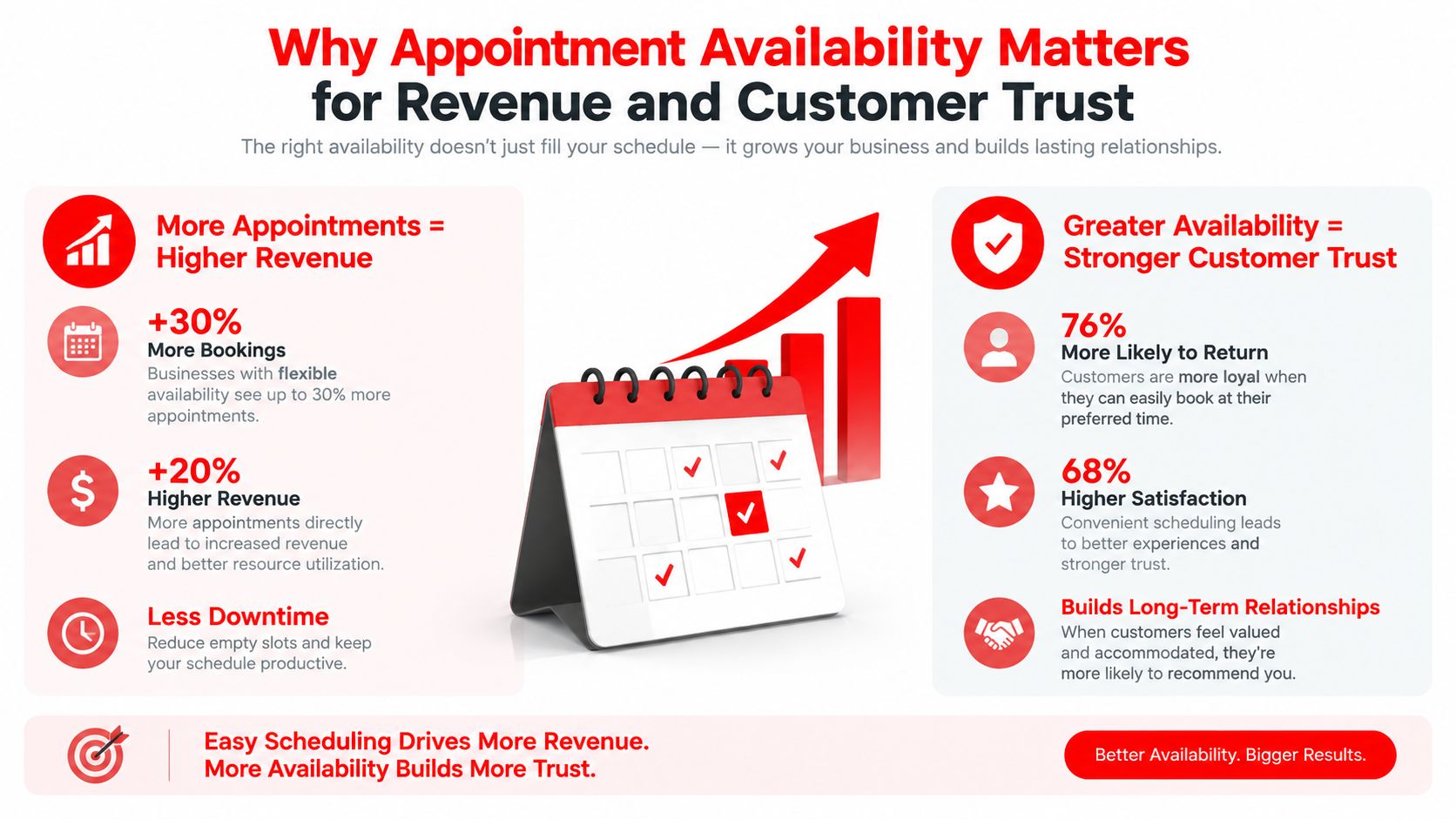
A customer calls about a brake repair and sees an opening tomorrow. The bay is free, but the right technician is committed, the parts have not been confirmed, or the schedule has no room for diagnostic follow-up. The booking looks available until the workflow fails. That failure can leave a bay idle, delay approval, reduce completed repair orders, and send the customer to a dealer or another shop.
Availability therefore affects revenue in two directions. A credible opening helps the shop accept work while the customer is ready to buy. An inaccurate opening creates rescheduling, unused technician time, and a promise the team cannot keep. The calendar is only the customer-facing surface. The product is a workable appointment.
Customers judge the process, not the internal reason
A customer may accept “the next opening is in several weeks” when the answer is clear and consistent. Confidence drops when the shop gives different answers, delays a callback, or accepts a booking that later moves.
Healthcare access research offers a limited but useful comparison. U.S. scheduling data found that 17% of patients waited one to three months between scheduling and attending their last doctor's appointment, while 33% said they could not see a doctor during the previous year because of availability. A separate analysis of clinics accepting new Medicare patients found median physician wait times ranging from 8 days in New York City to 61 days in Portland. The setting is healthcare, not automotive service, but the operational lesson transfers: a published opening matters only when customers can reach it and the business can deliver it.
For a repair shop, the conversion loss is easy to recognize. A customer who cannot find a dependable time may postpone the work, call another provider, or arrive after confidence has already weakened. A shop that displays fewer, more accurate openings can create a better experience than one that advertises a full calendar and repeatedly changes it.
Availability also affects no-shows and daily utilization. Operations research on appointment systems shows that booking rules must account for expected no-shows, variation in service time, crowding, and delays. Filling every theoretical technician hour can increase scheduled volume while making the actual day harder to control.
Lead time changes customer behavior
A booking far in the future gives plans more time to change. A systematic review identified high lead time as one commonly reported determinant of no-show behavior. In one clinic study, average no-show rates were 9.1% and 2.4% across the two clinics studied for appointments booked 0 to 2 weeks ahead. They rose to 38.3% and 6.9%, respectively, when appointments were booked 6 months ahead. The authors estimated that shifting more appointments into the shorter window could reduce no-shows by nearly 60%.
The repair-shop lesson is practical. Keep future openings tied to realistic workflow conditions, confirm parts before promising progress, and show times the team can honor. Availability becomes a revenue lever when it connects the right customer to the right work, and a trust lever when the displayed promise matches the shop's ability to perform. provides broader context for why service availability varies by category and market.
Common Scheduling Challenges That Shrink Your Real Availability
A shop can show open hours and still have little usable availability. The difference appears when the calendar ignores what must happen before, during, and after each repair. A slot is real only when the technician, bay, parts, time, and customer handoff can line up.
Overbooking removes recovery room
An advisor sees unused technician hours and adds another vehicle. Then a brake job runs long, a diagnostic needs another inspection, or a customer arrives late. Without recovery space, one delay pushes every later appointment back.
A practical buffer absorbs these overruns and protects room for walk-ins or urgent work. It is a planning recommendation, not empty time. The right amount depends on the shop's own delay patterns, parts availability, and demand. Keeping every minute bookable can make the calendar look productive while reducing the number of jobs the team can finish as promised. offers guidance on protecting realistic service-bay throughput.
A reliable schedule leaves room for the work that refuses to follow the original estimate.
Parts delays turn open slots into false promises
A customer may book suspension work for a day when a technician and bay appear available. If the part is backordered, incorrectly sourced, or still in transit, the appointment exists on the screen but not in the repair workflow.
The advisor must then reschedule the customer, keep the vehicle waiting, or replace the job at the last minute. A parts check before confirmation connects the displayed time to a workable repair plan. It also gives the advisor a clear reason to offer a different appointment when the first choice cannot be supported.
One appointment rule cannot fit every service
A short maintenance visit, an electrical diagnosis, and a complex repair carry different levels of uncertainty. One generic appointment length may leave capacity unused for simple jobs and crowd the day with complex ones.
Set availability by service type, technician skill, bay needs, and uncertainty. The customer may see fewer choices, but each choice has a better chance of matching the work. Clear service categories also help advisors ask the right questions before promising a time.
Phone-only booking loses demand
Customers often search for service outside office hours or cannot call while the team is serving vehicles. Advisors can miss calls when several customers arrive together, and some prospects will not leave a voicemail or wait for a callback.
Automotive scheduling guidance recommends after-hours access, including 24/7 booking and self-scheduling beyond normal office hours. links this access to how customers look for automotive service.
Messaging can provide another intake path. Shops that already communicate with customers this way can review options to. The channel is secondary to the workflow. Each request needs a clear next step, accurate service details, and a confirmed time instead of disappearing into a missed call.
Contact friction causes abandonment before booking
Availability can fail before a customer sees a time. In one U.S. primary-care study, 26% of offices were not taking new patients, 7% could not be contacted, and 14% required personal information before scheduling. Only 53% gave a usable appointment estimate. shows why access depends on more than open calendar space.
Repair shops face the same practical test. The request must be reachable, understandable, and easy to complete. If a customer cannot tell what information is needed, whether the vehicle qualifies, or what happens next, an open slot may never become a booked appointment.
How to Optimize Appointment Availability Without Overbooking
The strongest scheduling system starts with one change: stop managing the shop as a single pile of open hours. Availability should reflect service type, technician capacity, bay requirements, location, and parts status.
Start by separating the work. Maintenance can use a predictable rule, while diagnostics need room for uncertainty. A tire service may require different equipment from an alignment, and a mobile mechanic may need travel time that a fixed-location shop doesn't. Each category should expose only the times that match its actual resources.
Use a planning matrix
The matrix below turns that thinking into a repeatable starting point. The suggested buffers follow modern repair scheduling guidance, but the shop should adjust them after observing its own overruns, parts delays, and walk-in demand.
| Service Type | Suggested Buffer | Booking Rule |
|---|---|---|
| Routine maintenance | 15% capacity buffer | Offer specific times when the required technician and bay are available |
| Brake, tire, or suspension work | 15% to 20% capacity buffer | Confirm parts and equipment before presenting the slot |
| Diagnostics and electrical work | 20% capacity buffer | Reserve additional time for testing and avoid stacking uncertain jobs |
| Complex or parts-dependent repair | 20% buffer or more | Book only after parts, technician skill, and bay requirements are verified |
| Walk-ins and urgent work | Reserve 20% to 30% of shop capacity | Keep protected openings visible to advisors, not necessarily open to every online request |
The percentages in this matrix come from. They're planning guardrails, not promises that every shop should apply without review.
Confirm the job before confirming the time
An advisor should treat booking as a short readiness check:
- Service definition: Record the customer's concern and the requested service clearly.
- Resource match: Identify the technician, bay, tools, and expected service window.
- Parts check: Verify that required parts can be sourced before the appointment is offered.
- Customer promise: Give a specific appointment time, not an open-ended arrival period.
- Recovery space: Leave room for overruns, urgent work, and jobs that need extra diagnosis.
A team calendar helps keep those decisions visible. A shop management platform such as RedAppy connects appointments with technician scheduling, digital inspections, estimates, parts ordering, invoicing, payments, and analytics, giving advisors more context than a standalone calendar.
A full schedule is not the target. A schedule the team can finish without constant reshuffling is the target.
Technology should support the process, not replace judgment. Even a simple shared calendar can improve control if the team uses consistent service categories, marks unavailable resources, and updates the schedule when parts or technician assignments change.
For owners evaluating other operational tools, a resource about a can serve as a reminder that connected systems depend on dependable infrastructure. The scheduling lesson is straightforward: customer-facing availability is only useful when the underlying staff can keep information current.
How to Display Availability So Customers Can Book With Confidence
Customers decide quickly whether an appointment page feels trustworthy. They need to know which service they are choosing, when the shop can receive the vehicle, and what happens after they submit the request. Clear customer language works better than internal scheduling terms. “Service available Thursday at 9:00 AM” gives a usable choice. “Openings this week, call for details” sends the work back to the customer. “Drop off anytime Thursday” can also mislead when the repair needs a defined technician window.
Show choices that match the work
An online booking flow should connect each service label to the next operational step:
- Oil and filter service: Display times that fit the maintenance process.
- Brake inspection: Request vehicle details and explain that parts confirmation may follow.
- Warning light diagnosis: State that the first visit covers testing and inspection.
- Major repair request: Collect the concern and vehicle information before offering a confirmed time.
The customer does not need every internal constraint. They do need an honest status. If an advisor must review the request, label the slot as pending review instead of presenting it as fully confirmed. This distinction prevents a calendar opening from becoming a promise the shop cannot keep.
Accept requests after hours
Online booking lets customers submit requests while the front desk is handling vehicles, closing the shop, or unavailable. Automotive service guidance recommends after-hours access, including 24/7 self-scheduling. The team can review each request, check parts and resources, then confirm or adjust the appointment with a clear explanation.
Availability also has to reach the production team. A shared team calendar can place appointments beside technician assignments. A Kanban-style Digital Shop Board can show each vehicle moving from check-in through inspection, approval, repair, and checkout. That shared view works like a relay handoff. The customer's request reaches the people responsible for completing the work, rather than remaining an isolated online promise.
Shorten the path from interest to booking
Every extra field, unanswered call, or vague service label gives a customer another reason to leave. Ask for information that qualifies the request, including the vehicle, service concern, preferred time, and contact details. Keep the form focused instead of turning a simple booking request into a long intake interview.
RedAppy places scheduling alongside inspections, estimates, parts workflows, payments, and shop visibility. Owners and managers can view RedAppy's features to review those capabilities. For a focused discussion, the team can use the RedAppy contact page to consider how the booking process fits its service mix.
A clear availability page does more than show empty calendar cells. It sets the customer's expectation, gives advisors usable information, and helps the shop protect the workflow behind each appointment.
Putting It All Together for Smoother Scheduling and Fuller Bays
Appointment availability improves when the shop treats every opening as an operational promise. The right slot matches the job with the technician, bay, tools, parts, and time needed to move the vehicle forward.
A practical checklist keeps the system manageable:
- Classify the service: Use different rules for maintenance, diagnostics, parts-dependent repairs, and urgent work.
- Protect capacity: Keep a buffer for overruns instead of booking every technician hour.
- Reserve flexibility: Hold capacity for walk-ins and emergencies.
- Verify readiness: Check parts and resources before confirming the time.
- Use clear promises: Display specific appointment times rather than vague availability.
- Capture requests continuously: Let customers start the booking process online outside front-desk hours.
- Keep teams aligned: Connect the customer-facing calendar with technician assignments and vehicle status.
The strongest result isn't a calendar packed edge to edge. It's a shop where customers receive dependable choices, advisors spend less time rebuilding the day, and technicians can work without avoidable interruptions.
RedAppy connects appointment scheduling with technician assignments, digital inspections, estimates, parts ordering, invoicing, payments, and shop analytics, so availability reflects the work behind the calendar. Visit RedAppy to explore the platform and contact the team about building a more reliable booking workflow for the shop.
Ready to Transform Your Shop?
RedAppy helps auto repair shops create professional digital estimates with photos and videos, send them instantly via text or email, and get customer approvals in seconds. No credit card required to start.