
Auto Collision Repair Software: Features and How to Choose
A dented sedan sits in the lot, the owner is still waiting on a callback, and the clip the technician needs is on a truck somewhere between the supplier and the shop. The approval lives in a voicemail nobody has written down. That morning is ordinary in a collision shop, and it is where paper folders, spreadsheets, and sticky notes come apart.
Auto collision repair software is the job record that follows that car from the first call to the final payment. Photos, the estimate, the parts order, the approval, and the invoice stay on one file, so nobody retypes the same plate three times. A fast blank estimate is not the measure. The test is whether late-found work, a calibration or a delayed part, stays tied to the job instead of living in someone's head.
Table of Contents
- What Auto Collision Repair Software Covers
- Core Features Every Collision Shop Should Expect
- Why ADAS Calibration Belongs in the Workflow
- Parts Ordering and Supplier Tracking
- Test Software Fit Against Your Daily Workflow
- Estimates, Insurers and State Compliance
- Avoid Common Mistakes and Book Your Demo
What Auto Collision Repair Software Covers
Say a customer calls about a rear hit. The advisor writes the name on a pad, the estimator builds a sheet in another program, and parts sit in a supplier tab. By afternoon the car is on a lift and nobody can say which version of the estimate the owner approved.
One system should hold that car the whole way. Intake, inspection, the estimate, parts, job status, the signed approval, the invoice, and the reports belong on the same record. When a stage lives somewhere else, a person copies it by hand, and that copy is where numbers drift.
Stages to walk in a demo
| Stage | What the software handles | What to check |
|---|---|---|
| Intake and check-in | Customer and vehicle record, lookup by name, plate or VIN | Vehicle history loads from the first call |
| Inspection | Digital multipoint inspection with photos and video | Photos attach to the job record |
| Estimate | Parts and labor, itemized and customer-readable | Estimate converts into an invoice without retyping |
| Parts ordering | Supplier pricing, stock and orders | Orders placed without leaving the repair order |
| Job tracking | Kanban-style shop board from check-in to checkout | Each job shows its current status to staff |
| Customer approval | E-signatures and texting | Approval is recorded against the exact estimate |
| Invoice and payment | Invoices and online payments | Payments are logged against the right job |
| Reporting | Revenue, technician efficiency and average repair order | Reports match the shop's own totals |
Practical rule: If a stage is missing from the system, someone on staff is retyping that information by hand, and that is where errors and delays start.
Walk the demo in that order, using one real car, not a sample the vendor prepared. If the advisor has to leave the job to find a photo, a part price, or an old approval, the record is not finished.
Core Features Every Collision Shop Should Expect
Treat the feature list as three layers. Each layer only works if the one under it is solid.
Estimating and documentation is the base. Repair estimates include parts and labor and can be converted into invoices, so the approved sheet becomes the bill without a second typing pass. E-signatures lock which version the customer saw. Vehicle history and lookup by name, plate, or VIN mean the advisor is not rebuilding the file on every visit. All plans on a serious shop system should include e-signatures, multipoint inspection, vehicle history, and analytics, because those are daily tools, not extras.
Inspection and evidence sits on that base. Digital vehicle inspections can include photos and videos, and past multipoint results can be opened later to see how the car's condition changed. Customers argue less when they can see the torn bracket, not only a line that says "R&R bumper." Photo evidence also gives the insurer something concrete when a supplement shows up after teardown.
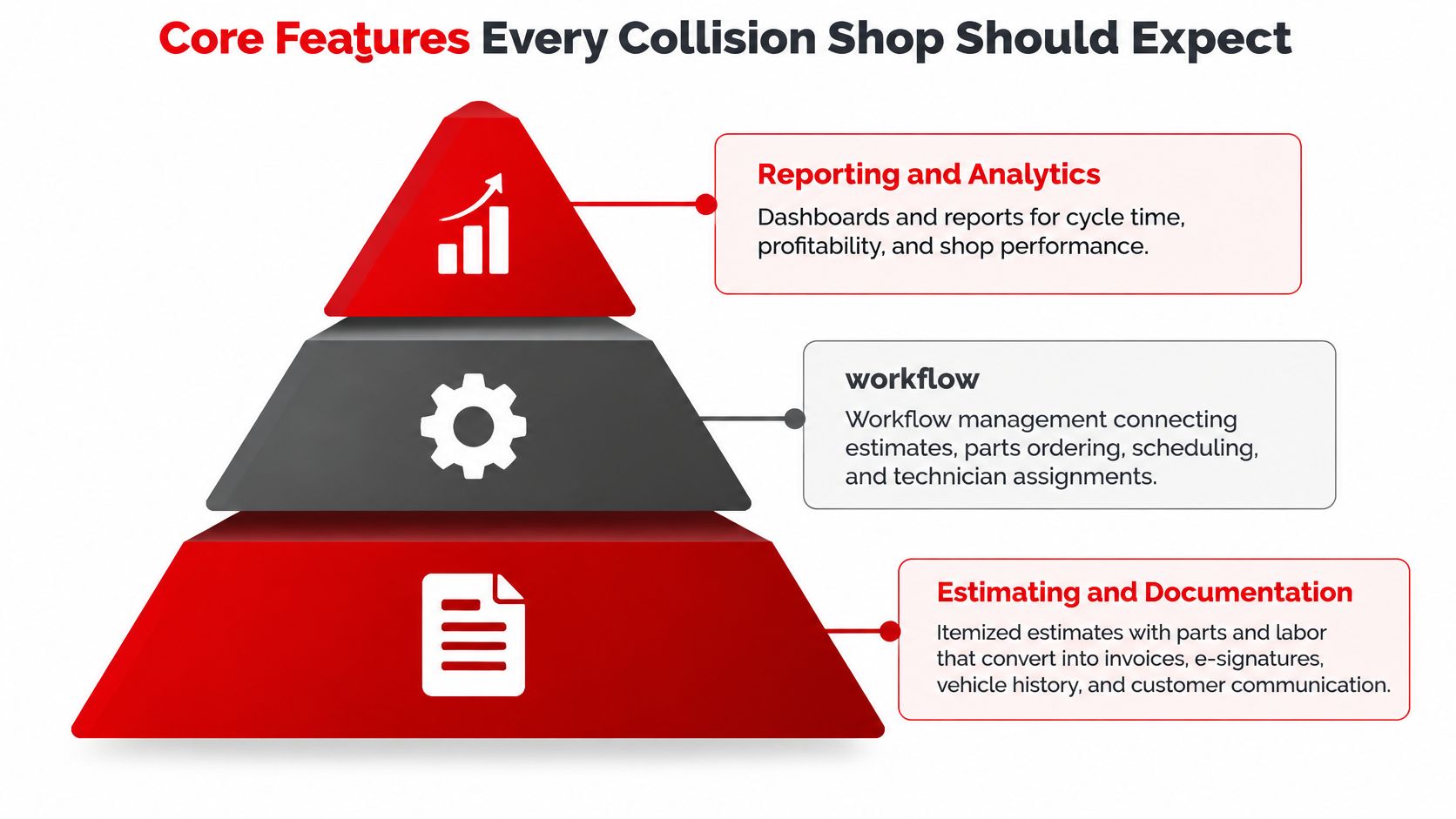
Shop control is the top layer. A Kanban-style shop board shows each job from check-in to checkout. A team calendar keeps drop-offs and loaners from colliding. Role permissions should start from defaults and then be tightened for each person, so a new advisor cannot close a job a foreman still needs to see. Analytics should cover revenue, technician efficiency, and money that never hits a repair invoice, such as scrap metal, used oil, or core returns. If that cash stays in a notebook, the reports lie.
The assistant still needs a person
The built-in assistant can supply labor times, diagnostic help, and shop insights when someone asks in plain language. That output is a draft. A technician or advisor has to check the hours and the price before the shop relies on them or sends them to a customer. A wrong labor time that looks official is worse than a blank line.
Example features are worth opening before any demo, then testing the inspection layer first. If photos do not stick to the job, the estimate and the board above them will not stay honest.
Why ADAS Calibration Belongs in the Workflow
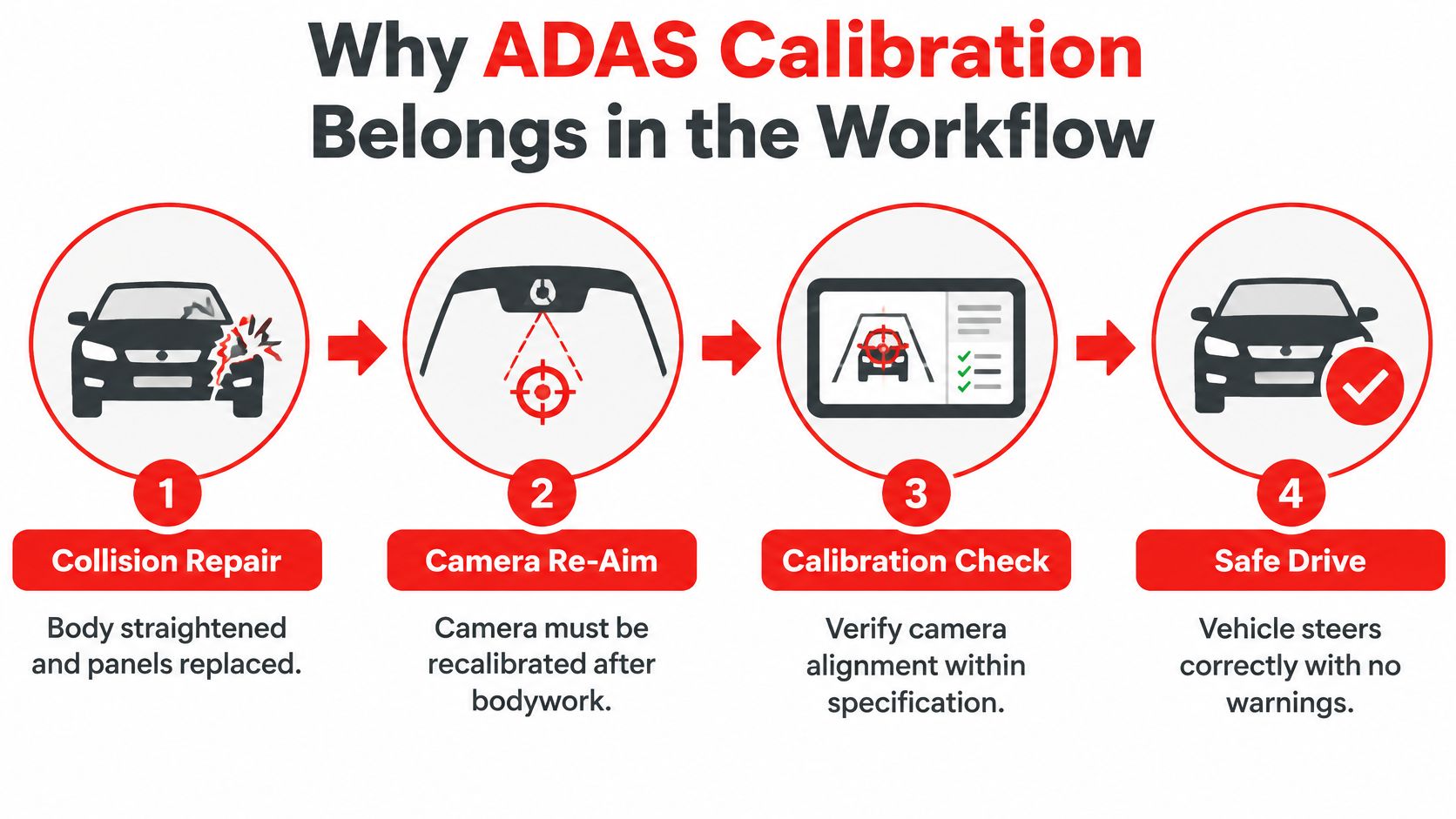
A windshield camera is like a mirror that has to be aimed again after the body is pulled straight. A few degrees off, and the car can steer the wrong way even though no warning light is on. Newer vehicles carry cameras, radar, and other sensors that often need calibration after a collision, a bumper job, a windshield, a wheel alignment, or suspension work.
treats vehicle identification, damage analysis, scanning, calibration, and post-repair verification as one linked process, not loose checklist items. ADAS performance depends on sensor alignment, mounting position, software state, and the systems tied to them. A collision or a removed part can leave a safety fault with a dark dash.
Six steps the job record should force
- Identify the systems. Decode the VIN and list the ADAS equipment on that exact car, not a similar trim.
- Scan before the repair. A pre-repair scan shows which systems the hit disturbed.
- Name the calibration type. Static, dynamic, and scan-tool-dependent calibrations are different jobs. A single "calibration complete" box is not enough.
- Record the tools. Note targets, alignment equipment, or a scan tool before the car is promised for a day the shop cannot meet.
- Follow the OEM procedure. The manufacturer steps control the work. A generic labor note does not.
- Scan and calibrate again after the repair. Attach the post-repair scan, the calibration type, the OEM procedure reference, the technician, and the result.
The software should refuse a normal complete status until those scans and calibrations are on the file. If a step is missing or failed, the job goes to a foreman or quality-control role. It does not slip out the door because the board looked full.
A calibration found after the car is painted is not a small add-on. It is a second visit, a supplement, and a customer who was told the wrong day.
Parts Ordering and Supplier Tracking
One missing molding can park a finished car on the lift all afternoon. Parts delay is common enough that tracking belongs in the core system, not in a side spreadsheet.
An says 38% of shops identified parts delays as a major bottleneck, and the median delivery time for collision parts was 7.1 days. A stalled order is a regular week, not a rare mess. Software that only prints the estimate leaves the advisor blind until the technician is already waiting.
A parts path that stays on the job
- Compare live prices and stock from the suppliers the shop already uses.
- Order without leaving the repair order, so the line on the estimate and the line on the purchase are the same part.
- Track each order's status on that job, not in a separate inbox.
- Flag an unavailable part before the technician reaches that stage, so the car is not torn down for a clip that will not arrive.
- Log any substitution the customer approved, including whether the part is OEM or aftermarket.
Nexpart Multi-Seller lets shops order from O'Reilly, AutoZone, NAPA, and hundreds more local and national suppliers without leaving the repair order, with live prices and availability. Shop inventory should also track parts and fluids, deduct them when a job uses them, and send a low-stock alert before the shelf is empty.
In a demo, ask which suppliers connect, whether the price on screen is live, and how a late part shows up in the status the customer can see. A parts delay is a supply problem and a communication problem at the same time. If the owner only hears about it when they arrive for pickup, the software did not finish the job.
Test Software Fit Against Your Daily Workflow
A polished tour hides gaps. Score the system on work the shop already does.
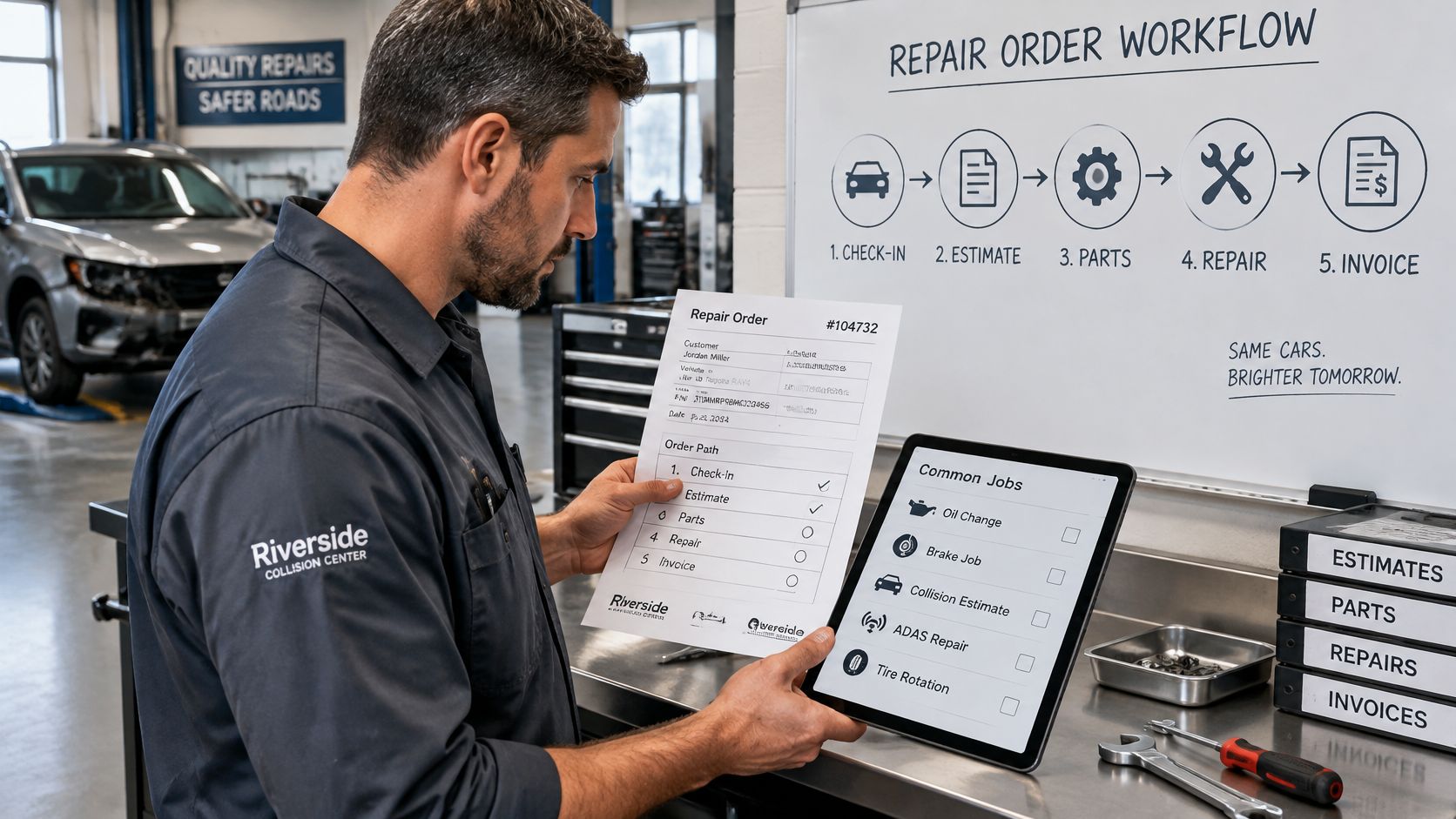
- List the five jobs that fill the week, such as oil changes, brake jobs, collision estimates, and ADAS repairs.
- Pick one recent repair order and walk it from the first call to payment, including any supplement.
- Run that same order through every demo, not the vendor's easy example.
- Score each system on the criteria below.
- Ask for the exact screen, not a slide, for every row.
Fit criteria for testing collision repair software
| Criterion | Question to ask | Good sign |
|---|---|---|
| ADAS calibration tracking | Does it create vehicle-specific calibration tasks from the VIN? | Tasks appear automatically and block job closure until recorded |
| Insurer-ready estimates | Can it produce an itemized estimate that shows part types and labor? | Estimate exports without retyping |
| Photo evidence | Can photos and video attach to the inspection and invoice? | Customers can view the same evidence the shop used |
| Parts sourcing | Does it show live supplier prices and stock inside the repair order? | Parts are ordered without leaving the job |
| Mobile job status | Can owners check job status from a phone? | Live status without calling the shop |
| Reporting | Do revenue and technician reports match the shop's own totals? | Totals reconcile with the books on the sample order |
| Pricing and terms | Is the fee clear, with month-to-month terms? | Written monthly price with no hidden add-ons |
| Staff training | How long until a new advisor can run a job alone? | Staff complete a sample order within the demo |
A shop with five or fewer technicians does not need every module on day one. A solo mechanic should test estimates and invoicing first, then add inspections and parts once those two stop the retyping. A larger shop should weight calibration holds and the shop board more heavily, because those are where cars sit.
Choose the system that finishes the sample repair order with the fewest manual steps and the least retyping.
If two products look close, count how many times a person leaves the job screen. Each exit is a place the shop will skip on a busy Friday.
Estimates, Insurers and State Compliance
The estimate is where insurer rules and state rules show up on the same page. California's requires a collision estimate to identify the specific job and itemize prices for parts and labor. For each replacement crash part, the estimate must say whether the part is new, used, reconditioned, rebuilt, OEM, or non-OEM aftermarket. A new OEM crash part is the default unless another category is named.
Good estimate software makes those classifications required fields. An advisor should not be able to save the sheet with a blank part type.
From photos to the invoice
- Build the estimate from inspection photos and the OEM repair information for that VIN.
- Assign each crash part its classification before the total is shown.
- Itemize labor operations and parts on separate lines.
- Produce a customer-readable document that matches the version later approved.
- Convert that approved estimate into the invoice without retyping lines or part types.
Insurer work adds supplements when hidden damage appears in teardown, plus a trail of who authorized each change. Clear photos and a clean parts list also help a customer because the carrier is not waiting on a second explanation of the same dent. Shops outside California should check their own state rules, since the required wording is not the same everywhere.
Ask the vendor to add a supplement to an already approved estimate, then open the invoice. The part classifications on the supplement should still be there. If they vanish, the compliance work was only on the first draft.
Avoid Common Mistakes and Book Your Demo
Most bad software buys fail in the demo the shop skipped.
Buying only for estimate speed. A fast first sheet does not help if the calibration or the part shows up three days later and the job has no place to hold it. Run those late steps in the demo too. A supplement added on day four should land on the same record as the original estimate, and a delayed part should sit visibly on that job while the car waits.
Trusting assistant output without a review. Labor times and pricing suggestions have to be checked before anyone relies on them or sends them to a customer. A confident wrong number still gets billed.
Skipping the sample-order test. A guided tour can step around a missing screen. Put one recent repair order through each system, supplements included, and watch where late-found work goes.
Ignoring whether the staff will use it. If advisors and technicians fight the screens, they go back to paper and the reports drift. Have each role finish one task during the trial, not only the person who likes software. A platform used by thousands of auto repair shops still only sticks when the people on the floor accept the clicks. RedAppy includes e-signatures, multipoint inspection, vehicle history, and analytics on every plan, so the daily record does not depend on buying a higher tier first.
Dropping the phone call. An found that 34% of collision customers preferred interacting with people rather than relying only on digital contact. Text updates still belong in the system, and RedAppy sells texting credits starting at $3.99 for 100 messages that never expire. The advisor who picks up the phone when the plan changes still matters.
Book a demo after looking through the features, and bring three things: one recent repair order, the five jobs the shop does most, and the names of the people who will use the system. On the call, confirm which plan covers the tools the shop intends to turn on. The Nitro AI assistant and video uploads sit in the Professional plan, so check the tier before assuming they are included.
RedAppy is an all-in-one shop management platform for auto repair businesses. Parts ordering across suppliers and the job record keep work on one file, from the first call and photo inspection through parts, approvals, and payment. Visit RedAppy to see how the workflow fits the cars already in the shop.
Ready to Transform Your Shop?
RedAppy helps auto repair shops create professional digital estimates with photos and videos, send them instantly via text or email, and get customer approvals in seconds. No credit card required to start.