Auto Parts Inventory Software: A Buyer's Guide
Monday morning starts with three work orders waiting, a technician calling for brake pads, and a parts manager moving between a clipboard, two supplier portals, and a spreadsheet that insists six rotors are available. The shelf says otherwise. One rotor is committed to another job, two are in the wrong bin, and the remaining three have never been received correctly.
That situation is why auto parts inventory software deserves an operations-level evaluation, not a quick feature tour. The right system connects parts, work orders, suppliers, receiving, purchasing, and accounting so the counter team can act on reliable stock information without rebuilding the same data in several places.
The category is expanding quickly. One market estimate places auto parts inventory management software at $7.15 billion, with a projection of $12.9 billion and a 12.4% compound annual growth rate across the stated forecast period, according to. That growth reflects a practical shift: inventory control has become a core shop process, not a back-office convenience.
Table of Contents
- What Auto Parts Inventory Software Actually Does
- The Core Workflow Behind Real-Time Stock Visibility
- Must-Have Features Versus Nice-to-Have Extras
- How Independent Shops and Multi-Location Chains Should Evaluate Differently
- Selecting and Rolling Out the Software Without Disrupting the Shop
- Measuring ROI From Time Saved, Fewer Stockouts, and Faster Repairs
- Your Next Steps and Quick-Reference Checklist
What Auto Parts Inventory Software Actually Does
The parts manager's real problem isn't a lack of spreadsheets. It's the gap between what the spreadsheet says, what the supplier portal says, and what the shelf contains.
Auto parts inventory software creates one searchable record for every SKU from receiving through installation, return, transfer, or core exchange. It connects stock quantities to live estimates and work orders, records committed parts, and can generate restocking suggestions when on-hand inventory drops below a shop-defined minimum threshold, as described in.
Four jobs the system must handle
A useful system has to perform four operational jobs without forcing staff to rekey information:
- Count the shelf: The system should show on-hand, committed, on-order, and available quantities rather than one misleading stock figure.
- Locate the part: A bin map, location field, or barcode workflow should tell the counter employee where the item sits.
- Reorder quickly: Approved supplier catalogs should connect low-stock rules to purchase orders and supplier selection.
- Reconcile receiving: The receiver should match delivered quantities, costs, cores, and invoices before the purchase order closes.
That's the difference between inventory control and a glorified spreadsheet. A spreadsheet stores a number. A proper platform stores the number, the transaction that changed it, the person who made the change, the bin where the part belongs, and the work order that reserved or consumed it.
Barcode workflows make this visible on the floor. Scanning a part tag and rack location can reveal quantity on hand, quantity on order, committed quantity, bin location, stock levels, and pricing, while movement reports can show who scanned or moved an item, according to.
Practical rule: If a salesperson can't demonstrate receiving, reserving, issuing, returning, and correcting a part against a real work order, the system hasn't been proven.
A business inventory platform may also need hosted access when several staff members or locations require the same records. For background on hosted inventory environments, provides useful context. The definition matters because every later buying decision depends on it. If the system doesn't track the full part lifecycle, impressive dashboards won't repair a broken parts counter.
The Core Workflow Behind Real-Time Stock Visibility
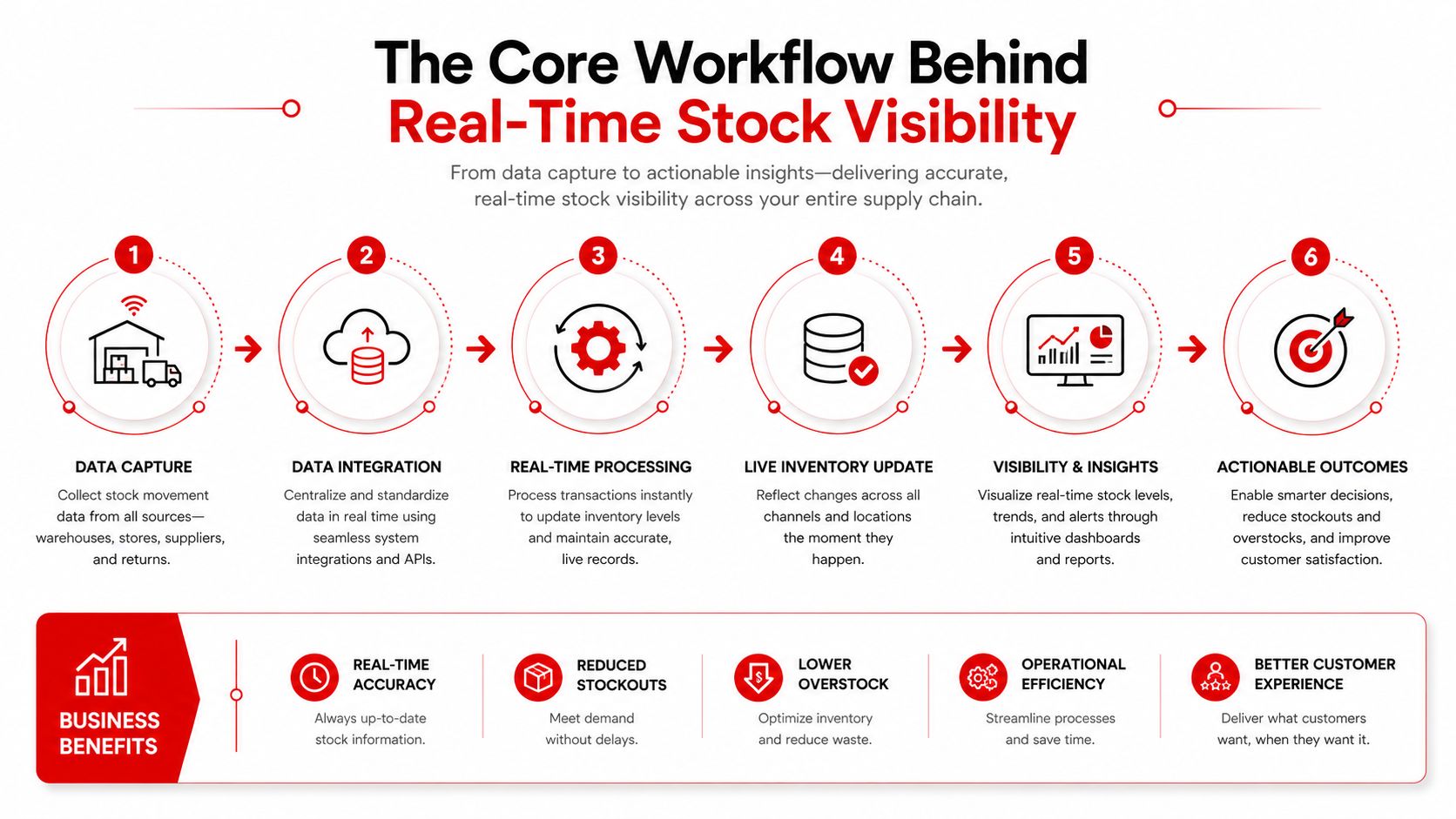
Real-time stock visibility only matters when it changes what staff do next. A brake job provides the clearest test.
A technician selects the vehicle or scans the VIN. The shop system identifies the relevant pad and rotor records, including fitment and supplier references. The advisor adds the parts to the work order, and the inventory system checks live availability before reserving the units.
If the shop has the parts, the system marks them as committed rather than leaving them in the general available quantity. That distinction prevents a second advisor from promising the same rotor to another customer. The technician sees what has been assigned, and the counter team doesn't need to make a separate note on paper.
The shortage path
Suppose the shop has one pad set but needs two. The software should identify the shortage, apply the shop's approved supplier rules, and create a purchase order without manual rekeying. Price comparison matters here, but the cheapest supplier isn't automatically the right supplier if availability, delivery reliability, or return terms create more delay.
The work order should show waiting on parts, and the advisor should receive a clear status update. A parts manager shouldn't have to call the advisor after checking three portals just to explain why the vehicle remains on a lift.
The receiving path
When the delivery arrives, the receiver scans the barcode, verifies the part number and quantity, assigns the bin, and confirms the cost. The purchase order closes only when the delivered items match the order and the invoice. The reserved part then becomes an issued line when the technician pulls it, rather than forcing the team to update stock in a separate screen.
The data flow must cover quantities, costs, cores, returns, and VIN-specific fitment. Mixed-label environments complicate the process because OEM numbers, manufacturer codes, and alpha-numeric identifiers aren't always cleanly barcode-ready. highlights the need for exception handling, OCR support, and receiving controls alongside scanning.
Most shops leak time at handoffs. A supplier price gets typed into a work order, a received quantity gets entered into a spreadsheet, and a core return sits outside the inventory record. The best system removes those gaps instead of displaying more information.
Must-Have Features Versus Nice-to-Have Extras
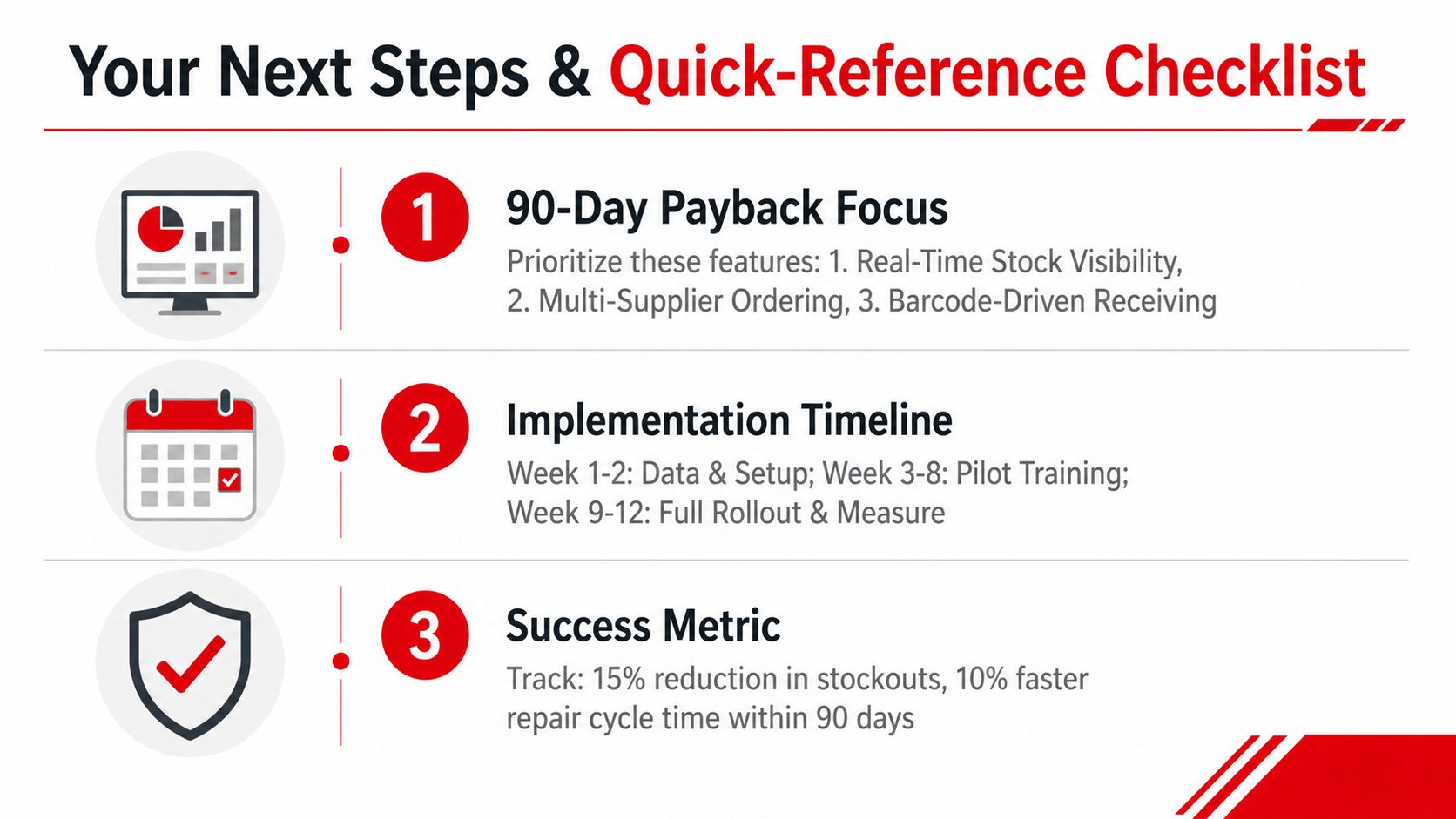
A buyer's checklist should start with payback, not novelty. Features that improve stock accuracy, receiving speed, ordering, and work-order flow can pay back inside 90 days when the shop already has enough transaction volume to benefit. Predictive features can wait until the foundation is reliable.
Tier one belongs in every serious demo
The following capabilities deserve proof against live shop scenarios:
- Real-time inventory tied to work orders: Prevents double commitments and reduces counter lookups.
- Barcode or QR receiving and issuing: Cuts manual entry and strengthens location accuracy.
- Multi-supplier ordering with price comparison: Reduces emergency buying and repeated portal searches.
- VIN-based part matching: Lowers the risk of ordering an incompatible part.
- Purchase order receiving with three-way matching: Connects the order, delivered item, and invoice for cleaner month-end work.
- Shop management and accounting integrations: Prevents duplicate entries across estimates, invoices, inventory, and financial records.
The system should also support differentiated replenishment. A practical method combines ABC classification with demand-variability scoring, then assigns tighter reorder points and audit frequency to high-value, fast-moving SKUs. The approach is supported by, which also cautions against applying one static replenishment cycle to every part.
Tier two can wait
Predictive demand forecasting, customer-facing catalogs, CRM-linked marketing, AI reorder suggestions, and elaborate dashboards may help a mature operation. None should distract from unresolved duplicate SKUs, inaccurate bins, missing supplier costs, or unrecorded returns.
| Feature Priority Matrix for Auto Parts Inventory Software | Tier | Payback Outcome | Typical Cost to Add |
|---|---|---|---|
| Real-time work-order stock | Must-have | Fewer double commitments and counter searches | Vendor and integration fees vary |
| Barcode receiving and issuing | Must-have | Faster receiving and cleaner location records | Hardware, setup, or add-on fees vary |
| Multi-supplier ordering | Must-have | Fewer emergency runs and less portal rekeying | Supplier-feed or platform fees vary |
| VIN-based matching | Must-have | Fewer wrong-part orders and returns | Catalog or integration fees vary |
| Three-way PO matching | Must-have | Cleaner invoice reconciliation | Included or add-on, depending on vendor |
| Forecasting and advanced dashboards | Nice-to-have | Better planning after clean data exists | Often an additional module |
One platform option, RedAppy's shop management features, includes parts ordering across multiple suppliers, real-time inventory, and workflow connections for repair businesses. The correct choice still depends on whether those capabilities work against the shop's actual suppliers, work orders, and accounting setup.
How Independent Shops and Multi-Location Chains Should Evaluate Differently
A single-location shop doesn't need the same control structure as a chain. The independent owner usually cares about speed at the counter, accurate barcode receiving, simple supplier ordering, and a workflow the existing team can learn quickly.
A multi-location operator needs the same basics, but adds a network layer. A part sitting at one branch may prevent a delay at another, so shared visibility, inter-shop transfers, central purchasing, and consolidated reporting become decisive. Supply-chain resilience also requires data visibility. Automotive supply-chain research reports that 28% of respondents identified software, digitalisation, and data management as a major issue in supply-chain transparency, as reported by.
| Feature Priorities: Independent Shop vs Multi-Location Chain | Independent Shop Priority | Multi-Location Priority |
|---|---|---|
| Real-time stock | High, for immediate counter decisions | Critical, across branches and warehouses |
| Barcode receiving | Critical, with a simple mobile workflow | Critical, with standardised location controls |
| Supplier ordering | One or a few approved suppliers | Central supplier rules and branch purchasing |
| Inter-shop transfers | Low unless storage areas are separate | High, with transfer status and receiving |
| User permissions | Basic role separation | Detailed permissions by branch and role |
| Reporting | Actionable daily reports | Consolidated margin, stock, and purchasing views |
| Accounting integration | Direct connection to the shop's books | Centralised financial and branch reporting |
The independent shop should reject unnecessary complexity. A chain should reject a system that works only when every location follows informal habits.
A useful demo exercise is to run one local brake order for the independent shop, then run a shortage at one branch and a transfer from another for the chain. The software earns credibility when both workflows remain visible, auditable, and easy to explain to staff.
Selecting and Rolling Out the Software Without Disrupting the Shop
A shop shouldn't replace its parts process during its busiest operational period. The rollout needs a controlled path that protects active repairs while exposing weak data before cutover.
Start by mapping two weeks of parts activity. Record the common work-order types, supplier feeds, receiving routines, bin structure, returns, cores, and accounting handoffs. That activity map gives the buyer a shortlist based on real work rather than generic sales demonstrations.
A paid pilot should run for 14 to 21 days on a single workstation with a live supplier feed. The pilot needs real incoming shipments and real work orders, not sample inventory. Counter staff should test reservations, substitutions, returns, and purchase-order receiving while the manager compares the new record with the existing process.
Data migration decides the outcome
Before full cutover, the shop needs to clean:
- Duplicate SKUs: Merge records that describe the same part under different codes.
- Units of measure: Separate individual parts, packs, kits, litres, and other buying or issuing units.
- Core records: Define whether the core is tracked as an inventory item, a credit expectation, or a return obligation.
- Locations: Standardise bin names so staff don't create several labels for one shelf.
- Supplier costs: Confirm current costs and preferred vendors before automated ordering begins.
Run the old and new systems in parallel long enough to compare receipts, issues, returns, and stock corrections. The purpose isn't to maintain two permanent systems. It's to catch discrepancies while the old process still provides a reference.
Train counter staff first because they control receiving, ordering, and work-order accuracy. Train technicians next on reserved parts, issued parts, substitutions, and returns. On day one, monitor cycle-count variance and time to stock, then investigate every unexplained difference instead of accepting a clean-looking dashboard.
Implementation rule: A slower controlled rollout beats a fast cutover that teaches staff to distrust the new inventory record.
Measuring ROI From Time Saved, Fewer Stockouts, and Faster Repairs
A parts manager can defend the software purchase with three measurable categories: time saved, stockouts avoided, and repairs completed faster. The calculation should use the shop's own baseline rather than a vendor's broad promise.
Time saved
Count the weekly minutes spent on counter lookups, manual stock counts, supplier searches, purchase-order keystrokes, and invoice corrections. Multiply the recovered hours by the fully loaded hourly cost of the staff performing that work. The result is operational capacity, but the manager should distinguish between genuine capacity and time that moves to another task.
Fewer stockouts
Track stockouts by SKU and work order. The value of avoiding one shortage can include emergency-order markup, delivery charges, lost approval, rescheduling, idle lift time, and a missed core return. A system should also expose aging inventory early, so managers can return or redirect slow-moving parts before the cash remains trapped on the shelf.
Faster repairs
Measure the time from parts approval to technician access, then compare that with repair turnaround for common jobs. A faster parts handoff can create additional bay capacity, but only if the shop has demand, technician availability, and scheduling discipline to use it.
Inventory turns provide another useful management view. defines turns as total parts sales divided by average inventory value and cites manufacturer ranges of 4 to 6 annual turns, 6 to 8 for high-volume domestic brands, and 3 to 5 for luxury brands. Those ranges aren't universal targets. Brand mix, vehicle population, and local demand determine what efficient movement looks like.
Capture baseline figures before launch, then review results at 30, 60, and 90 days:
- Weekly lookup and counting time
- Stockouts and emergency orders
- Parts approval-to-availability time
- Cycle-count variance
- Inventory turns and aging stock
- Unreturned cores and invoice discrepancies
Measurement rule: A dashboard metric matters only when it changes purchasing, scheduling, labour use, or cash tied up in stock.
Your Next Steps and Quick-Reference Checklist
The buying decision becomes straightforward when the priorities stay operational. Real-time stock visibility, multi-supplier ordering, and barcode-driven receiving are the features most likely to create early value. The rollout should then follow a controlled sequence: shortlist vendors, run a live pilot, clean and migrate data, train staff, and measure the result.
A practical buyer checklist
Before signing, the shop owner or operations manager should:
- Demo real work orders: Test a brake job, a shortage, a substitution, a return, and a core.
- Verify catalog depth: Confirm the suppliers, brands, part numbers, fitment records, and pricing sources the shop uses.
- Test receiving: Scan an incoming shipment, assign a bin, match the purchase order, and process an exception.
- Establish baselines: Record stockout frequency, lookup time, receiving time, and cycle-count variance before go-live.
- Assign ownership: Name one internal owner for master data, reorder rules, bin discipline, and staff questions.
- Inspect integrations: Confirm that estimates, invoices, inventory, supplier orders, and accounting records stay aligned.
- Book a live walkthrough: Require the vendor to demonstrate the workflow with the shop's operating model.
The software shouldn't become another screen that staff avoid. It should make the correct action, receive, reserve, order, issue, return, or reconcile, easier than the old workaround.
RedAppy connects shop management with parts ordering, real-time inventory, estimates, invoices, and supplier workflows for independent and multi-location repair businesses. Visit RedAppy to review the platform, then contact the team through the RedAppy contact page for a rollout discussion built around the shop's actual parts process.
Ready to Transform Your Shop?
RedAppy helps auto repair shops create professional digital estimates with photos and videos, send them instantly via text or email, and get customer approvals in seconds. No credit card required to start.