
Auto Repair Platform Features That Actually Matter
Most advice about auto repair software starts with the wrong question: “Does it have invoicing, scheduling, and work orders?” Those features are table stakes. A platform can check every box and still leave advisors retyping technician notes, managers chasing approvals, and customers wondering why the final bill differs from the estimate.
The features that matter are the ones that keep information moving from booking to check-in, inspection, estimate, approval, repair, invoice, and payment. They should also make pricing understandable before the customer authorizes work. This is the practical standard for evaluating auto repair platform features that matter.
Table of Contents
- Rethinking Your Software Evaluation Criteria
- Core Technical Features Driving Shop Efficiency
- The Business and Legal Case for Pricing Transparency
- Implementation Strategies and Communication Scripts
- Measuring Impact Through Analytics and Reporting
- Real-World Application for Independent Shops
- Choosing the Right Platform for Your Shop
Rethinking Your Software Evaluation Criteria
A generic feature list tells an owner what a platform contains. It doesn't show whether the platform fits the shop's daily handoffs. That distinction matters because an advisor, technician, parts coordinator, and manager don't use the same screen or need the same permissions.
Independent buyer guidance consistently highlights familiar capabilities such as work orders, approvals, payments, scheduling, parts, and customer history. It also warns that role-based access and integration quality are often underexplained, so shops should verify how data synchronizes instead of assuming that an advertised integration creates clean data flow. Capterra's auto repair software guidance is useful precisely because it points owners toward those operational questions.
Start with the bottleneck
The right evaluation begins with the delay that costs the shop money.
- Slow intake: The platform should capture customer, vehicle, mileage, and appointment details without repeated entry.
- Estimate confusion: Advisors need labor guidance, parts pricing, taxes, and fees assembled in a format customers can understand.
- Missed recommendations: Inspection findings should become approved, deferred, or declined work without disappearing into notes.
- Technician interruptions: Technicians should receive clear assignments and update job status without waiting for an advisor.
- Payment chasing: Customers should receive invoices and payment options through the same workflow that delivered the estimate.
A shop shouldn't pay for a large collection of disconnected tools when a smaller, continuous workflow would solve the core problem. The question isn't whether software has invoicing. The question is whether the approved estimate becomes the repair order and then becomes the invoice without manual reconstruction.
Practical rule: Map every handoff where information gets rewritten, delayed, or lost. Those handoffs deserve more attention than a long vendor feature list.
Test the data flow, not the sales demo
A convincing demonstration can hide weak integration. Vendors should show how a vehicle record moves from booking to inspection, how technician findings reach the advisor, how a customer approval updates the repair order, and how the final transaction reaches accounting.
The same test applies to QuickBooks synchronization. “Integration” may mean a useful two-way flow, a limited export, or a connection that still demands frequent cleanup. Owners should ask which records sync, how edits are handled, what happens when a payment is reversed, and whether parts and labor remain distinguishable.
A platform earns its place as an operational hub when each role sees the information needed for the next action. Anything less is a digital filing cabinet with extra steps.
Core Technical Features Driving Shop Efficiency
A repair platform earns its keep by removing workflow bottlenecks, protecting margin, evidence, and cash flow. Standardized labor data keeps estimates consistent. Digital inspections give customers reasons to approve work. Integrated invoicing and payments reduce the delay between completed repairs and collected revenue.
Standardized labor guidance
Estimate accuracy declines when each advisor relies on memory, personal habits, or a different labor reference. Industry labor guidance separates OEM warranty time from independent standard time. Warranty time reflects an estimate for a factory-trained technician. Standard time supports flat-rate pricing for out-of-warranty work. Keeping those definitions separate helps the shop account for technician skill, warranty status, and its own labor-rate strategy.
Labor guidance should appear inside the estimate and invoice. Advisors should not have to check one system, retype the result in another, and verify the figures before presenting a quote. MOTOR describes estimated work times as repeatable guidance developed through proprietary methodology and more than 50 years of industry expertise, as discussed in.
The payoff is operational, not cosmetic. A consistent labor baseline reduces under-quoting and makes technician efficiency, average repair order, and job profitability easier to interpret. If advisors start from different assumptions, management reports cannot show whether performance changed or estimates merely changed.
Digital inspections with structured evidence
A digital inspection must connect findings to the VIN, customer, mileage, repair order, approvals, deferred work, and service history. A checklist that disappears after the appointment does little for the shop. VIN scanning at check-in, reusable templates, smartphone access, photos, and high-resolution video turn observations into records the advisor can act on.
Visual evidence also strengthens the approval conversation. One cited industry study found that customers who received photos or videos of recommended repairs spent an average of $230 more per repair order, and 49% said visual evidence made them more likely to approve the work. supports the practical lesson: media affects results when it connects to a specific recommendation and a clear approval action.
For fleet-related workflows, reinforces the value of organized vehicle records, maintenance planning, and consistent documentation across service events.
Payments that finish the workflow
Payment tools should complete the repair order rather than create another administrative queue. Customers need to review completed work, open the invoice, choose a payment method, and receive confirmation through the same workflow.
Payment status must flow back to the repair order. Advisors and managers should see whether an invoice is open, partially paid, paid, or reversed without checking a separate system. That status supports accurate customer communication, cleaner daily cash reporting, and faster follow-up on unpaid work.
| Technical feature | Operational benefit | Customer impact |
|---|---|---|
| Standardized labor guidance | More consistent estimates and stronger margin control | Clearer explanation of labor charges |
| VIN-linked digital inspections | Less re-entry and fewer lost recommendations | Evidence-based repair decisions |
| Photo and video capture | Better documentation for advisors and managers | Greater confidence in recommended work |
| Integrated invoicing and payments | Faster collection and less manual follow-up | Easier approval and payment experience |
| Role-based workflow access | Cleaner handoffs between shop roles | Fewer delays and contradictory updates |
RedAppy's online invoicing analysis reports that businesses using online invoicing get paid up to 2x faster than businesses using manual methods. It also reports processing costs falling from $12.88–$19.83 per invoice to $2–$5, an 80% expense reduction. RedAppy's overview of online invoicing for small businesses supports the implementation decision: payment functions belong inside the repair workflow, with their status visible to the people responsible for the next action.
The Business and Legal Case for Pricing Transparency
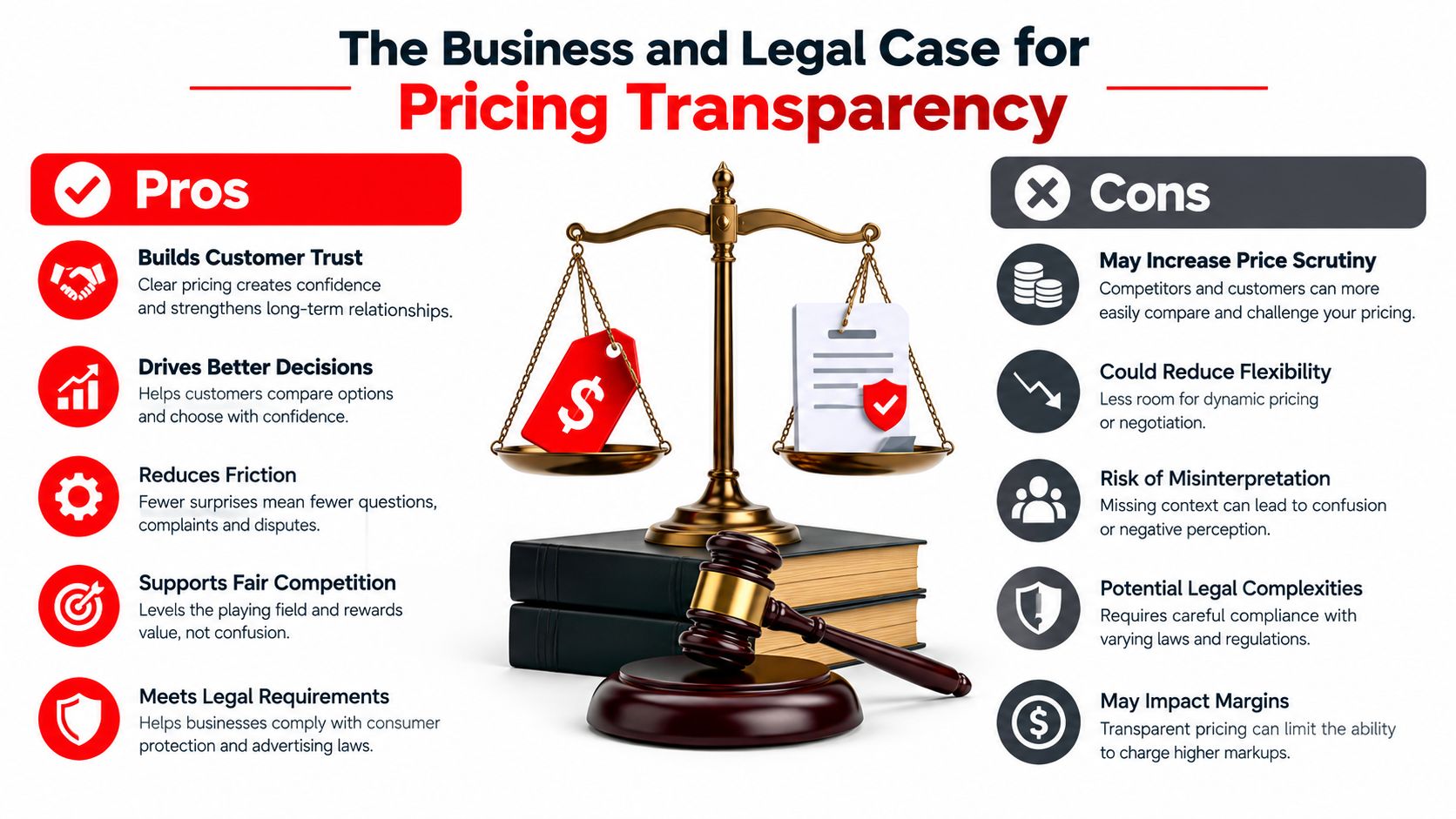
Pricing transparency isn't a decorative customer-service feature. It protects the relationship before work begins and gives the shop a defensible record of what the customer approved.
Customers don't need every internal calculation, but they do need a clear description of labor, parts, shop supplies, taxes, diagnostic charges, and any conditions that could change the total. An estimate should explain what the vehicle needs, why it needs it, and what the customer is authorizing. An invoice should make it easy to compare the completed work with that authorization.
Transparency doesn't expose a weak business
Some advisors worry that showing a detailed price gives customers too much information. That concern usually reflects an unclear sales process, not a pricing problem. A transparent estimate lets the advisor explain value before the customer compares totals elsewhere.
The stronger objection is that customers may decline more work when every line is visible. In practice, hiding recommendations doesn't create approval. It creates suspicion. A documented inspection, a standardized labor basis, and a clean estimate give customers a reason to say yes, while a vague total forces them to decide without context.
A mobile approval workflow also matches customer expectations. A survey of U.S. drivers found that 54% wanted a digital vehicle inspection tool they could view on a mobile device to authorize recommended repairs, while 50% wanted clear pricing quotes and estimates. Those findings are reported by.
Build a defensible approval record
A strong estimate should preserve:
- The vehicle identity: VIN, plate, mileage, and service history.
- The recommendation: The observed condition and proposed repair.
- The price logic: Labor, parts, fees, taxes, and applicable alternatives.
- The decision: Approved, declined, or deferred work.
- The authorization: A timestamped digital acceptance or signature.
That record supports consistent internal behavior and helps the shop answer disputes with documentation instead of recollection. It also discourages unauthorized upselling because every additional operation requires a visible customer decision.
Owner's standard: If an advisor can't explain an estimate line in plain language, the workflow isn't ready for customer approval.
Implementation Strategies and Communication Scripts
Software adoption fails when the shop treats it as an installation project. The platform may be technically configured, but advisors still use paper notes, technicians send informal messages, and customers receive inconsistent explanations. Management needs a simple operating procedure that every role can follow.
Make the inspection routine predictable
The technician should begin with the same basic sequence for every vehicle. Confirm the vehicle record, complete the relevant inspection template, attach useful photos or video, classify each finding, and submit the report to the repair order.
The advisor then reviews the evidence before contacting the customer. The advisor shouldn't forward a raw checklist and expect the customer to interpret it. The report needs a recommendation, a reason, a price, and a clear choice.
A practical customer script is:
“The inspection found wear at this component. The attached photo shows the condition, and the estimate separates the part, labor, and related charges. The customer can approve this repair now, decline it, or defer it for later service.”
That wording is direct and non-defensive. It explains the evidence without pressuring the customer.
Explain labor without sounding evasive
Advisors should avoid saying that a labor figure is “what the system charges.” The software is a reference and workflow tool. The shop remains responsible for setting and explaining its pricing.
A stronger script is:
“The labor line uses the shop's standardized time reference and current labor rate. That keeps estimates consistent across similar repairs. The invoice will show the approved work and any authorized changes separately.”
If a customer challenges the total, the advisor should return to the estimate structure:
“The total includes the documented repair, the parts selected, the labor calculation, and applicable charges. The customer can approve the complete repair, approve selected work, or ask which items can safely be deferred.”
Train around actions, not buttons
Training should follow the vehicle journey rather than the software menu. Each employee should practice a complete job from appointment through payment.
- Advisors: Create the appointment, confirm vehicle data, send the estimate, and document approval.
- Technicians: Open the assigned repair order, complete the inspection, attach evidence, and update status.
- Managers: Review deferred work, exceptions, margin indicators, and uncollected invoices.
- Front desk staff: Confirm customer details, send documents, and verify payment completion.
Management should inspect a small sample of completed repair orders and look for missing photos, unexplained price changes, and approvals that don't match the final invoice. That review reinforces the process better than another generic software lesson.
Measuring Impact Through Analytics and Reporting
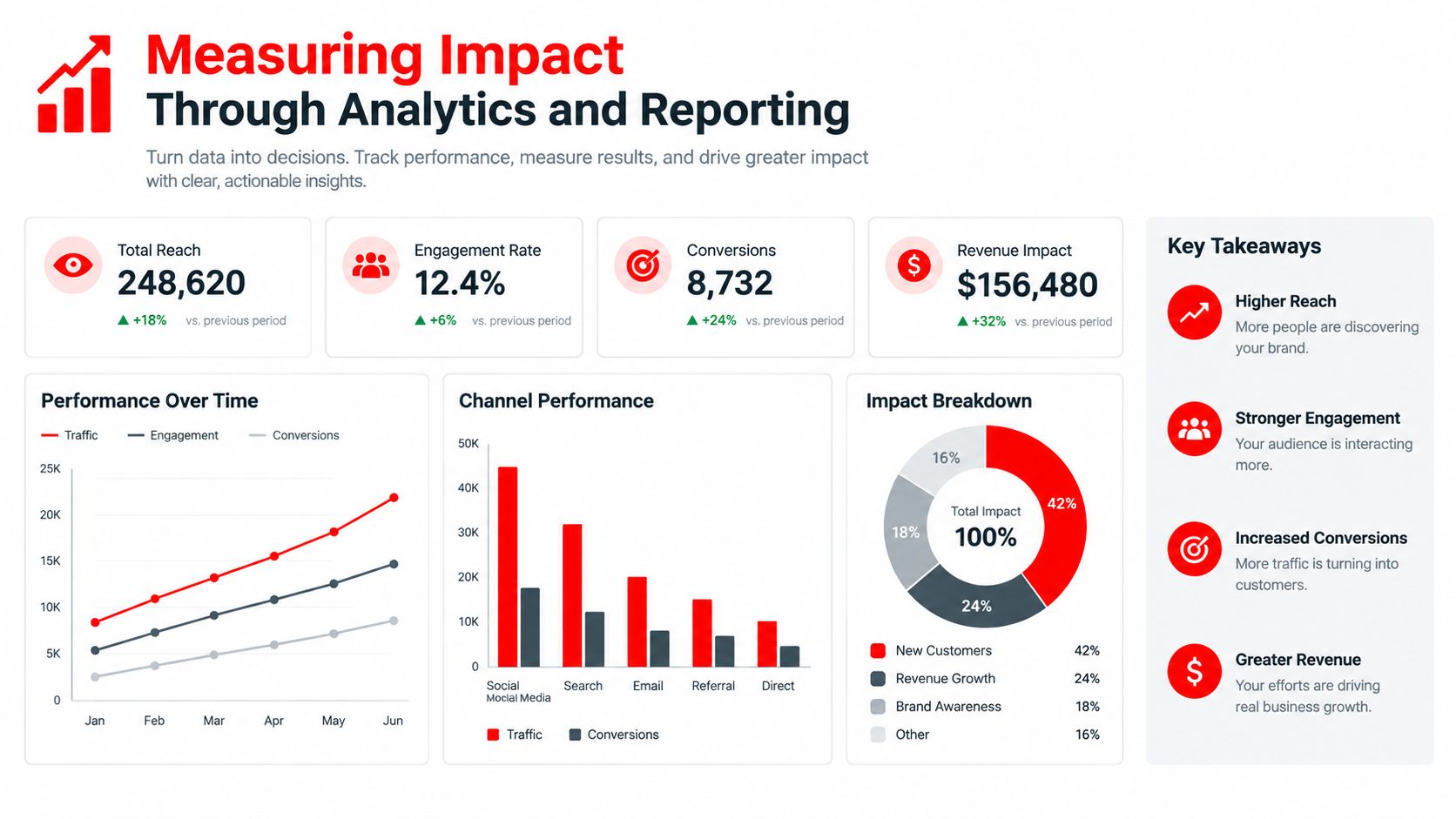
A platform earns its keep when the shop can see where work stalls and whether the process protects revenue. Owners should measure each handoff, not rely on a single sales total.
Start with a baseline. Track days to payment on the last 50 repair orders before and after adopting integrated payments, then compare the median rather than the average. Record approval, deferral, and decline rates for recommendations, along with corrections made before invoicing. These measures expose workflow bottlenecks that revenue reports conceal.
Technician efficiency should be compared with the standardized labor baseline used in estimates. Managers should review whether photo-supported inspections lead to clearer customer decisions and whether advisors follow up on deferred work. The purpose is to locate weak handoffs and training gaps, not punish employees.
Use a dashboard that follows the money
A useful dashboard connects operational activity with financial outcomes.
- Estimate quality: Compare quoted labor and parts with completed repair orders to find recurring under-quoting.
- Inspection performance: Review recommendations by approved, declined, and deferred status, including whether supporting media was attached.
- Technician efficiency: Compare actual work with the standardized estimate baseline.
- Average repair order: Track whether complete inspections and clear recommendations change the value of approved work.
- Collection speed: Monitor completed invoices, outstanding balances, and payment status.
- Deferred work: Track open recommendations so they return to the customer workflow.
Use RedAppy's online invoicing analysis as a comparison point, then validate payment results against the shop's own baseline. The useful test is whether integrated payment reduces days to payment, follow-up time, or unresolved balances.
Turn reports into management decisions
Analytics matter only when managers act on them. If approval rates remain low despite complete inspections, review recommendation wording, photo quality, and advisor follow-up. If labor variance repeats within one repair category, check the labor reference, technician notes, parts setup, and pricing rules.
The dashboard should also expose administrative drag. Repeated corrections, duplicate entries, and unresolved sync errors consume staff time and weaken customer confidence. Assign an owner to each issue, set a review date, and confirm whether the correction improves the next group of repair orders. That turns reporting into operational control rather than another screen to monitor.
Real-World Application for Independent Shops
Consider an independent shop with several service bays, a busy front counter, and no dedicated person assigned to chase every administrative detail. Before a connected platform, an appointment may begin with a phone note, continue through a paper inspection, and finish with an invoice assembled from separate records. The customer waits while the advisor locates information, and the manager discovers incomplete documentation after the vehicle leaves.

One vehicle, one continuous record
The improved process begins before arrival. The customer books online, the shop captures the vehicle details, and the team sees the appointment on a shared calendar. At check-in, a VIN scan or vehicle lookup confirms the record, while the technician receives the assigned repair order instead of a handwritten summary.
The technician completes a structured inspection on a phone or tablet. Findings include photos or video, and each recommendation carries a status that the advisor can explain. The customer receives the report digitally, reviews the evidence, and approves selected work without waiting at the counter.
The approved items flow into the estimate and repair order. Labor guidance gives the advisor a consistent baseline, parts information supports ordering, and the shop board shows whether the vehicle is awaiting diagnosis, approval, repair, or payment. Nobody needs to copy the same information into separate documents.
The customer sees the logic
A customer who sees a photograph of a worn component receives more than a verbal recommendation. The advisor can explain the condition, connect it to the repair, and show the exact price before authorization.
The customer may still decline the work. That isn't a failed workflow. A clean system records the decision as deferred, preserves the recommendation in service history, and gives the shop a legitimate reason to follow up later.
After completion, the customer receives a professional invoice with the approved work and any authorized changes. Online payment closes the transaction, while the vehicle record retains the service history for the next visit. Shops that want to strengthen the post-service relationship can also review practical guidance on from RecensioAI B.V., especially when the team wants feedback requests to follow a consistent customer experience.
The operational gain comes from continuity, not from one flashy feature. The advisor spends less time reconstructing facts, the technician gets clearer assignments, and the customer can make a decision with evidence and pricing in front of them.
Choosing the Right Platform for Your Shop
A single-bay garage, a mobile mechanic, and a multi-location repair group shouldn't evaluate software in exactly the same way. The common requirement is workflow continuity, but the permissions, reporting, inventory controls, and accounting connections must match the operation.
| Shop situation | Minimum platform requirement | Vendor question |
|---|---|---|
| Solo or very small operation | Mobile access, estimates, invoices, payments, vehicle history | Can the complete job be handled without returning to a desktop? |
| Independent shop with several roles | Role-based access, inspections, approvals, scheduling, parts visibility | Can each employee see and update only the work relevant to that role? |
| Growing operation | Analytics, standardized labor data, accounting sync, deferred-work tracking | Can management identify workflow delays and pricing variance? |
| Multiple locations | Location-level reporting, shared records, permissions, inventory controls | Can owners compare locations without duplicating administrative work? |
Ask the questions vendors avoid
A serious evaluation should include a live workflow test, not just a list of promised features.
- Data ownership: Can the shop export customers, vehicles, inspections, estimates, invoices, and service history in a usable format?
- QuickBooks behavior: Does synchronization move invoices, payments, parts, and labor cleanly, and how are corrections handled?
- Approval control: Does a customer approval update the repair order without manual copying?
- Inspection structure: Can photos, video, findings, deferred work, and service history remain tied to the vehicle?
- Pricing transparency: Can the estimate show labor, parts, fees, taxes, and authorized changes clearly?
- Contract flexibility: Are month-to-month terms available, and can the shop change its setup as the operation develops?
- Access control: Can managers, advisors, technicians, and outside accountants receive appropriate permissions?
RedAppy is one example of an all-in-one platform that combines digital inspections, estimates, invoicing, online payments, parts ordering, inventory visibility, vehicle history, scheduling, analytics, and a Kanban-style Digital Shop Board. Its built-in AI Repair Assistant provides labor times, diagnostic guidance, and shop insights, while the platform also supports customer and vehicle lookup by name, plate, or VIN.
The purchasing decision should come down to whether the system removes a bottleneck the shop can identify today. If the vendor can't demonstrate that improvement with the shop's own workflow, the feature list doesn't matter.
RedAppy gives independent repair shops one connected workflow for inspections, estimates, approvals, invoices, payments, parts, scheduling, and performance reporting. Visit RedAppy to review concrete feature examples, or contact the team through the RedAppy contact page for a direct conversation about the shop's bottlenecks.
Ready to Transform Your Shop?
RedAppy helps auto repair shops create professional digital estimates with photos and videos, send them instantly via text or email, and get customer approvals in seconds. No credit card required to start.