
Auto Repair Shop Management Software Reviews: Best Tools for 2025
Running an auto repair shop means juggling estimates, parts, technicians, inspections, and payments — all at once. Finding the right auto repair shop management software reviews can be the difference between a shop that runs smoothly and one that constantly feels behind. According to the Auto Care Association, the auto repair industry generates over $115 billion annually in the U.S., yet many shops still rely on paper records and phone calls to manage daily operations.
The right software cuts admin time, reduces missed approvals, and gives you a clear picture of shop performance in real time. But with dozens of platforms on the market — each claiming to do it all — choosing the wrong one wastes money and creates more headaches than it solves. This guide cuts through the noise.
Below, you'll find honest, practical breakdowns of the leading shop management tools available in 2025. Each review covers what the platform does well, who it's built for, and where it falls short. Whether you run a single-bay garage or a multi-location operation, there's a tool on this list that fits how your shop works.
Table of Contents
- How We Evaluated Auto Repair Shop Management Software
- RedAppy — Best All-in-One Shop Management Platform for Modern Shops
- Mitchell 1 — Best for Repair Data Depth and OEM Integration
- Conclusion
- Frequently Asked Questions
How We Evaluated Auto Repair Shop Management Software
Choosing the right shop management software comes down to a handful of factors that actually move the needle for a running business. We looked at core workflow coverage, real-world usability, pricing clarity, and whether the platform can grow with a shop over time.
Evaluation Criteria
Here's what we measured across every platform in this guide:
- Core features: Estimates, digital inspections, invoicing, parts ordering, and payment processing. These are non-negotiable for any modern shop.
- Ease of use: How quickly can a service writer or technician get up to speed? A powerful tool that nobody uses is worthless.
- Pricing transparency: Hidden fees and per-module add-ons are common in this space. We flagged them where we found them.
- Integrations: Does the platform connect with accounting tools, parts suppliers, and payment processors your shop already uses?
- Scalability: Can it handle one bay today and five locations later without forcing a platform switch?
- ROI indicators: Time saved on admin tasks, inspection approval rates, and measurable revenue impact wherever data was available.
We focused on platforms with verified user reviews, publicly available pricing, and meaningful feature differentiation — not just brand recognition.
Platform Comparison Table
| Platform | Starting Price | Key Features | Best For | Standout Differentiator |
|---|---|---|---|---|
| RedAppy | Transparent, month-to-month | Digital Shop Board, AI Repair Assistant, inspections, parts ordering, analytics, branded website | Modern shops wanting all-in-one simplicity | Built-in AI guidance + included branded website |
| Mitchell 1 | ~$200–$400+/mo (varies) | OEM repair data, labor guides, wiring diagrams, Manager SE | Shops needing deep repair data | Broadest OEM repair information database |
| Tekmetric | ~$199+/mo | Cloud reporting, digital inspections, integrations ecosystem | Data-driven, growth-focused shops | Reporting depth and third-party integrations |
| Shop-Ware | ~$299+/mo | Real-time job updates, photo inspections, customer approvals | Transparency-first customer experience | Customer-facing communication tools |
Pricing in this space shifts frequently. Always request a current quote directly from the vendor before making a budget decision.
What "Best" Actually Means Here
No single platform is the best fit for every shop. A two-tech independent garage has different needs than a multi-location operation running 40 repair orders a day. Throughout this guide, each review is framed around a specific use case — so you can match the tool to your actual situation rather than chasing a generic "top pick."
According to a 2023 survey by the, shops that adopted dedicated management software reported an average 20% improvement in workflow efficiency within the first six months. That number is meaningful context for evaluating whether the monthly cost of any platform pays for itself.
The platforms reviewed here represent the strongest options across different shop types and priorities as of 2025. For a deeper look at how to choose shop management software for the first time, that guide covers the setup process and what to watch for in a demo.
RedAppy — Best All-in-One Shop Management Platform for Modern Shops
RedAppy is an all-in-one shop management platform designed for auto repair businesses that want to replace disconnected tools with a single, streamlined system. It covers the full job lifecycle — from the first customer call to final payment — without requiring multiple subscriptions or manual data transfers between apps.
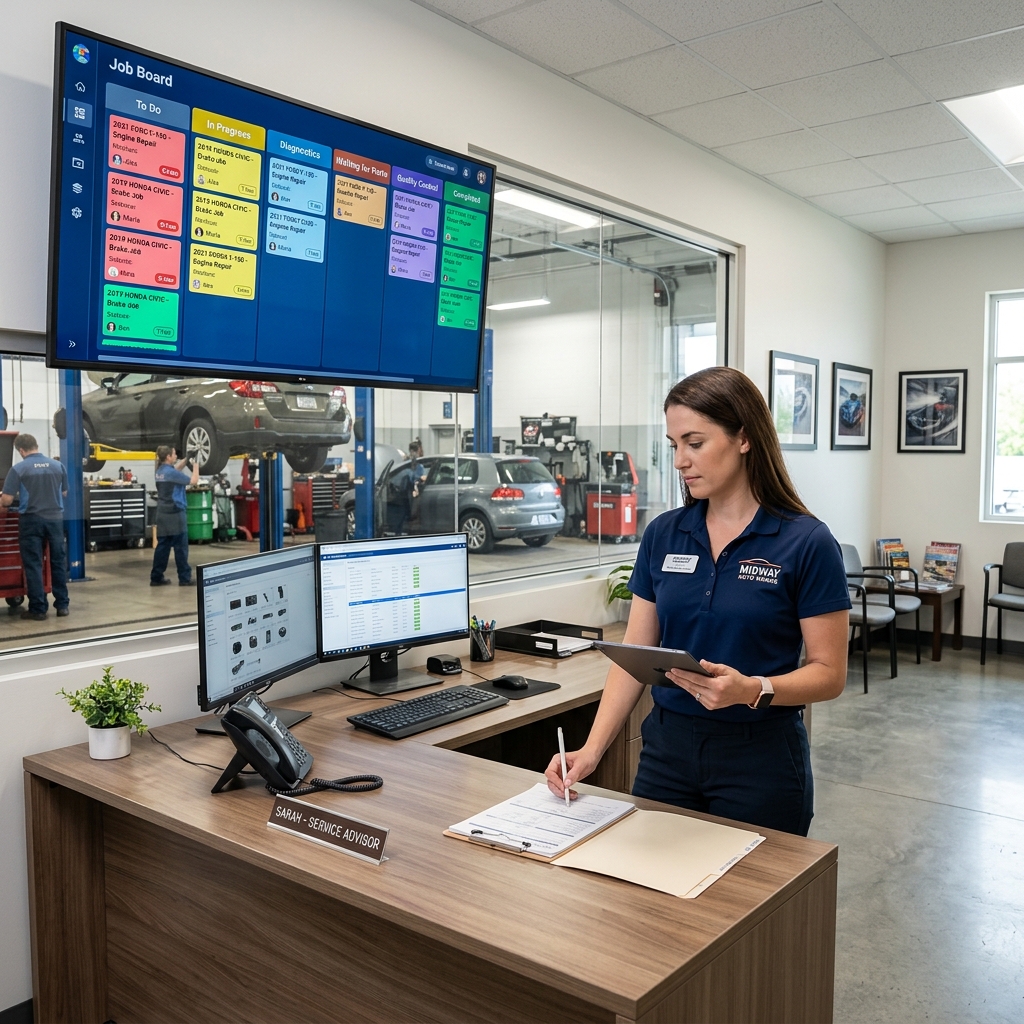
The platform's Digital Shop Board is the operational centerpiece. It uses a Kanban-style layout to show every active job's status at a glance, so service writers and technicians always know what's waiting, what's in progress, and what's ready for pickup. In practice, this alone eliminates a lot of the "where's this car at?" back-and-forth that slows down busy shops.
Beyond the board, RedAppy handles digital inspections with photo documentation, instant estimates, one-click invoicing, online payments, and multi-supplier parts ordering with real-time inventory visibility. Vehicle history, customer lookup by name, plate, or VIN, and a team calendar keep all shop information in one place. Every plan also includes a branded website with contact forms and optional used-car listings — a feature most competitors charge separately for or don't offer at all.
Shops that consolidate on a single platform stop losing revenue to administrative gaps — missed approvals, delayed invoices, and parts ordered from memory instead of real-time stock data.
Best for: Independent shops and multi-location operations that want a modern, integrated platform without stitching together separate tools for inspections, invoicing, and customer communication.
Limitations: Shops heavily reliant on deep OEM repair data (wiring diagrams, technical service bulletins) will still need a dedicated repair information database like Mitchell 1 alongside RedAppy. There's also a short learning curve for teams switching from paper-based or legacy software workflows, though the interface is designed to reduce that friction.
RedAppy's AI Repair Assistant and Analytics
The AI Repair Assistant is one of RedAppy's most practical differentiators. It delivers labor time estimates, diagnostic guidance, and shop-specific insights on demand — directly inside the platform, without switching to a separate lookup tool. In practice, this means a technician can pull up labor times for a brake job or get diagnostic direction on a check engine light without leaving the active repair order.
This matters because technician time spent on lookups adds up fast. When labor time data and diagnostic prompts live inside the same workflow where the estimate gets built, the time from inspection to approved estimate shrinks noticeably.
The analytics dashboard tracks metrics that directly reflect shop health:
- Revenue by time period — daily, weekly, monthly views
- Technician efficiency — hours flagged vs. hours billed per tech
- Average repair order (ARO) — a key indicator of upsell performance
- Repeat business rate — tracks how often customers return
| Metric | What It Tells You | Why It Matters |
|---|---|---|
| Technician Efficiency | Billed hours vs. clocked hours per tech | Identifies underperformers or scheduling gaps |
| Average Repair Order | Revenue per vehicle visit | Benchmarks upsell effectiveness |
| Repeat Business Rate | Returning customer percentage | Signals customer satisfaction and retention |
| Revenue Tracking | Total revenue by period | Flags slow periods before they become problems |
Knowing your ARO and technician efficiency numbers weekly — not monthly — gives you time to course-correct before a slow period becomes a revenue problem.
From experience, shops that monitor technician efficiency regularly catch scheduling and productivity issues weeks earlier than shops that rely on end-of-month reports. RedAppy surfaces these numbers in real time, not after the fact.
Pricing and ROI
RedAppy uses transparent, tiered pricing with month-to-month terms — no long-term contracts required. This is a meaningful difference from legacy platforms that lock shops into annual agreements before they've validated whether the software fits their workflow.
RedAppy reports typical results of saving 10+ admin hours per week, which at average shop labor rates translates to measurable recovered revenue in the first months of use. The included branded website adds additional value that would cost $100–$300/month as a standalone service from a third-party provider.
For a direct value comparison against the broader market, see how RedAppy stacks up in our full platform comparison table.
What you get across plans:
- Digital Shop Board and job tracking
- Digital inspections with photo documentation
- Instant estimates and one-click invoicing
- Online payment processing
- Multi-supplier parts ordering
- AI Repair Assistant
- Real-time analytics dashboard
- Branded website with contact forms and optional used-car listings
The month-to-month model makes RedAppy practical for single-bay shops testing their first management platform, while the feature depth and scalability serve multi-location operations that need consistent workflows across sites. Shops considering upgrading from spreadsheets or legacy software will find the onboarding straightforward relative to enterprise-tier alternatives.
Visit RedAppy's official site to review current pricing tiers and customization options.
RedAppy's AI Repair Assistant and Analytics
The AI Repair Assistant is one of RedAppy's most practical differentiators. Instead of switching between labor guides, diagnostic databases, and your shop management system, everything lives in one place. In practice, this means a technician can pull up labor times, get diagnostic guidance, and surface shop-specific insights without leaving the platform.
What the AI Repair Assistant does:
- Delivers labor time estimates on demand, so advisors can build accurate quotes faster
- Provides diagnostic guidance to help technicians work through unfamiliar jobs with more confidence
- Surfaces shop insights — patterns in vehicle history, repeat issues, and workflow bottlenecks — that would otherwise require manual digging
Shops that rely on separate labor guides and diagnostic tools lose time on every single repair order. Having these tools embedded in the workflow removes a real friction point.
The analytics dashboard is where RedAppy earns its claim as a management tool, not just a workflow tool. It tracks revenue, technician efficiency, average repair order (ARO), and repeat business — the four metrics that most directly predict whether a shop is growing or stagnating.
What the analytics dashboard tracks:
- Revenue trends — daily, weekly, and monthly breakdowns so you can spot slow periods before they become problems
- Technician efficiency — billed hours vs. clocked hours, which highlights your strongest performers and where training gaps exist
- Average repair order — a key benchmark; according to industry data from the, tracking ARO consistently is one of the clearest indicators of service advisor performance
- Repeat business rate — shows customer retention without needing a separate CRM report
From experience, most shop owners either don't track these metrics at all, or they pull them manually from spreadsheets once a month. By the time they see a problem, it's already a trend. Real-time dashboards close that gap.
The combination of AI-assisted repair guidance and live analytics is specifically useful for:
- Service advisors building estimates quickly without waiting on a technician to look up labor times
- Shop owners who want to manage by data instead of gut feel
- Multi-location operators who need consistent performance visibility across shops without consolidating separate reports
One honest limitation: the AI Repair Assistant is most valuable when your job history and vehicle data are in RedAppy. Shops migrating from another system will need time to build that data foundation before the shop insights feature reaches its full potential. The diagnostic guidance and labor times work from day one, but the shop-specific intelligence improves with use.
Pricing and ROI
RedAppy uses transparent, tiered pricing with month-to-month terms — no long-term contracts required. This is a significant advantage over competitors like Mitchell 1 and Tekmetric, which often lock shops into annual commitments before they've fully evaluated the software.
What you get at each tier: Every RedAppy subscription includes the core platform — digital inspections, estimates, invoicing, online payments, multi-supplier parts ordering, the Kanban Digital Shop Board, and a branded website. Higher tiers unlock additional users, advanced analytics, and expanded customization options. This structure means a single-bay shop isn't paying for features built for a 10-bay operation.
Month-to-month billing reduces the risk of switching. You're not tied to a platform that stops working for you just because you signed a contract.
How the ROI Math Works
RedAppy reports that shops typically save 10+ admin hours per week after switching from manual processes or disconnected software. At an average shop labor rate of $125/hour, that's roughly $1,300 in recovered productivity every week — or around $67,600 annually.
The photo-rich digital inspection workflow also drives measurable revenue gains. Shops that present customers with visual evidence of needed repairs consistently approve more work. According to industry data from the, shops using digital inspections see approval rates increase by 20–40% compared to verbal-only estimates.
Here's a simplified first-year value breakdown for a typical independent shop:
| ROI Factor | Estimated Annual Value |
|---|---|
| Admin hours recovered (10 hrs/wk @ $125) | ~$67,600 |
| Increased approvals from digital inspections | Variable — typically 20–40% lift |
| Reduced no-shows via team calendar | Fewer lost appointments |
| Parts ordering efficiency (multi-supplier) | Reduced markup loss, faster turnaround |
| Branded website (included) | Saves $500–$2,000/yr vs. third-party web builds |
How It Compares on Value-Per-Dollar
In practice, most standalone shop management platforms charge separately for their website, digital inspections, and parts ordering integrations. RedAppy bundles all of these into one subscription, which changes the true cost comparison significantly.
| Platform | Contract Terms | Website Included | AI Features | Starting Price Range |
|---|---|---|---|---|
| RedAppy | Month-to-month | ✅ Yes | ✅ Yes | Competitive tiered pricing |
| Tekmetric | Annual typical | ❌ No | Limited | Higher per-feature cost |
| Mitchell 1 Manager SE | Annual | ❌ No | ❌ No | Quote-based |
| Shop-Ware | Annual | ❌ No | ❌ No | Premium pricing |
The included branded website alone offsets a meaningful portion of RedAppy's monthly cost for shops that would otherwise pay a separate vendor.
Who Gets the Most Value
RedAppy's pricing model suits shops that are scaling or optimizing — not shops that want the bare minimum. A single-bay garage with low volume may not fully leverage the analytics or multi-location features, but will still benefit from the time savings and customer-facing tools.
From experience, the strongest ROI cases are shops that:
- Currently use paper estimates or spreadsheets
- Struggle with parts ordering across multiple suppliers
- Lack a professional web presence
- Want to track technician performance without a separate HR tool
Shops already running a mature software stack may see a smaller initial lift, but the month-to-month terms mean there's no penalty for trying. You can explore RedAppy's full feature set to map which tools apply directly to your workflow before committing.

Mitchell 1 — Best for Repair Data Depth and OEM Integration
Mitchell 1 has been a trusted name in repair information since 1918, and its modern platform reflects more than a century of technical data collection. The core offering combines, its repair information system, with Manager SE, its shop management module. Together, they give shops access to OEM-accurate repair procedures, wiring diagrams, labor times, and TSBs (Technical Service Bulletins) — all in one ecosystem.
What Mitchell 1 Does Best
ProDemand is widely regarded as one of the most comprehensive repair databases available to independent shops. According to Mitchell 1, the platform covers over 1 million vehicle applications with real-world repair data sourced from actual shop fixes, not just OEM manuals. That combination of factory procedures and real-world validation is what separates it from many competitors.
Manager SE handles the shop management side — estimates, work orders, invoicing, and parts ordering. It integrates directly with ProDemand, so technicians can pull labor times and repair procedures without switching platforms.
Mitchell 1 is especially strong for:
- Shops that handle complex diagnostics and need accurate wiring diagrams
- Multi-line repair facilities working across a wide range of makes and models
- Service advisors who need fast, defensible labor time lookups for estimates
Mitchell 1 vs. Alldata
A common question among shop owners is whether Mitchell 1 or offers better repair data. Both pull from OEM sources, but the differences matter in practice.
| Feature | Mitchell 1 (ProDemand) | Alldata |
|---|---|---|
| Data source | OEM + real-world repair data | OEM-only |
| Wiring diagrams | Side-by-side interactive diagrams | Standard OEM diagrams |
| Labor guides | Mitchell 1 proprietary guide | Alldata + Motor guides |
| Shop management | Manager SE (integrated) | Alldata Manage (separate) |
| Best for | Diagnostics + complex repairs | Straightforward OEM reference |
| Pricing | Subscription-based, varies by module | Subscription-based, per-vehicle or flat |
Mitchell 1 tends to win on diagnostic depth. Alldata tends to win on raw OEM accuracy for shops that want factory procedures and nothing else.
From experience, shops that frequently tackle European vehicles or late-model diagnostics tend to prefer ProDemand because of its interactive wiring diagrams and real-world fix data. Alldata remains competitive for shops doing mostly domestic vehicles with straightforward repair needs.
Limitations to Know
Mitchell 1's biggest friction points are pricing complexity and setup. The platform is sold in modules — ProDemand and Manager SE are priced separately, and add-ons like SureTrack (their real-world repair community data) layer on additional cost. For smaller independent shops, this can push the monthly total higher than expected.
Manager SE is also a desktop-based system, which means it lacks the cloud flexibility that newer platforms offer. Remote access is possible but requires additional configuration. Shops looking for a fully cloud-native experience will feel that limitation quickly.
Use case: Mitchell 1 is the right call for established shops — particularly those with 3 or more bays — where diagnostic accuracy and OEM data depth directly affect technician efficiency and customer trust. It works best when repair information and shop management need to live in the same ecosystem, and where the team has the bandwidth to learn a feature-rich platform.
For shops that want a lighter operational footprint with built-in AI guidance and workflow automation, a platform like RedAppy may cover daily needs more efficiently without requiring separate subscriptions for data access.
Conclusion
Picking the right shop management software comes down to three things: how your shop operates today, where you want to take it, and what problems cost you the most time and money right now.
Here's a straightforward way to think through the options reviewed above.
RedAppy suits shops that want one platform to handle everything — from the first customer call to the final payment. The AI Repair Assistant, digital inspections, Kanban board, and built-in website make it a strong fit for independent shops and growing multi-location operations that don't want to stitch together separate tools. Based on reported results like saving 10+ admin hours per week, the ROI case is clear for shops currently running on paper or spreadsheets.
Mitchell 1 is the right call when repair data depth is non-negotiable. If your technicians regularly work on complex OEM diagnostics, wiring, and labor guides, Mitchell 1's Manager SE platform gives them the reference layer they need alongside shop operations. It's less about workflow simplification and more about technical authority.
Tekmetric fits shops with a data-first mindset — service managers who track KPIs closely, run multi-location reporting, or depend on a specific stack of third-party integrations. The reporting suite is genuinely strong, though the pricing makes more sense once a shop is consistently producing high repair order volume.
Shop-Ware works best when customer transparency is the primary growth lever. Shops in competitive markets where trust and communication drive referrals will find the photo-rich, real-time approval workflow a meaningful differentiator.
The platforms that deliver the strongest ROI aren't necessarily the ones with the most features — they're the ones that match how your team actually works.
No single platform wins across every shop type. But if you're starting from scratch or replacing an outdated system, the fastest path to results is usually an all-in-one solution that reduces the number of tools your team has to switch between daily.
Explore how RedAppy simplifies shop management end to end — including a walkthrough of the Digital Shop Board, AI Assistant, and built-in customer-facing tools that help shops convert more estimates and retain more customers.
Frequently Asked Questions
What is the best software for managing an auto repair shop?
Mitchell 1 Manager SE, Shop-Ware, and Tekmetric are consistently rated among the best auto repair shop management software platforms. Mitchell 1 leads in market share with comprehensive features including repair orders, scheduling, inventory, and customer history. Tekmetric is highly rated for its cloud-based interface and real-time reporting dashboards.
What's better than Alldata?
Mitchell 1 ProDemand and Identifix are widely considered strong alternatives or upgrades to Alldata, offering more intuitive interfaces and broader OEM data coverage. Mitchell 1 ProDemand is particularly praised for its integrated SureTrack real-world fix data, which helps technicians resolve issues faster. Many shops also use both platforms simultaneously to cross-reference diagnostic and repair information.
What is the best software for managing an automobile workshop?
Shop-Ware and Tekmetric are top-rated choices for automobile workshop management, offering cloud-based access, digital vehicle inspections, and integrated customer communication tools. Shop-Ware stands out for its parts-ordering integrations and transparent workflow features. Both platforms are scalable, making them suitable for small independent shops and larger multi-location operations alike.
What is the best accounting software for an auto repair shop?
QuickBooks Online is the most widely used accounting software among auto repair shops due to its broad feature set and easy integration with shop management platforms like Tekmetric and Mitchell 1. It handles invoicing, payroll, tax reporting, and expense tracking efficiently. Some shops prefer Xero as a QuickBooks alternative for its simpler interface and competitive pricing.
Ready to Transform Your Shop?
RedAppy helps auto repair shops create professional digital estimates with photos and videos, send them instantly via text or email, and get customer approvals in seconds. No credit card required to start.