
Auto Repair Shop Photos: How to Shoot and Use Them
A technician has found a leaking component, the estimate is ready, and the customer is waiting for an explanation. The attached photo shows a dark patch surrounded by metal. The technician knows exactly what it means. The customer doesn't even know which part of the car is pictured.
Good auto repair shop photos close that gap. Each useful image identifies the component, shows the condition clearly, and gives the service advisor something specific to explain. A caption, a visible scale where size matters, and an honest urgency label make the difference between documenting a defect and helping someone understand a repair.
Table of Contents
- The Shot List Every Vehicle Needs
- How to Frame and Light Each Shot
- How Many Photos Each Job Needs
- Naming and Storing Photos So You Can Find Them
- Captions and Labels Customers Can Follow
- Using Photos to Win Approvals and Listings
- Shop Photos for Listings and a First Week
The Shot List Every Vehicle Needs
Required photos for every vehicle
| Shot | What it proves | When to take it |
|---|---|---|
| Four corner overview shots | Vehicle condition at arrival | Every vehicle at check-in |
| VIN and odometer | Vehicle identity and mileage | Every vehicle, VIN even when plate is visible |
| Dashboard warning lights | Active warnings at arrival | When a light is on or diagnosis needs it |
| Mid-range panel shot | Where each defect sits | Every finding |
| Close-up of the defect | Exact edges and severity | Every finding and every recommended repair |
| Removed or replaced part | Why the part was needed | Every replaced component |
| Before and after pair | Completed work | Every repair order |
| Reference image of a good part | What normal looks like | When comparing wear or corrosion |
The corner shots come first, before the vehicle moves into the bay or anyone starts disassembly. Each frame should include the adjacent sides, bumper area, and wheels without cutting off the vehicle. Existing scrapes and dents belong in the intake record, clearly marked as pre-existing rather than mixed into the customer's current concern.
The VIN establishes which vehicle the file belongs to. A plate alone isn't a reliable substitute when a shop handles fleet vehicles, plate changes, or similar cars. The odometer image should show readable mileage, not a dashboard obscured by steering-wheel glare.
Coverage that follows the work
During diagnosis, the technician should capture the affected area before removing anything that explains its location. Removed parts need their own photographs while the relevant wear, break, or contamination remains visible. Completion images should document the actual operation, not just show a washed car outside the shop.
A reference image needs a clear label identifying it as an example of a serviceable component. Otherwise, the customer may mistake it for another photograph of the vehicle.
J.D. Power findings cited by show that 64% of service customers want a photo or video with their inspection, while only 26% of customers at mass-market brands received one. That gap gives shops a practical reason to make visual documentation routine rather than dependent on which technician gets the job.
Intake rule: The checklist belongs beside the vehicle, not in a training document nobody opens.
Staff also need clear boundaries between inspection records and public content. Boocoo's guide to provides useful context for organizing staff-created material without treating every bay photograph as something to publish.
The manager should print the table or save it as an intake-bay checklist, with responsibility assigned before the first vehicle arrives.
How to Frame and Light Each Shot
A phone camera is usually sufficient for documentation when the operator controls position, light, and focus. An expensive camera won't rescue a photograph taken from the wrong angle or a close-up that leaves the component unrecognizable.
The supports a context-to-detail sequence, scales positioned in the defect's plane, and camera alignment that avoids distorting damage. Those principles translate well to a working repair bay.
A repeatable capture sequence
Take the context shot first. From a few steps back, the technician should include the whole panel and nearest vehicle corner. For underbody work, recognizable landmarks such as the wheel, crossmember, or transmission housing establish location.
Move to a mid-range view. The camera's sensor plane should remain parallel to the damaged surface, with the lens aimed squarely at it. A standing shot looking downward can make a dent appear deeper or shallower and shouldn't replace the straight-on view.
Add a measurable scale. A ruler should sit in the same plane as the dent, scratch, crush damage, or leak being documented. A finger can suggest rough size, but it isn't a substitute when the advisor needs to discuss an actual measurement.
Capture the close-up. The defect should fill the frame without losing its boundaries, with the scale still visible. Digital zoom often sacrifices useful detail, so moving closer is preferable when access and focus allow it.
Control the lighting. Daylight or a steady inspection lamp usually produces a clearer starting point than direct phone flash. The operator should move the light or camera until reflections stop hiding the surface, using side light to reveal texture without relying on shadows to imply severity.
Review before attaching. Each frame needs an on-screen check for sharpness, exposure, and obstructions. Recapturing a blurred image while the vehicle is accessible is easier than discovering the problem after reassembly.
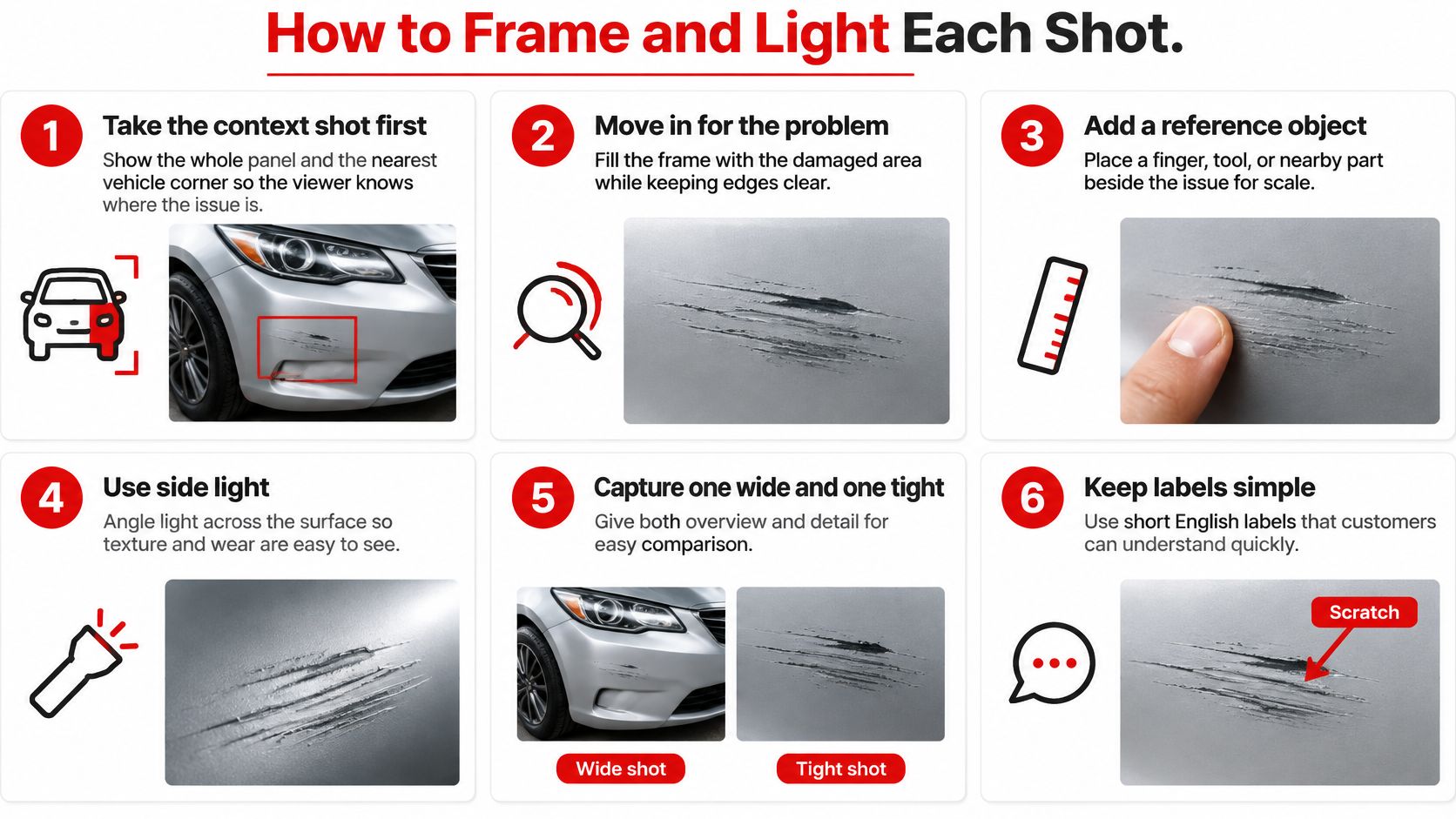
For impact analysis, damage height from the roadway should be recorded when it matters to the diagnosis. The vehicle's position and measurement reference also need to remain clear, otherwise the number lacks context.
A visible condition isn't always a complete diagnosis. A fluid stain may require cleaning and rechecking to establish its origin. Brake wear may require a gauge measurement that a surface photograph can't supply.
The finished set should pass a simple test: someone unfamiliar with the job can identify the vehicle, the affected area, and the specific defect without the technician standing beside the screen.
How Many Photos Each Job Needs
A useful photo count follows risk and repair scope, not a fixed maximum. Each safety-critical finding, recommended repair, and meaningful leak or wear item needs an identifying overview, a mid-range locator, and a scaled close-up where measurement helps. An overview can serve related findings when their locations remain unmistakable.
Near-identical frames don't make an inspection stronger. They make the advisor sort through more material and force the customer to guess which image matters. Another photograph earns its place only when it answers a different question.
An associated inspections containing 20 or more photos with repair orders approximately 30% higher than inspections containing five or fewer, and associated strong digital-inspection practices with a 27–28% increase in average repair-order value. The same report recorded a 21-minute median inspection time against a cited 30-minute best-practice benchmark.
Those are observational associations, not evidence that adding pictures alone causes higher sales. More extensive repairs can require more documentation. Better-organized shops may also explain findings, price work, and follow up more consistently.
Check usefulness before counting images
| Review field | Passing standard |
|---|---|
| Focus and exposure | The relevant condition is sharp and visible |
| Vehicle identification | The image set belongs unmistakably to the correct vehicle |
| Context plus detail | The customer can locate the part and inspect the finding |
| Estimate linkage | Every recommendation has matching visual support |
Reflections hiding a scratch, inconsistent lighting, and detail shots without location are reasons to recapture, not reasons to send a larger gallery. Missing identification should stop delivery until the correct association is confirmed.
Managers should track approval rate, average repair order, inspection completion time, declined-work recovery, and photo rework rate by technician. Comparisons over several weeks are more useful than judging the process from a single unusually large repair order. Job type and technician workload should accompany the comparison.
More images aren't the target. Fewer unanswered customer questions are.
The advisor's final review should be quick enough to run in under a minute:
- Correct vehicle: Identity matches the repair order.
- Readable finding: Nothing important is blurred, dark, or hidden.
- Complete explanation: The location and condition are both visible.
- Matching recommendation: The photo supports the operation being offered.
Naming and Storing Photos So You Can Find Them
The file structure should begin with a folder named for the repair order, not the technician's phone or the customer's first name. Inside it, intake, diagnosis, repair, and completion folders separate the stages without requiring someone to open every image.
An annotations subfolder should hold marked-up copies. The originals stay untouched, including their available metadata. This keeps an arrow added for customer explanation from becoming the only surviving version of the evidence.
A file name that works across the shop
The naming pattern should be consistent: repair order number, last six VIN characters, shot type, sequence number, and technician initials. The following values are illustrative, not details from an actual customer record.
File name parts and examples
| Name part | Example | Why it matters |
|---|---|---|
| Repair order number | RO48216 | Links the photo to its estimate |
| Last six VIN characters | A12345 | Confirms the vehicle identity |
| Shot type | corner-front-left | Groups similar photos for review |
| Sequence number | 001 | Keeps photos in estimate order |
| Technician initials | JM | Shows who took the photo |
A copyable example is RO48216_A12345_corner-front-left_001_JM.jpg. Shot descriptions should use a controlled vocabulary so one technician doesn't write left-front while another writes driver-corner for the same view.
The shortened VIN helps retrieval, but the complete VIN still belongs in the vehicle record. Sequence numbers should follow the estimate's review order rather than an arbitrary order created during upload.
Preserve the record without keeping clutter
Accidental duplicate captures can be removed during intake review under the shop's recordkeeping policy. A declined finding isn't clutter and should remain connected to the recommendation and customer response. Deleting it removes useful context if the vehicle returns with the same concern.
The folder needs a backup in a separate location, with restoration checked rather than assumed. Access should be limited to staff who need the records, especially when images contain paperwork or customer information.
The manager should establish a written retention period that matches applicable state rules and insurance requirements. A blanket deletion schedule shouldn't override an active claim, dispute, or preservation requirement.
Multi-location shops should use the same folder names and naming vocabulary everywhere. The pattern belongs on a posted bay reference, then should run for a week before staff propose changes. That trial exposes awkward names and missing shot categories without letting every location invent its own system.
Captions and Labels Customers Can Follow
A close-up of a rusty brake rotor can be accurate and still fail to explain anything. The customer may not know whether the photograph shows ordinary surface rust, significant deterioration, or a condition that requires measurements before anyone can recommend replacement.
The caption must explain what the image cannot. It should distinguish an observation from a diagnosis and a diagnosis from a repair recommendation. Rust alone shouldn't become a fix-now label because it looks dramatic.
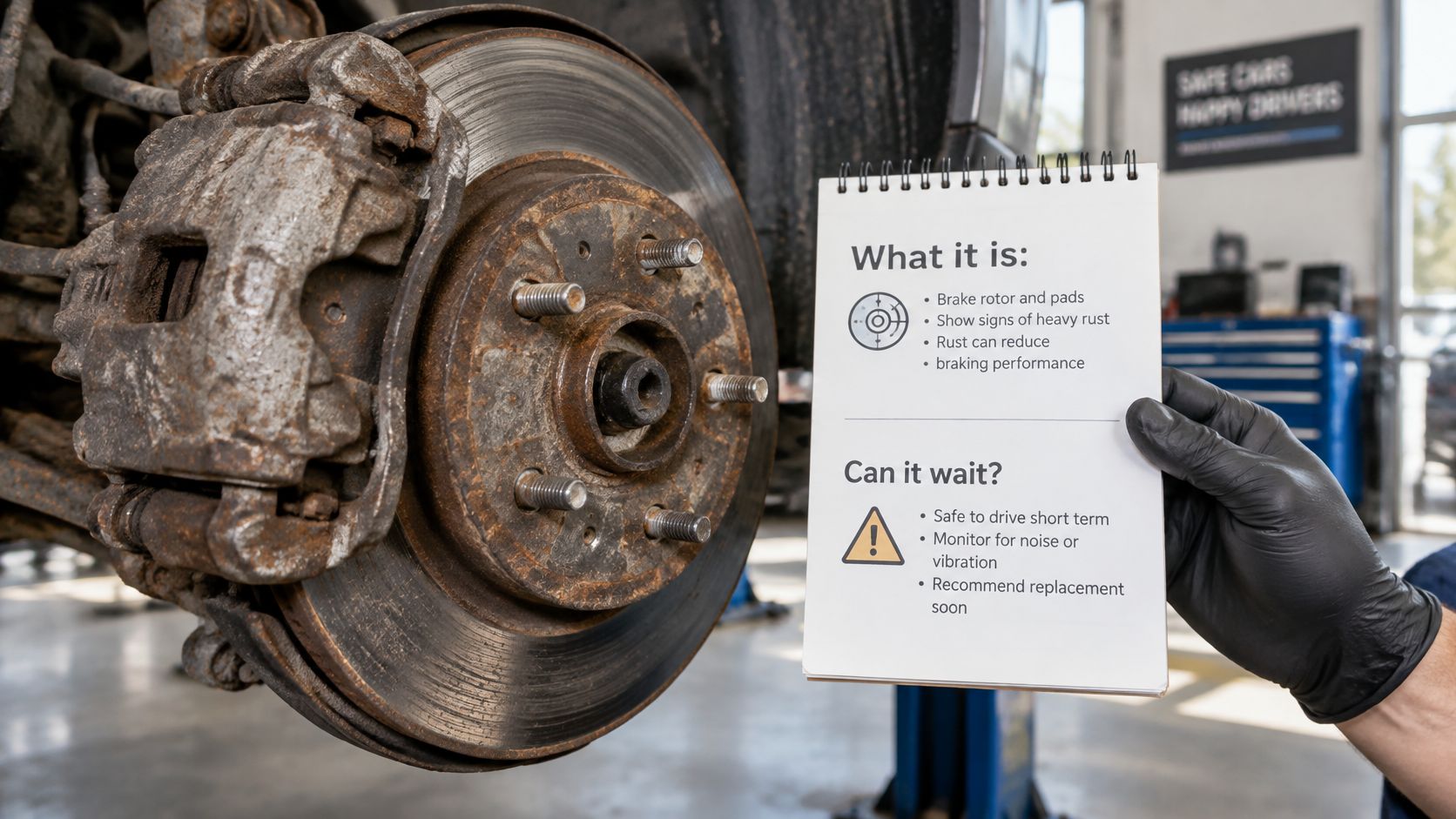
The TEXT2DRIVE consumer study announcement reports that 53% of drivers value digital inspections primarily because they improve understanding of recommended repairs. Clearer explanation deserves at least as much attention as camera quality.
Answer the customer's actual questions
A useful caption contains these elements:
- Part and location: The component's plain-language name and its position on the vehicle.
- Observed condition: What the technician found, including a recorded measurement when relevant.
- Safety or reliability consequence: What the condition affects, without predicting a failure the inspection can't establish.
- Urgency and next action: Whether the work needs immediate attention, monitoring, or no mechanical action.
Labels such as fix now, watch at next service, and cosmetic only should reflect the diagnosis, not a sales target. When timing depends on further testing, the caption should say so. A warning about declining work should describe the relevant consequence without turning uncertainty into a threat.
Arrows and circles help when the defect is small or the component is crowded. They shouldn't cover the damage, and contrast adjustments shouldn't exaggerate corrosion or conceal surrounding conditions. A clearly labeled serviceable-part reference can make an unfamiliar condition easier to interpret.
“The inspection photos sell the work for us. Customers don't argue when they can see the problem themselves.”
Ahmed S., Auto Boost
Visible evidence can make a discussion easier, but customers still deserve room to ask questions. The advisor should be ready to explain alternatives, diagnostic limits, and why the proposed timing fits the finding.
A reusable caption template keeps that explanation consistent:
Part and location: [component and vehicle position]. Finding: [visible condition and relevant measurement]. Meaning: [effect on safety or reliability]. Urgency: [plain-language label and reason]. If deferred: [likely consequence or monitoring requirement]. Recommended action: [specific operation or further test].
Using Photos to Win Approvals and Listings
A J.D. Power aftermarket-service result cited by reported a 51% approval rate when customers received photo or video documentation, compared with 24% without it. That comparison supports putting useful evidence inside the authorization process, not leaving it in a gallery the customer must interpret alone.
The strongest approval screen brings the finding, recommended operation, and price together. A customer shouldn't need to switch between a text message, an image attachment, and a separate estimate to work out which cost belongs to which problem.
Match the evidence to the decision
Each estimate line should have a directly relevant image attached, with supporting views available where necessary. A general gallery can remain useful as a job record, but it shouldn't be the only route from a recommendation to its evidence.
For a tire recommendation, the useful picture may show the wear pattern and tread-gauge reading. For a leak, it may show the confirmed source rather than fluid spread across the undertray. For brake work, the image should support the measured condition, not merely show a wheel removed.
- Separate diagnosis from repair: A warning-light photo supports the reported symptom, not a particular component replacement.
- Explain related operations: When access or component condition justifies linked work, the advisor should explain that relationship.
- Keep authorization explicit: Sending a photograph isn't the same as receiving permission to perform the repair.
Before-and-after documentation belongs with the invoice as a record of completed work. It shouldn't be used to imply that everything visible in the finished image was replaced or serviced.
Public listings need a different selection
A used-car listing should let a prospective buyer assess the vehicle rather than admire a single polished angle. Exterior views, an interior image, readable mileage, and an engine-bay photograph answer different buying questions. Disclosed defects should remain visible instead of being hidden by flattering framing.
For public shop galleries, cropping and display requirements deserve their own preparation. Netco Design LLC's guide to is a useful reference before staff export images for the listing.
The manager should choose three repair types that regularly produce hesitation, such as brakes, tires, and fluid leaks. For each, the team should identify the picture and explanation most likely to answer the customer's question before the next estimate goes out.
Shop Photos for Listings and a First Week
Inspection records explain a particular vehicle. Public shop photos help an unfamiliar customer recognize the business, find the entrance, and understand the working environment. Mixing those purposes can leave a listing full of damaged parts but no clear view of the shop itself.
A public-gallery shooting order
- Storefront: The business name should be readable in daylight, with the approach easy to recognize.
- Entrance and waiting area: The frame should show where customers enter and wait. Anyone appearing needs to have agreed to be photographed.
- Wide bay: Lifts and organized tools should be visible without exposing customer paperwork.
- Technician at work: A recognizable task, such as brakes or an alignment, gives the image a clear subject.
- Diagnostic equipment in use: A scan tool at the dashboard can show diagnostic work without revealing private vehicle information.
- Finished vehicle: A completed car in the lot should look ready for collection.
- Exterior detail: Signage or a courtesy shuttle can help customers recognize the business.
- Team photo: An uncluttered background keeps attention on the people customers will meet.
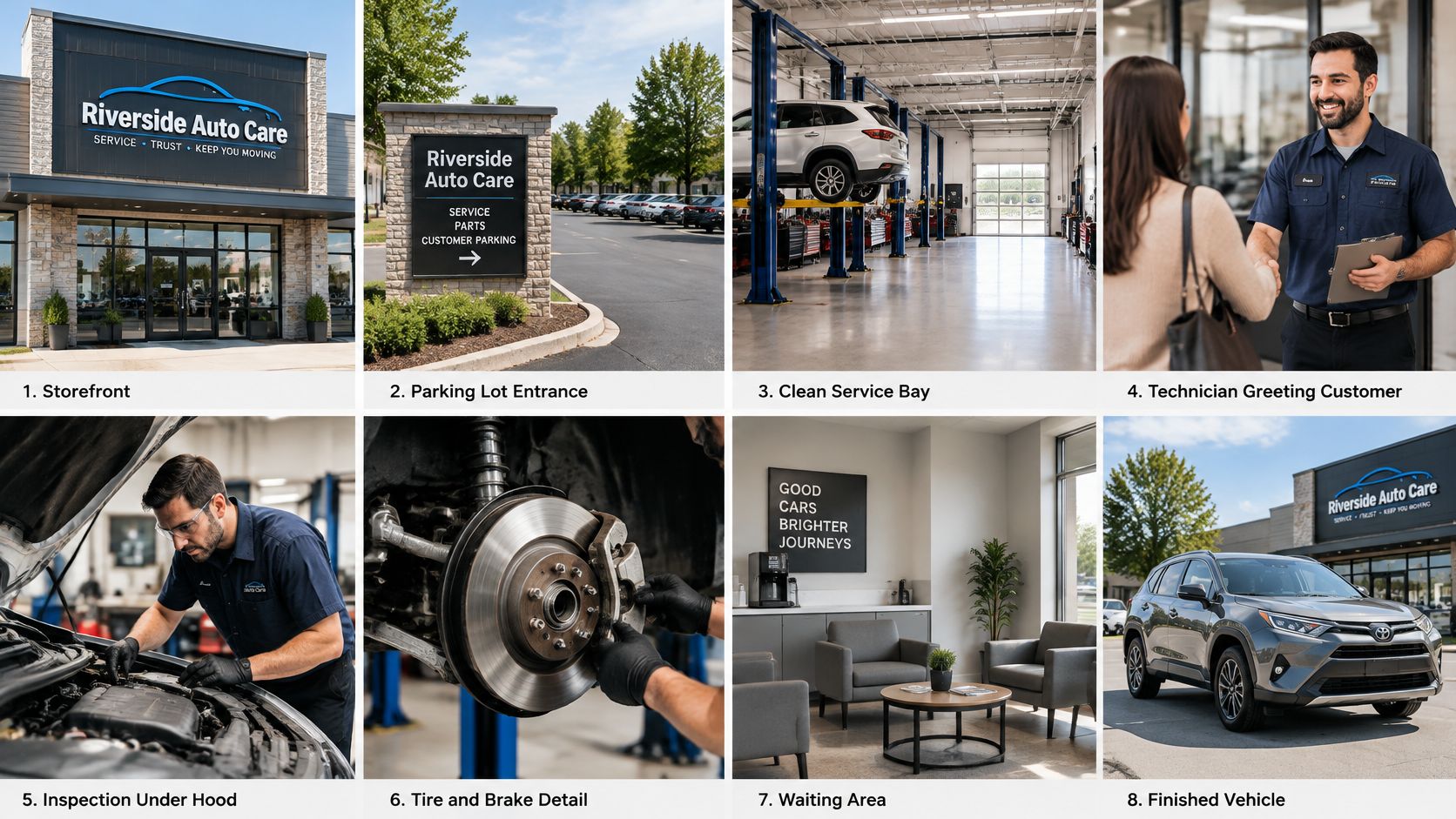
Daylight, horizontal framing, and flash switched off make a sensible starting setup. Staff should remove clutter from the frame, keep other customers' plates out of view, and avoid presenting half-finished repairs as completed work. Camera work must never interrupt safe lifting or tool operation.
A manageable first-week rollout
The first publishing task is small: the storefront, bay, team, and completed-car images go on the public listing. Defect photographs stay with estimates and inspection records.
The vehicle checklist should then run on the next five repair orders. The manager can review missing views, unclear captions, and retrieval problems before expanding the routine.
RedAppy's digital vehicle inspections can include photos and videos, and invoices can include photos and videos of completed repairs. Managers can review the inspection and invoicing features or contact the RedAppy team to discuss how that workflow fits the shop.
RedAppy connects photo-rich inspections, digital estimates, and completed-repair documentation within its shop management platform. Visit RedAppy to explore a workflow that helps the team turn clear vehicle photos into understandable recommendations and documented work.
Ready to Transform Your Shop?
RedAppy helps auto repair shops create professional digital estimates with photos and videos, send them instantly via text or email, and get customer approvals in seconds. No credit card required to start.