
Auto Repair Shop POS System Guide for Modern Service Centers
The front desk is busy, a technician is waiting on a parts answer, and a customer wants to know whether the repair can be approved today. Paper estimates are piled near the keyboard, a handwritten note is stuck to a monitor, and the same vehicle details get typed in again because the last record lives in a different folder. That's the moment when an auto repair shop POS system stops being “software” and starts acting like the shop's control center.
For a repair business, the right system does more than take payment. It keeps the vehicle, the customer, the estimate, the labor, the parts, and the invoice moving together so the shop isn't rebuilding the same job on three different screens. If the shop already compares services on places like the, the same clarity matters inside the workshop, where the core work gets tracked and completed.
Table of Contents
- Introduction to Auto Repair Shop POS System
- Understanding Key Concepts of POS for Auto Repair Shops
- Essential and Advanced Features of Auto Repair Shop POS System
- Business Benefits and ROI of a POS System
- How to Choose the Right Auto Repair Shop POS System
- Implementation Checklist for Auto Repair Shop POS Adoption
- Example Workflows for Different Shop Sizes
- Conclusion and FAQs
Introduction to Auto Repair Shop POS System
A busy service counter can feel like a relay race with missing batons. One advisor writes an estimate, another person checks parts, a technician scribbles labor time on paper, and somebody else builds the invoice at the end. The result is familiar, too, because every extra handoff creates another chance for a missed line item, a wrong rate, or a lost customer note.
An auto repair shop POS system turns that scramble into one connected workflow. It should handle the billing realities of repair work, including parts invoices, labor hours with different technician rates, sublet work, tax rules, and vehicle-linked customer records by plate or VIN. That matters because repair shops are not retail counters, they're job-based operations with moving pieces that need to stay tied to the same vehicle file.
The strongest systems don't just sit at the register. They connect the estimate to the repair order, then to technician assignment, then to invoicing, so service details appear without manual re-entry. That reduces transcription errors and keeps the job moving from bay to counter without the usual paper chase, which is why digital POS is more like a workflow backbone than a payment terminal.
Practical rule: if a system only helps at checkout, it's missing most of the shop's real work.
That's also why modern shops look for tools that support vehicle history, parts tracking, and service communication in one place. When those pieces are split apart, the front desk spends more time retyping than serving customers. When they're connected, the shop gets a cleaner record of what was promised, what was installed, and what still needs follow-up.
Understanding Key Concepts of POS for Auto Repair Shops
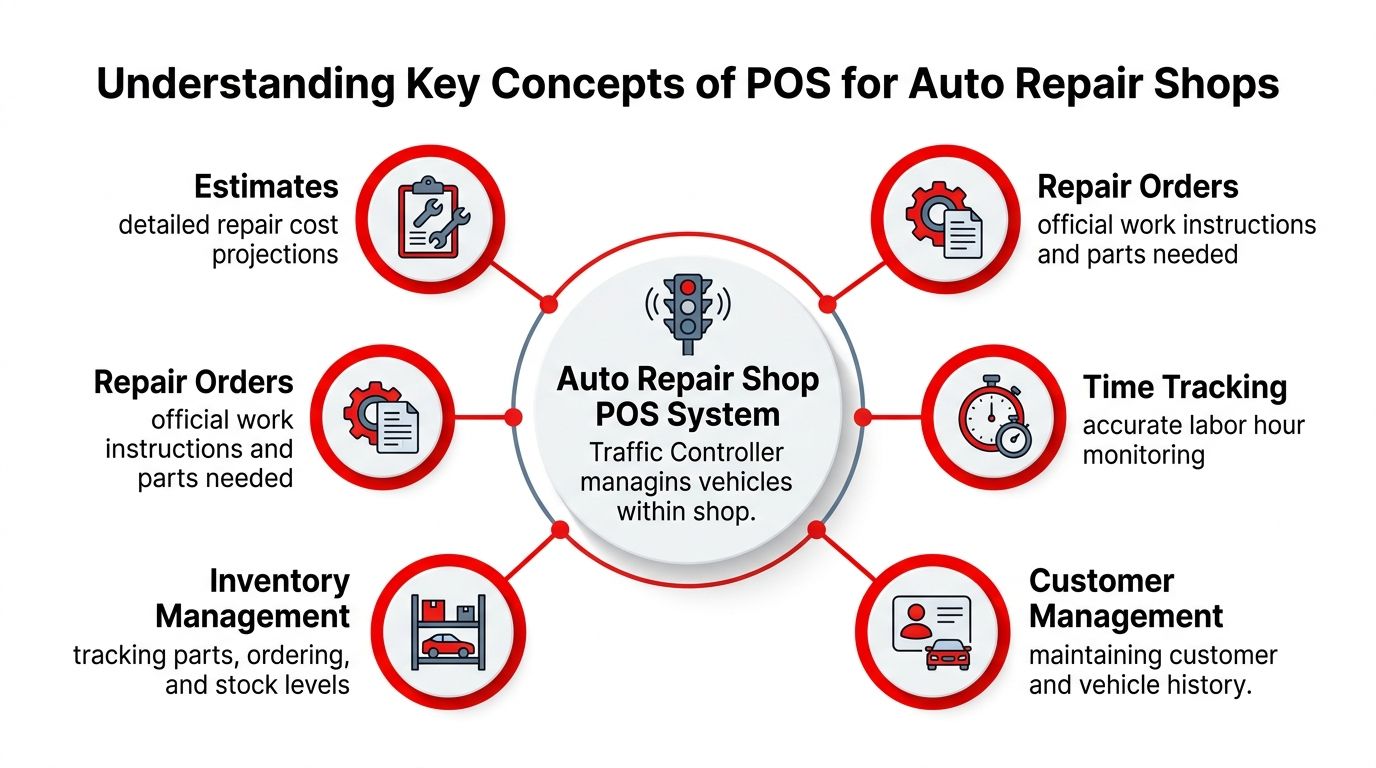
A helpful way to think about an auto repair shop POS system is as a traffic controller. Vehicles enter as estimates, move into repair orders, get routed to technicians, pick up parts, and finish at invoicing. If one lane is blocked, the whole lot backs up, which is exactly what happens when paper, memory, and separate tools are carrying the same job.
The core objects in the workflow
The first concept is the estimate. This is the job's starting point, where the shop records the likely repair, the parts expected, and the labor needed. A good estimate isn't just a price guess, it becomes the working reference for the rest of the job.
The next step is the repair order, the formal instruction set for the team. It tells the shop what needs to happen, what parts are required, and which technician or bay should handle it. When estimates and repair orders stay linked, the front desk doesn't have to rebuild the same information twice.
Then comes time tracking, which records labor as the work happens. That matters because shops often price labor in different ways, and a POS should keep those hours attached to the right job instead of leaving them in a notebook. The same logic applies to inventory management, where the system tracks parts, stock levels, and ordering so the bay doesn't stall while someone searches shelves.
A repair shop runs better when the job card moves instead of the people chasing it.
The data that keeps records clean
The most useful systems also carry customer management and vehicle history. That means the shop can pull a record by name, plate, or VIN and see past work without asking the customer to repeat the story. A VIN lookup also reduces confusion when parts compatibility matters, since the vehicle's identity stays attached to the job throughout the process.
One more term causes confusion for new users, sublet work. That's outside work the shop sends elsewhere, but it still belongs in the same billing flow. A repair shop POS has to keep that expense visible so the final invoice reflects the full job instead of only the labor done in-house.
The image above maps those ideas together because they're not separate features in practice. They're the moving parts of one operating system, and when one part is missing, the rest gets slower and messier.
Essential and Advanced Features of Auto Repair Shop POS System
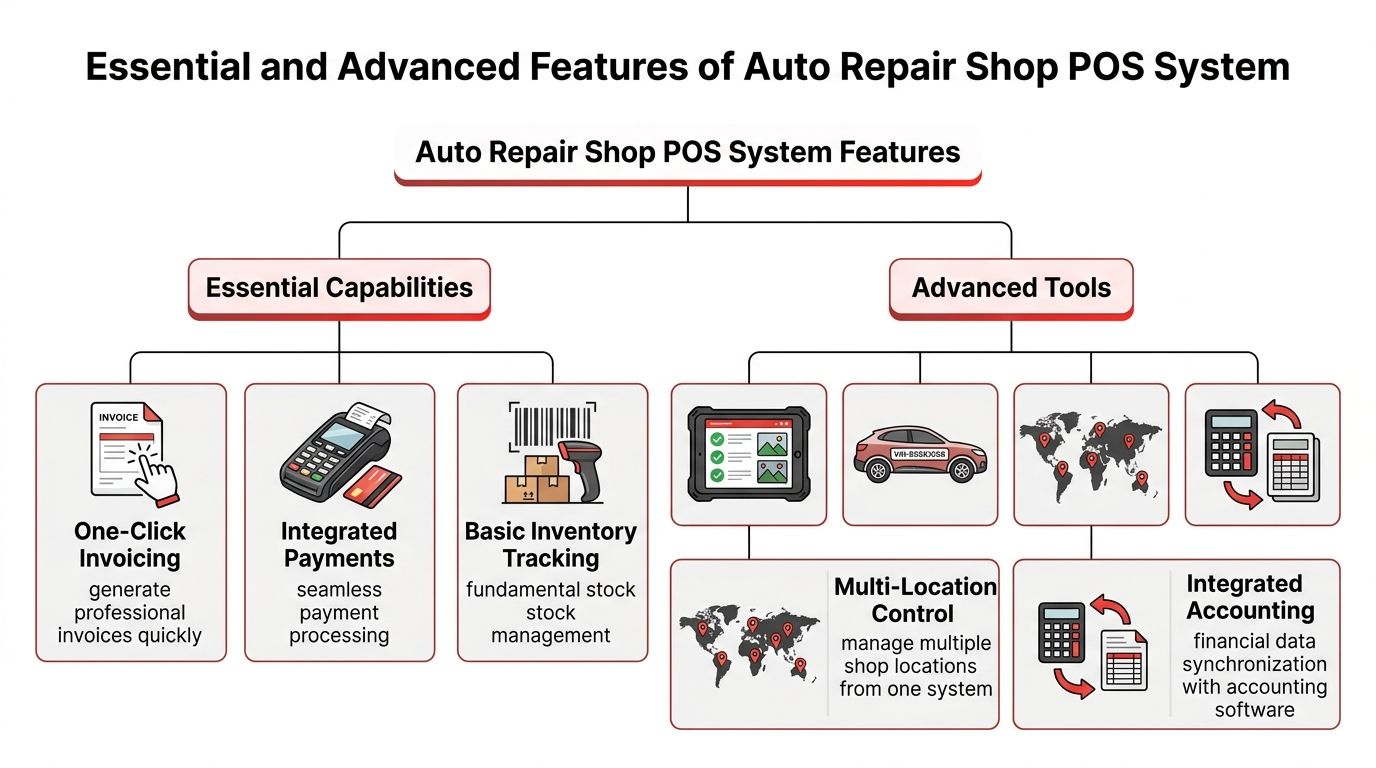
A repair shop doesn't need software that looks impressive in a demo and then falls apart at the counter. It needs features that remove friction from the day's actual work. The difference shows up when an advisor can approve a job, parts can be ordered correctly, and the invoice can be generated without retyping the whole file.
Essential capabilities that keep the counter moving
One-click invoicing saves time because it pulls completed service details into the final bill without rebuilding the job from scratch. That's not a cosmetic convenience, it reduces the handoff gap between the bay and the front desk. Integrated payments matter for the same reason, because the customer shouldn't wait while staff jump between separate systems to collect money and close the ticket.
Basic inventory tracking is another essential feature. A shop needs enough visibility to know whether a part is available before promising a same-day turnaround. The system should also support vehicle-specific part lookup, because generic stock counts aren't enough when fitment depends on the car.
Advanced tools that solve deeper shop problems
The next tier is where many generic POS tools fall short. Digital inspection reports with photos help service advisors show customers what the technician found, which makes approval conversations clearer. VIN-based lookups prevent mismatched parts and reduce guesswork, while multi-location control lets a chain see shared stock and job flow instead of running each branch like a separate island.
A useful system also needs real-time parts inventory by location, supplier-catalog integration, low-stock alerts, and automated reorder triggers. Those capabilities reduce parts-related delays and stop the cycle of overstocking one item while running out of another, which improves repair cycle time and working-capital efficiency according to.
If a driver is staring at the dashboard light, a good shop can also use a resource like to frame the conversation in plain language. That kind of clarity helps the front desk explain the repair without turning every warning into a vague guess.
Operational advice: if a feature doesn't shorten a handoff, improve a decision, or reduce re-entry, it's probably decoration.
The systems that hold up under pressure are the ones that make the work-order flow feel natural. Estimates become repair orders, repair orders become technician tasks, parts requests stay tied to the job, and invoicing happens from the same record. This is the fundamental difference between a register and a shop operating system.
Business Benefits and ROI of a POS System
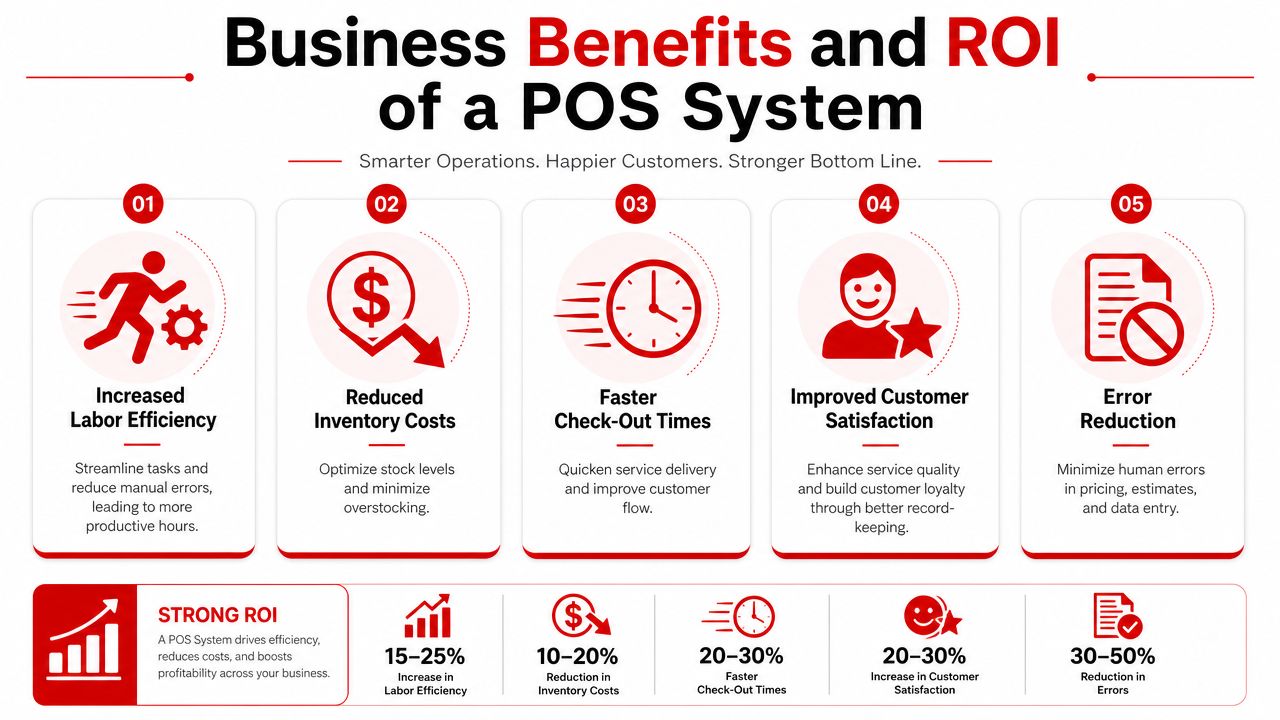
A shop owner usually feels the value of a POS system in small, repeated savings before it shows up as one big line item. A few minutes saved at the counter, one fewer parts mistake, and cleaner records for each repair may not look dramatic on their own. Together, they reduce the hidden cost of running the shop by hand.
That matters even more in shops with multiple bays or multiple locations. Without shared controls, each branch can drift into its own habits, which makes stock harder to track, reporting harder to trust, and the actual cost of a job harder to see.
Where the savings actually come from
Independent reporting says shops that use digital POS can see 10% to 15% higher labor efficiency, POS-linked inventory management can reduce carrying costs by 15% to 25%, and many shops recover the investment in 3 to 6 months. The same source says a shop with USD 500,000 in annual revenue may save USD 15,000 to 25,000 per year in labor and error-related costs, which makes the payoff easier to picture for a mid-sized operation. Those figures come from.
Broader market analysis reports that full-featured automotive POS systems often bring 15% to 20% reduction in administrative labor costs within the first year, with ROI typically landing in the 18 to 36 month range depending on the shop's size and starting efficiency. The same research reports 25% to 30% improvement in customer retention, 30% to 40% shorter checkout times, 25% to 35% better inventory accuracy, and 10% to 15% higher technician utilization when VIN-based lookup, real-time stock tracking, and integrated workflow tools are in place, according to.
How to read those numbers in a real shop
A shop owner does not need to memorize the percentages. The useful question is where the time and money are being lost. Faster checkout keeps the front desk moving, better inventory accuracy reduces promises that cannot be kept, and higher technician utilization means more of the day goes to billable work instead of waiting for missing information.
The gains also build on one another. A repair that moves faster at the counter, needs fewer corrections, and gets the right part on the first try improves more than one part of the operation at once. That is why the return can feel larger than the software bill itself. Multi-location control adds another layer, because shared inventory, transfer tracking, and centralized reporting keep every branch working from the same record instead of forcing managers to reconcile separate systems by hand.
How to Choose the Right Auto Repair Shop POS System
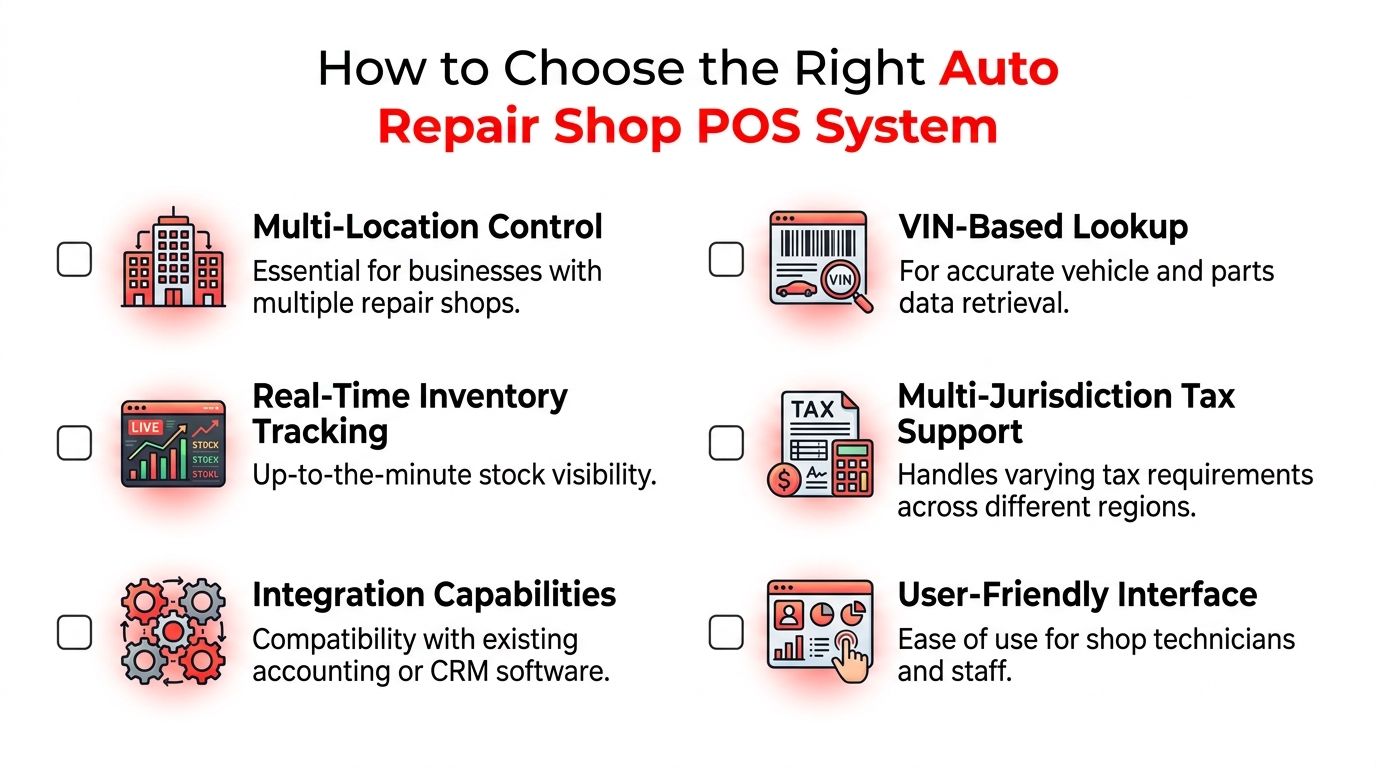
Choosing a system gets easier when the shop starts with operations, not with a sales demo. A tool can look polished and still miss the hard parts, especially when the business has more than one bay or more than one location. The right questions expose that fast.
Criteria that should not be skipped
| Criteria | Operational Benefit |
|---|---|
| Multi-Location Control | Keeps shared inventory, transfer tracking, and reporting connected across branches |
| VIN-Based Lookup | Reduces fitment mistakes and speeds vehicle-specific part sourcing |
| Real-Time Inventory Tracking | Prevents stockouts and gives the counter current parts visibility |
| Multi-Jurisdiction Tax Support | Helps the shop handle different tax rules without manual workarounds |
| Integration Capabilities | Connects accounting, CRM, and other shop tools |
| User-Friendly Interface | Helps advisors and technicians learn the system faster |
A major gap in many buying guides is cross-location control. Most frame POS like a single-location checkout tool, but multi-site shops need shared inventory, transfer tracking, centralized reporting, and role-based permissions. That point is reinforced in, and it matters because one weak branch can create billing and stock confusion for the whole group.
What to watch during demos
A buyer should ask how the system handles a job that starts in one bay and finishes in another. It should also be clear whether the software can manage labor-hour pricing differences, sublet work, and multi-jurisdiction tax handling without spreadsheets. If the demo can't show those flows cleanly, the shop will probably inherit those problems later.
Another useful filter is permissions. Advisors, techs, and managers do not need the same level of access, so role-based controls matter more than most demos admit. That protects records and keeps each person focused on the part of the job they own.
Buyer warning: if the vendor keeps talking about checkout speed but avoids multi-bay routing or branch-level control, the system may be built for retail, not repair.
The most practical purchase decision comes from mapping the shop's hardest daily tasks against the system's actual workflows. If a feature solves a real bottleneck, it belongs on the shortlist. If it only looks good on a slide, it probably belongs in the “no” pile.
Implementation Checklist for Auto Repair Shop POS Adoption
A rollout goes smoother when the shop treats it like a service schedule, not a software event. The records need cleaning, the staff needs training, and the workflow needs testing before the system is trusted with the whole day. Skipping those steps usually just moves the chaos from paper into software.
Start with the data and the process
The first step is data migration. Customer files, VIN history, vehicle records, parts lists, and open jobs need to be reviewed before they move into the new system. If the old records are messy, the new system will only preserve the mess more efficiently.
Next comes workflow mapping. A manager should walk through how a job starts, who touches it, where it waits, and when payment happens. That's the easiest way to spot duplicate entry points and places where the staff still depends on memory.
Train in the real rhythm of the shop
Staff training works best when it happens around the shop's actual flow. Advisors need to learn estimates and invoicing, technicians need to understand time tracking and job assignment, and managers need to know how to read reports without hunting through menus. Short sessions between appointments usually work better than one long classroom block, because the team can practice while the process is still fresh.
A trial run in one bay lowers the risk of a full cutover. It gives the team room to find problems in the parts catalog, scheduling board, or invoice path before every job depends on it. Supplier catalog integration should be checked during this phase, since part lookup is where many shops first feel the difference between theory and reality.
The workflow should finish with go-live support. That means having a clear point person for questions, a method for handling failed lookups, and a backup plan for open tickets. The best systems also support digital work-order flow, connecting estimates, technician assignment, parts ordering, labor tracking, and final invoicing without manual re-entry, while keeping vehicle history tied to VINs and multi-bay visual scheduling boards, as described by Fitgap's auto repair POS guidance.
Implementation rule: don't switch every process at once unless the team is ready for the same kind of disruption it sees during a storm of walk-ins.
That approach keeps the rollout controlled. The shop learns the new rhythm on a small scale, fixes the rough spots, and only then expands it to the rest of the floor.
Example Workflows for Different Shop Sizes
A repair shop does not change shape just because the software does. A mobile mechanic, a neighborhood garage, and a multi-location chain all run into different bottlenecks, handle customers in different ways, and need different levels of control. The POS has to fit the work on the floor, like a tool that fits the job instead of forcing every technician to use the same wrench.
A single-bay mobile mechanic
A mobile mechanic usually needs speed and clean records in a very tight workspace. The system should pull up the customer record quickly, link the vehicle to the job, and build the invoice without sending the mechanic back to a laptop full of spreadsheets. Digital inspections and instant parts lookup help keep the work moving, so the repair story does not have to be rebuilt after every stop.
A 3-bay independent shop
A small independent shop has a different pressure point, it handles more than one job at once. A visual shop board lets the advisor see what is waiting, what is in progress, and what is ready for pickup. That makes technician assignment easier and keeps customer updates tied to the car's actual status.
Short handoffs matter here. When the front counter, the tech bay, and the customer call all point to the same work order, fewer things get lost in the gaps.
A 10-bay or multi-location operation
A larger chain needs control as much as speed. Shared inventory, transfer tracking, and centralized reporting matter because parts and jobs can move between locations, and the system has to show where everything stands without extra calls or duplicate entry. Role-based permissions matter too, since busy teams need clear access boundaries or the system becomes harder to trust.
The hidden return often shows up in the background work. Shops using fuller automotive POS setups often see less administrative time, faster checkout, and better technician use, according to. Those gains do not belong to one shop size only, but they show up in different ways as the operation gets larger.
For a mobile mechanic, the win may be fewer repeat entries. For a small shop, it may be smoother handoffs between the counter and the bay. For a chain, it is the ability to coordinate across sites without losing sight of parts, labor, and customer history. The right system respects those differences instead of pretending every repair counter works the same way.
Conclusion and FAQs
An auto repair shop POS system is really a workflow engine with a payment layer on top. The shops that win with it are the ones that use it to connect estimates, labor, parts, inventory, and customer history, especially across multiple locations where the hidden coordination work grows fast. Shops that want to compare options or see the feature set in practice can review RedAppy's features or contact the team through RedAppy's contact page.
FAQ Can a repair shop POS handle multi-tax setups? Yes, the system should be able to support the shop's tax rules without manual workarounds. Can it protect records across staff roles? Yes, role-based permissions are part of a serious setup. Is switching worth it for a small shop? If manual re-entry, parts confusion, and slow checkout are eating time, the workflow gains usually matter more than the software label.
A CTA for RedAppy.
Ready to Transform Your Shop?
RedAppy helps auto repair shops create professional digital estimates with photos and videos, send them instantly via text or email, and get customer approvals in seconds. No credit card required to start.