
Auto Repair Shop Work Order Template: How to Fill It In
A customer calls after pickup and says the brake bill is higher than the number they agreed to. The advisor remembers a text. The technician remembers a seized caliper. The work order shows one signature for “brakes” and a total that does not match any line. That argument is already lost, because nobody can prove what was approved, when, or by whom.
An auto repair shop work order template is the record that settles that fight. It is not a billing slip you fill in after the work is done. Each field protects the shop from an unpaid surprise and protects the customer from work they never asked for. Fill it in the same way on a $40 inspection and on a four-figure repair.
Table of Contents
- Required Fields and Intake Steps
- Writing Labor and Parts Lines That Hold Up
- Authorization Stages and Mid-Job Additions
- Checking State Rules Before You Finalize
- Matching the Final Invoice to the Approved Estimate
- Set Up Your Template This Week
Required Fields and Intake Steps
A template that skips one field leaves a hole the moment a bill is challenged. Make these fields mandatory so the counter cannot save a blank record. Capture the customer's name, phone, email, and preferred contact method. Capture the vehicle's year, make, model, and VIN or license plate. Capture the odometer reading and the date and time at intake. Write the symptoms in the customer's own words. Record the diagnostic fee and what it covers. Itemize parts with price and condition, whether new, used, rebuilt, or remanufactured. Itemize labor with hours and rate. Add the estimated completion, warranty terms, payment terms, an authorization block, a technician name on each task, and a final invoice line.
Modern cars need two more lines. Record pre-repair and post-repair scan results, and list any calibration as its own operation. Scans and camera or radar calibrations are often the work that shows up after the first look, and a note buried in a tech story will not hold up as a sold job.
steer drivers toward written estimates and clear invoices. A finished repair order should identify each repair, every part supplied, individual part prices, labor charges, and odometer readings at intake and at completion, which is also what the Federal Trade Commission recommends. Treat that list as required boxes, not optional notes. The failure that costs shops money is undocumented scope expansion. The technician finds more work, and the advisor cannot prove what the customer approved.
Use two approvals, not one blended signature. First, authorize towing, inspection, testing, diagnosis, or disassembly, and the fee for that step. Later, authorize the repair itself. If more work appears, record an additional authorization with the revised estimate, the exact added operations, the approving person, the time, the channel, and the proof of that yes. A technician note is not consent.
Intake in counter order
- Search before you create. Look up the customer by name or phone so you do not open a second file for the same person.
- Enter the VIN, then check the plate. A mismatched plate is how the wrong car gets the history.
- Write the odometer before the keys leave the customer's hand, and read it back. A missing mileage reading is the gap regulators and warranty clerks notice first.
- Record the complaint in the customer's words. “Pulls right when braking above 40 mph” is usable. “Brake issue” is not.
- Photograph dents, scratches, and warning lights that are already there.
- Confirm the contact method and who else may approve work. A spouse who is not on the record cannot be your only “they said yes.”
Read the intake back and get a clear yes before diagnosis starts.
| Field | What to record | Example |
|---|---|---|
| Customer | Name, phone, email, preferred contact method | Text first, email for invoices |
| Vehicle | Year, make, model, VIN or license plate | Civic, VIN checked against plate 7KRP214 |
| Odometer | Reading at intake and at completion | 48,216 miles in, 48,221 miles out |
| Date and time | When the vehicle arrived and when work was promised | Dropped off 8:40 a.m., promised by 4:00 p.m. |
| Reported symptoms | The customer's own words | Grinding when braking below 20 mph |
| Diagnostic fee | Amount and what it covers | Inspection fee, credited if the customer approves repair |
| Parts | Part, part number, quantity, unit price, condition | Front brake pads, qty 1, new |
| Labor | Task, hours, rate | Replace front pads and rotors, 1.5 hours |
| Calibration and scans | Pre- and post-repair scan results and any calibration required | Front camera recalibration listed as its own line |
| Authorization | Scope approved, approver, time, method | Diagnosis approved by text at 9:12 a.m. |
| Warranty and payment terms | Coverage period and when payment is due | 12-month parts warranty, payment at pickup |
| Technician | Name of the technician who did each task | Tech name on each labor line |
| Final invoice | Total, matched to the approved estimate | Total matches the approved estimate |
Writing Labor and Parts Lines That Hold Up
A total by itself does not explain a bill. The tells consumers to ask for a written estimate that names the condition to be repaired, the parts needed, and the anticipated labor charge. It also tells them the estimate should say the shop will get approval before work goes past a set amount of time or money. Write every line to that standard.
Describe the condition as symptom and cause. “Front pads worn to 2 mm, rotors scored” tells the customer what failed. “Brake job” could mean pads, rotors, a hose, or a caliper, and it gives you nothing to point at later.
The line that survives a question
For labor, state the task, the hours, and the rate. “Replace front pads and rotors, 1.5 hr” can be checked against the book time and against the invoice. For parts, list the name, part number, quantity, unit price, and condition. “Front brake pads, one set, new” is a purchase. “Brake pads” is a guess.
Give diagnostic time its own line. The customer should see what the inspection costs before any repair is added. Folding the scan into the repair hides the fee and makes a declined job look like free work you then try to collect.
Put the approval threshold on the estimate itself. Say the dollar amount, or the amount over the estimate, past which you will stop and call. A line that cannot be matched from the estimate to the invoice should not be on the invoice.
| Weak line | Strong line |
|---|---|
| Brake job | Front pads worn to 2 mm, rotors scored, replace pads and rotors, 1.5 hr |
| Brake pads | Front brake pads, part number, quantity 1, unit price, new |
| Diagnosis | Scan and road test for the stated pull, 0.5 hr, billed on its own line until a repair is approved |
Practical rule: If you cannot point from an invoice line back to a written estimate line, do not charge it.
Authorization Stages and Mid-Job Additions
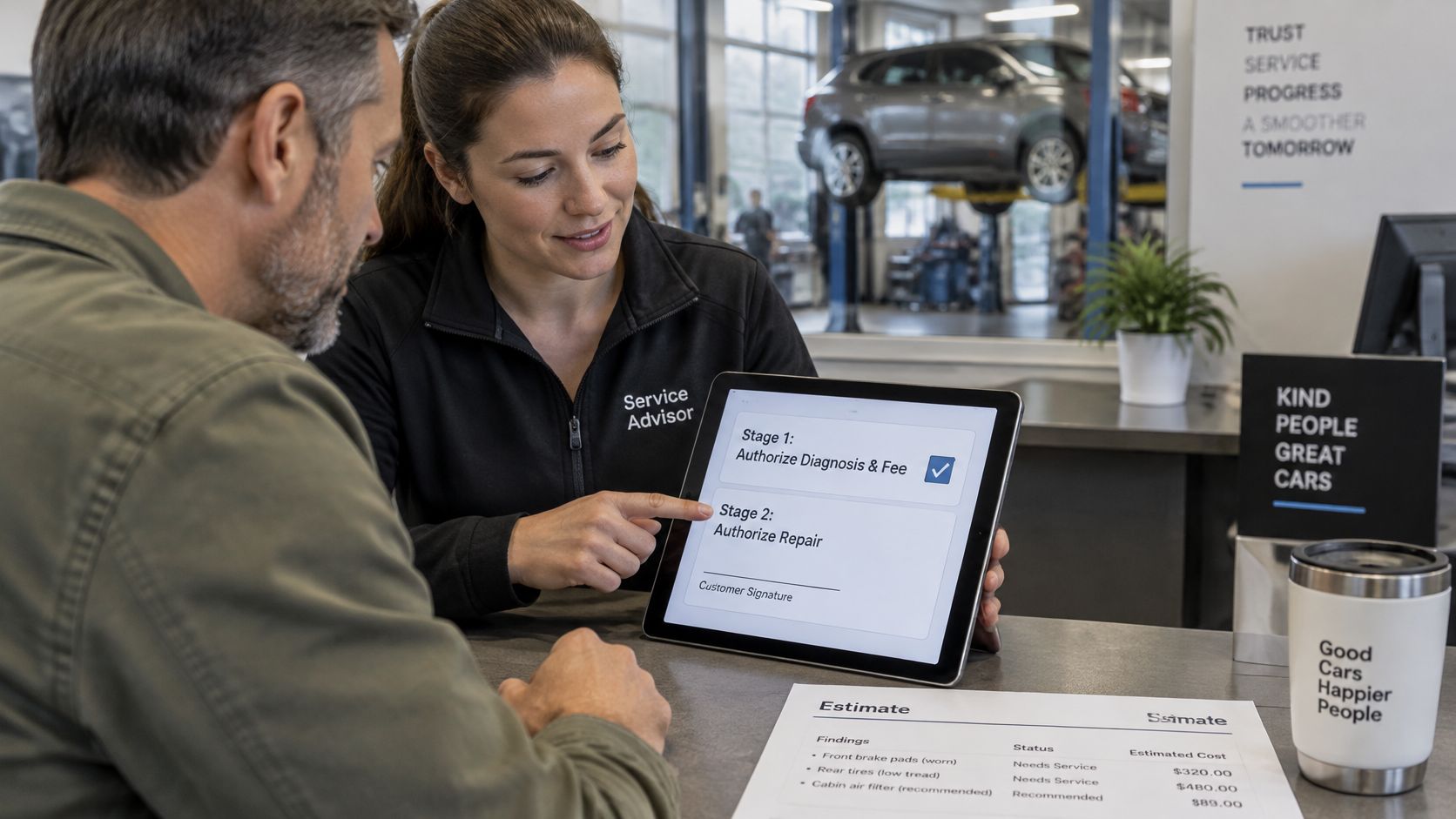
Keep diagnosis and repair as two confirmations. One signature that covers “inspect and fix” leaves both sides arguing about which half was agreed. The first yes covers inspection, testing, or diagnosis and the diagnostic fee. After the findings are on the estimate, a second yes covers the repair.
Approval can be a text reply, an email link, a phone call, or a signature at the counter. Record the channel, the time, and the person who approved, and store that on the work order before the technician starts. A verbal yes that lives only in someone's memory will not win a dispute.
A customer can get the estimate by SMS or email, open a link, review the labor, parts, and total, and approve it from their phone. That reply is the approval record. Each team member's own login lets the shop assign a technician, see who wrote the estimate, and decide who can open the numbers. Shared logins erase the author of a revision, which is the person you need when the customer says they never saw the new total.
Stop before the extra work
Say the first estimate is a straightforward pad and rotor job. The technician pulls a wheel and finds a seized caliper, and the job is no longer the one that was priced. Stop. Do not install the extra part “so the car is safe today” and explain it at pickup.
says that before additional diagnosis or repairs begin, or before charges pass the original estimated and authorized price, the shop must describe all additional parts and labor, state the cost of those additions and the revised total, get authorization, and record it. Text the revised estimate with a photo of the caliper. Name the added parts, the added labor, and the new total. Wait for the reply.
Keep the revision on the same work order. The add-on section lists added parts, added labor, the revised total, the approval channel, the time, and the employee who recorded it. A note that says “caliper seized” documents a finding. It does not authorize the repair. Charging from that note, with no approval record, is how shops lose these arguments.
| Stage | What to record | Who records it |
|---|---|---|
| Intake authorization | Approval to inspect or diagnose, and the diagnostic fee | Service advisor |
| Diagnosis estimate | Condition, parts, labor, total and approval threshold | Service advisor, after technician findings |
| Repair authorization | Separate approval of the repair itself, with channel and time | Service advisor, with the customer |
| Additional work | Added operations, revised total, approver and time | Service advisor, before work starts |
| Completion | Work performed, parts supplied, final odometer reading | Technician, then service advisor |
| Final invoice | Charges traced to approved lines only | Service advisor or cashier |
Checking State Rules Before You Finalize
A form that works in one state may leave out a field another state requires. That gap can turn a properly authorized repair into a disputed invoice.
California's defines a work order as a paper or electronic document containing the authorized estimate for a specific job, the repairs the customer requested and authorized, and the vehicle's odometer reading. The authorization must appear on the estimate before work begins, and the customer must receive a copy of each document they sign when they sign it.
The says a written estimate should identify the condition being repaired, required parts, expected labor, and the point above which the shop needs approval to continue. Many states set their own estimate and approval rules, so a form that meets one state's requirements may omit fields another state requires. Check the rules wherever the shop operates.
Phone approval also needs a record. If you record the call, check the before relying on it. A call recording made without the required consent can create a separate problem.
- Find the regulator. Identify the auto repair agency for each state where the shop operates. Read its estimate and work order requirements.
- List required fields. Compare those requirements with the template, then add any missing fields.
- Confirm the approval threshold. Check how each state handles approval for added work and charges above an estimate.
- Keep the rules tied to the template. Use a version for each state where requirements differ, and confirm it against the regulator's guidance before putting it into use.
Matching the Final Invoice to the Approved Estimate
Close the job only after the paperwork can stand on its own. Run this check before the customer is called.
- Total: The invoice total matches the authorized amount, including every approved addition and nothing else.
- Lines: Every part and every labor charge appears on the approved estimate or on an approved addition.
- Mileage: The completion odometer reading is filled in, not left for someone to remember.
- Names and photos: The technician is named on each task, and completion photos are attached to that job.
Keep the original estimate, each revision, the approval records, the invoice, and the completion details in one file. Months later, that single record is what answers “what did you do to this car,” for the next advisor and for the customer.
Digital files make the link easier, because inspection photos and approvals stay with the vehicle instead of in a personal text thread. Invoices can include photos and videos of completed repairs, which is the evidence you want when someone questions a part at the counter. Service history includes only the work recorded in the system. Older jobs will not appear by themselves. For work done before the shop used RedAppy, add a note on the vehicle record, or create an invoice dated in the past and mark it paid. Label anything entered later, and cite the source, such as a copy of a paper invoice. Never rebuild history from memory, and never alter a closed invoice to make a story fit. A gap is honest. A changed record is not.
A few minutes at closeout is the difference between an invoice you can defend and one you can only hope nobody questions.
Set Up Your Template This Week
Use a recently closed job to check whether your template captures the details that settle questions later: the customer's complaint in their own words, the odometer reading, and who approved the work. Then check that the final invoice reflects the recorded authorization. A missing approval or unclear line can turn a straightforward question at the counter into a dispute.
Add a field for each gap, then use the template on every job, including oil changes and quick inspections. Short tickets still need clear records. Paper shops can use multipart forms so the customer, technician, and office each receive a copy. Paper does not record when extra work was approved or who gave the approval, so write down both.
If you want to handle the process in software, RedAppy estimates include parts and labor. From the Estimates or Invoices list, Find Customer shows matching customers and vehicles; New Estimate or New Invoice starts the write-up with the selected customer and vehicle filled in. The features page explains how estimates, approvals, and inspection evidence can be kept with the vehicle record. For a paper option, are carbonless forms that create multiple copies.
RedAppy keeps estimates, approvals, inspection photos, and invoices on one vehicle record, making it easier to trace a disputed line. Its all-in-one shop management platform supports parts, labor, and customer authorization in the same workflow. See RedAppy at RedAppy.
Ready to Transform Your Shop?
RedAppy helps auto repair shops create professional digital estimates with photos and videos, send them instantly via text or email, and get customer approvals in seconds. No credit card required to start.