
Auto Repair Software with Parts Ordering Guide
The customer is standing at the counter, ready to pay. The technician installed the premium alternator, but the service advisor is looking at a separate parts receipt and an old estimate that still lists the standard unit. One hurried copy-and-paste later, the invoice bills the wrong part, the margin is exposed, and the shop has to explain an error that should never have reached the customer.
That problem rarely starts with bad intentions. It starts when ordering, estimating, inventory, and invoicing live in separate places. Auto repair software with parts ordering closes that operational gap by keeping the selected part, supplier cost, customer vehicle, repair order, markup, and final receipt connected from approval through payment.
Table of Contents
- The Hidden Cost of Disconnected Shop Workflows
- Connecting Your Supplier Network to the Dashboard
- Building Compliant and Itemized Repair Receipts
- Managing Inventory Velocity and Special Orders
- Digital Delivery and Archiving for Customer Trust
- Scaling Your Shop with Unified Workflows
The Hidden Cost of Disconnected Shop Workflows
A disconnected workflow creates several opportunities for a small mistake to become a financial problem. A service advisor may order a premium component, a technician may install it, and the front desk may still rely on a manually edited estimate. The customer sees a receipt that doesn't match the work performed, while the shop loses time correcting the document and defending the charge.
The same issue appears with quantities, supplier pricing, core charges, and returns. A part can be ordered under one description, entered into the repair order under another, and billed with a price that no longer reflects the shop's parts matrix. Each manual handoff makes the record harder to trust.
Practical rule: The part selected for the job should become the part billed on the job, unless an authorized change is recorded.
The commercial case for fixing this workflow is becoming clearer. One industry report estimates the global auto repair software market at USD 3.4 billion, rising to USD 8.6 billion at a projected 14.2% CAGR, and identifies inventory and parts management as the dominant application segment with about 38% share. Those figures come from, and they reinforce a practical point: parts ordering isn't a niche add-on.
Independent shops also need to think about procurement as a controlled business process, not just a quick supplier search. Teams managing maintenance, repair, and operating supplies can find useful process ideas in this guide to, especially around approvals, supplier visibility, and purchase records.
The right system creates one chain of evidence:
- Estimate: The customer sees the proposed repair and expected parts.
- Repair order: The approved work becomes the operating record.
- Supplier order: The selected component and purchase details remain attached to the job.
- Invoice: The final receipt reflects the part actually supplied, the correct quantity, and the approved pricing.
- Payment record: The transaction closes against the same customer and vehicle history.
That connection protects more than margin. It gives the front desk a defensible answer when a customer asks what was installed, where it came from, or why the final amount changed.
Connecting Your Supplier Network to the Dashboard
A clean receipt starts with a clean purchasing process. If an advisor leaves the shop-management system, searches several supplier sites, and later retypes the result, the shop has already created a reconciliation problem. The better approach keeps the repair order open while the advisor searches and orders.
RedAppy integrates with Nexpart to link suppliers such as AutoZone, O'Reilly, and Advance Auto Parts to the dashboard, allowing parts to be ordered without rebuilding the customer or vehicle record. Nexpart describes its Multi-Seller system as a single interface for searching and ordering from participating vendors, with access available around the clock. Its network includes more than 53,000 supplier locations and more than 20 million parts, according to.
A practical setup sequence
Create the supplier relationships in Nexpart Multi-Seller. Add the vendors the shop uses, including local and national sources. A broad network is useful only when pricing, availability, delivery expectations, and return rules are clear.
Open the shop-management integration settings. The shop connects the Nexpart account using the supplied username and password. This step establishes the link between the supplier network and the dashboard rather than relying on separate browser sessions.
Enable review and submit ordering. The advisor should be able to review the selected line items before the order leaves the shop. That review is the control point for quantity, supplier, price, availability, and any core-related detail.
Start from the repair order. Search by the vehicle and approved repair rather than by an isolated part number. The selected item should return to the same job, with the customer and vehicle information already attached.
Confirm the order status. Use clear stages such as needed, quoted, ordered, and received. The front desk can then tell whether a vehicle is waiting for approval, a supplier response, delivery, or installation.
The configuration mechanics are also documented in this. The essential test isn't whether the connection exists. It's whether an advisor can search, compare, order, and return the chosen line to the correct repair order without duplicate entry.
Building Compliant and Itemized Repair Receipts
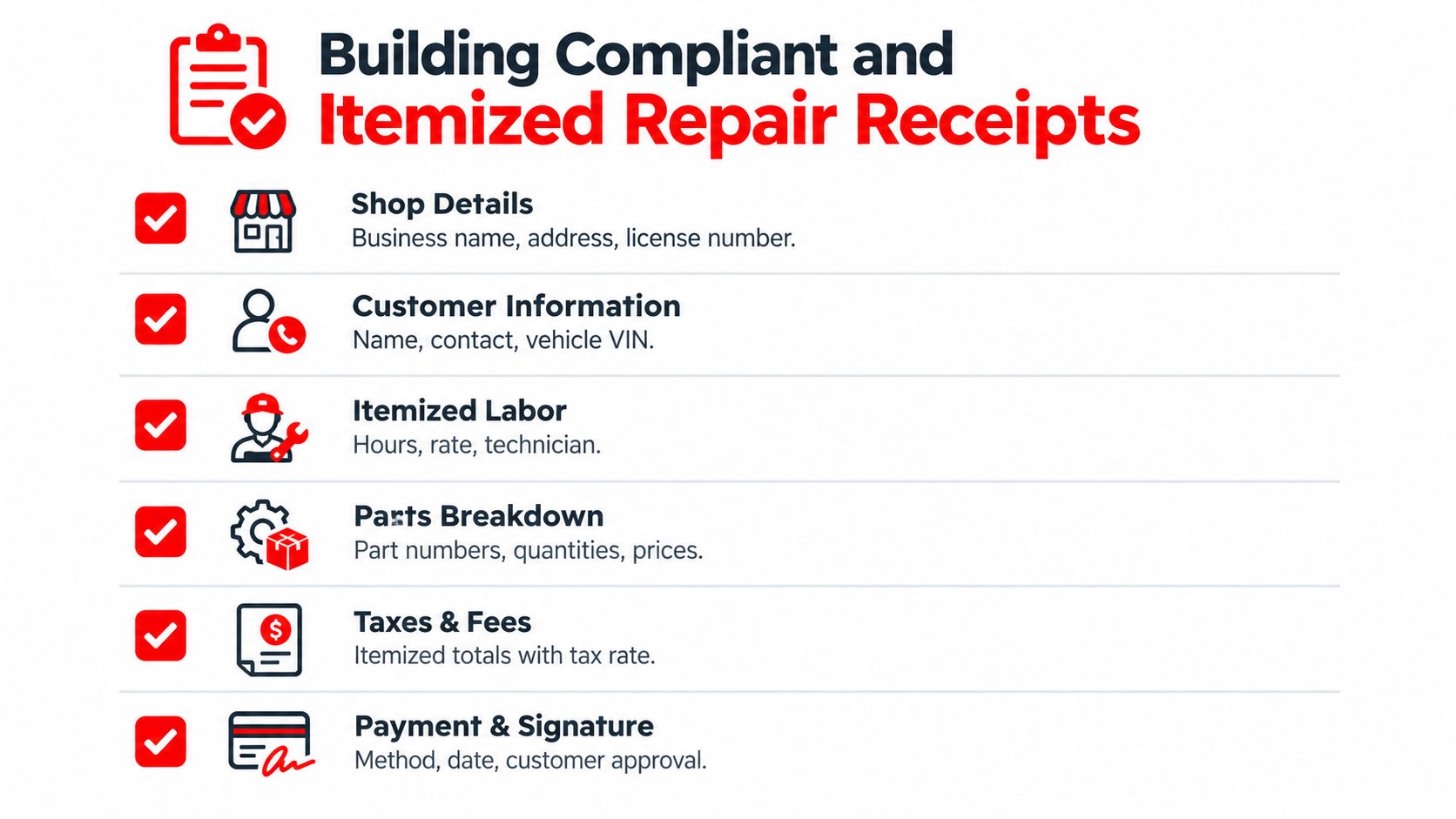
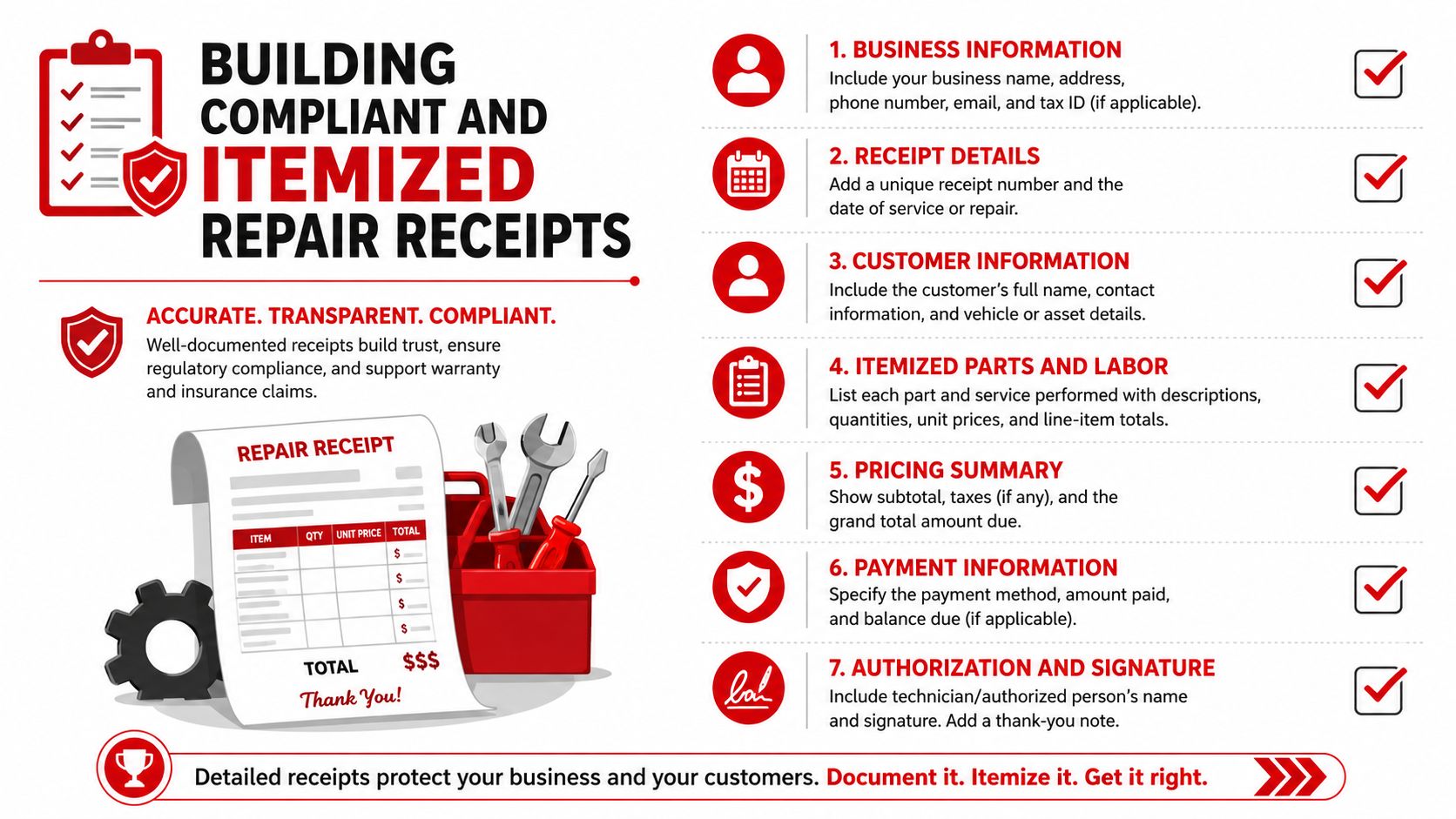
A repair receipt must explain what the customer authorized, what the shop performed, what parts were supplied, and how the total was calculated. Requirements vary by location, so the shop should confirm applicable consumer, tax, environmental, and warranty rules with the relevant authorities. Software can organize the record, but it can't replace local compliance judgment.
An integrated parts workflow makes the receipt more reliable because the part begins as a line on an existing estimate or repair order. The system can search multiple catalogs, compare current price and availability, and push the selected item back into the job without re-entering customer or vehicle data. This workflow, described in, also keeps order status connected to the repair process and reduces manual copy errors.
What the final document should show
| Receipt area | Operational purpose |
|---|---|
| Shop and customer details | Identifies the business, customer, vehicle, and repair order. |
| Labor lines | Shows the work performed, technician or job description, hours, and rate where applicable. |
| Parts breakdown | Lists descriptions, part numbers, quantities, prices, and any applicable core treatment. |
| Taxes and fees | Separates taxable items, tax rates, environmental charges, and other permitted fees. |
| Approvals and changes | Records customer authorization when the original estimate changes. |
| Warranty information | Connects coverage terms to the installed component and the shop's supporting records. |
| Payment details | Shows the amount due, payment method, payment status, and transaction record. |
The key distinction is between a receipt that merely looks professional and one that can withstand a question later. A generic line reading “alternator” gives the customer little context. A line connected to the supplier order can show the chosen description, part number, quantity, cost basis, applied price, and warranty reference.
The same record helps with comebacks. If a component fails, staff can identify what was ordered, which supplier provided it, when it was received, and what coverage applies. That doesn't eliminate every dispute, but it replaces guesswork with a traceable transaction.
Managing Inventory Velocity and Special Orders
A shop shouldn't try to stock every possible component. Shelf space, cash, delivery time, and vehicle mix all affect the right purchasing decision. The practical starting point is to identify the fast-moving minority of stock-keeping units and keep those items available, while sourcing slower or unusual parts as needed.
One industry guide states that roughly 20% of part numbers drive 80% of volume and recommends setting stocking depth according to part velocity and supplier lead time. The benchmark appears in. It should be treated as a planning reference, not a universal formula for every shop.
Separate shelf stock from job-specific purchasing
Fast-moving items can justify defined reorder points. Special-order parts need a different path:
- Record the demand source: Attach the item to the approved repair order before ordering.
- Capture the expected arrival: Set the job status to waiting for parts instead of leaving the vehicle in an undefined queue.
- Protect the customer record: Don't create a second customer or vehicle entry when the supplier confirms a substitution.
- Verify receipt: Match the delivered part to the order before the technician installs it.
- Update the job cost: Confirm the actual purchase price, quantity, core charge, and any credit expected from the supplier.
Core charges deserve particular attention. A core isn't just another part line, and a returned core may generate a credit later. The repair record should distinguish the amount collected, the item returned, and the credit status so the final billing record doesn't silently absorb an unresolved supplier transaction.
Purchase orders should also reflect the reason for the order. A low-stock replenishment belongs in inventory planning, while a special-order component belongs to a specific repair order. Mixing those purposes makes it harder to know whether an item is available for sale, reserved for a customer, or still waiting for delivery.
Control point: No part should move from “ordered” to “billed” without a receiving or installation confirmation.
The front desk can then use one status view to answer the questions that usually cause delays: Is the part ordered? Has it arrived? Was the quantity correct? Does the invoice reflect the actual component? That visibility reduces the chance that a technician reaches the vehicle only to find the wrong or missing part.
Digital Delivery and Archiving for Customer Trust
A paper receipt can prove that a transaction occurred, but it often fails to explain the transaction. Digital delivery gives the customer a clearer record of the repair, including itemized parts, labor, inspection findings, payment information, and warranty documentation where the shop provides it.
Digital adoption is already broad enough to support these workflows. One market estimate says more than 72,000 independent repair shops had adopted digital software platforms, while cloud-based deployment represented roughly 58% of installations globally. Those figures are reported in.

Delivery should follow the completed repair
The system should generate the customer document from the closed repair order, not from a separate template. That keeps the final version aligned with approved work, installed parts, taxes, fees, and payment status. Email or text delivery also gives the customer a convenient record without requiring staff to print, scan, or manually attach files.
The archive matters just as much. A searchable record should connect:
- The vehicle history: Customer identity, vehicle information, and prior repair orders.
- The work performed: Technician notes, inspection results, approvals, and completed labor.
- The parts trail: Supplier, part description, part number, order status, receipt, and warranty information.
- The financial record: Final invoice, taxes, fees, payment, refund, and credit activity.
When a customer calls about a repair, the advisor shouldn't have to search a paper folder, a supplier portal, and a payment terminal separately. A single job record lets the advisor answer from the same information used to produce the receipt.
The archive also supports internal review. Managers can compare ordered parts with billed parts, identify unclosed special orders, and investigate disputed charges without reconstructing the job from memory. Security still requires discipline. Access permissions, reliable backups, retention policies, and careful handling of customer information should be part of the software evaluation.
Scaling Your Shop with Unified Workflows
A unified workflow begins when the vehicle arrives and the team creates one customer and vehicle record. The technician's findings feed the estimate, the approved estimate becomes the repair order, and the parts search begins from that order rather than from an unrelated supplier screen.
The selected supplier item then carries through ordering, receiving, installation, pricing, and invoicing. The service advisor can see whether the job is waiting for approval, waiting for a part, ready for payment, or complete. The customer receives a receipt that explains the repair without forcing staff to reconcile multiple versions of the truth.
A useful evaluation test
Run a real repair through the platform before committing to it. Check whether the team can:
- Create the repair order with accurate customer and vehicle information.
- Build and approve an estimate without retyping the same details.
- Search multiple suppliers from the active job.
- Review and submit the order with pricing and availability visible.
- Receive the part and confirm the correct item reached the technician.
- Generate the final invoice from the completed work.
- Deliver and retrieve the receipt when the customer needs it later.
A platform can advertise parts ordering and still leave the shop with a disconnected invoice process. The meaningful question is whether procurement and billing share the same job record. If they don't, the shop may still face duplicate entry, incorrect part descriptions, inconsistent markups, and avoidable customer disputes.
RedAppy offers shop management features that connect digital inspections, estimates, invoicing, payments, supplier parts ordering, vehicle history, scheduling, and job-board visibility in one workflow. Shops evaluating that approach can review the RedAppy features or contact the team through the RedAppy contact page.
RedAppy connects repair orders with multi-supplier parts ordering, real-time inventory workflows, digital inspections, estimates, invoicing, and online payments so the front desk doesn't have to rebuild the same job several times. Visit RedAppy to see how a unified dashboard can help keep supplier purchases, customer approvals, and final repair receipts aligned.
Ready to Transform Your Shop?
RedAppy helps auto repair shops create professional digital estimates with photos and videos, send them instantly via text or email, and get customer approvals in seconds. No credit card required to start.