
Auto Shop Scheduling Software: Features and How It Works
Three customers want their cars back by Friday. The advisor has a paper book, a phone that won't stop ringing, one tech waiting on a parts delivery, and a diagnostic that's already an hour past its estimate. Every booking looked fine when it was written down. The shop finds out otherwise when the cars are already in the lot and the keys are on the board.
That gap, between what a calendar records and what the shop can finish, is the whole reason scheduling software exists. It isn't a prettier version of the paper book. It's a system that knows a booking needs a qualified technician, a free bay, the right parts and a realistic block of labor time, and it holds all four in one view before the customer shows up.
Table of Contents
- What Auto Shop Scheduling Software Does
- Core Features and What Each One Does
- How a Booking Moves From Request to Done
- Why Scheduling Fails Without Capacity Rules
- Cutting No-Shows and Filling Empty Slots
- Choosing Software That Fits Your Shop Size
- Confirm the Right Fit Before You Switch
What Auto Shop Scheduling Software Does
Auto shop scheduling software is a digital system that holds appointments, technician hours, bay availability, parts status and job progress in a single shared view. The closest everyday comparison is an air traffic control tower. Arrivals, gates and runways all sit on one screen so no two planes get cleared onto the same strip of tarmac at the same moment. A repair shop runs on the same logic, with more brake dust and less radio chatter.
Three people touch that screen every day. The service advisor takes and confirms bookings, the technician opens a queue to see what's next, and the owner reads the day's load to decide whether to promise a same-day turnaround or push it to tomorrow.

The distinction that trips people up is calendar versus scheduler. A calendar stores times. A scheduling system stores requirements: this job needs a diagnostic tech, two hours on a lift, and a water pump that hasn't arrived yet. That difference shows up in the adoption numbers. A found 47% of surveyed repair shops used online appointment and scheduling systems, while 69% used electronic messages for repair-status updates. Shops got digital at talking to customers before they got digital at booking them.
Demand for the tools is real. valued the global automotive appointment-scheduling software market at USD 1.34 billion, and 52% of respondents to the said their shops used AI-powered scheduling systems.
The test: if bookings live in a paper book, a spreadsheet tab or a sticky note on the monitor, the shop has a scheduling gap. Software is built to close exactly that gap.
Core Features and What Each One Does
Seven features do most of the daily work, and they're easier to compare side by side than in a paragraph.
| Feature | What It Does | Why It Matters |
|---|---|---|
| Online booking | Customers choose a service, date and time on the shop website | Fills the calendar without phone calls |
| Team calendar | Holds days off, closures, reminders and booking requests in one place | Stops bookings on closed days |
| Technician assignment | Assigns each job to a technician through individual logins | Shows who is free and who is qualified |
| Shop Board | Moves jobs from To Do to Completed and lets the team add tasks | Makes bottlenecks visible across the day |
| Parts and fluid inventory | Deducts parts on jobs and sends low-stock alerts | Prevents jobs starting without parts |
| Automated reminders | Sends confirmations and reminders before appointments | Reduces missed visits and empty bays |
| Analytics | Tracks revenue, technician performance and shop efficiency | Shows whether scheduling changes are paying off |
Online booking changes the front desk more than any other row. A customer picks a service and a preferred date and time on the shop website, and can book the next visit at 11 p.m. without calling anyone. The team calendar then carries days off, closures and reminders in the same place it receives those website requests, so a booking can't land on a day the shop is shut.
Technician assignment is where the software stops behaving like a calendar. Each team member gets a login, which lets the shop attach a job to a person with the right skill, see who wrote an estimate, and control who can open the numbers.
Two Rows Worth a Closer Look
The Shop Board is the feature owners underestimate before they switch and rely on afterward. Jobs move from To Do to Completed, the team can pin tasks to a job, and a walk-in without an appointment gets registered at a check-in kiosk and joins the same flow instead of starting a second list. Parts and fluid inventory works the same way in the background: stock deducts as jobs post, and low-stock alerts fire before the lift is occupied and the tech is standing there with an empty box.
Start with the one or two rows that fix the loudest problem in the shop. Booking conflicts and technician overlap are the usual winners, and everything else can be compared later.
Analytics close the loop. Revenue, technician performance and shop efficiency are what tell a manager whether the new schedule produced more billed hours or just more appointments entered. The RedAppy features page shows each of these in use rather than as a bullet on a spec sheet.
How a Booking Moves From Request to Done
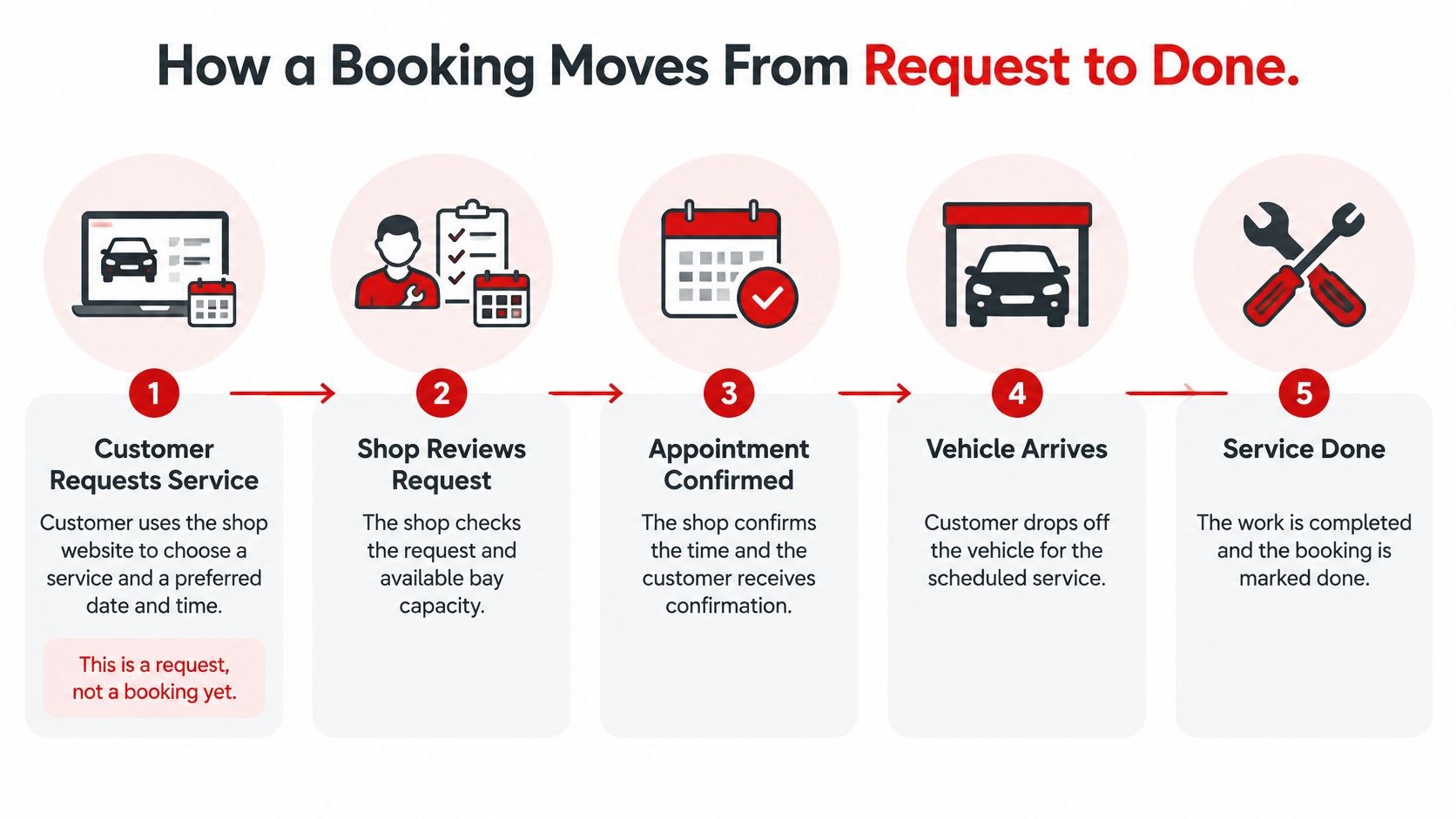
A repair request can look settled on a calendar before the shop has checked whether the right technician, bay, time and parts are available. Treat each stage as a handoff, and breakdowns become easier to spot at a few specific points.
The customer requests a service. On the shop website, they choose a service and preferred date and time. That creates a request, not a confirmed appointment. The distinction keeps two vehicles from being promised the same bay before the shop checks its workload.
The shop reviews and confirms. An advisor checks the schedule and available technician skills, then confirms by phone or text. Requests left unanswered can turn into lost work: the customer may book elsewhere, leaving an empty slot the shop did not plan for.
The appointment becomes a calendar event. Once confirmed, it is added to the team calendar alongside days off and closures. That gives the shop one place to see commitments and helps prevent bookings on closed days.
The vehicle arrives and checks in. The advisor matches the vehicle to its appointment. If a customer arrives without one, the check-in kiosk can register the walk-in rather than pretending an open slot exists.
The job moves across the Shop Board. Work progresses from To Do toward Completed, with a technician assigned and parts pulled from inventory or ordered. A job without a named owner can sit idle while each person assumes someone else is handling it.
The estimate goes out, then the invoice. The estimate includes parts and labor and reaches the customer as a link for approval. After approval and the repair, the shop sends the invoice. A delayed response can hold up work, so the vehicle may be ready while the shop still waits for a decision.
The same handoffs apply to longer jobs. Customers who choose a service and preferred time, then the shop confirms what fits its capacity. A heavy-duty bay and the technician's available hours must line up with the vehicle just as they do for any other repair.
The four-part check: For each booking, check the time, assigned technician, bay and parts status. A missing item is a signal to review the plan before the vehicle arrives.
Why Scheduling Fails Without Capacity Rules
Three vehicles arrive for the same 9 a.m. diagnostic procedure. The calendar has space for all three, but only one technician can do the work. By lunchtime, the cars are waiting, the technician is overloaded, and customers are calling for updates. This is a capacity problem, not a calendar problem.
A workable schedule puts each repair order where the required skill, bay and equipment, parts, and labor time overlap, as explains. These limits depend on one another: a trained technician needs the right bay, the parts must be ready when the repair begins, and the time block must reflect the work involved.
Start with technician hours and skills. A technician who is available is not automatically qualified for every job. Next, check bays and lifts, since the vehicle needs a space and equipment suited to the repair. Then account for parts readiness: a car waiting for a delivery may not use a technician's hours, but it can still occupy a bay and crowd the lot. Finally, set labor time blocks that leave room for the work rather than treating an estimate as a guaranteed finish time.
The order of work matters, too. Diagnosis comes before approval, and parts need to arrive before the repair starts. Scheduling software can keep a job at the right stage instead of letting it advance before those conditions are met. A dispatch board shows which jobs are in progress and where work is building up. Analytics can compare scheduled hours with available technician hours and completed billed hours, helping the shop see whether the day's plan matches its actual capacity.
Three Controls That Work
- Limit same-day bookings for constrained skills. If one technician handles a particular type of diagnostics, avoid filling that technician's day with overlapping jobs that require the same skill.
- Leave buffer time for diagnostic uncertainty. A diagnostic may uncover a problem that takes longer to fix, such as a stripped bolt. Slack in the schedule can keep that delay from pushing every later job back.
- Use newly available time for waiting work. When a slot opens, the shop can fit in a vehicle already on the lot instead of letting the opening go unnoticed.
Intelligent time blocking can increase daily appointment capacity. To judge whether it helps, measure the shop's baseline before changing the schedule, then compare the same measures afterward.
| Scheduling Task | Paper or Spreadsheet Calendar | Scheduling Software |
|---|---|---|
| Checking technician skill before booking | Relies on memory or a separate list | Matches the job's required skill to available technicians |
| Preventing bay conflicts | Staff check the book by hand | Blocks overlapping bay time automatically |
| Accounting for parts arrival | Checked after the car is in the bay | Flags jobs waiting on parts before they start |
| Handling cancellations | Slot stays empty until someone notices | Releases the slot for waiting jobs |
| Tracking delays and cycle time | Rebuilt from notes at month end | Reported from job status history |
Use measures that reflect the shop floor: sold hours per technician, bay utilization, schedule adherence, average repair-order cycle time, and the share of jobs delayed by parts or skill conflicts. Together, they show whether the schedule fits the shop's people, space, and work, rather than appearing full.
Cutting No-Shows and Filling Empty Slots
A shop that books ten jobs a day can lose capacity when customers do not show. Industry estimates put automotive service no-show rates at 10% to 20%, while put the figure near 20% without an active confirmation process. That can leave two planned slots empty in a day. The impact is greater when a missed appointment was a long repair requiring a particular technician, rather than a quick oil change.
Track each appointment through clear statuses, such as requested, confirmed, checked in, delayed, rescheduled, and no-show. These statuses show the team what needs attention. When a customer cancels, the opening can go to a waiting job instead of staying hidden in the calendar.
Reminders help reduce no-shows, but a message alone does not confirm that the customer plans to arrive. A confirmation response gives the shop a clearer signal, so staff can follow up or offer the time to someone waiting.
Rescheduling also affects capacity. When customers can move a booking through their preferred channel, the shop can adjust the schedule and make the released time available. Online booking lets customers request their next service without calling, while the team calendar's closure settings keep customers from requesting times when the shop is closed.
Measure three things monthly: no-show rate, recovered appointment slots, and billed hours per available bay. Together, they connect booking behavior to technician utilization and revenue.
Before changing the process, record those measures for four weeks. Compare them afterward to see whether reminders and recovered slots are helping the shop use its technicians and bays more effectively.
Choosing Software That Fits Your Shop Size
The right system depends on the shop, not on the longest feature list. Start by finding the row below that matches the operation.
| Shop Type | Main Scheduling Pain | Features to Check First |
|---|---|---|
| Single-bay independent garage | Phone bookings and paper calendar | Online booking, team calendar, reminders |
| Mobile mechanic | Booking jobs across different locations | Mobile-friendly calendar, online booking, customer reminders |
| Small multi-bay shop with apprentices | Matching skilled work to the right technician | Technician assignment, Shop Board, capacity checks |
| Multi-location chain | One schedule across several sites | Shared calendar, per-location views, analytics by technician |
Then check five things on any vendor, in roughly this order.
Can the calendar be viewed by technician and by bay? If it only shows times, the shop is back to guessing which lift is free. Do closures and days off block online booking? A calendar that accepts a request on a closed day creates a phone call and an apology. Does every team member have a login with permissions set? That's what makes technician assignment real, and it's how a shop controls who can open the numbers. Do online bookings come in from the shop's own website? The booking page should be on the shop's site, not a third-party page that hides the brand. Are pricing and contract terms stated plainly? RedAppy plans start at $39 per month on month-to-month terms, the shop website with online booking is included with every plan, and the team takes on custom work for a specific shop's needs.
Capacity deserves more weight than most buyers give it. Marketplace's reporting on the mechanic shortage put the gap at approximately 37,000 more technicians leaving or retiring each year than entering the profession, citing National Automobile Dealers Association figures. Software that accepts unlimited bookings against that reality is a liability. The schedule should reflect real technician hours and skill coverage, not optimism.
Shops that also run detailing or wash work tend to compare notes across the car-care trades before they commit, and is a useful read on how booking tools handle add-on services and time slots. The questions are the same ones a repair shop asks.
Three Questions For Any Demo
Bring these to the call and watch how quickly the vendor answers.
- How does the system handle a technician absence? The jobs attached to that person need to be visible and reassignable the same morning, not buried in a personal calendar.
- How does a mobile mechanic book on the road? If the booking flow assumes a desk and a landline, it won't survive a driveway.
- How does a multi-location shop see one schedule? A shared view with per-location filtering is the difference between managing capacity and reconciling three separate books.
Confirm the Right Fit Before You Switch
Five steps finish the decision this week, and none of them require signing a contract.
- List where bookings live today. Paper book, spreadsheet, phone log, text thread. Naming the mess makes it fixable.
- Count last month's no-shows and empty slots. That's the baseline the new system gets judged against.
- Run real jobs through a trial. Confirm that a website request appears on the calendar, that a technician gets assigned, and that a closure blocks online booking the way it should.
- Decide what counts as success in advance. Fewer empty bays, fewer no-shows, more billed hours per technician. Pick one and write it down.
- Plan the records move before the trial ends. Shops leaving a previous system can export customer and vehicle lists as CSV and have them imported before the trial closes, which avoids running two systems in parallel for a month.
To talk through a specific setup, the RedAppy contact page is the place to start, and the feature walkthroughs on the site show how each piece behaves with real jobs on the board.
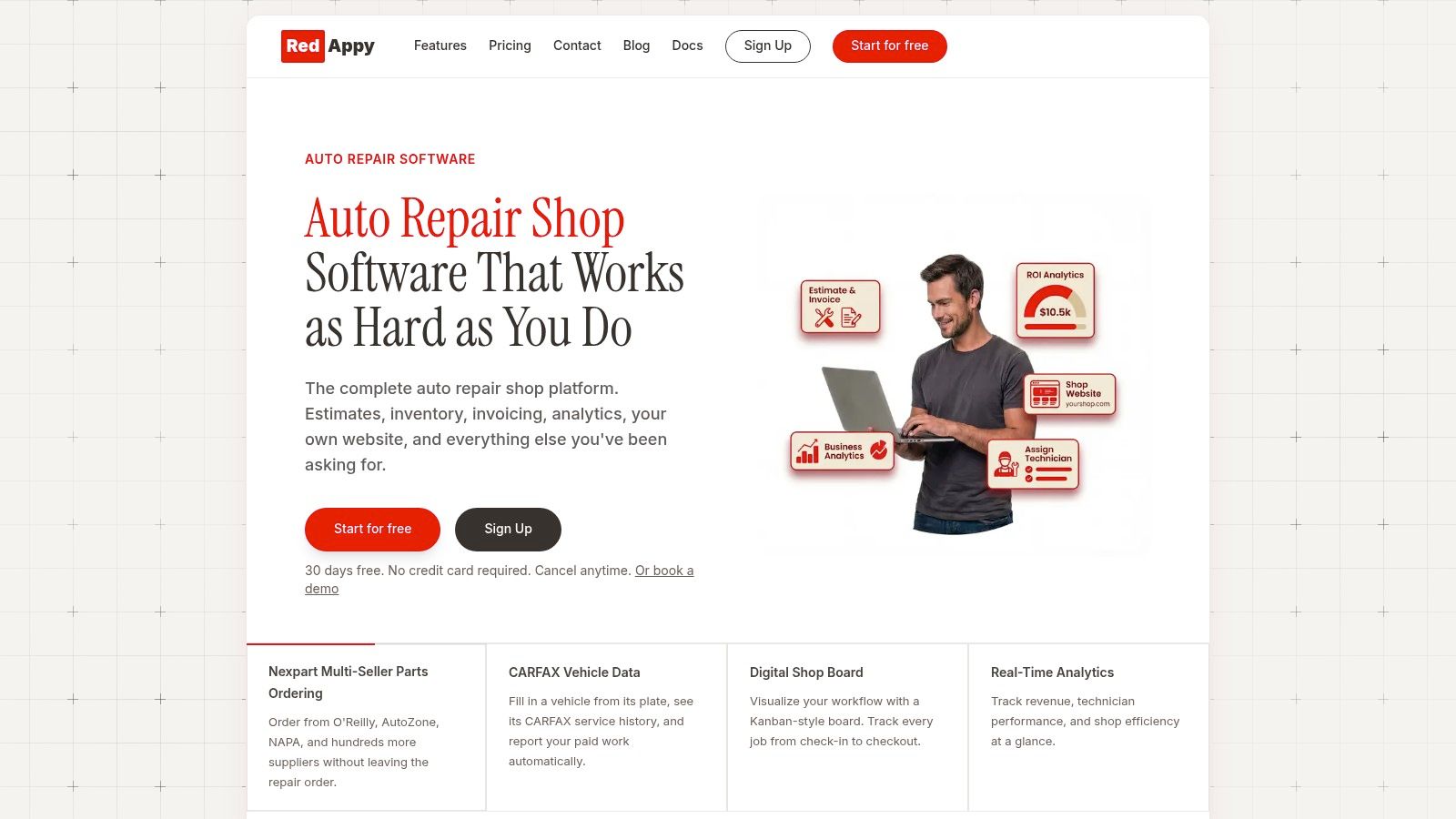
RedAppy brings appointments, technician assignments, the Shop Board, parts inventory and analytics into one shop management platform, so the schedule reflects what the shop can finish rather than a free slot on a page. Online booking runs straight from the shop website, which is included with every plan, and plans start at $39 per month on month-to-month terms. Visit RedAppy to see how it fits a single bay or a multi-location operation.
Ready to Transform Your Shop?
RedAppy helps auto repair shops create professional digital estimates with photos and videos, send them instantly via text or email, and get customer approvals in seconds. No credit card required to start.