
Car Service Invoice Template for Auto Repair Shops
A customer picks up a car, glances at a one-line invoice, and asks what the total covers. The advisor remembers the conversation differently, the technician has moved to the next job, and nobody can quickly show which parts were fitted or which extra work was approved. That common counter dispute is rarely a pricing problem alone. It's usually a record problem, and a good car service invoice template prevents it.
Table of Contents
- Why Your Car Service Invoice Template Matters More Than You Think
- The Essential Fields Every Repair Invoice Needs
- Breaking Down Labor, Parts, Taxes, and Fees on the Invoice
- Formatting and Branding Tips for Print and Digital Templates
- Choosing Between Paper, Spreadsheet, and Shop Software Templates
- Connecting the Estimate to the Final Invoice
- Putting Your Invoice Template Into Practice
Why Your Car Service Invoice Template Matters More Than You Think
A brake job gets approved by phone, then a seized caliper adds parts and labor. At pickup, the invoice only shows a repair description and a total. The customer disputes the added caliper, there's no authorization note, and the shop absorbs the cost or spends an hour reconstructing the job from memory.
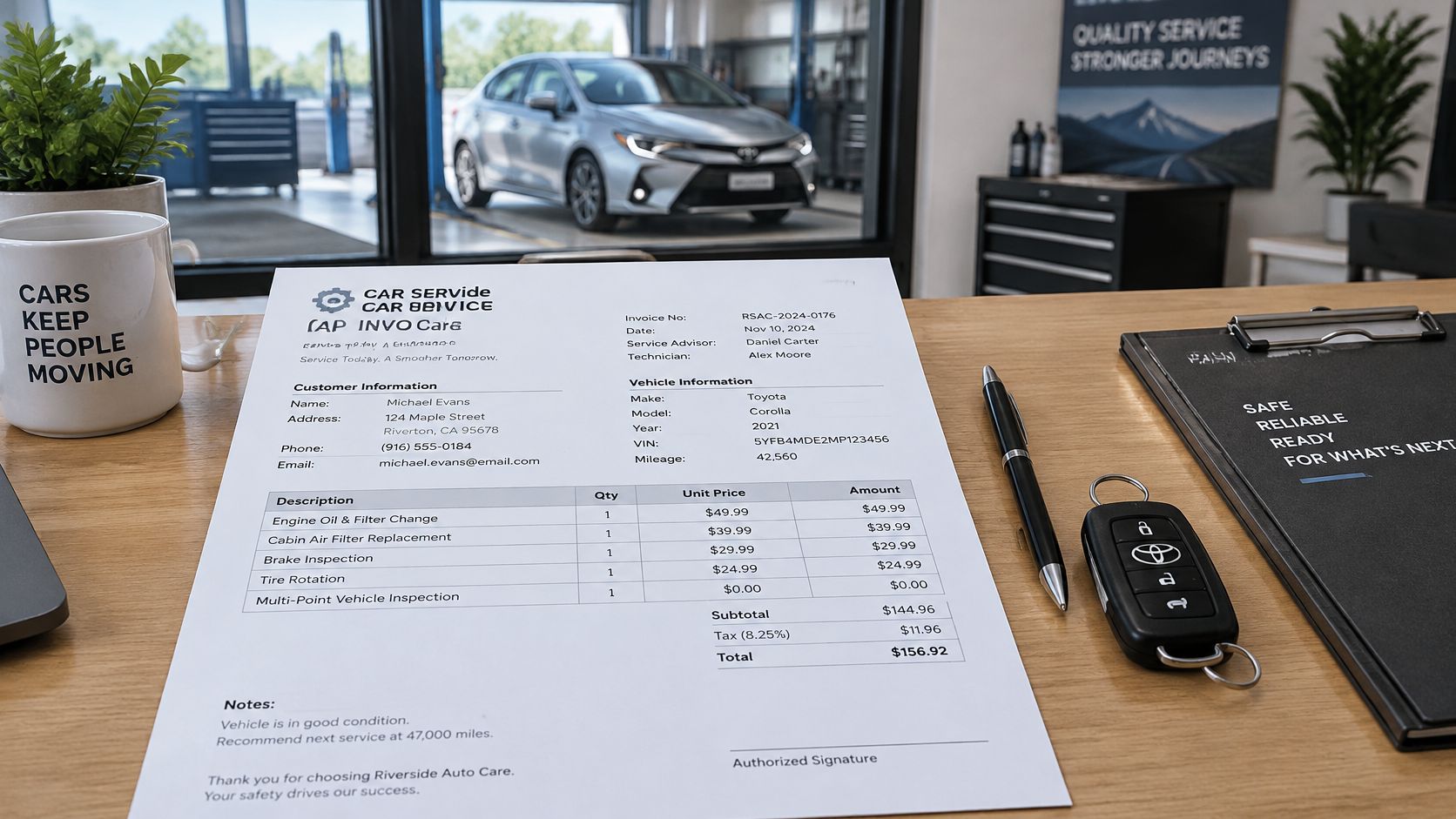
That outcome illustrates a basic point. A car service invoice is more than a payment receipt. It's a legally significant record of the vehicle, work performed, parts supplied, pricing, taxes, and warranty terms.
What Regulators Actually Expect
call for the current date, odometer reading, service description, itemized labor and parts, merchandise cost, parts condition, warranty details, and the shop's registration number. Parts must be identified as new, used, rebuilt, or reconditioned. Illinois requires the facility, date, odometer reading, customer, vehicle, guarantee terms, repair work, major parts, subtotals, sales tax, and total price, with a legible customer copy and a retained copy kept for two years, including in electronic form.
A shorter invoice isn't automatically cleaner. Missing fields create work at the counter, in warranty claims, and during bookkeeping.
A structured template therefore supports more than collection. It helps resolve disputes, document repeat servicing, prove warranty coverage, and reconcile revenue. Shops that need cleaner month-end records often pair that discipline with specialist help such as, especially when invoice data doesn't match deposits or parts purchases.
The practical standard is simple. Every invoice should let a stranger reconstruct the job without asking the technician. If it can't do that, it isn't finished.
The Essential Fields Every Repair Invoice Needs
A usable template groups fields so advisors complete them in the order work happens. Scattered boxes get skipped under pressure.
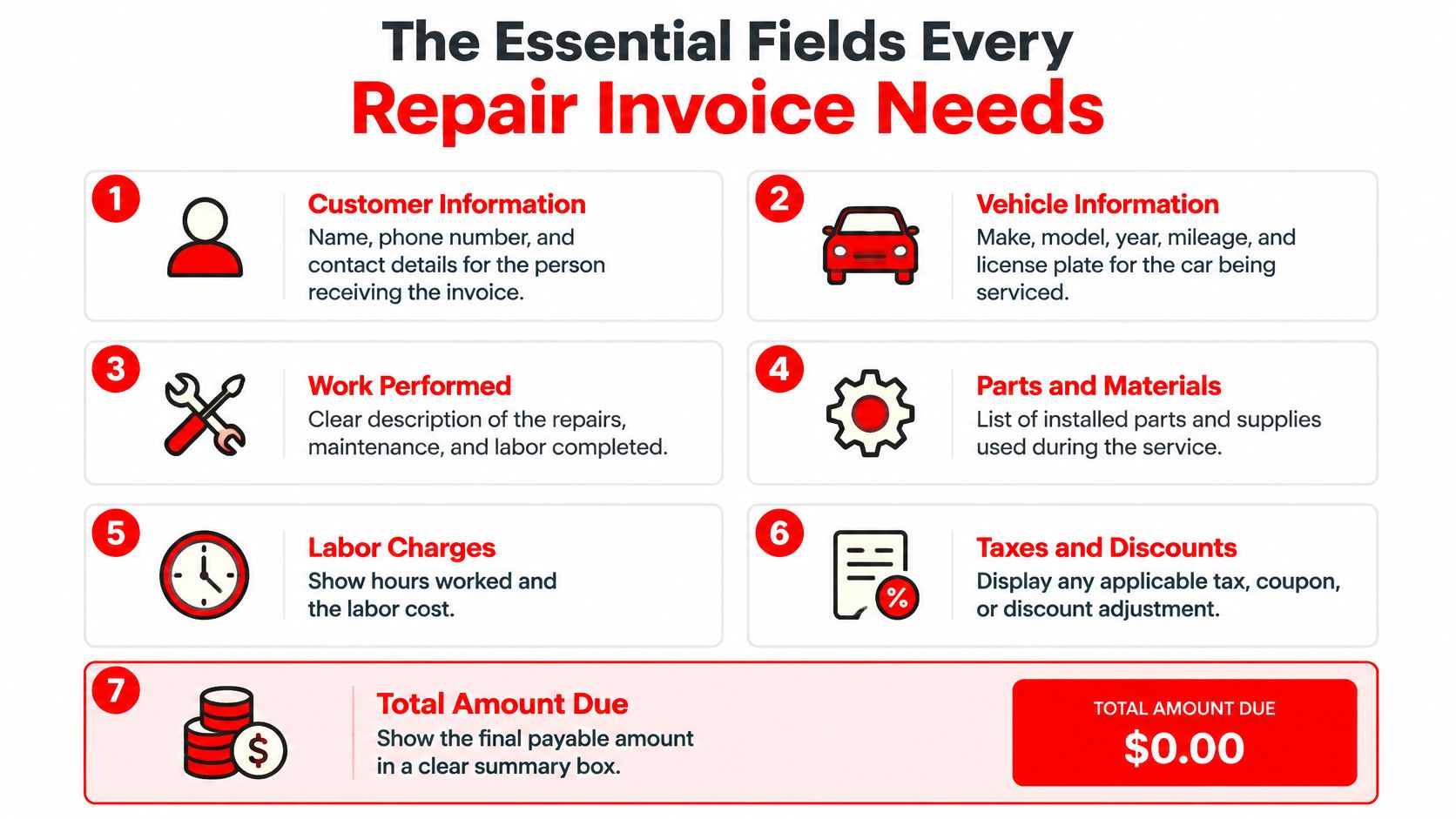
Customer and Vehicle Identification
- Customer details: Legal name, address, phone, and email identify who authorized and paid for work.
- Vehicle details: Year, make, model, plate, VIN, and odometer at drop-off and completion tie charges to one specific car.
- Shop details: Legal name, address, contact details, registration or license number, invoice date, and invoice number establish who issued the record.
Work, Parts, and Coverage
Labor lines need a plain-language operation, hours or flat-rate basis, rate, and amount. Vague entries such as "repair brakes" don't explain whether pads, rotors, machining, or a caliper were included. Parts lines need description, part number where practical, quantity, unit price, extended price, and condition marked as new, used, rebuilt, or reconditioned.
Warranty terms belong near the relevant lines, not buried in fine print. The template also needs space for diagnostic charges, declined work, storage fees, authorizations, technician identity, payment status, balance due, and signatures where required.
Jurisdiction changes the mandatory list. sits within a patchwork where Michigan also requires identification of each mechanic who worked on or inspected the vehicle, certification information, and an authorized signature. California recognizes paper or electronic documents and expects itemization for diagnosis, warranty work, and no-charge repairs.
The sound design is a core field set plus a jurisdiction-specific checklist, not a claim that one universal form satisfies every rule. Shops operating across borders face the same issue with tax fields, as shown by guidance on, where local identifiers and wording matter.
Breaking Down Labor, Parts, Taxes, and Fees on the Invoice
A lump sum hides the exact questions customers and bookkeepers ask later. It doesn't show whether a price rise came from parts, labor, tax, a shop fee, or an approved extra operation.
Separate Every Money Category
require an issue date, a unique sequential invoice number, supplier and customer names and addresses, descriptions and quantities, unit prices before tax, the applicable tax rate, total tax due, and a breakdown by rate or exemption. A payment or transaction date is also needed when it differs from the issue date.
That structure translates directly to auto repair. Labor revenue, parts revenue, discounts, taxable subtotal, tax amount, deposits, refunds, and balance due should never collapse into one figure.
| Line-Item Category | Fields to Include | Why It Matters |
|---|---|---|
| Labor | Operation, hours or flat rate, rate, amount, technician | Explains time billed and supports efficiency review |
| Parts | Description, quantity, unit price, condition, part number | Proves what was installed and supports warranty claims |
| Diagnosis and fees | Diagnostic operation, shop supplies, storage, disposal | Prevents surprise charges and separates non-repair revenue |
| Discounts | Coupon, fleet rate, goodwill adjustment, amount | Shows price reductions instead of altering original charges |
| Taxes | Taxable subtotal, rate, exemption, tax amount | Allows accurate filing and customer tax review |
| Totals and payment | Subtotal, total, deposit, amount paid, balance, method | Connects completed work to collected cash |
No-charge work still deserves a priced-out line at zero. Otherwise warranty labor disappears from history and a later advisor can't tell whether a comeback repair was already performed. Diagnostic time needs the same treatment, whether it's billed, waived, or applied toward an approved repair.
Sequential numbering matters because gaps become visible. Combined with customer tax identification numbers where required, it creates an audit trail from repair order to ledger.
Formatting and Branding Tips for Print and Digital Templates
Good formatting isn't decoration. It controls the order in which a customer reads the bill and reduces avoidable questions at pickup.
Build for Scanning First
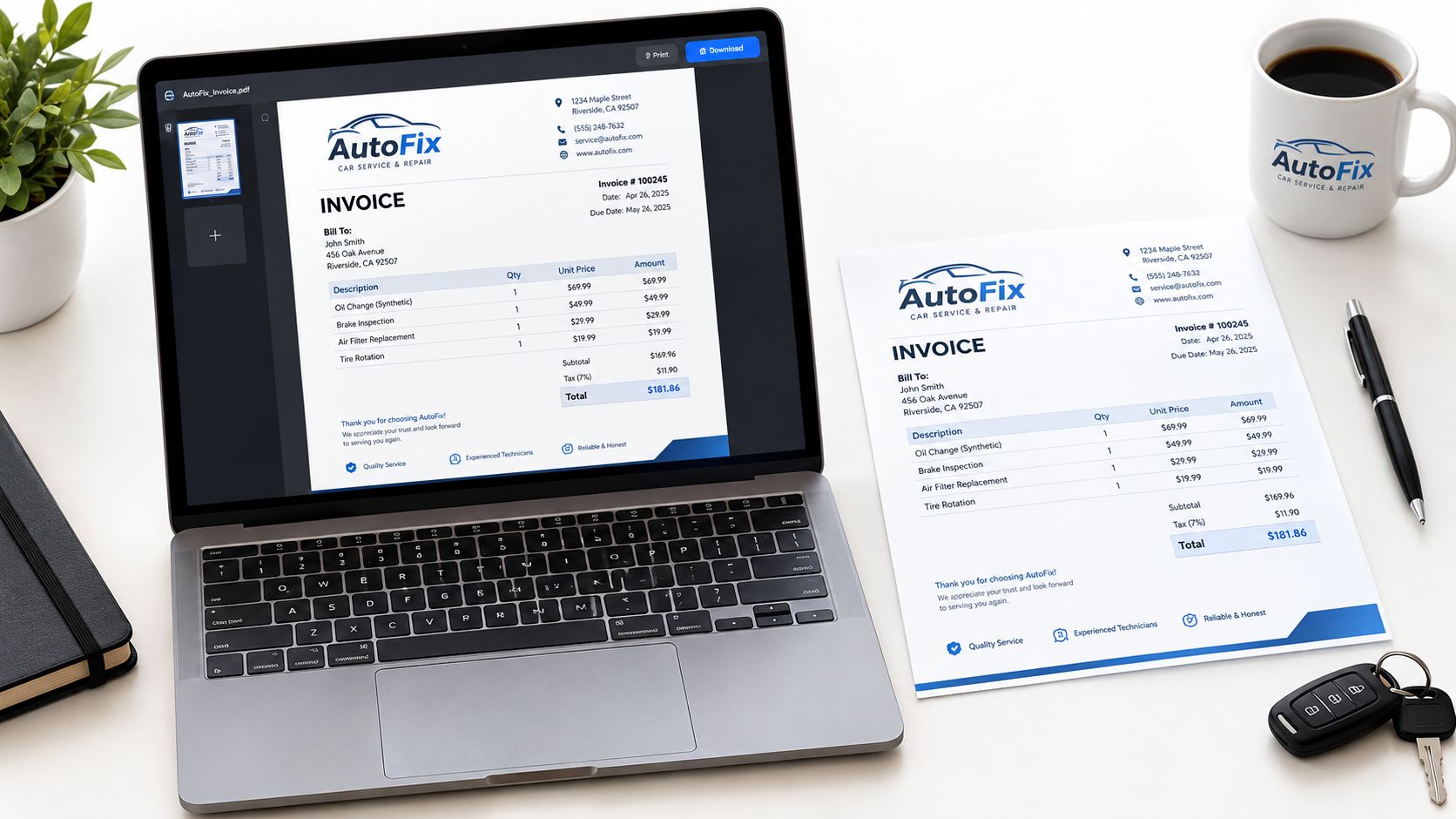
Place the shop logo, legal name, address, phone, and invoice number at the top, but keep that header compact. Vehicle and customer blocks should sit side by side. Line items need the widest area, with subtotals aligned in one column and the total amount due visually distinct.
Use one legible font family, consistent decimal alignment, and enough white space between labor, parts, fees, and warranty notes. Dense templates encourage advisors to squeeze multiple operations into one line. Digital versions need the same hierarchy on a phone screen, plus PDF export for customers and CSV or Excel export for bookkeeping.
recommends that customers obtain a paper or electronic invoice and verify the date, shop and customer details, vehicle model and registration, itemized services and prices, parts status, and totals with and without taxes. Both formats should therefore carry identical information. A print copy must not become a shortened receipt.
Pre-send rule: If totals, warranty terms, or authorization notes require hunting, the layout needs work.
Pre-Send Checklist
- Identity check: Customer, vehicle, plate, VIN, and mileage match the repair order.
- Math check: Extensions, discounts, tax, deposits, and balance calculate correctly.
- Authorization check: Added work, signature space, and approval notes are present.
- Delivery check: The file prints cleanly and remains readable on mobile.
Branding should signal professionalism without pushing required data into footnotes. A restrained logo and consistent colors are enough.
Choosing Between Paper, Spreadsheet, and Shop Software Templates
Each format can work at a certain volume. Problems start when a shop keeps a low-volume system after job complexity and advisor handoffs increase.
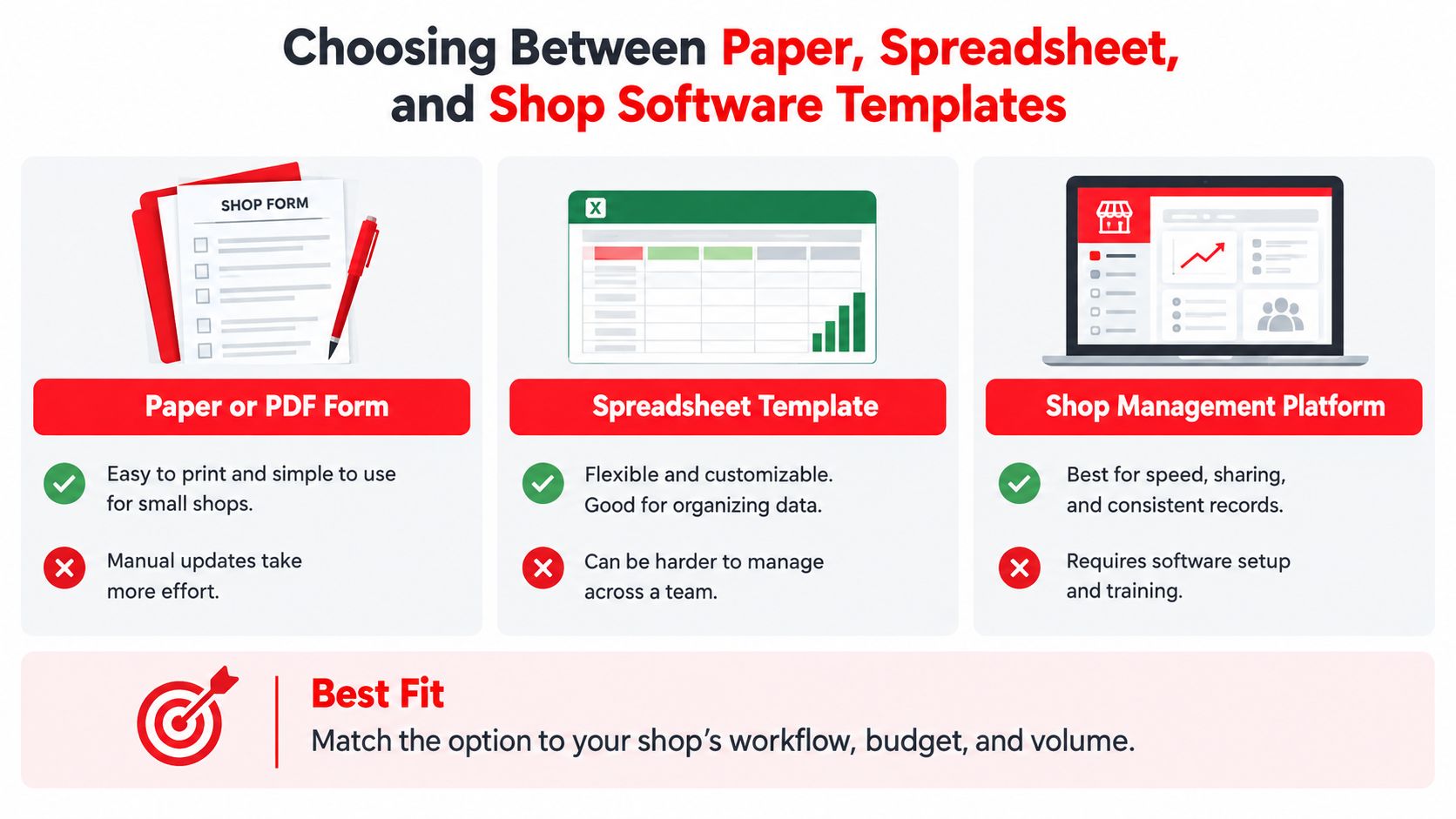
Paper or PDF forms are cheap, familiar, and adequate for very simple work. They don't validate fields, calculate reliably, connect estimates to invoices, or create searchable history. A missing odometer reading is usually discovered after the car leaves.
Spreadsheet templates improve math and allow reuse in Excel or Google Sheets. Formulas help, but version control is weak. One advisor edits a copied file, another overwrites a formula, and accounting still receives data that needs manual cleanup. Photo evidence, approvals, parts status, and payment records usually live somewhere else.
Where Software Changes the Work
Shop software links intake, inspections, estimates, parts, labor, payments, and the final invoice in one record. RedAppy offers one-click invoicing, digital inspections with photos, online payments, parts ordering with real-time inventory, and analytics for revenue, technician efficiency, average repair order, and repeat business, with month-to-month terms for shops from single-bay garages to multi-location operations. Shops comparing workflows can review the RedAppy feature set before deciding whether manual templates still fit.
Record quality is the deciding test. describes invoices, receipts, sales slips, deposit slips, and paid bills as supporting documents that should show amounts and sources of gross receipts. A system that preserves customer and vehicle identifiers, quantities, prices, tax, payment method, and balance due makes that trail easier to maintain.
Paper optimizes familiarity. Spreadsheets optimize flexibility. Software optimizes consistency across people, locations, and repeat visits.
Connecting the Estimate to the Final Invoice
Most billing disputes begin before the invoice exists. They start when an estimate, a phone approval, and the technician's actual findings drift apart without a shared record.
Use a Linked Estimate-to-Invoice Workflow
- Record the complaint: Capture the customer's concern in plain language and attach inspection notes or photos.
- Issue a versioned estimate: Separate estimated parts and labor, state approval limits, and retain a signed or electronically accepted copy.
- Log every change: Add the approval time, method, person approving, revised amount, and any declined recommendations.
- Bill actual work only: Carry forward installed parts, labor performed, diagnosis, warranty work, and no-charge operations.
- Explain variance: Reconcile estimate and final total before requesting payment.
distinguishes an estimate specifying the job and estimated parts and labor from a final invoice listing every service performed and its price, including diagnosis, warranty repairs, and no-charge work. Illinois allows an itemized estimate to be exceeded by no more than 10 percent, while a non-itemized total estimate cannot be exceeded at all. Michigan requires a written estimate for repairs costing $20 or more and restricts exceeding it.
Those limits make one question central. How does the shop prove approval for additional work?
A static template answers that poorly unless it includes estimate references and authorization history. New York's requirements for each repair, replacement part, labor cost, non-original or used parts, and relevant odometer readings reinforce the same discipline.
Detail doesn't weaken trust. Unexplained detail does. A clear variance trail shows why the final amount changed and gives the customer a record that matches earlier approvals.
Putting Your Invoice Template Into Practice
A practical rebuild starts with an audit of recent invoices. Shops should check whether each one identifies the customer and vehicle, separates labor and parts, states parts condition, shows tax clearly, records mileage, explains warranty coverage, and proves approval for work beyond the estimate.
A Simple Rollout Sequence
- Fix mandatory fields first: Add missing identifiers, sequential numbering, technician details, and local compliance items.
- Fix the money layout: Separate diagnostics, fees, discounts, taxable subtotal, tax, deposits, and balance due.
- Connect documents: Reference the estimate on the invoice and retain approvals, declined work, and inspection evidence together.
- Choose the operating format: Keep paper or spreadsheets only while volume and staff handoffs remain simple.
Durable copies matter as much as design. Customers need a legible copy, the shop needs searchable retention, and bookkeeping needs figures that reconcile without re-entry.
Shops ready to test a connected workflow can contact the RedAppy team to discuss how estimates, inspections, invoices, and payments fit existing counter habits. The immediate goal isn't a prettier form. It's an invoice that settles questions before they become disputes.
Shop owners can use RedAppy to connect digital inspections, estimates, one-click invoicing, online payments, parts ordering, and performance analytics in one workflow built for auto repair businesses. A visit to the platform gives shops a concrete way to compare a static invoice template against a connected system that preserves approvals, vehicle history, and payment records from check-in to checkout.
Ready to Transform Your Shop?
RedAppy helps auto repair shops create professional digital estimates with photos and videos, send them instantly via text or email, and get customer approvals in seconds. No credit card required to start.