
Digital Inspection Checklist Guide for Auto Repair Shops
The cheapest approval tool in an auto repair shop isn't a discount. It's a clear photo attached to a failed inspection item.
Digital checklists give technicians a place to record findings, but the result matters only if the customer can understand it. A market report from Endeavor Business Intelligence, conducted with AutoZone, surveyed 300 shop owners and service managers responsible for technology decisions and found that 43% of shops used digital inspection sheets. A separate survey found that electronic inspection sheets were in use at about half of the shops surveyed. Many shops still explain a worn tie rod end with words alone.
A well-built checklist guides what the customer sees, what the service advisor can estimate, and what the shop documents if recommended work is declined. Treat each finding as a customer approval decision: classify it clearly, add evidence, and make the next step easy to understand.
Table of Contents
- Digital Inspection Checklist Template at a Glance
- Classify Findings as Safety, Monitor or Recommend
- How to Record Each Inspection Item Step by Step
- Photo and Video Evidence for Every Finding
- Turn Findings into Estimates and Customer Approval
- Keep Inspection Records Audit-Ready
- Common Checklist Mistakes and Staffing Limits
- Set Up Your Digital Inspection Checklist Today
Digital Inspection Checklist Template at a Glance
Here's the complete template in one view, arranged in the order a technician works around a vehicle rather than as a flat list of parts.
| Section | Example items | Result options | Evidence required |
|---|---|---|---|
| Functional checks | Warning lights, horn, wipers, windows, locks, lighting, HVAC, headlight aim | Pass, Fail, Not Applicable | Comment on any failure |
| Under-hood | Fluid levels, visible leaks, belts and hoses | Pass, Fail, Requires Measurement | Photo of the leak or low fluid level |
| Brakes and steering | Pad and rotor condition, brake pedal feel, steering play | Pass, Fail, Requires Measurement | Photo with a measurement reading |
| Tires and wheels | Tread depth, tire pressure, sidewall damage | Pass, Fail, Requires Measurement | Photo with tread gauge reading |
| Road test | Alignment pull, abnormal noise or vibration, parking brake, transmission | Pass, Fail | Short video of the symptom |
| Electronic health | Diagnostic trouble codes, tire-pressure monitoring | Pass, Fail | Scan report attached to the record |
| Customer concerns | Symptoms the customer reported at check-in | Pass, Fail, Not Applicable | Technician note linked to the concern |
That staging isn't decorative. The for manufacturer inspections split functional checks, under-hood checks, road-test checks and electronic health checks into separate stages, and that separation is what makes a sheet repeatable across technicians with different habits. Each item also ends in a controlled result (Pass, Fail, Not Applicable or Requires Measurement) rather than a free-text opinion, with a required comment or evidence field behind every failure.
Brakes, steering, tires, restraints, lighting and leaks carry the strictest rules on the sheet. A missed item in that group puts the vehicle at risk, not just the invoice, so a failure there needs a named part, a measurement and a photo. A worn pad with no reading is an opinion the customer can argue with.
Identity before condition
Fill in the VIN, license plate, mileage and work order number at the top before the first item is touched. An inspection that can't be tied to a specific vehicle and a specific job is a set of opinions with no owner, and it's the reason some shops can't answer a simple question six months later about what was found and what was approved.
Save this table as the starting template before adding a single shop-specific item. The result options and evidence fields matter more than the length of the item list.
Classify Findings as Safety, Monitor or Recommend
The fastest way to teach a customer to ignore a red flag is to raise one on every vehicle. A sheet that flags tires, wipers, a cabin filter and a worn ball joint with the same urgency tells the person reading the estimate that nothing on it is urgent.
A pass-or-fail checklist hands the advisor a list and no priorities. Four labels fix that.
| Classification | Use when | Customer action | Example |
|---|---|---|---|
| Safety-critical | The item affects safe operation, such as brakes, steering, tires, restraints, lighting or a fluid leak | Repair before the vehicle leaves, or decline in writing | Brake pads worn to the replacement point |
| Monitor | The part is within limits but changing over time | Re-check at the next visit | Brake pads at mid-life wear |
| Recommend | Wear that is not yet unsafe but should be fixed soon | Schedule the repair within a set period | Tires near the tread limit |
| Maintenance | Scheduled service item that is due by time or mileage | Plan the service at the next interval | Engine oil change due |
Safety-critical carries an obligation, not just a color. The vehicle doesn't leave the lot until the item is repaired or the customer declines in writing. Monitor is the label most shops skip, and it's the one that builds trust, because it shows a part is inside limits now and trending the wrong way, so it gets rechecked next visit and the progress sits on the vehicle's history.
Underneath those four labels sits a structure: a mandatory safety baseline of brakes, steering, tires, restraints, lighting and leaks; conditional checks triggered by a symptom or a vehicle system; and optional maintenance checks when the clock allows. A car with a brake complaint gets a deeper look at brakes. A car in for an oil change gets the baseline and nothing invented.
Practical rule: if the advisor can't explain the label to the customer in one sentence, the classification is probably wrong.
How to Record Each Inspection Item Step by Step
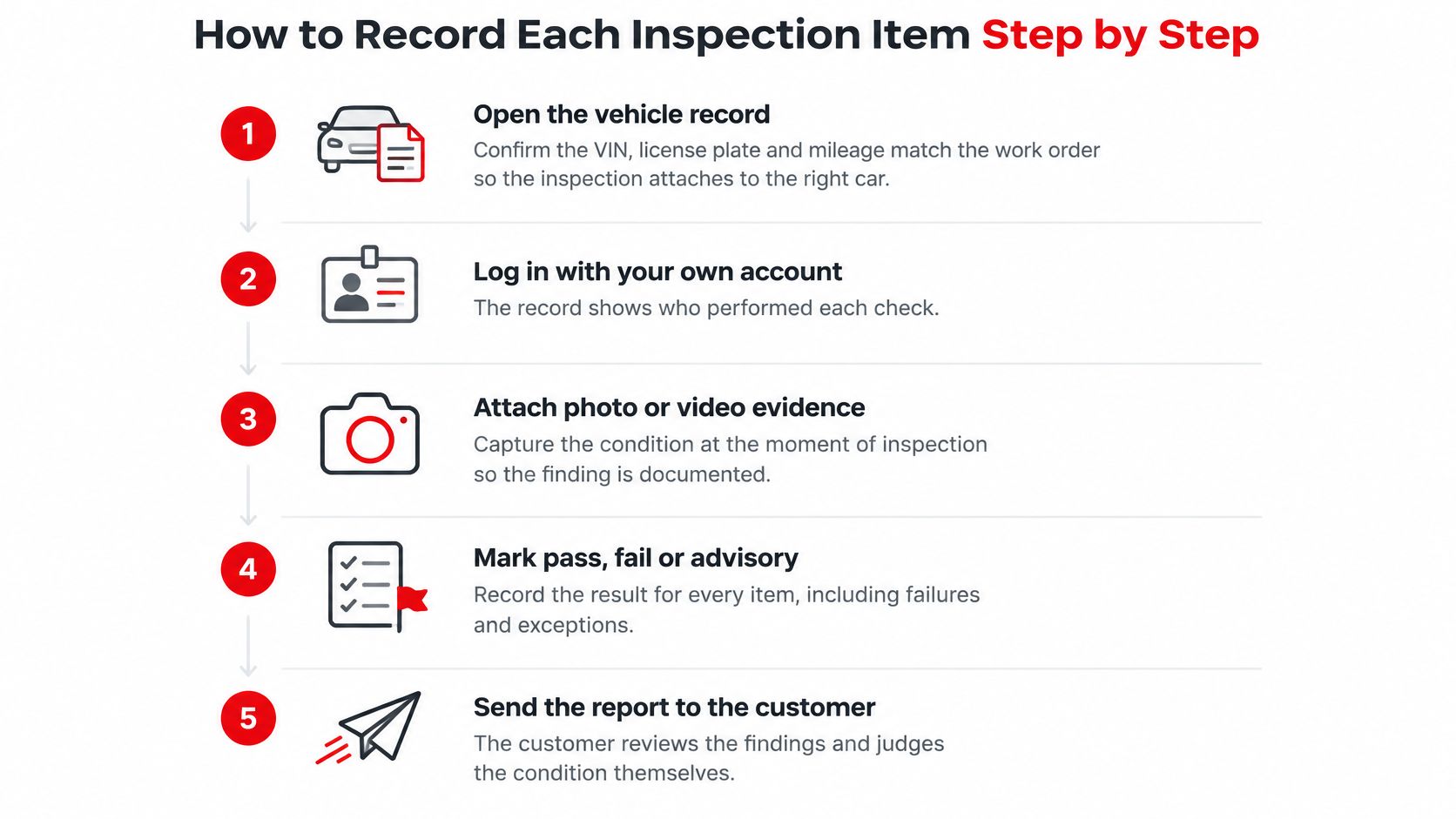
The recording sequence matters as much as the item list, because a good finding recorded badly dies in the advisor's inbox. Eight steps, in order.
- Open the vehicle record and confirm identity. Check that the VIN, license plate and mileage match the work order before touching the car. An inspection filed against the wrong vehicle follows that vehicle into its next visit, and nobody trusts a history that contradicts itself.
- Log in under your own account. Every finding needs a name behind it. Shared logins make it impossible to answer a customer who asks who looked at the car, and a shop with several locations loses the pattern of which inspections keep missing the same item.
- Start with the customer's concern. Whatever the driver reported at check-in goes first, because a symptom steers what to look at next. A vibration complaint earns extra attention on the road test and the tires; an oil change doesn't.
- Set a result on every item. Pass, Fail, Not Applicable or Requires Measurement. Blank rows are the most common reason a finished report reads as half done.
- Write a comment that names a part and a symptom. "Front pads low" is a phrase. "Front pads at 2 mm, rotor lip catches a fingernail" is something an advisor can put a price against without walking back to the bay.
- Attach evidence wherever a number applies. A gauge or ruler in the frame for pad thickness and tread depth, a short clip for a leak that only shows under load.
- Label the finding and propose the next step. Safety-critical or maintenance, then repair, monitor, re-inspect or a service at the next interval.
- Save each item as you go. Saving as you work stamps every result with a time, and it means a dropped tablet or a walk-in interruption doesn't wipe twenty minutes of inspection. Then submit the whole record to the advisor.
A complete record passes one test: someone who never stood in that bay can read it and understand what was found, how bad it is, and what should happen next.
Photo and Video Evidence for Every Finding
Evidence belongs on failures and exceptions, not on every passing item. Photographing forty passing components slows the technician and buries the two findings that matter. The exceptions are the record.
The payoff is measurable. 38% of surveyed automotive customers named photos or repair documentation as a trust-building factor, and 47% said photos, estimates and repair documentation significantly increased their confidence when approving expensive repairs. Documentation stops being paperwork the moment it changes a yes from a no.
Match the Evidence to the Finding
- Wear with a number: a photo with the gauge or ruler visible in the same frame as the part, so the reading can't be disputed later.
- A leak that only drips under load: a short video of the drip, not a still of a wet, unidentifiable surface.
- A noise or vibration: video of the symptom on the road test where it's safe to capture, with a note on the speed and conditions.
- A diagnostic code: the scan report attached to the record, so the code, the freeze-frame data and the finding live in the same place.
When a Photo Fails the Test
Three shots waste everyone's time: one taken from so far back the part is a smudge in the frame, one so blurred the leak could be condensation, and one borrowed from a different vehicle that got filed to the wrong record. The last one is the dangerous one, because it survives an audit and only surfaces when the customer compares notes.
A finding without clear evidence shouldn't be sent as is. Mark it as needing re-inspection, or walk back out and take the shot properly. A vague photo invites a second opinion; a clear one ends the conversation.
Turn Findings into Estimates and Customer Approval
Customers approve more work when they can see the problem. A U.S. Aftermarket Service Index survey of 10,348 vehicle owners found that 41% of full-service maintenance and repair customers approved recommended work when they received a multi-point inspection with photos or video, compared with 17% among customers who received the inspection without visual evidence.
The approval flow that turns that gap into booked hours runs in a fixed order.
- Review every failed item before it reaches the customer. The advisor checks that each safety-critical finding has evidence attached and a measurement where one applies.
- Group findings into estimate lines with labor, parts and a total. One line per decision, not one line per part, so a brake job doesn't arrive as eleven separate questions.
- Link each line to the photo or video that shows it. The customer should be able to see the worn pad beside the price of replacing it.
- Send the estimate by text or email. A customer receives it, opens a link, reviews labor, parts and total, and approves from their phone, with an e-signature where the shop requires one.
- Record the decision. Approved, declined or deferred, with the date and the name of the advisor who had the conversation, because memory is not a record.
- Close the loop on approvals and declines separately. Approved work goes to the shop board. Declined work stays visible.
A declined safety-critical item needs its own handling. Record the decision, restate the risk in writing so the customer understands what they're deferring, and leave the finding on the vehicle record. It comes back at the next visit, and it comes back with evidence attached.
Keep Inspection Records Audit-Ready
An open inspection record is a customer-service problem waiting to become a legal one. If a finished report can be edited with no trace, the shop can't prove what it found, what it recommended or what the customer agreed to, and a digital signature on top of an editable record proves nothing.
, treats the inspection as a controlled quality record with traceability to the inspected item or work order, the checklist revision used, the person performing the inspection, the execution time, the result or measured value, the supporting evidence, the treatment of nonconformities and the release decision. That translates into a short list of controls for a repair shop.
- Version every template. Each inspection should show which revision it used, so a change made last month doesn't rewrite what happened last year.
- Lock completed results against silent edits. Amendments happen, but they get an audit trail that names who changed what and when.
- Separate permissions by role. Technicians record findings, advisors record the customer's decision, and only the owner or manager can change a finished record.
- Give every failure a disposition. Repair required, monitor, re-inspect or customer declined, with the estimate and the final invoice linked to the same vehicle record so the history shows the whole chain.
- Define retention, backup and retrieval. A record nobody can find is a record that doesn't exist, and checking the record history before a new inspection is how a shop stops re-diagnosing a problem it already solved.
Those controls earn their keep in a multi-location operation, where standard inspection quality is the only way to compare one store against another, and where a comeback traced back through the record says plainly whether the fault was missed or never present.
Common Checklist Mistakes and Staffing Limits
A checklist earns customer trust only when each finding is specific, supported and classified consistently. Technician shortages and uneven experience make a short, repeatable checklist more useful than a long form that gets rushed.
| Mistake | What it causes | Fix |
|---|---|---|
| Copying the same comment onto every vehicle | Advisors cannot distinguish a real finding from template text | Require a vehicle-specific note for each failed item |
| Marking items Not Applicable with no reason | The customer and advisor cannot tell whether the item was checked | Require a short reason for each Not Applicable |
| Photos with no measurement or reference | Customers may doubt the finding | Include a ruler, gauge or reading in the frame |
| Starting before VIN, plate and mileage are confirmed | Findings may be attached to the wrong vehicle | Confirm vehicle identity and mileage before starting |
| Too many required items | Technicians rush or copy findings, weakening the evidence customers see | Keep a short mandatory baseline and make maintenance checks optional |
| Marking everything as urgent | Customers stop trusting the labels | Reserve Safety-critical for items that affect safe operation |
The number of required items sets a real trade-off. A long generic form can look thorough, but it invites rushed checks and copy-paste notes, especially when the shop is short-staffed or a technician is still learning the process. Keep the mandatory baseline focused on brakes, steering, tires, lighting and leaks. Add optional maintenance checks when time allows.
A smaller, risk-based checklist with clear escalation rules gives the advisor better evidence for explaining what needs attention now and what can wait. That distinction helps customers make decisions without treating every finding as an emergency.
Review ten recent inspections against the six mistakes in the table. Count which issue appears most often, then change that part of the checklist first. Check the next ten records to see whether the change improved the notes, evidence or classifications before adjusting another item.
Set Up Your Digital Inspection Checklist Today
Trust is the constraint everything else runs into. Clear pricing and estimates were the leading trust factor for automotive businesses, cited by 77% of respondents, and photos, estimates and repair documentation significantly increased confidence for 35% of customers considering repairs below $750, rising to 58% when the estimate exceeded $1,500. A checklist that captures condition, explains the action and links to a transparent estimate hits that factor directly.
Roll it out in five moves.
- Compare what exists today against the seven sections in the template and note the gaps.
- Pilot one service lane or one technician for two weeks. One willing technician beats a company-wide mandate.
- Train on the eight recording steps and the four finding labels before the first live inspection.
- Review the first twenty records for missing photos, vague comments and mislabeled urgency.
- Expand to the full team once records pass review, not before.
RedAppy runs those steps inside one system: multi-point inspections can include photos of what's found, and the results can be sent to the customer so they can approve the work, alongside estimates, invoices, texting and parts ordering. The inspection features are laid out on the RedAppy features page, and setup questions for a specific shop go through the RedAppy contact page.
RedAppy gives independent shops and multi-location groups a single place to record a digital inspection, attach the photo or video behind each finding, and send the customer an estimate they can approve from their phone. Those approvals turn into invoices without retyping, and every inspection stays in the vehicle's searchable service history. Start with the RedAppy platform and see how much more work gets approved once the customer can see the problem.
Ready to Transform Your Shop?
RedAppy helps auto repair shops create professional digital estimates with photos and videos, send them instantly via text or email, and get customer approvals in seconds. No credit card required to start.