
Digital Vehicle Inspection Software: A Complete Guide
A customer is waiting at the counter, a technician is halfway through a multi-point check, and the service advisor already knows the next question: “Can the shop show me what's wrong?” If the answer depends on a smudged paper form or a hurried explanation over the phone, the repair order can stall before the estimate is even presented.
Digital vehicle inspection software gives the technician a tablet or smartphone workflow for recording findings, adding photos and videos, rating vehicle conditions, and sending a customer-ready report. The important part isn't the screen. It's the connection between the bay, the service counter, and the customer's decision.
The category has also grown beyond a niche administrative tool. One industry estimate valued the global market at US$1.319 billion in 2024 and projected US$3.067 billion by 2031, while another placed it at US$1.2 billion in 2024 and forecast US$2.5 billion by 2033. Those estimates differ, but both point to the same conclusion, digital inspections are becoming a mainstream layer in vehicle service operations.
Table of Contents
- What Digital Vehicle Inspection Software Actually Does
- Core Features Every DVI System Should Include
- How a Digital Inspection Flows From Check-In to Approval
- Where DVI Connects With the Rest of Your Shop Management
- The Real ROI of Digital Inspections for Independent Shops
- Audit Readiness and Compliance Questions Most Buyers Skip
- How to Choose and Roll Out DVI Software
- Putting It All Together and Taking the Next Step
What Digital Vehicle Inspection Software Actually Does
Tuesday morning starts with a familiar rhythm. A service advisor opens the repair order, the technician takes a tablet to the vehicle, and the inspection follows a guided checklist instead of a loose sheet of paper. Before the customer's coffee cools, the shop can have photos, notes, condition ratings, and recommended services ready for review.
That's the basic job of digital vehicle inspection software. It replaces handwritten multi-point forms with a digital inspection that can capture:
- Technician findings: The technician records whether an item is in good condition, needs attention, or requires urgent work.
- Visual evidence: Photos and videos attach directly to the relevant inspection item.
- Condition ratings: Color-coded states, often green, yellow, and red, help customers understand priority without decoding technical language.
- Customer communication: The completed report reaches the customer by text or email, often with approval options connected to the estimate.
The software is best understood as a workflow layer, not a standalone gadget. The technician documents the vehicle in the bay, the advisor reviews and prices the findings at the counter, and the customer receives enough context to make a decision. That chain matters because a recommendation without evidence can sound like a sales pitch, while a recommendation connected to a clear photo and plain-language note feels easier to evaluate.
Practical rule: The inspection should answer three customer questions quickly: What did the shop find, why does it matter, and what happens if the work waits?
Digital inspections also reduce the handling involved in manual paperwork. Technicians enter information on a mobile device, which can reduce inspection time and lower the chance of reporting errors compared with paper-based processes. Photos and videos give the customer a direct view of vehicle issues, and visual documentation can support faster approvals for needed work.

A paper replacement is useful, but it's only the starting point. The value appears when inspection findings move directly into estimating, customer approval, repair planning, and the vehicle's service history.
Core Features Every DVI System Should Include
A DVI platform earns its place in a shop by doing specific jobs reliably. A polished demo isn't enough. The system needs to work when a technician has dirty gloves, a customer has weak mobile service, and the advisor needs to turn a finding into an estimate without typing it twice.
Templates should match the actual process
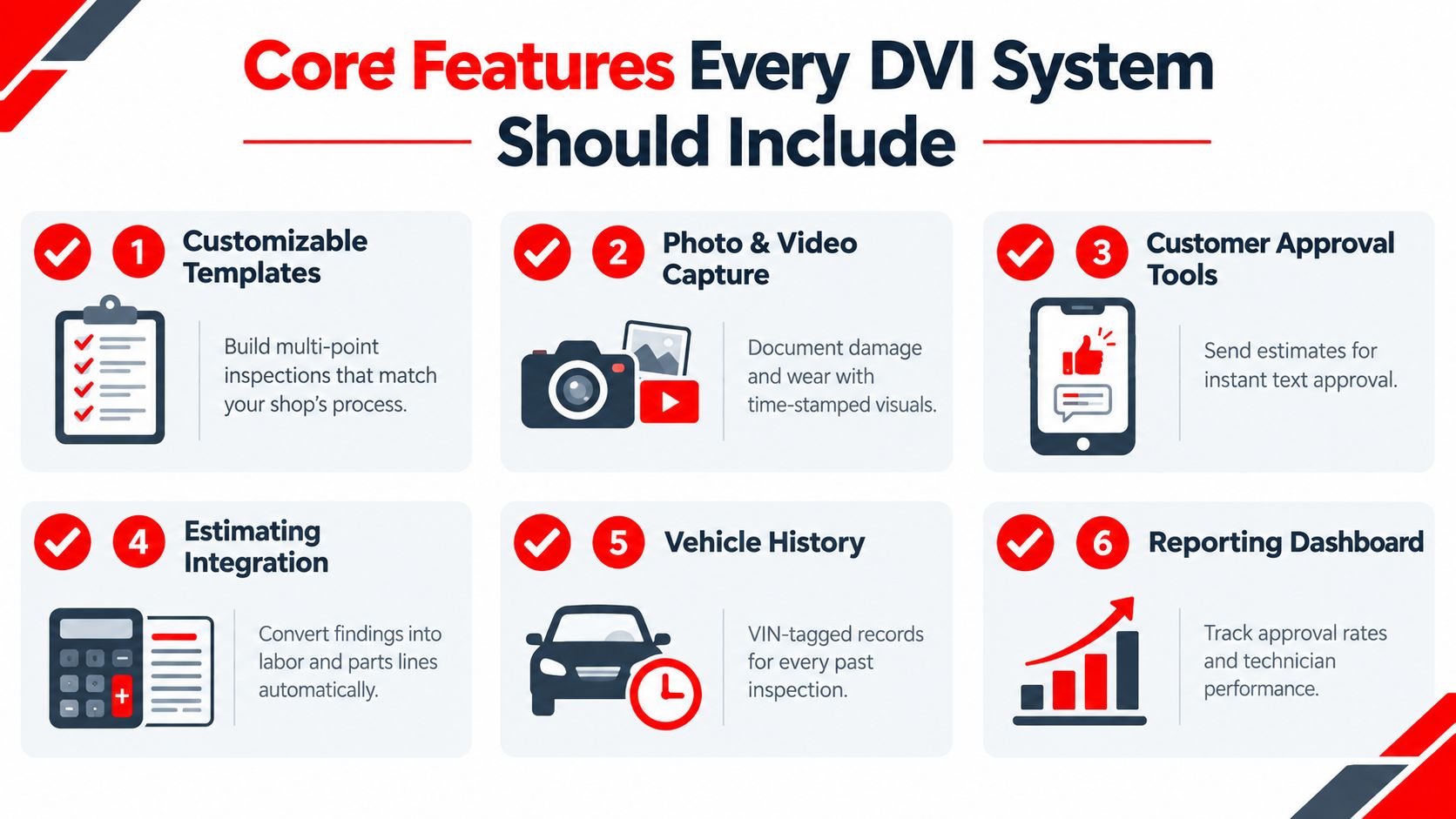
A shop needs customizable inspection templates that reflect its own multi-point list, vehicle types, and service standards. A quick-lube operation, a European specialist, and a heavy-vehicle workshop won't inspect the same items in the same order. Templates should also support required fields, conditional questions, and different procedures for different technicians or locations.
Locked templates can become an expensive limitation. Buyers should confirm whether customization is included in the plan or reserved for a higher tier.
Evidence needs to be easy to create and understand
Photo and video capture should happen inside the inspection, not through a separate camera app. Annotation tools help a technician circle a cracked bushing, mark uneven tire wear, or point to a fluid leak. A timestamp and clear connection to the inspection item make the image more useful later.
Color-coded condition ratings add a second layer of clarity. A green result can show an item is acceptable, yellow can identify a developing concern, and red can identify a priority repair. The labels should remain configurable so the shop can define them consistently.
Approval must connect to the estimate
The customer-facing report should be formatted for a phone, include useful thumbnails, and explain findings in plain language. Two-way text or email approval is more practical than forcing a customer through a complicated portal, especially when the customer is at work or away from the shop.
The system should capture timestamped consent, including which recommended lines the customer approved or declined. Technician assignment, time tracking, VIN decoding, historical inspection recall, and offline mode are also important operational pieces, particularly for shops with weak signal in parts of the building.
Controls protect the record
Audit logs, role-based permissions, and integration hooks shouldn't be treated as enterprise extras. The shop needs to know who changed a finding, who approved a repair, and when the record moved from inspection to work order. Integration with shop management and accounting systems prevents the front desk from retyping information and creates fewer opportunities for mismatched records.
How a Digital Inspection Flows From Check-In to Approval
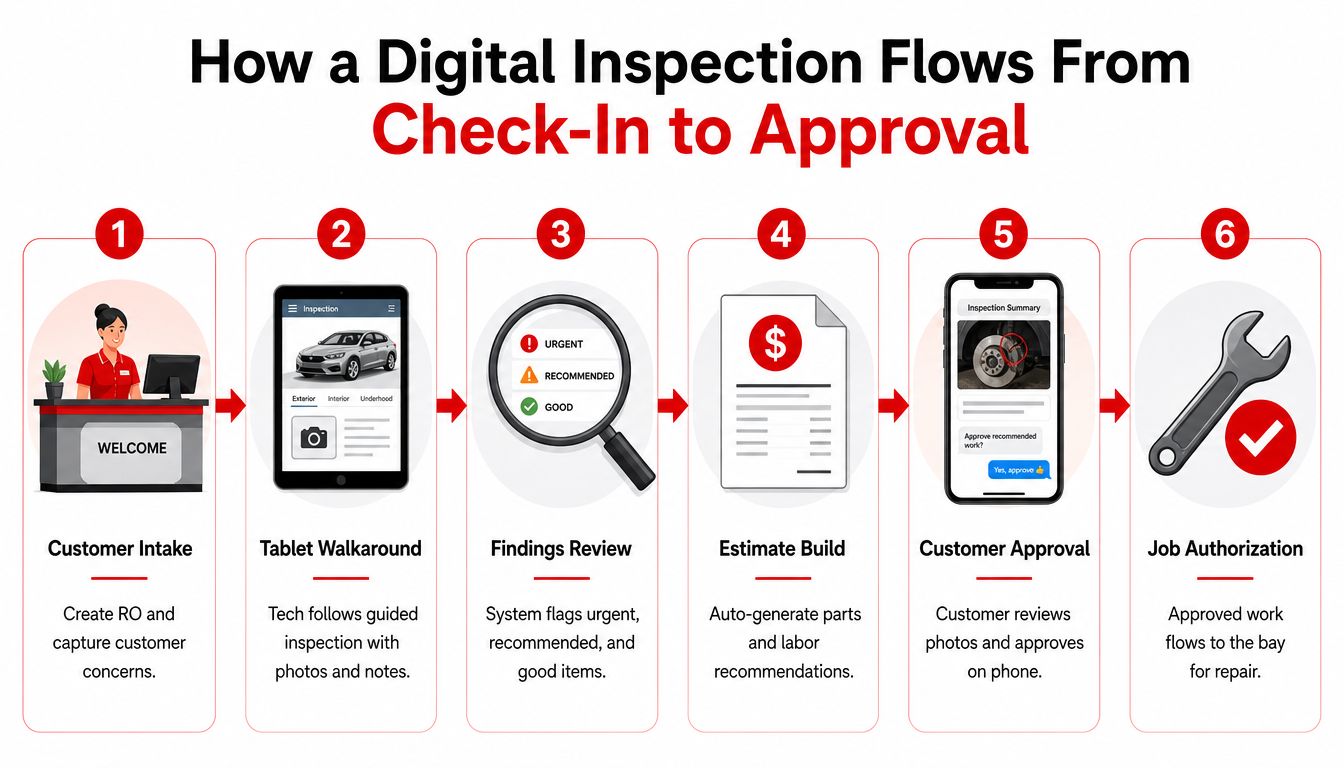
A strong inspection process follows the same path as the repair order. Each stage has a clear owner, and each handoff removes uncertainty instead of creating another task for the service advisor.
Start with a complete intake
The advisor creates the repair order, records the customer's concerns, confirms vehicle details, and assigns the inspection. VIN-linked information helps ensure that the findings attach to the correct vehicle and customer record. A rushed intake can undermine everything that follows, so the original concern should remain visible to the technician.
Let the technician follow a guided walkaround
The technician works through the checklist on a tablet or phone. At each relevant item, the technician records the condition, adds a note, and captures a photo or video when visual proof will help the customer understand the recommendation.
The best workflow doesn't ask technicians to write an essay. It uses structured selections for speed, with enough space for a concise explanation when a finding needs context. A photo of a worn component becomes more useful when the note explains what the customer is seeing and what service the shop recommends.
Review before sending
The advisor should review the inspection before it reaches the customer. Unclear notes, duplicate recommendations, or poorly framed photos get corrected. The advisor then bundles the findings into a buildable estimate with parts and labor lines.
A report sent too late can lose momentum. A report sent without explanation can create more questions than approvals. The service advisor's job is to connect the technical finding to the customer's decision without overstating the risk.
Send, authorize, and preserve the decision
The customer receives the report by text or email, reviews photos and recommendations, and approves or declines individual work. Declined items should remain archived in the record rather than disappearing. Approved work should move into the job plan so the technician and parts team can act on the same authorization.
After repair, the report can show completed work and final photos. That creates a cleaner closeout and gives the customer a record that distinguishes the original concern from the completed service.
A DVI report isn't finished when it reaches the customer. It's finished when the decision, the repair, and the final documentation all stay connected.
Where DVI Connects With the Rest of Your Shop Management
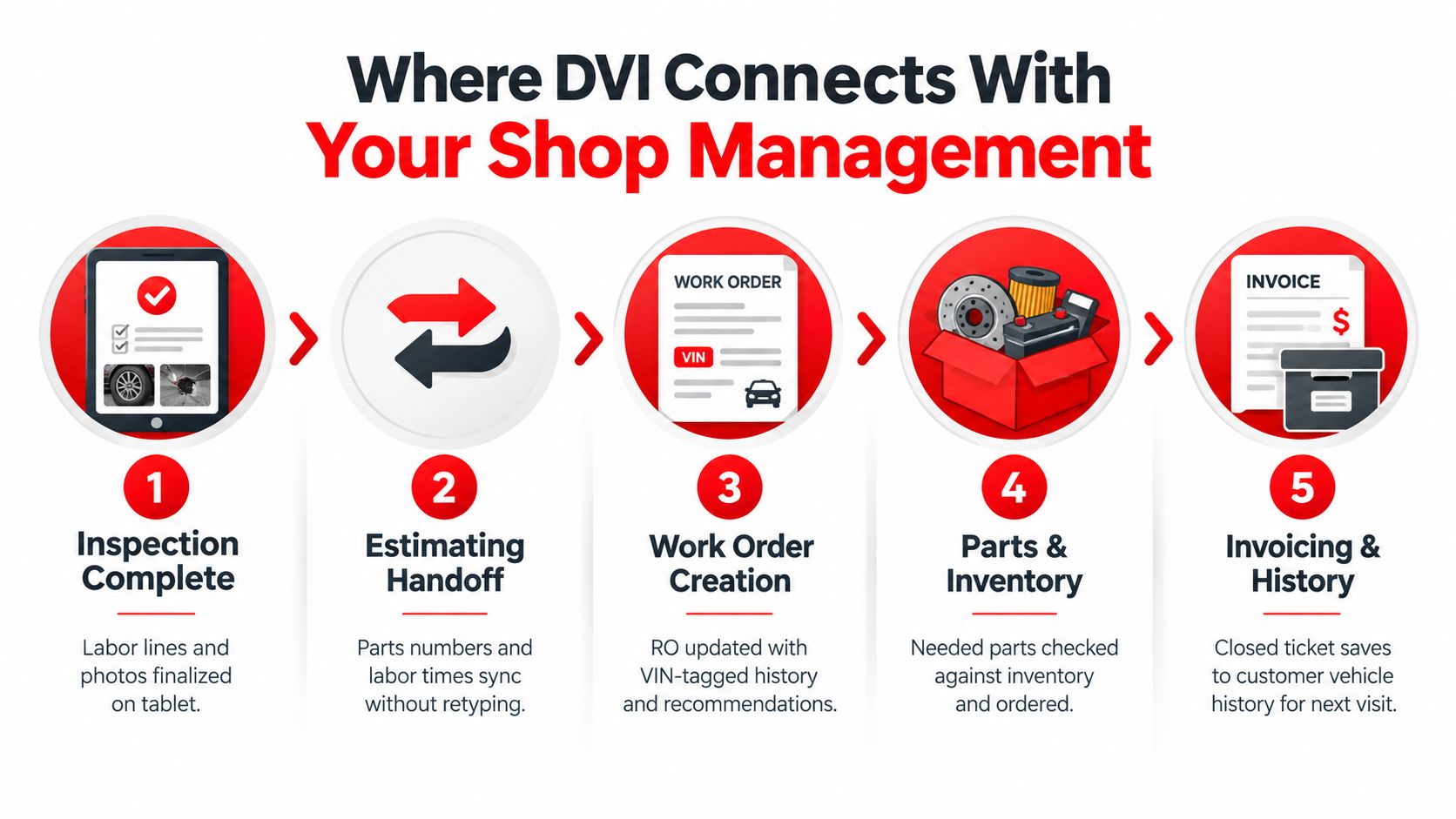
Inspection data becomes more valuable when it travels without retyping. Once a technician completes the inspection, the findings should support the estimate, parts process, work order, invoice, and future vehicle history.
A native shop management platform usually keeps DVI inside the same environment as the repair order. A standalone inspection app may connect through an API, an export, or another synchronization method. Neither approach is automatically right. The deciding question is whether the handoff preserves the details that matter.
A useful integration should support:
- Estimating handoff: Findings can become labor lines, parts numbers, and recommendations without duplicate entry.
- Work order continuity: The repair order retains the inspection, photos, approvals, and VIN-linked history.
- Parts coordination: Flagged services can connect to inventory checks and ordering workflows.
- Technician accountability: Assigned work and technician time can remain connected to the job.
- Follow-up opportunities: Deferred recommendations can enter a pending work list for future conversations.
- Management reporting: Owners can review approval activity, ticket performance, technician productivity, and recurring inspection findings.
A bolted-on app can still work well if its integration is dependable. The warning sign is a workflow that makes the advisor download a report, copy the findings, and manually rebuild the estimate. That process may look digital to the customer, but it leaves the shop operating with the same administrative friction.
Accounting is part of the same loop. Shops reviewing payment and receivables workflows may also find value in resources about, particularly when invoice creation and payment handling need to connect more cleanly with operational records.
The strongest setup keeps the customer's approval, the technician's documentation, and the closed invoice in one traceable history. That history supports the next visit, warranty questions, and internal review without asking someone to reconstruct the job from scattered systems.
The Real ROI of Digital Inspections for Independent Shops
Buying DVI software doesn't automatically grow a shop's revenue. A subscription can sit unused if technicians skip photos, advisors send reports late, or customers receive technical notes they can't understand.
The revenue opportunity comes from a chain of behavior. Technicians need consistent inspection habits, advisors need to present findings clearly, and managers need to review whether recommendations move through approval and repair. A shop that treats DVI as a digital checklist may gain cleaner records but miss the larger commercial benefit.
Industry reporting connects richer inspection documentation with higher repair order value. One survey cited inspections containing 40 or more photos alongside 45% higher average repair order value, while edited or annotated photos were associated with 19% higher ARO. Another analysis cited 30.4% higher repair order value when inspections included 20 or more pictures compared with inspections containing 5 or fewer. These figures shouldn't be treated as a promise for every shop. They show why visual evidence can matter, not what any individual operator will earn.
| Lever | Typical Impact | What It Depends On |
|---|---|---|
| Deferred-work approvals | More recommended work can receive a clear customer decision | Photo quality, explanation, timing, and trust |
| Average repair order value | A fuller vehicle conversation can surface relevant maintenance needs | Consistent inspections and accurate estimates |
| Comeback protection | Pre-existing conditions are easier to document | Clear images, timestamps, and vehicle history |
| Reclaimed admin time | Less paper routing and retyping can reduce front-desk friction | Integration depth and staff adoption |
A single-bay shop may value reduced paperwork and clearer customer communication more than a large increase in inspection volume. A four-bay operation often has more opportunities for faster payback because the same workflow can support more technicians, repair orders, and customer decisions. The result still depends on execution.
The trade-offs are real. Subscription fees, tablet hardware, training, template setup, and the learning curve can slow production while the team adjusts. Shops comparing DVI with broader workflow tools can also review how to, especially when too many disconnected systems create their own administrative burden.
Audit Readiness and Compliance Questions Most Buyers Skip
Vendor demonstrations often lead with polished photos and instant customer texts. Buyers should reverse the order and ask what happens when an auditor, warranty administrator, insurer, or customer challenges the record months later.
The regulatory question is no longer limited to whether electronic inspections are allowed in fleet-adjacent work. Recent coverage states that an FMCSA final rule explicitly authorized electronic DVIRs, added eDVIR language to 49 CFR 396.11 and 396.13, and made the rule effective on March 23, 2026. The practical issue is whether the system creates a defensible record.
Questions for the vendor
- Retention: How long are inspection records stored, and can the shop choose a retention policy?
- Integrity: Does the system preserve timestamps, location information, original images, edits, and audit history?
- Authorization: Can the record show who approved each repair line, when approval occurred, and through which channel?
- Permissions: Can technicians, advisors, managers, and administrators access only the functions appropriate to their roles?
- Export: Can the shop export a complete inspection, including notes, media, approvals, signatures, and change history?
- Continuity: If a customer changes shops, can the vehicle's relevant service history be transferred in a usable format?
- Security: Does the vendor provide SOC 2 or an equivalent security certification, along with clear backup and access policies?
State inspection programs, recall information, emissions checks, and manufacturer requirements may sit outside the core DVI workflow. The buyer should ask whether those records can connect to the same vehicle history or whether staff must maintain a second process.
Audit-ready means more than stored. The record should explain what happened, who acted, what the customer authorized, and whether the original evidence remains intact.
Compliance design can reduce business risk even when no formal audit is pending. A complete record can support a warranty claim, clarify a disputed recommendation, and show that the shop documented a pre-existing condition before work began.
How to Choose and Roll Out DVI Software
A shop should treat the purchase like hiring a new employee. Before watching a demo, managers should write down the jobs the system must perform and the people who will use it.
Build the buying checklist
Start with the actual building, devices, and repair-order process. The checklist should cover:
- Mobile compatibility: Confirm that the platform works on the tablets and smartphones technicians already use.
- Weak-signal operation: Test offline inspection, photo storage, signatures, and later synchronization in the shop's worst-connected bay.
- Media tools: Check whether technicians can capture, annotate, and organize photos and videos without leaving the inspection.
- Customer approval: Verify two-way texting or email approval, item-level decisions, timestamps, and a usable mobile report.
- System integration: Confirm native connections to the existing shop management platform or accounting software.
- History and search: Test VIN lookup, past inspections, customer records, and export options.
- Controls: Review audit logs, role-based permissions, backups, and retention settings.
Pricing may be structured by rooftop, technician, or bundled software. The quote should be compared with the shop's monthly repair-order volume and technician count, not just the advertised subscription figure. A low sticker price can become expensive if staff must retype estimates or maintain separate customer records.
Test the workflow, not the sales script
A vendor should provide a sandbox loaded with sample vehicles, but the shop should also test a real ticket. The technician needs to inspect an actual vehicle, the advisor needs to build an estimate, and a manager needs to review the report and approval record.
A reference call with a comparable independent shop can expose details a demo hides. Questions should cover onboarding, support response, device failures, integration problems, and whether technicians still use the system after the initial rollout.
Roll out in controlled stages
A single technician can act as the first champion. The shop can run parallel inspections during the first week, compare the digital report with the paper process, and correct template or training problems before expanding to the full team.
For the first 60 days, a weekly metrics review can identify missing photos, incomplete inspections, slow customer follow-up, and recommendations that never reach estimates. Managers should correct the workflow rather than blaming users for problems created by confusing screens or unrealistic inspection times.
Putting It All Together and Taking the Next Step
The inspection itself isn't the whole product. The useful loop runs from photo-rich findings to customer approval, from approval to job planning, from job planning to parts and invoicing, and from the closed repair order back into vehicle history.
Independent shops can reduce the decision to three practical questions:
- Does the platform integrate with the shop management system already trusted by the team?
- Can the highest-volume technician complete a clean inspection on a tablet without slowing the bay?
- Will the vendor provide dependable support after implementation, not only during the sale?
Two side-by-side demos using actual vehicles and a real repair order will reveal more than a polished presentation. The advisor should send a report, the customer workflow should be tested, and the manager should inspect the final audit trail before any contract is signed.
RedAppy combines digital inspections with photo and video support, estimates, invoicing, parts ordering, customer and vehicle history, analytics, and a visual shop board. Shops evaluating that connected approach can review the available RedAppy features and compare them with the workflow requirements identified above.
RedAppy gives independent repair shops a connected way to document vehicle findings, present photo-rich recommendations, manage approvals, and carry the repair order through invoicing and payment. Visit RedAppy to review the platform, then schedule a working conversation through the RedAppy contact page using a real shop workflow.
Ready to Transform Your Shop?
RedAppy helps auto repair shops create professional digital estimates with photos and videos, send them instantly via text or email, and get customer approvals in seconds. No credit card required to start.