
How to Reduce Paperwork in Your Auto Repair Shop
At 7 a.m., the service advisor is already behind. A clipboard carries the day's repair orders, estimate folders wait for customer signatures, handwritten inspections sit beside parts invoices, and a printed work-in-progress report needs updating before the first vehicle leaves. The shop hasn't opened, but administrative work is already competing with customer calls, technician questions, and approval follow-ups.
That scene is why learning how to reduce paperwork in an auto repair shop starts with workflow design, not with buying another app. Paper is only the visible symptom. The cost appears when advisors re-enter the same VIN, technicians wait for printed instructions, customers miss approval requests, and parts staff reconcile information that already exists somewhere else.
Table of Contents
- The Paper Problem Hiding in Every Service Bay
- Map Every Paper Touchpoint Before You Change Anything
- Digitize Inspections and Estimates for Faster Approvals
- Connect Invoicing, Payments, and Parts Ordering
- Where Digitization Quietly Shifts the Burden
- Train Your Team So the New System Actually Sticks
- Measure Time Saved and Keep Tightening the Workflow
The Paper Problem Hiding in Every Service Bay
A repair order rarely stays in one place. The advisor carries it from the counter to the bay, a technician adds handwritten inspection notes, and separate sheets hold tire measurements or declined recommendations. An authorization slip may sit in a visor while the vehicle moves to another work area.
By midmorning, the same information exists in several forms. The estimate is printed for the customer, copied for the technician, and filed for the office. When parts arrive, someone matches the supplier invoice to the repair order. At close-out, the advisor compares handwritten notes with the work order, retypes parts details, prints the final invoice, and searches for the signature approving the repair.

The wasted time is scattered
No single task looks serious. A printer trip takes a few minutes. Locating a signed estimate takes longer after the vehicle changes bays. Retyping a VIN or parts line seems minor until the repair order passes through several hands.
Federal paperwork figures show how repeated handling can become a large operational burden. The Government Accountability Office reported 9.8 billion hours in fiscal year 2015, while later federal tallies cited in independent analyses reached about 10.5 billion hours in fiscal year 2023. One government-wide tally translated that burden into roughly $139 billion in annual cost. The figures appear in. A repair shop faces the same process problem at a smaller scale when staff repeatedly copy, check, and correct information.
Information also becomes harder to retrieve when documents are scattered. Industry reporting cited by independent sources says employees spend about 1.8 hours per day searching for information in documents, or roughly 9 hours per week, as detailed in.
Shop-floor rule: Measure minutes lost to movement, searching, re-entry, and correction. Do not measure paper by the box.
Start with a baseline: administrative time per repair order, approval delays, missing signatures, invoice corrections, and parts reconciliation. Then redesign the handoffs. Digitizing a form without removing duplicate entry only moves the burden from a clipboard to a screen.
Map Every Paper Touchpoint Before You Change Anything
A vendor demo can make any shop look organized. The mistake is choosing software before understanding the shop's actual path from vehicle arrival to payment. A proper map takes one full week and follows real repair orders through every handoff.
Start with the complete repair order
Track each artifact, not just the main form. The map should include:
- Write-up sheet: Record where customer and vehicle details first enter the process.
- Inspection checklist: Note every printed checklist, handwritten finding, and attachment.
- Estimate printout: Identify when the estimate is created, copied, revised, and delivered.
- Authorization slip: Record who collects the signature and where the approval is stored.
- Work order: Follow the document into the bay, including any notes added by technicians.
- Parts invoice: Log how staff match received parts to the repair order.
- Final invoice and warranty documents: Track printing, customer delivery, filing, and later retrieval.
For every node, record who handles the document, where it travels, how long it sits, and whether someone re-enters the information. If a technician writes a finding on paper and an advisor later types it into an estimate, that's two separate touches. If the VIN appears on the write-up, estimate, parts request, and invoice, mark every duplicate entry.
Rank the expensive friction
The finished deliverable should fit on one page. Draw the workflow from intake to close-out, place a paper icon at every handoff, annotate the minutes spent, and highlight the three nodes with the greatest time consumption or error rate.
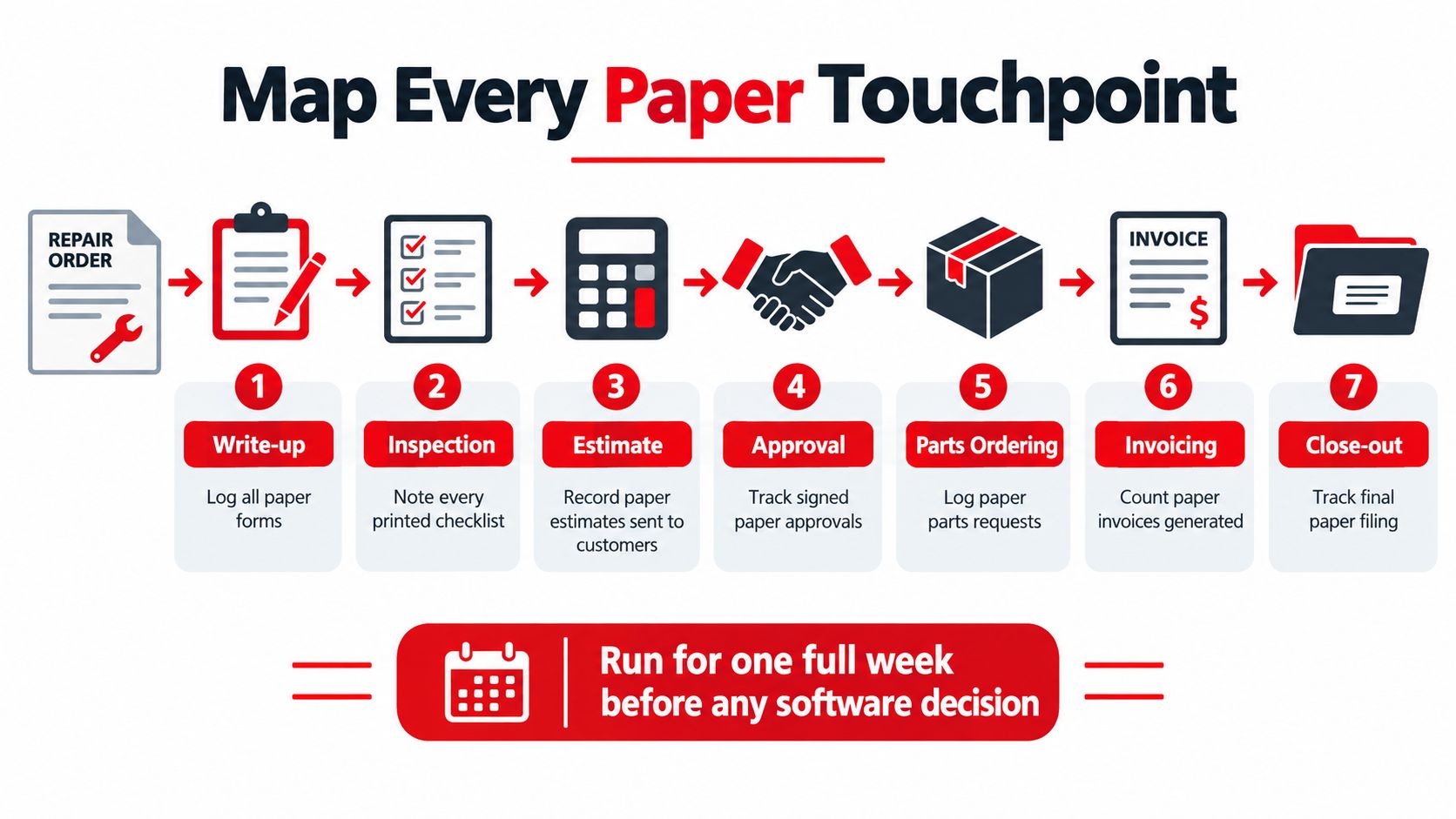
A workflow map also clarifies ownership. A good can help teams think in terms of repeatable steps, defined handoffs, and clear responsibility rather than vague instructions to “go paperless.”
Practical rule: Don't replace every form at once. Attack the three nodes that consume the most labor or create the most rework.
This week-long audit prevents the common failure of digitizing low-value paperwork while leaving the bottleneck untouched. A shop may scan invoices successfully and still lose time because approvals, parts updates, and technician findings remain disconnected.
Digitize Inspections and Estimates for Faster Approvals
The highest-value early change is usually the inspection-to-approval loop. A clipboard inspection creates a delay between what the technician sees, what the advisor explains, and what the customer can authorize. A mobile workflow can connect those moments, but only if the information is structured for decisions.
Build the inspection around usable findings
Technicians should complete guided checklists on a tablet or smartphone. Industry reporting describes digital multi-point inspections that let technicians use checklists, notes, and attached photos or videos instead of handwritten notes and separate paper handling, as explained in.
The checklist should match the vehicle and the shop's actual inspection routine. It can include brakes, tires, fluids, belts, visible leaks, warning lights, and other relevant systems. Findings need clear severity tags, concise notes, and photographs that show the customer what requires attention.

Make the estimate appear from the inspection
The estimate should generate when the inspection is saved, not after the advisor retypes a separate sheet. Labor rates, parts pricing, labor guides, shop supplies, and approved templates should already reflect the garage's pricing rules. Generic defaults create cleanup work, so the setup must begin with clean catalog data and realistic examples from the shop's own vehicles.
Photo-rich recommendations work best when the customer can distinguish urgent repairs from maintenance items and future observations. The advisor shouldn't send an overwhelming report with no direction. The customer needs a clear request for action, with the relevant line items, explanation, price, and approval control in one place.
Close the approval loop inside the repair order
Send the estimate by text or email with a tap-to-approve option. Store the digital authorization against the repair order, and archive declined work for follow-up rather than losing it in a folder. The advisor can then see what was approved, what was declined, and what still needs a conversation without searching through the vehicle or counter paperwork.
The right test is simple: can a technician save a finding, can an advisor send a decision-ready estimate, and can a customer approve it without a second manual entry? If any answer is no, the workflow still has a paper-era handoff hiding inside it.
Connect Invoicing, Payments, and Parts Ordering
Invoicing, payment collection, and parts procurement belong to one revenue cycle. Treating them as separate tasks forces the advisor to rebuild information at every stage, which defeats the point of digitization.
Let the repair order build the invoice
When a technician closes a job, the final invoice should pull approved labor, parts used, markups, and shop supplies directly from the repair order. The advisor should review exceptions, not retype completed work. A one-click invoice workflow can remove the most common clerical loop, converting an approved estimate into a customer-ready bill without recreating the document.
The customer should receive the invoice by text or email with a clear payment option. A pay-now link makes collection part of the close-out process instead of a separate phone call, printed envelope, or counter transaction. The system should sync the payment to the repair order so the advisor doesn't need to reconcile two records later.
Send approved parts information forward
Parts ordering should begin with the approved estimate. Supplier catalog connections can reduce SKU re-entry, while saved VIN filters help staff select the correct component. The order, confirmation, expected arrival, and received part should remain tied to the same work order.
A practical setup includes:
- Catalog accuracy: Keep supplier and internal parts data clean enough that staff don't correct every line manually.
- VIN context: Use vehicle-specific filters before ordering, especially where trim or engine differences matter.
- Fast-moving stock: Set par levels for commonly used items so reordering doesn't depend on memory.
- Special-order controls: Require customer pre-authorization before a backorder creates refund or cancellation work.
- ETA visibility: Store delivery expectations on the repair order, where advisors and technicians can see them.
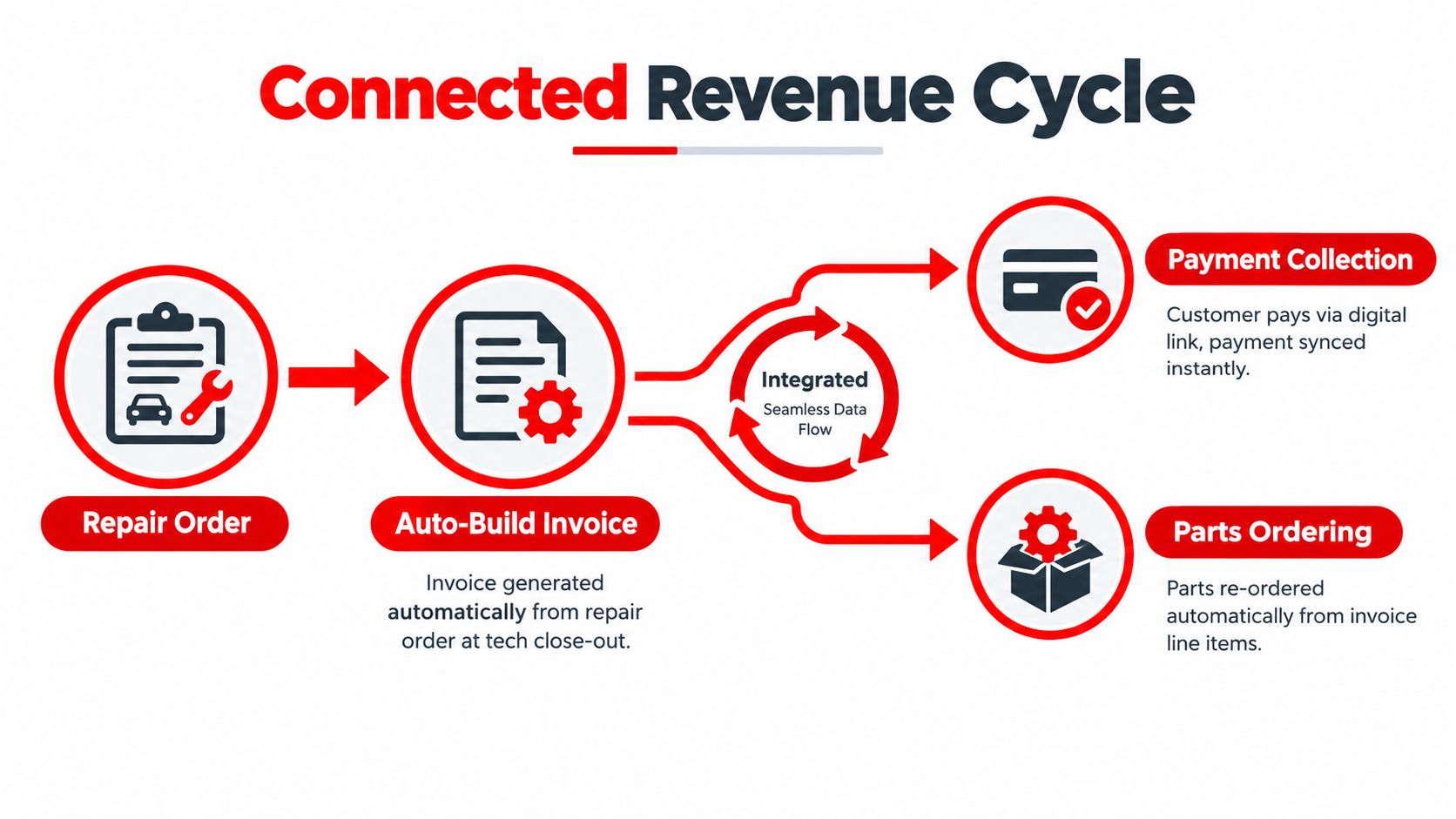
The model is useful when a shop has several systems that need to exchange information but lacks the internal capacity to design the handoffs. The goal isn't more automation for its own sake. The goal is one repair order that carries the correct information from approval through parts, invoice, and payment.
Where Digitization Quietly Shifts the Burden
Going paperless doesn't automatically eliminate administrative work. It can move the burden to a different person, a different screen, or the customer.
A technician may photograph a dashboard and send a long inspection report by text. That looks modern, but the process still fails if the customer ignores the message, the advisor chases several approvals, and the technician must re-enter findings into another system. A digital payment link creates a similar problem when the customer doesn't understand the total or every notification routes to the owner instead of the person managing the repair order.
Recent research on digital administrative burdens finds that online systems can amplify old burdens, allow them to continue, or create new ones. A systematic review of digital administrative burdens concludes that digital services aren't automatically burden-reducing.
Design the next action, not just the screen
Every workflow step needs one clear owner. The advisor owns the approval request. The customer decides whether to authorize. The technician records the finding. The parts coordinator confirms availability. The system should route the next action to that person and avoid notifying everyone by default.
A customer also shouldn't have to interpret a full technical dump before making a decision. Send the items requiring approval, explain why they matter, and keep the rest available as supporting detail. Good design reduces the amount of information each person must process.
Digitization removes paperwork only when it removes a handoff, a duplicate entry, or a search task. Otherwise, it has changed the container, not the workload.
Support matters as much as the software label. Research on digital administrative burden highlights auto-fill, clear information, and contact or help options as ways to reduce learning and compliance costs, while policy guidance emphasizes simpler requests, easier navigation, and support for underserved users. The front counter still needs a guided path for customers with low digital confidence or unusual circumstances.
Train Your Team So the New System Actually Sticks
A launch-day presentation won't change shop habits. Staff need to process real vehicles through the complete workflow while a supervisor watches where the process breaks.
Choose two workflow champions
Select one champion from the front counter and one from the technician area. Both should learn intake, inspection, estimate, approval, parts, invoicing, and payment. They become the first-line help desk, but their main value is practical feedback. They know which steps fit the bay and which ones slow down customer conversations.
Run a half-day shadow using two real vehicles. Have the team process each vehicle from check-in through close-out, then document every hesitation, missing field, awkward screen, and unclear handoff. Fix those rough edges before the rest of the team starts.
Train by role and repetition
Front-desk staff don't need the same practice as technicians. Train groups of two or three with scripted vehicles that reflect common repair scenarios. The technician practices documenting findings and attaching evidence. The advisor practices building and sending the estimate, handling approvals, and collecting payment. Parts staff practice ordering from approved line items and updating the work order.
Each role needs a one-page cheat sheet placed where the work happens. Keep it focused on the next action, not a full software manual.
Go live on a regular workday rather than the shop's most pressured opening. Shadow the first five jobs and coach in context. At the end of the week, hold a 30-minute debrief to retire paper habits that survived the change and assign one owner to each correction.
Adoption test: If staff still print a digital inspection “just in case,” the workflow hasn't earned their trust yet.
The strongest rollout makes the digital path easier than the old path. If the team must duplicate information, hunt for fields, or ask a manager to rescue ordinary exceptions, the system will slowly become another layer of paperwork.
Measure Time Saved and Keep Tightening the Workflow
A paperless system earns its place only when the shop's daily work improves. Start with a two-week baseline for administrative hours per repair order. Compare the same measure at 30, 60, and 90 days, using identical definitions each time. Otherwise, the result reflects changing measurement rules rather than workflow performance.
Track three operational measures:
- Drop-off to approved estimate: Average minutes from vehicle arrival to customer approval.
- Job complete to paid invoice: Time between technician close-out and payment.
- Inspection rework: The share of digital inspections returned for manager review or correction.
The first measure tests whether inspections and estimates connect without avoidable waiting. The second exposes delays between completed work and collected revenue. The third shows whether technicians are recording useful information or creating digital clutter that another employee must repair.
Keep the ROI sheet practical
Compare software cost with reclaimed advisor hours, less re-entry, fewer invoice corrections, and faster parts movement. Pull every input from the shop's baseline. Vendor projections cannot show what your team saves.
Paper reduction still has a direct cost rationale. Industry reporting estimates savings of up to $28 per signed document when businesses replace paper-based signatures. It also compares paper processing at about $6 to $8 per document with roughly $0.50 to $1.00 per document for e-signature workflows, as reported in. Treat those figures as context, not as your shop's ROI. Measure signatures, approvals, and routing in your own process.
| Metric | Before Digitization | After 90 Days | Target |
|---|---|---|---|
| Admin minutes per repair order | Record baseline | Compare same workflow | Continue reducing re-entry |
| Drop-off to approved estimate | Record average | Compare approval speed | Remove avoidable waiting |
| Job complete to paid invoice | Record payment delay | Compare close-out cycle | Make payment part of delivery |
| Inspection rework | Count corrections | Identify recurring errors | Improve templates and training |
| Parts order re-entry | Record duplicate entries | Compare supplier workflow | Send approved data forward |
Review where estimates still return for changes, which customer forms customers abandon, and where technicians avoid the tablet. Change one workflow each month. A small, measured adjustment is easier to test than a full-system rewrite, and it exposes whether the problem is a screen, a missing field, or an unclear handoff.
RedAppy supports a redesigned path with digital inspections, customer approvals, one-click invoicing, online payments, parts ordering, and a Kanban-style Digital Shop Board that tracks work from check-in to checkout. Owners can compare those functions with their own process through the RedAppy features before choosing software.
The goal is fewer duplicate entries, not paper recreated on screens. RedAppy connects inspections, estimates, approvals, invoicing, payments, and parts ordering so independent repair shops can identify the first administrative bottleneck worth removing. Each monthly review should answer one question: which remaining handoff still makes someone retype, search, or wait?
Ready to Transform Your Shop?
RedAppy helps auto repair shops create professional digital estimates with photos and videos, send them instantly via text or email, and get customer approvals in seconds. No credit card required to start.