
Invoicing and Billing Process for Auto Repair Shops
The customer is standing at the counter with the keys in one hand and a card in the other. The advisor can see the finished brake job, but the total on the screen is not the number the customer remembers approving. Someone has to decide, in the next two minutes, whether the car leaves and whether the shop gets paid.
That decision is the invoicing and billing process. It is not the act of printing a bill after the work is done. It is every record made from the first complaint through the last payment. Those records either protect the cash or leave the balance open.
Shops rarely lose money because nobody typed an invoice. They lose it because a line was never approved, a deposit never hit the bill, or the car went home with nothing on file.
Table of Contents
- The Five-Stage Repair Billing Workflow From Check-In to Paid
- Approval Records That Prevent Payment Disputes
- What Every Repair Invoice Must Include
- Payment Options, Deposits and Card Fees
- Common Pitfalls and How to Avoid Them
- Set Up Your Billing Workflow This Week
The Five-Stage Repair Billing Workflow From Check-In to Paid
Friday the car leaves. Monday the invoice goes out. The customer disputes a line nobody approved, and the advisor is scrolling old messages instead of taking payment. The parts are already on the car. The labor is already spent. The only thing missing is a record that would have made the bill obvious.
The cure is a fixed order. Each stage captures a set of facts, and the next stage does not start until those facts are on the repair order. Print the table and keep it at the counter. It is the checklist, not a poster.
| Stage | What to record | Done when | When it happens |
|---|---|---|---|
| Check-in | Customer name, plate or VIN, mileage, complaint in customer's words | Repair order open and customer contact confirmed | At arrival |
| Estimate | Labor operations with time, parts with supplier and cost, tax category, inspection photos | Estimate sent to customer by text or email | Same day as diagnosis |
| Approval | Approval per line item, method and time, declined items noted | Written approval on file for every billable line | Before any work starts |
| Invoice | Final labor and parts matched to approved estimate, payment terms, warranty status | Invoice sent by text or email | When the vehicle is ready |
| Payment | Payment method, amount, settlement reference, remaining balance | Balance is zero or a payment date is agreed | Before vehicle release |
Close each stage before the next
Check-in. Open the repair order from the customer's name, plate, or VIN. Write the mileage and the complaint in the customer's own words, not a shortened shop version. Confirm a phone number that receives texts. This stage is closed when the repair order is open and contact is confirmed.
Estimate. List each labor operation with its time. List each part with the supplier and the cost. Note the tax category. Attach inspection photos of worn or failed parts. Send the estimate by text or email the same day as the diagnosis, while the findings are still fresh.
Approval. Get a yes on each line, not one bundled total. Mark declined items instead of deleting them, so the history shows what was offered and refused. Do not start work without a logged reply. Written approval has to sit on file for every billable line before a wrench turns.
Work and reconcile. This sits between approval and the invoice, even though it is not its own row. If the scope changes, send a revised estimate before anyone continues. At completion, compare actual labor and parts with the approved lines. Declined work stays off the bill.
Invoice. Convert the approved estimate into the invoice. Do not retype it from memory or from a newer price list. Add tax and any core charges. Send it by text or email as soon as the car is ready, with payment terms and warranty status on the face of the bill.
Collect. Take card, bank transfer, or cash. Record the method, the amount, and the settlement reference. Release the vehicle only when the balance is zero or a payment date is written on the job.
Practical rule: A wrong VIN at check-in becomes a wrong invoice at the end. Each stage has to be closed before the next one starts.
That dependency is the whole system. Rushing the counter to "get the car in" only moves the argument to pickup, when the customer is tired and the shop has already bought the parts.
Approval Records That Prevent Payment Disputes
A documented approval record shortens the path to payment. Disputes usually start with work the customer cannot see on any record, not with a rude reminder. The common assumption is that a clear total and a firm follow-up call will collect the money. They will not, if the customer never agreed to the line in writing.
The stakes are plain. Coverage of U.S. small-business invoicing found that 56% of surveyed small businesses reported unpaid invoices, with an average outstanding balance of $17,500, as reported by the. A shop carrying even a slice of that on completed repairs is funding other people's cars.

Approve the line, not the lump sum
Get approval for each line rather than one bundled total. Send a text or a signed digital estimate and keep the time stamp on the job. Photograph the worn part before it comes off, and show that photo at the moment of approval. The same habit that keeps a new account clean, laid out in, applies at the service desk. Write the agreement down before work starts.
Say the customer approves brake pads. The mechanic then finds a worn rotor. Text the rotor photo and the new price. Wait for a clear yes. Log that reply on the job before the rotor is fitted. A nod in the bay is not a record. If the customer declines the rotor, write the decline in the customer's note and leave that line off the invoice.
A photo plus a time-stamped yes beats a longer collections script.
The jobs that still go sideways
Three situations still need a written path, even with good approvals.
Warranty adjustments. When a warranty credit changes the final amount, show the original line, the credit, and the new balance on the same invoice. Do not issue a fresh bill that hides what changed.
Partial payments. On a large job, record the amount received, the method, and what is still owed. A verbal promise to "bring the rest Friday" is not a balance.
Cars left uncollected. Keep a written storage policy, send written notice, and follow state or local rules before any sale or disposal. Storage fees that were never stated become their own dispute.
Aggressive chasing after a vague bill damages the relationship and still leaves the shop short. Clear approval before the work is the cheaper collection method.
What Every Repair Invoice Must Include
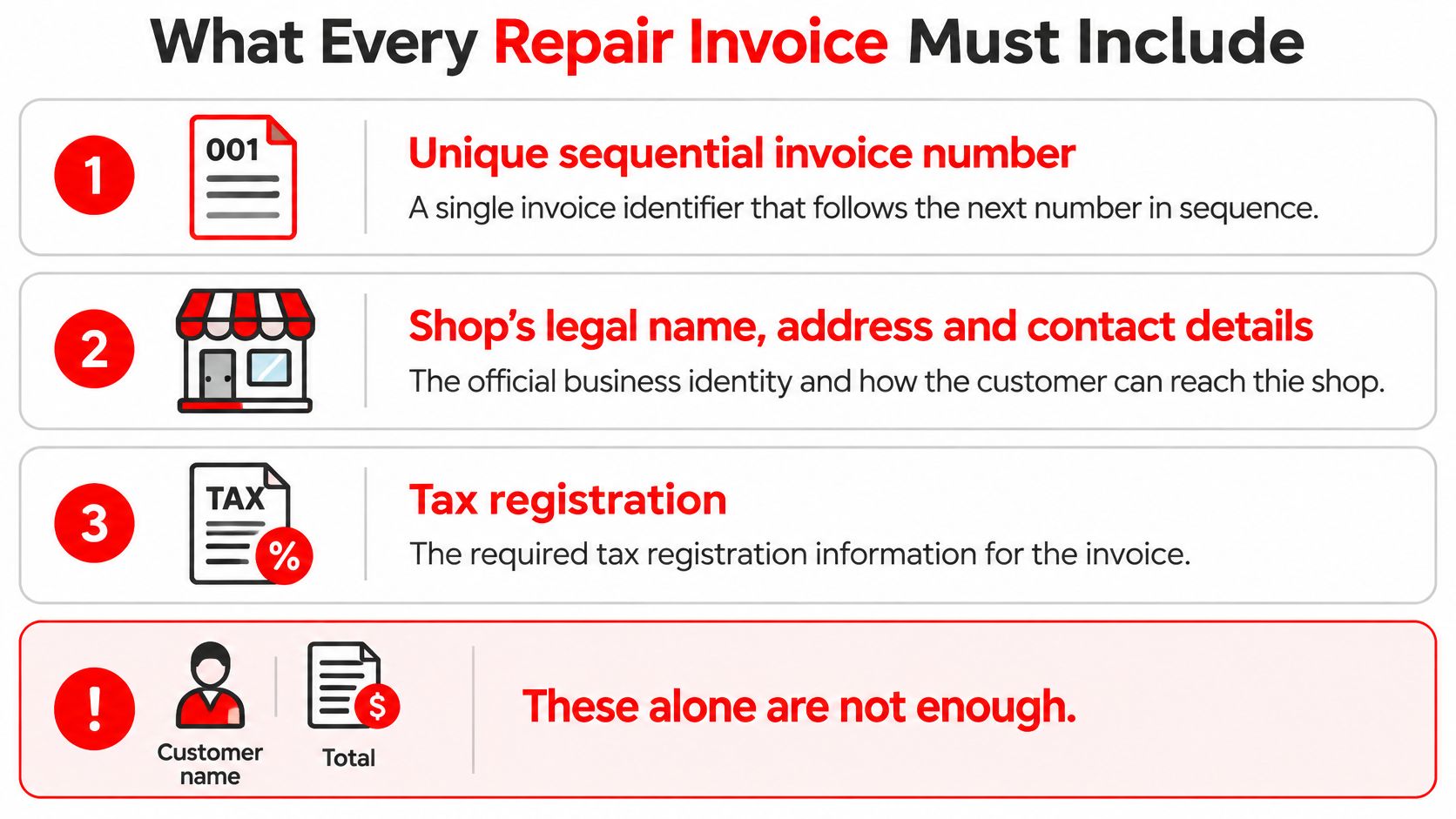
A customer name and a total are not an invoice. They are a note. A fleet buyer, an insurer, or a tax review will ask for the rest, and rebuilding it later is how billing hours disappear.
specifies a unique identification number, the seller's legal name, address, and contact details, the customer's name and address, a clear description of the goods or services, the supply date, the invoice date, the amounts charged, applicable VAT, and the total owed. VAT invoices can need more. Use that as the floor, then add the vehicle detail a repair bill cannot skip.
The fields in the order they should appear
- Unique sequential invoice number. One identifier, next in sequence, never reused.
- Shop legal name, address, and contact details. The name on the bank account, not a nickname on the door. Add the tax registration number where the shop has one.
- Customer name and billing address. Add the fleet or insurer when that party is paying.
- Vehicle year, make, model, and VIN or plate. So the bill cannot be applied to the wrong car.
- Service date and invoice date. The day the work was supplied and the day the bill was issued.
- Each labor operation. Hours, rate, and the technician's name on that line.
- Each part. Part number, quantity, and unit price.
- Tax. Rate and amount per line, and in total.
- Money already in. Subtotal, discounts, deposits already paid, and the amount still due.
- How to pay. Payment terms, accepted methods, and late-payment wording.
- Warranty. Any claim number or adjustment that changed the balance.
A digital invoice should carry the same information as a paper one. Where local rules require it, get the customer's agreement before sending invoices electronically. A complete bill makes accounting and tax reviews faster because nobody has to rebuild the job from texts and parts receipts.
Match it before it goes out
Take one finished invoice and lay it beside the approved estimate. Confirm each labor line, each part, and each tax figure. If a price moved, the revised approval should be on the job. Send the invoice only after that check. Sequential numbers and a live link between estimate, completed work, and invoice are what make the bill auditable.
Payment Options, Deposits and Card Fees
A customer approves a repair, then reaches the counter and learns the card price is higher than the quoted total. That surprise can delay payment and turn a completed job into a dispute. Set the payment method and any applicable fees before checkout.
| Option | Best for | Watch out for | Record on invoice |
|---|---|---|---|
| Card at checkout | Most routine repairs | Check state rules before applying a card surcharge, and disclose any fee before payment | Card type, amount, reference |
| Payment link by text or email | Customers who pay later from their phone | Confirm the customer can access the link | Link sent date, amount paid, date paid |
| Deposit before parts | Special-order parts and large jobs | State how unused deposits are handled | Deposit amount and remaining balance |
| Cash | Small walk-in jobs | Give a receipt and secure the cash | Cash received and receipt number |
| Bank transfer | Fleets and commercial accounts | Match the transfer to the right invoice | Transfer reference and date received |
| Financing | Costly repairs the customer cannot pay upfront | Show the cash price and financed amount separately | Financed amount and lender reference |
Fees, deposits, and the split bill
Card surcharge rules vary by state. Check the rules where the shop operates, and show any fee the customer must pay in the total before checkout. If customers have a no-fee payment option, make clear what each method costs before they choose. explains the costs shops should consider when setting payment policies.
Take a deposit for special-order parts or a large job, and state how unused deposits are handled on the estimate. For financing, show the cash price and financed amount separately. A monthly payment alone does not tell the customer the full cost. Financing can also leave the shop managing another balance, so it may be a poor fit for a small, urgent repair the customer can pay for now.
Consider a $1,200 repair. The customer pays a $400 deposit by card, then sends the remaining $800 by bank transfer two days later. Keep the invoice balance at $800 until the transfer clears. Record both payments on the same invoice, along with the transfer reference and date, so the final balance reflects what the shop has received.
Common Pitfalls and How to Avoid Them
A repair shop can pay for parts and labor and still be waiting on the customer. Late payment is normal, not a rare slip. An accounts-receivable survey reported that 92% of businesses were typically paid after the invoice due date, according to the. In that same survey, 25.3% of respondents said customers generally paid 15 to 30 days after the due date, while 17.2% waited more than 31 days. A clean invoice without a follow-up routine still leaves the cash sitting out.
| Pitfall | Why it happens | Fix |
|---|---|---|
| Vehicle released with no payment on record | Pressure to hand back the car at pickup | Take payment or record an agreed payment date before release |
| Unapproved work billed | Verbal add-ons never logged | Require approval on file for every line before billing |
| Deposits or core charges missing | Not built into the invoice template | Add deposit and core charge lines to every template |
| Invoice prices differ from estimate | Invoice retyped from memory or from a new price list | Convert the approved estimate instead of retyping it |
| Overdue balances chased too late | No reminder schedule | Set one reminder cadence and track overdue balances by age |
| Partial payments or refunds unreconciled | Payments recorded in separate places | Post every payment and refund to the same invoice |
Handing over the keys with an open balance is a loan the shop did not mean to make.
One cadence for every account
Where a contract sets late-payment interest, print that rate on the invoice itself. Then run the same reminder schedule on every account, and log each contact against the invoice.
- Day 1 after the due date. Send a text with the payment link.
- Day 7. The service advisor calls.
- Day 14. Send a written reminder that lists the balance and the payment options.
- Day 30. Send a formal written notice that restates the late-payment terms already printed on the invoice.
Three habits keep that schedule from becoming another pile of admin.
- Send the payment link in the same message as the invoice. A second email is easy to miss.
- Apply one reminder schedule to every account. Special treatment for favorite customers is how balances age in silence.
- Match payments to invoices every day. Month-end matching hides a missed transfer until the parts bill is already due.
Pick the one pitfall that happened most last month and fix that first. A shop that releases cars without a recorded settlement does not need a new template yet. A shop whose prices drift needs the convert-from-estimate habit before it needs more reminders.
Set Up Your Billing Workflow This Week
A car can be ready while its invoice is still unclear. Set up the counter steps so the approval, final charges, and payment status stay tied to the same job.
- Post the stage table. Put the five-stage checklist from this guide at the counter where the advisor writes the repair order.
- Choose one approval method. Use a texted or signed digital estimate for every job, including quick work and repeat customers.
- Build one invoice template. Include every required field, plus lines for deposits and core charges and the payment terms that apply.
Software can reduce repeat entry between estimates and invoices. In RedAppy, estimates are created in the software and converted into invoices with one click. When a customer pays online, the payment is recorded on the invoice, and its status and balance update automatically. Payments and refunds are recorded on the invoice automatically, keeping the balance current.
After a month, review how many invoices were paid before vehicle release and how many needed correction. Use those results to choose the next workflow change.
RedAppy keeps estimates, invoices, scheduling, and texting in one place. Customers can pay invoices by card through a link sent by text or email. Visit RedAppy to learn about the platform.
Ready to Transform Your Shop?
RedAppy helps auto repair shops create professional digital estimates with photos and videos, send them instantly via text or email, and get customer approvals in seconds. No credit card required to start.