
Labor Time Guide for Mechanics: Estimate, Bill, and Grow
A service advisor can have three numbers open at once and still feel stuck. The guide says one thing, the technician says another, and the clock says something else entirely. That tension shows up on brake jobs, water pumps, diagnostics, and every estimate where speed, price, and trust all have to line up.
A labor time guide for mechanics is the reference that keeps those conversations from turning into guesswork. It gives shops a shared baseline for estimating, billing, and comparing results, while still leaving room for real-world judgment when the car in the bay isn't a perfect textbook example. That's why the best estimators treat guide time, billed time, and clock time as three separate numbers, then reconcile them with a documented shop policy.
Table of Contents
- What a Labor Time Guide Actually Does in a Shop
- Sources of Labor Time Data Every Shop Should Know
- How Labor Times Are Calculated and Adjusted
- Adjusting Guide Hours for Real Repair Conditions
- Measuring Technician Efficiency Without Spinning the Numbers
- Integrating Labor Times Into Shop Management Software
- Common Pitfalls and How to Avoid Them
- Sample Calculations and a One-Page Shop Policy
What a Labor Time Guide Actually Does in a Shop
The estimate is half-written, the technician has already looked at the car, and the service advisor is staring at a line that says 2.0 flat-rate hours. Then the tech says the job will take longer because the fasteners are rusty and access is tight. At that point, the guide stops being a book and starts acting like a shop language problem.
A labor guide gives the shop a shared benchmark for a defined repair. MOTOR describes estimated work times as a structured labor-time data product for repair estimating, and flat-rate references explain the same idea in plain shop terms. Guide time is the stated labor allowance for the operation, and billed time is the number that goes on the ticket. Clock time is what the technician spent at the car.
Those three numbers can match, but they often do not. A guide may say one thing, the ticket may show another, and the stopwatch may show something else entirely. That does not automatically mean someone is wrong. It means the shop has to decide, in writing, how it will reconcile the difference when the car is not average and the job is not clean.
Practical rule: treat the guide as the starting point, not the verdict. If the car, tools, or access conditions differ from the guide's assumptions, the estimate needs a note.
That is where shop policy matters. The estimator should know when the guide time stands as written, when billed time changes because the job was documented differently, and when clock time is only useful for technician coaching. A good estimator keeps those lanes separate so the customer understands the quote, the technician understands the expectation, and the manager can review the job without mixing labor standards with actual shop conditions.
For a useful overview of how labor references fit into shop communication, can be a practical companion to the estimating process.
What gets confusing is that the guide is not trying to measure the technician's heartbeat or stopwatch time. It is trying to standardize repair duration across people, shops, and regions so the same operation does not get priced three different ways. That is why modern labor time systems sit at the center of estimating, billing, and technician tracking, especially when the same repair is quoted to a customer, approved by an insurer, and later used to review shop performance.
Sources of Labor Time Data Every Shop Should Know
A customer is standing at the counter, the estimator has the VIN open, and the repair order still has one unanswered question, which labor number should the shop trust? The answer depends on the job, because guide time, billed time, and clock time are not the same number. A good estimator keeps them separate and then reconciles them with shop policy, so the quote, the invoice, and the technician review do not get mixed together.
Start with the distinction between flat-rate and book time
Flat-rate time and book time are the shop terms used for the same basic idea, a standardized labor allowance for one defined operation. Mitchell says its estimated labor times are expressed in hours and tenths of an hour, and that published times reflect what an average technician should need under average conditions. That makes the guide useful for quoting, but it does not tell the whole story of what happened in the bay.
The main sources are easier to separate once the estimator knows what each one is built for. OEM time guides work best when the repair follows factory procedures or has warranty implications. Aftermarket flat-rate systems such as Mitchell, ALLDATA, and Chilton support retail estimating and day-to-day quoting. ALLDATA draws a clear line between Warranty Time, the factory rate, and Standard Time, the flat-rate time used for out-of-warranty work by independent labor-time providers.
The source should answer the question in front of the shop, not the habit in the office.
Community-driven databases add another layer when the vehicle mix gets older or less common. One such platform says it covers vehicles from 1955 to the present, contains over 700,000 labor time entries, serves more than 25,000 monthly active users, and spans 90 makes and 38,348 vehicle configurations. That kind of coverage matters because a narrow reference can miss the exact configuration sitting in a stall.
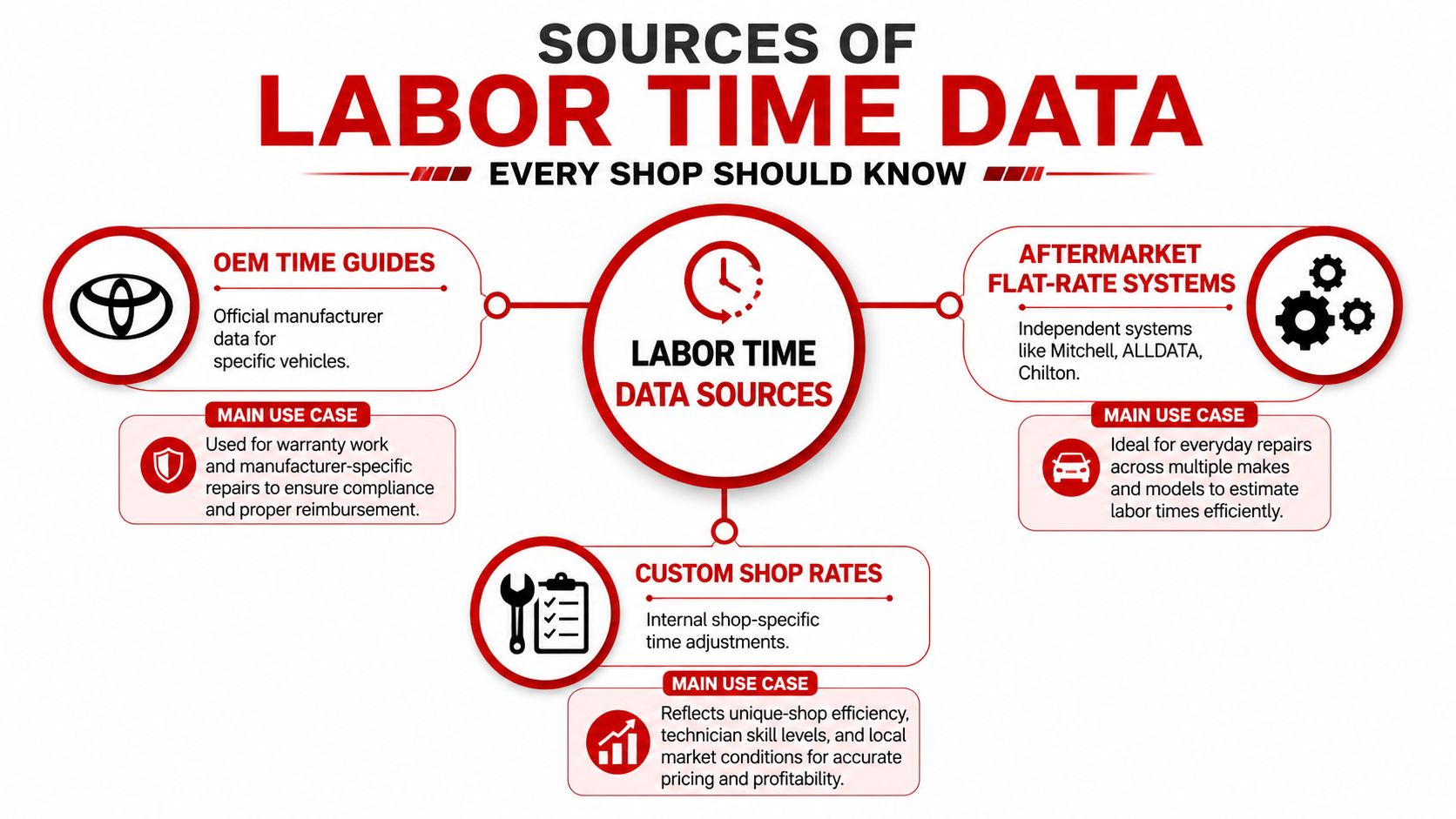
The clean mental model is simple. Use OEM data when the factory procedure controls the job, use aftermarket systems when the shop needs broad retail coverage, and use a custom shop policy when local labor reality has to be documented on top of the guide. That keeps the source from turning into a debate over preference, and it gives the estimator a way to explain why the guide time, billed time, and clock time may not line up on the same repair.
How Labor Times Are Calculated and Adjusted
A repair order often starts with three different numbers, and confusing them causes trouble fast. Guide time is what the labor guide says the job should take under stated conditions. Billed time is what the shop decides to charge based on policy and the job facts. Clock time is what the technician spends at the bay.
Published labor time does not come from a guess. MOTOR says standard labor times are compiled from studies by experienced technicians under controlled conditions, and labor guides are built to reflect a standard repair rather than the exact pace of one person in one stall. That makes the guide a baseline, not a promise, and it is the baseline that estimators must compare against the actual repair.
Read the clock math the right way
Labor guides usually use hours and tenths of an hour, so 0.1 hour equals 6 minutes. A 2.3-hour job is 2 hours and 18 minutes of guide time, not a loose estimate that can drift into “about two and a half hours”. That format matters because the estimator has to turn guide time into a line item the customer can understand and the shop can defend later.
The lookup also has to match the vehicle in front of the bay. VIN, drivetrain, and operation all matter, because the same model line can hide different labor paths. A labor guide only works when the estimator chooses the correct configuration and the correct job definition before the quote goes out.
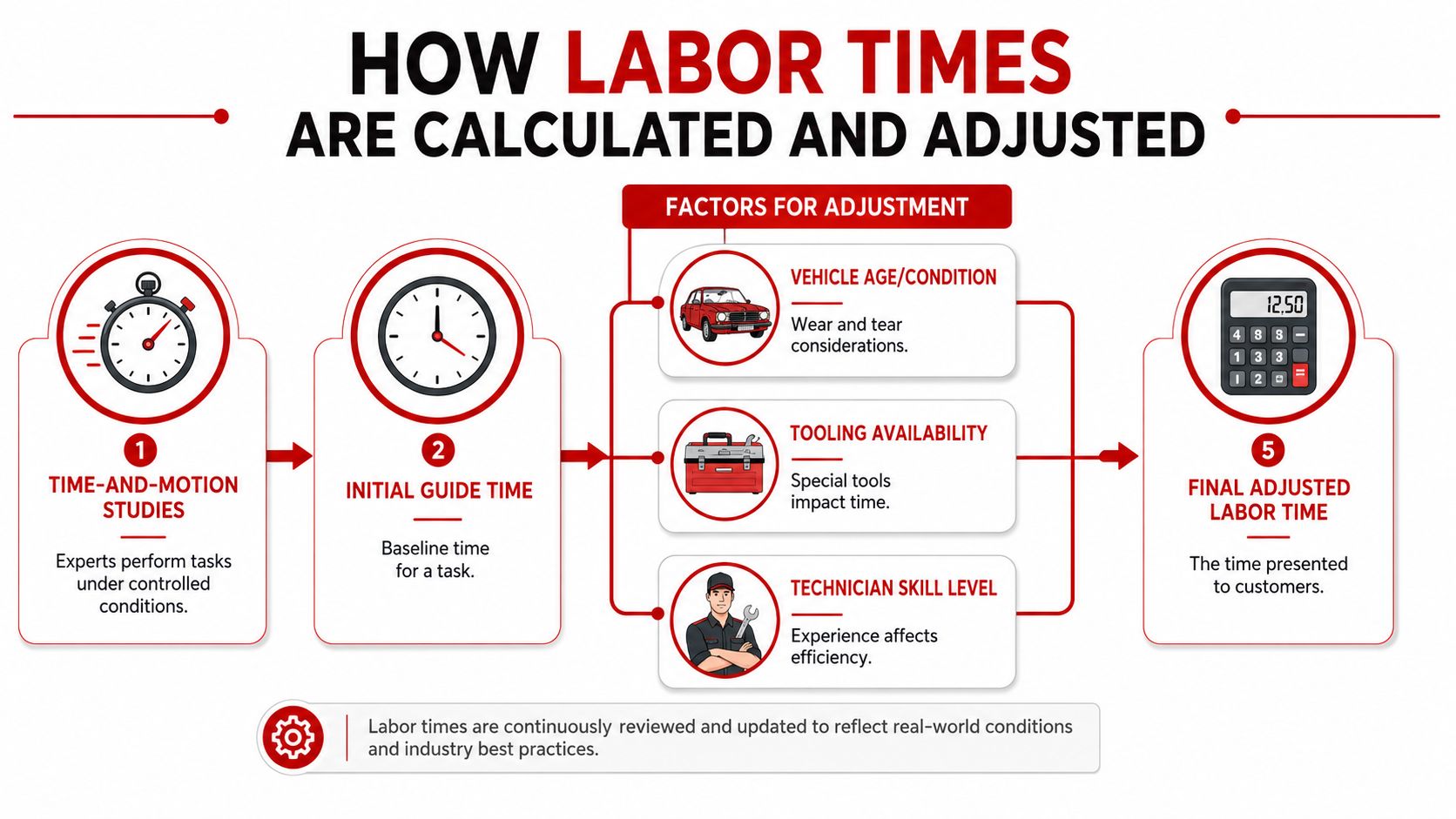
The hard part is reconciling the three numbers without mixing them together. Guide time comes from the reference. Clock time comes from the technician's actual day. Billed time comes from shop policy, plus any documented adjustment for the repair conditions in front of the estimator. AI-assisted recommendations can help flag likely add-ons or overlaps, but they still need a human to verify the reason and write it down in shop language that another advisor can follow later.
Adjustment factors are where judgment enters. Rust changes access. Aftermarket parts change fit. Specialty tools can shorten or stretch a job. Technician experience changes how quickly the repair moves once the work starts. Vehicle-specific configuration can change the whole operation, so the guide has to be paired with the actual car in front of the estimator rather than treated as a stand-alone answer.
Short version: the published time tells the shop what a standard repair looks like, then the vehicle and the bay tell the shop whether that standard still fits.
Adjusting Guide Hours for Real Repair Conditions
The easiest mistake is to treat the printed number like a contract. It isn't. The guide time is the baseline for the repair under stated conditions, and real repairs often deviate from that baseline because the vehicle has lived a life before it reached the bay.
Add time when the car adds work
A rusty fastener does not care what the guide says. Neither does a broken clip, a seized bracket, or an aftermarket accessory blocking access. Published times are usually built around ideal conditions or replacement with new, undamaged parts, so a shop needs a policy for when to add labor, and the reason has to be written down in a way another advisor can understand later.
A simple reason-code framework keeps estimates defensible:
- Corrosion or damage: add time when rust, broken hardware, or prior collision repair changes access.
- Access or overlap: add time when trim, shields, or related components must come off separately.
- Parts variation: add time when aftermarket or non-OEM parts change fit or sequence.
- Diagnostics: add a separate line when the repair includes fault-finding, not just replacement.
- Tooling limits: add time when a specialty tool or setup step is required.
Discount time only when the shop has a documented reason
Discounts need just as much discipline. If two operations share labor and the second one doesn't require repeating the same teardown, the estimate should avoid billing the overlap twice. If the shop has a shortcut because the vehicle is already apart for another approved operation, that should be documented as a shop note, not hidden inside a vague lower labor number.
If the estimate changes from the guide, the file should say why.
That policy protects the advisor at the counter and the technician in the bay. It also helps when a customer compares two estimates and assumes the higher one is inflated, when the actual difference is access, diagnosis, or part condition. A documented adjustment rule turns that discussion from an argument into an explanation.
Measuring Technician Efficiency Without Spinning the Numbers
Efficiency gets messy when the shop uses one number to mean three different things. A technician can be efficient in clock time, underbilled in guide time, and still look busy on the schedule. Those are not the same outcome.
Compare guide hours, billed hours, and clock hours separately
Guide hours are the benchmark in the labor guide. Billed hours are what the customer is charged. Clock hours are what the repair took on the technician's stopwatch. If those three numbers are blended together, the shop can't tell whether it has a pricing issue, a policy issue, or a training issue.
A quick reading works like this:
| Measure | What it means | Why it matters |
|---|---|---|
| Guide hours | Published labor allowance | Sets the quoting baseline |
| Billed hours | Labor charged on the repair order | Shows what the shop actually collected |
| Clock hours | Real elapsed repair time | Helps review process and staffing |
A technician who bills more than guide time is not automatically faster than one who bills less. The difference may come from a different job mix, a policy for adding documented labor, or a shop that undercharges because nobody wants to challenge the estimate at the front counter. The gap between billed and guide hours is often a shop policy problem first.
Use the gap as a management signal
When billed hours fall below guide hours repeatedly, the shop should look for underbilling patterns. When clock time is high but billed time stays low, the shop may be giving work away. When clock time is low and billed time is also low, the estimator may be leaving money on the table instead of capturing the full approved labor.
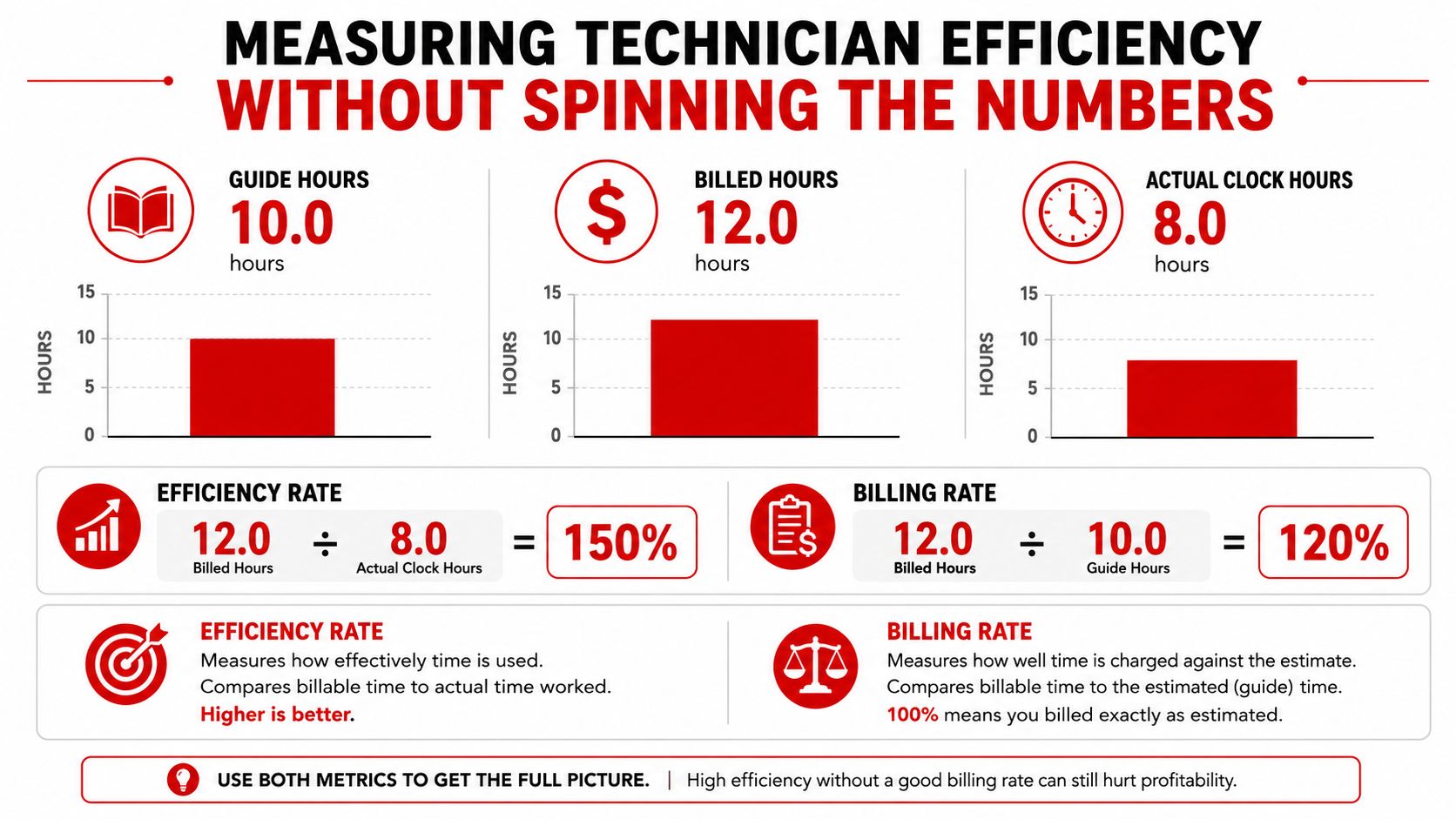
The cleanest way to talk about efficiency is to tie it to the job file, not to a personality judgment about the technician. That keeps the conversation grounded in data, which is what the guide was built for in the first place.
Integrating Labor Times Into Shop Management Software
A paper lookup can work, but it creates room for re-keying, skipped notes, and estimate drift. Shop management software closes that gap by pulling labor time into the estimate, connecting it to the vehicle record, and carrying it through invoice and reporting without forcing the advisor to rebuild the same line twice.
Static lookup versus software-driven workflow
| Step | Static Lookup | Software-Driven Workflow |
|---|---|---|
| Identify vehicle | Advisor searches manually | Vehicle data is tied to the RO |
| Find labor time | Flip through a guide | Lookup is pulled into the estimate |
| Adjust conditions | Notes may sit on paper | Reason codes can be stored with the job |
| Send estimate | Re-keyed into another screen | Estimate, parts, labor, and taxes stay linked |
| Close the invoice | Manual reconciliation | Labor flows into billing and reporting |
That workflow matters most when the estimate is more than one line. The customer may have repairs, diagnostics, and parts on the same order, and every labor change has to stay visible from quote to invoice. CarBoost's discussion of software for used car lots is useful as a reminder that systems built for vehicle businesses succeed when the software keeps inventory and workflow connected, not when it forces staff to bounce between disconnected tools.
RedAppy's AI Repair Assistant is one example of software that can surface labor hours alongside diagnostic guidance, so the estimator can see a suggested book time while still checking the VIN and the repair conditions. That kind of recommendation can speed up the first draft of an estimate, but a human still has to confirm whether the operation, access, and condition notes fit the actual vehicle. AI can suggest the starting point, the shop owns the final number.
Workflow rule: trust the software for lookup speed, verify the result for vehicle fit, then attach the shop's reason code before the estimate leaves the counter.
Common Pitfalls and How to Avoid Them
Most labor mistakes don't come from bad math. They come from bad assumptions. A guide can be accurate and still produce a weak estimate if the estimator skips the details that make the job real.
The mistakes that show up again and again
- Generic lookup without VIN: A shop quotes the obvious repair on the wrong trim or drivetrain. Fix it by checking the exact vehicle configuration before the labor line is committed.
- Warranty time mixed with standard time: A factory allowance gets used like a retail flat-rate number. Fix it by separating warranty labor from standard labor at the start of the estimate, using the source that matches the job.
- Diagnostic time folded into replacement time: The advisor hides diagnosis inside a part replacement line. Fix it by writing diagnostic work separately so the customer can approve it cleanly.
- Double-counted operations: Two labor lines repeat the same teardown. Fix it by checking overlap before adding the second operation.
- Flat-rate treated as a promise: The guide is read as a guarantee instead of a benchmark. Fix it by explaining that the published time is based on standard conditions and the actual vehicle may require documented adjustments.
The shop-floor clue is usually visible before the invoice goes out. A line that feels too high without a note, or too low without an explanation, usually means the estimator hasn't reconciled the guide with the car in front of them.
A clean estimate is rarely the one with the fewest notes. It's the one with the right notes.
That mindset saves time later. It also makes the front counter calmer, because the advisor can point to the reason code instead of trying to explain the labor number from memory.
Sample Calculations and a One-Page Shop Policy
A brake job is a good test because it looks simple until the vehicle changes the labor path. One car might need a straightforward pad and rotor service, while another needs extra time for access, inspection, or diagnostics. The estimator's job is to keep those differences visible.
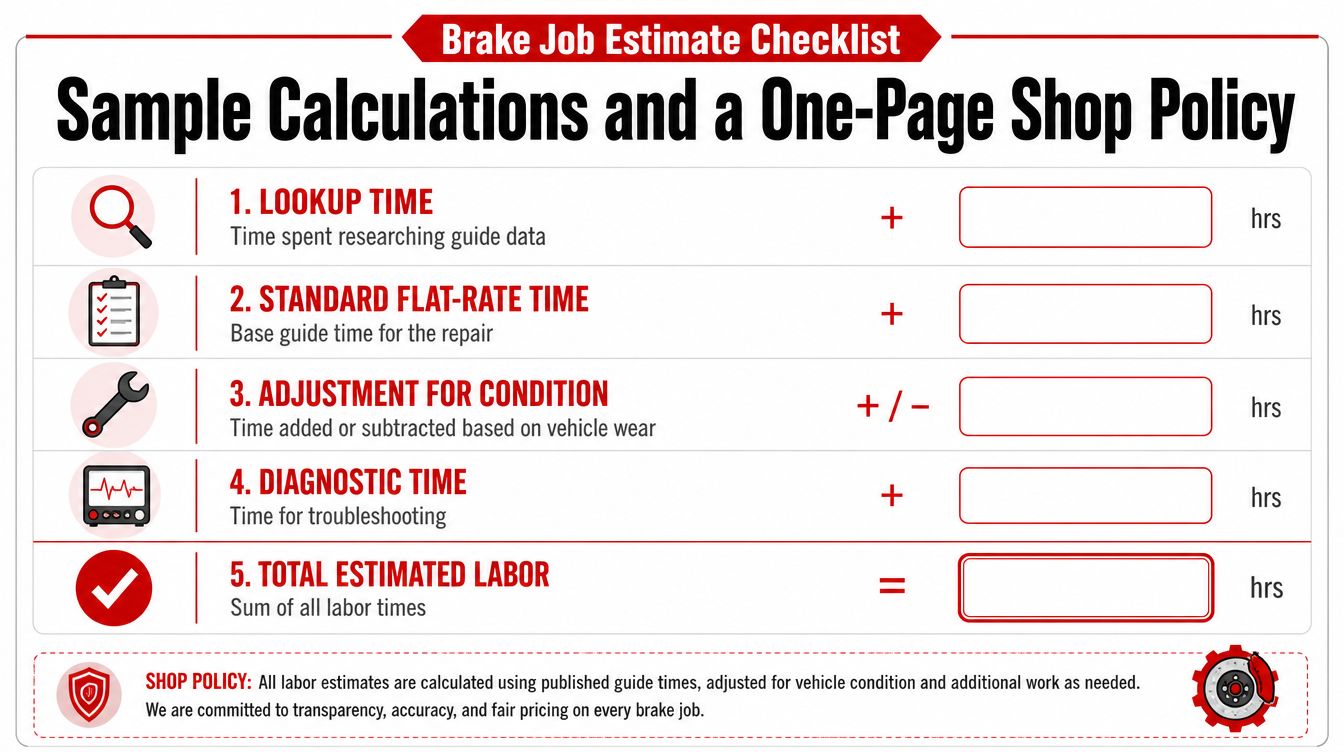
A simple side-by-side brake estimate
| Item | Vehicle A | Vehicle B |
|---|---|---|
| Lookup time | Guide labor time for the brake operation | Same guide lookup |
| Standard flat-rate time | Base labor from the guide | Base labor from the guide |
| Adjustment for condition | None noted | Added time for access or wear |
| Diagnostic time | None if the job is straightforward | Separate line if brake noise needs diagnosis |
| Total estimated labor | Base time only | Base time plus documented additions |
That table is the policy in miniature. The estimator starts with the guide, then adds only the time that can be explained on the repair order. If a line changes, the note should say whether the change came from condition, access, or diagnostics. If the customer asks why the number differs from another shop's estimate, the answer should be tied to the vehicle, not to a vague claim that “this is how we do it.”
A one-page shop policy that can live at the counter
- Source selection: Use the labor source that matches the job, OEM for factory-specific work, aftermarket flat-rate data for retail quoting, and a documented shop note for local adjustments.
- Lookup rule: Confirm VIN, drivetrain, and operation before any labor number is quoted.
- Adjustment rule: Add or reduce labor only when the reason can be written on the RO.
- Reason codes: Use short labels such as corrosion, access, diagnostics, overlap, or tooling.
- Audit cadence: Compare billed hours against guide hours often enough to catch underbilling and policy drift.
- AI-assisted recommendations: Use the software suggestion as the first draft, then verify the vehicle fit and the shop note before sending the estimate.
That policy keeps the estimator from reinventing the wheel on every repair. It also gives the service team a standard answer when the same job looks different on two different vehicles.
RedAppy brings labor-hour recommendations, estimating, invoicing, and vehicle history into one workflow, so the shop can review a suggested labor line, apply its own policy, and send the estimate from the same place. For a shop that wants to see how that setup works in practice, visit RedAppy and compare the estimating workflow with the features shown on the site.
Ready to Transform Your Shop?
RedAppy helps auto repair shops create professional digital estimates with photos and videos, send them instantly via text or email, and get customer approvals in seconds. No credit card required to start.