
Multi Location Inventory Management for Auto Repair Shops
Saturday morning is when inventory problems stop looking like spreadsheet problems. Bay two is three jobs deep, a technician is holding a brake-job work order, and the alternator needed for the next repair is supposedly at the sister shop. That shop is several miles away, but nobody can say whether the part is on the shelf, reserved for another vehicle, or already sitting in a return bin.
The service advisor starts calling. A parts manager checks a register. Someone walks to a shelf and finds a box with the right label, but the unit inside is damaged. The customer watches the clock while a repair that should have moved smoothly turns into a search mission.
That recurring question, which location has the right part right now, is the practical heart of multi location inventory management. It isn't abstract software theory. It's the discipline of giving every shop a dependable answer about available stock, incoming parts, transfers, and replenishment. The sections below focus on the fixes that work on real repair floors, without leaving the hard parts hidden behind enterprise language.
Table of Contents
- The Moment a Shop Realizes It Has Run Out of the Right Part
- What Multi Location Inventory Management Actually Means
- Where Multi Location Operations Quietly Break Down
- Features to Require in Multi Location Inventory Software
- Reorder Math and Transfer Workflows That Fit Real Shops
- Rolling Out a New System Across Every Location
- KPIs and ROI That Prove the System Is Working
- Putting It All Together With the Right Shop Platform
The Moment a Shop Realizes It Has Run Out of the Right Part
A growing repair business often notices its inventory problem during a job that seemed routine. The front counter has accepted the estimate, the technician has already raised the vehicle, and the parts request looks ordinary. Then the system says a needed alternator is available at another location, but the record doesn't explain whether the item is usable, allocated, in transit, or waiting for a core return.

In a single-bay garage, the parts counter and the shelf are usually close enough for a quick check. Once a business adds another shop, each location becomes its own small operation. The downtown branch may move brake pads constantly because of fleet vehicles and dense traffic. A suburban branch may see more trucks, longer service intervals, and a different mix of filters, belts, and suspension components.
The inventory total across both shops can look healthy while one technician waits for a part. That's the trap. Total stock is not the same as usable stock at the location serving the customer.
The question behind every transfer call
A phone call between sister stores can solve one emergency, but it doesn't create a reliable process. The caller still needs answers:
- Availability: Is the part physically present and saleable?
- Ownership: Has another repair order reserved it?
- Movement: Is it on a truck, waiting for receipt, or still at the source?
- Timing: Can the destination receive it before the bay loses its appointment window?
The National Retail Federation has estimated that overstock and out-of-stocks cost retailers about $1.75 trillion worldwide each year, a problem that matters to multi-location operators because imbalance leaves excess stock at one site while another loses a sale. Repair shops face the same underlying mismatch, even when the item is a single alternator rather than a large retail assortment.
The fix starts with organized answers. A dependable system shows each location's stock, records every transfer, and helps managers replenish according to local demand. The technology matters, but the operating rule is simpler: every bay should know what it can use before a vehicle is waiting on the lift.
What Multi Location Inventory Management Actually Means
Multi location inventory management tracks parts by the shop, warehouse, or storage point where they sit. Instead of treating every part owned by the company as one blended number, the system records the quantity at each location and updates that record as parts are received, sold, reserved, transferred, returned, or adjusted.
A useful garage analogy is to treat every bay as a small warehouse. Each shop is a node in a shared network, and the inventory platform acts like a dispatcher. When a technician requests a serpentine belt, the dispatcher should identify the shelf holding the usable belt, not merely report that the company owns one somewhere.
Oracle NetSuite's multi-location inventory capability reflects this broader shift from single-pool accounting to location-level control. Its documented model supports stocking, selling, fulfilling, associating transactions with locations, tracking stock levels and value, and transferring inventory between sites, as described in the.
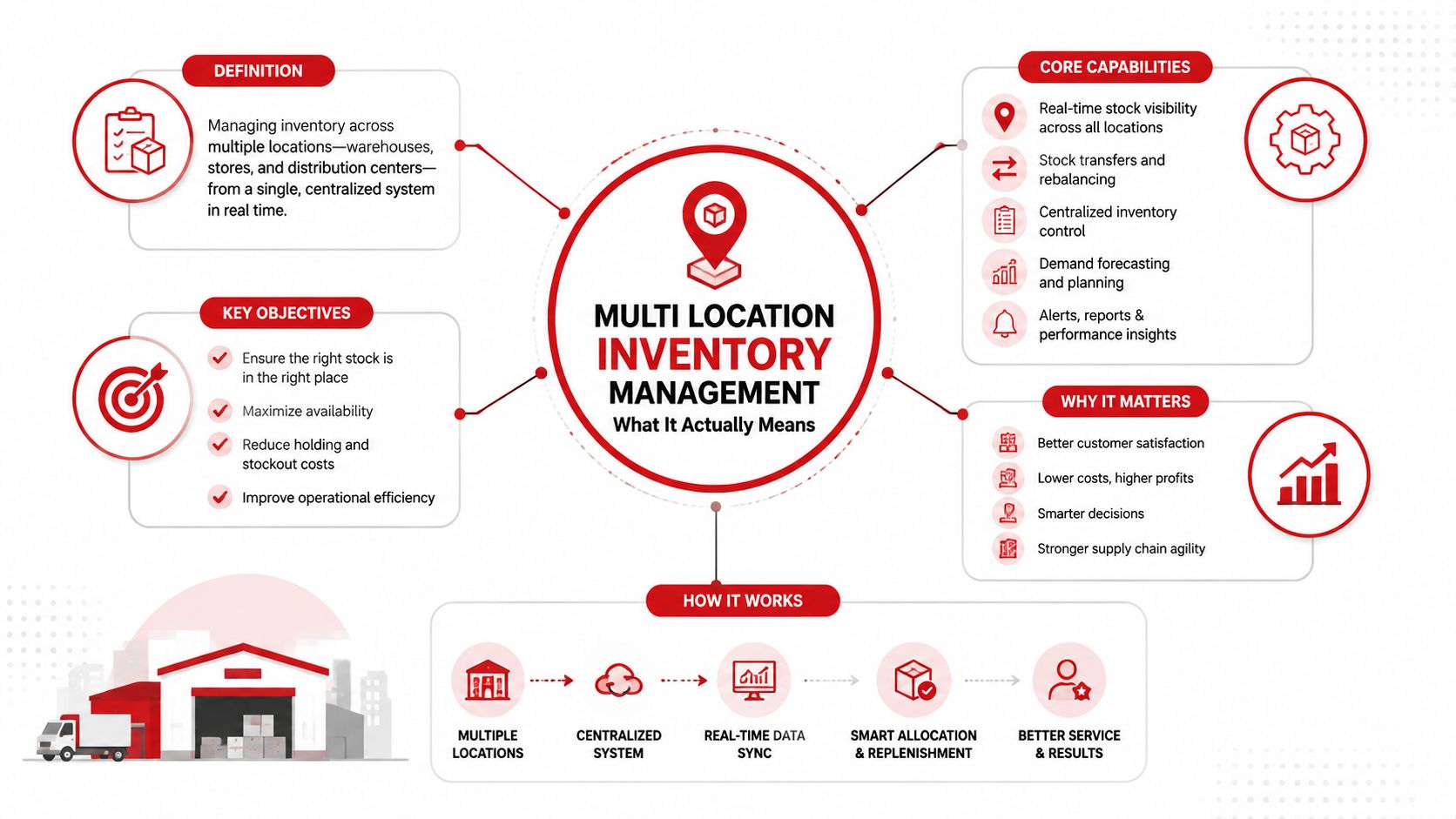
Three records must agree
A useful system brings three kinds of information together:
- Per-location availability: The counter team can see what each shop has now, including stock reserved for a repair order where the workflow supports reservations.
- Transfer status: A part leaving one shop becomes in transit instead of disappearing from the source and appearing prematurely at the destination.
- Local replenishment: Each location receives reorder guidance based on its own usage, supplier lead time, and safety-stock needs.
Single-location tracking usually relies on one set of quantities for one operating site. That model becomes unreliable when the business adds branches because a company-wide total hides the distance between the part and the vehicle needing it.
Why a blended total misleads
Suppose a downtown shop uses brake pads rapidly while a suburban shop carries the same pads for occasional repairs. A combined count may suggest that the chain is covered. The downtown branch can still stock out if the suburban units aren't transferable in time, or if the second shop needs its remaining stock for scheduled work.
Location-level visibility respects each shop's rhythm. It helps managers distinguish available at this branch, available elsewhere, reserved, and in transit. That distinction turns a vague search into an operational decision, whether the correct action is a transfer, a supplier order, a substitute part, or a conversation with the customer.
Where Multi Location Operations Quietly Break Down
Most multi-shop failures don't begin with a dramatic system outage. They begin with small gaps between what happened on the shop floor and what the inventory record says happened. A technician pulls an alternator without scanning it. A transfer leaves in a manager's vehicle. A spreadsheet gets updated after the rush. Each event seems manageable, but the next person makes a decision from a record that no longer matches reality.
The common failure pattern
Phantom stock appears when a system shows a part that can't be used. The box may be empty, damaged, reserved, mislabeled, or waiting for inspection after a return. A technician then pauses a repair while the front desk confirms the item manually.
Delayed synchronization creates a different problem. Batch processing can leave inventory blind spots lasting up to a day, which can produce overselling, mismatched counts, and customer-facing cancellations when multiple locations and channels update at different speeds. For a repair shop, even a shorter delay can matter if a part is sold at one branch while another branch promises it to a customer.
Uncontrolled transfers are especially costly because transfers are people-miles, not pallets. A phone call may start the movement, but without source confirmation, in-transit status, and destination receipt, the part can be counted twice or not at all.
Practical rule: A part should change status when a person scans or confirms the movement, not when someone remembers to edit a spreadsheet.
Other breakdowns often hide in policy:
- Chain-wide approval rules can prevent a shop from taking a fast-moving filter from a nearby branch.
- Group reorders can overfill a slow location because the system averages demand across the business.
- Missed vendor minimums can delay a needed order or force an unnecessarily broad purchase.
- End-of-month counts can expose differences that nobody can trace back to a sale, transfer, return, or adjustment.
| Breakdown Point | Bay Moment Triggered | Typical Cost |
|---|---|---|
| Phantom stock | A technician finds an empty or unusable box | Lost bay time and a new availability check |
| Delayed updates | A part appears available after another shop has used it | Rework, cancellations, or customer calls |
| Manual transfer | A driver leaves with stock but no formal receipt exists | Double-counted or missing inventory |
| Chain-wide reorder rule | One branch follows a threshold built for another branch | Overstock in one shop and stockouts in another |
| Unmatched returns | A core or returned part never returns to available stock | Capital tied up in inventory that staff can't sell |
| Inconsistent counting | Each shop counts and adjusts differently | Reconciliation work and unreliable reports |
The National Retail Federation's $1.75 trillion estimate for global retail overstock and out-of-stocks illustrates the scale of inventory distortion, while a Ware2Go survey reported that 67% of businesses using manual inventory methods experienced monthly stockouts, compared with 22% using automated systems. Those figures aren't a repair-chain forecast, but they show why manual visibility becomes a business risk as locations multiply.
Features to Require in Multi Location Inventory Software
A software feature matters only when it protects a real shop-floor action. A manager shouldn't buy a dashboard because it looks polished. The better question is whether the system prevents a technician from waiting, a service advisor from promising unavailable work, or a parts manager from ordering against stale information.
Start with movement accuracy
Per-location stock counts are the foundation. If a technician pulls a brake rotor from a bin, the available quantity should reflect that movement through the connected workflow, not wait for a nightly batch update.
Barcode scanning reduces manual keying during receiving, cycle counts, and transfers. Industry guidance reports manual inventory accuracy around 60% and mobile barcode scanning above 99%. The important point for a garage is process control. Staff should scan the source location, item, and quantity, then scan the destination when the part arrives.
VIN-linked or work-order-linked records add another layer of protection. An alternator assigned to a specific vehicle shouldn't look like free shelf stock just because it has not yet been installed.
Make replenishment local
The reorder engine should support location-specific minimums, maximums, lead times, and safety stock. Bay one may use Civic brake pads heavily because of fleet work, while bay two may need more truck filters. A corporate average can hide both patterns.
Supplier catalogs should support current product information and branch-level purchasing context, including freight differences between a downtown shop and a rural branch. Approval thresholds should be flexible enough for a local manager to respond to an urgent need without bypassing purchasing controls.
Other useful capabilities include:
- Purchase history: Staff can compare previous suppliers, costs, and order timing.
- Core-return tracking: Returned units remain visible until they are credited or made available.
- Cross-location search: Advisors can find a part without calling every sister shop.
- One-screen reporting: Managers can see surplus, shortage, transfers, and open orders together.
For a broader example of automated replenishment thinking outside automotive service, the guide on offers useful context on reducing manual inventory work.
| Feature | Shop Moment It Solves | Risk Without It |
|---|---|---|
| Live location counts | Advisor checks a sister shop before promising a repair | Customer receives an uncertain answer |
| Scan-based transfers | Part leaves one branch and arrives at another | Inventory disappears or gets counted twice |
| Local reorder rules | One branch sells a part faster than another | Corporate averages create imbalance |
| Work-order reservations | Part is held for a scheduled vehicle | Available stock is promised twice |
| In-transit status | Driver is carrying a part between shops | Managers reorder stock that is already moving |
| Core-return tracking | Removed unit enters the return process | Credits and usable inventory remain unclear |
| Unified dashboard | Parts manager reviews every location | Staff reconcile scattered spreadsheets |
A unified platform turns these actions into one chain of records. That is more dependable than asking a parts manager to reconcile disconnected point-of-sale registers, spreadsheets, phone calls, and shelf checks.
Reorder Math and Transfer Workflows That Fit Real Shops
Reorder logic should follow the rhythm of each shop. A branch serving fleet accounts may consume the same part steadily, while another branch sees irregular retail demand. Both locations need rules, but they shouldn't receive identical thresholds just because they share a company name.
A practical starting point is usage history for each location. The planned workflow may review the last 90 days of demand, then translate that history into a minimum level, a maximum level, and a replenishment trigger. The exact formula should reflect the shop's operating pattern and the supplier's delivery behavior.
Build the threshold per location
One practical guide expresses the site-level reorder point as lead time to that location multiplied by average daily demand at that site, plus site-specific safety stock. In plain language, a branch that sells parts faster or waits longer for delivery needs a different trigger from a branch with slower demand and quicker supply.
A simple working sequence looks like this:
- Review local usage: Separate each shop's demand instead of blending branches together.
- Set the minimum: Use local demand during the replenishment lead time, then add a safety buffer appropriate to that site.
- Set the maximum: Add enough stock to cover the normal ordering cycle without filling a slow-moving branch.
- Watch the trigger: Create a purchase or transfer request when available stock drops below the local threshold.
Oracle NetSuite's replenishment workflow demonstrates the same location-aware principle. Users can set reorder points and preferred stock levels by location, generate a transfer request between a source and target, and adjust the suggested quantity only within the source location's available stock, as described in.
Treat transfers as controlled work
When bay one falls below its minimum, the system should first check whether a sibling location has surplus that can move economically. If no branch can spare the item, the workflow should create a supplier order or flag the shortage for a purchasing decision.
Every transfer needs three checkpoints:
- Source scan: Confirm the exact item and quantity leaving the source bin.
- In-transit record: Remove the quantity from available source stock while keeping it visible as moving.
- Destination scan: Confirm receipt before adding the item to destination availability.
Transfer economics matter. A nearby move may be sensible for a high-value repair waiting on a part, while a low-margin item may justify a supplier order instead. The schedule should also account for driver routes, branch distance, receiving hours, and core-return pickups sharing the same vehicle. Research on lateral transshipment distinguishes no pooling, complete pooling, and partial pooling, with partial pooling using a threshold so a location ships only when it is sufficiently stocked. That selective approach fits repair operations better than automatically draining one shop to rescue another.
Rolling Out a New System Across Every Location
A multi-shop rollout works better as a calm sequence than as a switch flipped across the whole business. The first location should expose process problems while the team can still fix them without involving every branch.
Begin with one controlled pilot
A busy or well-organized shop makes a useful pilot because it produces enough real activity to test receiving, work-order reservations, transfers, and reorder alerts. Before loading data, the team should clean the part master:
- Merge duplicate SKUs: Give identical parts one consistent identity.
- Confirm suppliers: Assign a primary supplier and record alternatives where needed.
- Fix units of measure: Ensure the system distinguishes individual parts, kits, and packaged quantities.
- Label storage bins: Every item needs a known home that staff can scan and count.
The pilot should run for two to four weeks so parts managers, advisors, and technicians can practice the new workflow at one shop before the noise spreads. The duration is long enough to expose receiving errors, unclosed transfers, and confusing reorder alerts without requiring a company-wide cutover.
Turn the pilot into a repeatable playbook
The second location shouldn't start from scratch. A shared template can include SKU, description, vendor, cost, bin, minimum, maximum, and lead time. Each branch still gets its own values, but the structure remains consistent.
Parts managers and lead technicians need separate training because they touch inventory differently. Managers approve purchases, review exceptions, and reconcile counts. Technicians receive or pull parts, identify mismatches, and need the fastest possible scan workflow.
A branch cutover can follow a clear sequence:
- Physical count: Count the shelves before the old process closes.
- System load: Enter the cleaned location data and verify key part records.
- Live start: Begin receiving, issuing, and transferring through the new workflow.
- Fallback support: Keep a printed location chart available if a tablet or workstation becomes unavailable.
Each branch should receive direct communication before launch, not just a login and a short email. Staff need to know who approves transfers, who closes receipts, and who handles a part that doesn't match the system. Consistency protects the bays while the new habits settle in.
KPIs and ROI That Prove the System Is Working
A dashboard earns its place when each number prompts a decision. Reviewing the same measures at every shop exposes local problems, while the combined view shows whether the operating model is improving instead of merely shifting work between branches.
For a repair business, a weekly review can cover stockout rate, fill rate, average inventory value, inventory turns, order-to-receipt time, transfer time, excess stock, write-offs, and estimate approval rate. These measures connect the parts shelf to the repair bays. A stockout may delay one vehicle, while slow turns can tie up cash in parts that another location needs more.
| KPI | Decision Triggered |
|---|---|
| Stockout rate | Revisit the affected shop's reorder point or safety stock |
| Fill rate | Check whether available parts match promised repair work |
| Average inventory value | Investigate capital tied up in slow-moving stock |
| Inventory turns | Compare movement by shop and part category |
| Order-to-receipt time | Review supplier performance and receiving delays |
| Transfer time | Find pickup, routing, or authorization bottlenecks |
| Excess stock | Consider a selective transfer or purchasing pause |
| Write-offs | Investigate damage, obsolescence, and count accuracy |
| Estimate approval rate | Check whether parts availability affects accepted work |
Transport-related measures also help managers examine the movement side of the operation. The guide to offers broader context for choosing useful logistics indicators. In a garage network, transfer time deserves particular attention because it reflects staff travel, pickup coordination, and the hours a bay waits for a part, not just warehouse movement.
Build a defensible ROI baseline
An ROI review should compare software and setup costs with measurable operating benefits. Start with the previous quarter's stockouts, transfer delays, rush orders, and administrative hours. Then track technician time recovered through faster part searches, emergency purchases avoided, declined repairs recovered, and additional work completed with parts already on hand.
The calculation works like a shop estimate. Give each recovered hour, avoided order, and completed repair a value, then compare the total benefit with the system cost. Use the shop's own records rather than a general benchmark. For example, the operating example in this guide models eliminating eight hours of weekly transfer coordination, avoiding 15 rush orders per month, and recovering two previously declined service jobs. Those figures illustrate the method, not a universal result.
Review the trend monthly. A system is doing its job when delays, excess stock, and unexplained transfer activity fall while completed repairs rise. A higher purchase count alone proves little. The stronger result is a repair floor where managers spend less time hunting for parts or explanations and more time acting on accurate information.
Putting It All Together With the Right Shop Platform
A successful multi location inventory management system should feel like one coordinated parts department, not another spreadsheet assigned to the parts manager. Every shop needs its own demand pattern, but the business still needs one dependable view of part numbers, quantities, reorder rules, purchase orders, transfers, and open repair work.
Before rollout, managers should test the complete path. Can an advisor search every branch? Can the team reserve a part for a repair order? Can a manager create an approval-based transfer? Can the destination receive that item against the correct work order? If any answer requires a phone call or a second system, the workflow still has a gap.
Choose the workflow before the software
A practical platform should support:
- Cross-location search: Find a usable part without asking each shop to check a shelf.
- Local replenishment: Keep branch thresholds aligned with branch demand and lead time.
- Controlled transfers: Record source issue, in-transit movement, and destination receipt.
- Parts ordering: Connect supplier purchasing with the repair workflow.
- Operational reporting: Show managers which location needs attention and why.
RedAppy combines parts ordering with real-time inventory in an all-in-one shop management platform that also covers estimates, inspections, invoicing, payments, scheduling, vehicle history, and shop-floor job visibility. Its planned multi-location capability is described as managing multiple shop locations from one account while sharing customers, inventory, and reporting across locations. That makes it a relevant option for a repair business replacing scattered spreadsheets and disconnected registers.
The rollout should still begin with one branch. Clean the core part data, establish location-level reorder rules, document the request-to-receipt transfer path, and train advisors and technicians on the actions they perform most often. Use the pilot's transfer results and stock discrepancies to refine the process before adding the next location.
Centralized control isn't the point by itself. The point is a dependable rhythm where every bay knows what is available, every manager knows what needs attention, and customers receive accurate repair decisions without unnecessary waiting.
RedAppy brings parts ordering, real-time inventory, estimates, inspections, payments, scheduling, and shop-floor workflow into one platform for auto repair businesses. Visit RedAppy to explore the features, then contact the team to discuss how a location-aware process can replace phone-tag and make every branch easier to manage.
Ready to Transform Your Shop?
RedAppy helps auto repair shops create professional digital estimates with photos and videos, send them instantly via text or email, and get customer approvals in seconds. No credit card required to start.