
Online Invoice Creator: A Shop Owner's Guide
The service advisor has a customer at the counter, a technician waiting on parts approval, and a half-finished invoice sitting on a desktop screen that still doesn't match the repair order. That's a normal afternoon in a busy auto shop. The problem usually isn't making an invoice. The problem is making one that's accurate, easy to approve, easy to pay, and tied to the rest of the job.
That's where most online invoice creator advice falls apart for repair shops. Generic invoice tools assume a clean transaction with fixed pricing and simple line items. Auto repair work doesn't run that way. Labor changes after teardown. Parts availability shifts mid-job. Diagnostic time needs to be documented clearly. The invoice has to reflect the actual work without creating confusion or disputes.
Table of Contents
- Why Your Auto Shop Needs More Than a Basic Invoice Generator
- Designing Your Professional Auto Repair Invoice
- Mastering Itemization for Parts and Labor
- Streamlining Payments and Improving Cash Flow
- Connecting Invoicing to Your Entire Shop Workflow
- The Shift from Invoicing to Shop Management
Why Your Auto Shop Needs More Than a Basic Invoice Generator
A basic online invoice creator looks fine until the shop gets busy. It can make a neat PDF, email it to the customer, and maybe even save a template. But a repair shop doesn't run on templates alone. It runs on approved labor, parts status, technician notes, customer communication, and fast checkout.

The problem with PDF-only tools
When invoicing is disconnected from the rest of the shop, the front desk ends up retyping the same information several times. Vehicle info gets entered at check-in, then copied into the estimate, then copied again into the final invoice. Every handoff creates another chance to miss a VIN digit, forget an odometer reading, or leave off a diagnostic charge that the customer already approved.
That kind of tool also struggles with real shop work:
- Changing labor time when the actual repair takes longer than the original estimate
- Pending parts that aren't confirmed when the first version of the invoice goes out
- Multiple approvals when the customer says yes to one repair and wants to wait on another
- Mixed charges like diagnostics, labor, sublet work, shop supplies, and parts on the same job
Practical rule: If the invoice has to be rebuilt at the end of the job, the tool isn't helping enough.
A PDF generator solves formatting. It doesn't solve workflow.
Why the industry keeps moving digital
Businesses aren't moving to digital invoicing just to look modern. They're moving because speed, control, and fraud reduction matter. The show the market reached $24.18 billion and is projected to reach $60.81 billion by 2030, and full adoption could yield $616 billion in annual economic gains from improved productivity, quicker cash access, and reduced fraud.
That matters in an auto shop because invoicing isn't an isolated office task. It affects how fast jobs close, how clearly charges are explained, and how quickly cash hits the bank. The shop that can move from approved estimate to final invoice without double entry usually collects faster and wastes less admin time.
A stronger online invoice creator for auto repair should act more like an operating tool than a document tool. It should pull from the repair order, preserve vehicle details, reflect labor updates, and support payment without forcing the service advisor to patch everything together manually.
Designing Your Professional Auto Repair Invoice
A professional repair invoice has two jobs. It has to satisfy legal and recordkeeping requirements, and it has to make sense to a customer who may already be stressed about the repair bill. If it misses either one, problems start later.
The fields that can't be skipped
Some details aren't optional in automotive invoicing. According to automotive repair invoice requirements, U.S. repair invoices legally require vehicle identification fields including the Year, Make, Model, VIN, license plate number, and odometer readings recorded at both check-in and check-out.
That changes how a shop should evaluate any online invoice creator. If the template can't cleanly support those fields, it's already the wrong fit for auto repair.
A solid layout usually includes:
- Shop identity up top with business name, phone, address, and logo
- Customer block with name and contact details
- Vehicle block with Year, Make, Model, VIN, plate, and odometer readings
- Repair summary that explains the concern, findings, and completed work
- Line-item charges broken out clearly instead of buried in one total
- Approval trail in notes or supporting records when labor changed during the job
For shops that still receive PDFs from vendors, warranty companies, or fleet clients, clean record assembly matters too. If office staff regularly combine scanned work orders, inspection results, and outside approvals into one file, this guide on is a useful reference for keeping documentation organized before sending or storing final records.
Layout choices that reduce questions
Customers don't read invoices the way shop staff do. They scan for three things first: what was wrong, what got fixed, and why the total is what it is. The invoice should support that reading pattern.
A better design uses spacing and grouping instead of cramming everything together. Put vehicle details in one area. Put services and parts in another. Keep totals easy to find. If taxes, fees, or sublet work apply, they should be visible rather than hidden inside a vague line item.
Clean invoices lower the number of “What am I paying for?” conversations at pickup.
A few presentation choices help more than most shops realize:
| Invoice element | What works | What creates trouble |
|---|---|---|
| Vehicle details | Separate vehicle info block | Mixed into customer notes |
| Labor description | Plain language service lines | Internal shorthand only |
| Parts listing | Part name and quantity | One bundled parts total |
| Totals area | Clear subtotal, taxes, and final due | Charges scattered across the page |
The best invoice template reflects the quality of the repair itself. If the shop is careful in the bay but sloppy on paper, the customer notices.
Mastering Itemization for Parts and Labor
During the invoicing process, shops either protect revenue or create arguments. A generic online invoice creator often assumes every service fits a simple quantity-times-rate formula. Auto repair billing rarely does.
The hard part isn't adding a line item. The hard part is structuring line items so the invoice stays clear when the job changes during diagnosis or teardown.
How to break out labor clearly
Billing ambiguity creates disputes. The says 85% of auto repair disputes arise from billing ambiguities regarding labor time calculations, which is exactly why fixed-template invoicing causes so much trouble in repair shops.
A better invoice separates labor by purpose, not just by technician activity. That means the customer can see why each labor charge exists.
Examples that usually work better than one bundled labor line:
- Diagnostic labor for test time, inspection, fault tracing, or confirmation work
- Primary repair labor for the approved repair itself
- Additional approved labor for issues found after teardown or during the job
- Calibration or programming labor when the repair includes setup or system initialization
What doesn't work is a line that just says “Labor” with one total.
A customer can accept a changing repair bill more easily than a vague repair bill.
Shops should also avoid mixing diagnostic time into repair labor when it was a separate process. If a vehicle came in for a no-start concern, and the technician spent time isolating the issue before the customer approved the repair, that diagnostic work deserves its own line and description.
How to handle parts without creating friction
Parts create a different kind of confusion. The invoice should show what the shop supplied, what was customer-supplied, and what was still pending when the estimate changed. That keeps the final bill tied to the actual job instead of forcing the advisor to explain everything verbally at pickup.
A practical structure looks like this:
- List installed shop-supplied parts clearly. Use recognizable part names, not just internal SKU codes.
- Separate customer-supplied parts. That avoids confusion about warranty responsibility and pricing.
- Call out special-order or non-returnable parts in notes when relevant.
- Keep shop supplies distinct from parts. Don't bury disposal or miscellaneous materials in the parts total.
A short example format helps:
| Line type | Better wording |
|---|---|
| Diagnostic | Check engine light diagnostic and circuit testing |
| Labor | Replace front brake pads and machine rotors |
| Additional labor | Remove seized hardware and complete approved extra labor |
| Part | Front brake pad set |
| Part | Brake cleaner and shop supplies |
This kind of itemization does two things at once. It protects the shop from underbilling, and it gives the customer a paper trail that feels fair. That's the primary function of a modern online invoice creator in a repair environment.
Streamlining Payments and Improving Cash Flow
A finished invoice doesn't help much if the customer still has to call the shop, read a card number over the phone, or wait until pickup to settle the balance. Payment friction slows everything down. It keeps cars on the lot longer, ties up the front desk, and drags cash flow out.
Why payment links matter
An online invoice creator earns its keep when it shortens the gap between “job complete” and “payment received.” That usually means sending a digital invoice with built-in payment options so the customer can pay from a phone or laptop without extra steps.
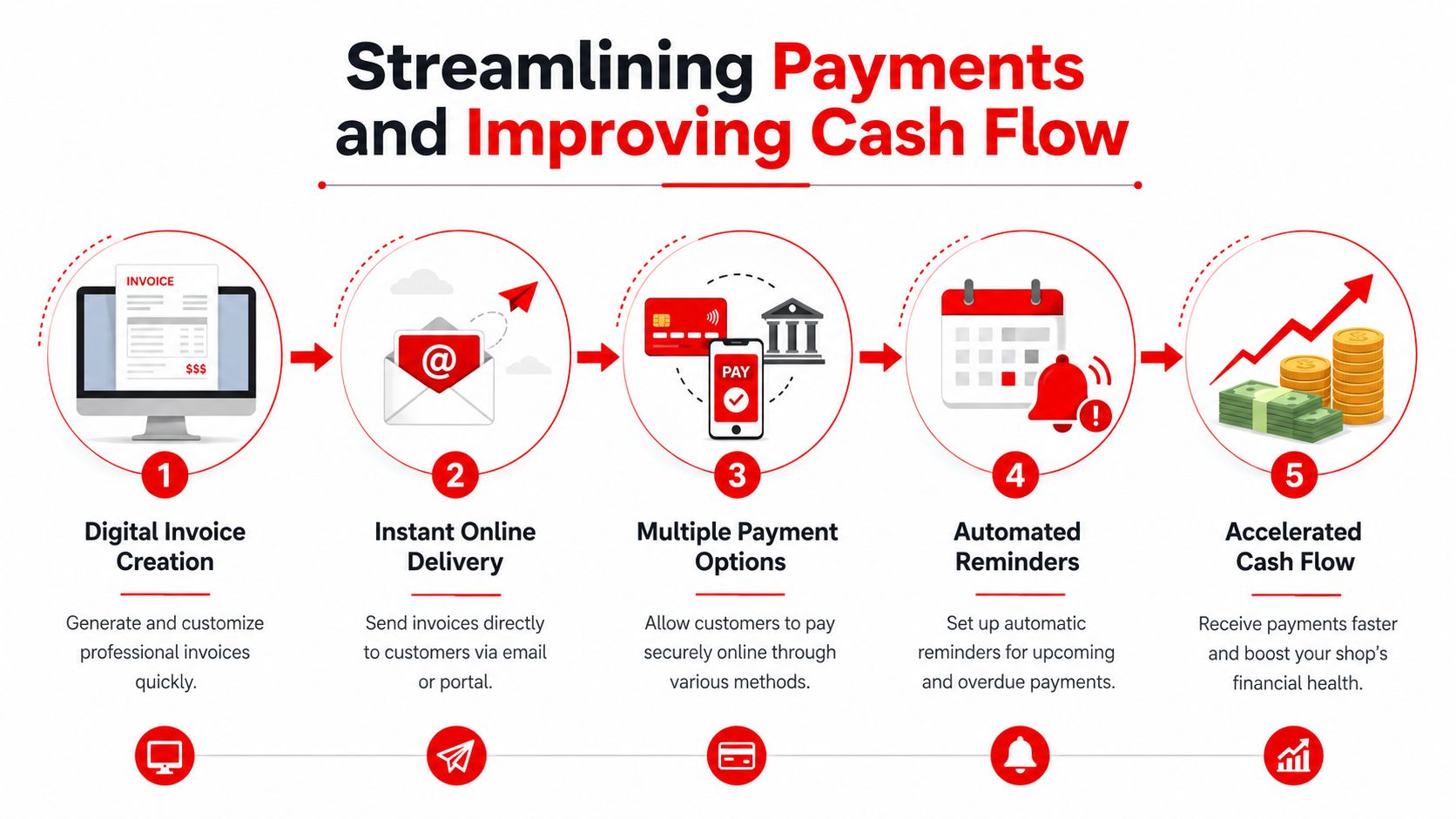
The operational case is strong. shows enterprises using automated accounts payable software, including online invoice creators, reduce invoice processing time by an average of 62%, cutting the cycle from 20.8 days to 7.9 days per invoice. The same source says AI can cut processing time by 60% or more.
Those figures come from a broader finance context, but the lesson applies directly in a shop. Every manual step between invoice creation, delivery, payment, and reconciliation adds delay. Remove enough of those steps and the shop closes jobs faster.
A good payment workflow usually includes:
- Digital delivery so the customer gets the invoice right away
- Online payment methods so payment can happen before or at pickup
- Automatic reminders for unpaid balances
- Status visibility so staff can see paid, sent, viewed, or overdue invoices quickly
The best invoice is the one that gets paid without a follow-up phone call.
When factoring enters the conversation
Some shops run into bigger cash flow gaps than invoicing alone can solve. Fleet work, commercial accounts, and longer payment terms can create strain even when the paperwork is clean. In that situation, it helps to understand all financing options, including, which explains how businesses use unpaid invoices to improve short-term cash access.
That said, most independent shops should fix process before reaching for financing. If invoices go out late, payment instructions are unclear, or reconciliation still happens by hand, the shop is paying for a cash flow problem that better systems could reduce.
The practical order is simple. First, tighten invoice delivery and payment collection. Then look at outside funding tools only if timing still creates pressure.
Connecting Invoicing to Your Entire Shop Workflow
Most invoicing problems start earlier than the invoice itself. They start at check-in, during estimate approval, or when parts and labor updates aren't reflected in the final paperwork. That's why a standalone online invoice creator often feels disappointing in a real shop.
What disconnected systems do to a shop
When billing lives in one tool and the rest of the job lives somewhere else, the front office has to connect the dots manually. The estimate might sit in one app, parts status in another, technician notes on a tablet, and payment records in a separate system. The invoice becomes a cleanup task.
That isn't just annoying. shows 60% of small business delays in payment collection stem from disconnected billing and fulfillment systems, while most online invoice creator content still focuses on standalone generators instead of integrated workflows.
In an auto shop, disconnected systems usually create the same set of problems:
- Repeated data entry across estimate, repair order, and invoice
- Missed charges when approved work doesn't transfer cleanly
- Parts confusion when invoices don't reflect ordering status
- Slow pickup because the advisor has to rebuild the bill at the counter
What a connected workflow looks like
A shop runs better when the invoice is the final step in one continuous path instead of a separate document built from scratch. The cleanest workflow usually looks something like this:
| Shop step | What should carry forward |
|---|---|
| Check-in | Customer details, vehicle details, concern |
| Inspection and estimate | Findings, recommended services, parts, labor |
| Approval | Authorized work and declined work |
| Repair order | Technician activity and parts usage |
| Final invoice | Completed charges and payment status |
That structure matters because it preserves context. If the customer approved diagnostic time first and repair labor later, the final invoice should already know that. If a part was ordered from a supplier and substituted, the billing side should reflect the installed item without another round of typing.
Shops collect more cleanly when the invoice is built from the job record, not from memory.
The ultimate benefit isn't just speed. It's confidence. Service advisors can close out vehicles without second-guessing totals. Managers can review tickets without hunting through notes. Customers get invoices that match what they approved.
The Shift from Invoicing to Shop Management
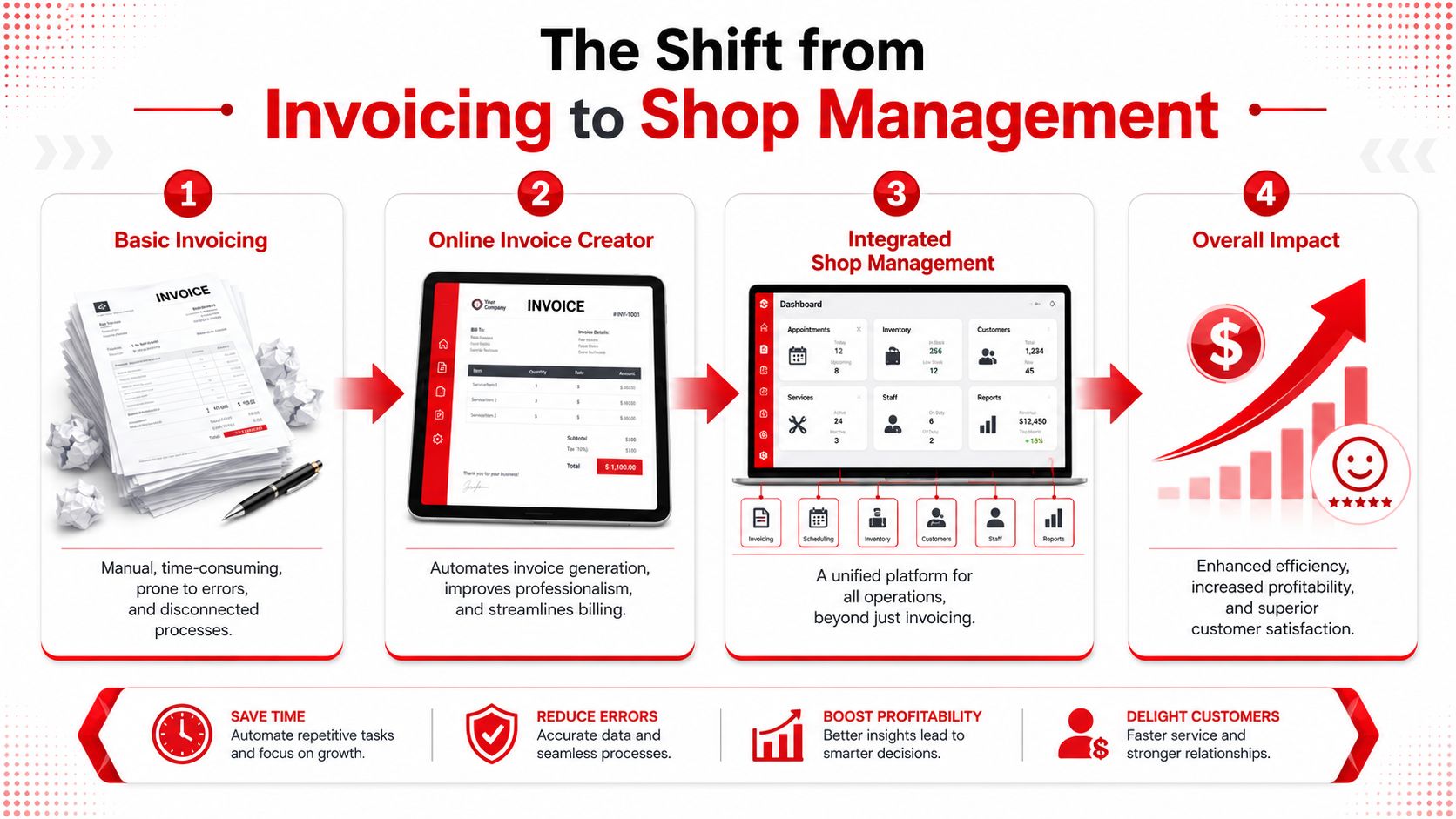
The biggest change isn't moving from paper to digital. It's moving from isolated billing to connected shop control. A basic online invoice creator can improve appearance, but a shop only feels the full benefit when invoicing supports operations, payment, documentation, and accountability in one flow.
What changes when invoicing becomes operational
When invoicing is treated as part of shop management, several things improve at once. The invoice looks more professional. Charges are easier to defend. The customer has fewer questions. The office spends less time chasing paperwork.
That also changes how the team works day to day:
- Service advisors spend less time rebuilding tickets
- Technicians are less likely to lose approved labor or parts detail in translation
- Managers get cleaner records and better visibility into what's billed and what's still open
- Customers get a clearer explanation of the work they authorized
The invoice stops being a form. It becomes a record of the job.
What to look for next
A shop choosing an online invoice creator should look past surface features like logo upload and PDF export. Those matter, but they aren't enough. The stronger question is whether the tool supports the way an auto repair shop operates.
That means looking for software that can handle vehicle-specific fields, dynamic parts and labor itemization, payment collection, and full workflow continuity from check-in to checkout. If the system can't do that, the shop will still end up doing admin work by hand.
A better invoicing setup doesn't just make bills prettier. It makes the whole business easier to run.
Shops that want to move past disconnected invoicing and into a cleaner front-to-back workflow can explore RedAppy or review the platform's features built for auto repair shops. For a closer look at how it fits a specific process, the next step is to contact the RedAppy team.
Ready to Transform Your Shop?
RedAppy helps auto repair shops create professional digital estimates with photos and videos, send them instantly via text or email, and get customer approvals in seconds. No credit card required to start.