
Best Online Invoicing Software for Small Business
The paperwork pileup usually starts the same way. A shop owner finishes a brake job, writes notes on a paper estimate, tells the front desk to “send the invoice later,” then spends the evening hunting down signatures, tax totals, and a customer who still hasn't paid for an oil change from last week.
That's where online invoicing software for small business stops being a nice-to-have and starts becoming a shop control tool. In an auto repair setting, invoicing is tied to estimates, parts, labor, approvals, payments, and customer records, so the underlying issue isn't just billing, it's the workflow around the bill.
Table of Contents
- Escaping the Paperwork Pileup
- Why Your Shop Needs More Than an Invoice Template
- Essential Features for Service-Based Businesses
- How to Choose the Right Invoicing Software
- Putting Your Software to Work Implementation and Integration
- Calculating the Return on Your Investment
- Frequently Asked Questions About Invoicing Software
Escaping the Paperwork Pileup
A busy repair shop can look orderly from the bay door and still be one stack of paper away from trouble. One advisor is writing estimates, another is calling for approvals, and someone in the back is trying to remember whether the customer left a deposit or only promised to.
Cloud-based billing changes that routine because it moves invoicing off the clipboard and into the browser or phone. That shift matters in a shop where the work starts at the estimate, moves through parts and labor, and ends at payment. The more the team can update a job from the front counter, the bay, or a mobile device, the less likely a detail slips between steps.
Why the old process slows the shop down
Paper-based billing creates avoidable friction. A handwritten estimate can turn into a typed invoice, then into a reminder call, then into a second entry in accounting, and every handoff opens the door to mistakes.
Practical rule: if the same job details are being typed more than once, the shop is losing time it could spend on bays, parts, or customer follow-up.
Free-entry products also show how broad the category has become. Zoho Invoice and Wave handle basic invoicing, payment reminders, and online payments, which lets very small firms and startups move away from manual paperwork without a heavy upfront commitment. The market now serves working operators who need speed and visibility, not just office staff.
For an auto repair shop, that usually means one less missed detail on labor, one cleaner record for parts, and one less awkward conversation about a late invoice that never got sent. It also means fewer delays between approval and payment, which protects cash flow and keeps a job from sitting open longer than it should.
Why Your Shop Needs More Than an Invoice Template
A template can print a bill. It can't run the job.
That distinction matters in a repair shop, where the invoice sits at the end of a chain that starts with the customer complaint, moves through the estimate, includes parts and labor, and ends with payment. A basic template is like carrying a single wrench in a truck that needs a full diagnostic kit, it helps in one moment, but it doesn't solve the whole problem.
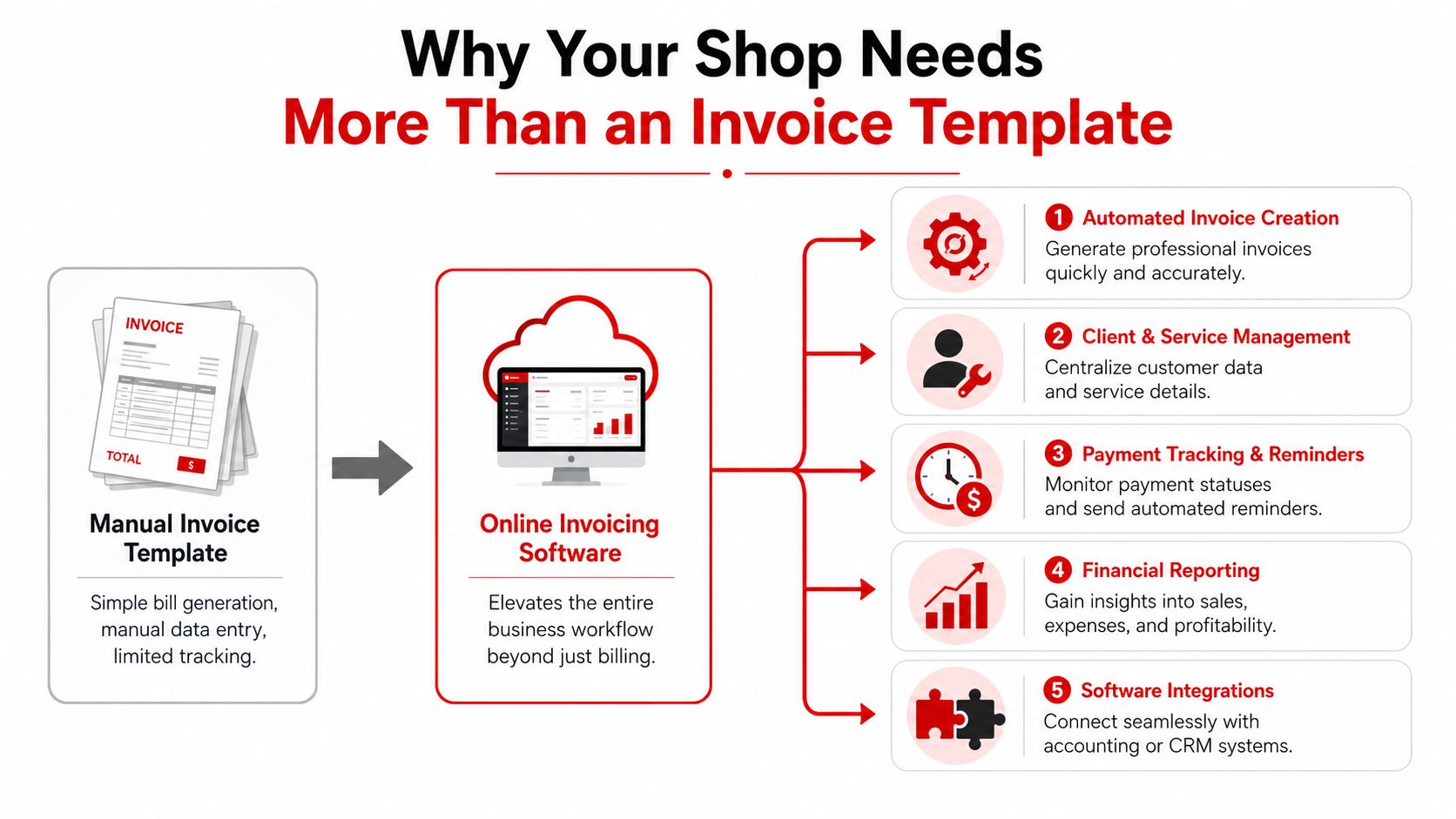
The real value is control, not just formatting
Modern invoicing software has moved beyond simple billing into broader administrative automation. Tailor Brands describes FreshBooks as an all-in-one accountancy, invoicing, and admin automation service, and that idea maps well to service shops that need reminders, bookkeeping support, payment collection, and a clearer view of what's happening across the business.
Stripe's guidance is even more practical for shop owners. It ties tax calculation, discount application, payment-status tracking, and scheduled reminders to fewer manual errors, fewer disputes, and less time spent chasing late payments.
That matters in real shop work. If a technician finds an extra brake issue mid-job, the invoice has to reflect the change cleanly. If a customer pays part up front, the system needs to show it. If a car sits because the customer forgot the approval message, the shop needs a reminder workflow that doesn't depend on someone remembering to call after lunch.
A template helps a shop look professional. Software helps the shop stay profitable.
Essential Features for Service-Based Businesses
An auto repair shop needs invoicing software that fits the way work moves through the bay. A polished billing screen still falls short if the job includes deposits, parts tracking, change orders, or a repair that grows after inspection.
Core invoicing that matches the job
The first requirement is clear line-item billing. Parts and labor should stay separate, so the customer can see what was done and the service advisor can explain the bill without guessing. Estimates should convert directly into invoices, because no shop wants to rebuild a work order by hand after the vehicle has already left the lot.
Recurring billing matters less for every shop, but it becomes useful for fleet accounts, maintenance plans, and repeat service contracts. notes that recurring billing software automates invoicing, reminders, and tracking, which saves time and cuts manual work when the same customer returns on a schedule.
Payments and records that reduce friction
Customers pay faster when the invoice supports the way they already prefer to pay. CNBC's comparison lists Zoho Invoice as free, Square Invoices starting at $0/month plus processing fees, and Harvest with a free plan plus paid tiers at $11 and $14 per month, so a shop can keep entry costs low while testing the workflow.
A strong shop system should also keep client history, service notes, and payment status in the same place. RedAppy is one example of an all-in-one shop management platform that combines estimates, payments, and reporting in one system, which helps when invoicing needs to sit inside the broader job workflow instead of operating on its own.
- Customer data in one place: The advisor should be able to pull up vehicle history without digging through old folders.
- Payment reminders that don't feel manual: The software should track overdue invoices and send follow-ups without adding more phone work.
- Online payment support: Cards and other digital options shorten the gap between completed work and collected cash.
- Accurate tax handling: The total has to be right the first time, especially when parts and labor are both involved.
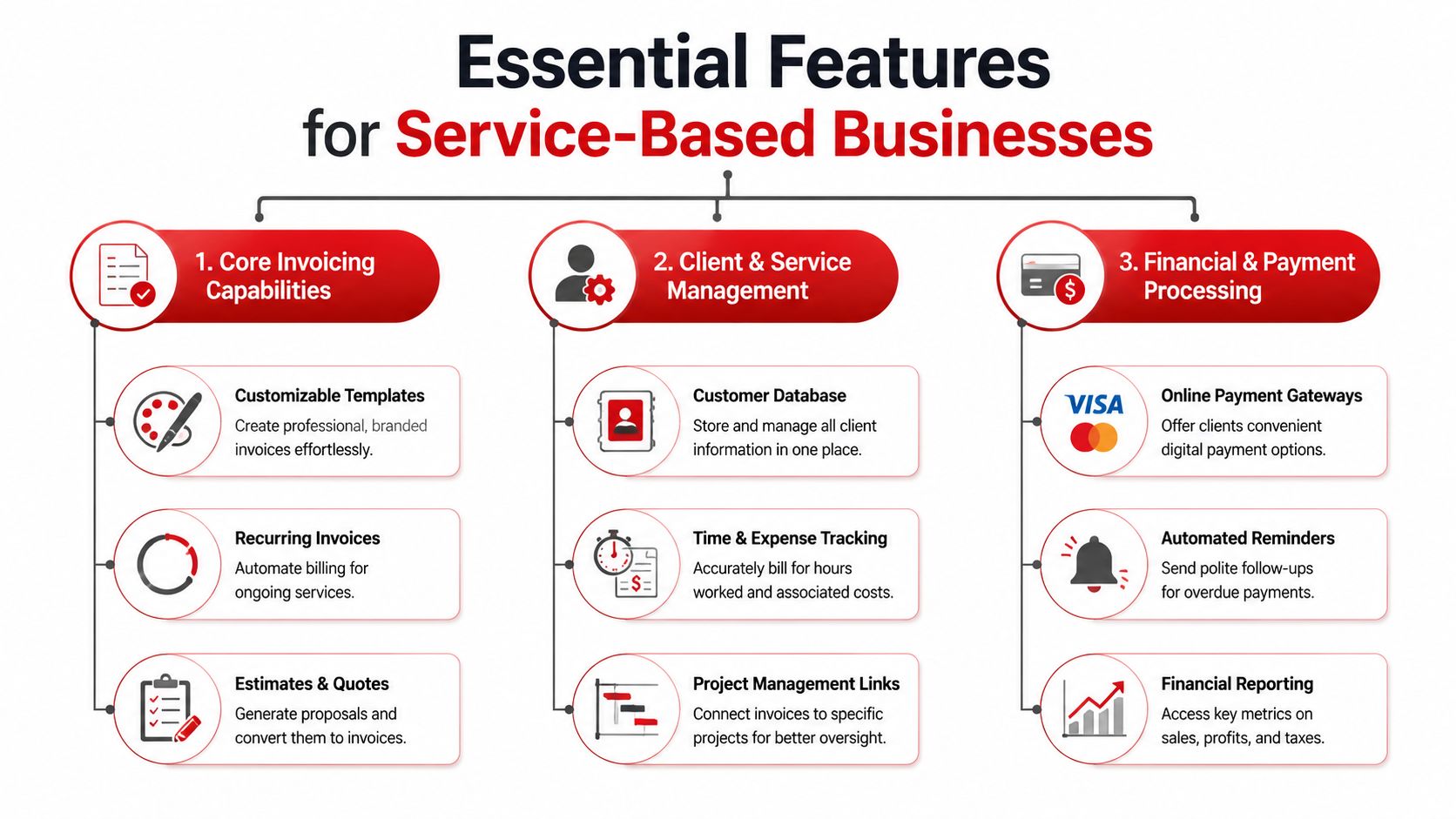
When those pieces work together, the invoice stops being just a bill and becomes a job record the shop can trust.
How to Choose the Right Invoicing Software
The easiest mistake is shopping for invoicing software like it's just a billing form. A better choice starts with the question, can the system support the shop's workflow, or does it only print a prettier bill?
Start with workflow fit
A repair shop should look closely at how the software handles estimates, approvals, payments, and history. Business.org points out that comparison guides often focus on invoice features like automation, reminders, customization, tax handling, and payment tracking, but don't always answer the bigger question of whether the software can manage the process end-to-end. That gap matters for job-based work where quoting, inventory, and accounting are connected.
Ease of use matters just as much. If a service advisor needs three screens to send one invoice, adoption will stall. If the system lets the team move from estimate to invoice without retyping customer data, the front counter stays faster and the technician spends less time waiting on paperwork.
Choose tools that reduce double entry
The strongest buying signal is integration. When invoicing sits inside customer records, service history, and accounting, the shop avoids the double entry that causes delays and mistakes.
A practical shortlist should include these checks:
- Estimate-to-invoice flow: Can the system turn approved work into a bill without rebuilding the order?
- Mobile access: Can staff update a job or send an invoice from the front desk, the lot, or the bay?
- Payment tracking: Does the dashboard show what's paid, pending, and overdue at a glance?
- Support for service history: Can the team see prior work before writing the next invoice?
A shop that chooses on workflow fit usually ends up with fewer handoffs, fewer missing details, and fewer end-of-day surprises.
Putting Your Software to Work Implementation and Integration
A shop feels the rollout immediately if the new system slows the front counter or creates extra steps for the service advisor. In auto repair, that kind of friction shows up fast, because advisors, technicians, and managers are already juggling estimates, approvals, parts, and payment follow-up at the same time.
Move the important data first
Bring over customer lists, service histories, and open invoices before the team switches fully. That keeps the desk from bouncing between old records and new records, which is where errors creep in. For an auto repair shop, that also means a customer does not have to repeat the same vehicle details every time the car comes back in.
Cloud tools make that move easier because the work can happen from a browser or app instead of a single office machine. That matters in a shop where the counter, the bay, and the waiting area all need access to the same job record. GetApp's point to the value of cloud-based workflows for small businesses that need to keep billing and cash flow visible away from one desk.
Roll out the system in a realistic order
The smoothest launches usually follow a simple sequence.
- Import the current customer file. Get names, contacts, and vehicle notes into the system so the front desk can work from one record.
- Set up payments early. Connect the payment gateway before the first live invoice goes out.
- Train the advisors first. They use the system most often and set the tone for the rest of the team.
- Test with a few jobs. Run a small batch before moving every invoice into the new process.
- Refine the settings. Clean up default tax, reminder timing, and invoice templates after the pilot jobs.
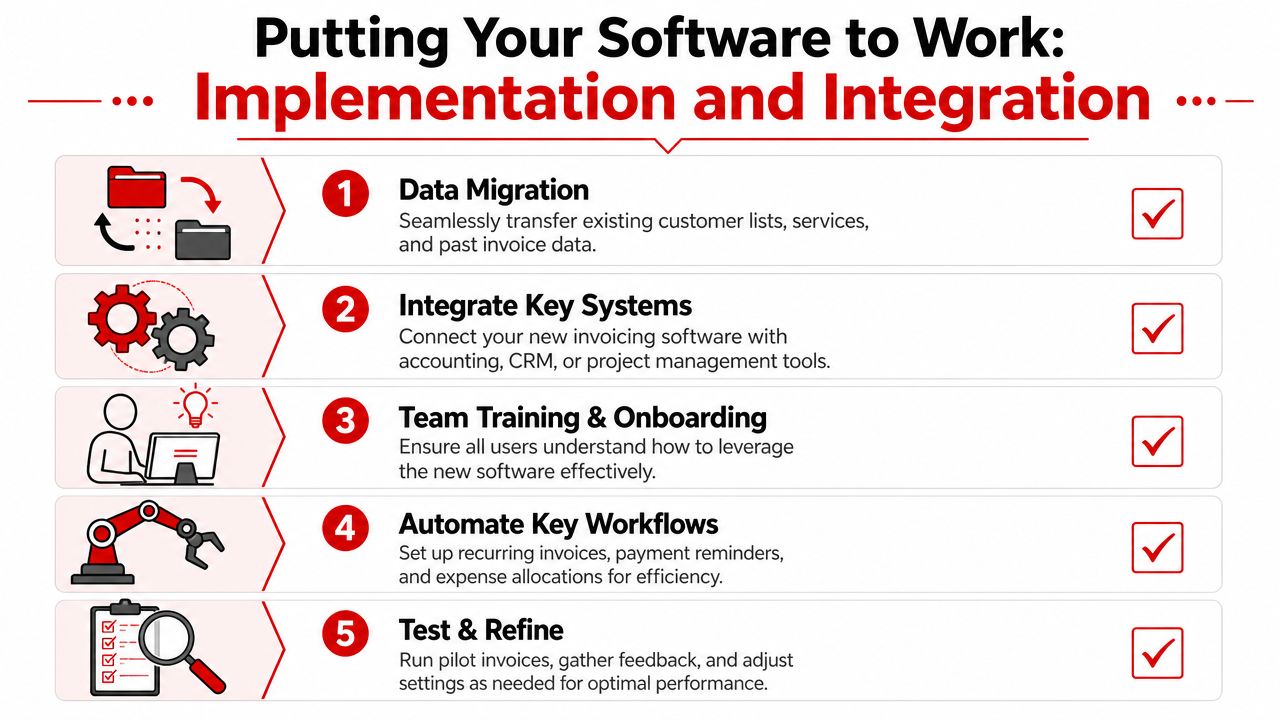
A shop that starts with a small pilot sees problems sooner and avoids turning the whole counter into a test lab. That matters because a service advisor who can move from estimate to invoice without retyping customer data spends less time fixing paperwork and more time keeping jobs moving.
The best implementation is the one the team does not have to fight every day. A system built for service work should make the transition lighter, not heavier, and it should cut the manual steps that slow down a repair order from estimate to payment.
Calculating the Return on Your Investment
The return on invoicing software is not limited to the subscription fee. It shows up in the hours the office gets back, the payments that arrive sooner, and the jobs that are approved because the customer could see the estimate, invoice, and balance clearly.
Time saved becomes operating capacity
If the front office spends less time retyping invoices, chasing signatures, and checking payment status, that time goes back into work that keeps the shop moving. In an auto repair setting, that can mean quicker estimate follow-up, faster customer callbacks, and better attention to the repair schedule. A service advisor who can move from estimate to invoice without re-entering customer details is not just saving minutes, they are reducing the odds of a delayed handoff at the counter.
Free and low-cost entry points also reduce the risk of getting started. As noted earlier, some platforms are available at no upfront software cost, so the first step does not have to be a big financial bet.
Cash flow improves when the paperwork disappears
When invoices go out cleanly and reminders happen automatically, the shop spends less time waiting on money that should already be moving. That matters because a completed repair still ties up parts, labor, and bay time until the payment clears.
A shop owner should compare any software cost against the operational drag it removes. The more a system cuts manual entry, the fewer billing mistakes the team has to unwind later, and that directly protects profit by keeping billable time from slipping away. It also helps the shop avoid awkward follow-ups, such as calling a customer back because a labor line was entered twice or a deposit was not applied correctly.
Useful test: if the software removes one repeated office task and prevents one billing mistake each week, it is already doing more than a template ever could.
The best return is usually quiet. The front counter feels calmer, the advisor spends less time on follow-up, and the books close with fewer loose ends.
Frequently Asked Questions About Invoicing Software
Is online invoicing software secure enough for customer and payment data
Security needs to be part of the decision from the start. Modern invoicing platforms for small businesses usually include role-based access, encryption, and payment controls, which is a much better setup than keeping customer and payment details in scattered spreadsheets or paper files that can be lost, copied, or shared too widely.
Can it handle deposits and partial payments on large repair jobs
It should. Large repairs often start with a deposit, then end with a final invoice that shows what was collected, what is still open, and how the balance was applied. A system that tracks payment status clearly makes those jobs easier to manage at the counter and easier to explain to the customer when a repair stretches across several steps.
Is a mobile app really necessary
For a repair shop, it usually is. Service advisors and owners need to send invoices, check payments, and keep an eye on cash flow without being tied to the front desk. A mobile app also helps when a customer calls from the parking lot, a tech is waiting on approval, or a vehicle is ready before the office staff has finished another task.
Should a shop choose a standalone invoicing tool or a full shop platform
That depends on how much workflow control the shop needs. If invoicing is the only problem, a simpler tool may be enough. If the business also needs connected quoting, service history, parts visibility, and payment tracking, a broader platform usually fits better because it keeps the estimate, repair order, invoice, and payment in the same process instead of forcing the team to re-enter the same job details at each step.
A CTA for RedAppy.
Ready to Transform Your Shop?
RedAppy helps auto repair shops create professional digital estimates with photos and videos, send them instantly via text or email, and get customer approvals in seconds. No credit card required to start.