
Online Payment Gateway Explained for Repair Shops
A customer approved a brake job, collected the car, and drove home. The service advisor then spots a remaining balance on the invoice. Calling the customer back to the counter is awkward, and taking card details over the phone creates another task nobody needs.
An online payment gateway gives the shop a better route: send the invoice, let the customer pay securely, and keep the payment attached to the repair record. Understanding what happens between that payment link and the bank deposit helps staff handle the less tidy cases, too.
Table of Contents
- What an Online Payment Gateway Does
- How Authorization Capture and Settlement Work
- Features a Shop Should Expect
- Security Checks Before the Bank Says Yes
- What to Do When the Payment Fails
- Chargebacks That Start as Repair Disputes
- Send the Invoice and Let the Customer Pay
What an Online Payment Gateway Does
The customer with the unpaid brake-job balance doesn't need another appointment. The customer needs a secure way to open the invoice and pay from home. An online payment gateway connects that checkout to the payment processor and banking system so the shop can request approval without physically handling the card.
Think of the gateway as a translator and courier. The shop works with repair orders, invoice totals, and customer balances. The bank works with payment credentials, transaction requests, and authorization codes. The gateway carries the payment information between those systems and returns the result to the checkout.
Where the gateway fits
Several businesses participate in the same payment, even when the shop sees only a single payment screen:
- The gateway securely collects and transmits checkout information, including the amount associated with the invoice.
- The processor or acquirer submits the transaction through the card network and supports the movement of funds.
- The issuing bank is the customer's card provider and decides whether to approve the request.
- The merchant account receives settled payment funds before payout to the shop's business bank account.
A provider may bundle several of these services together. That doesn't make their jobs identical. An invoice system can show a payment result without being the bank that approved it or the provider responsible for paying it out.
The gateway also has clear limits. It isn't the card brand, it isn't the shop's bank account, and it isn't a cash drawer. Sending payment information isn't the same as physically receiving spendable money.
Why remote collection belongs at the service desk
The found that 22 percent of non-bill consumer payments were made online or remotely, while credit and debit cards together represented more than 60 percent of consumer payments. Card-not-present collection is ordinary payment work, not something reserved for online retailers.
For a repair shop, checkout therefore needs to work from an invoice opened through a text message or email on a phone, not just from a website's shopping cart. A useful evaluation starts with actual jobs: collecting a remote balance, taking a deposit, and charging a later approved adjustment without staff reading card numbers aloud.
Counter rule: An approval confirms the bank's decision about a transaction. It doesn't confirm that the shop's bank has received a deposit.
That gap becomes easier to manage when staff distinguish authorization, capture, and settlement instead of calling every successful screen a completed payout.
How Authorization Capture and Settlement Work
The brake-job invoice follows a different path through the banking system than it does through the service desk. Staff may see a successful payment almost immediately, while the provider still has work to complete before the money reaches the shop.
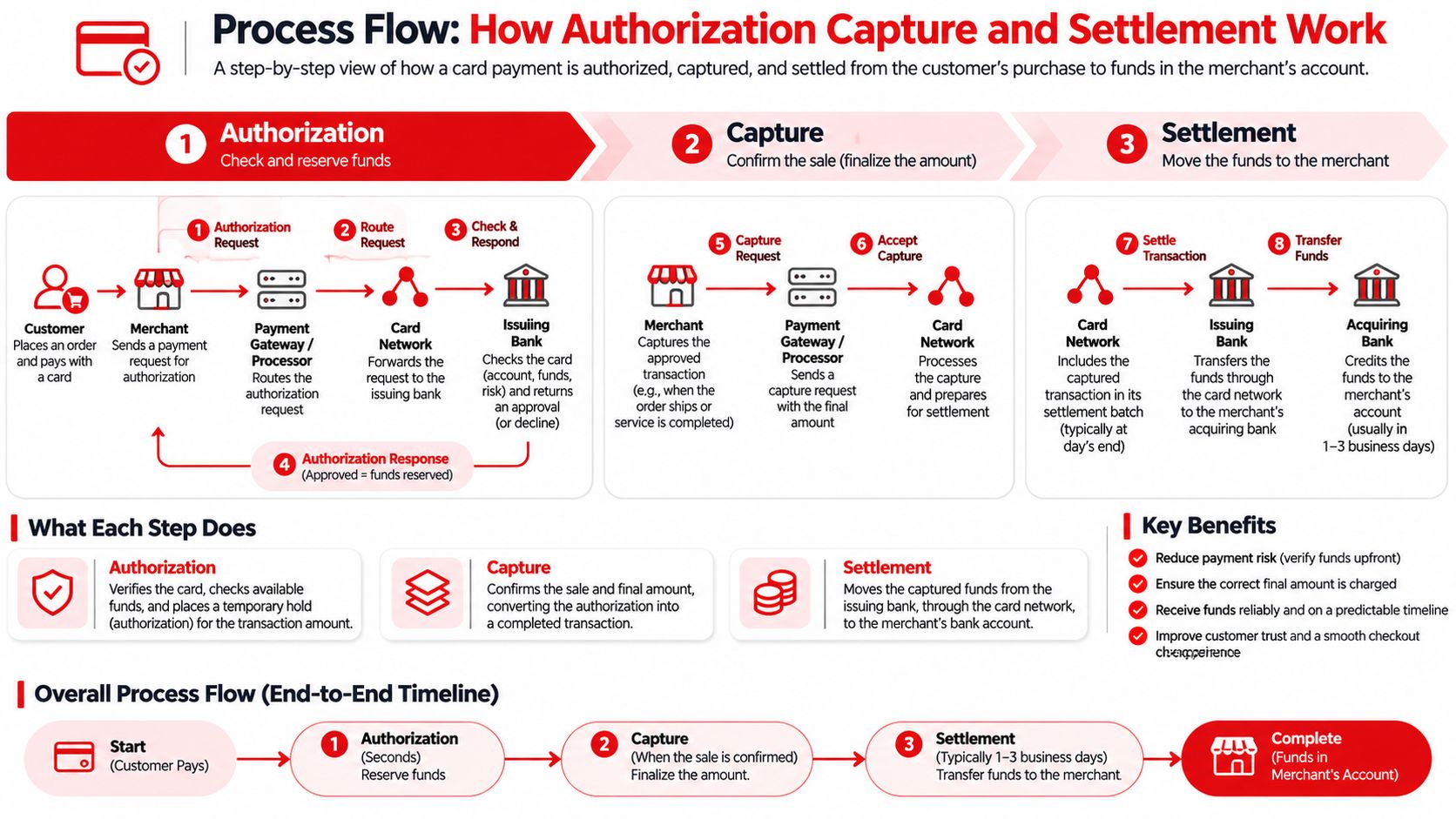
separates that path into authorization, capture, and settlement, noting that gateways commonly batch transactions daily for settlement. These are separate events, even when the payment software handles them together.
Authorization reserves funds
During authorization, the issuing bank checks the card and available funds. An approval normally places a hold rather than sending money to the shop. The customer may see a pending transaction, but the shop hasn't received a bank deposit.
Consider a deposit requested before special-order parts arrive. If the shop only authorizes that deposit, it has reserved funds rather than collected the deposit. Staff need to know whether the workflow automatically captures approved payments or requires a separate action.
A hold also shouldn't be treated as an indefinite promise. The shop should follow its processor's authorization rules and avoid planning a long repair around an approval that may no longer be usable.
Capture confirms the amount to complete
Capture tells the payment system which approved amount should proceed. describes full and partial capture and the need to reconcile authorized, captured, cleared, and settled amounts.
Say the customer approved an estimate, but the technician completes only part of the planned work. A supported partial capture lets the shop complete the payment for the actual amount owed rather than automatically collecting the whole authorization.
Added labor needs a different decision. The customer must approve the extra work, and the payment workflow must support the resulting amount. A further capture is appropriate only when the processor permits it within the authorization; otherwise, the shop needs an additional authorization or a new charge.
Settlement and payout complete the money path
Settlement moves captured funds through the card network and acquiring bank. Payout delivers the available proceeds to the shop's bank according to the processor's schedule. Staff should reconcile the payment record and payout report rather than assume the invoice total will appear as an identical bank deposit.
For a broader explanation of the organizations involved, Disputely's guide to provides useful context alongside the shop's own processor documentation.
What happens at each stage of an online payment
| Stage | What the bank does | What the shop sees | Money in the bank |
|---|---|---|---|
| Authorization | Checks the card and available funds and places a hold | Approved or declined on the invoice | No, only a hold |
| Capture | Marks the final amount for completion, full or partial | Invoice balance updates to the captured amount | Not yet |
| Settlement | Moves the batch through the network and acquiring bank | Payout follows the processor schedule | Yes, after payout |
Staff should read this table as a daily mental model, not a fee sheet. The practical question is always which stage the payment has reached and whether the invoice balance agrees with the underlying transaction.
Features a Shop Should Expect
A gateway can process a technically valid payment and still be awkward at a repair counter. A shop needs checkout features that fit customers approving work remotely, changing repair scopes, and paying balances through different methods.
Hosted checkout is a sensible starting point. The customer enters payment details on the provider's payment page rather than handing them to the advisor. With tokenization, the shop's software can use a substitute reference or payment record instead of retaining the full card number.
Match checkout to the repair job
A payment link by text or email suits customers who aren't standing beside the advisor. It should identify the invoice, show the balance clearly, and connect the result to that same job. Staff shouldn't need to copy a successful payment into an unrelated spreadsheet to remember which vehicle it covered.
Deposits, partial payments, and split tenders deserve equal attention. A customer might pay a downpayment before parts are ordered, then settle the remaining balance using another method. The invoice should preserve the payment history and show what remains due after each entry.
Ways a repair customer can pay
| Method | Best for | Staff see card numbers | Record on the invoice |
|---|---|---|---|
| Card link by text or email | Balance due after the customer leaves | No | Paid or partial balance updates |
| Hosted in-shop card checkout | Customer is still at the counter | No | Same invoice, no phone readout |
| Mobile wallet | Customer prefers phone pay | No | Treated as a card payment |
| Bank transfer | Large invoice or a card that will not run | No | Match the transfer to the invoice |
| Cash, check, or financing | Customer pays offline | No | Recorded manually with the method noted |
For hosted in-shop checkout, the customer enters the details privately on the provider's page. It's not the same as an advisor typing a number while the customer reads it out. For bank transfers and offline methods, recording the method doesn't itself prove that funds have cleared.
Make the record useful after payment
A recognizable billing descriptor helps the customer connect the statement charge with the shop. An unfamiliar legal entity name can leave an otherwise satisfied customer wondering who took the payment.
Refunds need the same discipline. Returning cash for a card payment can leave the processor record unchanged and make later reconciliation harder. The refund should run through the processor, with the reason and adjusted balance retained against the job.
RedAppy's refund workflow uses the shop's Stripe dashboard and automatically updates the invoice and reports, including partial refunds. That keeps the original payment and the return of funds connected.
A short set of payment methods that staff can explain is more useful than a long menu nobody knows how to reconcile.
The strongest feature comparison is a practical demonstration: collect a deposit, finish the invoice, apply another payment method, and issue a partial refund. Staff should be able to follow the balance throughout without handling raw card details.
Security Checks Before the Bank Says Yes
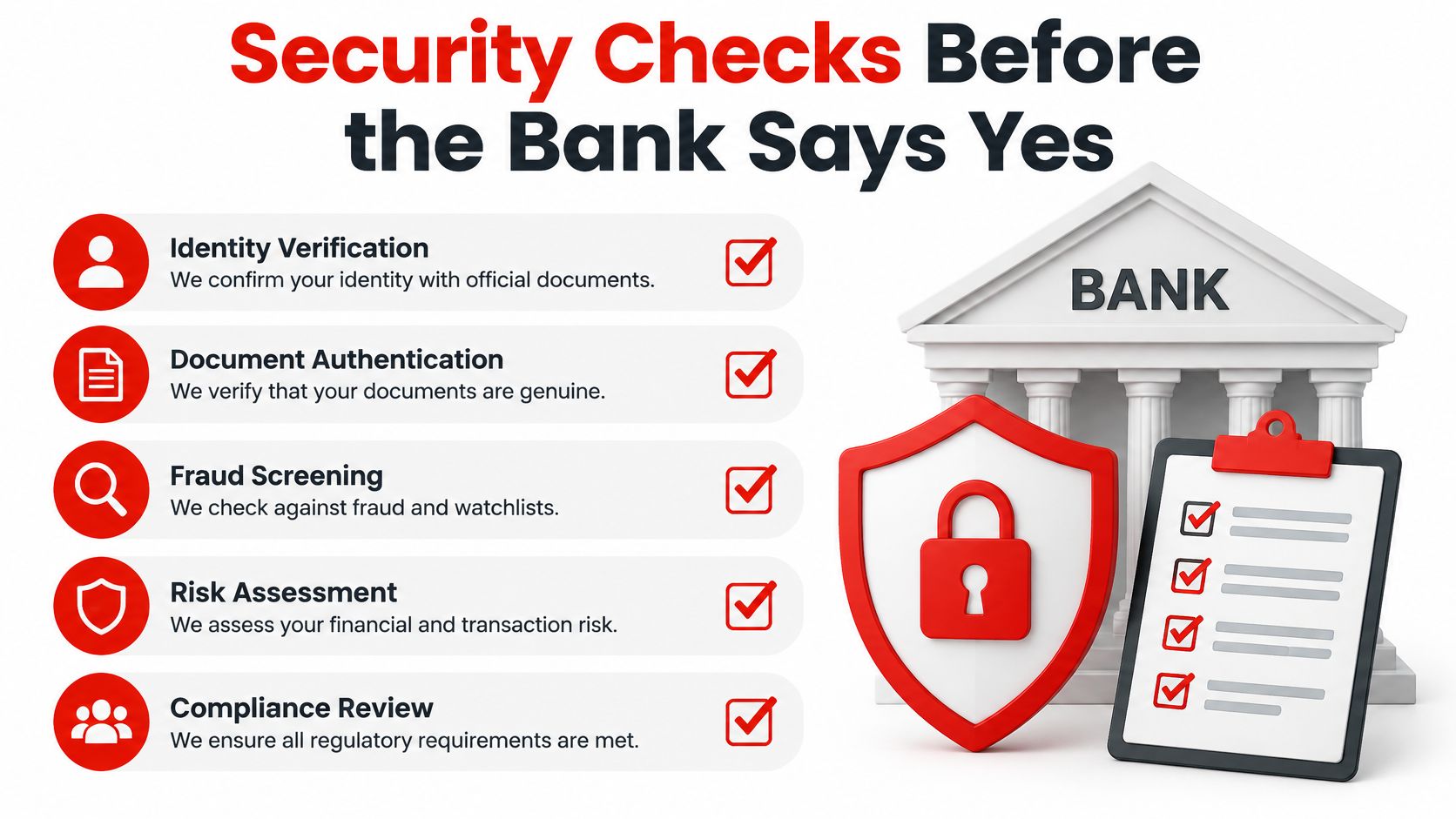
A legitimate-looking invoice doesn't prove that the person entering a card is entitled to use it. A secure banking connection also doesn't guarantee that the checkout page itself is safe. Shops need to recognize these as separate security problems.
Issuer authentication checks the person and transaction. Payment-page controls protect the browser environment where the customer enters payment information.
Authentication gives the issuer more context
EMV 3-D Secure lets the payment provider send transaction, device, account-history, and contextual information to the issuing bank. The issuer can then authenticate through a frictionless flow or request a step-up challenge, such as a one-time passcode or biometric verification.
Accurate information matters. Consistent customer and transaction details give the issuer a better basis for distinguishing an ordinary repair payment from a suspicious attempt. Staff shouldn't invent details merely to get a transaction accepted.
reports approximately 45 percent lower fraud for authenticated Visa Secure transactions, with fraud rates of about 11 basis points. That's an authentication finding, not a guarantee that every challenged payment is genuine or every authenticated repair charge is immune from dispute.
The shop should preserve the authentication result with the transaction. Any fraud-chargeback liability protection still follows the applicable network rules and final authentication outcome.
The checkout page needs its own controls
A malicious browser script can copy card information before the payment reaches a secure gateway. That's why a harmless-looking analytics addition deserves scrutiny on a payment page.
The explains that PCI DSS 4.0 requires payment-page script authorization, integrity controls, and an inventory documenting business necessity, along with header and page tamper detection operating at least weekly unless a documented targeted-risk analysis establishes another frequency.
The practical controls have specific jobs:
- Content Security Policy can restrict which scripts the browser is allowed to run.
- Subresource Integrity can verify that a fetched script hasn't been altered.
- Script inventories identify each script's purpose and authorization.
- Tamper alerts notify the responsible person when protected page content or headers change unexpectedly.
A provider-hosted or appropriately tokenized payment form can reduce the shop's exposure, but it doesn't justify ignoring the surrounding website. Extra advertising tags and unnecessary scripts shouldn't be added casually to checkout pages.
Responsibility must also be explicit. Alerts should reach someone who can investigate the same day, stop an unsafe change, and contact the payment provider when necessary. An unread security notification doesn't protect a customer's card.
What to Do When the Payment Fails
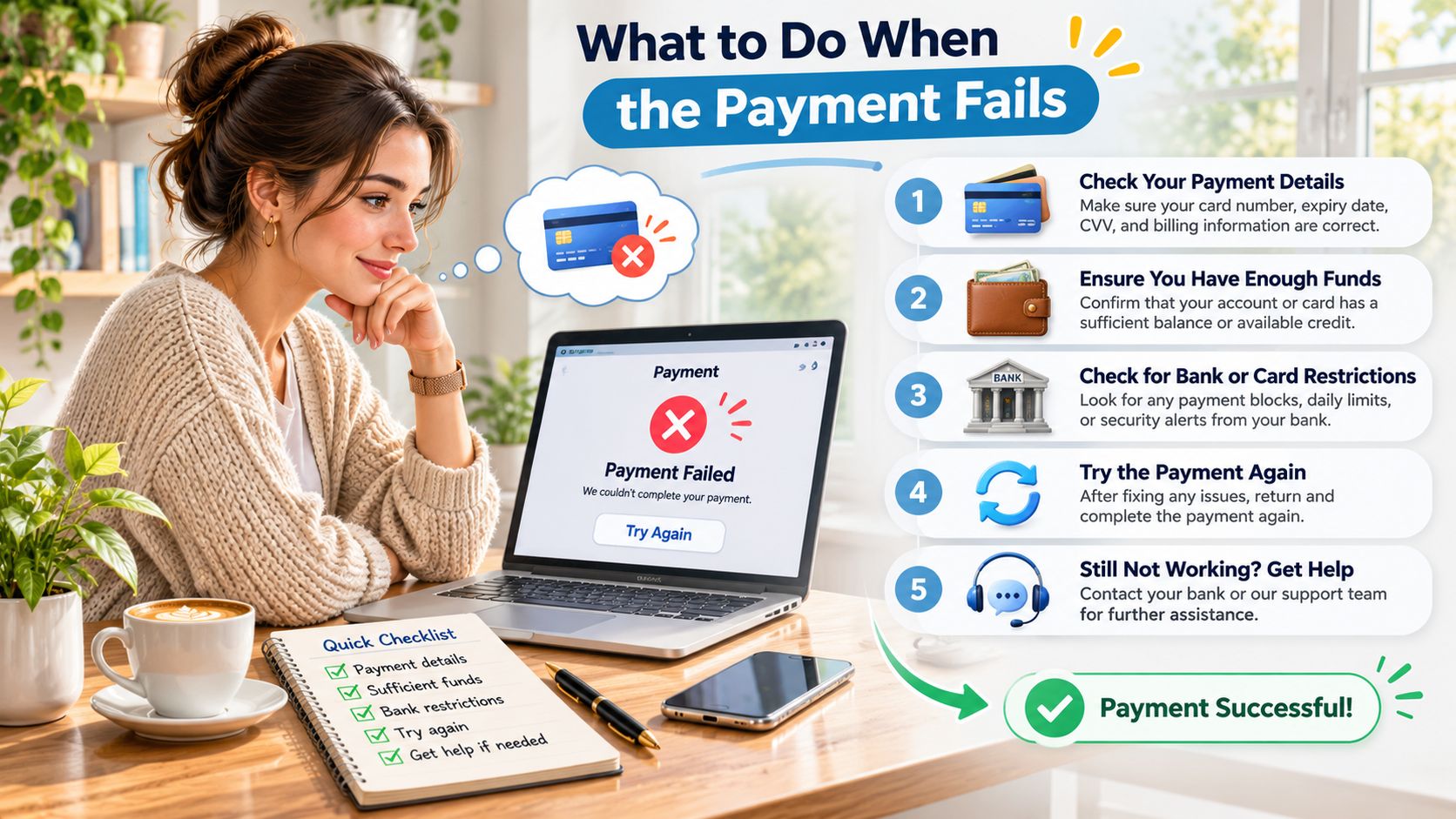
Adding more payment brands doesn't automatically finish more repair invoices. Staff need a clear failure message, a reliable alternative, and a habit of checking transaction status before another attempt.
A found that 55 percent of adults had experienced at least one difficulty with digital payments, including declined payments, website crashes, unavailable methods, and merchants not accepting digital payments. The useful lesson for a service desk is operational: checkout needs a recovery procedure, not just a payment button.
Check the transaction before trying again
A browser error isn't proof that the bank rejected the payment. The customer's phone may lose the confirmation screen after the provider has already approved the request. Before sending another attempt, the advisor should check the invoice and processor record for an authorization, capture, or pending result.
Repeated attempts can leave the customer with duplicate holds or charges. If the result remains uncertain, staff should investigate the existing transaction rather than repeatedly pressing the payment button.
Payment failures and the safe next step
| What went wrong | Tell the customer | Staff action |
|---|---|---|
| Card declined | Another card or a fresh payment link | Do not rerun the same authorization at once |
| Checkout page crashed | A new link to the same invoice | Confirm no approval already exists |
| Wallet unavailable | Switch to a card link | Leave the original invoice open |
| Customer already left | Text or email the balance | Do not treat a promise as payment |
| Processor is down | Pay by cash, check, or financing for now | Record the method and reconcile later |
A decline after pickup calls for another card or a fresh payment route, not an assumption that the customer is dishonest. The advisor should state the result neutrally and avoid promising that another attempt will succeed.
A checkout crash calls for a status check before a replacement link. A wallet problem usually needs a different checkout method on the existing invoice, not a duplicate invoice with another outstanding balance.
Keep collection and vehicle release aligned
When the customer has already left, staff should send the exact remaining balance and track the invoice as open until payment or an approved arrangement is recorded. A verbal promise isn't a payment entry.
During a processor outage, cash, check, or financing may provide an alternative where available and appropriate. Staff must record the method and reconcile it later, recognizing that accepting a check or initiating financing isn't necessarily the same as receiving cleared funds.
The shop's release procedure should prevent a vehicle leaving while an unpaid balance has neither payment nor a recorded fallback arrangement. That makes the exception visible to the manager instead of leaving another advisor to discover it.
The advisor's message can stay simple: the payment didn't complete, the invoice remains open, and another payment option is available.
Chargebacks That Start as Repair Disputes
A chargeback isn't always a stolen-card problem. A customer may recognize the shop and still challenge a diagnostic fee, a deposit, additional labor, or work the customer says was never authorized.
puts first-party and third-party fraudulent chargebacks together at about 45 percent of merchant chargeback volume, with an average chargeback amount of $94 across four surveyed countries; it also describes a separate analysis projecting hundreds of millions of global chargebacks and tens of billions of dollars in value, with both increasing. Those figures don't identify the reason for an individual repair dispute. The shop still needs evidence of what the customer agreed to and what the technician completed.
Build evidence around consent and completion
A payment receipt proves that a transaction occurred. It doesn't, by itself, prove that the customer approved a diagnostic charge or an expanded repair scope.
The useful evidence belongs together:
- Time-stamped digital estimate showing the work, price, and relevant terms presented to the customer.
- Inspection photos documenting the condition that prompted the recommendation.
- Approval record and signed authorization identifying the accepted scope, including later additions.
- Parts detail and technician notes explaining what was installed and completed.
- Pickup confirmation connecting the finished job to vehicle handover.
- Readable refund policy showing the terms available to the customer before payment.
Evidence should answer the actual allegation. For an unauthorized-extra-work claim, the added-work approval matters more than a stack of unrelated workshop photographs. For a disputed diagnostic fee, the record should show that the customer accepted that charge before diagnosis began.
Evaluate dispute handling alongside collection
Aggressive fraud filters can reject a legitimate customer whose card or circumstances trigger a warning. Weak service documentation creates the opposite problem: the shop accepts payment but can't answer a later friendly-fraud allegation. Neither problem is solved by treating every customer as suspicious.
Gateway evaluation should therefore include dispute-alert timing, evidence export, a recognizable statement descriptor, partial-refund handling, and a payment record attached to the repair job. Staff need enough notice and accessible records to respond within the deadline shown on the dispute.
A tidy evidence bundle doesn't guarantee a successful defense. It does let the shop explain the transaction clearly, acknowledge a genuine mistake when appropriate, and avoid submitting disconnected records that never address the customer's complaint.
Send the Invoice and Let the Customer Pay
The practical change for a repair shop is straightforward: stop collecting card numbers by phone and send the finished invoice as a payment link. Staff can keep the conversation focused on the completed work while the customer handles payment privately.
RedAppy supports that workflow through the shop's connected Stripe account. Customers can pay any invoice by card from a link sent by text or email, using Stripe's secure checkout. The shop needs no card terminal for that checkout and doesn't read card numbers over the phone.
Keep the money and invoice connected
Customer payments go to the shop's own Stripe account, and Stripe pays them out to the shop's bank. RedAppy never holds the shop's money. When the customer pays online, the payment is recorded on the invoice, and its status and balance update automatically.
That gives the advisor a clear collection routine: finish the invoice, confirm the customer's contact details, send the payment link, and check the recorded outcome. The next person opening the job can see whether a balance remains instead of relying on a note about a phone conversation.
Shops comparing the full workflow can explore RedAppy's feature examples to see payments alongside estimates, inspections, and invoicing. For help matching the setup to a single bay or several locations, the next step is to contact RedAppy.
RedAppy connects repair invoices with secure online card payments and automatically updated payment records. Shop owners ready to replace phone-read card details with invoice payment links can visit RedAppy and arrange a conversation about their collection workflow.
Ready to Transform Your Shop?
RedAppy helps auto repair shops create professional digital estimates with photos and videos, send them instantly via text or email, and get customer approvals in seconds. No credit card required to start.