
Protecting Customer Information: A Repair Shop Playbook
A service advisor texts a customer a photo of worn brake pads from a personal phone. The estimate goes out by email, the invoice sits in the shop system, and a paper repair order with a plate number and phone number waits on the counter for pickup. None of that feels like a data problem until a phone is lost, an email account is taken over, or a former employee still has a login.
That's the normal starting point for protecting customer information in a repair shop. The records aren't in one locked file. They're spread across phones, inboxes, shared drives, paper, and vendor portals, and each copy needs a decision about who can see it and how long it stays.
Table of Contents
- Map Your Customer Data and Who Touches It
- Set Roles, Training and Strong Logins
- Encrypt Your Data and Test Your Backups
- Take Payments Without Holding Card Data
- Protect Texts, Emails and Your Website
- How to Respond to a Suspected Breach
- Put This Checklist to Work This Week
Map Your Customer Data and Who Touches It
Say a shop scanned a driver's license for a loaner car and saved it in a shared folder everyone can open. The job ended, the car came back, and the scan stayed. That forgotten file is the risk most shops face, not an attack on the main system.
Vehicle-linked records count as customer data too. The points to a current data inventory showing what information is collected, where it's stored, who receives it, and how long it's retained, and it notes a breach at automotive credit provider 700Credit reportedly affected more than 5.8 million people across roughly 18,000 dealerships. VINs, plates, insurance details, diagnostic records, and inspection photos can identify a person and a vehicle together, so they deserve the same care as a phone number.
Build a One Page Inventory
List every place customer information lives. Check the job management system, phone contacts, text threads, shared drives, paper repair orders, inspection apps, accounting software, and the checkout tool.
For each place, write four things in plain language:
- Data held: Names, phone numbers, email addresses, plates, VINs, insurance details, invoices, photos, or scanned licenses.
- Location: The exact system, folder, phone, drawer, or vendor portal.
- Who receives it: Staff roles and outside companies, named specifically.
- Keep period: The point when the record gets deleted, not a vague intention.
Then apply the collect less rule. If a record doesn't serve the repair, billing, communication, or a legal duty, stop collecting it and delete what's already stored. Removing a field from an intake form costs nothing and removes that data from every future breach, export, and lost device.
Practical rule: Data a shop never collects can't be stolen, forwarded to the wrong person, or left on a retired laptop.
| Data type | Where it usually lives | Who needs it | Typical keep period |
|---|---|---|---|
| Name, phone, email | Job management system, text threads | Service advisors, front desk | Active customers plus any warranty period |
| License plate and VIN | Vehicle record, repair orders | Technicians, service advisors | Life of the vehicle record while warranty or repair history matters |
| Invoices and payment records | Accounting system, checkout tool | Office manager, owner | Set by tax rules, commonly several years; confirm locally |
| Inspection photos | Phone, inspection app, cloud folder | Technician, service advisor | Delete after the job and any dispute window closes |
| Insurance details | Estimate or claim file | Service advisor, owner | Only while the claim is open, unless law requires more |
| Driver's license copy | Scanned file or paper | Owner only | Avoid collecting; if kept, delete after the transaction unless required |
Confirm those periods with an accountant or attorney before deleting tax, warranty, or safety records. The table is a starting point for a conversation, not a legal schedule.
Write the Policy and List the Vendors
Turn the inventory into a one page data policy with three parts, what the shop collects and why, who may access it, and when records are deleted. Keep it short enough that new staff will read it during onboarding. A long policy nobody opens doesn't change behavior at the counter.
List every vendor and integration that touches customer data, including parts suppliers, software providers, website hosts, texting services, and payment processors. Ask each one for security documentation and a clear statement of who is responsible if its system is breached.
Treat vendor access as its own control point:
- Unique logins: Give each parts supplier, software provider, and texting service a unique login under shop control, never a shared one.
- Limited permissions: Restrict integrations to order status and part numbers, not full customer lists.
- Prompt removal: Revoke vendor access the day a contract ends and record when it was removed.
Deletion needs the same attention as storage. Remove obsolete photos from phones, clear exported customer lists from shared drives, empty cloud trash where the tool allows it, and shred paper instead of tossing it in the shop bin.
Set Roles, Training and Strong Logins
Access should follow the job, not seniority or convenience. A technician needs the vehicle and repair notes for assigned work, not the ability to export every customer phone number the shop has collected.
| Role | Can access | Should not access |
|---|---|---|
| Technician | Vehicle and repair notes for assigned jobs, inspection photos | Payments, customer exports, shop settings |
| Service advisor | Customer contact details, estimates, invoices | Admin settings, bulk exports |
| Front desk | Scheduling, customer contact details | Refunds, vehicle photos not needed for booking |
| Office manager | Invoices, payments, reports | Owner-level settings and staff permissions |
| Owner or admin | Everything, including settings and exports | Sharing the admin login with anyone |
Adjust the split to fit the shop, but keep refunds, bulk exports, and settings with named people. Those three actions cause the most damage when an account is misused or taken over.
Three Login Rules That Do Most of the Work
Unique accounts come first. Remove shared advisor, technician, and admin logins, because a shared account makes it impossible to tell who exported a customer list or changed a setting. Users are responsible for all activity under their account, including activity by their employees, so the shop needs accounts that point to a person.
Multi-factor authentication comes second. The recommends requiring multi-factor authentication on every account that offers it, particularly phishing-resistant MFA, and recommends passwords or passphrases of at least 15 characters. It also recommends a password manager for unique credentials, which matters when staff juggle a shop system, parts portals, email, and accounting tools.
Access reviews come third. Review who has access every quarter and remove access on a person's last day, not at the end of the month. Role changes need the same treatment, since a former advisor working in the shop shouldn't keep advisor-level export rights. RedAppy's permission boxes per shop area, such as Jobs, Customers, Vehicles, Estimates, Invoices, and Inventory, show the granularity to aim for when setting Create, Read, Update, and Delete rights per user.
A shared login feels faster at a busy counter. It costs far more time later, when nobody can prove who sent a file or approved a refund.
Train for the Messages Staff Actually Get
Run three short sessions built around real shop situations. Generic security videos about office spear phishing don't stick with a team that orders parts all day.
- Spotting imitations: Walk through fake texts and emails that copy parts suppliers, insurers, or the shop software provider, and show how to check the sender address and link destination.
- Verifying payment changes: Any request to change payment or bank details gets confirmed by calling a known number already on file, never a number inside the suspicious message.
- Reporting fast: Anything odd gets reported immediately to a named person rather than handled alone, because early reporting limits how much data leaves.
Keep each session brief and repeat the reporting step until it's automatic. Staff who fear blame hide mistakes, and hidden mistakes give an attacker days of quiet access. The goal is a team that flags a strange login prompt the way it flags a leaking brake line, right away and without drama.
New hires should get the same training before they receive logins, not after a busy first week. Pair the training with the one page policy so expectations and access arrive together.
Encrypt Your Data and Test Your Backups
Encryption makes stolen or lost equipment far less useful to whoever finds it. Backups decide whether a shop reopens quickly after ransomware, a failed drive, or an accidental deletion. Both controls fail without warning when nobody checks them, so each step below ends with a verification.
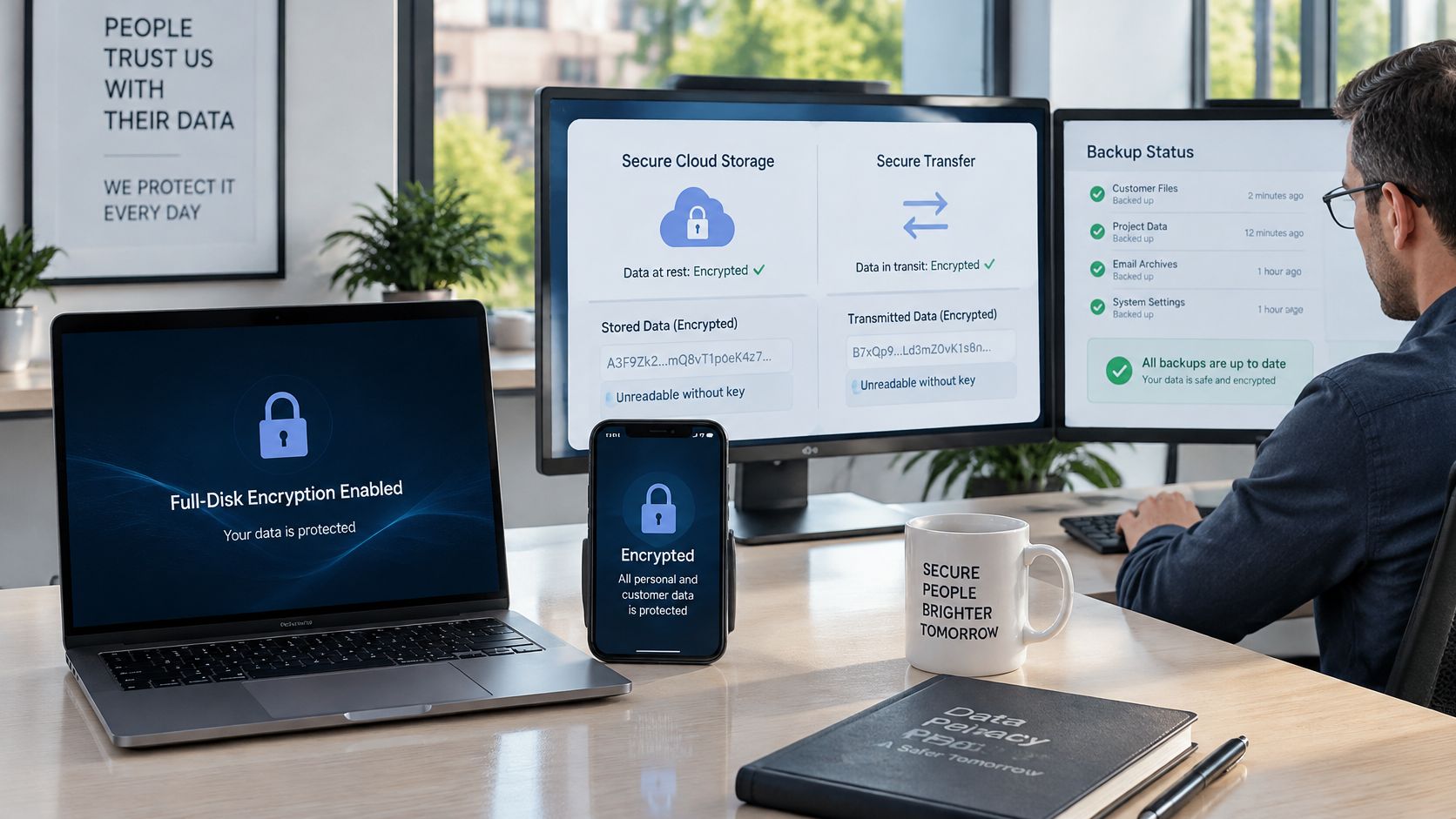
- Encrypt every device: Turn on full-disk encryption, such as BitLocker on Windows laptops or FileVault on Macs, plus the built-in encryption and screen lock on every phone that holds customer files or photos.
- Encrypt data in tools: Use only cloud tools that encrypt data at rest and in transit, and confirm HTTPS on every page that collects contact or booking details by checking the address bar and testing the form.
- Own the backup schedule: Set a backup routine covering customer records, vehicle histories, estimates, invoices, accounting data, and system settings, because users are solely responsible for maintaining appropriate backups of their data.
- Export on purpose: Customer data can always be exported, so use regular exports as an offline copy and store that copy somewhere separate from the main system, protected with its own password.
- Test the restore: Every quarter, pick a random customer record from last month, restore it to a test location, time the process, and write down the result.
- Delete securely: When retention periods end, shred paper, wipe retired laptops with the manufacturer's reset and erase tools, and remove old photos and exports from shared drives and recycle bins.
Why the Restore Test Matters Most
The describes how CISA notes organizations affected by ransomware often had no backups or had incomplete or damaged backups, and recommends testing both partial and full restores while defining a restoration plan and backup cadence. A green checkmark in a backup dashboard doesn't prove the files open, the permissions work, or the accounting data matches the invoices.
A restore test exposes boring problems while they're cheap. The export might exclude inspection photos, the backup drive might be full, or the only person who knows the backup password might be on vacation. Timing the restore also sets honest expectations, since a shop that needs six hours to recover customer records should know that before a Monday morning failure.
Bottom line: A backup that has never been restored is only a hope, not a plan.
Protect the backups themselves with unique credentials and MFA, separate from daily shop logins. If ransomware reaches the main system through a staff account, backups guarded by different credentials stand a better chance of surviving.
Keep one copy offline or in a separate account that daily work never touches. Label backup drives with contents and dates in plain words, store them away from the front counter, and replace aging drives before they fail. Small habits like that decide whether recovery takes an afternoon or a week of rebuilding customer histories from paper and memory.
Take Payments Without Holding Card Data
Card numbers should never enter shop systems. Payment should happen through a hosted checkout link or the processor's terminal, so card entry stays on the processor's side and the shop keeps tokens and receipts instead. Customers pay on Stripe's secure checkout, so the shop needs no card terminal and does not read card numbers over the phone.
The states PCI DSS applies to every entity that stores, processes, or transmits cardholder data, including merchants, regardless of transaction volume or business size. Encrypting cardholder data does not by itself remove the environment from PCI DSS scope, since systems involved in encryption, decryption, and key management can remain in scope.
- Search and delete: Check old files, email, and spreadsheets for card numbers and delete them securely.
- Replace phone payments: Send a secure payment link instead of taking details by voice.
- Name refund staff: Limit refunds to specific people with unique logins.
- Review monthly: Read refund logs for amounts or timing that don't match repair orders.
- Trim receipts: Keep receipts showing only the last four digits.
Ask the processor which validation applies and answer any self-assessment accurately. Shops that want the operational side spelled out can review guidance on alongside processor instructions. Any employee reading card numbers aloud or writing them on a repair order has pulled the shop into scope.
Protect Texts, Emails and Your Website
Texts and emails are where customer details most often leave the building. A job status update is harmless, but a thread that accumulates addresses, full VINs, invoice totals, and photos becomes a customer file sitting on personal phones and in inboxes nobody audits.
Rules for Customer Messages
Get consent first. Users are the senders of their customer communications and must obtain all legally required consents before sending them. That responsibility sits with the shop even when software sends the message, so intake forms and booking confirmations should capture permission clearly and store it with the customer record.
Follow the messaging laws every time. Users must follow laws for their communications, including the TCPA, the CAN-SPAM Act, and state telemarketing laws. Marketing texts, service reminders, and review requests each carry obligations, and "the system sent it automatically" isn't a defense a shop controls.
Honor STOP without exception. Users must honor opt-out requests, such as a reply of STOP, promptly and must not message recipients who have opted out. Check that automation respects opt-outs across campaigns and manual messages, since a reminder sequence that ignores an opt-out creates legal exposure and angry customers.
- Use the shop number: Every text to a customer goes out from the shop's own texting number and stays attached to the customer's record, so anyone on the team can see the conversation.
- Send less per message: Share job status and next steps, not full VINs, invoice totals, or ID details in the message body.
- Expire photo links: Send inspection photos through a link that expires rather than as open attachments that can be forwarded forever.
Personal phones break all three habits at once. Conversations leave with departing staff, opt-outs get missed, and the shop can't show what a customer approved. A shared business number with a visible thread protects the customer and the shop's version of events.
If a customer conversation lives only on one employee's phone, the shop doesn't really have that record.
Rules for Email and the Website
Treat any email asking to change a payment account, bank detail, or supplier remittance address as suspect until it's confirmed by calling a number already on file. Business email compromise works because the message looks routine, so the callback step has to be routine too.
For the website, use HTTPS on contact and booking forms and verify the certificate stays current. Never ask for Social Security numbers or card numbers in a web form, and trim forms to what's needed to book or answer an inquiry. Publish a short privacy notice that says what the shop collects, why it collects it, and how a customer can ask questions about it.
Form submissions deserve the same handling as repair orders. Route them to a monitored business inbox with MFA, delete inquiry emails that contain unneeded personal details, and check that form plugins and website software get updated promptly. An unpatched booking form is an unsecured side door into customer contact data.
How to Respond to a Suspected Breach
The first hour decides how much evidence survives. When a laptop goes missing, an email account is taken over, ransomware locks files, or a customer export goes to the wrong person, speed matters more than a perfect diagnosis.
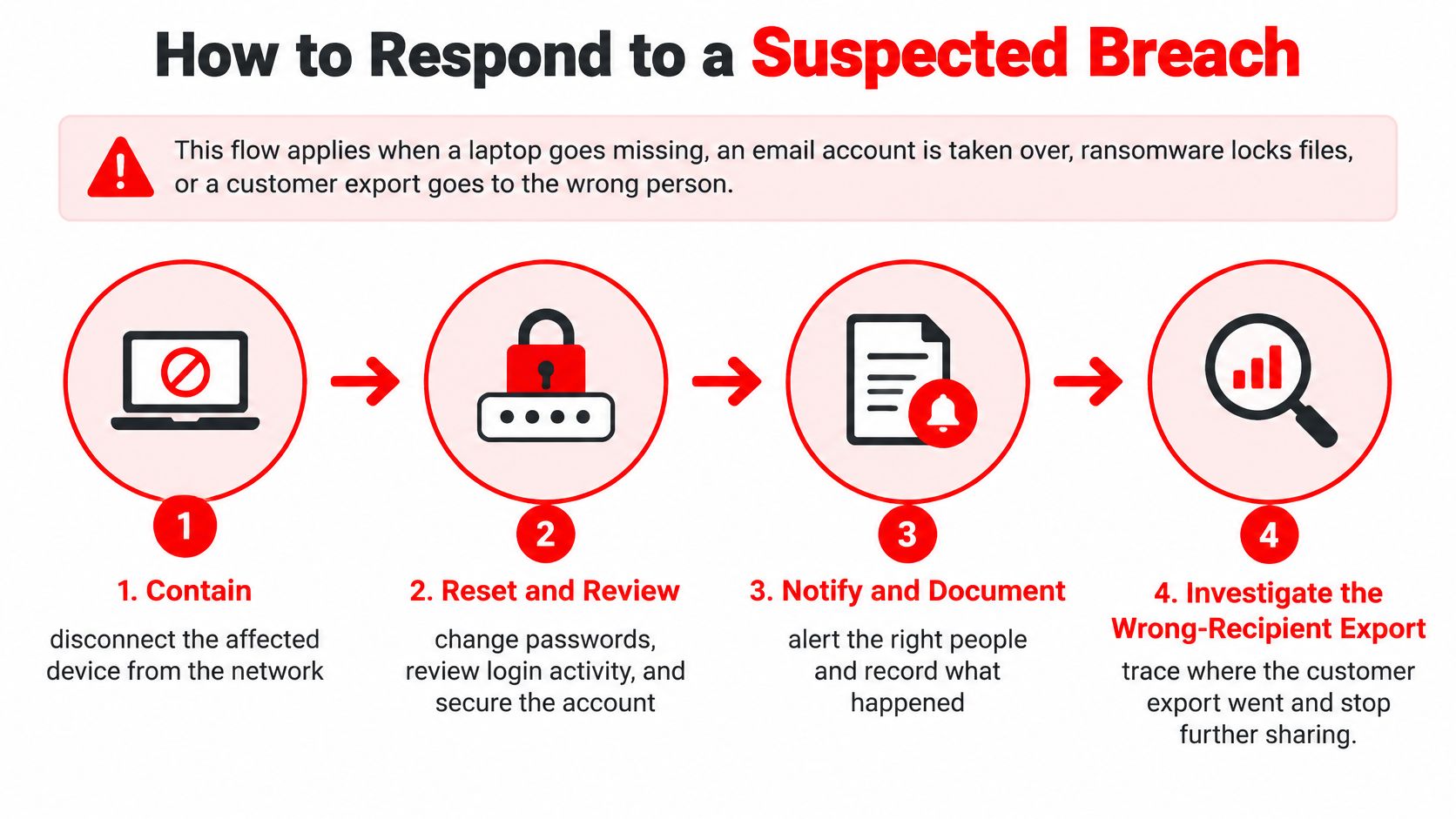
- Contain: Disconnect the affected device from the network but don't wipe it, so evidence survives for investigators and insurers.
- Suspend and reset: Suspend compromised accounts, then reset passwords and integration tokens from a clean device.
- Preserve proof: Save logs, screenshots, suspicious messages, and the time the problem was first noticed.
- Identify exposure: Use the data inventory to name which customer records the device, account, or export could reach.
- Call the right parties: Contact the payment processor, bank, insurer, and counsel, since each may impose its own reporting timeline.
- Check deadlines: The notes a notification event may require notifying the FTC within 30 days, and most shops should confirm with counsel which state and national rules apply.
- Warn customers plainly: Alert customers about phishing risk even when notice isn't clearly required, state what's known, and don't guess about what's still unconfirmed.
- Document decisions: Record each decision with a time and a name, including decisions not to notify and the reasoning behind them.
Reporting in found a record 3,322 publicly disclosed data compromises while only 30% of companies provided details about the incidents. Legal compliance and customer trust are different problems, and a shop can satisfy a notification threshold while still losing customers who hear nothing.
Users must promptly notify RedAppy if they believe their account has been accessed without authorization, and the same prompt reporting should go to every software provider involved. RedAppy cannot guarantee absolute data security and is not responsible for unauthorized access, data breaches, or data loss, which is exactly why the shop's own playbook matters. If malware is involved, follow documented steps for or bring in professional help rather than experimenting on the only copy of shop records.
Practice before an incident forces the lesson. Run tabletop scenarios for a spoofed payment request, a stolen service-advisor laptop, and an inspection-photo link posted publicly, then fix whatever steps the team fumbles.
Put This Checklist to Work This Week
A full security program sounds like a quarter of paperwork. Broken into daily tasks, the essential controls fit inside one working week, and each day leaves the shop measurably safer than the day before.
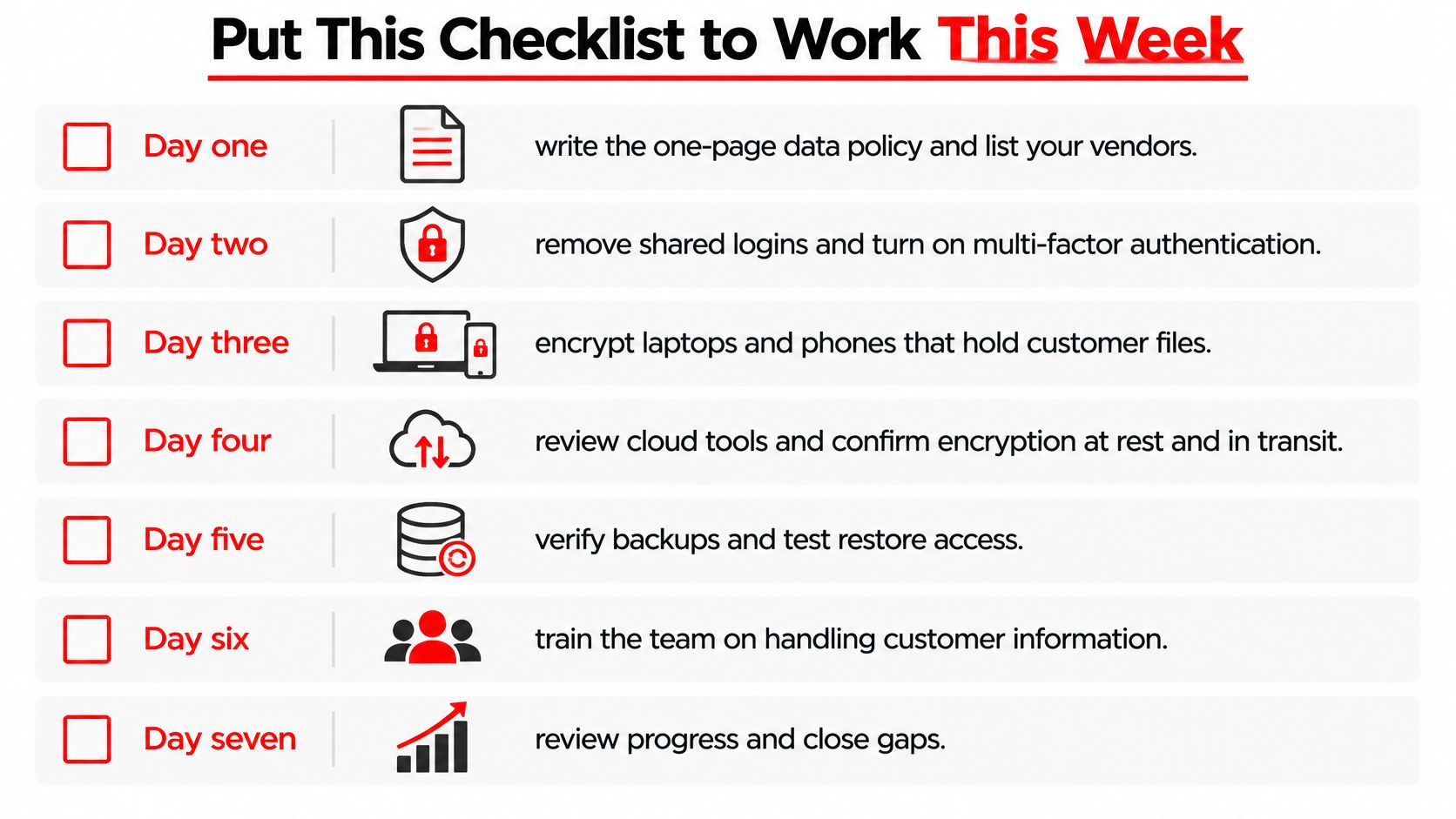
Day one, map and write. Build the data inventory, draft the one page policy, and list every vendor that touches customer information. Expect surprises, usually an old shared folder, a personal email used for estimates, or photos living on two phones. Write those findings down rather than fixing them from memory, because the list drives the rest of the week.
Day two, fix logins and roles. Remove shared accounts, issue unique logins, turn on MFA everywhere it's offered, and set roles so technicians can't export customer lists or process refunds. Remove access for anyone who has left, and check vendor logins against current contracts. This day usually takes the longest and delivers the biggest risk reduction.
Day three, encrypt and back up. Enable device encryption, confirm phones lock quickly, schedule backups of customer records and accounting data, and run the first restore test on a random record. Time it and record who performed it. A failed first test is useful information, not a wasted afternoon.
Finish the Week Strong
Day four, clean up payments. Search old files, inboxes, and paper folders for card numbers and delete or shred what turns up. Switch phone payments to secure links, name the staff allowed to issue refunds, and confirm the processor's validation requirements in writing.
Day five, tighten messages and rehearse. Update text and email consent capture, confirm STOP handling works, add a short privacy notice to the website, and run the first tabletop exercise with staff. Pick the stolen laptop scenario, since it tests containment, password resets, inventory knowledge, and customer communication in one sitting.
- Quarterly access review: Compare active logins against the current staff roster and vendor list.
- Quarterly restore test: Restore a sample record, time it, and file the result with the policy.
- Ongoing deletion: Clear expired photos, exports, and claim files on the retention schedule rather than during a yearly panic.
The shops that handle incidents well aren't the ones with the most software. They're the ones that know where their data is and who can touch it.
Owners who want to see how role-based access and secure payment links look in practice can review the RedAppy features page for concrete examples. Shops that would rather walk through a setup with a person can use the RedAppy contact page to map this checklist to their own systems, staff, and vendors.
None of these steps requires an enterprise budget. Most require an hour of decisions, a page of writing, and the discipline to delete data the shop never needed. That's the realistic core of protecting customer information for a small shop, fewer records, tighter access, tested backups, and a rehearsed response.
RedAppy gives repair shops role-based access, digital inspections with photos, estimates, invoicing, and online payments through secure checkout in one system, so customer records stay organized instead of scattered across phones and paper. Shops ready to put tighter controls around customer information can visit RedAppy to see how the platform fits daily work from check-in to final payment.
Ready to Transform Your Shop?
RedAppy helps auto repair shops create professional digital estimates with photos and videos, send them instantly via text or email, and get customer approvals in seconds. No credit card required to start.